Home Blog Page 253

An Algorithm That Detects Deepfakes By Looking At Their Eyes

Detect deepfakes

Researchers have developed an algorithm that detects deepfakes portraits by looking at the eyes and the reflection of light in them. Computer scientists at the University of Buffalo have developed this tool. Here you can read the full study document.

The key is in how the light is reflected in the eyes. This algorithm, with an effective rate of 94% in detecting deepfakes, analyzes the effects of light in the eyes of the subjects of the videos to determine if they are realistic or not.

This system analyzes, more specifically, the corneas of the eyes, which have a surface that reflects light in a similar way to how a mirror would. The idea is to determine if the reflective patterns of light are reflected in the same as real-world scenario.

Using logic, if we take as an example a photo taken of a person with a camera, we will see that the reflection of the eyes will be very similar in both since they are looking in the same direction. The deepfakes tend to skip the smallest details, as they are not able to achieve this kind of detail as variables.

AI system detects deepfakes

Ironically, it is again the artificial intelligence system that this time is in charge of looking for the error, analyzing the face and the light reflected in each of the eyeballs, looking for these inconsistencies. Once it does, it generates a similarity score — the lower the score, the more likely the face in the image is a deepfake.

In addition to its functionality only being demonstrated in portraits, this AI is only capable of determining the aforementioned inconsistencies in the subject’s eyes. If these are not displayed, the system will not work.

In fact, if the subject does not look at the camera, it is likely that the system will deliver a false positive. Of course, this is all being investigated for future versions, but the important thing is that it will not be able to detect the most advanced deepfakes.

5 Proven Tips For Choosing Durable Headphones

Apple AirPods Max headphones

Headphones have become an essential item lately; when they break down, you immediately start looking for a new pair. However, there are numerous options on the market, and making a choice is never easy. Finding headphones that don’t only sound right but last can become quite challenging – fortunately, not impossible. 

First things first, never buy headphones because they’re cheap. Remember that you get what you pay for, and $5 headphones won’t sound as good as the $30 variety (and probably much worse than those for $300). But don’t worry about spending all your savings – you can find good-quality durable headphones even if you’re on a budget. You just need to know what to look for.

We’ve consulted the experts from Headphonesaddict.com — a blog about headphones and earbuds – and asked them how to choose the most durable device. Want to experience music on a whole new level for a long time? Read on!

Check the Cables

If you want wired headphones, the cable is the first thing to check. It should be long enough for your situation, but not too much – a cable can easily become tangled (or even affect sound quality!) If you are willing to purchase a better-quality pair, make sure the cable is shielded – this minimizes noise and prolongs the headphones’ life. 

If the cable is insubstantial or thin, it may break shortly, externally or internally. You probably have encountered the latter – this happens when one of the earbuds stops working, and you have to tug or pull it to see if the problem will disappear. To avoid such a situation, look for thicker cables – for example, braided ones – which are reinforced at both ends.

When you’re buying headphones from a premium brand, check if replacement parts are available on the market. If something happens, it will be cheaper to change only the cable instead of the whole set.

Go for a Heavier Pair

Lighter headphones may be more comfortable, but they aren’t very durable. You may sit on them accidentally or snap them in half – it’s better to purchase something heavier when possible. However, you often need something to take with you outside, and then a lighter pair is preferable. In such a case, make sure to be careful with your headphones, and choose the most durable pair from your shortlisted selection. 

You may also look for fold-ups – they’re portable and easier to protect in transit. But before buying, check if they’re sturdy enough – the hinges may break off quickly. 

Make Sure There’s a Case (If Necessary)

Headphones are made of plastic, which, depending on their quality, may often break. And if some parts are glued together, you’ll have a hard time repairing them if anything happens. Whether you’re buying premium-quality headphones or the cheaper pair, a case may be necessary, especially if you travel a lot. 

Look for a case made of hard plastic or metal, so even if the headphones fall, nothing will happen to them. And make sure it’s comfortable – for example, if you’re buying an earbuds case, it should fit in your pocket. 

Look for Waterproofing

If you’re going to take your headphones or earphones outside, look for a waterproof pair. If it starts raining, a plash or two can ruin a perfectly good piece of equipment, and you want it to last. 

There’s something called an IPX rating that indicates how waterproof a product is, so it is worth checking the IPX score of the headphones you are considering purchasing. If you don’t submerge in water with your earbuds often, choose the pair with an IPX rating of 5 or 6. And if you’re a swimmer, go for level 7 – just remember that “waterproof” is not the same as “water-resistant.” 

Ask for a Warranty

Even if you’re on a budget, try to get a warranty for your headphones. There’s always a chance that your pair was born defective on the production line, and nobody has noticed it. Trust us – that happens more often than you may think. 

Most stores offer earphones with a 1-year warranty against manufacturing defects and malfunction, so if something goes wrong, you will be able to have the device repaired repair at no additional cost (of course, if you didn’t break it yourself). 

Let Your Headphones Live Long

Buying headphones can be challenging, especially if you want to get the best device at your preferred budget. Quality of the sound and the device, design, affordability – all those factors matter, but you should remember about durability, too.

Ensure the headphones you’re buying are waterproof, sturdy, and heavy enough not to break, and have a long and thick cable. Store them in a special case, if you’re going to take them outside, to avoid potential damage, and remember to ask for the warranty in the store. This way, your headphones won’t break down quickly after you purchase them, and you’ll be able to enjoy the quality sound for longer.

How to Automatically Scrape Sales Leads with PHP

eCommerce Website Development

In today’s increasingly data-driven society, accessing data is more of an obligation than ever. Whether you are a journalist, a venture capitalist, marketer, or an eCommerce company, you need the latest data to formulate your strategy and move forward.

In a nutshell, web scraping is the process of scraping data from the web and turning it into structured data that can be easily used and analyzed. Web scraping can be done in a format of your choice, like manually, automatically, or hiring a service to do it for you.

The bottom line — web scraping ultimately helps generate leads, which in turns generates sales. Since the Internet has changed much of how we do business, people consume more data on a day-to-day basis — approximately 2.5 quintillion bytes (IBM, 2016).

Businesses today are leveraging this data to help them gain more leads. While manual web scraping certainly does the job, automated web scraping helps the process go by faster and more efficiently.

Enter web scraping and PHP.

Both web scraping and PHP are more similar than you think; both work quickly and effectively with the aid of additional services and tools.

While some articles may boast “the best way” to web scrape using PHP, the process entirely depends on what you want to achieve. There are numerous PHP web scraping libraries, and it’s important to choose the right one carefully. Clients like Guzzle, cURL, and Goutte are just a few popular PHP web scraping libraries.

In this article, we’ll walk you through the process of scraping sales leads with PHP and where to start.

Web Scraping to Generate Leads

Let’s be hypothetical for a second.

Say you’re running a startup business. In order to reach out to potential customers and make sales, you need to develop a way to generate leads.

This requires the retrieval of basic information, like the name of a business, the street address, email, contact number, and so on. While this kind of data is easily accessible online, the trick is extracting that data. Manually grabbing such data would be a pain. Hence, web scraping.

With web scraping, you can automatically scrape data and extract sales leads you need for your business.

First, You Must Understand HTTP

The first step in this PHP web lead scraper procedure is understanding HTTP, or Hypertext Transport Protocol. This is the most commonly used form of communication when browsing the web and the foundation of data exchange.

The collecting of resources — like HTML documents — also falls under HTTP.

HTML, or Hyper Text Markup Language, describes the structure of a document displayed in a web browser. HTML pages are composed of HTML elements, which are called tags. For example, “paragraph,” “header,” “title,” and “body” tags are used in the coding of a page, which are not visible to average web users.

To better understand how HTML relates to web scraping, click here for a comprehensive tutorial from Zenscrape.

Step 1: Using Simple HTML DOM

To make this process much easier, we recommend using PHP Simple HTML DOM, or an HTML DOM parser that is written is PHP5+ to let you manipulate HTML in a simpler way. An HTML DOM allows you to retrieve and collect contents from HTML with a single line of code.

So before anything else, download Simple HTML Dom Parser and extract the zip file, leaving you with the remaining “simple_dom” folder.

Step 2: Create Your New PHP File

Now we can begin the web scraping process using PHP.

First, create a PHP file and name it “simple_dom.” Be sure to include the “simple_html_dom.php” file at the top.

You’re now ready to extract the data from whatever site you choose.

Step 3: Extract and Scrape

To extract the HTML page of the URL, use the “file_get_html” function.

Next, you’ll use the HTML tags and scrape the appropriate data.

To identify the class of each tag, go to your browser’s URL (we recommend using Chrome), right click, and select “inspect element.”

Next, scrape all the necessary information from HTML according to CSS (or Cascading Style Sheets; CSS describes how to display HTML elements on screen or paper).

Now, review the output.

Step 4: Storing Output

Now it’s time to store the output onto an xml file.

First, we’ll use the “SimpleXMLElement” class to convert the PHP arrangement into an xml element.

Create a file and name it appropriately (“_____.xml”). Then, store the extracted data into this file.

Step 5: Review

Now that you’ve finished scraping, you may review the output and xml file you just created. This will ensure you’ve extracted all the proper data.

Other than that, you’re done! Repeat these steps to extract more data as needed.

Conclusion

In this day and age, where users consume data at a rapid rate, web scraping is a necessity for businesses.

Anything and everything requires data. Whether it’s market research, SEO monitoring, drawing up a sales strategy, or lead generation, you need data. In all aspects, web scraping can contribute to your business’s success by automated data extraction.

When it comes to scraping sales leads, businesses start by identifying their target audience. Then, they locate where the majority of their audience tends to gather. Identifying publicly available resources helps them narrow down which sources they need to scrape and locate potential sales leads.

However, web scraping a large amount of data for your business needs may cause you to encounter some difficulties:

  • You may experience blocking.
  • You may experience difficulty when scraping data from an active website.
  • You might get stuck on lengthy pages.

But Zenscrape solves a lot of these problems. You can extract large amounts of data without getting blocked, making the HTML extraction process so much easier.

Zenscrap’s web scraping API responses quickly and effectively — all while maintaining high-performance regardless of how much data you extract. And to make things easier, Zenscrape guarantees the first 1,000 API requests free of charge.

Zenscrape is a reliable and efficient web scraping service that tackles all the potential challenges that come with the process.

How to Add a Firewall Protection on Android Smartphone

Firewalls for better Internet Security

A firewall is, after all, the ultimate protection that saves your device against malicious programs by blocking all sorts of threat suspicious files. A reliable firewall further looks over your network security and stands as an ultimate shield for your device. Coming to Android, it seems like an open platform without any convenient protection from outer threats. But Apps such as NoRoot Firewall give an easy way to set up your personal firewall on your smartphone.

At such times, it becomes important to load up your Android smartphone with a reliable firewall that looks after the overall health of your device. But how do we do that? Since Android doesn’t offer inbuilt firewall protection, how can we add one to our phones? Don’t worry, you can check out list of the best firewall for Android you can choose from. But for this article, we will be using a free and easy to use the app to set up a firewall on your Android smartphone and use it efficiently.

Steps to Add a Firewall Protection on Any Android

First and foremost, as Android has no inbuilt firewall protection, the only way left is to use a third-party application. NoRoot Firewall does everything for you. Just as the name suggests, it requires no root access, it is reliable, and it contains certain unique features which make it the best fit for this job.

Configuration

NoRoot firewall comes with plenty of options for elite users to configure their firewall options. There are some of the options you might consider tweaking.

Custom App Filters: You can set up separate IP and port number for apps you want to create the firewall connection. This is ideal for games or other high internet consuming apps.

Ability to export preferences: In times of changing devices, you can export the settings for your firewall and import them to your new devices easily in a snap.

Connection Logs: Ideal for tech geeks who need to keep track of connection details.

Adding NoRoot Firewall Protection on your Android

NoRoot Firewall is easy to add and set-up on your smartphone. The app offers robust protection without root. Here is how to add NoRoot Firewall on your device:

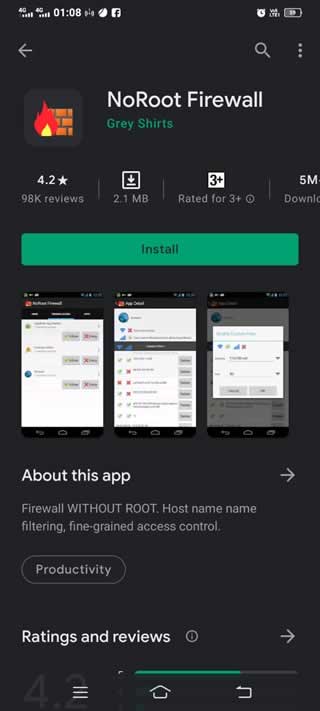
Firstly, install the application from Google Play or click here.

NoRoot Firewall 1

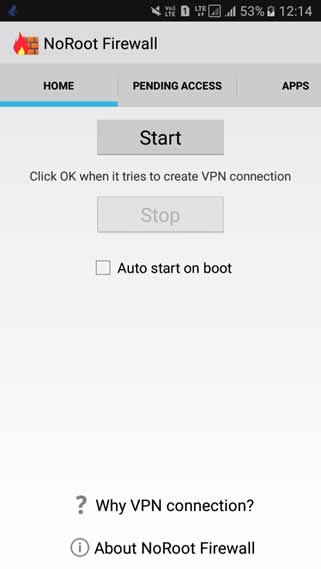
Once the installation is successful, launch the app.

Click on the ‘Start button.

NoRoot Firewall 2

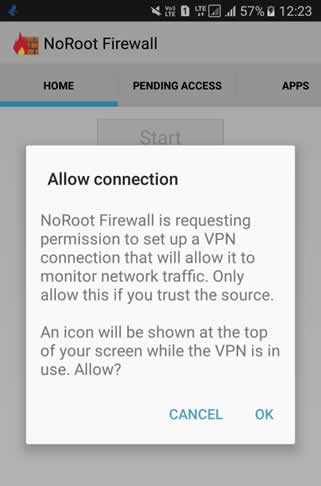
Now, click ‘OK’ from the pop-up menu to allow the connection.

NoRoot Firewall 3

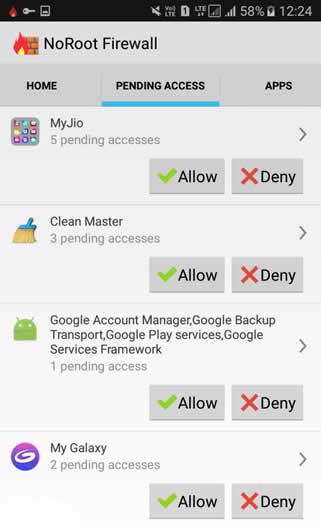
Click on the ‘Pending Access’ tab on the top.

NoRoot Firewall 4

It will display a list of apps that need to be connected to the internet.

Allow or deny each app as per your preference.

And that’s all. NoRoot Firewall is now added to your Android Smartphone and active.

NoRoot Firewall – Features

NoRoot Firewall is the perfect solution to keep your Android phone safe and secured. It offers the following amazing features as a Firewall Protection app:

  • It requires no root access and works just fine, even with the latest Android update.
  • Instant access control based on IP/ hostname/ domain name
  • Controls outgoing/ incoming network connections.
  • Intuitive interface
  • Requires minimal permission
  • Allows global filters for each app
  • Allows to block specific IP/ Port for all or selected installed applications

Although this app’s features look pretty convincing, one thing to remember is NoRoot Firewall does not work on LTE Android smartphones since it doesn’t have support for IPv6 yet. We might see this feature too in the coming upgrades of the application. However, as of now, it offers a pretty decent and powerful service.

Besides, the application is lightweight and occupies very little space on your smartphone (size varies with device). It has a 4.2 rating on Google Play. NoRoot has over 5,000,000+ installs, and the app keeps getting regular updates, which is one of its impressive things.

Conclusion

And that is how you add your personal Firewall on your Android smartphone. NoRoot Firewall Protection is one of the best solutions when it comes to a reliable firewall for Android. It is quite easy to set-up and protects your personal data from getting leaked on the internet, and also acts as a shield for your phone. Above all, this application is trusted by many and is one of my personal favourites.

Artist Sold A JPG Collage Of His Works As An NFT Token For A Record $69 Million

NFT artwork 69 million us dollars

American artist Mike Winkelmann, known under the pseudonym Beeple, entered the top three most sought-after and highest-paid artists in the world.  

Auction house Christie sold his work “Everydays: The First 5000 Days” as a non-fungible token (NFT) for a record $69.3 million. This is a record price for NFT.

Everydays-The First 5000 Days

If you don’t know, a non-fungible token (NFT) is a new type of digital asset on the blockchain that guarantees the originality of an item and the ownership of its owner. Like other tokens, each NFT is unique and cannot be reproduced. NFT technology is booming right now. In mid-February, CoinDesk estimated the total value of all artworks sold as NFTs at over $100 million.

The work “Everydays: The First 5000 Days” JPEG file measuring 21,069 x 21,069 pixels is a collage of all the images that the artist — Beeple aka Mike Winkelmann — has published on the internet every day for five thousand days since 2007 — which can be viewed free of charge on the Tumblr online platform.

According to The New York Times, the auction took place over two weeks, with a starting price of $100. In the last few seconds of the auction, a lot of bids were received, which is why the auction was extended by two minutes.

Beeple’s work value was the third-highest auction price for a work by a living artist, behind Jeff Koons ($91.1 million) and David Hockney ($90.3 million).

How To Stop Your Voice Assistant From Being Hacked

Google Assistant settings to disable to protect your privacy

We’re moving more and more towards a digitized world. Facial recognition software, cryptocurrency, the IoT, and AI have all become familiar concepts. And the use of voice assistants, such as Siri or Alexa, is the norm in millions of homes around the globe.

But despite their growing popularity, voice assistants are vulnerable to hackers, just like every other online technology. 

How and Why Are VAs Hacked?

The idea of someone being privy to personal calls and information is bad enough, but the even greater threat is that hackers can gain access to your bank accounts and other important information. 

Voice assistants activate by a vocal command—“Ok, Google” for Google Assistant is one example. Unfortunately, as with all online technologies, they are vulnerable to hacks. One way is by using ultrasonic waves to replicate the effect of vocal commands. The software can also emulate the device owner’s voice, offering easy access.

On top of this, the convenience of linking all your online profiles can backfire when a hacker slips through in one area and gains access to all your information. 

But it’s not all doom and gloom; there are a few things you can do to increase the safety and security of your virtual assistants.

Staying Safe: A Few Tips

1. Stop Eavesdropping 

Just as you shouldn’t save your password for online banking, you need to be careful with your voice assistant. Don’t make sensitive information vulnerable by allowing it to be recorded

That includes passwords, online banking information, or credit card details, as well as details about your identity. 

Go one step further by muting your voice assistant when you’re not busy using it. There is no way to tell for certain what your device is recording when you think it’s dormant. 

2. Don’t Connect Indiscriminately

It’s very tempting to connect all your devices—it’s convenient, and it works, right?

Unfortunately, this ease of access for you can also mean ease of access for hackers. Be careful with using your voice assistant for your house alarm, for example, as well as details such as addresses and contact numbers. 

3. Use Multi-Factor Authentication 

Sometimes, even changing your passwords regularly isn’t enough to keep hackers out. Although having multi-factor authentication can be a pain, it keeps your information more secure. 

4. Secure Your Wi-Fi Connection

Wi-Fi is one way that hackers can gain access to your online world, especially if you have multiple devices connecting to it. The more laptops, smartphones, tablets, and voice assistants are on one network, the greater the vulnerability. 

To combat this, your network should have a secure password—preferably a WPA2-encrypted Wi-Fi network. 

5. Don’t Allow Personal Results

Voice assistants can make your personal details vulnerable to hackers when you use them to manage tasks such as payments. Enabling this feature can allow sensitive information to pop up on any connected device.

6. Review Settings Regularly

You can be going about your business with the assumption that settings automatically default to the safest option. 

This isn’t always the case.

Check your history and settings regularly to protect your privacy. What commands did your device save, and has it been tracking your locations? Are your passwords saved as well?

Use Discretion

Despite these risks, you can still use voice assistants safely if you’re conscious of the pitfalls. Besides, they definitely make life easier.

With a rise in general use and voice commerce, they’re set to be a big part of the future. If you’re security-conscious and use them wisely, they open a whole new world of digital convenience. 

100 TB HDD: Seagate Presented Its Plans For Future Hard Drives

Seagate 100 TB HDD

Currently, the highest-capacity hard drives are the 20 TB hard drives by Western Digital, and there was no sign of any contenders to exceed this limit.

Now Seagate arrives, and not only does it promise to exceed those numbers, but it goes on to say that it will launch 100 Terabyte hard drives in less than ten years.

Specifically, Seagate says it is on track to offer 50 TB hard drives by 2026; and that by the year 2030, that figure will reach 100 TB. Finally, by the 2030s, it expects to exceed 120 TB.

To reach 100 TB, Seagate will have to adopt new magnetic recording technologies that do not lose performance despite the higher density of information on the platters. The solution ‘seems’ simple: put more read and write heads inside the drive.

Indeed, the new ‘multi-actuator’ technology allows more than one head to be used to access the data. Including two heads, for example, almost doubles the read rate and the operations throughput per terabyte.

Although SSDs are becoming more and more popular, traditional hard drives continue to be sold a lot. More hard drives were sold last year than ever, which may seem strange. The reason is not only that there are still many users who opt for the best capacity/price ratio of HDDs, but there are more companies with data servers that generate an absurd amount of information every day.

Therefore, Seagate’s announcement will appeal more to companies who fear that data servers take up more and more physical space and require more power. However, the end consumer will also benefit, especially if SSDs do not come at more affordable prices.

For now, Seagate says it will be able to break the 20 TB barrier during 2023 when it expects to launch the first 30-terabyte drives. From there, every year and a half, it hopes to add approximately 10 terabytes to its models.

Major Red Flags For WordPress Plugins

WordPress Plugins Conflicts

Every WordPress web designer and content creator out there knows that their jobs would be much more difficult had it not been for the helpful plugins. The WordPress directory is packed with these handy add-ons that can simplify many different aspects of your website – from SEO to e-commerce.

Not every WordPress plugin is safe to use, though. Some of them can be exploitative of your data or slow down your WordPress site. A few of them are straight-up malware that, if installed, can do some serious damage not only to your website but also to the device you’re using it on.

Thankfully, the cases of viruses “smuggled” into the WordPress plugin directory as add-ons are rare and can be dealt with pretty quickly.

However, even if they are not maliciously designed, some plugins can pose a security threat simply because they’re outdated, poorly coded, or otherwise improperly created. They can increase your site’s loading time, make it vulnerable to external threats, and ruin the user experience for visitors who will be reluctant to return to your website.

Danger lurks everywhere. For instance, before you install that cool lightbox popup WordPress plugin, double-check its history in search for any warning signs. If you don’t know how to spot a suspicious plugin, check out this article! We’ve compiled a list of some of the major red flags for WordPress plugins, so you know what to avoid in the future.

Outdated Repository

When you google a plugin you want to install, and the repository you end up on looks like it was created in the early 2000s, with a tacky logo and poor spelling – you probably want to be cautious. If the website of the author looks similar, then it’s probably best to completely ignore it. When the plugin’s last update was more than 10 years ago, it’s safe to assume it’s not maintained anymore.

If the description says that the plugin was last updated years ago, or the author hasn’t been active on GitHub for years, be careful. Sure, it doesn’t mean that the plugin is dead, but you should definitely check how up-to-date the code is yourself and not blindly trust the author without verifying.

To summarize, you should always double-check whether the plugin you plan to download is maintained by its developers or not. If it isn’t – it’s a major red flag, as outdated plugins are vulnerable to all sorts of exploitation.

Developer with a Bad Reputation

A quick online search can tell you everything you need to know about a plugin’s developer. If the people on WordPress forums advise you to stay away from them, you might want to heed their warnings. Installing a plugin from a questionable source can potentially open a backdoor to your website. You never know how vulnerable you are until it’s too late.

Not Many People Have Downloaded It

Of course, if it’s a brand new plugin that has been released minutes ago, the lack of downloads is warranted. However, if a plugin has been around for years, promises to be everything you’ve ever needed, yet the number of downloads suggests otherwise, you should be cautious.

It can be a sign that the plugin is not in use by anyone, and while this may be a good indicator that the open-source community does not consider it worth trying, it may also suggest that the plugin has some major inconsistencies or bugs that the developers found hard to fix.

Fishy Code

A good practice when downloading WordPress plugins is to check their code yourself. This is the best way to protect yourself from unsafe plugins. There are plenty of hacked plugins out there, either by the developers themselves or by external hackers who exploited its poor code.

Even plugins that are considered secure can be hacked. Let’s say that the author of a plugin protected it with a secret key known only to him. Someone might have gotten their hands on that key and distributed the plugin with malicious code.

Unfortunately, sometimes even good programmers use weak encryption codes or don’t use one at all. If you take your time to check the malicious plugin code, you can avoid using it. For this purpose, you need to be able to read some code and understand what it does.

The Bottom Line

Developing your own WordPress site can be a pleasant and effortless experience, provided that you’re using the right plugins to help you throughout the process. Once you learn to recognize suspicious and untrustworthy add-ons, you’re going to make sure that your WordPress website does not get exploited by malicious actors.

A lot of the time, it is faulty plugins that open up the backdoors for these kinds of exploits. Remember that there are more bad plugins than there are good ones, and knowing how to safeguard yourself against them is one of the most important things to keep in mind when working with WordPress.