Home Blog Page 254

Top 3 Cloud Storage Apps for Android: Review of the Most Top-Ranking Ones

Cloud Storage Apps for Android

Today people use smartphones not only for calls, texting, and entertainment purposes. Nowadays, users can work with the help of Android and iOS-based gadgets. But for the storage of multiple files such as documents, photos, images, PDFs, and other assets, it is necessary to have enough memory.

Cloud storage is the perfect solution for this purpose. Using cloud-based software provides many benefits at once. These applications for Android ensure security and disaster recovery that are highly required by business people who store their essential files on the smartphone and run various critical business processes via Android-based pocket screens. Among other advantages of the cloud storage apps are:

  • Usability and high-level accessibility;
  • Cost-efficiency (affordable pricing plans or even free options);
  • Convenient file sharing properties;
  • Affordable-to-use storage;
  • Multiple-user access to files;
  • Qualitative synchronization.

The main idea that smartphone owners who use cloud storage software upload any files to cloud storage servers. First, the memory of the device is not used. Secondly, this is one more way to secure back-ups. All the text documents, imagery, videos, and other data files will not be lost because of gadget failure or smartphone loss, theft, or any tech errors take place.

The List of Top Cloud Storage Apps for Android 2021

The special-purpose applications provide users with convenient storing data capabilities. The most top-ranking cloud-based apps include up to 15 GB for storage of photos, videos, text documents, and other files. The ranking rates depend on the available features of the cloud-service apps for Android. One more necessary aspect that is taken into consideration in the review is pricing. Users prefer apps with the free version. Extra storage, in this case, is purchased optionally. Let’s take a closer look at the top three cloud-based software for Android.

1. Google Drive

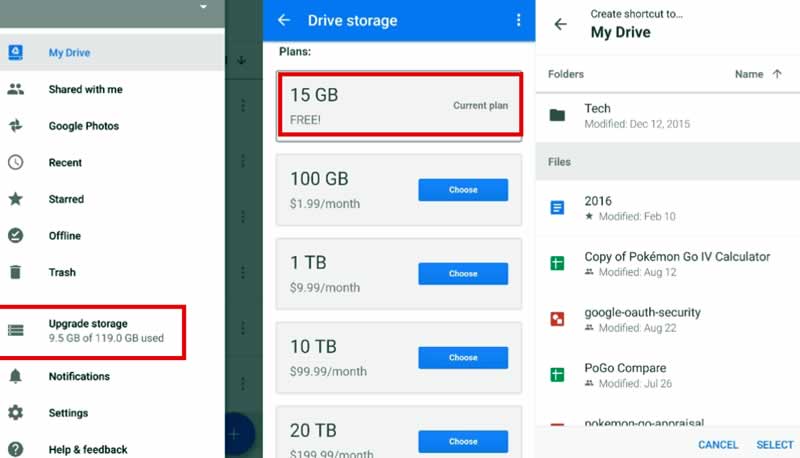
This is one of the most popular applications for Android smartphones. At the same time, Google Drive is available for desktop use and iOS-based gadgets. The free version provides 15 GB of cloud storage for any purpose without any charges. People who work with text documents, spreadsheet files, and other shareable data can find Google Drive any presentation, preview, and edit tools. If users require more GB for work or graphical content storage, there other paid plans 100 GB, 1 TB, 10 TB, 20 TB.

Google Drive interface

To sum up, Google Drive offers the following data storing options to owners of Android-based smartphones:

  • Storage and access to files at any time and everywhere. The user needs to sign in to the Google account only.
  • Searching for files, their editing, and preview options in several clicks. The interface of the application is user-friendly.
  • Availability of the free plan with 15 GB for cloud storage of any data. A range of paid plans with 100 GB, 1 TB, 10 TB, 20 TB.
  • Offline view and a preview of Google Drive content created (owned) by the user. File sharing option with the help of permissions and shareable links.
  • Data segmentation options via folders, file assortment, other Google Drive tools (Starred, Recent, Quick Access).
  • Paper document scanning via the smartphone’s camera. Various formats of files to create, edit, store, share.

The minimum pricing plan for extra storage is only $1.99 monthly for an additional 100 GB. Users can get up to 30 TB for $29.99 per month. Google Drive pricing is the same for desktop and mobile versions. Sometimes users prefer free cloud storage only. To meet free-of-charge limits. People use file compressors. It is possible to create different folders in Google Drive and store here compressed videos, photos, PDF presentations, and assets of other formats. One of the best options for Android is 7Zipper, while for desktop, it is better to use an online video compressor.

2. Amazon Drive

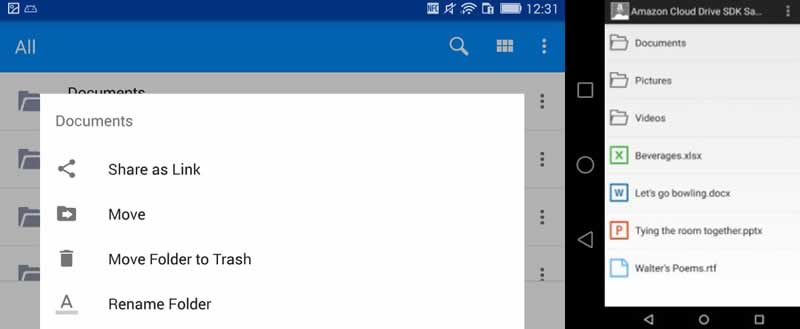
Amazon Drive interface

Amazon Drive is a popular app for Android-based cloud storage. It provides easy access to text documents, videos, photos, music, other files. Users can preview photos, video files, and text documents from their Android devices. All the changes to the stored and shareable content are possible online. Amazon Drive offers the following options as well:

  • Create folders and make the storage space more structured this way.
  • Users can add files to new folders, cut them, and move content to new ones.
  • It is possible to download any cloud-stored files to the Android storage memory.
  • Users can use links and attachments to share their content. They can be sent via email, messengers, SMS, etc.

The free version provides only 5 GB without any charge. Other Amazon Drive storage plans start at $11.99/year. Users can try a free plan for 3 months. Among new options are bug fixes and bulk file/folder selection.

3. Mega

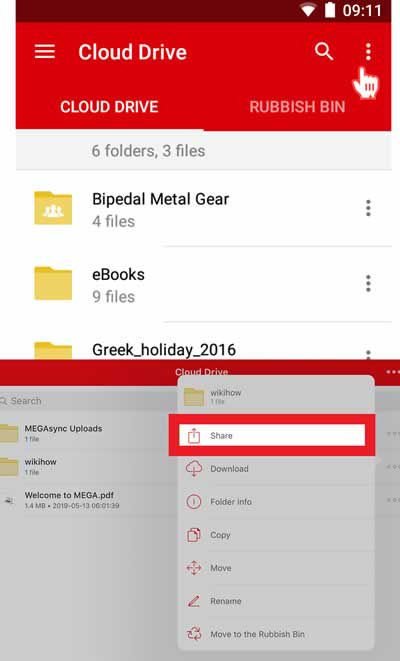
It is one more cloud storage app with free 50 GB for owners of Android smartphones. The application is available on iOS devices as well. The main advantage of the software is its drag-and-drop interface for fast and easy modification. The Mega users can share files, store video, music, photos, and other data.

Mega interface

Additionally, Mega offers streaming options for users who would like to share videos or monetize their streaming activities. The cloud storage application is fully-encrypted, which means high-level data security. Affordable pricing plans complement a wide range of services provided by the Mega cloud storage (video chat, real-time content updates, easy access to files, etc.). 400 GB of extra cloud storage costs only $6 per month. If the user requires more cloud storage, there is a paid plan with 8 TB for $25 per month. It is worth noting that users get a transfer quota for the first month. Among key hot-topic features is bug fixes.

The Final Word

Today the market is full of different cloud storage applications for Android and iOS devices. Users can select the most optimal one according to their requirements and budget. This review presented information on the most popular cloud storage for Android available on Google Play and other app stores. Each of the three apps offers free versions and paid plans to choose from. The key aspect to take into account is the range of available options for data storage, editing, sharing, and assortment.

Level 3 Automated Driving: Honda Brings Out The World’s First Car With A Traffic Jam Pilot

Honda Legend Hybrid EX Level 3 Automated Driving

Driving in traffic jams is annoying and prone to accidents. Adaptive cruise control helps in such situations. But drivers still need to pay full attention to the traffic and keep their hands on the steering wheel. 

Systems for conditionally automated driving or Level 3 automated driving are set to change that. Honda is taking the next step in autonomous driving by launching a vehicle with such a system. The Japanese Ministry of Transport granted approval for this in November 2020.

The manufacturer has equipped the Legend Hybrid EX, an upper mid-range sedan, with a traffic jam pilot and is launching the vehicle in Japan, albeit in a limited edition. This makes it the first series vehicle on the market that can drive partially automated.

Conditionally automated or Level 3 automated driving means that people do not have to constantly monitor the car. The vehicle performs certain functions such as changing lanes and keeping in lane or accelerating, braking, and steering in traffic jams. In the meantime, the person can turn to something else until the vehicle prompts them to take control again.

SENSING Elite is what Honda calls the Level 3 system. It is based on the sensing system that is part of the standard equipment of the cars offered by the Japanese concern in Europe. This includes adaptive cruise control (ACC) and a lane departure warning system (LKAS).

So-called hands-off functions have been added. This means that your hands do not have to be permanently on the steering wheel while the vehicle is driving itself. It can accelerate or brake in relation to a vehicle in front. It keeps the lane or changes it when the turn signal is activated.

If the traffic jam clears, the vehicle warns. If a person does not react to the various warnings, including tones or vibrations from the seat belt, the vehicle drives to the hard shoulder or the edge of the road and brakes in a controlled manner.

The difference between Level 2 and Level 3 is not only that the person has to be in constant control of the vehicle and have their hands on the steering wheel. At Level 3, it is not the driver who is liable but the manufacturer. To ensure that the systems are safe, Honda says it has tested them extensively: around ten million real driving situations were simulated in the simulator. In addition, the test vehicles drove 1.3 million km.

The vehicles equipped with SENSING Elite can be recognized by their blue auxiliary lights and special rims. Honda will be offering the Level 3-capable sedan from March 5, 2021, in a small edition only in Japan and exclusively for leasing.

Choosing The Best Laptop For Podcasting: A Laptop Buying Guide

Best Laptop For Podcasting

Multiple Kinds Of Podcasting

Not all podcasts are alike. One of the most prominent, if not the most prominent, is The Joe Rogan Experience. This podcast incorporates multiple camera angles, staff running computers in the background for fact-checking purposes, and individuals who will throw videos on a screen to be viewed by guests, Joe, and the audience.

The podcast uses professional microphone equipment and takes place in a room which has neutral sound through specific design—echoes aren’t ever a problem on JRE. They’ve got headphones, tables, employees, lighting, cameras, microphones, keyboards, and computers—in short, they’ve got it all.

At a minimum, the equipment costs for that podcast alone are going to be in the $15k range, at a qualitative level, and since for Joe, price is no object, you can expect he’s probably spent $30k+ on that aspect of his output alone. Most podcasters aren’t going to be operating from that sort of budget.

On the other end of the spectrum, people use tape recorders with computer jacks to capture conversations in public places, transfer them to computers, then upload them to free podcasting sites; from there, advertising via social media. In short, what laptop you need will depend on what you’re doing. Here, we’ll cover average qualifications.

The Middle Of The Road Defines Podcast Laptops

Even for high-end podcasts, you’re not really going to need a high-end machine. Free video editing programs like iMovie can edit most podcasts. It’s just a matter of lining up multiple camera angles, cutting between them, and adding in relevant music files or internet videos. The most basic device will do for most video and audio processing at that level.

However, that’s not the case in all areas. A cheap web portal like Google’s Chrome series can be had for between $250 and $1k, or thereabouts. The same is true of Dell, Lenovo, HP, Windows, and other laptop developers. Most models tend to come in a range.

For podcasting specifically, the general expense for requisite quality will vary between $500 and $700. There are a lot of resources out there to help you explore specific devices around this middle range; this site identifies the best laptop for podcasting at around $603 on Amazon.com.

Budgetary Considerations

That being said, if you’re having trouble buying a new laptop owing to budget, you can get one of the same quality at a reduced price if you buy an older next-gen device. Essentially, every year new computers are put out there, and the refinement process as far as technology is concerned proceeds in a relatively continuous fashion.

This means a device three or four years old may be under “average” device costs for the market if you buy it refurbished. It may deliver more than costlier options even so. Certain computers that were $2k when they were brand new will function just as well as brand new computers that are four years younger but sold in the $500 range when launched.

The issue with used devices comes down to unknown problems in operation. Sometimes sellers made a mistake that undermined either hardware or software integrity. Shops selling used devices can generally fix such problems, but not always, so it’s easy to imagine a situation where a less-then-new computer ends up glitching out, and you have to buy again.

Ease Of Use

Beyond the sort of podcast you’re running and the kind of budget you’ve got to work with, it’s wise to consider the learning curve for laptop operation. Just because a device runs on Windows OS doesn’t mean it’s precisely like the previous Windows device you purchased.

For example, if you’re doing a lot of typing, look at the laptop’s keyboard before you buy—some designs put “arrow” and “enter” keys too near one another on the righthand side, and it will take you three times as long to type something basic because your pinky doesn’t know any better.

So the final consideration on a good podcasting laptop is how easy it is to use while you’re running the podcast. You won’t want to be chasing bugs or incidental mistakes when you’re trying to produce content.

Making The Best Choice

The three primary factors influencing the laptop you choose will be how easy it is to use, your budget, and the sort of podcast you’re doing.

Definitely, use websites offering resources to get a more in-depth look at what hardware and software features are best for what you intend. Generally, basic video and audio processing capability that’s affordable and easy to use will define reliable podcasting machines.

Banana As A Controller: Sony Thinks That Any Object Can Be A PlayStation Controller

Banana As A PlayStation Controller

Sony is researching bananas, oranges, and other everyday objects used to control games on the Playstation.

It sounds like a joke, but it’s true — A new patent from Sony shows how any object could be a controller for its PlayStation platform.

While the PlayStation 5 was released in November 2020, Sony is continuing with its wave of patents that could help improve the future of the platform. Last time we saw a Sony patent that shows a new AI system capable of dynamically raising or lowering the difficulty of a video game.

Now with this new patent where we can “an inexpensive, simple and non-electronic device as a peripheral for video games” could stop depending on official controls like Dualsense gamepad.

So much so that a banana appears as an example in the patent. This method works with “any passive non-luminous object held by a user,” which describes a very wide spectrum of easily accessible everyday objects. For example pens, glasses and of course other peripherals would also work.

Sony patent Banana As A PlayStation Controller

It would not be necessary to install additional components, as a system of virtual buttons would take care of “transforming” the object into a remote control.

The idea is that a camera obtains the images of the object in the hands of the users and tracks their main elements based on pixels, contours, and colors. By obtaining its shape, you could map the appropriate areas to “insert” the virtual buttons.

Now, the patent describes that, since there is a practically unlimited variety of shapes, the system could suggest objects to users. Another option would be to train the system on the most frequently used objects.

If motion control does not work, then we have the camera mapping the necessary buttons on the object in question and thus explain through images which parts of it must be “touched” to perform according to what actions.

Certainly, the idea posed by PlayStation is very interesting. Unfortunately, this is one of those patents that, more than likely, you will never see a real application.

How VR Is Changing Modern Medicine

VR in Healthcare

Virtual Reality is becoming more popular every year. Some people think that VR technology is limited to gaming or other entertainment fields, but actually, that’s one of the less interesting ways of using it. Past years have witnessed a significant development in the methods and processes of using VR in healthcare.

Virtual Reality is used in many areas of medicine. Applications like robotic surgery, healthcare devices, etc., are gaining more and more popularity and are likely to be adopted by different healthcare institutions as standard equipment. However, if you are thinking about buying Virtual Reality equipment for your private practice, you should realize the VR market is still in its infancy.

If you want to know more about equipment for your practice, you can just click here, but in this article, we will focus on the application of VR and the latest technologies used in modern medicine.

Applications of VR in Healthcare

The launch of Oculus Rift and HTC Vive has made a considerable impact on the augmentation of newer Virtual Reality technologies. Healthcare is one of the biggest industries that enjoy the benefits of this tech.

Medical Training

Various kinds of medical training can be simulated using VR, allowing medical students to practice without real patients. It can minimize the risks of making mistakes and view training recordings of the simulated procedures.

Training doesn’t have to be limited only to students. Sophisticated 3D graphics can recreate any part of the body in detail, and training can be offered using many scenarios mimicking real-life procedures. Surgeries can be video recorded from multiple angles and then combined with the 3D graphics so complicated surgeries can be practiced in VR.

Another advantage of VR is that it can reveal inaccessible areas of the human body. For example, the dissection of cadavers is sometimes conducted using VR googles. In the same way, they can learn how to apply sutures in the operating room, with the use of VR and sensors makes it safer and less expensive than conventional training.

Diagnostics

The use of VR can be an excellent diagnostic tool to carry out an accurate diagnosis. One example can be neuronavigation that allows neurosurgeons to visualize the scenario for brain surgery in a 3D model that can be manipulated however it’s needed. It means that doctors can practice the surgery, try different approaches, and asses difficulties before the actual procedure.

Treatment

VR use is not limited to surgery visualizations. It can help in the therapy of diseases like autism. Consider the case of Manjoy Sazawal, who displayed a fascination with 3D maps and navigation from an early age. Google Earth inspired his parents to try Floreo, which uses Virtual Reality to teach social and communication skills to people with autism. Floreo’s games help kids practice various social skills like nonverbal gestures or joint attention.

Treatment of mental illnesses is changing due to VR; it is low-cost, flexible, and low-risk. Its unique ability to create simulations and scenarios eliminates the need for accompanying patients to malls, tall buildings, or other stressful locations. It is proving effective for working with patients with phobias and PTSD.

One of the newest innovations in the performance of surgeries is the use of robotic arms. The procedure is conducted using an arm-like device controlled by a surgeon. This method reduces time and risks, as the arm is much more accurate, making smaller incisions, reducing blood loss, and a faster recovery time.

Virtual Reality can also shorten recovery time by making it easier for patients to do physical therapy exercises. VR takes the attention away from the sterile surroundings and the pain, providing an absorbing reality that motivates and encourages them to complete their activity. A study by the University of Washington Seattle and the UW Harborview Burn Centre showed that VR immersion significantly reduces pain levels in patients during therapy.

VR Companies in Healthcare

Some of the top companies that create new equipment and generate more breakthroughs are:

Augmedics

This company was founded in 2014 and is best known for its xVision headset used for spinal surgeries. According to Augmedics, it is the ” first augmented reality guidance system for surgery.” The surgeon can look at the patient and “see” his anatomy through the skin and tissue, similar to x-ray vision.

Proprio Vision

Proprio Vision is a computational imaging company providing enhanced visualization systems for precision tasks like brain surgery. Their technology enables immersion during medical procedures and improves the success rate of surgery.

Health Scholars

Health Scholars create AI-enabled VR simulations that are designed for first responders and clinicians. They address the required emergency care training and scenarios in pre-hospital, general care, perioperative, and obstetrical setting. All trainees can relieve their experience, learn from their mistakes, and close skill gaps without real-life patients.

The Bottom Line

Even though VR is relatively new and we are seeing only the first steps in augmenting it to real-life problems, the benefits of the technology are already huge. VR’s popularity is steadily rising in all industries, as it’s becoming less expensive. It probably won’t be long before VR equipment is standard for every practice and hospital.

Virtual Reality can improve surgeries and therapy’s effectiveness and make it less risky for both patients and doctors. This technology’s potential in the healthcare sector is enormous, and it’s limited only by the designers’ imagination and creativity.

Monetizing video in 2021: Explore new opportunities with your Vimeo channel

Vimeo news and stories

Many content creators fail to see the value of their Vimeo channels outside of the native platform. However, in reality, there are many lucrative opportunities for monetizing video.

Is video advertising the future of online advertising?

Trends indicate the future of digital advertising lies in OTT, CTV, and independent publishers. Outside of the big tech giants, ad spend in this area is relatively high. As more people choose streaming services over cable, brands are finding more value in this growing audience.

In today’s digital environment, a business cannot just place its ads anywhere online. Video advertising on CTV, OTT, and streaming services doesn’t only attract groups with significant spending power. They deliver ads directly to viewers with a high propensity to buy. This creates the best opportunity for content creators to make more money from their content.

Can you monetize on Vimeo?

The video platform Vimeo has less stringent measures when it comes to revenue policies. That alone is already a considerable advantage to creators. Now the question most content creators ask is how to monetize effectively?

Why you need a CTV app

The Vimeo platform mostly leans towards channel subscription to create a revenue stream. However, there is more to be gained by developing a custom CTV app for your channel. It will encourage more people to access your content across all major CTV/OTT platforms. Currently, CTV and OTT have the most ad revenue potential in the market, right after Amazon, Google, and Facebook.

With a CTV app, you can bring your channel to popular places like Amazon Fire, Apple, Android TV, and Roku, which is by far one of the biggest CTV platforms. You also get more powerful encoding and streaming capabilities while enabling efficient ad monetization.

If you already have a sizable following on your channel, the next step is to get advertisers to consider using your media to showcase their brands. The smartest way to do it is through a video monetization platform.

How a video monetization platform boosts Vimeo ad revenue

Developing a consistent and reliable revenue source from your Vimeo channel through a monetization platform is easy. It enables you to tap into a pool of high-value advertisers.

Video analytics capabilities

A monetization platform allows creators to access intelligent video analytics thanks to the machine-learning algorithms in place. This technology powers real-time ad performance optimization so channel owners can increase the value of their media.

Improved channel visibility

Top monetization services provide marketing support to creators on their CTV platforms and beyond. Channels are promoted to reach the right demographics and increase viewership.

With the growing sea of online content, it pays for publishers to increase their online presence. It’s a great way to increase channel size. The bigger the audience, the more advertisers are willing to pay for premium slots. 

Reduced red tape

By leveraging a monetization platform, channel owners have the freedom to charge for online ads as they see fit. The ad formats they can employ are unlimited, especially through a CTV app. Monetization platforms simplify online advertising, enabling advertisers to buy media directly from publishers. This allows creators to keep as much of the advertising fees as possible. 

Make your move now

The future of online ads is now in video. Content creators currently have the upper hand as the most preferred destination for ad placement. If you own a Vimeo channel, it’s the best time to join the trend and increase ad revenue. A monetization platform not only improves your value but also gives you more control.

Role Of Technology: 5 Common Strategies Money Launderers Use to Avoid Detection

Money Launderers Use to Avoid Detection

Money laundering is a serious crime that all financial institutions have to contend with. It is often defined as a process that criminals use to make their ill-gotten wealth seem legitimate. As the banking industry evolves, so, too, do money launderers continue to change and adapt their methods to keep from getting caught.

That being said, it is extremely important to keep yourself and your team abreast of the different ways that money launderers avoid detection. Knowing these methods can give you the information you need to re-evaluate your AML reporting processes and recognize if there are improvements that need to be made. To help your company fight back against financial crime, read on to learn some of the most common strategies that money launderers rely on to conduct illegal activities.

Anonymous Shell Companies

This is one of the most common methods that malicious individuals use to move and hide their money. Simply put, a “shell company” is a business that exists on paper but does not have any documentation of its activities. The lack of authentication means that the owners can hide their identities or present false data as facts, and they can get away with it because anonymity is valued and upheld as a civil right in all 50 states across the United States.

This creates a loophole for any US-based money launderer to register their shell company under a fake name or in complete anonymity. Most of the time, criminals use a combination of real and fabricated information for this company, making it harder to trace their transactions. Unfortunately, some financial institutions don’t conduct rigorous checks to verify a user’s identity, making it easy for them to slip through the cracks under the guise of a supposedly real business.

Business Email Compromise Attacks

While this is a rather common scam to defraud a business, it can also be used to launder money. Criminals use a combination of social engineering and other computer hacking techniques to compromise email accounts that may contain valuable information. Usually, businesses that transact regularly with foreign suppliers are the main targets of this method. Once the criminal has access to these accounts, they manipulate the emails to layer and launder money without getting caught. 

Online Banking Loopholes

Even if the world is slowly digitizing almost everything, it is still a relatively new process for many industries, and the financial industry is no exception. Expending the effort and resources necessary to combat money laundering is a standard practice in traditional banking, but not so much in digital banking. As some banks are slower to make the transition compared to others, money launderers jump at the opportunity to abuse the system by sticking to online transactions. 

In a way, an online bank is like a digital playground for criminals. This is because the nature of the internet enables them to hide their identities. They may also have more sophisticated or automated tools that can allow them to phish for private data and hack into other people’s accounts. To launder money, a large transfer can be made to a victim’s account, and the owner can be tricked into revealing their sensitive information to “correct the mistake.” The criminal then proceeds to use the account to make unauthorized payments and proceeds to disappear before they can be traced.

Cryptocurrency

Because of the high security and anonymity provided by digital currencies, they have become a convenient way for cybercriminals to launder money online. To make matters worse, criminals can convert these virtual currencies into cash through traditional banks, leaving said financial institutions none the wiser.

Additionally, many platforms for digital currencies do not require people to give out their personal information to carry out most types of transactions. Since cryptocurrency only requires a private key and lacks a clear connection to any specific individual’s identity, it is extremely difficult to trace transactions back to a single person or company. Even the regulators of cryptocurrencies have a hard time keeping track of everything due to the lack of centralized record-keeping.

Online Payment Services

While debit or credit card applications require thorough application processes, the same cannot be said of prepaid gift cards, debit cards, or credit card purchases. The latter types of cards, in particular, can be bought by individuals providing false personal information. In the worst of cases, they can even be obtained completely anonymously.

Additionally, redeeming the cash value of these cards rarely ever requires someone to provide any identification. Instead, they only need to input the card number to use them for payments. Because of this, it possible for anyone to use them anonymously in place of cash when making purchases online.

Technology has an important role to play when it comes to detecting and preventing money laundering from happening to any financial institution. With this in mind, digitizing your bank processes can expedite simple tasks while increasing security for online banking customers efficiently and cost-effectively. If your team needs regulatory tech solutions and assistance for your bank’s anti-money laundering strategy, get in touch with a reputable provider of AML software today.

5 Ways To Make Business Networking Easier

Business Networking

Business networking can feel a lot like mind games and manipulative for some people, but it doesn’t have to be. There are effective ways to build genuine and mutually beneficial relationships without you seeming to schmooze the other person for your exclusive benefit.  

Improving your business networking skills could help you get ahead in your area of expertise while also making sure you bring value to those you interact with.

You can start doing specific things right now to make your experience in business networking much better. These will work whether you’re in an entry-level position or a high-ranking one, such as your own company’s CEO.

Take a look at the following ways to make business networking easier for you:

1. Improve Your Intra-Organizational Networking

Networking doesn’t only happen when you meet a group of strangers; it also does as you relate and build business relations within your current organization. If you aspire to rise through your organization’s ranks, then there are several things you can do to better your prospects. Some of which are:         

  • attending more workshops within your organization; 
  • keeping the contact details under your email signature updated; 
  • interviewing someone from a different department or branch to have a holistic appreciation of how your organization works, and  
  • remembering small details from previous conversations, which will help you in forming meaningful relations within the organization. 

If you’re already in top management and would like to keep communication with those who work under you open, it’s still vital to follow these recommendations. Additionally, you have to ensure that all various branches and departments in your company are adequately connected to set the company’s stage for great networking. One approach to managing a wide area network is designed to make this task easy.

What is SD-WAN? SD-WAN stands for software-based wide area network. As the name suggests, it uses software instead of hardware to manage connectivity and data between centers. This makes it a huge timesaver in business networking and is cheaper than Multiprotocol Label Switching (MPLS). With it, you can be connected to branches within your organization that are outside your current location and improve the quality of connection even in traditionally low-connectivity zones.

2. Your Online Presence Should Represent You Well

Gone are the days when face-to-face interactions were the full face of business networking. Nowadays, with the surging use of the internet, a potential client or business connection is likely to get themselves acquainted with what you do through an online search.

Your profile that’s posted by the company you work for, as well as your LinkedIn profile, are now the new first impressions. Like all first impressions, these profiles must sell you well.   

Don’t just say you’re an expert—demonstrate that you really are. By creating a comprehensive and professional profile with all the important details a potential client might need to know about you, you build the reader’s confidence in your work and skills.

Your online presence is your chance to subtly, but not so subtly, say, “I know what I’m doing.” Even if you’re not selling something, simply establishing your authority could be one of the best ways to meet both new clients and fellow industry gurus.

3. Add Value to Yourself

To make your business networking easier, you should aim to gain more knowledge and qualifications in areas where you could use some help. Try to gain a depth of knowledge of your focus area and get a breadth of learning in the areas related to your field. This will increase the value you bring to the table with a potential business connection and ultimately adds to your confidence in initiating contact.

This doesn’t make networking impossible for an entry-level potential. If you’re just starting on a profession, your greatest asset will be your appetite for learning. This will be most useful when trying to connect with more experienced professionals or those from other industries. If someone is confident that investing time in you is worthwhile, they’re more likely to do so.

Keeping abreast of the industry trends will also come in handy. It’ll help you stay relevant in your interactions and field, whether you are already an entrepreneur or trying to climb the corporate ladder.

4. Get Introduced By Someone In Their Circle

You’ll realize soon enough that in your business networking journey, nothing will beat a personal referral! The reception by the person you wish to meet will be much warmer if you’ve been referred by someone closer to and more trusted by them.  

All you have to do is to stay close to the people you already know who are connected in some way to the people you want to meet. It’s up to you if you want to ask to be introduced or wait to eventually be in the same space with both of them and let the conversation grow organically.

5. Create A Follow Up Plan For Your Contacts  

Losing contact with good business connections can happen if you’re not careful. Keeping in touch with all the contacts you’re getting over the years can be difficult if you’re not deliberate and intentional about it.

This is why you need to develop an easy-to-maintain plan to follow up with every valuable contact you have.  

Create a schedule with reminders and notifications for making follow-ups. Your goal is to nurture the relationships you’ve started to make each connection as rewarding as possible for both parties.

Get Ready For The Next Level Of Your Networking Experience  

No matter what field you’re in, you’ll need people to help you get to the next level. So, it’s a great idea to start spending time, interacting, and exposing yourself to the people in your field or outside it who can speed up your climb up the ladder. It doesn’t matter whether you build your network in person or via online platforms, as long as you keep the communication effective and consistent. While at it, make it enjoyable! Networking should be far from dreadful and taxing.