Hackers Hijacked Mark Zuckerberg's Twitter and Pinterest Accounts
Facebook CEO Mark Zuckerberg is also not that much cautious about his passwords. Yesterday a hacker group called OurMine Team hijacked Zuckerberg’s Twitter and Pinterest accounts and the hackers claimed the Zuckerberg ‘s password “dadada” was leaked through a massive data breach on LinkedIn in May, with more than 164 million users’ data stolen.
The hack implies Zuckerberg reused passwords across multiple sites or perhaps that the format of the password he chose for other sites was guessable after breaking his LinkedIn login credentials.
The group claiming responsibility for the high-profile hacking left a taunting message on both social media accounts. “Hey @finkd, you were in Linkedin Database with the password “dadada,” the team wrote from Zuckerberg’s Twitter page. On his Pinterest, the new title was “Hacked by OurMine Team.” In a deleted tweet, OurMine claimed it also breached Zuckerberg’s Instagram (which Facebook owns) claiming it was “just testing your security.” Zuckerberg’s Facebook account was not affected.
The affected accounts were rapidly re-secured, hopefully with a stronger password, and cleaned up. In a statement, Facebook said: “No Facebook systems or accounts were accessed. The affected accounts have been re-secured.”
Mark Zuckerberg’s Twitter and Pinterest accounts hack following the LinkedIn attack goes to show the serious extent to which password re-use, and simple forms of authentication, can have huge knock on effects to online security.
Facebook is going to become a lot smarter with its latest DeepText AI project. DeepText – Facebook’s new artificial intelligence system that will help Facebook to analyze several thousands posts a second across 20 languages with near-human accuracy.
About 400,000 new stories and 125,000 comments on public posts are shared every minute on Facebook. So the goal of the DeepText is to more precisely understand the content and context of text on Facebook, in order to improve its overall user experience.
DeepText AI – Facebook’s New Text Understanding Engine
DeepText is already being tested on some Facebook experiences. In the case of Messenger, for example, it is beginning to give us a better understanding of when someone might want to go somewhere. DeepText is used for intent detection and entity extraction to help realize that a person is not looking for a taxi when he or she says something like, “I just came out of the taxi,” as opposed to “I need a ride.”
DeepText also help people find the right tools for their purpose. For example, someone could write a post that says, “I would like to sell my old bike for $200, anyone interested?” DeepText would be able to detect that the post is about selling something, extract the meaningful information such as the object being sold and its price, and prompt the seller to use existing tools that make these transactions easier through Facebook.
DeepText has the potential to further improve Facebook experiences by understanding posts better to extract intent, sentiment, and entities (e.g., people, places, events), using mixed content signals like text and images, and automating the removal of objectionable content like spam.
Facebook is not yet open sourcing this technology. And the company is only beginning to use DeepText with its own services. But as described by Facebook, DeepText shows how the giants of the Internet hope to accelerate the progress of natural language understanding in the months and years to come. In building these systems, they aim to rely far less on humans and far more on data—enormous troves of online data.
Windows 10 – Microsoft most secure and flexible OS now on 300 million active devices and company announced that they are going to end Windows 10 upgrade offer – upgrading Windows 7 or Windows 8/8.1 to Windows 10 free of cost – on July 29, 2016.
In their official blog post Microsoft confirmed that – “The free Windows 10 upgrade offer was a first for Microsoft, helping people upgrade faster than ever before. And time is running out. The free upgrade offer will end on July 29 and we want to make sure you don’t miss out. After July 29th, you’ll be able to continue to get Windows 10 on a new device, or purchase a full version of Windows 10 Home for $119.”
So after July 29, you’ll either have to purchase a license by paying $119 or buy a new PC with Windows 10 pre-installed. There’s still plenty of time to upgrade at no cost so upgrade to Windows 10 now.
According to Netmarketshare, most popular desktop OS is Windows 7, with nearly 48 percent share and that nearly 10 percent of people still use Windows 8.1. Combined, that means nearly 60 percent of Windows users are eligible for an upgrade that they didn’t used Microsoft free Windows 10 upgrade offer yet.
You may know that many new features are coming in the upcoming Windows 10 Anniversary Update this summer, mainly Bash on Window 10. So what are you waiting for upgrade Windows 10 now for free or else you have to pay $119.
At last an Apple product successfully booted a Windows OS.
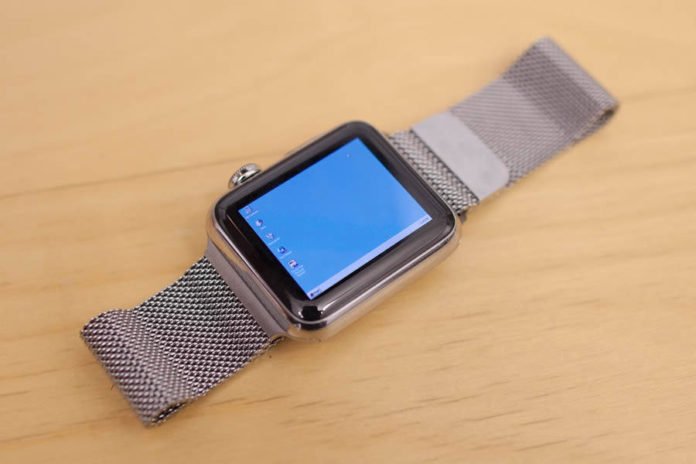
Yes, developer Nick Lee managed to install classic OS Windows 95 on an advanced and compact Apple Watch. Nick Lee, Partner & CTO at TENDIGI, has also demonstrated the whole process, step by step, in a video.
Windows 95 On Apple Watch
This is not the first time we are hearing that someone installed Windows 95 on a strange device.Last year Nintendo 3DS XL managed to run Windows 95 and now Apple Watch.
Nick Lee in its YouTube video neatly described how he successfully installed 20-year-old Windows 95 on a 1.7-inch screen Apple Watch.
It’s certainly not fast — it takes around an hour to boot the emulated OS that’s been shoved inside a WatchKit app. And also need some way of keeping the screen awake during the booting process. Li glued a motor to a small prodding device to ensure it didn’t nap.
Since Windows 95 not built for touch input, a little code-wrangling is also required. Li says that it’s possible to patch some files within a WatchKit app in order to load your own app code.
This isn’t the first time Lee has been installed an old operating system on a watch. Previously he made Apple Watch to run Mac OS 7.5.5. That time his technique was a bit different. To get System 7 on his Watch, Lee ported over the Gryphel Project’s Mini vMac emulator.
Google is the biggest search engine now ruling the web. But did you know, Google is storing your private data. Yes, Google keeps tabs on a lot of data about you. How and when you surf, the search terms you use, the pages you visit. This happens when you visit them while logged into your Google Account from a Chrome browser, an Android device, or by clicking on them in Google.
Only way to avoid this problem is by accessing Google in incognito mode. It’s a good option if you know you’re going to surf something objectionable.
But always this is not a bad thing because Google uses most of these stored data to display relevant ads to you. But sometimes this ads becomes so irritative we hope to get rid off them but don’t know how to?
In this article we will help you to find out and delete data Google stored about you.
Clearing your browser history is NOT the same as clearing your Google Web & App History. When you clear your browser history, you’re only deleting the history that’s locally stored on your computer. Clearing your browser history doesn’t do anything to the data stored on Google’s servers.
Their you can see complete insight of search keywords that Google stored about your online activity.
Backup Data Google Stored About You In Its Server
Before deleting you can download your entire Google Web & App History. For that,
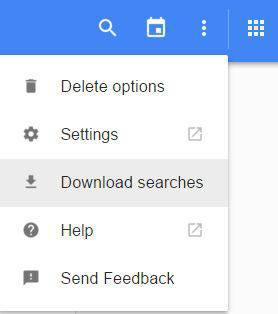
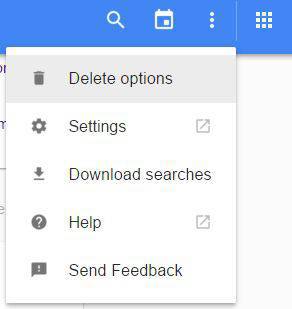
Click the vertical ellipsis (⋮).
Choose “Download Searches” from the drop-down menu.
You’ll see a window confirming that you want to “Download a copy of your data” .Read the important information before you proceed. Then click on “Create Archive“.
A message will appear telling you that Google is preparing your archive. Click Ok.
Check your email. A link to your archive should be there.
Delete Data Google Stored About You In Its Server
Now we are going to delete these past searches and the content you’ve browsed in Chrome and other apps. You can delete selected queries or delete entire content from Google.
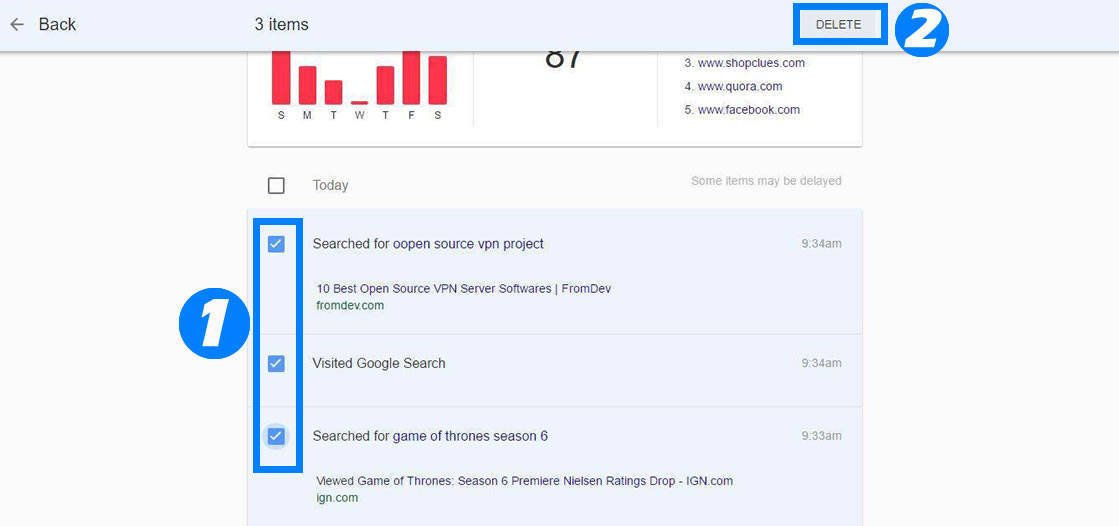
To delete selected items, tick on each check box that you want to delete and tap on “Delete” option appear on the header of the page.
To delete entire records from your Web & App History, click the vertical ellipsis (⋮) on top right corner of the page and select “Delete Options“.
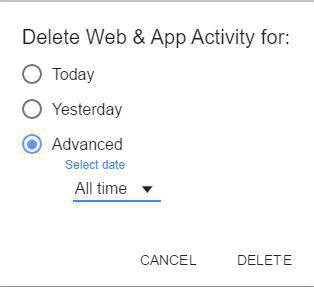
Now a small popup will display, their choose “Advanced” and in “Select Date” field choose “All Time” and tap on “Delete“.
Google will ask if you are sure you want to delete your web & app activity. Keep in mind that deleted items cannot be recovered! Click “Delete” to proceed.
After the process is completed, you should see that there are “No items to show” in your Google Web & App Activity.
You can also pause Google servers from storing your search history. For that:
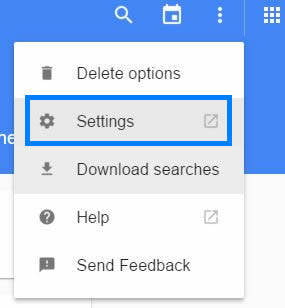
Again click on vertical ellipsis (⋮) and choose “Settings“.
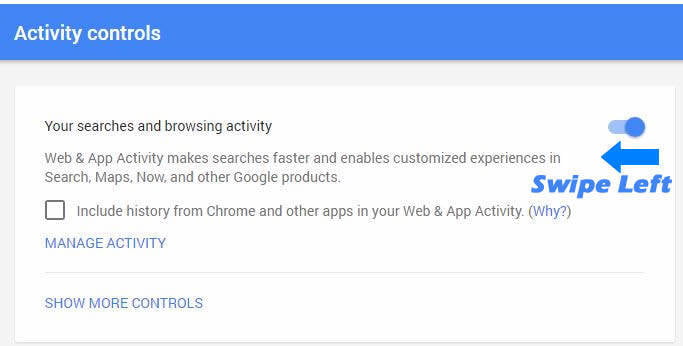
On the “Account controls” page, there is a blue switch next to “Your searches and browsing activity”. Slide the switch to the left.
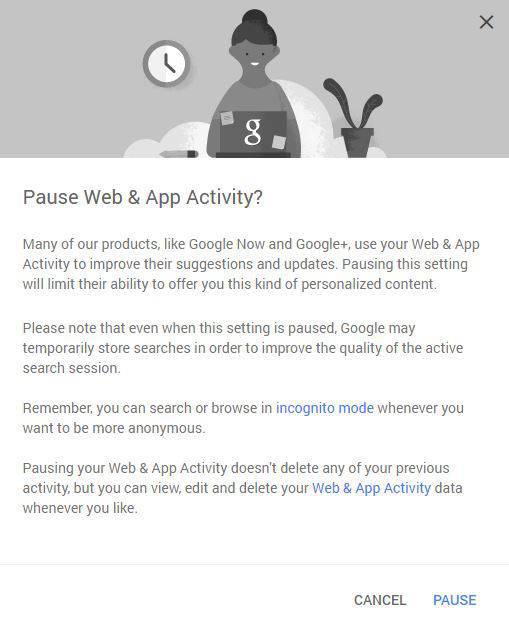
You’ll see a window asking, “Pause Web & App Activity?” Read the important information before your proceed. Then click “Pause“.
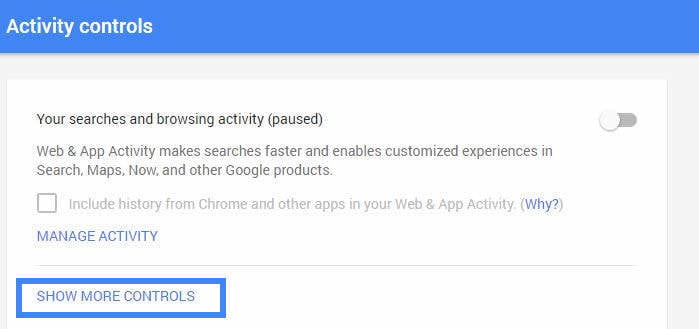
Your “Account history” page should say that your search and browsing activity is paused, and the switch should be gray.
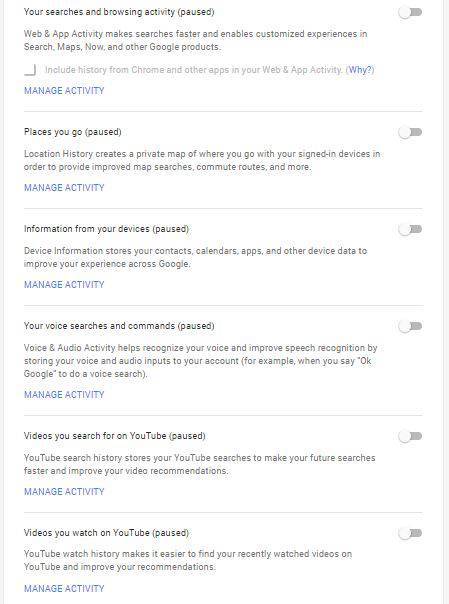
If you want to go a little further, you can tell Google to “pause” all of the other history it logs from the other Google apps and services you use. This includes the places you go, information from your devices, and your YouTube watch history. To access these settings, click on “Show More Controls“.
Slide all the switches to the left. After you slide each switch, you will see a confirmation message asking if you would like to pause each activity. Read the important information for each item, then click “Pause” to complete the process.
Even though you delete and disable your history, you are not invisible to Google—especially if you maintain a Google account for using various Google apps and services, such as Gmail and YouTube.
The reality is that it’s pretty much impossible to be invisible to Google. But you can be prudent. Start by eliminating all Google apps and services from your daily web use.
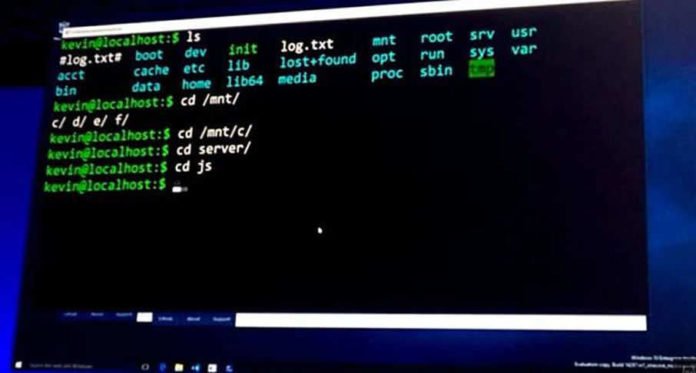
Windows 10 going to add Ubuntu’s bash and Linux command line was one of the big reveals at Microsoft’s recent Build conference. Since then, there’s been a lot of speculation about what Microsoft did to make this possible. The whole idea of running Ubuntu Bash shell on Windows is to allow developers to run Linux tools natively on Windows.
Recently Microsoft reveled what they are planning and how bash on Windows 10 will work via the Windows Subsystem for Linux (WSL), through a new Channel 9 video.
Bash On Windows 10 Works Via Windows Subsystem For Linux
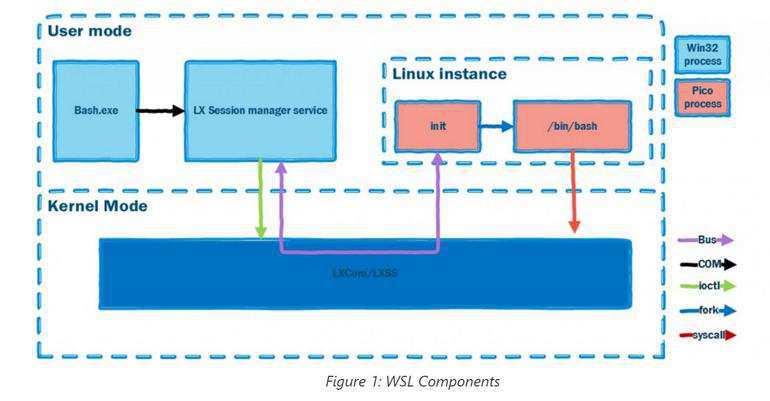
In the video, team member Deepu Thomas explains how bash on Windows 10 will work. Actually there’s no secret Linux kernel hidden in Windows 10, instead, it’s the Windows Subsystem for Linux (WSL) that was developed by the Windows Kernel team is what provides the foundation that enabled the Linux binaries to run on Windows.
So what is Windows Subsystem for Linux (WSL)
WSL is a collection of components that enables native Linux ELF64 binaries to run on Windows. It contains both user mode and kernel mode components. It is primarily comprised of:
User mode sessionmanager service that handles the Linux instance life cycle
Pico provider drivers (lxss.sys, lxcore.sys) that emulate a Linux kernel by translating Linux syscalls
Pico processes that host the unmodified user mode Linux (e.g. /bin/bash)
According to Microsoft blog post – “It is the space between the user mode Linux binaries and the Windows kernel components where the magic happens. By placing unmodified Linux binaries in Pico processeswe enable Linux system calls to be directed into the Windows kernel. The lxss.sys and lxcore.sys drivers translate the Linux system calls into NT APIs and emulate the Linux kernel.”
The pico process components may ring a bell with folks who’ve followed along with Microsoft Research’s Project Drawbridge work.
The Channel 9 architectural overview video and the related blog post both note that the Windows kernel does include the Drawbridge pico process/pico driver concepts. And it’s these pico processes and drivers that “provide the foundation for the Windows Subsystem for Linux.”
The video is worth checking out for those whose hearts beat just a little quicker when they see an OS architectural diagram.
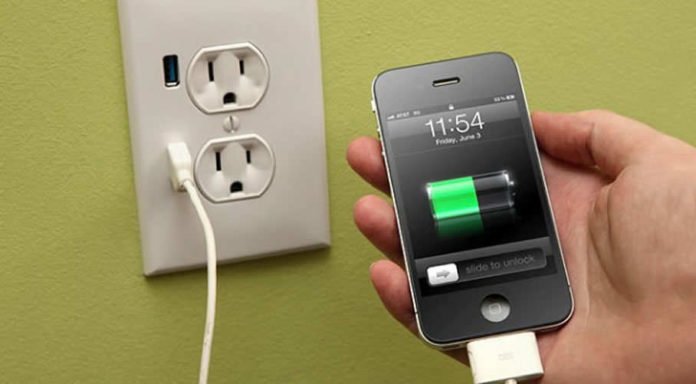
Its common after a number of recharges, batteries of our devices will gradually degrade overtime and battery replacement becomes the only option to solve the problem. But now researchers found a new technology to solve this problem. Yes, now no more battery replacement, you can recharge batteries hundreds of thousands of times.
Recharge Batteries Hundreds Of Thousands Of Times With No Degradation
University of California, Irvine researchers have invented nanowire-based battery material that can be recharged hundreds of thousands of times. The breakthrough work could lead to commercial batteries with greatly lengthened lifespans for computers, smartphones, appliances, cars and spacecraft.
Batteries degrade over time, and the older they get, the less of a charge they can hold, requiring more frequent recharging. But scientists devised a way to protect nanowires in batteries from degradation. They did it by coating a gold nanowire in a manganese dioxide shell, and then encasing the entire assembly in an electrolyte that’s made of Plexiglass-like gel, according to Phys.org.
While a typical battery may see the cracking appear after 5,000 – 7,000 recharges, but the study leader, UCI doctoral candidate Mya Le Thai, cycled the testing electrode up to 200,000 times over three months without detecting any loss of capacity or power and without fracturing any nanowires.
“The coated electrode holds its shape much better, making it a more reliable option,” UCI doctoral candidate Mya Le Thai said. “This research proves that a nanowire-based battery electrode can have a long lifetime and that we can make these kinds of batteries a reality.”
Popular multiplayer game have a lot of fans around the world, but the interestingly now you can play Counter-Strike 1.6 on your Android smartphone. Of course, playing Counter-Strike on an Android device can be quite challenging, especially with the absence of a mouse and keyboard. But you can try it out!
Play Counter-Strike 1.6 On Android
A developer named Alibek Omarev has found a way to play Counter-Strike 1.6 on an Android tablet. By a Reddit post in /r/Android, he detailed how to play Counter-Strike on Android, which involves moving files over from an existing Steam installation, and installing the Xash3D apk.
As expected, the game doesn’t run as fast on a mobile device. The screen is cluttered with touchscreen controls, but at least they’re fully customizable, according to Omarev on Reddit post.
To be clear, Omarev is referring to the full game installed and running on the device and not simply being streamed or mirrored from a PC.
Gamers who are looking forward to trying this out should also expect some lag and slowdowns especially when playing online. Users will also be able to play online using the Counter-Strike 1.6 servers.
How To Install Counter-Strike 1.6 On Android
Install the APK. Install APK with omp postfix if you have multi-core device and noomp if you have single-core device or have problems with omp version.