Home Blog Page 307

How to factory reset Windows 10 without losing your data

How to factory reset Windows 10 without losing your data

Simple guide to show how to factory reset Windows 10 without losing your personal files or data.

Sometimes our Windows 10 PC crashes because of :

Some Registry errors or malware attacks or program-incompatibility issues. So getting rid off this crash or Windows 10 errors we go for reinstalling the OS which usually compel us to format our hard disk.

Since to reinstall Windows 10, we need installation media or Windows 10 free download ISO file in our CD/USB drive. And most of us don’t have it. But their is a hidden option in Windows 10 – which help you to reinstall Windows without installation CD or USB drive.

Yes you heard it right :

You can reinstall Windows 10 without installation media – also while keeping your personal files such as documents, music, etc. intact. …

So this Windows 10 hidden feature will work like a factory reset which deletes all the user installed programs without touching your personal data.

So lets start the guide :

How to factory reset Windows 10


Let me explain what exactly factory reset Windows 10 means :

  • Resetting will delete all user files in Windows partition.
  • Resetting will remove all apps and programs that didn’t come with PC.
  • Resetting will change your Windows 10 PC settings back to their defaults.

So before factory reset Windows 10, make sure you already moved your personal data or files from “C: Drive” or Windows partition. So checkout if their is any personal files like images,videos,pdf..etc in Desktop or Download folders. If yes – then move those files to another partition.

Because factory resetting Windows 10 PC means clearing user files or user installed programs – cleaning your Windows 10 partition.

After moving your personal files follow these steps to factory reset Windows 10 :

First navigate to Windows 10 settings or hit ”  + I 

Now you can see all available Windows 10 settings, there choose ” Update & security

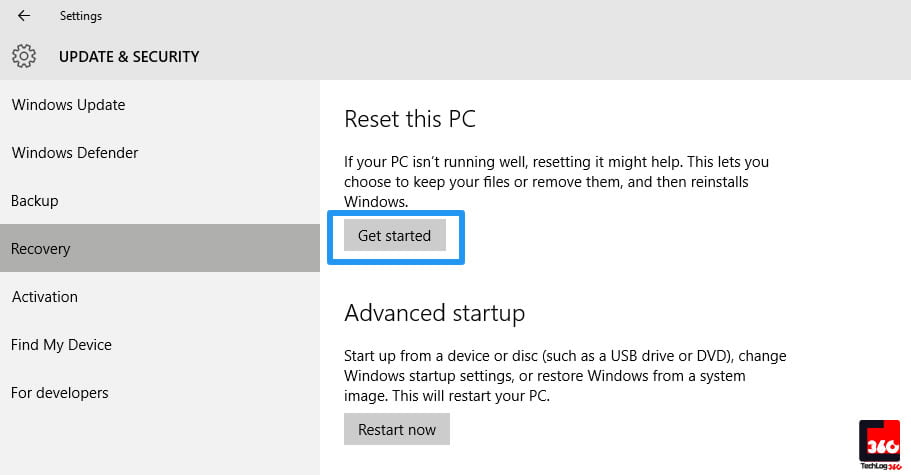
Choose Windows Recovery option from left panel and click “ Get Started ” button under ” Reset this PC “.

How to factory reset Windows 10 without losing your data
Windows Recovery option >>” Get Started ” button under ” Reset this PC”

Also Read : Microsoft’s Windows Subsystem For Linux

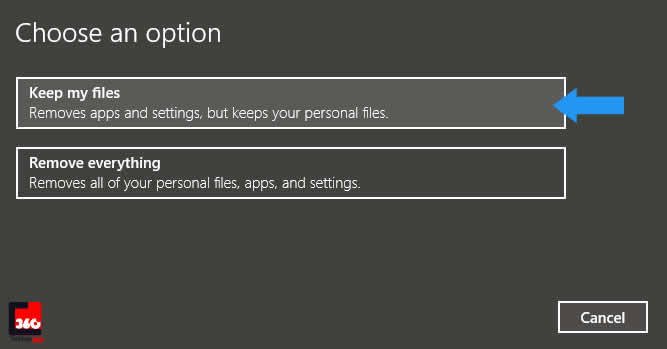
Now a window will popup asking two options – how you want to handle Windows 10 reset :

How to factory reset Windows 10 without losing your data
Choose “Keep my files”

If you like to reinstall Windows 10 without deleting your personal files – choose first option ” Keep my files ” or if you  want to wipe your data from hard disk and then reinstall Windows 10 – choose second option ” Remove everything “.

Here we are choosing first option because the whole tutorial is about resetting Windows 10 without losing personal data.

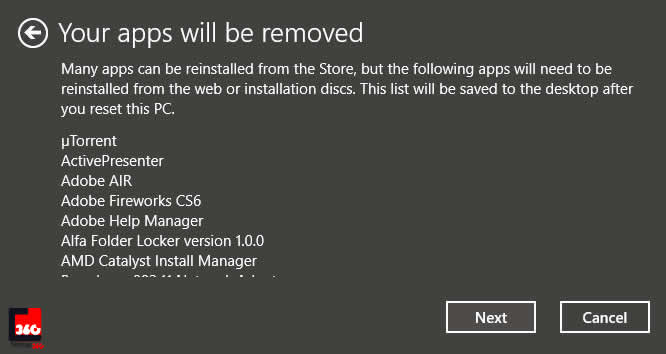
So after choosing first option, now a new window will open – which will show all the installed programs in your Windows 10 PC which is going to be removed during factory reset Windows 10.

How to factory reset Windows 10 without losing your data
List of programs going to removed

Don’t worry you will get list of removed programs in your Desktop once resets completes, so that you can reinstall them again.

Now hit ” Next ” button.

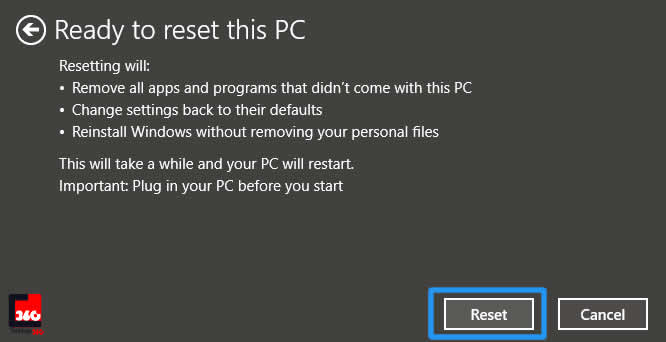
Again a new window will open to ask final confirmation about factory reset Windows 10. So click ” Reset “.

How to factory reset Windows 10 without losing your data
Click “Reset”

Now Windows 10 will restart to process factory reset. Wait several minutes to complete the process.

That’s it….. this is how yo reinstall Windows 10 without Windows ISO and keep your file intact during reset. If you got stuck during any steps, feel free to comment below and also let us know do resetting Windows 10 resolves your crashing issue?

Ubuntu will soon end support to 32-bit PCs

Ubuntu will soon end support to 32-bit PCs

Bad news for those who are still using 32-bit processors :

Ubuntu along with other Linux distributions are planning to end support to 32-bit PCs.

Since 64-bit CPUs were first released more than a decade ago, many people are still using 32-bit CPUs – the decision is going to affect them. So if you want to run a Linux distro with full power in future : you have to switch to 64-it processor..

Also Read : How To Uninstall Linux Or Windows From Dual Boot System

Linux distribution soon end support to 32-bit PCs

Ubuntu is the latest operating system planning to end support to 32-bit processors. Ubuntu’s Dimitri John Ledkov put forth a proposal to wind down 32-bit support on the Ubuntu mailing list recently.

He reports that hardware that can’t run 64-bit software is becoming much less common, while creating 32-bit images, testing them, and supporting them takes time and effort.
Ledkov also points out that Ubuntu wants to limit the number of new 32-bit installations, with Ubuntu 16.10. This next release will not offer a 32-bit Ubuntu Desktop or Ubuntu Server image. The software could still be installed for legacy compatibility purposes via more traditional installers. By Ubuntu 18.10 in October 2018, Ubuntu would completely end support for 32-bit software and encourage running it in a virtual machine or container instead.

Also Read : UNIX vs Linux – How UNIX Differ From Linux

Fedora has made a similar choice. Fedora Server no longer offers a 32-bit image as of Fedora 24.

OpenSUSE Leap hasn’t even offered 32-bit images since its inception. OpenSUSE Chairman Richard Brown explained on Reddit that it wasn’t worth supporting 32-bit for another three years after the release because downloads of 32-bit releases have steadily declined.

Yes, 32-Bit Linux distributions will still exist

Don’t worry,  32-bit Linux distributions will continue to exist for a long time. Because the recently released Ubuntu 16.04 LTS will be supported for five years until 2021. Even after many of the big Linux distributions stop releasing new versions for 32-bit hardware, there will be Linux distributions out there specializing in support for this older hardware. But, by then, more 32-bit hardware will be out of commission.

Also Read : A-Z Bash Command Line for Linux

Hacker demands free Rift VR in exchange for Oculus CEO’s hacked Twitter account

Hacker demands free Rift VR in exchange for Oculus CEO's hacked Twitter account

Facebook-owned virtual reality company,Oculus CEO Brendan Iribe had his Twitter account hacked Wednesday; and funny thing is the hacker demand a free  Rift VR in exchange for hacked Twitter account.

The hacker, who has not been identified yet, changed Iribe’s cover photo and replaced his bio to “im not testing ya security im just having a laugh.

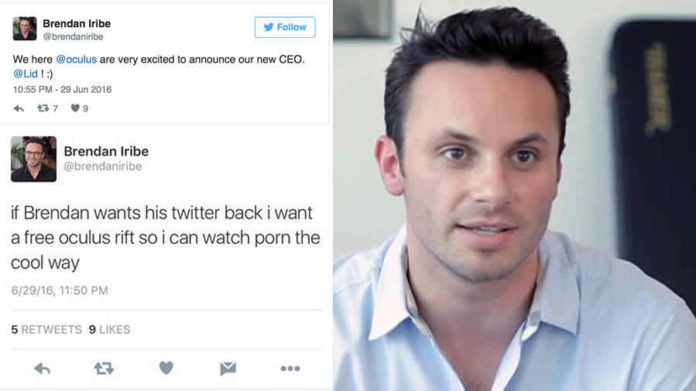
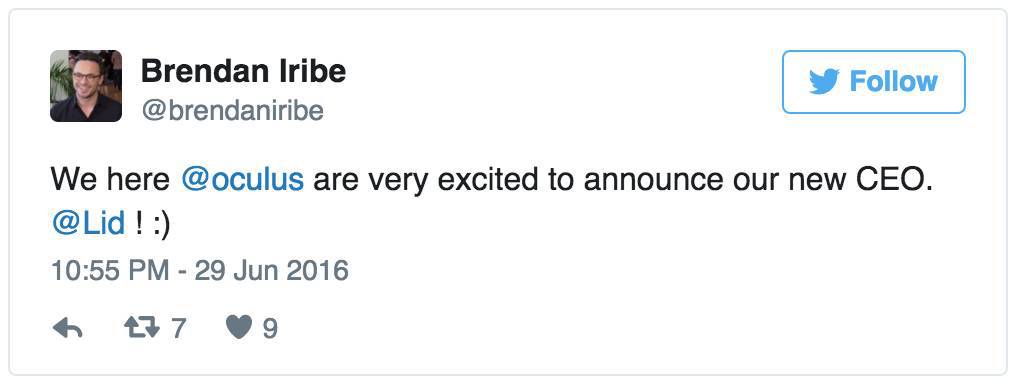
The hack became apparent when a tweet from Iribe Twitter account was made saying: “We here @oculus are very excited to announce our new CEO. @Lid ! :)”

Oculus CEO's hacked Twitter account 5

Also Read : A Hacker Claims to be Selling 32m Twitter Accounts on the Dark Web

Even after two hours of the first tweet they were still visible on the page with new ones coming at intervals. It appears whether Iribe was not aware of the hack for a long time or the security team at Twitter is having a hard time taking back control of the handle. The hacker on the other hand seemed to be having fun.

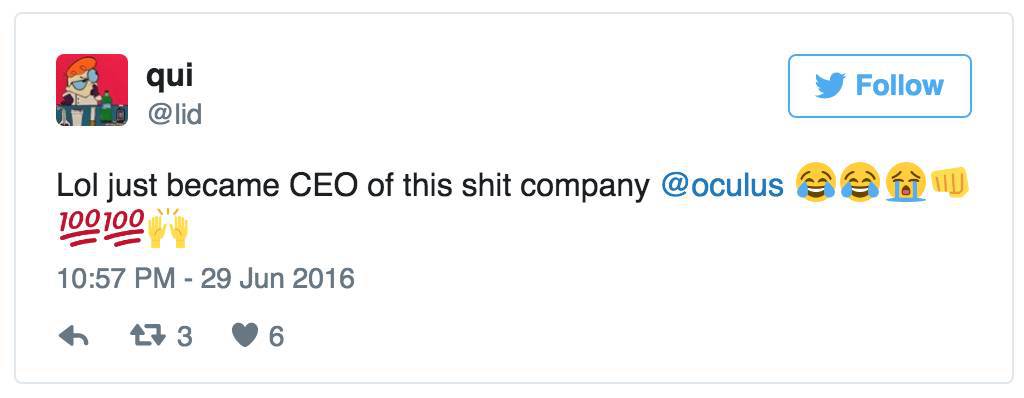
A Twitter user named Qui, @Lid, is apparently behind the hack. The handle owner tweeted from his own account saying, “Lol just became CEO of this shit company @oculus.”

 Oculus CEO's hacked Twitter account

Declaring himself the CEO was just the beginning of a series of tweets. He later tweeted, “imagine creating the coolest s*** to ever be introduced to gaming and technology but using the same pass for 4 years lol… silly mr CEO!”

 Oculus CEO's hacked Twitter account

In other tweets the hacker demanded from Iribe to send him a free Oculus Rift VR. “If Brendan wants his twitter back i want a free oculus rift so i can watch porn the cool way,” the hacker said.

Also Read : Learn How To Create A Super Secure Password

Hacker demands free Rift VR  in exchange for Oculus CEO's hacked Twitter account
Hacker demands free Rift VR in exchange for Oculus CEO’s hacked Twitter account

All the tweets in question have since been removed from Iribe’s Twitter feed, and the account has now been restored.

The hacker later told Tech Crunch that he was able to get the hold on Iribe’s Twitter account by using his credentials exposed in recent MySpace data breach.

Earlier this month, Mark Zuckerberg’s Twitter was also hacked, although, the Twitter hack was caused due to a LinkedIn hack which happened back in 2012. Unfortunately for Zuckerberg, he had been using the same password for both LinkedIn and Twitter. To add insult to the injury the password was “dadada”.

Also Read : Soon Twitter will have 10,000-Character Tweets

Secure-K, a portable Linux-based encrypted OS to protect your privacy and data

Secure-K, a portable Linux-based encrypted OS to protect your privacy and data

Here comes the next generation operating system – Secure-K, a portable Linux-based encrypted OS that can be securely loaded on any computer. Secure-K claimed to be the most secured OS which lives on a USB drive. Are you worried about your data and your online privacy, then you need this encrypted OS.

Also Read : Microsoft Probably has your Disk Encryption Key in its Server, Here’s How to Take it Back

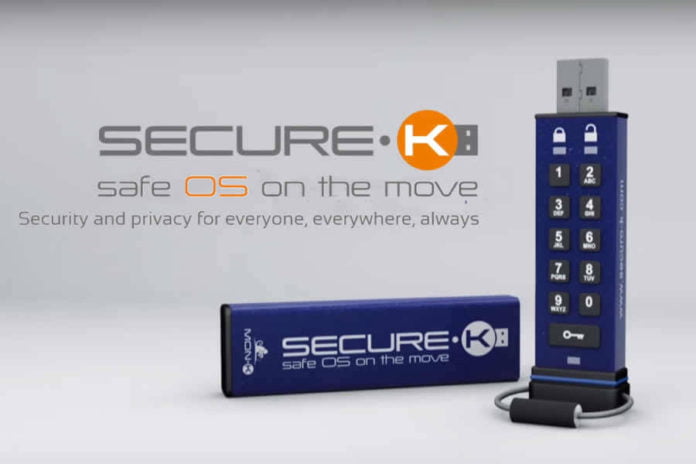
Secure-K, from Mon-K is an encrypted operating system enclosed in a USB stick that the company says will allow users to protect their data without sacrificing ease of use. The Secure-K is fitted with a pin-pad on the front which is needed to activate the OS, and Mon-K says the drive can be securely used on just about any computer without additional software. Being a Linux-based operating system, the hardware requirements are minimal. And also flash memory in a rugged shell, waterproof, break and tamper proof.

The company says Secure-K will come with a full suite of encrypted apps: chat, video, and VOIP tools, an anonymous internet browser, a full suite of office products, and the ability to sync with Mon-K’s secure cloud for back up and recovery in case you lose the actual USB drive. The company says encrypted email will be coming soon.

With hardware and software encryption, Secure-K is especially suitable for all those sectors in which security is a crucial factor such as finance, insurance, healthcare, education, telecommunication, oil & gas and companies operating in “hot” or politically unstable areas of the world.

Since we have to wait until October to find out what else this super secure OS can do. Mon-K says there will be personal and enterprise editions available in 8GB, 16GB, 32GB, and 64GB variations when it launches, but the company has not announced pricing yet.

Also Read : MIT Researchers Developed Untraceable SMS Text Messaging System that’s Even More Secure than Tor

Google introduced ‘Project Bloks’ to teach kids how to code

Google introduced ‘Project Bloks’ to teach kids how to code

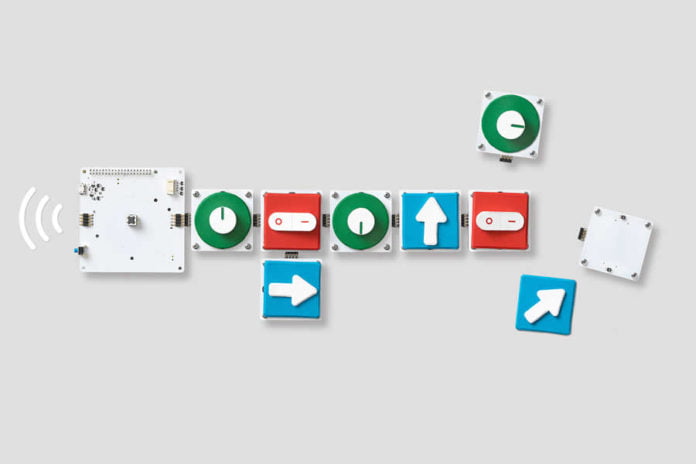
Google know how kids like to learn things – usually through playing and interacting with one another, with everything around them. So Google launched a new set of toys – “Project Bloks“, that will teach kids how to code instead of using traditional screen and keyboard.

Project Bloks is an open hardware plan from Google which will allow developers to create physical blocks that can be used together in order to teach kids how to code. It is a part of a research partnership between Google, Paulo Blikstein (Stanford University) and design firm Ideo.

Also Read : Google’s Project Loon will Offer Affordable Internet Access to Millions of Indians

Teach Kids How to Code with Google’s Project Bloks


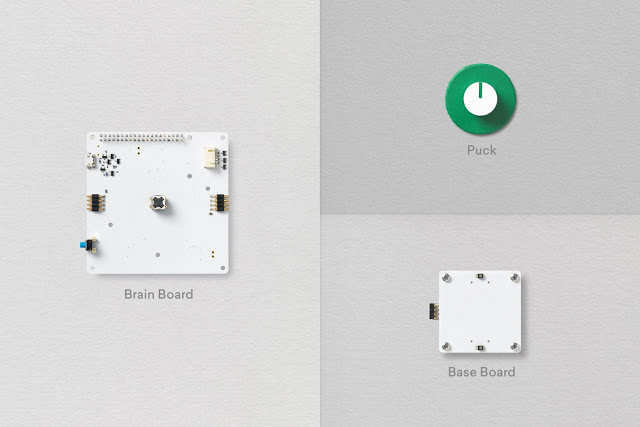
The Project Bloks system is made up of three core components the “Brain Board”, “Base Boards” and “Pucks”. When connected together they create a set of instructions which can be sent to connected devices, things like toys or tablets, over wi-fi or Bluetooth.

The three core components of the Project Bloks system

Also Read : Find Out And Delete Data Google Stored About You In Its Server

The Brain Board houses a processing unit based off of Raspberry Pi Zero, both controlling and providing power to the rest of the connected units. It can also interact with WiFi and Bluetooth devices. Meanwhile, the ‘Base Boards’ are connective units that let you design instruction flows. The Pucks are the fun bits you directly interact with, shaped like switched, arrows, buttons, dials and more. These can be programmed to do things from turning things on or off, moving avatars, playing music, or more.

You can also record instructions from multiple pucks into a single one. As they have no active electric components, they can be made from a variety of inexpensive materials, including something as simple as paper with conductive ink.

Last year Codie Labs introduced a a rolling and programmable robot,Codie – which is controlled via a mobile application to teach kids the programming concepts.

The whole aim of the Project Bloks is to make programming more interactive to help future generation to master in their programming skills. Google said they will test a reference design at a small group of schools. If it catches on, expect the program to expand.

Also Read : Google Says its Quantum Computer is More Than 100 Million Times Faster Than a Conventional PC

Microsoft Edge Experiment Shows How Using Edge Instead of Chrome Saves your Laptop’s Battery

Microsoft Edge Experiment Shows How Using Edge Instead of Chrome Saves your Laptop's Battery

Google Chrome – favorite browser of majority of PC users. We all know Chrome eats a lot of our PC’s RAM even also its the no.1 browser around the planet. But the recent Microsoft Edge experiment results clearly shows how Google Chrome badly drains your laptop’s battery than other popular browsers.

Also Read : 86% Of Critical Vulnerabilities Affecting Windows Could Be Avoided By Removing Admin Rights

Microsoft Edge Experiment


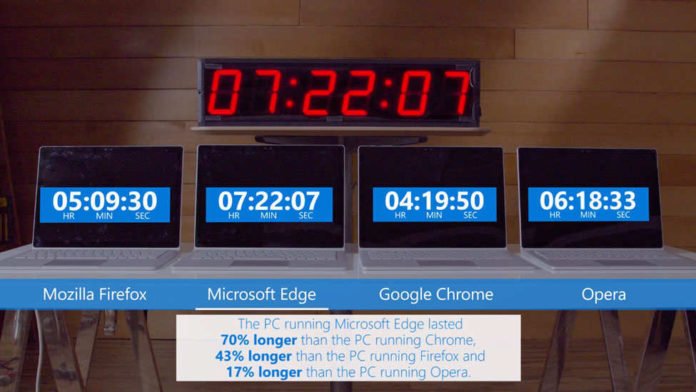
Microsoft did this experiment to shows how its Edge browser is better and power saving than any other available browsers.  Microsoft Edge experiment done through three tests to measure the power consumption by browsers. First they tested browser’s power consumption in a controlled lab environment by measuring typical browsing behavior on popular sites. Secondly examined the real-world energy telemetry from millions of Windows 10 devices. And finally, recorded time-lapse videos of each browser performing the same tasks until the battery dies. And the test results shows that Microsoft Edge wins out in every case and crowned as the most power efficient browser.

Also Read : Find Out And Delete Data Google Stored About You In Its Server

In Microsoft Edge experiment video, they used four identical fully charged laptops with four different browsers – Mozilla Firefox,Microsoft Edge,Google Chrome and Opera to check how long streaming HD video lasts. And the results were amazing the laptop one with Microsoft Edge lasts for 7 hours and 22 minutes on the streaming video test where Chrome drained battery first by playing video for just 4 hours and 19 minutes. After Chrome, Mozilla Firefox ended up playing for 5 hours and 9 minutes. And then Opera lasts to play 6 hours and 18 minutes. In short in the Microsoft Edge experiment, the PC running Edge lasted 70% longer than PC running Chrome, 43% longer than the PC running Firefox and 17% longer than the PC running Opera.

In these four popular browsers, new comer Edge succeeded to save battery life and also world’s no.1 Chrome became the last word of most power consuming browser. Google is implementing many technique to improve Chrome browsing speed but they forget to improve its power efficiency and memory consumption.

Also Read : All Available Google Chrome Shortcuts List For Windows,Mac And Linux Users

This Made in China Supercomputer is Now World’s Fastest

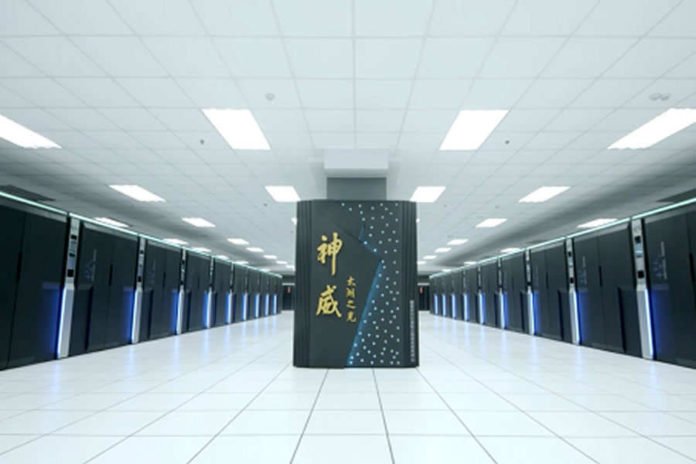
Made in China Supercomputer - the Sunway TaihuLight System

The Sunway TaihuLight, a made in China supercomputer is now declared as the world’s fastest. And the highlite is, it uses only Chinese-designed processors instead of U.S. technology.

Also Read : Researchers managed to transfer data at record-speed 57Gbps using fiber optic technology

Sunway TaihuLight – Made in China Supercomputer


The Sunway TaihuLight takes the top spot from previous record-holder Tianhe-2 (also located in China), built using US-made Intel processors. And Sunway TaihuLight is twice as fast and three times as efficient as Tianhe-2, which posted a performance of 33.86 quadrillions of calculations per second.

And also Sunway TaihuLight is roughly five times more powerful than the speediest US system, Titan,which is now ranked third worldwide.

The TaihuLight is comprised of some 41,000 chips, each with 260 processor cores. This makes for a total of 10.65 million cores, compared to the 560,000 cores in America’s top machine. In terms of memory, it’s relatively light on its feet, with just 1.3 petabytes used for the entire machine. (By comparison, the much less powerful 10-petaflop K supercomputer uses 1.4 petabytes of RAM.) This means it’s unusually energy efficient, drawing just 15.3 megawatts of power — less than the 17.8 megawatts used by the 33-petaflop Tianhe-2.

Why China Used Domestic Chips?


China’s efforts in developing their own processors stems from Washington’s decision to block Beijing’s access to Intel’s processors last February. This was based on an unfounded fear that the Chinese government would use the technology to develop nuclear weapons, though some Chinese critics feel American politicians used this excuse to stymie progress of the Eastern nation’s supercomputer development.

The TaihuLight is installed at China’s National Supercomputing Center in Wuxi, and uses ShenWei computers that operate on a system called Sunway Raise and were developed at Jiangnan Computing Research Lab in Wuxi.

Also Read : Google Says its Quantum Computer is More Than 100 Million Times Faster Than a Conventional PC

Hackers Hijacked Mark Zuckerberg’s Twitter and Pinterest Accounts

Hackers Hijacked Mark Zuckerberg's Twitter and Pinterest Accounts

Facebook CEO Mark Zuckerberg is also not that much cautious about his passwords. Yesterday a hacker group called OurMine Team hijacked Zuckerberg’s Twitter and Pinterest accounts and the hackers claimed the Zuckerberg ‘s password “dadada” was leaked through a massive data breach on LinkedIn in May, with more than 164 million users’ data stolen.

Also Read : Facebook Going To Be A Lot Smarter With Its New DeepText AI

The hack implies Zuckerberg reused passwords across multiple sites or perhaps that the format of the password he chose for other sites was guessable after breaking his LinkedIn login credentials.

The group claiming responsibility for the high-profile hacking left a taunting message on both social media accounts. “Hey @finkd, you were in Linkedin Database with the password “dadada,” the team wrote from Zuckerberg’s Twitter page. On his Pinterest, the new title was “Hacked by OurMine Team.” In a deleted tweet, OurMine claimed it also breached Zuckerberg’s Instagram (which Facebook owns) claiming it was “just testing your security.” Zuckerberg’s Facebook account was not affected.

The affected accounts were rapidly re-secured, hopefully with a stronger password, and cleaned up. In a statement, Facebook said: “No Facebook systems or accounts were accessed. The affected accounts have been re-secured.”

Mark Zuckerberg’s Twitter and Pinterest accounts hack following the LinkedIn attack goes to show the serious extent to which password re-use, and simple forms of authentication, can have huge knock on effects to online security.

Also Read : Mark Zuckerberg Quit His Job At Facebook Because Of This Bug