Home Blog Page 15

5 Ways To Deal With Google Storage Running Out Of Space

Solve Google Storage Running Out Of Space

Many of you who rely on Google Drive has probably received a warning message telling you that Google storage running out — it has reached 95% capacity. So, either you have to delete your data to free up space or pay for additional storage.

The efficient management of data on Google storage is better than paying Google One for more cloud storage. So, here’s what to do when Google storage running out of space. Reduce your data in the cloud and avoid upgrading to Google One at all costs.

What file formats tend to consume space?

There are file formats that tend to consume space and file formats that don’t. How can we tell them apart?

Email:

Messages and attachments in your Gmail account can take up a lot of your Google storage. Let’s take measures that make full use of email management techniques such as inbox zero.

Photos and videos:

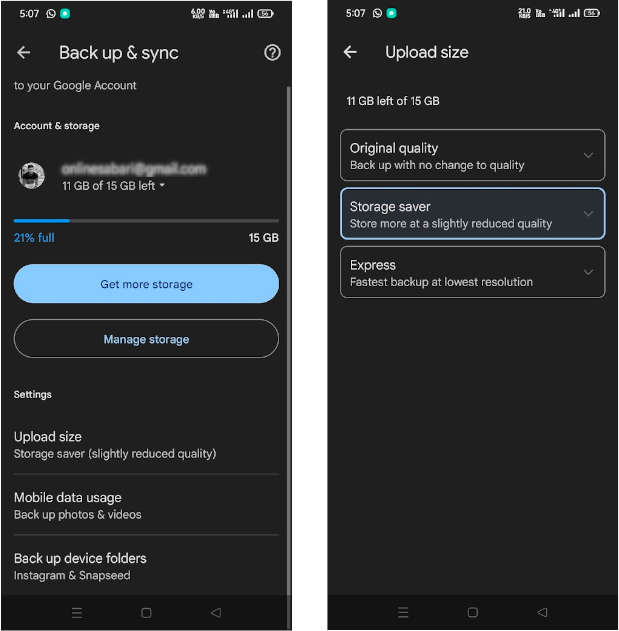
If you have the Google Photos sync feature enabled, your photos and videos are probably taking up space on your Drive. There are three settings to back up your photos and videos: “Express” option to save media files at the lowest resolution, “Storage saver” to save them at a slightly reduced quality and “Original quality”, which uses more space, while the first two option helps you from Google storage running out of space. So always choose the backup settings that save your Google storage space. Also you can try some Google Photos alternative services to back up photos and videos.

Document:

Documents, spreadsheets, presentation slides, PDFs, video files, ZIP archives, files shared and downloaded from other Google Drives, etc., use a lot of data space.

Backup:

Google Drive data backed up by Google Takeout is saved as a ZIP file. 

Backups and other files from your Android device may also be automatically synced to Google Drive without your knowledge, like the chat and media files from your Whatsapp also take a lot of space.

However, Google Docs, Sheets, and Slides are light compared to your storage limit, so you may not need to consider them. Also, note that items you share with others are stored in your own storage, not theirs.

How to Avoid Google Storage Running Out Of Space? — Get the most out of your 15GB of Google storage

You can make effective use of the space by performing delicate data management, as introduced below.

  • Delete old emails from Gmail
  • Delete unwanted photos and videos in Google Photos
  • Delete documents from Google Drive
  • Empty google drive trash
  • Delete Android App Data

Besides this, it is a good idea to set aside some time to move or delete data on your Google Drive. These will help you to avoid upgrading to Google One. 

Delete old emails from Gmail

The easiest way to reduce your overall Google Drive space is to delete emails from mail.google.com.

Start with saved drafts, then work your way through spam, trash, and content. Once that’s done, it’s time to look at emails with attachments. Search by typing “has: attachment” in the search bar.

You can then filter by a variety of options, such as time and file format. Let’s make full use of these functions and look for the ones that are putting pressure on the Drive.

For example, do you need emails from before 2015? — No, you might want to take the plunge and just save the last few months’ emails and delete them all. 

Delete unwanted photos and videos in Google Photos

You may also have some images in the Google Drive interface, but if you’re syncing photos and videos from your phone or PC, they’re stored in photos.google.com, not on Drive.

Delete unnecessary photos and videos from the Photos. But wait a minute. Before you start deleting photos, why not try changing the image quality first?

  • Open Google Photos and go to your Account by tapping the profile avatar in the upper right corner and then go to “Photos Settings”.
  • Go to option “Back up & sync”.
  • There you can find “Upload Size” settings for photos and videos.
  • Select “Storage Saver” to store more photos and videos at a slightly reduced quality compared to the original.
Google photos upload size settings

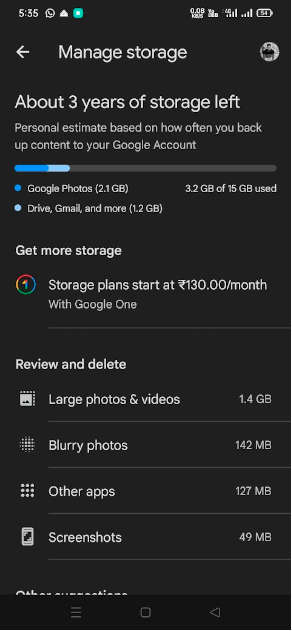
Next, find the “Account storage” option; there, you can see Google Photos auto categorized your photos and videos according to different criteria like “Large photos & videos”, “Blurry photos”, and “Screenshots”, etc. This will help you to easily delete unwanted and large-sized photos and videos from Google storage.

Google photos upload size settings 1

Manually delete photos and videos from Google Photos

  • Go to Google Photos gallery
  • Find images by scrolling
  • Check the check box on the upper left of the image you want to delete.
  • Click the Delete button when ready
  • Run with “Move to Trash”

However, manually deleting images one by one is a time-consuming task.

Finally, hit the Trash button to check if deleted photos and videos are consuming cloud space. It will be deleted automatically after 60 days, but you can permanently delete it immediately by clicking the “Empty Trash” option from the “Trash” folder in “Library”.

Delete documents from Google Drive

Use the Search in Drive box above the web interface to search PDFs, documents, spreadsheets, presentations, photos and images, videos, and more.

Click on each item to see the file size and modified date in the details pane. Use this information to decide whether it is safe to delete.

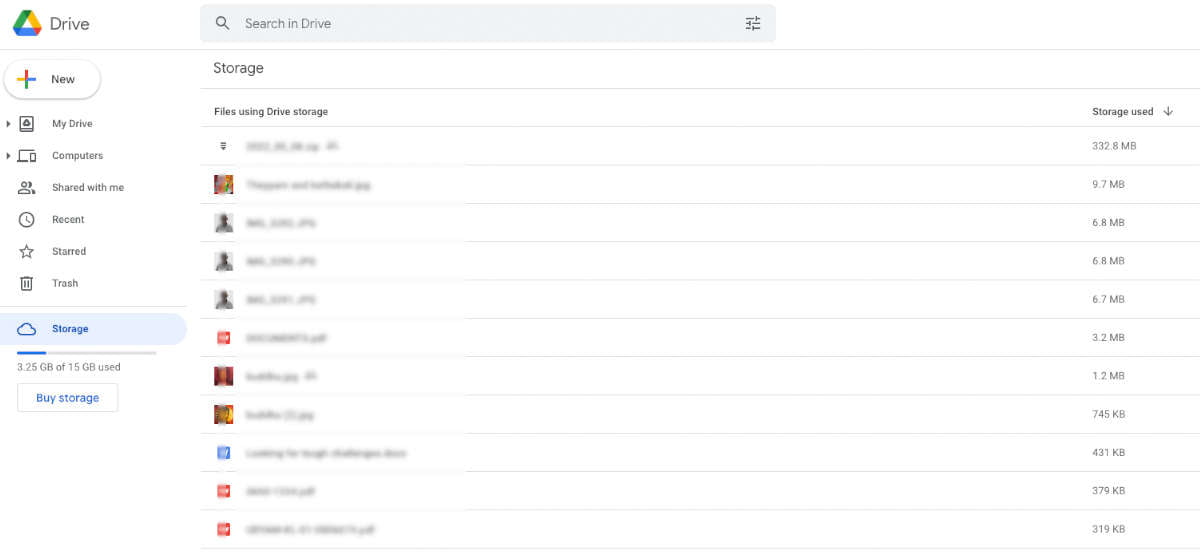
You can check the current storage status on the left window of the Google Drive interface. In addition, you can also find the file using a lot of space by clicking on the “Storage” option in the left window and at the top right corner, select “Storage used “↑ “or “↓”. If there are things you don’t need, select them individually (or all at once) and “delete” them.

Google drive storage check

Empty Google Drive trash

Like Google Photos, Google Drive also has a Trash. Deleted files are stored here and are automatically deleted permanently after 30 days. If you’re desperate to free up space on your Drive right now, emptying the Trash seems like a smart choice. To empty your Google Drive Trash, select Trash from left side and just click Empty Trash.

Delete Android/Web App Data

Data from various Android apps are stored in Google Drive and unknowingly take up space.

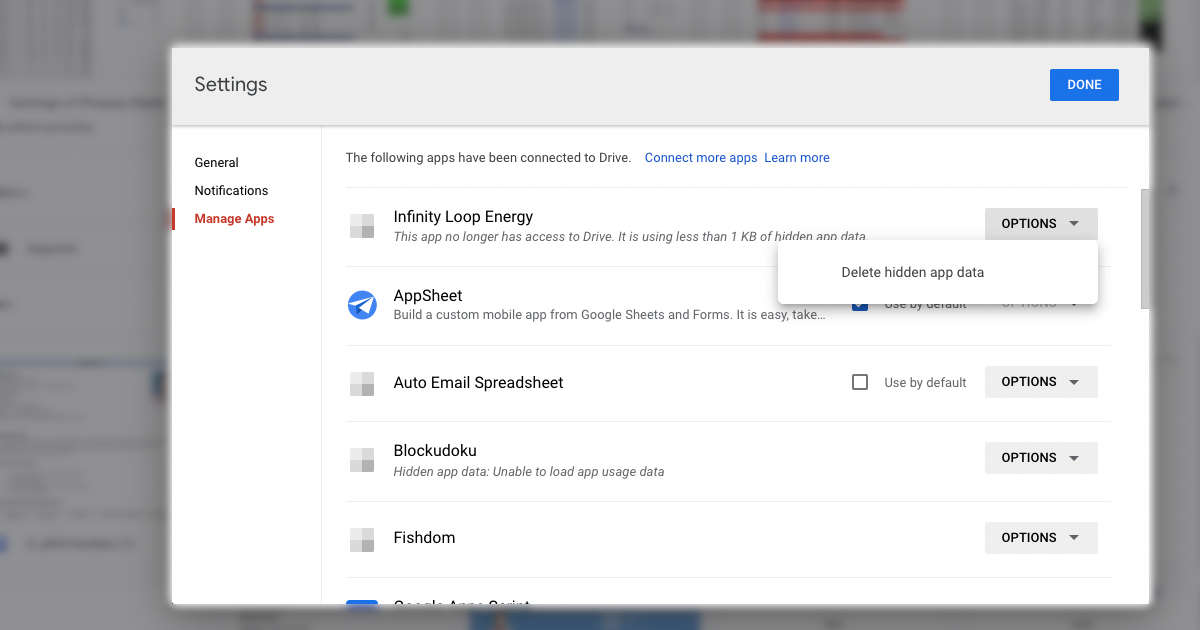
To find out what’s going on, click open Settings > Manage apps. On this screen, you can see how much data each app stores in Google Drive.

You can free up that space by clicking Options > Delete Hidden App Data > Delete. Repeat this for any unused apps or services that are taking up too much space.

Google drive storage check 1

What happens when Google Drive runs out of space?

By now, your Google Drive should be pretty organized, right? You should be able to use more emails, files, and photos. So, what happens to Google Drive if left unchecked?

As you can see, all you can do is delete the data or pay for it. In the meantime, you won’t be blocked from accessing Drive, but you won’t be able to upload anything.

In other words, the only way to keep using Google Drive for free is to delete unnecessary data. At that time, as mentioned above, do keep a backup of important data before deleting them.

Google One plans:

  • 100GB: $2/month or $20 yearly
  • 200GB: $3/month or $30 yearly
  • 2TB: $10/month or $100 yearly

Considering the storage capacity of PCs and smartphones, you may think that 15GB is not enough. But in reality, even 15GB is convenient enough. Plus, knowing what’s taking up that 15GB will give you an idea of ​​what file types to look for when clearing space.

So, when you get a warning for short storage in Google, take action as soon as possible. You can save money by deleting or just pay Google for more storage. Make it a habit to delete emails, old photos, and unnecessary documents, so you don’t drown and grab your Google One.

From Window Displays to Checkout Counters: Components of Successful Retail Merchandising

online ecommerce business

In the world of retail, successful merchandising is key to attracting shoppers, boosting sales, and fostering brand loyalty. Whether it’s eye-catching window displays or strategic product placements near checkout counters, every merchandising aspect plays a significant role in shaping customer behavior. By using the right retail merchandising strategies, you can set your business apart from others. Standing out is crucial because the competition is fierce, and most retailers bring their top game. So, in this article, we will understand retail merchandising and its components that can drive revenue and elevate the shopping experience.

What is Retail Merchandising?

Successful retail merchandising is like the art of setting the perfect stage for products in a store, making sure each item is not just seen but also sings its own unique tune to shoppers passing by. It’s a blend of science and creativity, where the layout, design, and placement of products are meticulously planned to catch the eye, spark interest, and, ultimately, coax a wallet out of a pocket. Think of it as the silent salesman who whispers, “Hey, take a closer look!” every time you stroll through the aisles.

At its core, retail merchandising focuses on maximizing product attractiveness and accessibility to boost sales. It involves everything from setting up eye-catching displays and arranging products in a way that makes sense to the shopper to ensuring the store itself is navigable and inviting. It’s not just about piling products on a shelf; it’s about telling a story with those products, creating an experience that resonates with customers and encourages them to engage, explore, and, most importantly, purchase.

In a nutshell, retail merchandising turns a simple shopping trip into a journey of discovery, ensuring every product has its moment in the spotlight and every shopper leaves feeling like they’ve found exactly what they didn’t even know they were looking for.

Components of Retail Merchandising

Captivating Window Displays

One of the things that grabs a customer’s attention is an alluring window display. A well-crafted window showcase not only exhibits products but also sparks interest and intrigue among passersby. By incorporating props, hues, and thoughtfully arranged items, retailers can entice customers to step inside the store. It’s crucial for retailers to regularly refresh their window displays to keep them engaging and appealing for repeat visitors.

Thoughtful Store Layout

Once a shopper enters the store, guiding them through a well-thought-out layout is essential for an efficient shopping journey. Placing items towards the back of the store encourages customers to browse through products, potentially leading to impulse buys or extended browsing time. Additionally, having product categories with signs can help customers navigate the store more easily.

Product Placement and Arrangements

Where products are placed in a store can greatly impact sales. Retailers should consider placing items and considering which products complement each other to encourage customers to make additional purchases. For instance, having dip sauces near snack items could prompt shoppers to pick up both chips and sauces they may not have initially planned on buying.

Effective Signage

Using simple signs can catch the attention of customers by informing them about promotions and discounts or guiding them to areas in the store where they can find what they’re looking for quickly (such as “New Arrivals” or “Seasonal Specials”). Eye-catching signage placed strategically helps ensure that customers notice information, which could potentially lead to increased sales.

Sensory Branding

Creating a sensory experience can form an emotional bond with customers, making their shopping trip more memorable. Retailers can experiment with elements like pleasant smells, calming music, and visually appealing displays that align with their brand identity. Thoughtfully incorporating elements that engage the senses helps involve customers in the shopping atmosphere and reinforces a connection with the brand.

Strategic Placement of High-Profit Items

Strategically positioning high-profit items at eye level increases the chances of engaging customers. Products placed at eye level on shelves are more likely to catch the attention of shoppers compared to those displayed either too high or too low. Eye-catching displays near checkout counters can prompt purchases as customers wait in line.

Practical Display Solutions

It is crucial for retailers to invest in shelving solutions. Durable shelves capable of holding items allow for product presentation while maintaining safety and aesthetics. Adjustable shelves provide flexibility for retailers to modify display layouts based on inventory changes while ensuring a look throughout the store.

Promotional Displays

Promotional displays are drivers of sales success, highlighting arrivals, limited edition products, or discounted offers prominently within the store environment. Placing displays near high-traffic areas enhances visibility and encourages spontaneous purchases from interested shoppers.

Focus on Bettering Customer Experience

Creating a satisfactory shopping experience is vital for customer satisfaction. Fostering loyalty towards a retail brand in the long run. Elements such as informed staff offering assistance, clear signage for easy navigation through aisles, and maintaining a clean store environment collectively contribute to an overall positive perception among customers. Creating a welcoming shopping environment boosts customer satisfaction and encourages them to return for more visits, enhancing their shopping experience.

Prioritizing Customer Needs in Merchandising

Understanding and catering to the preferences and requirements of customers is vital for a merchandising strategy. By analyzing customer data like buying habits and demographics, retailers can gain insights into their target audience. Customize their merchandising approach accordingly. This understanding of customer behavior enables retailers to make choices about product selection, pricing, and placement to optimize sales opportunities.

Infusing Creativity into Visual Merchandising

Injecting creativity into merchandising can differentiate a store from its competitors. Retailers can experiment with displays that incorporate props or decor elements that resonate with their brand’s identity. Creative visual merchandising captures attention, evokes connections with customers, and leaves a memorable impact on them. What’s more, they can give your business the boost it needs to capture more attention via offline or digital marketing.

Seasonal Merchandise Alignment

Another aspect of successful retail merchandising is syncing merchandise with trends and special occasions. By integrating themes or holiday-specific promotions, retailers can leverage customer anticipation. Capitalize on heightened spending during these periods. Adapting store aesthetics based on the season not only draws in customers but also cultivates a sense of timeliness.

Streamlined Inventory Management

Efficient inventory management is key to optimizing merchandising endeavors. Retailers need to keep their inventory records accurate, check stock levels regularly, and reorder products promptly to prevent running out of stock or having inventory that can lead to lost sales or higher costs.

Data Analytics for Decision-Making

Utilizing data analytics is crucial for making decisions about merchandising strategies. By analyzing point-of-sale data, retailers can identify top-selling items as well as products that are not performing well. This analysis also provides insights into customer behavior, like shopping habits, demographics, purchase patterns, and average transaction values. Armed with this information, retailers can adjust their product offerings, negotiate deals with suppliers, and predict trends.

Omnichannel Merchandising

In today’s era, successful retail merchandising goes beyond stores. Implementing an omnichannel approach ensures a shopping experience across platforms such as online marketplaces, social media platforms, and mobile applications. Consistency in how products are presented online, pricing strategies are applied, and promotions are run is essential for engaging customers through different channels.

Interactive Displays and Technologies

Interactive displays and technologies enhance the shopping experience by enabling customers to interact actively with the merchandise on offer. Features, like kiosks and virtual reality experiences, help shoppers visualize products effectively, ultimately boosting their confidence when making purchase decisions. Integrating fun elements into spaces can create a memorable and immersive atmosphere that entices customers to spend more time exploring the products on offer.

Sustainable Retail Practices

With the increasing consumer focus on sustainability, retailers have the opportunity to set themselves apart by adopting eco-merchandising practices. This involves utilizing materials for packaging and displays, opting for energy-efficient lighting systems, and highlighting sustainable product choices through clear labeling or dedicated sections in stores. By aligning with customers’ values on sustainability, retailers can attract consumers who value ethical businesses.

Rotating Merchandise and Seasonal Updates

Regular merchandise rotations and seasonal updates are essential to keep the environment dynamic and engaging. A vibrant display featuring arrivals, seasonal items, or exclusive collections keeps customers interested during each visit. Effective coordination among store teams is key to achieving impact. Refreshing displays to reflect changing trends helps retailers avoid a shopping experience. By rotating merchandise, retailers not only encourage impulse buys but also pique the interest of loyal customers who are eager to see what’s new.

In Closing

In summary, successful retail merchandising involves leveraging strategies to capture attention, influence customer choices, and elevate the shopping experience. The interplay of captivating window displays, product placement, appealing signage, sensory branding, promotional setups, and trained personnel all play a crucial role in effective retail merchandising. 

Retailers who invest in these elements can experience heightened customer interaction, increased sales figures, and a dedicated customer following. With the multitude of factors at play, retailers must regularly. Adjust their merchandising tactics, taking into account the evolving needs and preferences of their target. It is this dedication to improvement that distinguishes retailers and ensures sustained growth in the long term.

Android Unveils New ‘Find My Device’ Network to Locate Lost Devices Even When Offline

Android Find My Device
Key Takeaways:
  • Android’s ‘Find My Device’ forms a global network for locating devices even when they are offline.
  • It mirrors Apple’s Find My feature, making it user-friendly for those familiar with Apple’s ecosystem.
  • The service extends to various devices and objects, including those with third-party trackers.
  • Features advanced tracking options, including sound playback and visual aids for easier location.
  • Ensures user privacy with end-to-end encryption and alerts against unwanted tracking.

Android has officially rolled out its new ‘Find My Device’ network, a significant upgrade aimed at assisting users in tracking their lost or stolen cell phones and other devices. This advanced technology enables the location of devices even when they are offline or, in specific cases, turned off.

The essence of the Find My Device feature is its ability to establish a global network of interconnected devices. This marks a departure from the previous Android device locator, which could only display a device’s last known location based on its last mobile data or WiFi connection. The new system leverages the proximity of other smartphones or accessories to pinpoint the exact location of the lost device.

For those familiar with Apple’s ecosystem, Find My Device by Android mirrors the functionality of Apple’s Find My service. The two networks operate similarly, making it easier for users who are accustomed to Apple’s technology to adapt to Google’s new offering.

Find My Device on Android

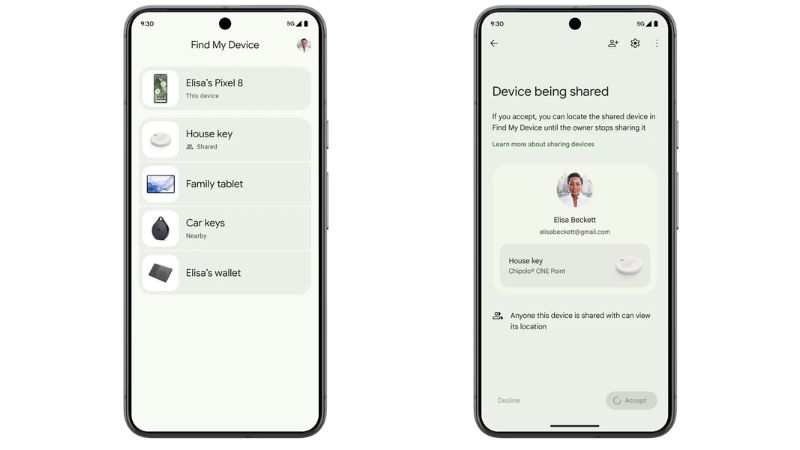
Google has initiated the process of notifying Android users about the Find My Device activation, allowing them to opt-in or out of this feature for all devices linked to their Google account. Accepting this feature will integrate their mobile phones and other compatible devices into this extensive network. Furthermore, Find My Device is designed to recognize various everyday objects, such as wallets, backpacks, and keys equipped with third-party trackers.

Starting in May, Android will extend support to tracker devices comparable to Apple’s AirTags, including those from brands like Pebblebee and Chipolo. Additionally, audio devices from manufacturers such as Sony and JBL will soon receive updates to incorporate Find My Device functionality.

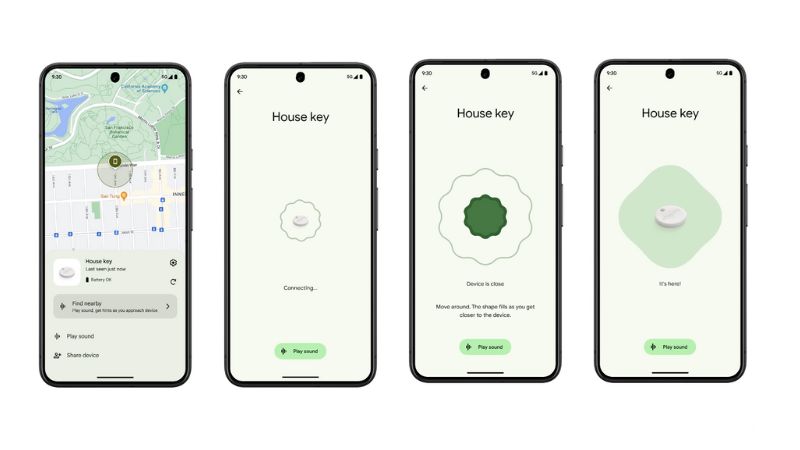
The service not only facilitates the location of devices on a map but also allows users to manage multiple devices and share the tracking of specific accessories with friends and family. It can locate a lost mobile phone or tablet, pinpoint its position on a map, and activate a sound to facilitate its recovery, even without network connectivity. Remarkably, the Pixel 8 and Pixel 8 Pro models offer the capability to track the devices even when they are switched off or out of battery, thanks to Google’s specialized hardware.

Find My Device enhances the ease of locating objects in close proximity, such as within a home, by signaling the device’s nearby presence and enabling sound playback. It differs from Apple’s Find My, which directs users with an on-screen arrow, by using a visual indicator that fills in as one nears the lost item.

Find My Device on Android Working

An innovative feature of Find My Device is the integration with Nest devices, allowing them to act as waypoints. This means that if users forget where they left items like car keys, the network can guide them to the nearest Nest device.

Regarding privacy, Google assures that Find My Device is fortified with a multi-layer security system, including end-to-end encryption for location data. It also integrates with an alert system for both Android and iOS, warning users of potentially unwanted tracking, thereby preventing misuse of the technology.

The new feature is built on a network comprising over a billion devices worldwide, requiring Android 9 or higher for compatibility. This wide-reaching network includes most devices released since the latter half of 2018.

Currently, Find My Device is operational in Canada and the U.S., with plans to extend its services to compatible Android devices globally in the near future.

Top 10 Mobile Apps for Pet Owners

Android and iOS Apps for Pet Owners

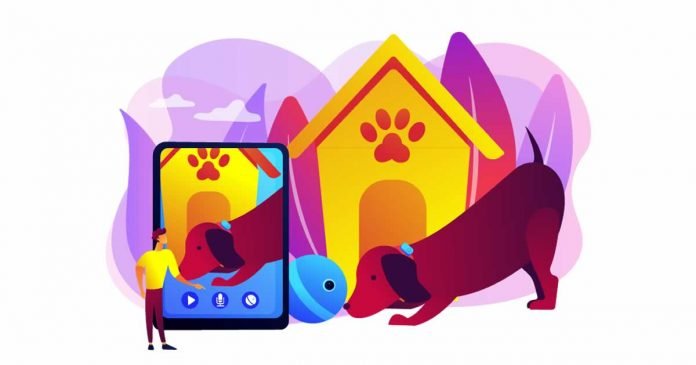
Are you someone who loves their furry friend and wants to provide them with the best possible care? We’ve put together a list of the top-rated Android and iOS apps that are highly recommended for pet owners.

We understand that pets are more than just animals, they’re a part of our family. As responsible pet parents, we want to make sure they receive the best care possible. However, with so many pet apps available for Android and iOS, it can be overwhelming to choose the right one. But don’t worry; we’ve got you covered! 

These apps have been chosen based on user reviews, ratings, and features that cater to a wide range of pet needs. They provide a variety of resources, from advice on training and behavior to reminders for veterinary appointments and even emergency first aid instructions. Whether you’re a seasoned pet owner or a new one, these apps are designed to simplify your life and ensure your pet’s well-being.

Android and iOS Apps for Pet Owners:

1. PetDesk

PetDesk is an all-in-one pet health and care app that allows you to easily manage your pet’s health records, schedule appointments, and keep track of medication schedules. You can also set reminders for feeding and grooming, access a collection of pet health articles and videos, and share your pet’s health history with your veterinarian. With its user-friendly interface and convenient features, PetDesk is an essential app for pet owners who want to ensure their pets are healthy and happy.

Android DownloadiOS Download

2. Tractive GPS

Tractive GPS is an app that tracks your pet’s location using GPS in real-time. It has a virtual fence to alert you when your pet leaves a designated area and lets you track their activity throughout the day. It works in over 150 countries and is compatible with Tractive GPS devices, including collars and GPS trackers. The app also has a location history feature to see where your pet has been in the past 24 hours.

Android DownloadiOS Download

3. Pet First Aid

Pet First Aid is a must-have Android and iOS app for pet owners in case of emergencies. It provides step-by-step instructions, videos, and tips for handling common pet emergencies like choking, bleeding, and poisoning. Additionally, it helps with non-emergency situations like grooming and identifying heat stroke symptoms. The app can also locate nearby animal hospitals and emergency vets, and allows you to store your pet’s medical information and create profiles for multiple pets.

Android DownloadiOS Download

4. 11pets

11pets is a pet care app that helps you manage your pet’s health and well-being. It allows you to track your pet’s diet, exercise, medications, and appointments. The app also lets you store important information such as vet contacts, vaccination records, and insurance details. You can sync the app with multiple devices and connect with other pet owners to share advice.

Android DownloadiOS Download

5. Rover

Rover is a pet care app for Android and iOS that connects pet owners with trusted dog walkers and sitters nearby. You can search and book pet care services from experienced professionals. Rover offers various services like dog walking, pet sitting, and overnight boarding. The app allows you to customize your search based on your pet’s needs, ensuring they are in good hands while you’re away.

Android DownloadiOS Download

6. Puppr

Puppr is an app that provides dog owners with training and behavior lessons. The app offers over 70 step-by-step video lessons from professional trainers on various topics such as obedience training, leash walking, and tricks. Puppr also provides personalized lesson plans based on your dog’s age, breed, and skill level. The lessons are fun and engaging, with clear instructions and positive reinforcement techniques. Additionally, Puppr has a social feature that enables you to connect with other dog owners and share tips and advice.

Android DownloadiOS Download

7. Cat Training

Cat Training app provides cat owners with helpful tips and resources for training and caring for their cats. It includes step-by-step instructions and videos on litter box training, grooming, and addressing behavior issues like scratching and biting. The app also allows you to create customized training plans based on your cat’s age and personality and track their progress using a behavior journal and rewards system. Additionally, you can connect with other cat owners through the app’s social feature. Cat Training is a great app for cat owners of all levels to improve their cat’s behavior and strengthen their bond with their furry friend.

Android DownloadiOS Download

8. Chewy

Chewy is a popular pet app that sells all pet essentials, from food and treats to toys and accessories. Chewy has an auto-ship feature that delivers your pet’s favourite products on a regular basis. The app has 24/7 customer service and a satisfaction guarantee. Chewy also provides resources like articles and advice on pet care and behaviour.

Android DownloadiOS Download

9. iKibble

iKibble for Android and iOS is an app that helps pet owners ensure their pets have a healthy diet. It has a database of over 300 meals and their nutritional benefits, allowing you to decide if they’re suitable for your pet. You can create custom diets for your pet based on age, breed, and weight. The app is user-friendly and lets you save your favorite foods and diets for quick access. It provides useful tools to make sound decisions about your pet’s food.

Android DownloadiOS Download

10. PetCoach

PetCoach is an app that provides expert advice and guidance for pet owners from veterinarians and professionals. It offers personalized consultations, chat support, and informative articles on pet health and wellness. With its 24/7 chat assistance and access to licensed veterinarians, PetCoach provides professional advice from the convenience of your home. Additionally, it provides informative articles and videos on pet-related topics such as nutrition, behavior, and training.

Android DownloadiOS Download

Owning a pet comes with various responsibilities, and these top Android and iOS apps for pet owners can be incredibly helpful in fulfilling those responsibilities. These apps can help you manage your pet’s healthcare needs, track their location, train them, and find pet-related services easily. They can also give you vital information in an emergency and assist you in keeping track of key appointments and reminders. Check out the apps that make pet ownership a little bit easier and more fun for both you and your furry buddy.

Google Considers Paid Subscription for Advanced AI Search Capabilities

Google Search AI-Powered Image Generation

Google is reportedly considering the introduction of a premium subscription service for its search engine, aiming to unveil a new revenue stream. According to the Financial Times, informed sources reveal that Google plans to monetize the AI-powered enhancements expected to be integrated into its search engine.

Historically, Google’s search engine has been freely accessible to all, with the company’s revenue primarily stemming from advertisements displayed across various search result sections. However, this new initiative would mark Google’s first attempt at placing a paywall around one of its principal services.

While the traditional, ad-supported search function will remain free, Google intends to offer an advanced search experience, powered by generative AI, for a monthly subscription fee, details of which are yet to be disclosed. Interestingly, opting for the premium route won’t exempt users from ads. Google clarified to Reuters, asserting a continued ad presence in search results, even within the paid model.

The Mountain View-based giant is no stranger to integrating paid AI features into its services. Google One’s AI Premium plan subscribers already have exclusive access to Gemini Advance, an enhanced version of its language model. This advanced AI assists users in composing emails via Gmail and performing tasks in other Google services like Docs and Slides.

Furthermore, Google’s AI Premium service, part of the Google One suite, is priced at $19.99/month. This pricing is on par with what OpenAI charges for ChatGPT Plus. It remains uncertain whether Google’s enhanced AI features for its search engine will be incorporated into the existing Google One AI Premium plan or if they will be offered through a separate subscription model.

12 Best Android Prank Apps To Fool Your Friends

Prank Apps For Android

Humor and pranks have found a new playground in the realm of smartphone apps. Android users, in particular, have a plethora of options to choose from when it comes to prank apps designed to fool friends and spark laughter. These apps range from harmless fun, like fake call simulators, to more elaborate pranks that can genuinely surprise and amuse your pals. In this article, we have compiled some of the best Android prank apps available, ensuring you have the perfect tool at hand to lighten up any gathering or just to have a good laugh with friends.

Best Prank Apps For Android:

1. Voice changer with effects

Changing your voice to pretend that you are someone else is nothing new. The good thing about using a voice changer on your mobile is that the effects are much better, and Voice changer with effects app is one such tool to change your voice with a distorter and apply different effects to it.

2. Ants on Screen

Ants on Screen allows you to display between 1 and 300 ants on screen. The app simulates that there are several ants running around your screen, even letting you choose the number of these insects there are and the speed at which they go. It may be a good idea to activate this application and leave your phone with someone. You can use this prank app either to prank your friends or as a relaxing foreground wallpaper.

3. Air Horn – Siren Sounds Prank

Air Horn turns your phone into the loudest, best quality air horn. The app can make loud sounds like a horn to give someone a little scare. It has several types of sounds, including a siren, a horn, a noisemaker or a clown horn, among others.

4. Hair Clipper Prank

Hair Clipper Prank app for Android gives the most realistic shaver simulation app that you can prank all your friends. The idea is that you approach the mobile, without being seen, to the head of the person whose hair you want to cut to make them believe that you are doing it. With realistic sounds and vibration, your friend will feel like he is getting a haircut.

5. Lie Detector Test Prank- Fingerprint Scanner

Lie Detector Test Prank simulates to test whether you are telling the truth or lying. You can use it to play lie detector games with your friends. At the same time, you control the result by pressing the volume key. The volume up key is truth, and the volume down key is lie, which makes it a perfect and one of the best prank apps for Android.

6. Fart Sound Board

Fart Sound Board guaranteed laughter with children and adults. The app has plenty of options, and different types of fart sounds recorded in high quality for realism.

7. Spider Filter Prank

Similar to that of ants on the screen, Spide Filter Prank is an app to play realistic pranks with the camera. To use it, you have to open the app and activate the camera, aim at your victim, and a series of realistic spiders will appear, crawling on their face.

8. Fight Photo Editor

Fight Photo Editor app allows you to overlay realistic fight effects such as bloody wounds, bruising, blood sprays, and fight blood onto your photos, creating the illusion of a fierce battle scene without any real-world harm.

9. Fake call

With Fake Call you can simulate an incoming call prank. In the app’s caller option, you can set up the name and number of the person who is calling you. The smarter way to make a prank is to schedule a call using the scheduling feature so your friends don’t suspect it was a deliberate act.

10. Empty Messages

Empty Messages is another simple Android prank app that helps you to surprise your friends by sending blank messages on Whatsapp, Messenger or any app. It will seem that you have sent something but that they cannot see it.

11. Hacker App

Hacker App is a fun hacking prank app for Android. With this app, you can make your friend or any person think that their mobile phone is hacked. Apart from that, the app also comes with many other fake prank options that look like real Android hacking tools, such as Wifi Password Hacker Prank, CTV Camera Prank, and Face Recognition Prank. The app also offers live hack wallpaper and cool hacking wallpaper for your smartphone.

12. WhatsMock

WhatsMock lets you create fake chat conversations that look incredibly real, allowing you to trick your friends and family into believing you’re having conversations that never actually happened. You can create fake profiles to simulate conversations with anyone you choose. The app allows you to send fake messages and even manage both sides of the conversation, giving you total control over how the chat unfolds. To add a layer of authenticity, WhatsMock supports full emoji, GIF, and sticker integration, making your fake conversations as lively and realistic as possible.

FTX’s Sam Bankman-Fried Gets 25 Years in Prison for Multi-Million Dollar Fraud

Sam Bankman-Fried

Sam Bankman-Fried, the former executive director of the now-defunct FTX exchange, has been sentenced to 25 years in prison. The sentencing, which took place on Thursday, March 28, comes after Bankman-Fried was found guilty of defrauding investors and consumers associated with the exchange.

The judge presiding over the case, Lewis Kaplan, declared the sentence in a federal court, emphasizing the potential future risks posed by Bankman-Fried. According to reports from CNN, Judge Kaplan expressed concerns about the possibility of Bankman-Fried committing further egregious acts, stating that this risk is far from trivial.

Despite the prosecution’s push for a harsher sentence of at least 50-110 years, the 25-year term represents a significant reduction but underscores the severity of the crimes committed. Alongside the prison term, Judge Kaplan mandated an $11.2 billion forfeiture from Bankman-Fried, although he acknowledged the impracticality of restitution due to the vast number of victims involved.

During the sentencing hearing, Bankman-Fried made a statement expressing his regret over the events that transpired. He apologized for the disappointment caused and admitted to the mistakes made during his tenure at FTX.

However, Judge Kaplan noted the absence of genuine remorse from Bankman-Fried, particularly towards the investors who suffered due to his actions. He pointed out that Bankman-Fried was aware of the wrongdoing but proceeded regardless.

The recommendation for Bankman-Fried’s imprisonment includes the possibility of placement in a medium-security prison or another appropriate facility, as determined by the United States Bureau of Prisons.

The collapse of FTX under Bankman-Fried’s leadership marked one of the most significant downfalls in the cryptocurrency industry, rivalling major players like Binance. The exchange’s failure, attributed to fraudulent practices, resulted in substantial financial losses for investors and lenders, totalling several billion dollars.

Judge Kaplan specifically mentioned the staggering losses incurred by FTX investors and the lenders of Alameda Research, FTX’s financial arm, which played a crucial role in the exchange’s collapse. The total loss to FTX clients was cited as approximately $8 billion, highlighting the scale of the financial devastation caused by the scandal.

10 Alternatives to Android and iOS You Should Know

Sailfish OS Alternatives to Android and iOS

The duopoly of Android and iOS dominates the world of mobile operating systems, leaving little chance for other platforms to make a substantial influence. This dominance has been linked to a mix of consumer patterns and the closed nature of ARM-powered devices.

This dominance is comparable to the “duopoly” of Windows and macOS on personal computers, which has similarly proven to be a powerful market force despite many available alternatives. However, the dominance of Android and iOS in the mobile industry has degraded into tyranny, with customers having no viable choices. However, this may be read as people rejecting having many options in that market.

Another issue that has led to the mobile business becoming a duopoly is the closed nature of devices that employ ARM processors. Because ARM devices often have locked bootloaders and require a specific system image to run, it is difficult to create a generic kernel that would work on any device. This has made it difficult to design alternative operating systems that can run on various devices.

Despite these obstacles, it is apparent that mobile operating systems not based on iOS or Android are being developed. This article will describe 10 alternatives to Android and iOS, highlighting their features, capabilities, and why they could be worth considering as an alternative to the market’s major competitors. 

Some of the systems we will discuss are freely available, while others are not, and they are not all compatible with existing mobile devices. It is important to note that Android ROMs have been excluded from this list since they are still the Google system that has been customized according to the developers’ standards and aims. Of course, some of the platforms we’ll list support the execution of Android-compliant applications.

Alternatives Mobile OS to Android and iOS:

1. Sailfish OS

Sailfish OS is a Linux operating system that utilizes Wayland as its graphics display technology. Its graphical user interface is designed with Qt, the same technology used by the KDE project. It is the continuation of another Linux-based operating system named MeeGo, which Nokia and Intel primarily developed. 

Sailfish OS was pre-installed on the Jolla Phone when it debuted in 2013, and it has since evolved into an independent system that favours Sony’s Xperia devices. Sailfish OS is a secure operating system that can run some Android apps. Vanha Rauma (4.4) is the latest version, published in March 2022.

2. Ubuntu Touch

Canonical’s ambitious Ubuntu Touch project, one of the centrepieces of its convergence strategy, was abandoned in favour of servers and IoT. The project has been carried on by UBPorts, a non-profit organization that does its utmost to keep it going. Ubuntu Touch is presently using the Ubuntu 20.04 technology foundation. Despite its modest development, it is one of the most intriguing possibilities in the market.

3. PostmarketOS

PostmarketOS is a project that aims to extend the useful life of smartphones by delivering a lightweight and efficient operating system. It runs Alpine Linux and makes use of the Wayland display server. Although the project is still in its early stages, it already supports many devices and has a growing developer community.

However, like the other systems described here, it does not support many devices. To be secure, you should get a device from PINE64, a tiny business with a long history of delivering ARM-based products on Linux.

4. Firefox OS

Mozilla’s Firefox OS was an open-source mobile operating system based on the Linux kernel that used the Gecko rendering engine for its web-based user interface. Its goal was to create an open-web alternative to Android and iOS, concentrating on online apps and HTML5 technology. The project was abandoned in 2016, but a small group of developers is still working on it.

5. PureOS

Purism, a non-profit organization in the United States, created the PureOS operating system. It is a free, open-source operating system that can be downloaded and installed. It is strongly intertwined with the company’s products, notably the Librem 5 smartphone.

PureOS’s capacity to be a concurrent system, which means it can adapt to mobile and desktop environments, is one of its important advantages. This enables a consistent experience across several devices, making it a versatile alternative for Android and iOS users. Furthermore, PureOS prioritizes privacy, with features and tools built in to secure users’ data and information.

6. /e/OS

/e/OS (also called eelo) is a mobile operating system designed to be a more privacy-conscious and user-friendly alternative to Android and iOS. It is built on the Linux kernel, which provides the operating system with a reliable and secure basis. eelo makes use of the MicroG project, which provides interoperability with Google services, making the transfer from Android or iOS easier.

One of eelo’s distinguishing traits is its emphasis on privacy. It has privacy options that allow users to govern and secure their data and information. Furthermore, eelo offers a custom app store that curates and promotes apps that protect users’ privacy.

7. Plasma Mobile

Plasma Mobile is a mobile operating system developed by the KDE community. It runs the Linux kernel and employs the Plasma desktop environment. Plasma Mobile is designed to provide a seamless experience between desktop and mobile devices, focusing on customization and privacy. It includes features such as an app launcher, a notifications centre, and support for many applications.

8. Tizen

The Linux Foundation and Samsung collaborated to create a mobile operating system called Tizen. It runs on the Linux kernel and uses the WebKit rendering engine. Tizen is intended to be an open-source and adaptable alternative to Android and iOS, emphasizing a uniform user experience across various devices. It has a modern user interface, support for many apps and services, and compatibility with multiple hardware platforms.

9. Replicant

Replicant is an Android-based free and open-source mobile operating system. It is intended to be a full-featured and privacy-conscious alternative to Android’s proprietary version. Replicant contains features such as compatibility for several hardware platforms, app and service support, and a focus on user freedom and privacy.

10. Mobian

Mobian is a Debian derivative meant to operate on mobile phones. It currently supports only a few devices, including the OnePlus 6, Librem 5, PinePhone, PineTab, PineBook Pro, and x86 64. It has a graphical interface called Phosh, created by Purism to adapt GNOME technology for mobile devices, and it interacts with Wayland via a proprietary component called Phoc. Mobian’s major purpose is to deliver a standard Linux distribution to the mobile device market, which is a difficult challenge.

Conclusion

While Android and iOS dominate the mobile operating system market, several alternative systems offer unique features and capabilities. From privacy-focused systems like Librem 5 and eelo to web-based systems like Tizen, various options are available for those looking for an alternative to the Android and iOS duopoly. Each of these systems has its strengths and weaknesses, and it’s worth taking the time to research and compare them to find the one that best fits your needs.