Home Blog Page 16

How Software Development Can Change Education?

Software developer environment

In today’s robust digital era, technology has become an integral element of every aspect of our lives, including education. As the world evolves, so do the methods and tools used in the education sector. One such significant transformation is the development of educational software. Education software development company, such as Piogroup, play a crucial role in revolutionizing the way we learn and teach.

Educational software development companies specialize in creating innovative solutions tailored to the unique needs of educational institutions, teachers, and students. These companies leverage cutting-edge technologies to develop educational software that enhances learning experiences, improves academic outcomes, and fosters collaboration in the classroom. By integrating technology into education, these software solutions offer endless possibilities for interactive learning, personalized instruction, and data-driven decision-making.

Ensuring Accessibility and Inclusivity

Another crucial aspect of software development in education is ensuring accessibility and inclusivity for all learners. Educational software development companies prioritize creating solutions that are available to learners with different needs, including those with disabilities or learning differences. By incorporating features such as text-to-speech functionality, closed captions, and customizable interfaces, these companies ensure that every student can fully participate and benefit from digital learning resources. Moreover, educational software development opens up opportunities for students in remote or underserved areas to access quality education through online platforms and virtual classrooms, breaking down geographical barriers and promoting inclusivity in education.

Collaborating for a Brighter Future

The collaboration between educational institutions and software development companies holds tremendous potential to shape the future of education. By harnessing the power of technology, we can create dynamic, interactive learning environments that empower students, support teachers, and foster a lifelong love of learning. As we continue to innovate and adapt to the evolving needs of learners in the digital age, the partnership between education and software development will remain essential in driving positive change and ensuring that every student has the opportunity to reach their full potential, regardless of background or circumstance. Together, we can build a brighter future for education, where technology serves as a catalyst for growth, creativity, and success.

Empowering Teachers with Innovative Tools

One of the key areas where educational software development has made a significant impact is in empowering teachers with innovative tools and resources. Custom education software development allows educators to create tailored lesson plans, interactive presentations, and multimedia content that engage students and cater to diverse learning styles. With the help of educational software, teachers can easily track student progress, identify areas for improvement, and provide timely feedback to support individualized learning journeys.

Enhancing Student Engagement and Collaboration

Another crucial aspect of software development in education sector is its ability to enhance student engagement and collaboration. Interactive educational software makes learning more enjoyable and interactive, encouraging students to actively participate in lessons and explore complex concepts at their own pace. Collaborative features such as virtual classrooms, discussion forums, and group projects facilitate peer-to-peer learning and collaboration, fostering a sense of community and teamwork among students.

Personalized Learning Experiences

One of the most significant benefits of educational software development is its ability to provide personalized learning experiences. By leveraging data analytics and artificial intelligence, educational software can adapt to each student’s unique learning needs, preferences, and pace of learning. Whether through adaptive learning algorithms or personalized tutoring systems, custom education software development ensures that every student receives tailored instruction and support, maximizing their potential for academic success.

Empowering Lifelong Learning

Beyond the traditional classroom setting, educational software development also plays a crucial role in empowering lifelong learning. With the rise of online learning platforms, mobile apps, and virtual reality simulations, individuals of all ages can access educational resources and opportunities anytime, anywhere. Whether it’s mastering a new skill, exploring a hobby, or pursuing professional development, educational software enables continuous learning and skill-building, empowering individuals to thrive in an ever-changing world.

Adapting to the Needs of the Digital Generation

The digital generation, comprising today’s students, has grown up surrounded by technology. Educational software development companies recognize the importance of meeting the needs and expectations of this tech-savvy generation. By developing intuitive, user-friendly software solutions that mirror the digital tools and platforms students are familiar with, these companies bridge the gap between traditional education methods and modern technology. This approach not only increases student engagement but also equips them with essential digital literacy skills necessary for success in the 21st century.

Driving Innovation and Continuous Improvement

Furthermore, educational software development is a driving force behind innovation and continuous improvement it in education sector. Embracing cutting-edge technologies like artificial intelligence, augmented reality, and machine learning, software developers are continuously pushing the boundaries of educational possibilities. From crafting immersive virtual reality simulations to designing adaptive learning platforms, the horizons of innovation stretch endlessly before us.

Through ongoing research, development, and collaboration with educators and stakeholders, education software development companies strive to create solutions that address evolving challenges and opportunities in education, ensuring that students and teachers have access to the best tools and resources available.

Conclusion

To conclude, the realm of software development stands poised to catalyze a profound transformation in education, offering a plethora of inventive tools that enrich student engagement, tailor learning experiences, and foster a culture of continuous learning. As the march of technology persists, the significance of educational software development will only amplify, serving as a linchpin in molding the trajectory of education and equipping learners for triumph in the digital era. By capitalizing on the capabilities of technology, we have the opportunity to forge an educational landscape that is not only more inclusive and interactive but also uniquely personalized to cater to the varied needs of both students and educators.

Bankman-Fried’s Fate Sealed? 110-Year Sentence Looms for Disgraced FTX Founder

Sam Bankman-Fried

Sam Bankman-Fried, once hailed as the cryptocurrency monarch, now grapples with a potential 110-year prison sentence. Merely eighteen months ago, Bankman-Fried, at 30, had built a business empire worth billions in the competitive world of cryptocurrencies. His lavish lifestyle in the Bahamas and munificent contributions to American academia and political spheres painted the portrait of a financial prodigy.

However, the collapse of his FTX cryptocurrency platform in November 2022 marked a turning point. The platform’s failure left its users stranded, unable to access or manage their investments. This led to Bankman-Fried’s company declaring bankruptcy, his subsequent arrest, and charges of fraud being filed against him.

Federal prosecutors have put forward a sentence recommendation of 40 to 50 years for Bankman-Fried, accusing him of misappropriating $8 billion. This recommendation was detailed in a 116-page document presented to the United States District Court in Manhattan.

Despite being initially granted bail, Bankman-Fried’s freedom was short-lived. His bail was revoked in August 2023 following accusations of witness tampering, leading to his imprisonment. The bail committee even suggested a century-long sentence, highlighting the gravity of his alleged crimes.

Bankman-Fried’s legal team contends that the suggested sentencing is excessively harsh. They are advocating for a more lenient sentence, proposing no more than six and a half years in prison. Their argument, however, faces strong opposition from prosecutors, who fear a lighter sentence might not deter future fraudulent behavior.

In November, Bankman-Fried was found guilty on seven counts, including wire fraud, money laundering, and securities fraud, in connection with FTX and Alameda Research.

The final decision on Bankman-Fried’s sentence will be made on March 28, when Judge Lewis A. Kaplan is set to announce the duration of his imprisonment. Meanwhile, the FTX website remains inactive, and the company is undergoing asset liquidation and debt settlement under Chapter 11 bankruptcy proceedings in the United States. The timeline for when, or if, users will recover their investments remains uncertain.

Elon Musk’s Neuralink Shows Paralyzed Patient Plays Chess with Mind-Controlled Cursor

Neuralink Begins Human Trials

Neuralink, the brain-chip company founded by Elon Musk, has demonstrated its first successful human trial. Noland Arbaugh, a patient paralyzed below the shoulders, was able to move a cursor on a computer screen and play chess online using a brain-implanted device.

Arbaugh, who suffered a severe spinal injury in a diving accident, received the Neuralink chip implant in January. The device, approximately the size of a one-pound coin, was surgically inserted into his skull. It features microscopic wires capable of reading neuron activity and sending signals wirelessly to a computer, thus enabling Arbaugh to control the cursor through thought alone.

During the presentation, Arbaugh shared his experience with the Neuralink device, stating, “The surgery was super easy,” and expressed his renewed sense of independence by playing the video game Civilization VI for eight continuous hours, thanks to the implant.

Despite the success, Arbaugh mentioned encountering some technical issues with the device, indicating that the technology is still in its developmental stage. Neuralink’s ultimate goal is to forge a seamless connection between human brains and computers, aiming to address and possibly cure complex neurological conditions.

The company has previously conducted trials with animals, claiming that pigs and monkeys could interact with computers in basic ways, such as playing the video game Pong, through the Neuralink implant.

Neuralink’s human trials were greenlit by the Food and Drug Administration (FDA) in May 2023. The technology, which operates by detecting the electrical impulses generated by the brain’s roughly 86 billion neurons, could herald a new era in medical science, offering hope and autonomy to individuals with severe physical limitations.

Epic Games Store to Launch on iOS and Android by Year-End with Developer-Friendly Revenue Share

Epic Games Store to Launch on iOS and Android

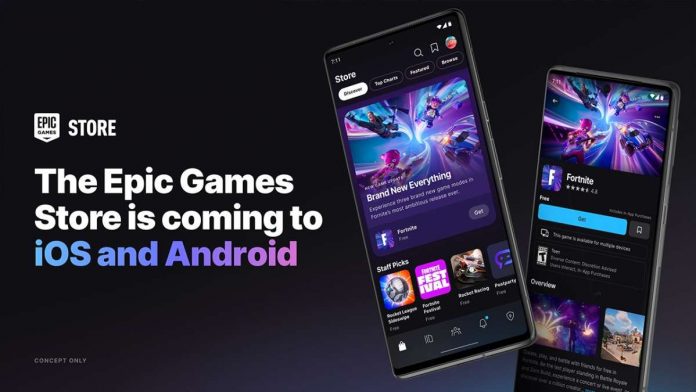
Epic Games announces its plans to launch the Epic Games Store on iOS and Android platforms by the end of 2024.

According to a post on X, Epic Games’ General Manager Steve Allison shared the news at the State of Unreal Event during the Game Developers Conference (GDC). Allison highlighted the company’s persistent efforts to break through the barriers set by mobile’s traditional gatekeepers, Apple and Google, pointing to a future where developers and gamers alike have more freedom and choice. His words resonated with many in the industry who have long criticized the tight control and high fees imposed by these platforms.

The upcoming Epic Games Store app is touted as a first-of-its-kind, games-focused multi-platform and the company plans to extend its developer-friendly policies to mobile, offering new self-publishing tools that promise to ease the process for game creators to showcase their work on this new platform.

Financially, Epic is set to continue its pro-developer revenue model, allowing them to retain 88% share of the revenue generated by their games, starkly contrasting the 30% commission rate maintained by Apple’s App Store and Google Play. This financial model not only challenges the status quo but also offers a more sustainable and developer-friendly ecosystem.

While specifics about the game titles to be featured on the mobile version of the Epic Games Store remain undisclosed, the gaming community is eagerly awaiting updates. Epic Games has a history of making waves in the gaming industry by offering top-tier games like Grand Theft Auto V, Just Cause 4, and Control for free on its PC platform, raising expectations for its mobile offerings.

Since its inception nearly six years ago, the Epic Games Store has rapidly grown in popularity, particularly noted for its generous game giveaways and the inclusion of major eSports titles like Fortnite and Rocket League. The company, also known for developing the Unreal Engine, has significantly influenced the gaming industry’s dynamics.

Android 15 to Enable SMS and MMS via Satellite Networks

Android 15

Second developer preview of Android 15 has unveiled the ability to send and receive SMS messages via satellite connections.

According to the change log, Android 15 is set to broaden the platform’s compatibility with satellite communications, allowing applications to detect satellite connections and adjust their functionalities accordingly.

This new feature is pivotal for areas where conventional network services are unreliable or unavailable, providing a lifeline in remote and underserved regions. The update will enable SMS and MMS applications, as well as Rich Communication Services (RCS) apps pre-installed on the operating system, to utilize satellite connections for messaging purposes.

Google’s integration of this technology is likely to be prominently featured in its default messaging app, Google Messages, which is the main text messaging service for the majority of Android smartphones. These devices, especially those with Google’s services pre-installed, will benefit from the enhanced connectivity options.

A screenshot from the Android 15 preview illustrates how users will be informed of their satellite connection status through a system notification. This alert will notify users that they can send and receive messages without the need for a mobile network or WiFi, enhancing the user experience and providing a seamless transition between different types of network connectivity.

The introduction of satellite SMS in the Android 15 could pose a challenge to existing services such as the Emergency SOS feature on iPhones. Although Qualcomm had previously attempted to develop similar capabilities with their Snapdragon Satellite, it was ultimately abandoned due to a lack of interest from manufacturers. However, the introduction of this technology in Android 15 may change this situation.

However, the availability of satellite SMS on Android 15 does not guarantee universal access to this feature. The functionality depends on the readiness of mobile providers and the presence of necessary infrastructure to support satellite communications. Companies like Starlink are at the forefront of this technological evolution, experimenting with Direct to Cell technology to enable satellite connectivity on mobile phones equipped with LTE capabilities. These efforts, in collaboration with network operators such as T-Mobile, Rogers, Salt, and Entel, are setting the stage for a future where mobile phones can directly connect to satellite networks.

Navigating Regulations and Restrictions: A Guide to Sending Money Amidst Changing Policies

Transfer Money Abroad

Though it has become normal for many individuals and companies to send funds internationally given the fast changing nature of global finance, there are always strings attached. Nonetheless, this connectivity is shrouded in a dense labyrinth of laws that make navigation difficult. The purpose of our small guide is to demystify such procedures, providing knowledge concerning the current dynamics involved in making money transfers successfully.

Understandable Territory

The reasons underlying money transfer to Russia regulations are important when trying to maneuver around them. Money laundering prevention, terrorism financing control and financial system stability require governments and financial institutions to provide these regulations. Although these goals apply universally, each country may adopt different approaches or even change its regulations according to political trends or economic conditions.

Keeping Up with Changes

Keeping up with the latest regulations is a must. You need to know how to overcome all barriers. This implies accessing official information all the time, such as central banks and regulatory authorities in the financial field and using experience from financial service providers. Often, these organizations have devoted compliance departments, which can give you useful advice about how new rules may affect your transfers.

How to Choose the Right Provider?

The choice of service provider can have a major impact on transaction convenience and expense. The traditional banking system may appear to be secure and dependable but frequently does not offer the best foreign exchange rates or lowest charges for remittances. On the other hand, certain specialized money transfer services are going to be less expensive than others especially in terms of pricing as well as speed; however there could be problems concerning coverage particularly in some states. Digital platforms together with cryptographic coins are increasingly seen as substitutes that provide fastness at low fee levels; although they bring their own sorts of constraints by regulators besides risks involved.

Your Step-by-Step Tips

  1. Be prepared and plan ahead. Sudden regulatory changes can delay transaction times and increase costs unexpectedly; transfers made in advance will prevent this.
  2. Always be ready to adapt your preferred transfer method based on changing regulations and market conditions, which might mean changing service providers or even modes of money transferring.
  3. Document everything. Regulations usually require detailed transaction records, hence maintaining comprehensive evidence would assist during compliance checks as well as resolving possible complications.
  4. Use technology to your advantage. You could also employ online instruments and applications that enable you to keep track of exchange rates and commission charges across several platforms in real-time so that you always get the best outcomes.
  5. Consult with professionals: for large or complicated transactions consult a financial adviser or legal specialist who specializes in international finance law and can provide specific strategies that conform to present regulations.

It is expected that as technology advances, the methods of transferring funds from one country to another will change. The advent of block chain technology and digital currencies may dramatically reshape the financial landscape making it easier for businesses to comply with regulatory requirements while enabling faster, less expensive and more transparent processes.

In Conclusion 

The movement of money across borders is navigated through regulations and restrictions which must be approached with care, adaptability and knowledge. With constant awareness about changes in policies, prudent choice of transfer channels, and strategic planning individuals and companies can manage their international transactions efficiently within a changing policy environment. Money transfer tomorrow is on course to become even more globalized than today.

5 Best Apps To Send Files Between Android And iOS

Send Files Between Android And iOS

Android and iOS are great in terms of features and usability. However, it is quite a difficult task for novice users to send files between Android and iOS. In the article, we will introduce you to the best file transferring apps available for these platforms — so that you can send files quickly and without much trouble from Android to iOS or from iOS to Android.

File sharing is not exactly the strong point of an iPhone, although there are many other methods to transfer files between Android and iPhone/iPad — using an app that supports both platforms makes file sharing faster and most comfortable for users.

Whether you have one file or hundreds of files, you can certainly send them from Android to iPhone or from iPhone to Android with these file transfer apps. You don’t need to be tech-savvy to share files, photos or videos. Before transferring files, make sure you have installed the same app on both devices to initiate the process without using any data. So choose apps based on your taste.

Send Files Between Android And iOS:

1. Xender

Xender has been one of the best apps available for years to send and receive large multimedia files in a very short time between Android and iOS. With Xender, you can send what you want — documents, photos and videos in a single instant. In addition, the app also makes it possible to transfer files wirelessly between Android and PC or iOS and PC.

2. SHAREit

SHAREit is another best app you need to send and receive files between Android and iOS without any mobile data. The app is Over 200 times faster than Bluetooth. And the fastest speed can exceed 20Mb/s while transferring files.

3. AirDroid

Like SHAREit and Xender, you can use AirDroid to transfer files between Android and iPhone. Since it’s available for both Android and iOS, you don’t have to worry about compatibility issues. AirDroid’s user interface is pretty good, neat and clean compared to other tools.

4. Send Anywhere

Send Anywhere helps you to send any file type without altering the original between Android and iOS — all you need is a one-time 6-digit key for an easy file transfer. This security key lets you send and receive files on Send Anywhere. It will be generated after selecting files. When the key is entered on the receiving device, files will be sent instantly. The app offers a very efficient P2P connection mechanism, capable of transferring even very large files without the slightest problem.

5. Instashare

Instashare worked well for file transfer between iPhone and Android devices. Apart from Android and iOS, the app is available for macOS and Windows desktop. It is like Apple AirDrop but works on all major platforms.

Tools needed for sending files between Android and iPhone are certainly not lacking. These listed apps allow you to exchange files without limits and without using your data.

10 Best Scanner Apps for Android And iOS to Digitize Documents

Best Scanner Apps for Android And iOS

With the best scanner apps for Android and iOS, your smartphone can morph into a high-tech scanner, capturing and digitizing everything from official documents to random doodles on a whiteboard. And it doesn’t just stop at scanning; these mobile scanning apps are smart enough to correct distortions, adjust skew, and even extract text from the most complex layouts. 

If you’re on the hunt for the best document scanner apps for Android, look no further. We’ve sorted through all the options to show you the very best ones.

Best Free Scanner Apps for Android and iOS

1. Adobe Scan

Adobe Scan is one of the most intelligent scanner apps for Android and iOS, which automatically detects text in any document and converts them into digital files — such as PDF and JPEG files. It allows you to create, save, and organize paper documents into a digital file within seconds. The app’s advanced image technology automatically detects borders, sharpens the scanned content, and even allows for text reuse from each PDF and photo scan. Adobe Scan allows you to touch up scans or photos from your camera roll, remove and edit imperfections, and even erase stains and marks. It even comes with a built-in tax receipt scanner feature, making expense tracking a breeze. This mobile scanning tool also offers a seamless integration with Adobe Document Cloud, making it easier than ever to access and share your files.

2. Microsoft Lens 

Microsoft Lens is not just another scanner app for Android and iOS — it’s a productivity powerhouse. Microsoft Lens takes mobile scanning a step further by enhancing the quality of your scans, making pictures of whiteboards and documents not just readable but crystal clear. It even corrects for distortions and skews, ensuring that your scans are as close to the original as possible. It offers integrated OCR (Optical Character Recognition), allowing you to digitize printed or handwritten text effortlessly. You can then save these scans to OneNote, OneDrive, or even your local device. The app supports multiple formats, letting you save your scans as PDF, Word, PowerPoint, or images. With its seamless integration with other Microsoft Office tools, it’s the perfect companion for anyone looking to boost their productivity on the go.

3. TapScanner

TapScanner is designed to make scanning a breeze. With just one tap, you can scan any document into a PDF or PNG. This scanner app for Android and iOS comes with a built-in PDF maker and reader, allowing you to handle everything from receipts and business cards to books and photos. You can even add E-signatures to your documents right within the app. One of the standout features is its Auto Border detection. The app automatically crops and sorts your documents, saving you the time and hassle of manual adjustments. Apart from that TapScanner features advanced OCR technology that allows you to convert images to text, making it easier to edit and manage your scanned documents. Also, the app has a minimal footprint, taking up only 20MB of your phone’s memory.

4. CamScanner

CamScanner transforms your Android and iOS device into a multi-functional scanner — capable of capturing a wide range of documents—from invoices and whiteboards to business cards and certificates. The app uses AI-powered OCR to automatically recognize and extract text, making it a breeze to search, edit, or share your scanned documents. The app offers smart cropping and auto-enhancing features to ensure your scans are sharp and clear. And if you’re concerned about security, you can set passwords to protect your confidential documents.

5. Document Scanner

Document Scanner allows you to scan a variety of documents, from official papers to whiteboards, along with QR and Bar-code scanning, anytime and anywhere. And it’s not just about scanning — the app enhances the quality of your scans automatically or manually by removing noise and grain, giving you professional-grade results right from your phone. The app offers a plethora of features that make it stand out from the crowd. You can optimize your PDFs in various modes like B/W, Lighten, Color, and Dark. Document Scanner also lets you organize your documents in folders and subfolders, making it easier to manage your files. 

6. Clear Scan

Clear Scan is a full-fledged document management system. For starters, it’s incredibly user-friendly. The app automatically detects document edges and corrects perspective, ensuring that your scans are not just quick, but also of professional quality. Whether it’s a photo, a receipt, or a multi-page document, Clear Scan handles it all with finesse. The app offers multiple filter options, allowing you to choose between photo, document, clear, color, or black & white modes. And once you’ve scanned your document, you’re not locked in — the app allows for flexible editing even after saving. The app supports immediate sharing via email, Dropbox, OneDrive, Google Drive, and more.

7. iScanner

iScanner is incredibly versatile scanner app for iOS and Android. It’s not just for scanning documents — you can also scan ID cards, passports, and even measure object lengths. The app also comes with a math mode to solve complex equations and a count mode to tally similar objects automatically. One of the standout features is its use of Artificial Intelligence. The app automatically detects and adjusts document borders, ensuring that your scans are as accurate as possible. It even offers text recognition in over 20 languages. iScanner offers real-time cloud storage, allowing you to access your files from any platform or web browser. Plus, you can lock your confidential scans with a PIN for added security. iScanner doesn’t just stop at scanning; it also allows you to edit your PDFs. You can color-correct, sign, and even watermark your documents right within the app. Its file manager is intuitive, letting you organize your scans with ease.

8. Tiny Scanner

Tiny Scanner transforms your smartphone into a portable document scanner, allowing you to digitize anything from official papers to handwritten notes. Whether it’s scanning in color, grayscale, or black and white, this app has got you covered. It even boasts AI-powered OCR capabilities, recognizing different languages and handwritings, which you can then edit, copy, or save in various formats like text or Word. The app is incredibly user-friendly, optimized for both phones and tablets. It automatically detects page edges and offers five levels of contrast to ensure your scans are as clear as possible.

9. QuickScan

QuickScan boasts a user-friendly interface coupled with advanced features that make scanning a breeze. Whether it’s a PDF, a book, or even an ID photo, this app has got you covered. QuickScan also offers a range of editing tools, allowing you to crop, rotate, and adjust the color and contrast of your scans. The app also uses OCR technology to extract text from images, making it easier for you to edit and organize your files. You can then edit the scanned document and save it in either PDF or JPEG format. 

10. Genius Scan

Genius Scan is not just a scanner; it’s a complete document management system for Android and iOS. Place any document in front of your phone’s camera, and the app automatically detects it, crops it, and even cleans it up, giving you a crisp, legible scan. The batch scanning feature allows you to scan multiple pages in seconds, making it a time-saver for both individuals and small businesses. It also offers PDF creation and editing features, allowing you to combine scans into multi-page PDFs, merge documents, and even import photos.