Home Blog Page 178

How to Protect Your Trade Secrets in the M&A Virtual Data Room

online data storage-data room

Polestar acquired Guggenheim Partners for $20 billion; Nvidia bought Arm Holding for $40 billion, while Microsoft acquired Activision Blizzard for a whopping $68.7 billion. These were some of the biggest M&A transactions in the last few years.

It is easily understandable that these transactions involved a lot of paperwork, exchange, and evaluation of corporate records, legal obligations, protection of sensitive company material, due diligence, and whatnot.

Sellers in M&A deals are not only concerned about the completion of the transaction. They need to protect their confidential business data during the process. For that, they need reliable and safe business solutions, such as virtual data rooms, to protect their important data from external and internal threats.

Why is online data room software so crucial for M&A deals? How does it protect your corporate data? Read on to get the answers!

What is an enterprise virtual data room?

An enterprise virtual data room is an online data storage space and a virtual platform specifically designed to safely store and exchange important corporate data and facilitate enterprises and large organizations during business deals.

An enterprise-scale electronic data room has all the basic features of a VDR and additional project management features that help in complex business transactions such as M&As, fundraising, IPOs, partnerships, etc. Depending on corporate needs, a virtual data room can accommodate hundreds of users simultaneously.

Importance of data room software in M&A deals

Why are VDRs important for M&A deals? How do they keep data safe? Here are your answers.

1. Centralized and secure data storage

Mergers and acquisitions are highly complex business transactions involving massive amounts of data exchange, communication, and collaboration. A lot of M&A deals fail because of insufficient or delayed supply of necessary corporate documents.

Traditionally, project management teams had to visit the seller company for document verification and evaluation. This process was not only tiring but time-consuming as well. Also, the departments in the company maintain their own records, so the data is found in dispersed form.

Imagine the acquiring company visiting the HR, Sales, or Finance department to collect all the necessary documents; this is synonymous with inefficiency.

In comparison to that, an online data room can help businesses keep all their corporate documents in one place. This will allow the project management teams to access any document they need from a single platform. Moreover, the data will be easily accessible to your own management and workforce.

The best thing about data room software is its unbreakable security. The data room administration can restrict unauthorized access to the data room with the help of two-factor authentication.

Data room management can also add or remove any user or purge any device that is connected to the data room. That means, if a user loses their device, it can be purged from the data room.

2. Safe data sharing

Online data room software makes data sharing a piece of cake. A user can share a file with multiple users simultaneously. Moreover, the drag-n-drop feature allows you to upload multiple files simultaneously.

But is data sharing in virtual data rooms safe? Yes, an electronic data room helps you protect data from internal threats as well. For example, if you worry that your document may fall into the hands of an unintended user, you can encrypt the document, and then only the intended recipient will be able to decode it.

Apart from that, depending on the data room services you go for, you can use the View only feature on any document. That means other users won’t be able to download, edit, or print that document.

View only feature is extremely useful when a company wants to protect its highly confidential documents such as patents, secret formulas, product designs, prototypes, etc.

Modern virtual data room providers offer smart lock features which allow you to revoke access to any document even after the end-user downloads it. The smart lock feature helps avoid data loss even if you sent a file by mistake.

Lastly, the digital watermarking feature in virtual data rooms is highly effective in settling copyright disputes. It allows you to trace the origin of any document or file.

3. Seamless collaboration

Seamless collaboration is one of the biggest advantages of using virtual data rooms for M&A deals. Sellers, buyers, legal advisors, investors, stakeholders, and third parties can collaborate on one central platform.

Communication is the key to successful M&A deals, and data rooms ensure 24/7 communication between all concerned parties.

Users can arrange audio or video meetings, communicate privately, engage in group discussionsand work on shared documents. Depending on their access, they can leave notes, access or edit any document, and that too from anywhere in the world.

Data room comparison is mandatory

It is important to note that all virtual data room providers are not the same. Some data rooms may provide excellent security features but they may not have all the collaboration tools you need. Therefore, you should compare virtual data rooms and decide which one suits your requirements.

Final words

Protecting your highly sensitive data during M&A deals has been made easy by virtual data rooms. VDRs not only protect your data but they ensure seamless communication, data sharing, and collaboration, ultimately boosting the deal speed. The best part? You can add multiple users simultaneously, enjoying a completely secure, centralized, and convenient collaboration on the deal.


Create And Schedule Custom Notifications On Android With Text Or Images

Custom Notifications On Android

Notifications have always been one of the strengths of Android, although sometimes the best we can do is disable them. However, when we can create and schedule our own custom notification on Android, the impertinence evaporates, and the usability goes up.

In this article, we are going to introduce you to a simple Android productivity tool called Notification Maker that welcomes you to the world of Android custom notifications.

With Notification Maker, you can easily create custom notification alerts on Android — which will act as reminders — where we can include both text and images on those notifications.

Obviously, we can use Google reminders, which are activated from the Google Assistant, but not everyone uses that function, nor can we put images in those notifications.

How to create custom notifications on Android?

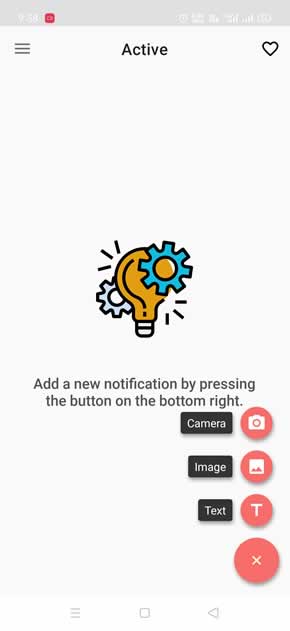
The creation of reminders using the power of Android notifications is very simple and customizable, allowing you to put a main text and a subtitle just below. In addition, it allows you to use photos to appear in notifications.

Custom Notifications On Android with Text and images

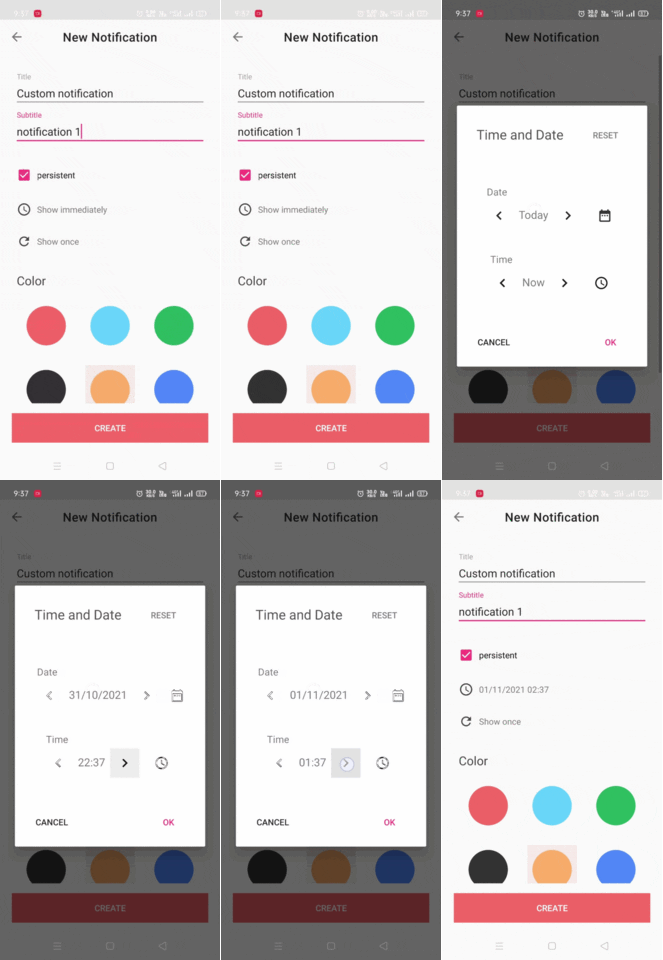
While creating the custom notifications on Notification Maker, you can either choose it to show immediately on the notification window or schedule it to show on a certain date and time. Also, you can set how often you want to repeat this same notification.

giphy

Apart from that, Notification Maker also makes it possible to use the share button in other apps to easily create reminders. This is especially useful when we use the share option from another application, being able to create a reminder of a shared item or of an image.

Create Custom Notifications On Android

So how it’s like to schedule your reminders by creating custom notifications on Android.

The European Commission Accuses Apple Of Restricting Competition With Apple Pay

Apple Pay payment service

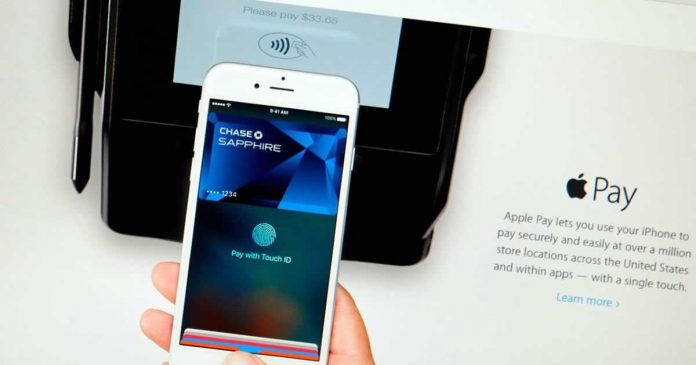
The European Commission accused Apple of exploiting its dominant position by restricting competitors’ access to crucial technology for offering payment services on iPhone via its Apple Pay payment service. The EU Commission concluded that Apple has limited the use of NFC to benefit its own solution Apple Pay.

It is important for the integration of European Payments markets that consumers benefit from a competitive and innovative payments landscape. We have indications that Apple restricted third-party access to key technology necessary to develop rival mobile wallet solutions on Apple’s devices.”, explained in a press conference by the executive vice president of the European Commission responsible for Competition, Margrethe Vestager.

Apple now has the opportunity to comment on the complaints. If the competition authorities then stick to their assessment, the company could face a high fine. If companies breach EU competition rules, they risk fines of up to 10% of their annual global turnover.

Europe understands that NFC technology is a widely used standard for mobile payments and is available in practically all shops in Europe. Limiting its use is a case of Apple’s dominance, as it restricts users’ choices.

Apple Pay is the only way to get access to the NFC chip on iPhones. Apple sees this as a technical solution to ensure payment security and ensures that anyone who wants access to Apple Pay will get it.

Is It Worth Building Your Own Laptop?

Lenovo Legion Series Laptops

Many people are surprised to learn that Gen Z-ers are less adept at troubleshooting tech than millennials. Technology is advancing every day. Shouldn’t younger generations be better at working with it than those who came before them? However, the reality is that the way we use technology has changed.

This is largely due to the approach taken by companies like Apple, for whom the goal is to make each device as user-friendly as possible. A toddler can pick up an iPhone and figure out how to use it with very little help. Macbooks are more difficult to use, but you don’t have to have any tech knowledge to use them to their maximum potential.

In other words, preconfigured items are now the norm, and the days of device users having to troubleshoot are over. If you’re in the market for a new laptop, it can feel like ‘building your own’ customized device would be going backwards. The easy option is to get a preconfigured device like everyone else, especially if you don’t love figuring technology out.

So, are there actually advantages to building your own laptop?

Insurance and warranties

Before talking about the specifications of the laptop itself, it is important to look at the indirect consequences of building your own laptop. When it comes to insurance for laptops, there is no difference between a preconfigured and custom-built laptop. They are both covered by your renters insurance.

However, it becomes more complicated with warranties. Every preconfigured laptop comes with a warranty from the manufacturer for at least a year. If anything goes wrong with any part of the laptop, you can take it in to be repaired at no cost. A custom-built laptop may not have the same protections for all of its parts, especially if a problem is an unintended consequence of your own configuration.

This is something you should take into account. It may not deter you, as most people don’t end up using their warranties anyway, but some people will have no peace of mind without one.

Specifications

When it comes to the specifications of your laptop, you will get better value for money with a custom-built laptop. Preconfigured devices are generally built with a one-size-fits-all attitude. You will get a lot of specifications that are to your liking, but some which are unnecessary and others which just don’t make the grade.

Building your own laptop gives you the chance to forego the unnecessary aspects and use your money for what you actually need. You get a laptop that does not do some of the things a preconfigured laptop would, but you did not need those functions in the first place.

Make it yours

But one of the big reasons to build your own laptop has nothing to do with price. Rather, it has to do with how you want to relate to the technology you use on a daily basis. You should not simply be settling for whatever a company has decided to give you. You should have an active part in choosing what you want and creating your own tech ecosystem.

Devices are becoming far too standardized for comfort. Instead of learning how to use new technology, with all the effort that entails, many people are simply taking what they’re given by a big company. It is a surefire way for atrophy to set in. You don’t learn anything by building your laptop or troubleshooting, and you start to forget how to do any of that work.

This does not lead to creativity, which is where the best technological advances come from. The average laptop user doesn’t need the specifications of a custom-built device, but we’d all be better for it if everyone put some more thought into their tech. There are pros and cons to a custom-built laptop, but for most techies it is the ideal option.

PHORHUM: New Google AI Project Can Easily Render 3D Models From Just A Single Photo

Google PHORHUM

Researchers Thiemo Alldieck, Mihai Zanfir and Cristian Sminchisescu from Google Research are developing a neural network for scanning 2D images into usable 3D objects. 

The project is called PHORHUM, is specifically focused on scanning people — just from a frontally shot image, the AI system can create usable 3D models. Points that are not visible in the image — such as the back of the person — are automatically added.

Apart from that, the AI generates light reflections and colors from the pixels, which can then be placed as a texture on a figure. Two different networks are used for this. A feature extractor generates distance values and points within a given 3D space. A shading network then calculates shading and color values based on the illumination and normal vector of all points.

According to the researchers, PHORHUM is, therefore, the only neural network that outputs brightness values and shades in addition to colors and surface normals instead of integrating them firmly and as unchangeable constants.

Google shows the first results in a presentation video. The system also seems to work well on non-visible areas, such as the backs of the models. 

However, a constructed model visibly loses detail there. With further research, however, such models could eventually be useful in the gaming industry, for example, when concept art needs to be turned into a 3D model. Until now, this has been a manual and time-consuming process.

Amazon Alexa Shares Your Voice Data With Dozens Of Partners To Show You Targeted Advertising

Amazon Alexa Shares Your Voice Data

Google and Facebook are well-known for using your data and search history to deliver personalized advertisements. Even in a recently leaked internal document, Facebook admits it has no idea what it does with your data or where it goes. 

Now a new report found that Amazon uses voice data from Alexa to send you personalized advertising. The report was published last week by researchers at the University of Washington and other US universities.

The study, “Your Echos are Heard: Tracking, Profiling, and Ad Targeting in the Amazon Smart Speaker Ecosystem“, reveals how Amazon collects and shares data from your interactions with Alexa with up to 41 ad partners and how Amazon will utilize the information you provide to your Echo to display tailored ads.

According to researchers, the actions of developers of Amazon and Skills (software integrated with Amazon’s Alexa voice assistant service) are often inconsistent with privacy policies. Experts have developed an auditing system to assess how voice data is collected, used and transmitted. They created several fake personas with different profiles of Echo smart speaker usage and then simulated interactions to test statistical differences in the amounts offered for audio and web ads.

Interaction with smart speakers, according to the study, results in up to 30 times greater ad bids from advertisers.

“Amazon’s inference of advertising interests from users’ voice can be interpreted as inconsistent with their public statements. Amazon does not provide transparency in usage of data and thus cannot be reliably trusted to protect user privacy.,” the researchers noted.

The paper also notes that Amazon received a patent in 2018 called ‘Voice-based determination of physical and emotional characteristics of users’ — which describes how “the current physical and/or emotional the state of the user may facilitate the ability to provide targeted audio content, such as advertisements, to the user.”

What Your Tech Start-Up Needs To Invest In

Important Gadgets to Have When Starting an Online Business

Being at the helm of a start-up is equal parts exhilarating and terrifying. You have a dream you want to make a reality, but at the same time, you might not be sure exactly what you need to make it happen. Of course, you’ve created a business plan, and you’ve got the finance (or you wouldn’t have got this far). You might even have got your premises lined up (if you need them), but there are some other key things you need to get in place to stand the best chance possible of still being here in the next 12 months.

You need to look at your staffing levels

The first thing you are likely to realize is that you can’t do everything yourself. Even if you have all the skills, you are going to quickly find that you probably don’t have enough hours in the day and you are going to need some help. Now, unless you can get friends and family to work for free, you are going to need to hire people, which can be expensive and could be an overhead you have not budgeted for.

Depending on what you need to be done, you’ll want to hire skilled or unskilled people to help you out on an ad-hoc basis. For many ad-hoc positions, do not underestimate the value of seeking out semi-retired or retired people looking for cash work or something to keep them occupied. For more specific tasks, you can hire freelancers to do one-off jobs on sites like Upwork or Fiverr or approach an agency for a major project like building your website.

Make sure your website looks professional

It won’t matter what sector your start-up happens to be in. Anyone who is going to work with you or become a customer is likely to look you up online first. For that reason, you are going to want your business website to look professional so they don’t get the wrong idea and choose someone else instead.

So with the solitary exception that your start-up actually specializes in web design, you should leave this up to the professionals and not attempt to cut corners by doing it yourself and creating something awful. While, as a new business owner, you will want to keep an eye on your expenses, not getting your website created by specialists is a false economy, as is trying to raise your online profile (more on that later).

Invest in Digital Asset Management

Regardless of what type of start-up you are involved with, you are going to have quite a lot of digital assets. If you are not sure what that means, a digital asset is an image, a video, or any other media file that is exclusive to you, and you’ll need to keep it safe. 

By using DAM (Digital Asset Management) tools, you can not only keep things like logos and presentations safe, but you can also securely control who has access to them (like the freelancers or agencies that are doing work for you) or set expiry days on any assets you have licensed to customers. This gives you flexibility and full control, and peace of mind that this area of your business is taken care of.

Raise your online profile 

To attract customers, you are going to need to let them know you exist, and there are several ways you can choose to do this. Which of these methods you choose (or which order you do them in) will depend on many factors like your budget or which business niche you happen to be in.

You could use advertising for quicker results, SEO as part of a longer game, or social media posts that combine both and is mostly free.

Using advertising

This is perfect for jumpstarting traffic to your business but is also typically the most expensive. You will get customers this way, but when you stop the adverts, the stream of traffic is turned off. As with your website design, you should get a specialist involved, certainly before you start spending big to make sure you don’t start pouring money down the drain.

Using SEO

This approach is more long-term and involves boosting your place in online search results. This is done using various tactics, which, again, are best left to the professionals, and while it very rarely produces instant results, it can work out cheaper in the long run. Having a decent placement for a relevant search term on Google can potentially bring in more traffic than a big-budget advertising campaign over time.

Using social media

If you are on a tight budget, then social media could give you a best of both worlds approach. By targeting the right hashtags and trends or approaching a social media influencer to promote your product or service for a results-based fee, you can open a few doors straight away. 

You can also, by consistently posting that offers value over time, you can build an audience that will respond to and share your posts and whose ethos align with your own. These people are most likely to buy your product or service when they need it, or at least recommend it to others.

A few final thoughts

You probably won’t need a spoiler alert to know that things rarely go exactly as you imagined them in the world of business, and this is especially true when it comes to having a start-up. This is mostly because, as a start-up, you are spending much of your time in the beginning in uncharted waters, and it is incredibly easy to be taken unawares by a serious problem.

However, by making sure you have the right headcount to deal with any sudden influxes of work and have a website that looks professional, you can keep those instances to a minimum. You will also need to manage your digital assets and make sure you keep raising your digital profile to keep what you have secure and also to keep your business moving in the right direction.

Microsoft And Cloudflare Teamed Up To Integrate A VPN Into Edge

Microsoft And Cloudflare Integrate VPN Into Edge

Microsoft joins forces with Cloudflare now to integrate a VPN into the Chromium-based web browserEdge, to protect the privacy and information of its users.

As Cloudflare announced in an official press release, the company, together with Microsoft, is integrating the so-called Cloudflare Proxy, a VPN service limited to 1 GB of traffic per month. The service, which is still classified as “Preview”, will soon be rolled out in waves to participants in the Insider program.

Microsoft has also commented on the new feature, which will be called “Microsoft Edge Secure Network”, on the official support website. The feature appears very similar to Cloudflare’s 1.1.1.1 service.

Microsoft Edge Secure Network will offer the same features that we have already seen in other VPN services. When activated, it will encrypt your internet connection to help protect your data from online threats like hackers, protect you from online tracking, and will let you browse with a virtual IP address that masks your IP and replaces your geolocation with a similar regional address.

Once available, the Microsoft Edge Secure Network can be activated directly from the browser settings. When in action, it will be identified by a shield icon that will appear to the right of the address bar.

Microsoft Edge Secure Network

It is still unknown what plans or payment options Redmond will offer when the free data quota is consumed per month, although there will surely be more details in this regard in the future. There is also no accurate data on when this new function would be available; For now, it’s only accessible to a handful of Canary build testers as part of a “controlled release.”

Microsoft Edge is not the first browser to provide a VPN service. For a long time, Opera has incorporated a free VPN, and Mozilla released a commercial VPN service in 2020.