Microsoft joins forces with Cloudflare now to integrate a VPN into the Chromium-based web browser, Edge, to protect the privacy and information of its users.
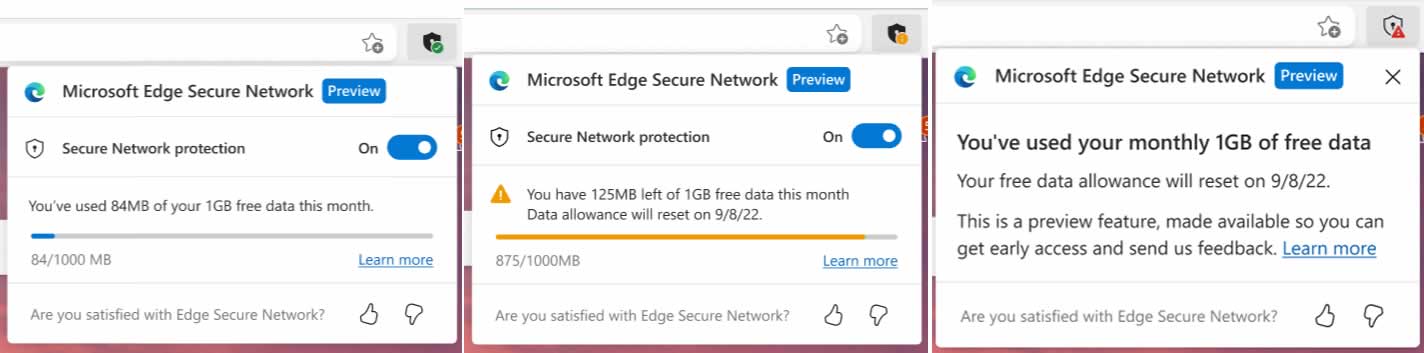
As Cloudflare announced in an official press release, the company, together with Microsoft, is integrating the so-called Cloudflare Proxy, a VPN service limited to 1 GB of traffic per month. The service, which is still classified as “Preview”, will soon be rolled out in waves to participants in the Insider program.
Microsoft has also commented on the new feature, which will be called “Microsoft Edge Secure Network”, on the official support website. The feature appears very similar to Cloudflare’s 1.1.1.1 service.
Microsoft Edge Secure Network will offer the same features that we have already seen in other VPN services. When activated, it will encrypt your internet connection to help protect your data from online threats like hackers, protect you from online tracking, and will let you browse with a virtual IP address that masks your IP and replaces your geolocation with a similar regional address.
Once available, the Microsoft Edge Secure Network can be activated directly from the browser settings. When in action, it will be identified by a shield icon that will appear to the right of the address bar.
It is still unknown what plans or payment options Redmond will offer when the free data quota is consumed per month, although there will surely be more details in this regard in the future. There is also no accurate data on when this new function would be available; For now, it’s only accessible to a handful of Canary build testers as part of a “controlled release.”
Microsoft Edge is not the first browser to provide a VPN service. For a long time, Opera has incorporated a free VPN, and Mozilla released a commercial VPN service in 2020.
Quality assurance (QA) is a critical process in software development. It involves verifying that the software meets the requirements specified by the customer and that it functions as expected.
QA testing can be performed manually or with automated tools. In this post, we will discuss some of the most effective QA testing techniques.
Test management tools are important for organizing and managing QA testing. These tools can help to automate tasks, such as scheduling tests and generating reports.
Test management tools can help to improve the efficiency of QA testing. They can also help to ensure that all tests are properly documented and tracked. There are so many tools including Rainforest QA and some other top Selenium alternatives.
When choosing a test management tool, it is important to select one that is compatible with the software being developed. It is also important to choose a tool that is user-friendly and easy to use.
2. Set Targets and Testing Requirements
Establish testing requirements and targets early on in the development process. This will ensure that all stakeholders are aware of the need for quality assurance and testing, and it will help to set realistic expectations.
Requirements gathering is an important first step in any software development project. It is especially important in QA projects, as it ensures that all stakeholders are aware of the need for quality assurance and testing.
Requirements gathering can be done through a variety of methods, such as interviews, surveys, focus groups, and user observation. Once the requirements have been gathered, they should be documented and shared with all stakeholders.
The next step is to establish targets and testing requirements. These should be based on the requirements gathered during the requirements gathering phase. The targets and testing requirements should be realistic and achievable.
Once the targets and testing requirements have been established, the development team can begin working on the project.
3. Form a Dedicated Security Testing Team
Security testing is a critical component of quality assurance. It is important to ensure that the software being developed is secure and free from vulnerabilities.
To perform security testing, it is best to form a dedicated team of experts. This team should be responsible for identifying and addressing any security issues that may arise during development.
The security team should have a clear understanding of the software being developed and the potential risks involved. They should also be familiar with common security vulnerabilities and how to mitigate them.
The security team should be proactive in its approach to testing. They should constantly be on the lookout for new vulnerabilities and ways to improve security.
4. Run a Regression Cycle
A regression test is a type of QA testing that is performed to ensure that changes made to the software have not introduced new bugs.
Regression testing should be performed after any major change to the codebase. This includes new features, bug fixes, and performance enhancements.
Regression tests can be run manually or with automated tools. Automated regression tests are typically run on a regular basis, such as daily or weekly.
Manual regression tests should be run after any major changes to the codebase. This will ensure that the software still functions as expected.
5. Perform Usability Testing
Usability testing is a type of QA testing that focuses on the user experience. It is important to ensure that the software is easy to use and understand.
Usability testing can be performed manually or with automated tools. In most cases, it is best to perform usability testing manually. This allows for more flexibility and customization.
Usability testing should be performed throughout the development process. It is especially important to perform usability testing before releasing a new version of the software.
By following these tips, you can improve the quality of your software development projects. Quality assurance is an important part of any software development process. By taking the time to perform QA testing, you can ensure that your software is of the highest quality.
Facebook has been alleged multiple times for poor handling of its users’ data. Scandals like Cambridge Analytica, hacks, or frequent failures that violate people’s privacy have been enough to put the company in the crosshairs of regulators.
Now a leaked internal document dating back to 2021, obtained by Motherboard, hints that Facebook does not list all of its users’ data and has no idea where it is going or how it is being used.
The report was written by Facebook privacy engineers on the Ad and Business Product team and was intended to report gaps in the way the platform processes personal information and advocate for change in an attempt to protect the company from problems with regulators in Europe, the United States and other countries.
In the document, the company admits that it does not know where this user data will end up specifically; in this statement, it could be read that they do not have “an adequate level of control and explainability over how our systems use data, and thus we can’t confidently make controlled policy changes or external commitments such as ‘we will not use X data for Y purpose.’ And yet, this is exactly what regulators expect us to do, increasing our risk of mistakes and misrepresentation.“
To understand the seriousness of the problem, Facebook’s privacy engineers draw an analogy.
“Imagine you hold a bottle of ink in your hand. This bottle of ink is a mixture of all kinds of user data (3PD, 1PD, SCD, Europe, etc.) You pour that ink into a lake of water (our open data systems; our open culture) … and it flows … everywhere. How do you put that ink back in the bottle? How do you organize it again, such that it only flows to the allowed places in the lake?“
The systems that drive advertising, the backbone of Meta’s revenue, are built in such a way that it is impossible to comply with regulations.
According to Facebook engineers, addressing its systems challenges will require additional several years of investment in its infrastructure. Only in this way can you have control over how data is entered, processed and generated.
The Ricochet development team, which created the anti-cheat system of the same name for Call of Duty games, is known for unusual anti-cheat measures.
Earlier, they released an anti-cheat system called Damage Shield, where gamers who have been caught cheating can no longer inflict fatal damage on other players. Now, the team has come up with a new update to their anti-cheat system.
It’s called Cloaking — where cheaters will no longer hear sounds or see other players, characters, and bullets during gameplay. However, legitimate players will be able to see affected cheaters.
This approach differs from the approach of other manufacturers. Normally, accounts that are caught cheating are banned without being asked, and players get locked out from the game. This is also the final consequence in Call of Duty; after all, according to the manufacturer, more than 140,000 accounts have already been deactivated for cheating.
The update is part of the worldwide release of Ricochet’s PC kernel-level anti-cheat security driver, which has come to Call of Duty: Vanguard. The announcement also states that these additional features will be implemented for Call of Duty: Warzone after examining how well these updates work and will also appear in this year’s sequel to Modern Warfare.
Are you still viewing your notifications by swiping down the status bar or notification center? How about your smartphone automatically reading notifications to you aloud?
Let’s try this advanced technique to look into your notifications. Some kind of Android notification hack where your Android device read-out-loud notifications for you. Here is the simple trick to enable the automatic notification reading feature through headset/speakers on Android
Enable automatic notification reading feature:
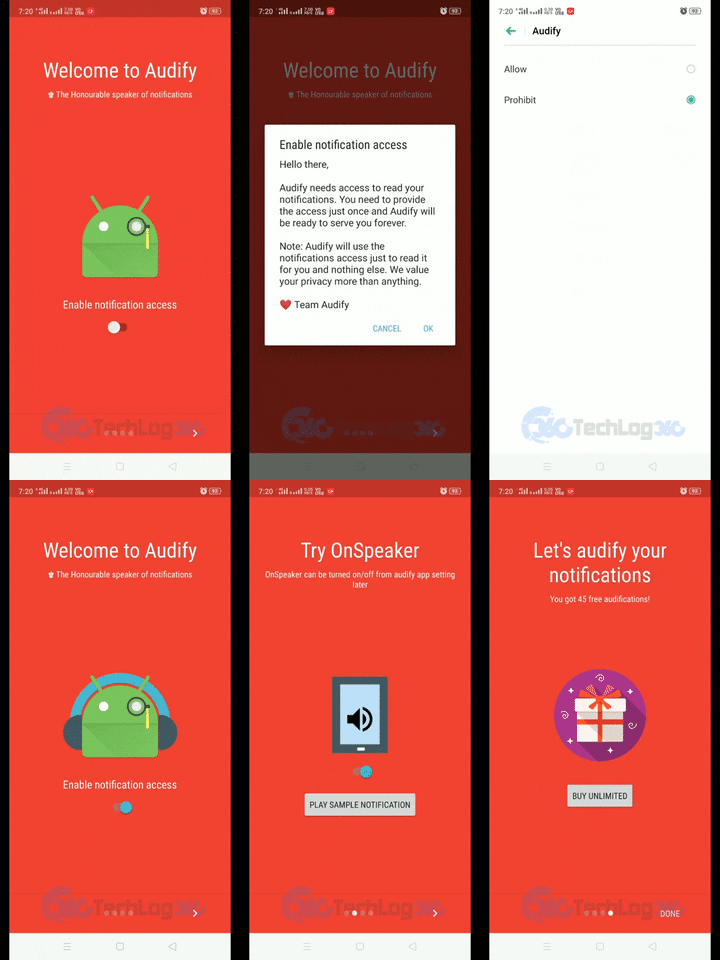
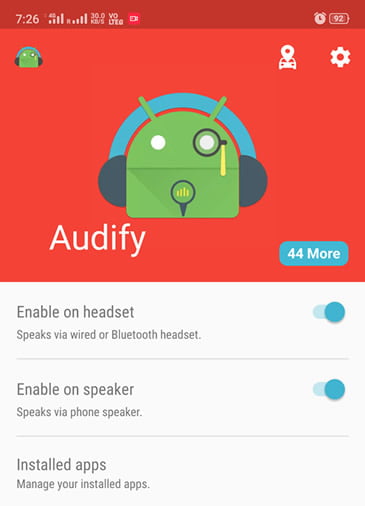
First, you have to install, a simple piece of a tool named Audify Notifications Reader to enable the automatic notification reading feature through headset or speakers on Android.
During app startup, Audify will request you to grant access to some permissions.
After approving the necessary permissions, Audify Notifications Reader will redirect you to the main interface. There you can see options to enable notifications to read via wired or Bluetooth headset and phone speaker. Activate them as your preference.
Also by going to the “Installed apps” option on the home screen, you can manage notifications for each app separately.
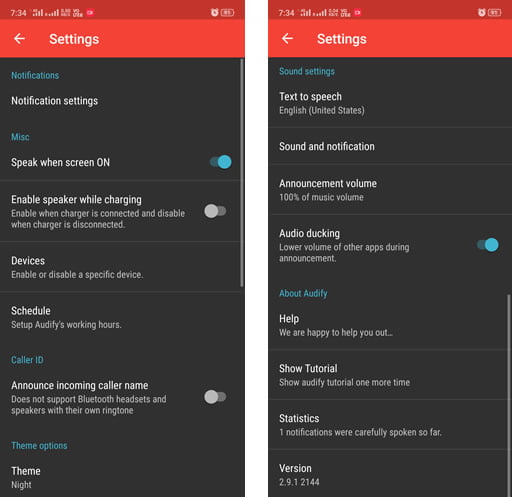
In setting Audify offers more customization options. Like scheduling time to read notifications on headset and speaker. Also, the theme option in settings provides a night or dark mode interface.
Note: In its free version Audify only reads 250 notifications for you. But don’t worry, the premium version is cheaper than you expect, you just have to pay 99 INR once to get unlimited notification reads forever across all your devices.
Key features of Audify Notifications Reader:
Intelligently avoids consecutive notifications from the same app to avoid an annoying burst of notifications from a specific app.
Mute annoying apps and enable only those apps you like.
Add blacklisted words and mute any specific notification from any app.
Privacy mode to skip notification content.
Also comes with a feature where Audify automatically saves your vehicle location and easily navigates it to you.
Fully accessible via TalkBack
Why do you need Audify and automatic notification reading feature on your Android device?
Audify Notifications Reader helps you to focus on the road while you drive or ride by reading your Android notifications on your phone speaker or headset or via any connected Bluetooth device. It also helps to enjoy your music without any distraction by muting your notifications tone on demand and reads the notification. More importantly, by enabling automatic notification reading feature you can avail a hand-free Android experience and you don’t have to unlock the phone screen every time to check notifications because Audify intelligently ignores the notifications that might annoy you.
How do you rate this Android tweak for notifications? Do you really think enabling the automatic notification reading feature can save you time and filter out annoying notification. Let us know your opinions in the comments also don’t forget to include some other similar notifications tricks too.
In 2020, Apple debuted “Privacy Labels” on the App Store. Last year Google announced the release of a similar feature in Google Play in the first half of 2022, where users see more information about how apps collect, share and secure their data.
Now Google has started rolling out the new app data description section in the Play Store detailing user data collection and privacy practices. With this new Data safety section of the Play Store, we should have more control over our privacy.
In the Data safety section, users can find information on whether data is collected and what purpose it serves. In addition, information should be found as to whether data is passed on to third parties or not.
The data collected includes information such as location, personal information, browsing activity, financial information and device identifier, and the purposes include the functionality of the application, analytics, advertising, fraud prevention, personalization, and account management, among others. Google also has a support page regarding more information on this feature.
The new section will also allow us to identify whether the data collected is strictly necessary for the operation of the application or if it is carried out as additional practice. We will also find information about the data protection measures implemented by the developers.
Developers have until July 20, 2022, to provide the necessary information. In a guide for the new Data safety section, Google explains in which cases developers do not have to indicate that data is collected. If, for example, the information is only stored on the device and not forwarded, or if forwarded data is only processed in a session-specific manner, labelling is not necessary.
As developers still have time to provide the necessary information, it may take some apps a while for the new information to appear.
It is undeniable that consumer behaviours around the world have altered since the coronavirus pandemic began. Whereas consumers used to favour gadgets that made outdoor activities easier or more appealing, such as wireless headphones, smartwatches, and smart bands — but now people prefer more and more smart tech gadgets that make it more pleasant or easier to remain indoors.
With the emergence of technology in every aspect of our life, gadgets are becoming increasingly popular. Back in the day, we had a limited number of options while buying the best tech device, but with advancements in artificial intelligence, now we have a vast collection of smart gadgets to assist in our day to day life.
The tastes of each generation differed as well; for example, older folks enjoy watching television; thus, a smart tv would be an appropriate upgrade for them in the present day. Teenagers, on the other hand, have a plethora of options, ranging from drones to microrobots to the virtual world of the internet. But also gadgets suited for both generations are not that difficult to find. If you want to find out what age group you fit in based on your technology usage, try this fun technological age quiz and find out.
In this article, we are bringing you a small selection of tech gadgets that will have a special impact and will be among the best sellers due to their connection with our new reality. The best part is that the listed gadgets are suitable for every generation.
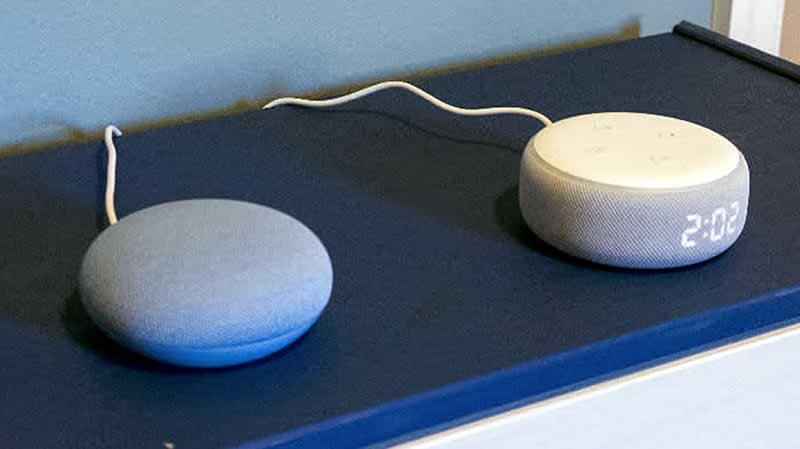
When it comes to the smart virtual assistant, we are recommending products from tech giants Google and Amazon — Google Nest and Amazon Echo.
Google Nest is powered by Google Assistant and Echo with Amazon Alexa to assist, entertain and ease your different day to day tasks. A virtual assistant to help you control your smart devices with your voice. You can opt for a speaker, which only has audio, or a smart touch screen, which allows you to visually interact with your assistant.
Amazon Fire TV Stick
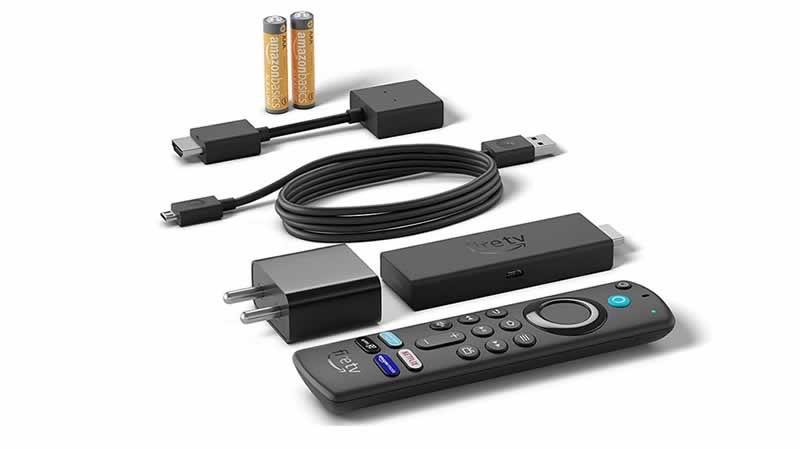
Amazon Fire TV Stick is an excellent choice for ensuring that all “digital content intelligence,” such as OTT and other online media, also reaches televisions that are not Smart.
By connecting the Amazon Fire TV Stick to the TV, we can send any content we want from the phone and access streaming platforms such as Netflix, Spotify and YouTube, among others. In addition, this powerful next-generation device includes Alexa voice control and various features that make it simply extraordinary.
Smart Bulbs and Plugs
Smart bulbs and smart plugs are one of the most convenient and cheap upgrades you can do to migrate to the modern era.
When compared to other home automation devices, smart bulbs and smart plugs are usually the first smart gadgets to make up our home automation easier because of their ease of usage and assembly, as well as their comparatively low cost. Of course, depending on the model, these smart bulbs and plugs will be linked to a virtual assistant or have a separate smartphone app that will allow us to handle not only their activation and programming but also adjust the colour, brightness, intensity, create scenes and environment, and so on.
Smart Security Cameras
Smart security and surveillance cameras allow us to go a step further in the automation of our home by taking advantage of today’s technology to monitor rooms or exteriors. Smart cameras are Wi-Fi-enabled, allowing them to be controlled from anywhere in the world using a smartphone or Alexa or Google Assistant – ensuring the protection of ourselves and our loved ones.
Robot Vacuum Cleaner
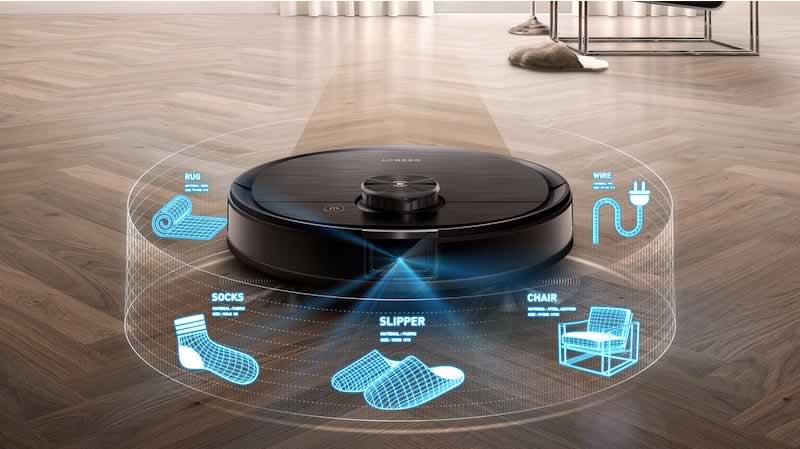
Robot vacuum cleaners have already changed the lives of many people. Surely if you have talked to someone who has the pleasure of having one of these robotic assistants in their home, they will have already told you that life can be wonderful.
As you may know, robot vacuum cleaners no longer only sweep; they can now scrub, mop, and even do all of these things at the same time. There are different ways of cleaning, depending on the technology used by the robot. These WiFi-enabled robots come with different sensors and support for voice assistants.
Technology is advancing, and there are many more smart devices that we can have at home — a Google Nest or Amazon Echo to dominate them all. Overall, these smart tech gadgets are practical, useful, and, most importantly, dependable. Which of the following will you add to your tech arsenal?
Google is on schedule with the development of the upcoming Android version 13. A few months ago, Google released the first developer preview of its new version of the operating system, and now the first public beta of Android 13 has finally been released.
Google already allows you to install this version of Android 13 on your Pixel mobile without any problem. The first beta version of Android 13 is more stable than the previous preview versions, and there are not many new functions in comparison.
What’s new in Android 13 Beta 1
In Android 13 beta 1, it seems that a large part of the new inclusions is focusing on the privacy section. As with location permissions, thanks to new runtime permission, apps will ask whether they are allowed to send notifications at all when they first send them. Apps for Android 13 will have to make this request in the future, and developers will have to build it accordingly.
More refined permission queries for media content — previously, if apps wanted to access photos or audio files on the Android device, for example, they asked for basic permission to use the storage. This gave them access to virtually all stored data. In the future, apps will have to ask directly for photos, videos and audio files and will then only have access to this content.
The beta version of Android 13 is available for all Pixel smartphones starting with the Pixel 4. Those who have already installed one of the previous developer previews will get the first official beta version automatically as an OTA update.
New participants of the beta program will be offered it as an update after joining the program; alternatively, the operating system can also be installed manually. Developers without a Pixel smartphone can also use Android 13 in the Android Studio emulator.
The final version of Android 13 is planned to be released in the late summer/fall of 2022. Also, Google has already started working on Android 14.