Home Blog Page 53

Useful Google Maps Features: 20 Best Google Maps Hacks To Become Master Of Navigation

Google Maps Hacks

Google Maps is one of the best feature-rich navigation apps available for Android and iPhone. From everyday use to work and overseas trips, there is not a day that doesn’t go without Google Maps. 

In addition to the obvious feature, such as finding a route from point “A” to point “B” and online navigation — Google Maps hide many more useful hacks and convenient elements that are not immediately noticeable.

So, in this article, we will tell you some of the useful Google Maps hacks to get the most out of the navigation application — from somewhat hidden settings to interesting features that may have gone unnoticed or that were recently added.

This collection of Google Maps hacks, tips and tricks will assist you in learning to control Google Maps like a pro.

Google Maps Hacks:

1. Share your location in real-time

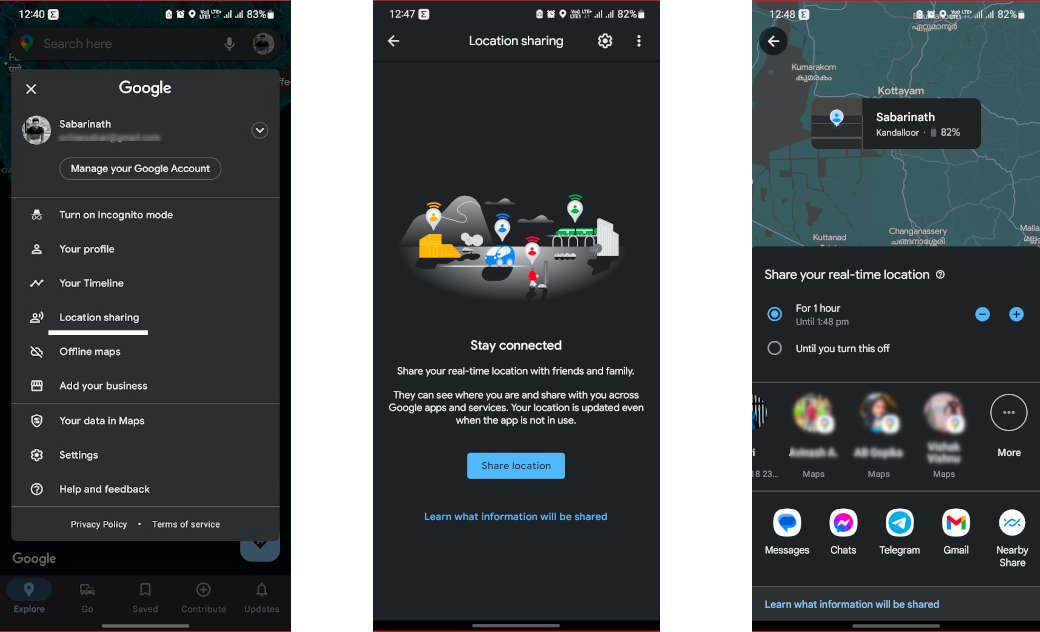
If you want to share your location in real time with another person, you can do it directly with Google Maps. In this way, the receiver will be able to know where you are at all times until you stop sharing the location.

To start location sharing, tap on your profile picture and choose “Location sharing”. Then tap “Share location” and there, you can choose for how long, and you must choose the contact with whom you want to share it.

Share your location in real-time

2. Incognito mode on Google Maps

Almost everything you do on Google Maps is saved unless you use incognito mode. Incognito mode doesn’t save your searches; use your activity to personalize Google Maps, or update your location history or share your location if you’re sharing it. To turn on incognito mode, tap on your photo and choose “Turn on incognito mode” from the menu.

Incognito mode on Google Maps

3. Calibrate the compass

If Google Maps isn’t showing your current location correctly or the map pointer is pointing in the wrong direction, the best thing to do is calibrate the compass. 

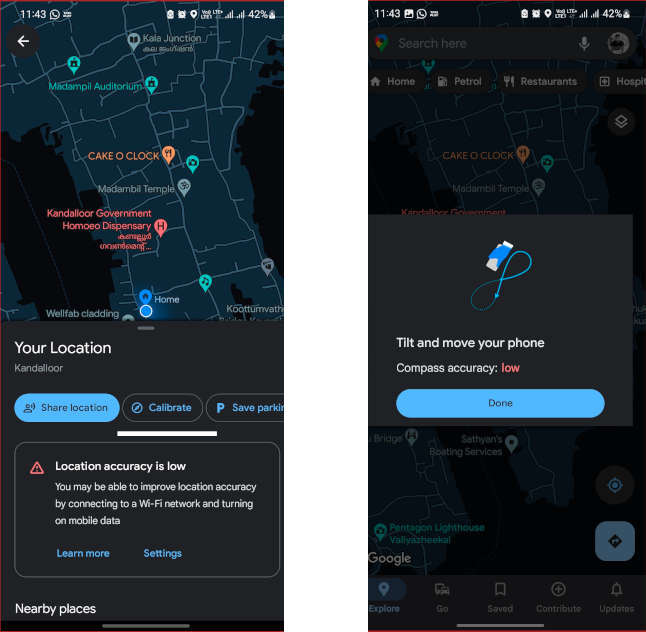
The process is simple and hasn’t been changed for a long time, although the interface is somewhat different. First of all, you need to tap on the blue circle on the screen that shows your current location on the map.

In the “Your Location” panel at the bottom of the screen, you will see the “Calibrate” option; tap on it. Then move the mobile following the instructions as shown on the screen.

Calibrate the compass

4. Change the car icon

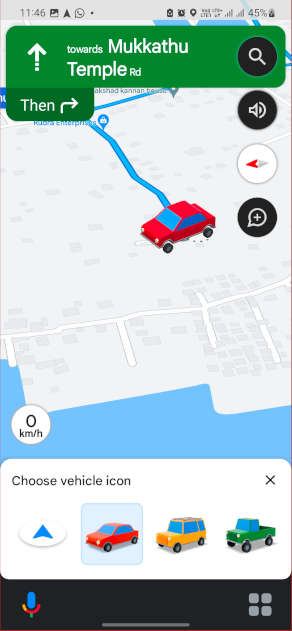
Bored of using the usual arrow icon in the navigation — how about using a 3D car icon to show you the way? In Google Maps, you have the option to choose between three cars — a red one, a yellow one and a green one. 

To change the Google Maps arrow icon, tap on the arrow while you are on a route to somewhere and then choose your favourite vehicle icon in the menu that appears at the bottom of the window.

Change the car icon

5. Google Assistant driving mode

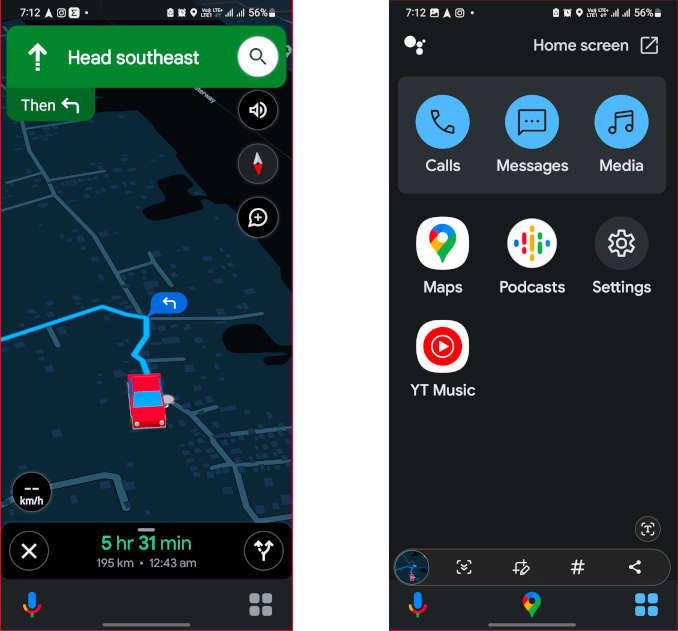
With the help of Google Assistant Driving Mode, you can control music, send messages or make calls with your voice. Google Assistant driving mode is activated automatically when available and is displayed on the bottom bar during a route. There you can find Google Assistant on the left side and a menu option on the right.

Google Assistant driving mode

If you’re not interested in it, you can turn it off from Settings under Navigation settings > Google Assistant settings > Driving mode.

Turn off Google Assistant driving mode

6. Route to home or work with a touch

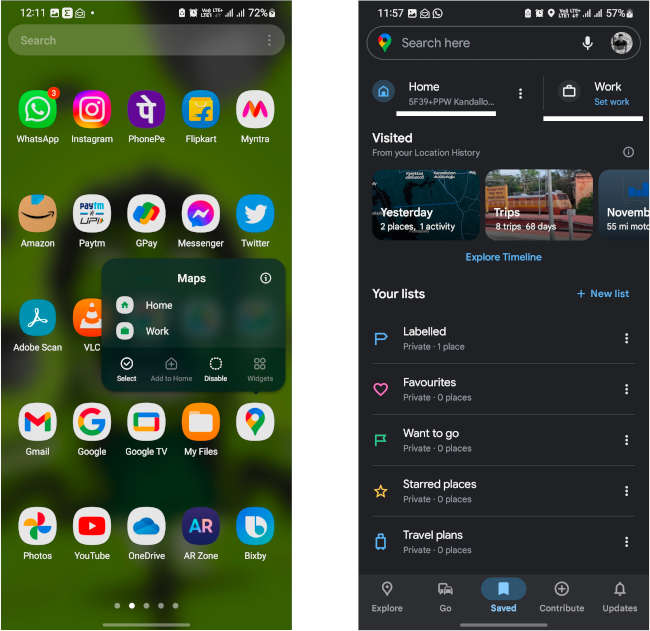
If you’re going home or to work, take advantage of Google Maps quick shortcuts, those that appear by long-tapping the Google Maps icon in your home screen. 

Two options will appear — Home or Work. Each option will open a navigation route with the home or work address that you have saved in Google Maps. If you don’t have these addresses saved, you’ll be prompted to do so the first time you use the shortcut. Or you can set it by going to “Saved” on the Maps homepage.

Route home or work with a touch

7. Google Map widgets

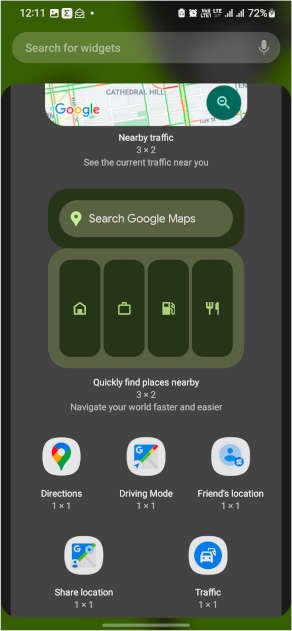
Google Maps offers a collection of home screen widgets for specific functions that can be very useful. These are all the widgets currently available:

Google Map widgets
  • Directions: It is a configurable shortcut in which you can create a route from one point to another by choosing the means of transport that you are going to use. Tapping on it opens the route directly.
  • Driving mode: This widget enables Google Assistant Driving Mode.
  • Friend’s location: When adding this widget, you must choose one of your contacts. The idea is that when you open the shortcut, you see the location of your friends and family, as long as they are sharing it with you, of course.
  • Share location: It is a shortcut to the location sharing feature of Google Maps. Using this feature, you can share your real-time location with anyone.
  • Traffic: This widget will give you direct access showing the nearby traffic.
  • Nearby traffic: It is a resizable widget with which you can see what the traffic around you is like with green, orange and red lines without opening Google Maps apps.
  • Quickly find places nearby: A search widget with shortcuts to specific searches like home address, work address, nearby gas stations, etc.

8. Routes with multiple stops

While going from place A to B, you can add stops in Google Maps and reorder them as you desire. To do so, first, choose the location where you want to go, then hit “Directions”, and then use the “⋮” menu on the upper right corner of the screen and choose “Add stop”. 

This will create a new stop, but as soon as you add it you will be given another option to add another one. Best of all, you can reorder them by sliding the button to the right of them.

Routes with multiple stops

9. Look for stops along the way

When creating a route, use the ⋮ menu and choose “Search along route” to find someplace like a restaurant, petrol pumps or any other places before reaching your destination.

This opens a normal Google Maps search, but the advantage is that it will search in the vicinity of the route. It is therefore ideal for finding places to visit on the way, such as services, a restaurant or a place to refuel.

Look for stops along the way

10. Arrive on time for your appointments

When creating a route in Google Maps, the application assumes that you want to leave exactly at that moment. It will tell you how long it takes to get there, but you can also choose a specific departure or arrival time. You can adjust it from the menu, in “Set depart or arrive time”.

Arrive on time for your appointments

If you choose a departure time other than your current time, Google Maps will use the traffic estimate for that time, and you can also choose an arrival time so that Google Maps calculates when you need to leave to be on time.

11. Places you frequently go

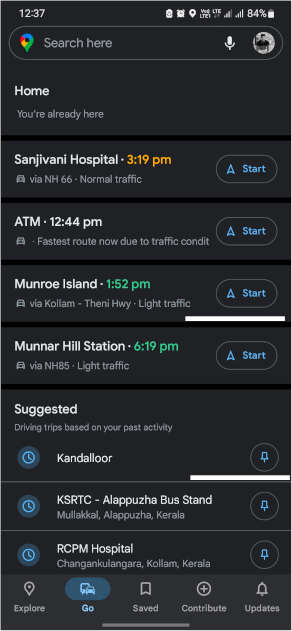
Google recently added the “Go” tab to the bottom bar of the app home screen. In it, you can add all the places you frequently go by tapping to pin button next to the place name, so you can start browsing them with one touch, in addition to seeing how the traffic is and what estimated time you would arrive at each one of them.

Places you frequently go

12. All the places and cities you’ve been to

If you are curious to know how many cities you have visited, you can easily check it on Google Maps. You can also easily check it from the “Saved” tab in the bottom bar.

Under Visited, you’ll see different categories of places displayed like cities, trips, world etc. Tapping on them opens the corresponding section of cities or countries that have been visited using Google Maps, while the location history was activated in your account.

All the places and cities you visited

13. Where were you on Tuesday of last year?

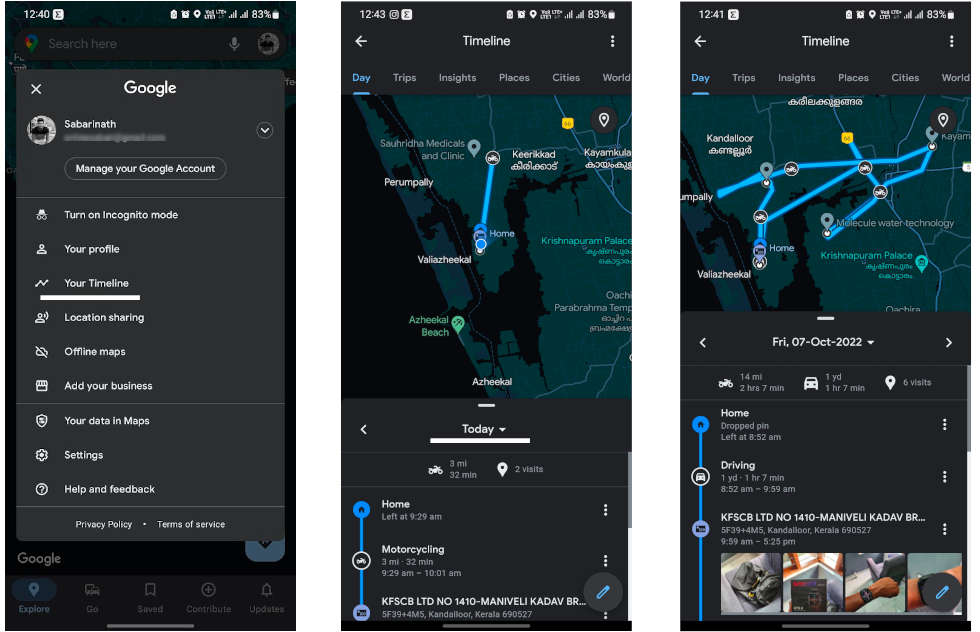
With Google Location History turned on, it keeps track of where you go or what photos you take each day. This can be useful later to see where you lost your keys or where you were on Tuesday, any date, any year, at any time. Only you can see this information.

To check your timeline, tap on your profile picture and choose “Your Timeline” from the menu. Next, tap on the Today displayed at the top to open the day picker on the calendar.

your Timeline in Google Maps

14. Take advantage of the different layers

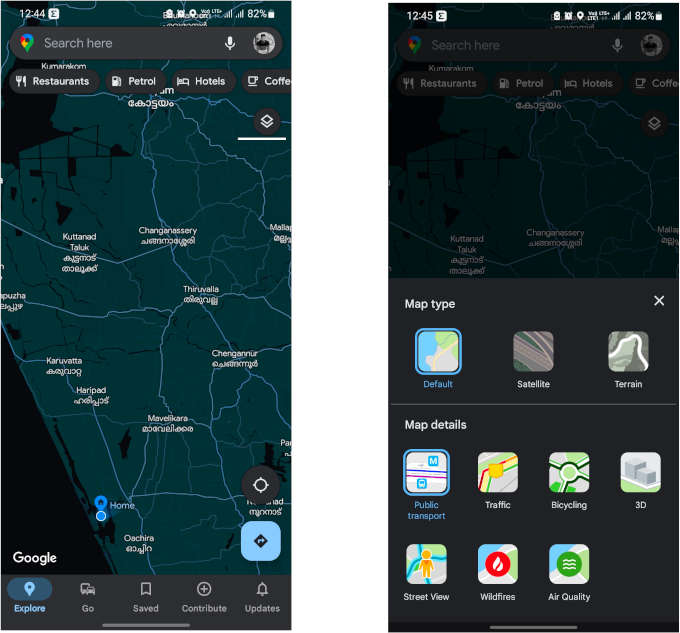
Over time, Google Maps has collected a good number of layers and different types of maps, accessible from the floating layer icon in the upper right corner of the map. These are the options available today:

different layers on Google Maps
  • Default: The most common and standard map of Google Maps.
  • Satellite: Map with Google satellite images.
  • Terrain: Map showing topography and elevation.
  • Public transport: The public transport lines are superimposed on the chosen map.
  • Traffic: Traffic information on the map.
  • Bicycle: It shows the status of bike lanes.
  • 3D: Activate 3D buildings by zooming in enough on the map.
  • Street view: Blue lines overlaid on map where Street View is available.
  • Wildfires: It shows information about forest fires on the map.
  • Air quality: Where available, shows air quality information on the map.

15. Measure distances from one point to another

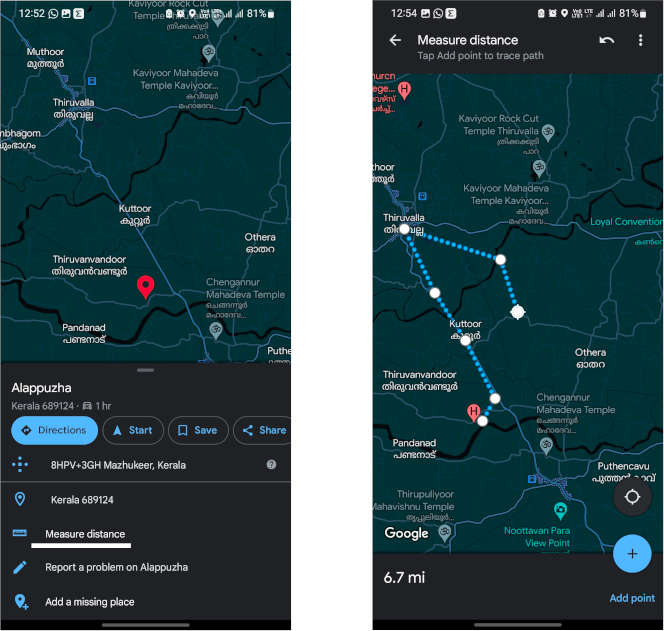
When you make a route in Google Maps, it tells you the distance, but you can also measure distances randomly in Google Maps. It measures the distance in a straight line. The function is a bit hidden, as you must first select any place by long pressing on the map — the red pin will appear and then choose the “Measure distance” option by swiping up the location option menu. 

This will open the measurement mode, which starts from the current location and then you can manually move the pointer to any part of the route. Another unique thing is that you can add more segments by tapping “Add point” button to make more exact measurements, it will help if you are not in a straight line.

Measure distances from one point to another

16. Download maps to view offline

Google Maps will automatically suggest you download areas of the map that it considers will be useful to you, but you can also choose areas to download yourself and so that you can use them even if there is no network coverage.

To do so, tap on your profile picture and choose “Offline Maps”. Then tap Select your own map option and adjust the inset view to fit the area of ​​the map you want to download.

Download maps to view offline

17. Tell Google what interests you

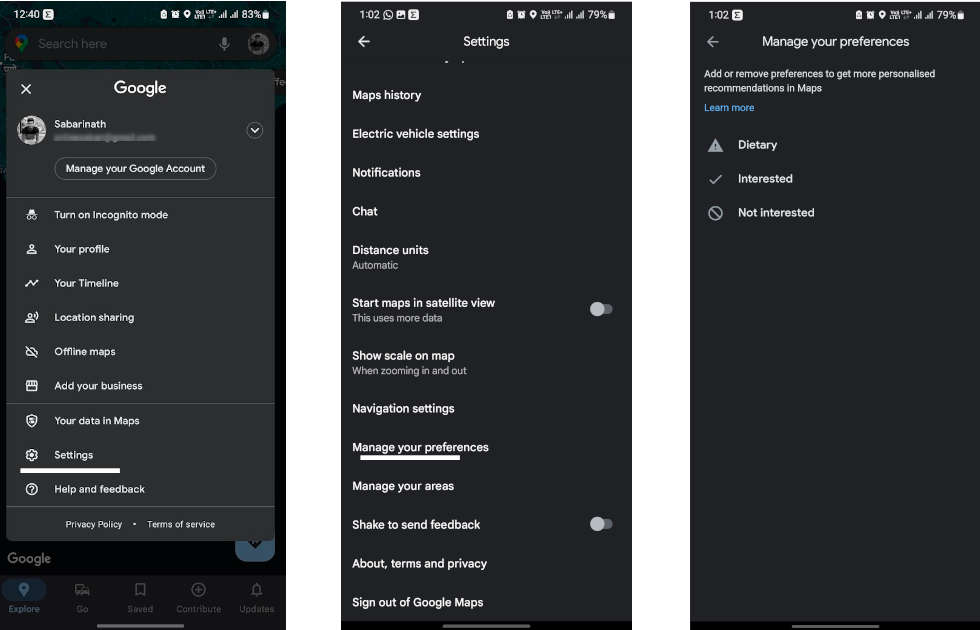
Google already has a good idea of ​​what you like and don’t like through the information it collects from you when you use its products, but you can help it by going to Google Maps settings and going to “Manage your preferences” option.

You can then go into Dietary, Interested, and Not Interested to tell Google if you prefer vegan or gluten-free food, if you’re interested in buffets, or if you’re not interested in anything else. This information will be used when recommending places to you on Google Maps and on the What’s New tab.

Tell Google Maps what interests you

18. Lower the volume of voice prompts

There are few things more frustrating than being in the car with Google Maps giving you directions and your phone not stopping the conversation or the voice yelling at you to take the third exit at the roundabout. If Google Maps is too loud, change the volume in the settings.

To do this, go to the Google Maps settings and go to Navigation settings. You can find three options available for “Guidance volume”: softer, normal and louder. You can also use the mobile volume, of course, but this setting will make Google Maps stand out more or less compared to other mobile sounds.

Lower the volume of voice prompts

19. Find everything around you

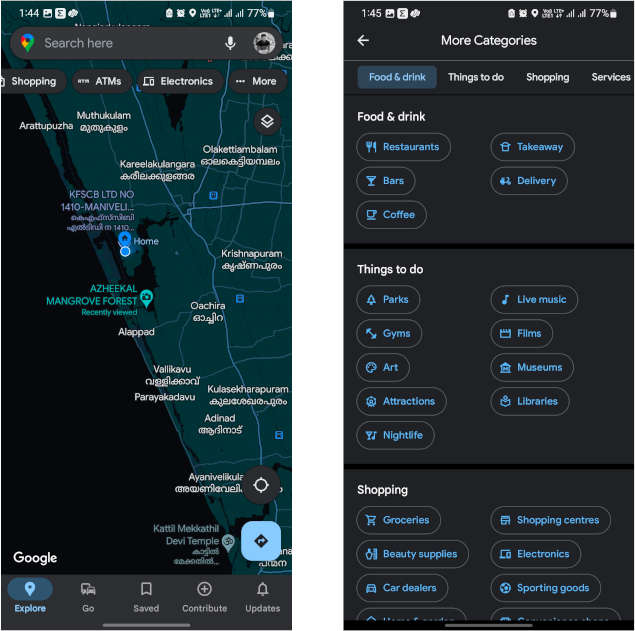
You can search for anything imaginable in the Google Maps search bar, but also just below it are category suggestions. If you slide to the left you will see that at the end of that list there is a button … More.

Clicking on it opens the list of categories of points of interest, such as restaurants, bars, parks, gyms, parking lots, car washes, charging points, ATMs etc. It’s a quick way to find specific places around you.

Find everything around you

20. Avoid highways and toll roads

There are times when you don’t want to use the highway. In such a case, let’s instruct Google Maps not to use the highway. Enter your destination and tap the three-dot icon on the top right of the screen. Tap the “Route options” button to display options to set not to use highways, toll roads, and ferries.

Avoid highways and toll roads

With these Google Maps hacks, you can now call yourself a Google Maps expert.

Free-to-Play Triumph: Genshin Impact Outprofits Activision Blizzard

Genshin Impact revnue

The free-to-play model has proven to be a goldmine for some developers. One such success story is the Chinese game studio Mihoyo, whose profitability has surpassed industry giants like Activision Blizzard and Sony’s Playstation.

According to a report by the Malaysian newspaper Guangming Daily, Mihoyo, which distributes its games internationally through its subsidiary Cognosphere or Hoyoverse, generated a revenue of 27.3 billion Yuan in 2022. This translates to nearly $3.84 billion USD. The profit stood at a staggering 16.1 billion Yuan, equivalent to over $2.27 billion.

To put this into perspective, Activision Blizzard reported a profit of around 1.5 billion USD on revenue of 7.52 billion for the fiscal year 2022. Sony’s entire gaming division, including Playstation, made a profit of 270 billion Yen, or 1.85 billion USD, in 2022.

significant portion of Hoyoverse’s revenue comes from mobile versions of their games. Data from Statista shows that the company made $715 million US dollars from in-app purchases in the first half of 2023 alone.

For a long time, the primary source of Hoyoverse’s income was the free-to-play role-playing game Genshin Impact. According to Sensor Tower, the game reached a revenue milestone of $3 billion in 2022. Despite recording its lowest monthly revenue since its launch in 2020 in May 2023, the game still brought in $53 million.

However, Hoyoverse’s new game, Honkai Star Rail, is now generating more international revenue.

Genshin Impact is a gacha game, where rewards are distributed randomly. Upon its release, many warned about its gambling-like mechanisms. Some Genshin Impact streamers reportedly spent five-figure sums on in-game content.

The success of Mihoyo and its games like Genshin Impact and Honkai Star Rail underscores the potential of the free-to-play model in the gaming industry. It also raises questions about the sustainability of such models and the ethical implications of their monetization strategies.

6 Ways IT Consultants Improve Your Tech Business

IT Consultants Improve Your Tech Business

In the present fast-paced, technology-driven world, having efficient and reliable IT infrastructure is important for tech businesses’ success. Anyhow, handling and maintaining complex IT systems can be a challenging task for most companies. These are the major reasons we need IT consultants.

There are several options, like the local IT pros at Nicolet Tech. Most of them offer the best expertise and assistance to improve your tech business.

It is necessary to contact the right IT consultants to improve your tech business. If you are not sure yet, keep reading our article.

What Does an IT Consultant Actually Do for You?

Thinking of hiring an IT consultant for your business? That may be a good idea. Before considering it, you should know how an IT consultant will assist your business.

Proper Planning and Long-Term Vision

IT consultants clearly understand the advanced trends and evolving technologies of tech companies. You can create a strategic plan to align your technological goals with your business objectives. IT consultants help you create a long-term plan to achieve your desired results. This will make sure that your technology investments are well-directed and allow your business to succeed.

Enhance Productivity and Efficiency

IT consultants have years of experience optimizing IT workflows and tasks. They will easily find the inefficiencies and bottlenecks in your present systems. IT consultants enhance productivity by integrating new software solutions, streamlining communication channels, and applying automation tools. They can improve the productivity and efficiency of your business operations by simply developing your technology infrastructure.

Flexibility and Scalability

When your business develops, your IT needs may differ. IT consultants can assist you in designing and applying scalable solutions that can adapt to your evolving requirements. They can evaluate your present infrastructure and recommend expansions or upgrades to make sure your systems can manage increased workloads and adopt future development.

In order to plan for scalability, IT consultants can help your business remain responsive and agile in a highly evolving marketplace.

Training and Expertise

Most in-house IT teams face various challenges while following business practices. IT consultants have plenty of knowledge and experience from working with several clients in different sectors.

Moreover, they can train your staff on new technologies, offer assistance on IT procedures and policies, and provide advice and support. Their skills help your team stay updated and learn the necessary skills. Your team will be able to adopt new technologies and improve efficiency.

Minimization of Expenses

Most businesses prioritize getting good-quality IT infrastructure without breaking their bank. IT consultants will perform a deep analysis of your technology expenditures and find areas where you can cut costs. It may include renegotiating vendor contracts, migrating to more affordable cloud solutions, and consolidating software licenses. IT consultants help you make the right decision in terms of IT investment.

Frees Up your Schedule

Hiring an IT consultant frees up a lot of time in your schedule. IT consultants take up a huge portion of your tasks and activities. This means that you don’t have to deal with the pressure of allocating resources or dealing with deadlines.

Final Thoughts

By partnering with IT consultants, your organization will remain thriving and competitive. We believe that you realized that an IT consultant is essential for your tech business. If so, you need to find a genuine one, with the experience and expertise to simplify your business.

Frequently Asked Questions

Who exactly is an IT consultant?

An IT consultant is a technology specialist who offers consulting services and helps clients with technical and technological initiatives to succeed in business. They function closely with the organizations that employ technology systems for the operations of businesses. They work as independent contractors or regular employees.

What are the responsibilities of an IT consultant? 

The responsibilities of an IT consultant are listed below.

  • Offer expert assistance and recommendations on IT problems and business.
  • Understanding business objectives and customer needs.
  • Handling IT development tasks with in-house technical staff. 
  • Training users in new and existing IT systems.
  • Designing IT networks and systems.
  • Troubleshooting network, software, and hardware issues.
  • Providing suggestions.
  • Generating reports.

Note: The ways IT consultants can develop your tech business may differ based on your requirements and circumstances.

Google Introduces Virtual Try-On and Real Model Imaging to Enhance Google Shopping Experience

Google Generative AI into Advertising Tools

Google is revolutionizing the shopping experience with the integration of generative AI into Google Shopping. As part of a broader update, Google has unveiled a virtual fitting tool for apparel, utilizing generative AI to capture clothing images on real models in various poses. This innovative technology enables customers to virtually try on clothes and even predicts how shadows will form, enhancing the online shopping experience.

Google’s virtual try-on feature is powered by a new diffusion-based model developed internally. Following the footsteps of text-to-art transformations like Stable Diffusion and DALL-E 2, the Diffusion model gradually subtracts noise from an initial image composed entirely of noise, step by step, to move closer to the desired outcome. This approach, applied to clothing images, allows Google to simulate how clothing drapes, creases, fits, stretches, wrinkles, and how shadows interact with the fabric.

To enhance the model’s robustness and address visual imperfections such as distorted folds, Google utilized pairs of images depicting individuals wearing clothes in different poses. By repeatedly processing random pairs of clothing and people images, Google refined the model, ensuring a more realistic representation of apparel.

Starting today, US Google Shopping users can virtually try on women’s tops from popular brands such as Anthropologie, Everlane, H&M, and LOFT. Users can identify available items for virtual try-on through the new “try on” badge in Google search results. Men’s tops are scheduled to be included later this year, broadening the offering to a wider audience.

Virtual try-on technology is not entirely new, as companies like Amazon, Adobe, and Walmart have also explored generative modelling and real-time clothing rendering. However, Google’s implementation stands out with its emphasis on using real models and catering to diverse body types, races, skin tones, and hair types.

Simultaneously with the virtual try-on feature, Google will implement AI and visual matching algorithms to filter clothing searches within Google Shopping. Users can refine their search results across various stores based on specific criteria such as colours, styles, patterns, and more. This feature aims to replicate the assistance one would receive in physical stores, where associates suggest alternative options based on what customers have already tried on

Google’s integration of generative AI and virtual try-on technology marks a significant advancement in the online shopping landscape. By enabling customers to virtually try on clothes and predicting how the clothing will drape and interact with shadows, Google is enhancing the accuracy and convenience of online apparel shopping.

Visual Query Builders vs. Traditional SQL Coding – Child Explanation

Visual Query Builders

Today, we’re going to talk about something that’s as exciting as a match in Brawl Stars, but instead of battling opponents in an arena, we’re going to battle data in a database. The game we’re playing is called SQL, and the tools we’re using are SQL queries and Visual Query Builders.

Just like in Brawl Stars, where you need to choose the right brawler for each match, in SQL, you need to choose the right method to interact with your data. You can write SQL queries directly using traditional SQL coding, or you can use a tool called a Visual Query Builder. Each method has its strengths and weaknesses, and choosing the right one can be the key to winning your data game.

In this article, we’re going to compare these two methods – traditional SQL coding and Visual Query Builders – and see how they stack up against each other. We’ll look at their strengths and weaknesses, and we’ll see some examples of how they work in real-world scenarios. By the end of this, you’ll be well-equipped to choose the right tool for your data battles, just like choosing the right brawler in Brawl Stars.

Understanding SQL Queries

Just like how each brawler in Brawl Stars has a unique attack that they use to interact with the game world, in the world of databases, we use something called SQL queries to interact with our data. SQL stands for Structured Query Language, and it’s a language that we use to communicate with databases.

An SQL query is like a command or a question that we ask the database. For example, we might have a query that asks, “What are all the items in our inventory?” or a command that says, “Add this new customer to our customer database.” Just like how the outcome of a Brawl Stars match can depend on the attacks you use, the results you get from a database depend on the SQL queries you use.

SQL queries are incredibly important in database management. They’re how we retrieve data, insert new data, update existing data, and delete data. Without SQL queries, a database would be like a Brawl Stars game with no brawlers – there’d be no way to interact with it!

Traditional SQL Coding

Traditional SQL coding is like playing Brawl Stars using manual controls. You have complete control over your actions, but it requires skill and practice to do it effectively.

In traditional SQL coding, you write out your SQL queries as lines of code. This gives you a lot of flexibility and control, as you can write any query you can think of. However, it also requires a good understanding of SQL syntax and database structure.

Let’s look at some of the benefits and drawbacks of traditional SQL coding:

Benefits:

  1. Flexibility: You can write any query you want, without being limited by the features of a tool.
  2. Control: You have complete control over the query and can fine-tune it to your exact needs.
  3. Learning: Writing SQL queries by hand can be a great way to learn SQL and understand how databases work.

Drawbacks:

  1. Complexity: SQL syntax can be complex, especially for more advanced queries.
  2. Time-consuming: Writing SQL queries by hand can be time-consuming, especially for complex queries or large databases.
  3. Errors: It’s easy to make mistakes when writing SQL queries by hand, and errors can be hard to spot.

Here’s an example of a traditional SQL query:

SELECT Customers.CustomerName, Orders.OrderID

FROM Customers

INNER JOIN Orders ON Customers.CustomerID = Orders.CustomerID

WHERE Customers.CustomerCountry = 'USA';

This query retrieves the names of all customers from the USA and their order IDs from a database. As you can see, it requires a good understanding of SQL syntax to write this query correctly.

Visual Query Builders

If traditional SQL coding is like playing Brawl Stars with manual controls, then using a Visual Query Builder is like playing with auto-aim turned on. It’s easier and requires less skill, but you might not have as much control.

A Visual Query Builder is a tool that allows you to create SQL queries by dragging and dropping database elements, rather than writing SQL code by hand. You can select tables, fields, and conditions, and the Visual Query Builder will automatically generate the SQL query for you.

Let’s look at some of the benefits and drawbacks of Visual Query Builders:

Benefits:

  1. Ease of Use: Visual Query Builders are generally more user-friendly than writing SQL code by hand, especially for beginners.
  2. Speed: Building queries visually can be faster than writing SQL code, especially for complex queries.
  3. Reduced Errors: Visual Query Builders can help reduce syntax errors, as they automatically generate the SQL code.

Drawbacks:

  1. Limited Flexibility: While Visual Query Builders can handle a wide range of queries, they might not be able to handle very complex or unusual queries.
  2. Learning Curve: While generally easier than writing SQL code, Visual Query Builders still have a learning curve, especially for understanding how to represent complex queries visually.
Visual Query Builders screenshot

One example of a Visual Query Builder is the one provided by dbForge Studio for SQL Server. This tool allows you to build queries visually by dragging and dropping tables and fields, and by setting up conditions and filters. It also provides features for optimizing and analyzing queries, making it a powerful tool for working with SQL Server databases.

Comparative Analysis

Just like choosing the right brawler in Brawl Stars can make a big difference in your game, choosing between traditional SQL coding and Visual Query Builders can have a big impact on your work with databases. Let’s compare these two methods in terms of ease of use, efficiency, error reduction, and learning curve.

CriteriaTraditional SQL CodingVisual Query Builders
Ease of UseRequires a good understanding of SQL syntax and database structure.Generally more user-friendly, especially for beginners.
EfficiencyCan be time-consuming, especially for complex queries.Can be faster than writing SQL code, especially for complex queries.
Error ReductionErrors can be hard to spot and easy to make.Can help reduce syntax errors, as they automatically generate the SQL code.
Learning CurveSteeper learning curve, especially for complex SQL queries.Still has a learning curve, but generally easier than learning SQL syntax.

So, when should you use traditional SQL coding, and when should you use Visual Query Builders?

  • Traditional SQL Coding is a good choice when you need maximum flexibility and control over your queries. It’s also a good choice if you’re trying to learn SQL, as there’s no better way to learn than by doing. However, it can be more time-consuming and prone to errors, especially for complex queries.
  • Visual Query Builders, on the other hand, are a good choice when you want to build queries quickly and easily, especially if you’re a beginner or if you’re working with complex queries. They can also help reduce errors by automatically generating the SQL code. However, they might not be able to handle very complex or unusual queries, and they still have a learning curve, especially for understanding how to represent complex queries visually.

In the end, the best tool depends on your specific needs and circumstances. Just like in Brawl Stars, the best brawler depends on the game mode, the map, and your personal play style. So, experiment with both methods, and see which one works best for you!

Goodbye to ‘Core i’: The Dawn of Intel Core Ultra

Intel rebranding

Intel has announced a significant rebranding of its processor lineup. The iconic “Core i” series, which has been a staple in the tech industry for over 15 years, is being phased out. In its place, Intel introduces a new naming scheme that is set to redefine its brand identity and product portfolio.

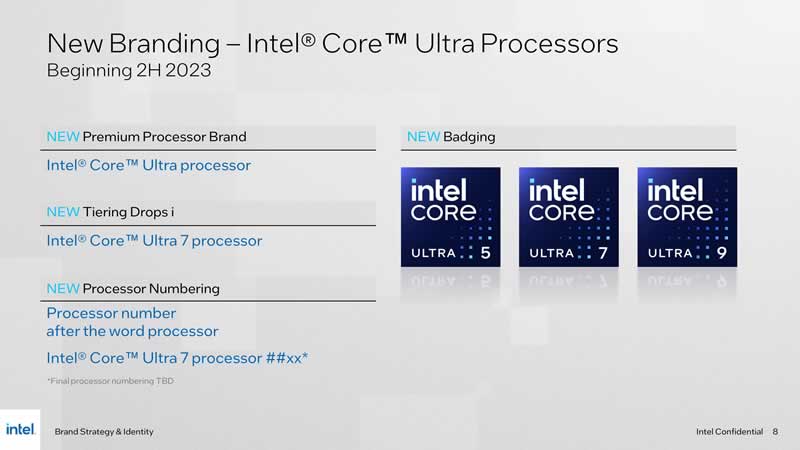
The new nomenclature will see the introduction of the “Core Ultra” series, a name that will be associated with Intel’s most powerful and next-generation processors. This change is set to take effect with the launch of the Meteor Lake line, slated for release in the second half of 2023.

The processor catalogue will now be divided into three distinct tiers:

  • Intel: This will be for entry-level processors that were previously offered under the Pentium and Celeron brands.
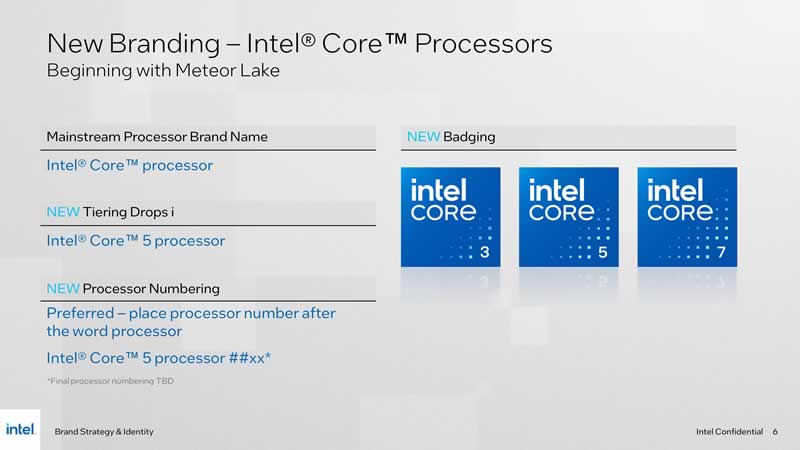
  • Intel Core: This will be for the mainstream line of processors, such as Intel Core 3, 5, or 7.
  • Intel Core Ultra: This will be for the catalogue of the most powerful and next-generation processors, such as Intel Core Ultra 5, 7, or 9.

Intel’s decision to adopt the “Core Ultra” name is not surprising, considering that the company had hinted at this change in early May. The company believes that the new naming scheme will help consumers differentiate between their latest high-performance releases and the rest of their products.

Intel Core Ultra

The rebranding is not just a superficial change. With the debut of Meteor Lake, Intel’s chips will be the first to adopt the 4-nanometer lithographic process. They will also be the first to feature a dedicated engine for artificial intelligence, known as Intel AI Boost.

However, the transition to the new naming scheme may not be without its challenges. There could be potential confusion between the Core and Core Ultra series, especially when there are overlapping launches of Core 5 and 7 with Core Ultra 5 and 7.

Intel Core rebranding

Intel’s new branding strategy is designed to simplify the identification of the right solutions for customers’ computing needs. It emphasizes the prominence of the Intel Core brand, which has been a staple in the PC industry for nearly two decades. With the introduction of the Core Ultra series, Intel is poised to redefine performance standards in the processor market.

Google Domains’ Journey Ends at Squarespace in a $180 Million Deal

Google Domains Shuts down

Alphabet, Google’s parent company, has announced its decision to wind down its domain business, Google Domains. The assets of Google Domains, which include hosting for approximately 10 million domains and a substantial client base, are being sold to Squarespace, a popular website creation platform.

The acquisition, valued at around $180 million, is expected to be finalized by the third quarter of this year. As part of the agreement, Squarespace has committed to maintaining the renewal prices for existing clients for at least 12 months. Furthermore, Squarespace will become the exclusive domain provider for Google Workspace subscribers.

Both companies are focused on ensuring a smooth transition for clients. This move marks a significant shift in the domain registration landscape, with Squarespace poised to become a major player in the domain hosting market.

The deal appears to be a win-win for both companies. Google, on one hand, can streamline its operations and focus on its core businesses. On the other hand, Squarespace can significantly expand its customer base and solidify its position in the market.

For Google Workspace subscribers, Squarespace will become their exclusive domain provider. This change is expected to be seamless, with Squarespace committed to maintaining the same level of service that users have come to expect from Google Domains.

With the acquisition of Google Domains, Squarespace is set to become a dominant force in the domain hosting market. The company’s commitment to maintaining renewal prices for existing clients for at least a year shows a dedication to customer service that will likely serve them well in this new venture.

How AI is Transforming the World of Web Development

AI Transforming Web Development

Are you a web developer or tech enthusiast looking to know how AI is transforming web development?

Read this entire blog post to clear your all doubts.

Prior, you would have known that web development has been in a state of continuous evolution since its inception. From basic HTML pages into dynamic, interactive, and immersive experiences. 

Now, you are going into a new era where artificial intelligence (AI) is set to revolutionize web development. To leverage the benefits of AI into your web development, you must know how to create a web application. If you are unclear about creating a web application, here is a complete guide on developing a web application. Remember, this is prior to knowing before you deep dive into this topic.

In this post, we’ll explore how AI is transforming the world of web development, including AI-powered web development tools, AI-driven web designs, and AI-enhanced UX/UI design. So, get ready to dive into the future of web development, shaped by the hands of AI.

Understanding AI’s Role in Web Development

Artificial intelligence is the science of making machines do things that would require intelligence if done by humans. With its ability to learn from experiences, adapt to new inputs, and perform human-like tasks, AI has made a significant impact on many industries, and web development is no exception.

Some of the ways AI impacts web development include:

  • Automating routine tasks: AI can automate several routine tasks in web development such as code generation, debugging, and testing. This automation reduces human error and speeds up the development process.
  • Improving user interfaces: AI can analyze user behaviour to create more personalized and user-friendly interfaces. This improves the overall user experience and increases engagement.
  • Enhancing web accessibility: AI, with machine learning and natural language processing capabilities, can improve web accessibility, making it easier for people with disabilities to access and use websites.

Let’s dive deeper into each of these areas and see how AI is truly reshaping the landscape of web development.

User Experience (UX) Design

Before AI, personalizing a user’s experience on a website meant a lot of manual work. Now, AI algorithms can analyze user behaviour in real-time, learning from each interaction to provide a more personalized experience. They can offer tailored product recommendations, serve relevant content, and even adjust the website layout based on user preferences.

For instance, consider an e-commerce site. With AI, the site can now dynamically display products based on a user’s past purchases or browsing history. This type of personalization not only enhances the user experience but also drives conversions and sales.

AI, with its ability to analyze large amounts of data and generate insights, is also transforming UX/UI design.

  1. Predictive user experience: AI can analyze user behaviour and use these insights to predict what users will do next. This allows developers to design interfaces that anticipate user actions, providing a smoother and more intuitive user experience.
  2. Chatbots and voice user interface: AI-powered chatbots and voice interfaces like Alexa and Google Assistant provide a more interactive and engaging user experience. They also allow users to interact with the website in a more natural and intuitive way.
  3. Accessibility improvements: AI can analyze websites for accessibility issues and suggest improvements. This makes websites more accessible to users with disabilities, providing a more inclusive user experience.

In addition, if you are looking to learn more about AI advancement in design, read this post on how AI will transform web design forever.

Chatbots and Virtual Assistants

The advent of AI-powered chatbots and virtual assistants represents a significant shift in how businesses interact with their customers. These virtual entities can handle multiple customer inquiries simultaneously, saving businesses time and resources. They can answer FAQs, guide users through processes, or even handle transactions.

The more sophisticated AI chatbots can understand and respond to complex queries, recognize user emotions, and even learn to improve their responses over time. This 24/7, personalized customer service is transforming the way businesses operate, and it’s all thanks to AI.

Automated Testing

In web development, testing is a crucial phase. It ensures the website works as expected and provides a good user experience. However, manual testing is time-consuming and error-prone. Enter AI.

AI can automate a significant portion of the testing process. It can run thousands of tests in a short time, identifying issues more accurately than a human tester. Moreover, it can learn from past test results to predict where new issues may arise and propose solutions. The result? A more efficient and reliable testing process saves developers considerable time and effort.

Here’s a detailed look at how AI aids in automated testing:

  • Speed and efficiency: One of the significant advantages of AI in automated testing is its speed. AI can run thousands of tests concurrently and much faster than human testers. It saves developers a significant amount of time and accelerates the development process.
  • Precision: AI-powered testing tools are capable of identifying even minor issues that might be overlooked by human testers. They can analyze every aspect of the website, including visual elements, links, forms, and even the performance of different features.
  • Learning capability: AI-powered testing tools have the ability to learn from the past. They utilize machine learning to understand where issues have occurred previously and can predict where potential problems may occur in the future. This proactive approach enhances the quality of the final product.
  • Regression testing: AI excels at regression testing, which involves testing a system to ensure that previously developed and tested software still performs after a change. AI can quickly identify any new issues or regressions caused by recent updates or changes.
  • Usability testing: With AI, testing tools can simulate user interactions and assess the user-friendliness of the website. They can detect complex issues like navigation difficulties, broken links, or non-intuitive workflows.
  • Continuous testing: AI enables continuous testing, where testing is performed at every stage of development. It reduces the chances of major issues appearing in the final product and helps maintain a high-quality standard throughout development.
  • Reporting and analytics: AI can generate detailed test reports and analytics, helping developers understand the weak points in their code and guiding them toward the right solutions.

Code Generation

Perhaps one of the most revolutionary aspects of AI in web development is its potential to generate code. AI algorithms can now produce basic code snippets based on specific parameters. While it’s not about replacing human developers, it’s an excellent tool for speeding up the development process and reducing repetitive tasks.

For instance, tools like Wix’s ADI (Artificial Design Intelligence) and Bookmark’s AIDA (Artificial Intelligence Design Assistant) can design entire websites based on user-provided information.

One of the most visible impacts of AI on web development is the creation of AI-powered web development tools. These tools leverage AI to automate and streamline various aspects of the web development process.

  • Automated coding: Tools like GitHub’s Copilot use AI to suggest code snippets as developers write, saving them time and effort.
  • Design assistance: Tools like Adobe’s Sensei use AI to help with design aspects of web development. Sensei can analyze images and suggest improvements, assist in creating layouts, and even help with image editing tasks.
  • Testing and debugging: AI can automate the testing and debugging process, spotting errors that might be missed by human eyes. Tools like Testim and Bugspots use AI to predict where bugs are likely to occur and automate the testing process.

Looking Ahead: The Future of AI in Web Development

As AI continues to advance, its influence on web development will only grow. Here are a few predictions for the future:

More Sophisticated AI Tools: As AI algorithms improve, expect to see more advanced tools for design, testing, and code generation. These tools will not replace human developers but will instead assist them in creating more complex and innovative web solutions.

Increased Personalization: AI will drive further personalization in web experiences. We might see websites that completely adapt their content and layout based on individual user profiles, leading to an unprecedented level of personalization.

Smarter Chatbots: AI chatbots will become more intelligent and versatile. They might understand user emotions better, handle more complex transactions, and offer a level of customer service that rivals human agents.

As you can see, AI is not just a trend or a buzzword. It’s a powerful tool that’s revolutionizing the web development landscape. Whether you’re a developer looking to streamline your workflow or a business seeking to enhance your web presence, embracing AI is the way forward. And remember, as with any technology, the key to leveraging AI effectively is to understand its potential and stay updated with its latest advancements.