Home Blog Page 128

The Best Tricks for Aiming in PC FPS Games

FPS Gaming

Frustration is a feeling that strikes every gamer once they miss a headshot. Without a doubt, you’ve pulled out your best strategies to deal with the enemy a headshot but missed it. Here’s the good news for you. 

All enemies in all FPS games have a weak point. Discover it, aim, and fire. It will weaken the enemy and give you a chance to give a precise headshot. 

The Best Tricks for Aiming in PC FPS Games

If you’re a newbie to computer FPS games, we advise you to visit https://battlelog.co/ to understand the basics of FPS games. Meanwhile, tag along for the best tricks to make the most of your FPS gaming experience.

Master your Aiming Skills

Before launching an online fight, you should perfect your aiming skills offline. Practice makes you perfect. You should practice how to aim and fire, aim while sprinting, aim while taking cover, and more. You’ll develop more expertise to play well in FPS battles as you keep practicing.

One of the best ways to master your aiming skills is by playing custom/offline modes with a friend or bots. That way, mastering your skills to aim in an FPS game becomes easier. 

Aim at Enemy Weak Point

When playing in an FPS game, monitor enemies’ health when you shoot at them. Identify which part of their body was shot and their health bar reduced drastically. If you can find it, then you have their weak points. 

The weak point of most enemies will be their neck or hip. So, aim at that point and fire to reduce the enemy’s life and weaken him. You can now take your shot.

Optimize the Sensitivity of Your Controller

A higher sensitivity allows you to make swift turns in the gameplay, while a lower sensitivity would provide you with accuracy and precision when locking onto a target. To optimize your sensitivity setting, keep changing between the sensitivity tab until you find a perfect spot that gives you what you want.

Whether you’re using a mouse or a gamepad, you need to optimize the sensitivity settings so your camera movement won’t be too fast or too slow. Rather it will be appropriate and fast enough to give you a perfect aim. 

Don’t Shoot and Sprint in your game

Just like how a recoil behaves, shooting as you sprint will affect your aim. Many bullets will fail to take out the target due to the BSM enabled (Bullet Spread Mechanism). Although sprinting helps you cover more ground, try to reduce the times you do that in your FPS games.

Alternatively, you can do the crouching trick to make your aim more precise and accurate. The difference between crouching while shooting and sprinting while shooting is obvious. Crouching makes a player move less and spread fewer bullets, while sprinting makes a player move more and spread more bullets without accuracy.

Get the best mouse and mousepad

You can get the best mouse and mousepad to enjoy perfect aims in your FPS gameplay. Since the friction between the mousepad and the mouse affects your aim, you may need to get something freer for your mouse to move on.

You can choose hybrid mousepads, hard surface mousepads, or cloth mousepads. These three are the best for FPS gamers. The material used to make these mouse pads will allow your mouse to move freely (and improve your aim).

Make use of your Forearm

Using only your wrist when aiming can affect your precision. Moving your entire forearm when aiming or looking around in FPS computer games is better. Not only will it save you from wrist sprain, but it will also make you experience an easier aiming technique.

Make sure you’re sitting on a comfy seat and a laptop table so your arms can hang freely and play the game. 

Engage in Aim Trainers

In many FPS computer games, you can find game modes that allow you to practice a specific skill over time. Like the Penalty Kick mode in Soccer games, PC FPS games come with Aim Trainers where you can practice your aims with AI-driven bots, targets, or both.

By engaging in the aim trainer mode, you can develop a new level of response time. You will be fast in looking around and make the most of your aiming skills.

Conclusion

Improving your aim in PC FPS games can be time-consuming. However, you can speed things up with these tricks. What’s more! Play aim trainers, move your mouse with your whole arm, and ensure you get the best gaming accessories. 

You don’t want your mousepad to hinder your movement. So, get the best, and don’t forget to always practice!

Zero Harm in Comms: Ubisoft And Riot Games Partner To Detect Harmful Chat With AI

Zero Harm in Comms

Ubisoft and Riot Games have announced a partnership to share machine learning data and make it easier to detect harmful chats in multiplayer games.

Ubisoft and Riot Games will investigate ways to build the technological basis for future industry cooperation and a framework to protect the ethics and privacy of this initiative through the “Zero Harm in Comms” research project. 

With Riot Games’ highly competitive games and Ubisoft’s diverse content, the database will cover all types of players and in-game behaviours, which will be applied further to train the AI ​​systems of the two companies. 

This is the first cross-industry research initiative involving the sharing of machine learning data. Both companies are developing their own deep-learning neural networks. These systems use AI to automatically examine in-game text chat and recognize when players are swearing at each other.

Neural networks get better with more data

The two organizations will exchange private player comments in this research initiative to improve the quality of their neural networks, allowing them to develop more powerful AI faster.

Other companies are also working on this problem — ActiveFence, Spectrum Labs, Roblox, Microsoft’s Two Hat, GGWP and others. The Fair Play Alliance gathers game developers who want to fix the toxicity issue. However, this is the first time a major game company has shared ML data.

This research initiative aims to build a cross-industry shared database and labelling ecosystem that collects in-game data to better train AI-based pre-emptive moderation tools to detect disruptive behaviour. 

As members of the Fair Play Alliance, Ubisoft and Riot Games are firm believers that only collaborative effort and information exchange can result in safe and fulfilling online gaming experiences. As such, this effort continues the great strides both companies have made in building game structures that promote a richer social experience and avoid harmful interactions.

While it is currently in its early phases, the “Zero Harm in Comms” project is the initial step in an ambitious cross-industry effort that will benefit the whole gaming community. As part of the initial research expedition, Ubisoft and Riot Games promised to share their early-stage experiments’ learnings with the entire industry next year, regardless of the outcome.

Discord Was Fined €800,000 For Violating GDPR

Discord news and stories

Discord was fined 800,000 euros (U.S. $829,000) by the French Data Protection Authority, the Commission Nationale de l’Informatique et des Libertés (CNIL), in violation of GDPR. The General Data Protection Regulation (GDPR) is a European Union regulation that strengthens and unifies personal data protection for all European Union (EU) citizens. 

The investigation conducted by CNIL focused on the methods of data processing by Discord Inc. The investigation involved the platform’s website and mobile application. In 2020, CNIL also conducted a documentary inspection by sending a questionnaire to the company.

The CNIL has ascertained the following violations by Discord:

  • Failure to define and comply with a data retention period appropriate to the purpose;
  • Non-compliance with the data subject’s obligation to inform;
  • No data protection by default;
  • Failure to guarantee the security of personal data;
  • Failing to do a data protection impact assessment

Discord saved 2,474,000 accounts of French users who had not used their account in more than three years and 58,000 accounts that had not been used in more than five years, with no particular reason or justification provided by the organization. The platform kept the data of inactive users longer than necessary and let the users use passwords that were too simple.

In determining the fine amount, the authority took into account the violations ascertained, the number of people involved, and the efforts in any case made by the company during the proceeding to be able to guarantee the resolution of the critical issues identified, as well as the fact that the primary business model of the company does not consist the use of personal data provided by the user.

CNIL also warned that once the Discord window is closed, the user is not automatically logged out of the voice chat. To solve this problem, the platform has installed a pop-up window that warns people that the application can run in the background after the window is closed.

FakeCatcher: Intel Introduces Deepfake Detection Technology With 96% Accuracy

FakeCatcher Deepfake Detection Technology

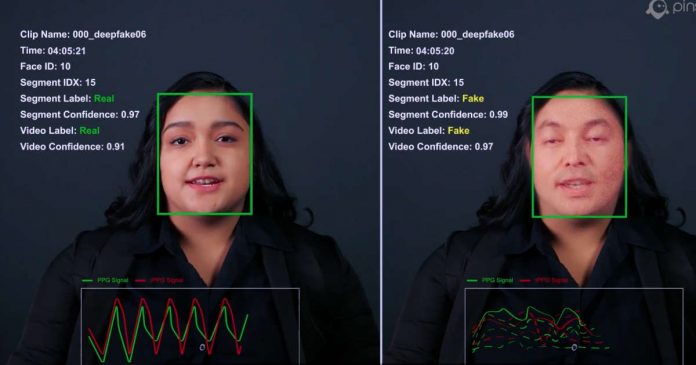
Deepfakes can be created in such quality that they can be mistaken for the real thing. There have been many instances of misinformation, rumours and fraud spreading online. In response to this situation, Intel announced that it had commercialized a deep fake detection technology, FakeCatcher, that can detect fake videos with 96% accuracy. 

Detecting deepfake videos in real-time is difficult, but FakeCatcher claims to be able to return results in milliseconds.

Deepfakes use sophisticated techniques derived from machine learning and artificial intelligence to make celebrities and politicians appear to be doing or saying things they don’t do in a frightening way.

Existing technology uses deep learning to examine digital manipulation trails, so if a web user mistakenly believes a deepfake is real, it can take hours to correct the mistake.

On the other hand, FakeCatcher can detect deepfakes in real time by seeing what makes us human — the ‘blood’ in the pixels of a video. Using a series of sensors, FakeCatcher collects changes in the colour of veins that occur when the heart pumps blood from faces in videos, creating Spatio-temporal maps. Then, machine learning algorithms use these maps to determine if the person in the frame is real.

 It can prevent harmful deepfake videos from being uploaded to social media and artificially processed videos from being inadvertently spread by news organizations.

What Are The Risks Of Downloading Unlicensed Apps?

Risks Of Downloading Unlicensed Apps

At some point, we’ve all downloaded an unapproved app. Despite being a common feature of smartphones, downloading unlicensed apps has significant risks. This post will go through the dangers of downloading unlicensed content to your device as well as how to avoid them.

Disadvantages of Downloading Unlicensed Apps 

Your security and privacy may be at stake if you use unlicensed apps. Unlicensed programs are frequently infected with viruses, malware, and other hazards, which makes it simple to download them from the internet. The same is true of fraudulent programs that pass for legitimate ones but in reality have malware or other hazardous components.

You run the danger of having your data stolen by hackers who want access to your device if you download an app without paying for it. If someone breaks into the server that the business that sold you their goods uses, they might take your credit card information!

Spyware

Spyware is a type of program that keeps track of your activities. It can be used to intercept text messages, emails, and other phone calls as well as to track your whereabouts and steal your personal information.

Games and social media applications like Facebook Messenger and WhatsApp are just a few of the many applications that contain spyware.

If you download these applications from unauthorized sources on your iPhone and Android then you have to face the consequences as somebody can hack your iPhone, Mac, and PC, etc. These social media apps are essential for every mobile users thus bring multiple virus risk.

Furthermore, these kinds of apps are sold by spyware businesses to marketers that want to track what consumers do on their phones in order to better target them with advertisements the next time they access such websites or applications.

Viruses And Other Malware

Malware includes viruses, worms, and trojans, all of which can be installed without the user’s knowledge. A compromised or malware-infected app that was downloaded and uploaded to your device can likewise be used to install them.

Any software program intended to harm a computer system or allow unauthorised access to it is known as malware. The most prevalent types include Trojans, worms, and viruses (also called backdoors).

Fake Apps Bring Trojan Horses 

Malicious Programs That Pose As Something They Are Not Are Known As Fake App

Since they frequently resemble the actual things that are made to steal personal information, they can be challenging to recognize. For instance, phoney antivirus software can request access to your contacts even if it is not required in order for you to enjoy the functionality of the program (allowing access would allow other users with similar intentions to use their own contact lists). 

On your phone or tablet computer, installing one of these phoney copies of well-known programs won’t let you know whether it is secure until you use its features. It can be performing something negative behind the scenes.

Breaches Of User Privacy

Identity theft is another danger. Your data may be stolen by hackers if you download an unlicensed program that contains your personal information. This may result in fraud or phishing, a scam that uses bogus websites that impersonate legitimate ones.

Conclusion

We trust you now understand the risks associated with downloading unauthorised apps. Only download software from reliable websites, and make sure they have been scanned for malware if you want to keep safe. Before downloading an app, do this by verifying the developer’s website or app store!

Nvidia And Microsoft Partner To Build A Powerful AI Supercomputer

Nvidia And Microsoft Partner

Nvidia entered a partnership with Microsoft to create one of the world’s most powerful AI supercomputers, designed to handle the massive computing workloads required to train and scale AI. Nvidia will leverage Microsoft’s scalable virtual machine instances to accelerate the advancement of generative AI models.

The AI supercomputer will be built on Microsoft’s Azure cloud infrastructure. It will include tens of thousands of Nvidia’s powerful H100 and A100 data centre GPUs and the Quantum-2 InfiniBand networking architecture. Microsoft’s Azure cloud platform combined with Nvidia’s GPUs, networking and full AI suite will enable more companies to train, deploy and scale AI, including large-scale and cutting-edge models, according to Nvidia.

The frosting on the cake will be Nvidia’s seventh-generation InfiniBand connectivity architecture. Quantum-2 devices are expected to accommodate heavy workloads with Remote Direct Memory Access (RDMA) and sophisticated acceleration engines. A bandwidth of up to 400 Gb/s will be provided in this instance. This is everything compatible with the Nvidia AI Enterprise operating system.

Nvidia said that the supercomputer could accelerate generative AI research and further advances. This is a relatively new class of large-scale language models, such as DALL-E and Stable Diffusion, that use self-learning algorithms to generate diverse content such as text, code, digital images, video and audio. In recent years, these AI models have grown rapidly, resulting in a major increase in the requirement for reliable computer infrastructure that can evolve with them.

Microsoft will optimize its DeepSpeed ​​library to reduce computing power and memory usage during AI training workloads. It is unknown how much money these companies will invest in the supercomputer and from what date it will start working. We have to wait to find out how this project will progress and if it will finally meet its objectives.

9 Best Security-Centric Linux Distributions For Privacy Protection In 2023

secure and privacy-focused linux distributions

Security-centric Linux distributions are now going to be more essential than before because online privacy protection is one of the important problems our generation facing today.

Since many popular operating systems which we trust with our data and information claims to protect our privacy itself spying on us. So if you are concerned about your privacy or you think your operating system is leaking your personal online details without your permission — then it’s time to ditch that OS.

Why you should need a secure and privacy-focused Linux distro?

  • They are pre-configured with security in mind
  • Addition of TOR network, firewalls, VPN..etc helps to make traffic anonymised
  • Adds extra layers of security to deliver a secure computing experience
  • DNS leaks are impossible, and even malware with root privileges cannot find out the user’s real IP

Actually open-source operating systems, I mean Linux distributions are now becoming more and more popular among users because of many reasons. One of the features of Linux distros is its security and privacy protection.

Almost every Linux operating systems are built to serve users, not to spy on users personal life. So you if you are a general tech geek you can start protecting your online privacy by simply installing any simple Linux distro.

But you are really serious about online privacy, then you should use one of this privacy protection security-centric Linux distributions.

Since these operating systems are not suitable as desktop replacements, so most users will probably also need to use a ‘regular’ operating system for day-to-day use, in which case be sure to perform sensitive tasks only within the secure Linux environment.

Security-Centric Linux Distributions For Privacy Protection

1. Tails

Best Linux Distributions For Privacy Protection

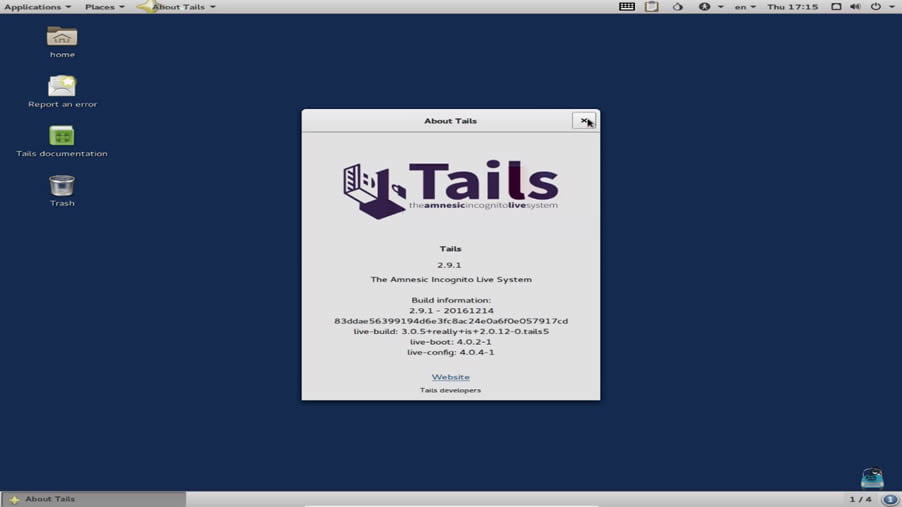
The Amnesic Incognito Live System (Tails) is a security-focused Debian-based Linux distribution. The main motto of this Linux OS is to provide complete Internet anonymity for the users.

Tails is a live security-centric Linux operating system that you can start on almost any computer from a DVD, USB stick, or SD card and leave no trace on the computer you are using unless you ask it explicitly. The important feature of Tails is, all its outgoing connections are forced to go through Tor and non-anonymous connections are blocked. The Tor Project has provided financial support for its development.

The product ships with several Internet applications, including the web browser, IRC client, mail client and instant messenger, all pre-configured with security in mind and with all traffic anonymised.

2. Whonix

Best Linux Distributions For Privacy Protection

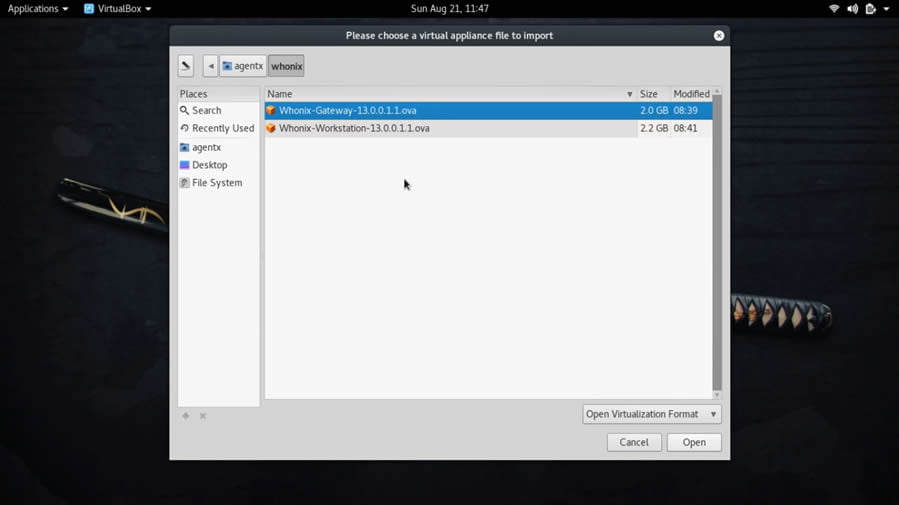
Whonix is another privacy and security-focused Linux distribution based on  Debian GNU/Linux that run on the Tor anonymity network. The operating system consists of two virtual machines — One solely runs Tor and acts as a gateway, which is called Whonix-Gateway. The other, which is called Whonix-Workstation, is on a completely isolated network.

Whonix benefits anyone who does sensitive work on their desktop or online. Only connections through Tor are possible. With Whonix, you can use applications and run servers anonymously over the Internet. DNS leaks are impossible, and even malware with root privileges cannot find out the user’s real IP.

Unlike Tails, Whonix is not “amnesic”; both the Gateway and the Workstation retain their past state across reboots. Not being amnesic improves security on the Gateway, by allowing Tor’s “entry guard” system to choose long-lived entry points for the Tor network, reducing adversaries’ ability to trap users by running malicious relays.

3. Linux Kodachi

Best Linux Distributions For Privacy Protection

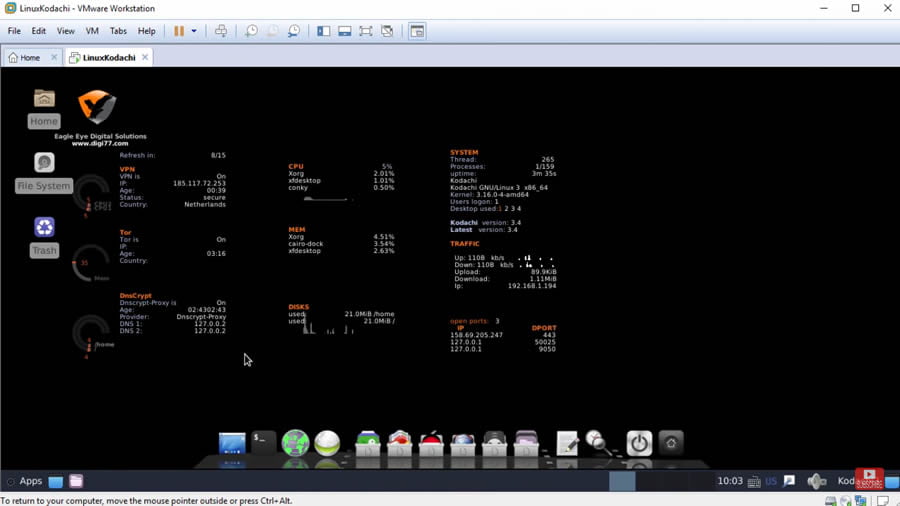
Linux Kodachi is based on Debian GNU/Linux operating system and built around the modern GNOME desktop environment. It will provide you with a secure, anti-forensic, and anonymous operating system considering all features that a person who is concerned about privacy would need to have in order to be secure.

Kodachi is also a live privacy protection operating system with an established VPN connection + Tor Connection + DNScrypt service running. The entire OS is functional from your temporary memory RAM so once you shut it down no trace is left behind all your activities are wiped out.

4. Septor Linux

Septor-Linux-secure-and-privacy-focused-linux-distro

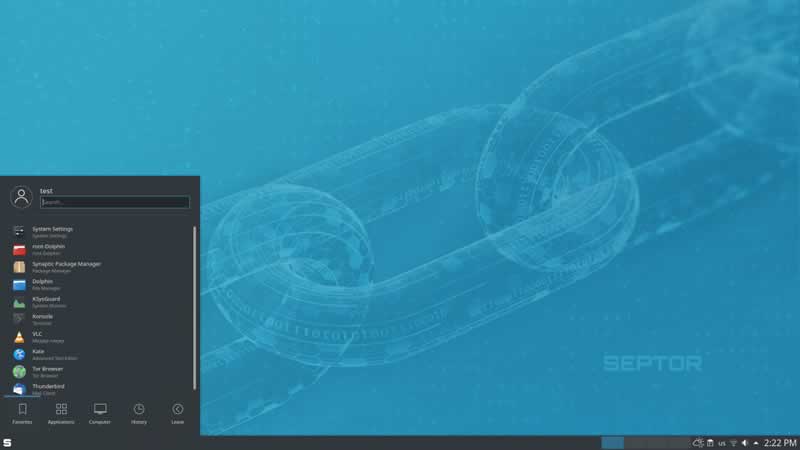
Septor Linux is the reliable distribution that is based on Debian GNU/Linux that provides users with a perfect computing environment for surfing the internet anonymously. Distribution featuring a customised KDE Plasma deskop and Tor technologies.

The developers behind the Septor project describe their operating system as a “hardened” Debian derivative suitable for everyday use and primarily want to address users who want a secure communication and internet environment. In addition to the Tor infrastructure, Septor Linux also uses the free proxy server Privoxy as an HTTP filter, which examines the outgoing HTTP traffic for retrieval of undesired content and information.

5. Subgraph OS

Subgraph OS - a secure linux distro

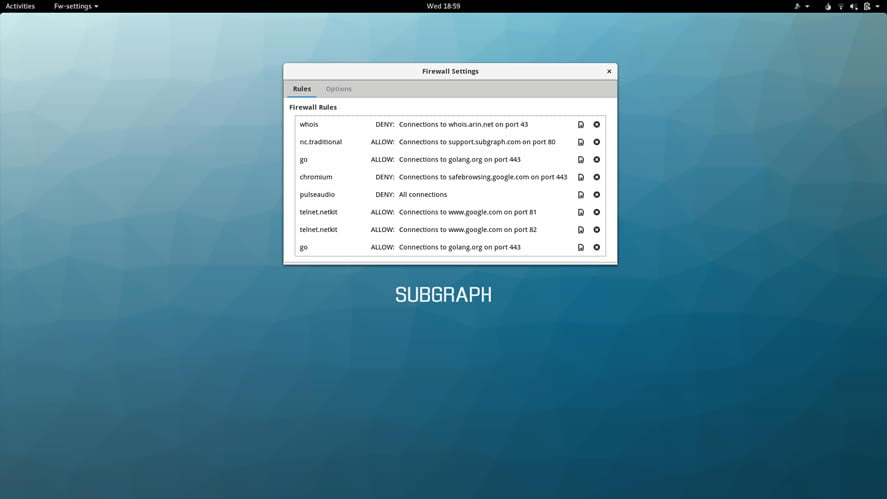
Subgraph OS — a Debian-based Security-focused Linux operating system that aims to combat hacking attacks easier, even on fairly low-powered computers and laptops.

Subgraph OS comes with all the privacy and security options auto-configured, eliminating the user’s manual configuration. The secure Linux distro provides several security, anonymous web browsing and hardening features. Subgraph OS uses a hardened Linux kernel, application firewall to block specific executables from accessing the network and forces all Internet traffic through the Tor network. The distribution’s file manager features tools to remove meta-data from files and integrates with the OnionShare file sharing application. The Icedove e-mail client is set up to automatically work with Enigmail for encrypting e-mails.

6. heads

heads - secure and privacy-focused linux distro

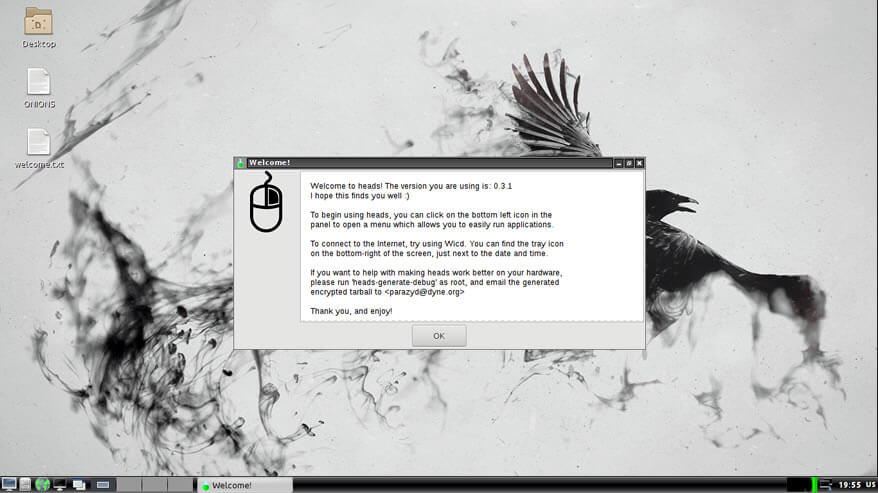
heads is the perfect privacy-focused Linux distribution for those wishes to control their anonymity on the Internet using the Tor network. heads is based on Devuan and one of the important features is that it only uses only free software — meaning you can gain access to any source code that is included in heads, at any time. In heads, all your Internet traffic is sent over Tor by default and also, there is an option to turn it off if you prefer.

7. Qubes OS

Qube OS - secure and privacy-focused linux distro

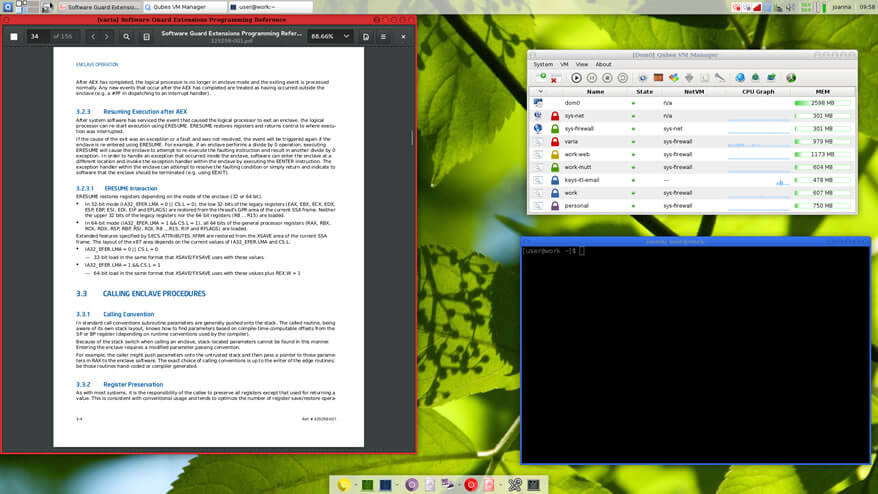
Qubes OS is the Fedora-based security-focused Linux operating system. Unlike other secure Linux distro, Qube OS implements a Security by Isolation approach, so that when some malicious software compromises one of the components of the system, it would get access to only the data inside that environment. Qubes uses the security of the Xen hypervisor, the same software relied on by many major hosting providers to isolate websites and services from each other.

To improve your privacy and anonymity on the internet, Qube uses Whonix and Tor to filter all network traffic. Qube OS is the recommended security-oriented Linux distro by many experts — Edward Snowden using it.

8. Alpine Linux

Alpine Linux - secure and privacy-focused linux distro

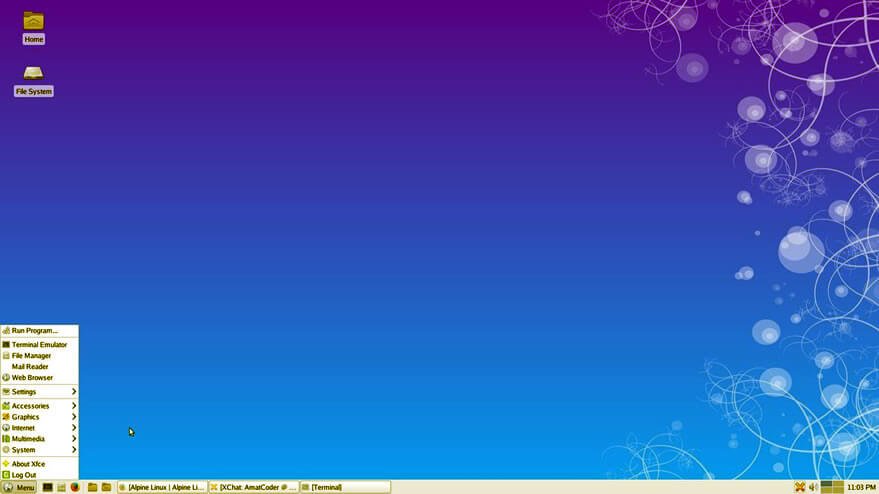
Alpine Linux is based on musl and BusyBox and it is the only independent general-purpose privacy-focused Linux distribution in the list. It was designed with security in mind; it has proactive security features like PaX and SSP that prevent security holes in the software to be exploited.

Also, it is one of the lightweight Linux distros which only requires no more than 8 MB and a minimal installation to disk requires around 130 MB of storage.

9. Discreete Linux

Discreete Linux is a Debian based operating system with the special purpose of protecting data and system against surveillance attacks with trojan software. It is one of the user-friendly security-centric Linux distros designed for ease of use by people without deeper computer knowledge but high-security requirements.

The main feature of Discreete Linux is that it provides an isolated, local work environment that is not accessible to spyware, so that the sensitive data can be processed, encrypted, and stored securely and is protected against such surveillance and espionage attacks.

Soon we will add more security-centric Linux distros with online privacy protection feature. For now choose a best Linux distro from above list and use it along with your existing OS.


Cybersecurity In Green Tech

Cybersecurity In Green Tech

Sustainability is a very complex term that encompasses concepts related to energy saving, environmental pollution and, more generally, safeguarding the planet. But today, it can be declined peculiarly. On the planet we live on today, we can say that two environments coexist, both equally important for life: the digital and the physical. If we adopt this perspective, the single environment loses its meaning. At the same time, it acquires the consideration of global sustainability that derives from the union between the physical and the digital world.

Future global growth depends on digital, but without the adequate security of information systems, such development cannot be guaranteed. The global community runs the danger of building an ecosystem that is vulnerable to the developing threat to the landscape. In this case, cybersecurity might become a barrier to fully utilizing technology and cyberspace.

Cybersecurity experts have urged green technology companies to ensure that their computer systems are adequately protected from cyberattacks, as it is mentioned in this sustainable gadgets ranking. Green technologies contribute to economic and social development without compromising natural resources. They include technologies for the production of clean energy, recycling robots, electric vehicles, financial technology and artificial intelligence.

The phrase “Green Technology” arose from the desire to reduce the environmental impact of technical resources. It promotes the creation of environmentally friendly technology products as well as the recycling of electronic trash.

Operating technologies, the computerized systems used to manage industrial operations and critical infrastructure services that control everything from the power grid to traffic light control, often run-on legacy hardware with low cybersecurity levels. 

For reasons like that, it is becoming increasingly essential to observe the attackers and think from their point of view, and that’s why introducing an ethical and environmental responsibility by those who have not yet implemented adequate protection systems within their own infrastructure is essential. Companies need to develop a set of cybersecurity standards to empower employees to manage risk in the event of a data breach.

These standards will help the organization reduce the risk and exposure to cyber-attacks and partially contribute to the sustainability of the global system, starting a virtuous cycle of protection from threats and reducing electricity consumption on a daily basis.

Furthermore, the essential technical revolutions that will support the future economy — the community will face substantial hurdles due to widespread connectivity, artificial intelligence, quantum computing, and next-generation identity and access control systems. They will, indeed, create new and systematic threats to global ecology. This indicates the critical need for collective action and political involvement, which increase government and businesses’ accountability on the cybersecurity issue and increase citizens’ awareness of cyber risk.

Without immediate action, it will be impossible to retain integrity and confidence in the new technologies that could underpin future global development.

In recent years, an increasing number of businesses have placed bets on the application of green technologies. Among the benefits is the previously mentioned decrease of the environmental imprint by using energy efficiently, which also reduces the company’s running costs and accentuates the Return on Investment