Home Blog Page 174

Everything You Need to Know About an Android TV Game Controller

Game controller for TV

An Android TV uses an operating system that allows you to stream content on your television. It’s built-in with a bunch of different apps, including Netflix and Hulu. This guide will teach you everything you need to know about Android TV game controllers and how they can help improve your gaming experience on Google Chrome Cast.

An Android TV game controller is designed specifically for Android-based devices like the Amazon Firestick or Nvidia Shield Pro. They provide an easy way for gamers to control their actions in real-time without having to worry about touch screens or keyboards getting in the way of their gameplay – something that would normally happen when using a mobile phone or tablet as a controller!

There are several types of Android TV controllers available today, but none offer quite as many benefits as those produced by Nyko Technologies, who have pioneered much of what we know today while also being one of only two major manufacturers currently producing these types of products worldwide!

What Is Android TV?

Android TV is a version of a smart TV operating system designed for TVs, set-top boxes, and TVs, enabling users to stream content from streaming giants such as Netflix and Amazon. Additionally, it allows users to play games on their television screens.

What Makes Android TV Great?

Android TV is Google’s operating system for TVs and streaming boxes. You can download games and apps to your Android TV device. Furthermore, you can watch movies, TV shows, and live sports as well. You also have the option to cast content from your phone to your TV.

Android TV Game Controller Options

There are several different options for an Android TV game controller. Some options are far more popular than others, while some offer better compatibility with games. Choosing the best option for your needs can be difficult, so we’ve created a quick guide to help you figure out what works best for you.

The first thing you need to do is decide whether or not the controller you have will work well with your TV gaming needs. If it doesn’t, then go ahead and look into getting an Android TV game controller compatible device so that you don’t have any issues while playing your favorite games on your television set! Otherwise, keep reading below!

Why Android TV Compatibility Matters

Android TV compatibility matters because if you have an Android TV and an Android TV game controller, your device will work with all the things that are designed to work with it. This includes Google Assistant, which is a powerful feature of the Android platform. 

You can use it to search for content on your device or YouTube, control smart home devices like lights and thermostats, set reminders, and more. There are also buttons on most controllers that let you use Google Assistant without having to hold down any buttons or speak into them—simply press the button that corresponds with what you want to be done (play/pause music player) and ask away!

You’ll also be able to play games designed for Android TVs as well as existing apps such as Netflix and Hulu. 

How to Check if Your Controller is Android TV Compatible

Unfortunately, there is no way to tell if your controller will work with your Android TV without first trying it out. However, you must check the manufacturer’s website and note any compatible controllers on their site.

Alternatively, you can check the box of your controller or read through its manual and see if there are any names listed for compatible apps or programs that might help you determine whether or not your controller is Android TV compatible. If a company lists a particular game or app as being supported by their product, then the chances are good that it will work well with Android TV.

If all else fails and none of these methods prove helpful at all (or if you just want to double-check), then contact the manufacturer directly via email or phone call: they should be able to provide additional information about how exactly their products work with different devices like Android TVs.

Wrapping Up

An Android TV game controller can turn your device into a powerful gaming console. The best part is that you can use the same controller with any Android TV device you have, not just one specific model.

The first step to using an Android TV game controller is to check if it’s compatible with your device. Google has a list of supported controllers on their website, and you should check the box for “Android TV” compatibility when purchasing one online or in-store (if available).

Once you have the right type of controller for your Android TV box, connect them via Bluetooth. 

After that, you are all set to start gaming on your Android device!

The Next-Gen Version Of ‘The Witcher 3’ Will Arrive In Q4 2022

The Witcher 3 next-gen update news

CD Projekt RED announced that the next-gen version of The Witcher 3: Wild Hunt for PlayStation 5, Xbox Series X and S, and PC will be released in the last quarter of 2022, although the specific release date has yet to be defined.

Taking advantage of the fact that the third installment of The Witcher saga celebrates its seventh anniversary this month, CD Projekt RED has released a brief message on its official Twitter account in which it has confirmed its intention to launch the next-gen version of The Witcher 3 at the end of the year. 

The Witcher 3: Wild Hunt was originally released in 2015 for PS4, Xbox One, and PC. In 2019, the game came to the Nintendo Switch. Along with the base game, over the years, the game has had two expansions, Hearts of Stone and Blood and Wine.

This is the third time CD Projekt RED is postponing the remastered edition of The Witcher 3. The game was originally scheduled to be released at the end of 2021.

Over 200 Apps In Google Play Infected With Facestealer Spyware Can Steal Your Facebook Credentials

Android malware and adware news

Facestealer, a dangerous spyware, is back on the Google Play Store. Detected by Trend Micro researchers, the malware managed to infect 200 apps available on Google Play by bypassing security measures.

Facestealer is focused on extracting the data of the Android users it affects. The spyware can steal your Facebook credentials and other data.

Facestealer was first identified in July 2021. The virus made a second notable appearance on the Play Store last March. The spyware is designed to steal Facebook credentials and transmit them to servers located abroad, in particular in Russia. Specifically, hackers seek to take control of the Facebook account of their victims.

Trend Micro does not publish the full list of infected apps on the Play Store. As Trend Micro reports, some of the apps they found have been installed over 100,000 times. The report notes that Facestealer-infected apps often look like photo editing, processing, or sharing tools but can also take other forms. For example, researchers talk about Daily Fitness OL, which is advertised as a fitness app with exercises and video tutorials.

This fake fitness app prompts users to log in to Facebook through the built-in browser, and then a JavaScript code is “injected into the loaded page to steal the credentials entered by the user.”

Other applications affected by this virus include Enjoy Photo Editor, Panorama Camera, Photo Gaming Puzzle, Swarm Photo, and Business Meta Manager. According to TrendMicro, 42 of the 200 infected apps fall under the VPN category, 20 are camera apps, and 13 are photo editing apps, while the rest serve other unspecified functions.

Google teams have already removed all of these apps from the Play Store.

Apple Patents An iPad Keyboard That Turns It Into A Mac

Turns iPad Into A Mac

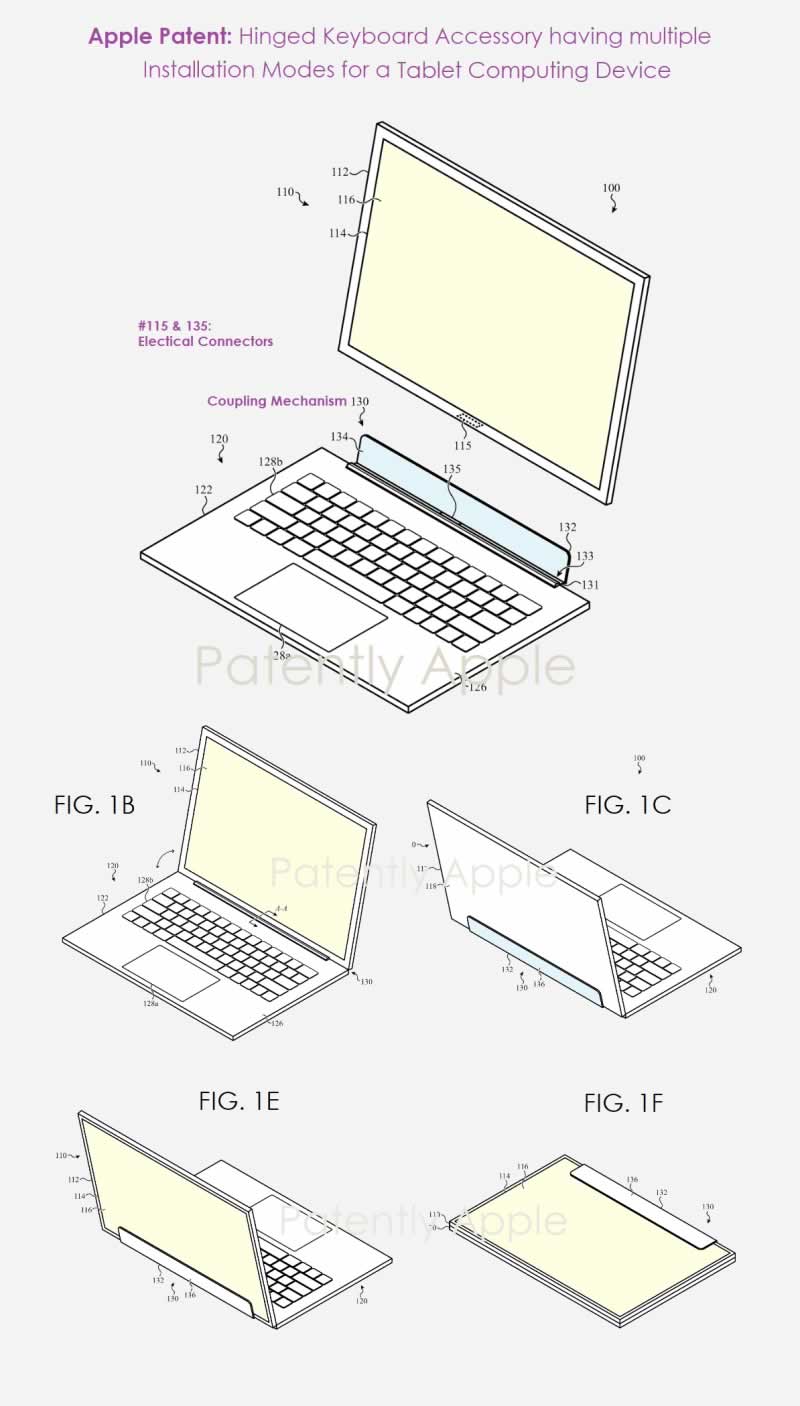
A new patent just acquired by Apple shows a new iPad keyboard that not only makes the iPad more useful but also completely transforms it into a Mac by changing the interface of the device.

The patent issued to Apple by the US Patent and Trademark Office seems to show it is a kind of hybrid device, similar to Microsoft’s Surface, a kind of MacBook with a touch screen. 

The device in question is composed of a portable part with a display which is precisely the iPad, and a part that has the keyboard and the trackpad, which instead has a hook that allows it to be joined precisely with the iPad.

Apple patent Turns iPad Into A Mac

When the iPad is connected to this keyboard, the patent shows a screen with an interface called “macOS-Like UI”, which as such is very similar to that of macOS but re-proposed on the iPad.

macOs-Like UI on iPad

Combined with iPad OS, the iPad is already a capable replacement for a laptop. This patent seems more like Apple’s twist on an existing idea than a redesign of the iPad.

It’s nice to see Apple experimenting with fresh iPad concepts, but this isn’t the first time the company has patented something incredible and exciting just to be stuck at the drawing board.

Why Proactive IT Support Is Crucial For Business Productivity

Technical support

Nowadays, most small and medium businesses embrace technology, giving them a competitive advantage over large corporations. But as companies continue to embrace technology in their operations, the need to have a reliable support team by your side is increasing. It is because even technology can fail at times, causing downtimes, errors, and financial risks, to mention a few.  

Before, many companies relied on reactive IT support. This process is where the support team is only contacted once there is a problem in the system. This support style had several disadvantages as it meant prolonged downtime as the system is corrected. It’s for such reasons that led to the adoption of proactive IT support. This team of professional IT experts continuously monitors the network system to find and resolve issues before escalating.  

This type of support system has several benefits to any business and can help increase productivity in the following ways:

1. Ensures Little To Zero Downtime 

Downtime is one of the biggest problems of businesses using technology. A lag in the network can delay the transmission of data, which can negatively affect your operations. Moreover, it also affects the productivity of your employees and clients. If a system goes down and stays offline for too long, employees may have to focus on other tasks or switch between multiple devices to complete their work. This situation may cause delays in completing tasks or result in an increase in errors due to multitasking.  

But, if you’re getting proactive support from experts such as BoomTech IT Support, you can experience little to no downtime in your system. This is because professionals are continuously working to keep your network and systems up and running, improving their performance and updating them with new technology to optimize them. It helps reduce downtime by ensuring your systems work smoothly, reducing the risk of crashes and other technical problems such as slowdowns or glitches that can make it difficult for users to get their jobs done efficiently.  

2. Prevent Cyberattacks And Data Breaches

Data loss can be devastating for businesses of any size. But it has a more adverse impact on small businesses that don’t have the resources to withstand it. For instance, when your computer system gets hacked and loses all of your files, you may lose everything from client data to financial records. Not to mention the time spent recovering from the incident.  

However, with proactive IT support services in place, you can take steps to prevent this incident from happening. Here are some ways IT support helps protect your business:

  • Network security – By installing firewalls and other security software, you can protect your network from viruses and other malicious attacks.
  • Data backup – Regularly backing up data ensures that all your data is stored in secured locations, preventing you from losing anything important if something ever happens to the main server or computer system. If you’re not sure where to start with backups, talk to an experienced IT professional who can help set up a backup plan for your business.
  • Updates – Keeping software up to date reduces the risk of malicious attacks because new vulnerabilities are patched before hackers have time to exploit them. Regularly updating software also improves productivity by ensuring programs run smoothly and efficiently on your system.

3. Streamlines Your Logistics And Operations

IT systems, networks, and other assets need to be up-to-date and work properly to ensure that your business functions smoothly. When they aren’t functioning well, you might have to work harder than usual to get everything done, slowing down your productivity.

With a proactive IT service provider, you can rest assured that this won’t happen. A proactive IT service provider will keep track of all your technology assets to remain in good condition — even if they’re not under warranty anymore. When something goes wrong with one of your devices, they can fix it quickly before it causes extensive problems for your business operations or workflow.

Moreover, they may suggest new software or hardware which can help streamline logistics or improve productivity within the office. They may also recommend changes in IT processes to make employees more productive and efficient.

4. Better End-User Experience 

The end-users of your IT system are your employees and your clients. Therefore, your systems should be friendly to them as much as possible since their interaction with the system determines how satisfied they are with it. For example, suppose employees have trouble accessing files or applications because there are too many users logged into the network or because one of the servers has crashed. In that case, this will cause them to waste time trying to resolve these issues instead of focusing on their work tasks. It could also lead to increased stress levels among employees if they cannot do their jobs on time because of these problems.  

When devices run smoothly, users are more likely to be happy and productive. With proactive IT support, you can ensure that any issues are resolved quickly and effectively with minimal downtime. It allows your employees to focus on their work rather than the problem with their devices. All in all, IT support can increase employee productivity and customer satisfaction by eliminating downtime and lost productivity due to technical issues.

5. Anticipate And Mitigate Risks 

If you have ever experienced an IT problem, then you know how disruptive and costly it can be for your business. These problems might occur due to human error or hardware failure. Still, they are also often caused by external factors such as viruses or hackers exploiting vulnerabilities in software applications or operating systems.

When IT problems occur unexpectedly, it takes time for a technician to diagnose the issue and resolve it. Although this may not seem like much of an issue if it happens only once a month, it can still have significant implications for productivity and profitability within your organization.

Proactive IT support enables businesses to anticipate potential risks before they occur and mitigate them before they become serious problems that require expensive solutions such as data recovery services or system upgrades.

Fast and reliable IT support

6. Handle More Workload Hence Growth

Proactive IT support can help you do more with less effort and time. It means running your business more efficiently, getting your staff to do more work, and expanding your business.  

Here are some examples: 

  • Get More Work Done: Proactive IT support helps you streamline processes, increase productivity, and reduce downtime. When there are no issues with the computers and servers in your office, you can focus on getting work done without the fear of losing data or suffering a cyberattack that is detrimental to the business.
  • Take More Clients: Now that you have streamlined processes in place, taken care of any maintenance issues, got rid of any glitches with the network, and have increased productivity for every employee, it’s time to grow the business by taking on new clients because everyone can work at their optimum level with ease.
  • Support New Employees: Once your system is working efficiently and other employees have no problems, you can support new employees by training them to help handle the workload in your company.   

These examples indicate that your team can handle more jobs with proactive IT support. With this, you can also support any team member who’s having problems meeting their target.

7. Long Term Cost Effectiveness 

Your company’s productivity, cost-effectiveness, and efficiency are all tied together. When you make your business cost-effective, you channel the resources and time to the most productive sectors of your company.  

Proactive IT support enables businesses to avoid costly downtime due to system failures or other problems that could compromise productivity and profitability. It means they can spend less money on resolving issues after they happen. It reduces costs over time while still achieving better results than they would otherwise have achieved using reactive IT support alone.

8. Support Business Transitions

Cloud computing and SaaS solutions have made it easier for companies of all sizes to scale up their operations without worrying about having enough hardware or software on-site. However, these platforms still require an underlying IT infrastructure to work effectively.

Furthermore, because there are so many different options available in today’s marketplace, it can be difficult for businesses to know which one is right for them. It means that they must choose wisely for their systems to work well when they need them most. Proactive IT support makes it possible for companies to make informed decisions about what kind of technology and how best to transition, including timelines and the departments to transition fast. In this transition period, the IT support can monitor everything to ensure no glitches or loopholes arise.  

Conclusion 

Running a business means that you’re always in operation, and your computers are a crucial part of that. It is why proactive IT support is vital. They ensure that your systems are running smoothly without hampering your productivity and requiring you to dig into technical details. The best IT support has features that run quietly in the background, ensuring that your technology needs are tended to before they get out of hand.


Epic Games Will Release Unreal Editor For Fortnite By The End Of 2022

Unreal Editor coming to Fortnite

Epic Games has taken another step towards the metaverse. CEO Tim Sweeny confirms Fortnite will now have an Unreal Editor where players can create games and monetize with them, just like on Roblox.

During an interview with Fast Company, Tim Sweeney revealed the plan that Epic Games has for Fortnite. According to Sweeney, the company’s goal is to launch an Unreal Editor in Fortnite by the end of the year, which would make it a platform for creators to unleash their talent and monetize it.

It is unclear whether the editor will be simplified or at least the user interface will be revised. After all, it is a complex tool that is actually intended for experienced users. In the interview, Sweeny only says that the editor contains all functions. 

The company boss hopes that “anybody can build very high-quality game content and code . . . and deploy it into Fortnite without having to do a deal with us–it’s open to everybody.”

According to Sweeney, the aim is to make Fortnite the go-to place for such things, similar to the app stores on mobile devices and consoles or like Steam. In addition, such a system for creating and implementing user-generated content will allow Fortnite to become even closer to the concept of an open metaverse.

Spotify Dives Into The Metaverse With A Virtual Island On Roblox

Spotify Island Metaverse

Spotify enters the metaverse. The streaming music platform has opened its Spotify Island in Roblox, a virtual universe where fans and artists will have access to interactive sound experiences, quests, hidden surprises and exclusive merchandise.

Through Spotify Island, Spotify is creating an easy opportunity for artists to connect with fans and partner with Spotify in creating virtual in-game merchandise. 

On interactive experiences, Spotify explained that Roblox users can mingle with artists, complete interactive quests, and unlock exclusive content. Profits from those Spotify Island sales will go directly to the artists themselves.

You can also create your own music and sounds through beat-making stations that work with Soundtrap, the online recording platform Spotify acquired in 2017. 

Spotify has already devised a series of themed events for the year and thus gives a lot of life and entertainment to Spotify Island. That first experience will be a K-pop-focused one with K-Park. Precisely the group Stray Kids and the artist SUNMI will be present throughout the coming weeks at this same event.

Diversity Space Tool: Activision Blizzard Wants To Solve The Lack Of Diversity In Video Games Using Mathematical Formulas

Diversity Space Tool

Activision Blizzard is causing discussions in the gaming industry with its unusual developer tool – Diversity Space Tool.

The software, developed by MIT, is intended to use numbers and statistical analyzes to ensure that the characters in a game have the widest possible range of ethnicities, skin colors, sexual orientations and gender identities.

To achieve this, the software identifies the typical traits of a hero or villain and plots them on a graph where the weight of each one is represented.

To put it simply, each figure is assigned a different number of points in several of the areas mentioned. For example, Overwatch sniper Ana scores 7 for age, 0 for body shape (presumably because she’s very slim), and 5 for gender identity.

Diversity Space Tool ranking

The tool was created in recent years in cooperation between the Game Lab of the Massachusetts Institute of Technology and the developer studio King (Candy Crush Saga), which belongs to Activision Blizzard.

The tool was used, among other things, in the production of Call of Duty Vanguard. “We used it to explore what ‘more diversity’ looks like for characters in both campaign multiplayer and live seasons,” says Alayna Cole of Sledgehammer Games.

The King’s Diversity Space Tool has caused a lot of outrage and criticism in the community. Players and developers write in social networks, among other things, that you cannot force diversity with numbers and that Activision Blizzard should ensure more diversity within its teams.

In an Activision blog post, Jacqueline Chomatas, Globalization Project Manager at King, mentions that the Diversity Space Tool takes basic characteristics such as gender, body type, role (hero or villain), age, and race. It also applies other, more granular values, such as culture, sexual orientation, physical and cognitive abilities, or socioeconomic background.