Home Blog Page 269

Benefits of Human Resource Software Solutions

Manage Your Business

Human Resource is the core function of a business organization. Without HR, the entire business will come to a standstill.

Most people confuse HR with recruitment and hiring. However, it is so much more than that. HR is a broad concept that includes various operations.

The HR department has to take care of recruitment, hiring, interviews, documentation, paperwork, background check, training, development, induction, compensation, benefits, leave management, promotions, transfer, wellness, etc.

So to make the process easier, companies go with HR software solutions. There are software solutions for each and every HR function. It makes it easier for the team to manage the business.

There are different types of HR solutions. You can approach an HR software development company to build a custom HR solution for you.

Benefits of Human Resource Software Solutions:

There are various benefits of using HR software solutions. It reduces the paperwork and removes all the human errors. It increases the efficiency of all the functions.

Easy Data Management:

The biggest problem faced by the HR department is data management. They have to deal with different documents and paperwork on a daily basis. But with HR software solutions, it becomes easier to manage the data. Now, all the data is available in one place. There is no need to search for data elsewhere. With a centralized database, you can easily pull out any type of data you want.

Helps in Leave Management:

There are thousands of employees working in a single branch. With the size of the company, the volume of the employee’s increases. The HR department has to take care of all the leave records. But with HR solutions, there is no need to track the leave record paper. Now, you can track all the records directly from the software.

Attendance and Time:

Earlier, the HR department had to take manual attendance and compile it together to calculate the salary. But now, there is no need to manage the time and attendance records. With the latest software solutions, the biometric machine tracks the time and attendance of all the employees and feeds it into the system. This way, the HR department can easily keep tabs on attendance.

Managing Payroll:

This is another function that has become easier after that advent of HR software solutions. HR can easily check the attendance and leave records with the software; it makes it easier for them to manage the payroll. The software also takes care of all the increments.

Less Paperwork:

As all the functions are managed through software, there is less requirement of the paper. All the records are maintained digitally. The salary slip, offer letter, and other certificates have become digital.

Reduced Admin Task:

HR software solutions are not only beneficial for the HR department but for the admin department as well. As everything is done with the help of software, there are less physical tasks. You can simply sit at one place and get all the work done.

Fewer Errors:

No matter how efficient you are, human work is prone to errors. But with the help of software solutions, there are fewer errors and discrepancies. It increases efficiency and security, as well.

These are the benefits of using HR software solutions. You can cut down the paperwork and human efforts with the help of this software. To develop this software, you can contact an HR software development company.

Does CloudHSM Combine the Simplicity of KSM and the Security of HSM?

Simplicity of KSM and the Security of HSM

The year 2020 has taken the use of internet and online services ahead by a decade within the last few months. It has created a surge for the need for data encryption and ways to keep confidential data secure in servers. Cybercrime and data theft have become quite frequent, and even multinational companies are becoming victims of it.

It seems like an even more daunting task for enterprises that store most of their information in the cloud. Public cloud providers are constantly making efforts to upgrade their security measures and provide tools to their customers that follow the best possible security practices. 

Once an enterprise decides to move to cloud data storage, they face a unique challenge. The encryption key management they had used so far might become inconsistent or redundant since the cloud environment might have a different way of managing their encrypted keys.

While most of these companies could either rely on legacy Hardware Security Module (HSM) or Key Management Services (KMS), they can avail of a third option when they move their data to a public cloud environment. CloudHSM offers encrypted security to the enterprises that were available only to those who chose to use private cloud environments. 

Choosing CloudHSM Over Others

CloudHSM can be potentially used by organizations of all sizes, irrespective of their buying power. It can also be used by enterprises that use either AWS or any other cloud service provider. CloudHSM can be used by any organization to store encrypted keys on AWS for any kind of data hosted in some public cloud environment. That is because AWS CloudHSM can not only generate but also store and manage encrypted keys for their clients.

Earlier, organizations did not have any means of achieving this because they either had to rely on Key Management Services for cloud storage of data, or they had to store the information on private servers using legacy HSM. However, with CloudHSM, businesses can afford the simplicity of KMS and the security of HSM in a cloud environment.

If someone compared CloudHSM vs KMS offered by AWS, the primary advantage is that CloudHSM is available to any enterprise, and not just AWS users. That is because CloudHSM can encrypt, store, and decrypt data to and from any cloud services around the globe. So now, when an organization wants to move their data to any cloud-based environment, they can use CloudHSM to get easy access to keys, manage the transition, and keep the data safe and secure.

Advantages of CloudHSM

CloudHSM indeed provides organizations with HSM security with the consistency of KMS. Some of the biggest advantages of using CloudHSM are:

  • Businesses can get multi-cloud support for their data storage in a centralized manner.
  • They can get HYOK support, which allows them to have their existing encryption key.
  • The keys are cryptographic, which means only authorized users can access them.
  • It can provide FIPS 140-2 Level 3 validation without requiring any HSM hardware.
  • CloudHSM can be accessed over any public internet facility across the globe without compromising security. 

Some Red Flags to Consider

However, there are certain aspects of CloudHSM that businesses must be aware of while using it. Some of them are mentioned below.

  • Businesses must use VPC while using CloudHSM since it is a part of a virtual private cloud-based environment.
  • Most business applications may need design adjustments to become compatible with CloudHSM, especially if they were hosted on private servers before. Developers may need to incorporate certain API components into the application to make it compatible.
  • Using CloudHSM does not release the company from the obligations of enforcing data security practices. For example, only authorized personnel must have access to the encrypted keys. 
  • The architecture of the application must also meet the cryptographic operations and practices. Most of the vulnerable areas of network security arise due to a lack of validated input methods and handling errors.

CloudHSM Can Be a Long-Term Strategy

CloudHSM can be an ideal solution to provide the best possible key management services as well as the means to implement them to the data storage. Enterprises that stored information in their private servers use legacy HSM to generate encrypted keys and can continue to do so for the foreseeable future. Companies that availed the services of single cloud service providers can also continue to use their KMS.

However, using CloudHSM can be a long term solution for both kinds of enterprises. Companies using private servers can eliminate the additional overhead cost of maintaining the HSM infrastructure in their data storage center. And companies using KMS can take advantage of the added security offered by CloudHSM by keeping the cryptographic keys away from the cloud service provider. 

So whether it is time to expand the enterprise’s data storage facilities or switch cloud service providers, CloudHSM can be the most effective way to generate and manage encrypted keys for the organization.

7 Email Marketing Tips To Look Out For In 2020

Email Marketing Tips

With the insurgence of social media marketing efforts over recent years, it seemed as though email marketing might eventually fall by the wayside. However, the past couple of years have made email marketing bigger than ever.

The key to reaching your audience via email marketing in 2020 is to keep your customers at the forefront of your mind. Here are seven email marketing tips to look out for in 2020.

Start Lifecycle Email Marketing

AI and automation are the driving forces behind email marketing success in 2020. Personalization and customization will reign supreme when talking to customers. One of the best ways to improve conversions with this in mind is through the use of lifecycle email marketing.

With lifecycle email marketing, you meet the lead or customer at their specific space in the customer lifecycle. For a prospect who hasn’t yet made a purchase, use browse and cart abandonment emails. For a customer who hasn’t been back in a while, include a series of win-back emails.

By using lifecycle email marketing, you’ll improve your conversion rates and use your email list to its full capabilities.

Smaller, Engaged Lists are Better

In email marketing, large lists used to be the be-all-end-all of success. While having a vast list is still ideal, it’s better to have fewer subscribers and more engagement.

Marketers are going through and cleaning up their lists to protect the integrity of their collected data. By doing so, they know the information they’re pulling is congruent with the audience that is more likely to convert. To understand more, this article by Accuweb Hosting compares the top 10 services for email verification and validation.

Optimize for Mobile

What looks amazing on a laptop doesn’t always translate well to mobile. As over half the world’s internet users access the web via mobile, ensuring that your email marketing efforts translate is paramount.

Optimize your messages for both mobile and desktop. Check for distorted graphics, challenging to read text, or unsightly spaces that could negatively impact the user experience. 

Limit Your Messages

In the past, the best practice has been to send as many messages as possible. The idea was that this would improve your chances of having them opened. Daily emails weren’t out of the norm.

Now, imagine every business you’ve ever subscribed to doing that. You’re talking hundreds of emails a day.

By limiting your message, you create a sense of novelty and intrigue that sets you apart from the other emails in your recipients’ inbox. Limit yourself to one message weekly, and make that message count. 

Craft Your Subjects and Teasers

While content is king when it comes to email marketing, you only have a second to capture your intended targets’ attention. To do this effectively, you need to have a subject line and teaser text that pops.

Keep these short and sweet, giving a tantalizing taste of what’s inside. Use questions or statements that elicit an emotional response. The better your subject and teaser, the more powerful the urge to open the email.

Hyper Segment Your Lists

As previously mentioned, personalization and customization are vital in reaching your intended audience and improving your conversion rate. 

Hyper segment your lists based on behavioral analytics. There should be endless paths for your audience. For example, when you launch a new product, there will be those that buy and don’t buy. Within that, you’ll have people who didn’t purchase but opened the email, those that clicked through, and those that ignored it completely.

By drilling down into the various behaviors, you’ll be able to tweak your messages more effectively going forward.

Practice A/B Testing

It takes time to find an email marketing strategy that works. Don’t hesitate to try a few different things to determine what works better. 

A/B testing allows you to send out various messages with the same goal. By choosing a small sample size from your overall list, you can evaluate which messaging works better. Then, select the winner to send to the larger list.

By crafting an email marketing strategy with your customer in mind, you’ll be able to improve your profits in 2020.

4 Best Universities to Study Technology

Tech-Based Teaching Methods

In the digital era, technical education is more than widespread and popular. More and more universities offer training at technical faculties, and more and more students go to study at these faculties. You can start a career as a programmer without higher education, but there are nuances. In the field of development, a “class division” has long appeared: there are cool “programmers-scientists” and “programmers-engineers”, as well as ordinary “programmers-hard workers”. 

Here everything is already as in ordinary industries: high engineering or research positions without higher education are unattainable. That is why we have compiled a list of the best technical universities in every corner of the world for you.

Why Should you Study Technology?

The demand for programming courses continues to grow from year to year. So, according to analysts of the educational marketplace platform, on average, demand for programming courses in 2020 increased by 50% compared to 2019. Most of all in the US segment of the Internet people are looking for courses in Java, PHP, JavaScript, and Python. If we look at the rate of growth in demand for training, then at the moment the leading queries are: “programming courses from scratch”, “programming courses for schoolchildren”, “Python courses”, “JavaScript courses”, courses related to the web development and layout, according to the company’s data. Before, everyone wanted to become astronauts, and now — programmers. Statistics confirm: the field of information technology has become the most attractive for employment.

If for some reason, you understand that there is a desire, but there is no understanding of the above terms, then it will not be superfluous for you to turn to the paper writing service https://essayshark.com/ for help. Professionals will help you deal with difficulties and will not let you fall behind in learning.

1. Munich Technical University

The Technical University of Munich bears the title of “elite university” and is part of the TU9 association of leading technical universities in Germany. So it comes as no surprise that it houses the largest and one of the best computer science faculties in Germany, which, incidentally, celebrated its 50th anniversary in 2017.

Education and research are carried out in almost all areas of modern informatics, including economic informatics, game development, bioinformatics, software engineering. Accordingly, the range of specialties is very wide. Students are offered six bachelor’s and seven master’s programs. Several of them are in English.

2. MIT

At this University, training programs in the field of applied informatics are especially highly valued today, the graduates of which are simultaneously programmers and specialists in economics. One of the new specialties is Economic Informatics. Graduates with such a diploma are especially in demand in the field of information technology marketing. Information security, mobile application development, and so-called Cloud Computing are also considered promising areas. Pay attention to the quantity and quality of internships offered by the University. Here you can practice from the end of the first course.

3. University of Oxford

Oxford is a big name in all sciences, and IT is no exception. “The peculiarity of Oxford is that it pays more attention to the theoretical aspects of computational science,” says one of the students in a promotional video for the University. “Even though you don’t specialize in a particular programming language, after graduation, you gain more confidence because of your deep understanding of the field,” notes another Oxford student. There are only good reviews of this University, so it is definitely a good choice.

4. Polish-Japanese Academy of Computer Technologies

The Polish-Japanese Academy of Computer Technology (PJATK) was founded in 1994 within the framework of an agreement between the governments of Poland and Japan. The main research complex is located in the center of Warsaw.

PJATK is the best-specialized University in Poland in the field of IT technologies, as evidenced by the leading positions in the ratings and the high interest of employers in the graduates of the University.

For practical training of students, laboratories have been created with the most modern computer equipment and software: unique multimedia installations, stationary and mobile robots, graphic stations based on iMac, 3D scanners, touch interfaces, and much more. High-speed Wi-Fi is available throughout the University.

PJATK pays a lot of attention to creating favorable conditions for the all-round development of students. Students can realize their interest in scientific activity in numerous scientific circles, and in sports – in sports sections and tournaments.

The University has a Student Self-Government — this is support for student life, assistance in the implementation of ideas and initiatives, integration trips, organization of events, and conferences.

Summing up

Technology is a thriving field, so the programmer must be able to quickly adapt to the current state of technology and constantly learn new technologies. Even an inexperienced specialist can find a job according to his level of knowledge and then gradually learn and gain experience. An intern’s salary is about $1000. A full-time programmer in a mid-level company (not IT) receives up to $1500-1800, a little more – in an organization associated with mass software development. The salary of the lead programmer is $2,500-3,000. The options for where you can study technology are huge, so don’t waste your time and choose the institution that you like.

Clinicminds Patient Management Software Powerful Features

Clinicminds patient management software

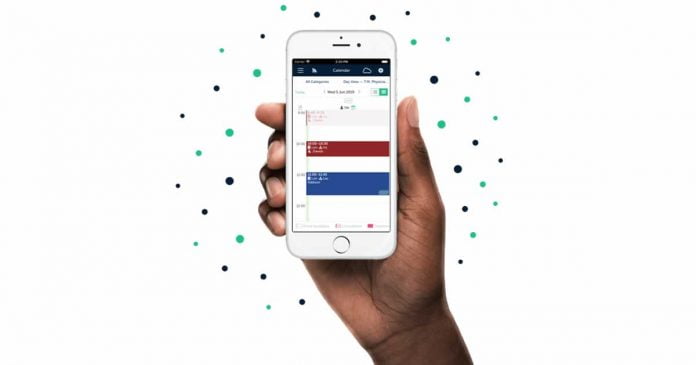
Are you a medical cosmetic practitioner looking for the perfect web-based Electronic Medical Management Record system for aesthetic (private) clinics? The Clinicminds EMR software is what you need. This software will help you take care of your clinical activities. The Clinicminds patient management software has powerful and practical features that will help practitioners to streamline practice workflow in their clinic to save time and resources. With this powerful patient management software, practitioners will do less paperwork and it’s all effortless and straightforward. The Clinicminds software is a cloud-based system that is compatible across all mobile platforms. Other features of this software include:

  • Paperless Record System
  • Simple access to patients’ records
  • Fast and effective scheduling
  • One-click video meetings
  • Integrated online booking system
Clinicminds patient management software

Effective Scheduling & Video Appointment Features

One of the features of Clinicminds patient management software is fast and effective scheduling. This allows aesthetic clinics to be able to schedule appointments with their patients with ease. The software is embedded with a free, online scheduling tool that is based on resources and availability. If you want to unburden your daily service, Clinicminds Electronic Medical Record software is a must-have for you. With this, you can create more appointments, thereby improving the customer experience. Additionally, the software comes with an automated email and messaging system that helps you automate messages – no more wasting time sending messages and texts.

Another feature that practitioners will find incredibly helpful is the video appointment feature that is integrated seamlessly into the software. You can schedule video meetings from your calendar, or customers can book them online. Once the video meeting has been scheduled, the Clinicminds patient management software will automatically send a link to join the meeting along with the confirmation SMS or email. 

Besides that, the software will also send a reminder a few minutes before the appointment to ensure that patients won’t forget. With this feature, instead of visiting the clinic, patients can have video meetings with their practitioners right from the comfort of their homes.

Easy Access to Patients’ Records & Payment Features

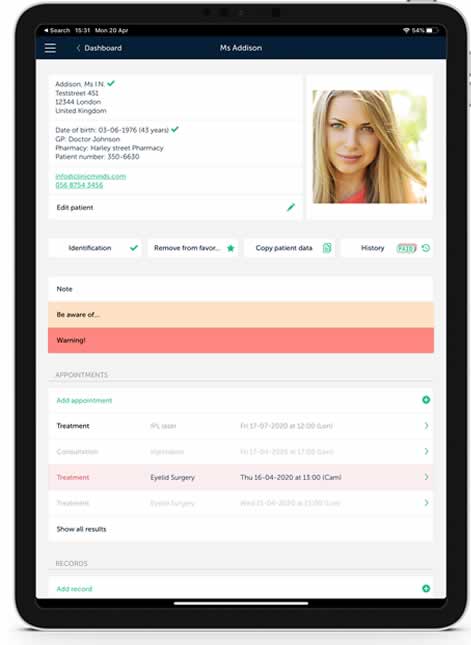
Clinicminds patient management software gives you easy access to patients’ records. Medical practitioners are able to register each consultation, treatment, and reviews in a well-detailed and structural record. This allows you to have a clear overview of past and present treatment info – anytime and anywhere. Also, the management software provides a tab-based registration feature that lets practitioners register items like a consultation, physical examination, medical history, treatments, invoices, photos, and consent forms. On top of all this, you can also customize the treatment record fields based on the clinic’s needs. With this incredible feature, you’ll be free from unnecessary paperwork.

Clinicminds patient management software also offers a stress-free payment registration system. They can do this through the efficient invoicing feature, which will help them to invoice all product sales and treatments efficiently within the workflow. This will help practitioners to avoid mistakes, save time, and keep the clinic paper-free. Clinics can use this feature to set discounts, choose payment methods, and send invoices via email. Aside from that, the software makes it straightforward for practitioners to keep track of their revenues (daily, weekly, monthly or yearly). The patient management software also allows practitioners to export revenue reports if needed.

Mobile compatibility and usage

Clinicminds patient management software is fully optimized and responsive across iPad, laptop, or desktop devices. Whether you are using iOS or Windows, you need not worry. Additionally, no software installation is required as practitioners can access it directly from their devices, giving you free mobility. Practitioners can easily schedule appointments on the go via their iPhone or iPad and review their patients’ records from anywhere around the world. 

As mentioned, Clinicminds is a cloud-based solution, which makes use of the latest 2048-bit SSL encryption to safely store and transmit patients’ information. With this, patients’ data is safeguarded from unauthorized users.

What Is Covered By IT Support? How Businesses Can Make Most Of This Service

IT Support and business

Technology has become a huge part of every business today, regardless of the field. Having a fully functional computer system improves the productivity of all departments within your company. However, for you to attain such success, you’ll need the services of an experienced IT team to maintain your system and recommend any possible improvements. 

Employing a whole new team has proven to be quite expensive and, sometimes, not as effective as one would like. As such, many companies have opted to outsource all IT-related tasks to an external team of professionals ready to offer their services 24/7 throughout the year. Knowing what to expect from these service providers will help in your decision-making process.

So, what is covered by IT support? Read on.

Services Offered By IT Support Team

A good firm specialized in IT support services employs technicians with some of the best skills in the market. As such, you can rest, knowing that your needs will be taken care of with utmost professionalism.

Here are some of the areas covered by most IT support teams:

1. Tech Support

This is the main job carried out by these firms. It involves solving technology issues, such as hacker threats, virus removal, software freezes, and file server maintenance. You can also contact them if you need software upgrades or installation of a whole new system. In other words, any task that might seem too technical for your employees working in the office can be outsourced to an IT support team. 

2. Computer Hardware And Software Repair

Some IT companies go the extra mile to ensure that all your computers are working as required. They attend to any hardware or software issues that need immediate fixing. You can either take the computer to their offices or request them to send a technician over to your business location. Most agencies, however, offer these services only to regular clients. 

3. File Servers And Cloud Services

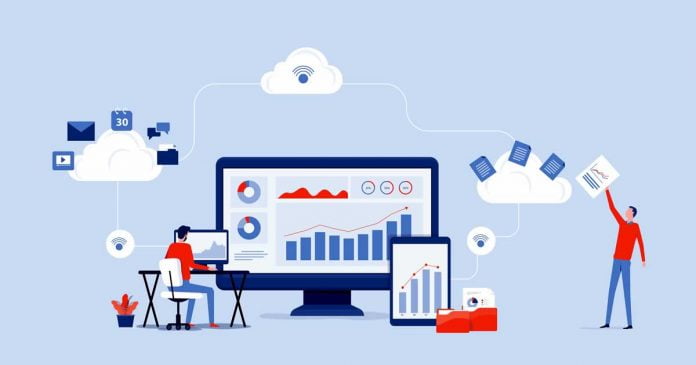
As you strive to improve your IT management, it’s important to keep up with the modern trends in the world of technology. Businesses are currently moving from physical computer servers to cloud-based storage. Most IT companies offer this service at an affordable price, and you’ll not have to worry about maintenance procedures. 

Cloud services, on the other hand, ensure that you can run certain applications without necessarily installing them on your computer. IT support agencies provide you with a ‘private cloud’ and offer any monitoring and maintenance services for an already existing system.

4. How To Make The Most Of IT Support Services

Hiring an IT support team has a lot of advantages to the success of your business. However, you can only enjoy the benefits and see their impact if you provide a favorable environment. There are a few strategies you could employ to ensure that the IT support you receive isn’t in vain.

5. Employee Education

Inasmuch as technology improves productivity, it’s important to note that not all your employees are aware of the impact caused by some of their actions. As such, you need to constantly educate them on technology-related best practices. For instance, securing one’s passwords, emails, and other crucial data should be among the priorities. Remember, hackers take advantage of a user’s actions to find loopholes that might gain them access to the company’s computer system.

6. Implement Changes As Soon As Possible

New updates are released regularly due to the ever-changing technology and new innovations. If an update may interrupt your normal operations, the IT company will request that you reschedule your tasks to allow for these updates to be installed. It’s up to you, therefore, to ensure that the changes are implemented as soon as possible. Failure to keep your system up-to-date may lead to a lot of vulnerability. As such, dealing with hackers and other technical problems will be a lot difficult, hence rendering the IT support services useless. 

Conclusion

Every IT company has a specific set of provisions, but all of them offer technical support as their core product. Other products and services you might receive from them include hardware and software repair, file servers, and cloud-based services. The type of IT agency you choose will depend on your business needs and affordability.

However, after hiring an IT support team, it’s still your duty to ensure that you get the most out of their services. For one, you’ll need to educate all your employees about various best practices when using technology. Also, ensure that you implement any changes recommended by the experts as soon as possible for you to remain competitive in the market.

Top 5 Music Composing Apps for PC

Music Composing Apps for PC

To turn your ideas into music and master your skills and facilitate the effortless music-composing experience, picking the right music composing app compatible with your PC is one of the most crucial steps.

However, if you want to explore text to speech technology, you should use other audio and video editing-related apps.

To help you find the perfect music composing app, we have picked the best 5 apps for PC. However, all the apps mentioned on our list will help you compose music effortlessly, each of the app exiles with its unique features. Therefore, it is crucial to know about each of the apps carefully. 

So, without any further delay, let us dive straight into the details of our top 5 music composing apps for pc (2020). 

Top 5 Music Composing Apps for PC

1. Image-Line FL Studio 

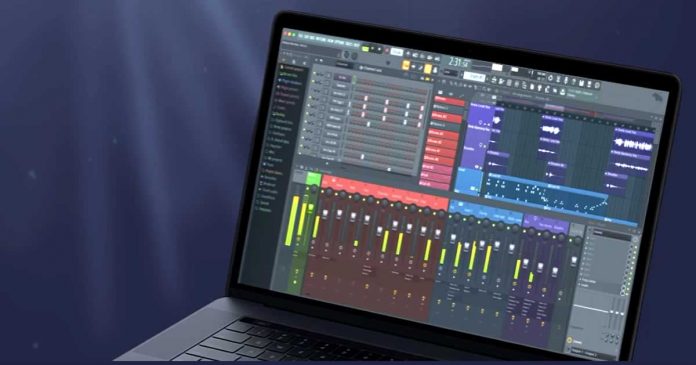
Image-Line FL Studio is undoubtedly one of the best music composing apps, especially for hip-hop and EDM producers. Imagine-Line, launched initially as FruityLoops, holds an iconic status due to its wide array of tools that help you create your masterpiece without any professional help. FL Studio is updated frequently, bringing new features every time. Imagine-Line comes with free lifetime upgrades that mean that all the existing Fl studio members will be automatically upgraded to the latest version that brings better features. Image-Line FL Studio is highly compatible with PC and MAC. 

Additionally, the app promises to let you create social-media oriented music video with a vast collection of templates as well as enables MIDI scripts that help you take control over the app through any MIDI controller to suit your needs. The app has gained significant popularity due to its interface and the ability to create music videos. You can also go through its trial version that lets you create projects and export them in various formats such as MP3 and WAV. 

2. Tracktion T7 

Tracktion T7 brings all the feasibility of creating your perfect music at ease with its highly compatible PC app. Tracktion T7 brings all the instruments at your fingertips. The app comes with excellent mixing features and editing tools. Tracktion T7 comes with unlimited audio and MIDI tracks depending on the hardware capability, and the app can hold various plugin formats, including VST and Audio Units. To avoid the mess of multiple windows crowding things for you, Tracktion T7 makes things as simple as possible with all the options available on one screen. Although this can be a little overwhelming for users, once you mastered the art of using the interface, you will be able to navigate easily. 

Moreover, when it comes to composing your melodies using MIDI, the app allows you to easily drag and choose the track and instrument you are looking for. This drag and drop functionality makes it easier for users to compose their melodies without any hassle. Overall, the app is perfect for users looking for an app that brings value for money. 

3. Audacity 

Audacity is an excellent and advanced drum machine that enables you to edit or create music. The app comes with a modern and easy to use interface that allows you to create music of any genre from your comfort zone.This is by far the best alternative of GarageBand (for PC). The app enables you to record top-notch audios by the studio and live mode. Besides, Audacity lets you add numerous effects to your sound, including fading in and out, trimming, and normalization. Audacity has made recording and playing back sound easy. Additionally, it comes with a timer record that lets you set the time for the record and when to end it for a better experience. 

Furthermore, Audacity lets you edit your audio easily. You can undo or redo your audios by cutting, pasting, copying, and more without any restrictions. Additional features include multitrack mixing, noise reduction, audio spectrum analysis, export/import, scrubbing, punch and roll recording, etc. If you are looking for the best overall music composing app for PC, Audacity is the best app to get your hands on. 

4. Acoustica Mixcraft

If we have to call top GarageBand rival, we will name it Acoustica Mixcraft. Over the years, Acoustica Mixcraft has evolved its features that you need to create a perfect masterpiece, and that’s the primary reason why it made it to our list of top 5 music composing apps. The app is ideal for PC users and beginners who started trying their hands on music composing. This versatile app comes with all the necessary features such as vocoder tracks, new effects, new instruments, and more. 

You can easily make your audio and save them, or even convert them into MIDI tracks at a single click of the button. The app is exceptionally approachable and comes at an affordable price. It comes with a decent library so that you can make your music anytime and anywhere. Additionally, unlike other applications, you would not outgrow the app quickly. If you are a beginner and need a well-supported music composition app, we recommend picking Acoustica Mixcraft in a blink of an eye!

5. BandLab CakeWalk

BandLab CakeWalk might be the last on our list, but it is definitely not the least. BandLab CakeWalk is formerly known as CakeWalk SONAR. The app makes it incredibly easy for music composers to find an all-rounder music composing app. Luckily, the app is free for users, so you can try your hands on the app to get the best for your music-making experience. The app is an all-in-one package for music makers with advanced mixing and mastering tools, a full suite of editing tools, songwriting tools and instruments, unlimited MIDI audio tracks, etc. 

Furthermore, once you have completed the composing music project, you can either save it or directly upload it on Facebook, SoundCloud, Youtube, and other sites, so that people can hear your music easily. However, one thing to keep in mind is that BandLab CakeWalk is available only for Windows 10. If you are using other versions, you might have to go for the alternatives, but if you are a Windows 10 user, the app is a cherry on top of your music composing experience!

Conclusion

So, with this was our list of the top 5 music composing Apps for PC. all the apps mentioned on our list are highly recommended and come with exceptional features to boost your music composing career. 

If you still need a quick suggestion, our top pick is Imagine_Line FL Studio and Tracktion T7, both the app comes with an intuitive interface and incredible features. With both of these apps, you would not have to strain your eyes or look for alternatives. 

Similarly, if you need an app with similar features like GarageBand, we recommend going with Acoustica Mixcraft. In the end, we would suggest choosing the app that fits your budget and needs. 

If we missed out on any music composing app on our list, let us know in the comment section below. 

5 Ways to Make a Music Streaming App

Create a Music Streaming App

Are you interested in creating an app for online music streaming? Here is an ultimate guide on how to build a music streaming app.

Let’s start with a brief market overview. The best music streaming platforms are:

  • Spotify – a music library, basing on a server, which reached 100,000,000 subscribers in 2019;
  • Pandora – a famous app to listen to music or radio on demand;
  • Apple Music – a relatively young but extremely popular music library developed by Apple;
  • YouTube Music – a streaming service developed by Google, the popularity of which is increasing rapidly;
  • Soundcloud – a favorite music streaming app because of its social media features like adding comments and viewing other users’ preferences.

They each have key features that make them popular in the market, for instance:

  1. purchasing songs
  2. social integration
  3. a search option
  4. making playlists
  5. covering many platforms
  6. offline mode
  7. song ratings

Audio streaming has become extremely profitable during the last decade. There exist lots of music apps like Pandora offering streaming services. That’s why you need to mind several peculiarities to build an app. 

How to make a music app: a full guide

Modern users demand several essential details of a good music platform. If you want to build a music streaming app, you need to consider user requests. Let’s find out the users’ latest requirements.

Build a music application: Key points

There are 6 points to take into account to create a music streaming app like Pandora. But before moving to them, we strongly recommend performing market research: listing and analyzing the main rivals. It will help you build a better strategy for your app and develop features your competitors don’t possess.

License

Getting a license is the first crucial step. Streaming music around the world may be too costly, even for big companies like Spotify or Pandora. So, choose a particular region and inquire about the price of the license for music streaming there. Then develop the best price for your application, covering all the license expenses and letting you gain profit. Never skip this stage before starting the development process.

Platform

The two leading platforms are – Android and IOS. You need to select the most suitable one. Our suggestion is to develop an app on each to reach the most potential users. If the budget is tight, it will be enough to select only one, considering the more popular one in the selected region. For instance, in the USA, IOS is more popular, while in Europe, Android systems are used more frequently. 

Monetization strategies

Building a profitable music application is a challenging task. The most popular ways to monetize an app are:

  • Subscription – offering a monthly or yearly subscription to receive unlimited access (Apple Music). This variant is the most widespread.
  • Advertisement – using the free version involves ads. To remove them, a user needs to buy a premium version. The app tracks the music you like and suggests the similar.

Design

The appearance of music apps plays a crucial role. The interface should look user-friendly, simple, but stylish on any device. The simple navigation technology and laconic outlook are vital for improving user experience. Users are more likely to keep using and pay for features if the app is easy to understand and use, so hiring a good UI/UX designer is an absolute must. 

Features

These are the essential features to make an app like Pandora. 

  1. Registration. This procedure should be fast and easy. The popular technology allows for signing up via a social media account, so the user should have the option to register via social websites, e-mail, or phone number. Forgot Password detail is essential.
  2. Search. A search engine is necessary for users. You may find music via artists, albums, titles, genres, or topics. 
  3. Playlist. The users can create playlists, remove, or share with others. The playlist management should be easy. 
  4. Social sharing. This enables users to share their preferences via social websites, creating a sense of community inside the app. It works like free advertising.
  5. Likes/dislikes. This technology is necessary to remember the user’s preferences and suggest listening to similar music. It helps to personalize user experience. 
  6. Purchases inside an app. It is an optional feature that allows for buying songs.

What does it cost to build a music streaming app like Pandora?

The final development cost depends on the region, features, the complexity of technology, and the developers’ hourly rate. In Eastern Europe, it comprises approximately $40/hour. Don’t forget you should never stop upgrading your application and making it more user friendly. This will require additional features and, therefore, spending more money on its development.