Home Blog Page 297

Five Common Security Errors Companies Make

Trends for SMEs

Some of the biggest and best targets hackers choose are company accounts. HR departments of many companies, for example, are often very conservative in their approach to change making them particularly vulnerable to cyberattacks. They often have the oldest systems with the weakest security.

The following are five of the biggest gaps in company security. Taking measures to close these gaps could go a long way in protecting the precious and sensitive data many of them have.

1. Manual Payroll Systems

In April, hackers struck the city of Tallahassee and got away with half a million dollars in payroll that belonged to city workers. It wasn’t an isolated incident. Hackers have long sought the massive payoff of a payroll breach. The large concentration of cash coupled is a powerful enticement.

The primary vulnerability is manual processing of the payroll accounts, which are often done using spreadsheets and programs like Excel. This security problem is especially prevalent in international payment processing. Even when the accounts are well protected, the manual aspect leaves them vulnerable to the biggest risk of all – the human factor.

Automating payroll is an idea whose time has come. It is cheaper than employing a staff of workers and it keeps data safe from phishing schemes and other ploys that target people’s behavior rather than system security.

2. Sending Sensitive Data by E-Mail

Email has been one of the most useful tools in the history of technology, judging by the sheer number of people to use it daily. It has withstood challenges from numerous other communications tools and remained as strong as ever. Naturally, it is also one of the biggest targets for cybercriminals.

During the recent run-up to Tax Day in America (April 15), cybercriminals took advantage of the deluge of correspondence between tax filers and accounting firms to launch a series of fake corporate accounts that resembled emails pages from large companies.

These kinds of attacks will continue as long as companies continue to allow sensitive information to be sent through channels as ubiquitous as email. Again, just as with manual payroll, even if the emails are secure, everyone remains vulnerable to dummy accounts. After all, who has time to check for irregularities on every email they get from a seemingly trusted source.

The solution is to ensure that sensitive material only travels through secure channels that are closed to outsiders, preferably through the cloud. That will help protect against fake accounts and keep important information safe.

3. Keeping Proprietary Information on USB Sticks

The advent of the “disk on key” has made life easier for people who wish to transfer large files between computers or to take files home with them. But the files on USB flash drives rarely have any protection, and if the disk is lost or stolen, there is nothing to prevent other people from gaining access to proprietary material.

That’s why the best defense against this type of security breach is simply to avoid ever putting sensitive information on portable disks. Once the files are lost, there is no way to bring them back or keep them from being spread if people who steal or find them choose to do that.

Be safe. Keep important information only on secure servers accessible only be those who have been approved by the company.

4. Delays in Installing Security Updates

Even a company that is highly conscious of security could fall victim to a hack attack if its IT staff is completely occupied by everyday tasks. Setting up a security system is not a one-time thing, but rather a process that requires ongoing attention.

Even the best security systems send out periodic updates. These are often patches that cover vulnerabilities that have been discovered. If the company is a way of vulnerability, it is only a matter of time before the hackers find them as well. So it’s vital to install the patch as quickly as possible.

Too often, however, the small IT staff of medium size business is overwhelmed by pressing matters elsewhere and the installations are delayed. That puts the company at risk for the interim period.

5. Leaving Documents Unattended

One of the most common practices that expose business documents to possible security breaches takes place virtually every day at many offices. It consists of leaving private documents unattended at workstations, on open computer screens, and especially at printers.

Most people feel completely safe within the confines of their company. So they leave sensitive documents open on their desks and walk away. Sometimes those documents may be there for hours if the worker has a series of meetings away from his or her desk, or during lunch break. Sometimes, they are left overnight if the project has not been finished.

Companies must combat this practice, as natural as it may be to the workers, by setting strict office policies against leaving documents unattended. There must be a rule that any document has to be put away to a safe place whenever a worker leaves his or her desk. The policy must also extend to the disposal of confidential documents. They must be shredded in order to avoid theft after they have been thrown out and assumed to have been disposed.

10 Worst Operating Systems Of All Time

Worst Operating Systems Of All Time

Worst operating systems of all time, yes as the title implies today we are going to list 10 worst operating systems ever made — Of course we all geeks loves our old tech stuffs. Actually some of us still uses them rather than most advanced ones out there – like Windows XP, Windows XP still have a huge number of fans even after Microsoft releasing several advanced operating systems.

Not all operating systems are like Windows XP, some out there were a real pain in the ass. Now you think why I selected them as worst operating systems. Have lot of reasons like lack of user friendliness, system configuration problems,incompatibility with many systems etc. And one more thing that the list added only those worst operating systems which I personally thinks were bad old days operating systems, so this one is a personal list.

Worst Operating Systems of All Time


1. Windows Vista

Windows Vista — I really hate this particular operating system from Microsoft more than Windows ME and Windows 8. After Windows XP Microsoft released Windows Vista 8 November 2006. But the OS was a huge disaster, because of its bloat, its slowness, its hardware and software incompatibilities, its high cost, its confusing versions, its security fumbles and other ineptitude make it one of the worst operating systems ever made.

2. Windows ME

Windows ME — A special millennium edition OS from Microsoft with promises of improved performance launched on September 2000,which went a real failure in the market. Even Microsoft ditched the OS after 1 year. It was the last operating system released in the Windows 9x series. because of its slowness and unstable performance make it one of the worst operating systems ever made.

3. Windows 8

Microsoft Windows 8 introduced major changes to the operating system’s platform and user interface to improve its user experience on tablets. Windows 8 was the first Microsoft OS which introduced tile interface which was unsuited for majority of home computing and also Microsoft has done away with desktop which people had grown to love and also with Windows 8, Microsoft ditched one of its popular feature “Start Button”, make it one of the worst operating systems.

Because of so many negative response Microsoft was forced to release Windows 8.1 later back on June 26, 2013 with  the restoration of a visible Start button on the desktop and the ability to boot to the desktop instead of the Start screen.

4. Corel Linux

Corel Linux — debian based operating system made by Corel  released to the public on November 15, 1999 is another one of the worst operating systems ever made. At that time it mainly competed against Windows 98 and Windows 2000 by Microsoft, plus Mac OS 9 by Apple. The major attraction of the operating system was the users can migrate Microsoft Windows settings to Corel Linux. So the OS out with high expectation.

Actually Corel Linux was graphically ahead of its time but the installer crashed more often during installation process and once OS was installed it struggled to start working in many great computers.

5. Lindows

Lindows — a mixture of Linux and Windows. Lindows first came out in 2001, promised to let you run all Windows applications on Linux. Within few months Lindows Inc. realized it was a bad idea. Even with WINE, a way to run Windows programs on Linux, the company couldn’t get enough Windows programs running on Lindows to sell it as a Windows replacement.

6. JavaOS

Yes you heard it right, JavaOS — an operating system with a Java virtual machine as a fundamental component, originally developed by Sun Microsystems. We know most of the operating system like Windows, Mac OS, Unix or Unix-like,  are primarily written in the C programming language and the JavaOS is primarily written in Java, one of the hardest programming language.

JavaOS was designed to run on network computers and embedded systems. Although several companies licensed it, the only product I know of that used it commercially was Sun’s own long-forgotten JavaStation network computer. By 2006, Sun had dumped it into the “legacy system” junkyard, and that was the end of the Java-based operating system.

7. Symbian

Symbian is a mobile operating system (OS) and computing platform designed for smartphones. Symbian was developed way back in 1997 and it wasn’t untill 2002, in the launch of the Nokia s60 the people began to take notice of it. Because of its many inaccuracies in previous versions of the firmware riddled with bugs and errors while the built-in web browser always struggled to load WAP enabled webpages and incompatibility with later versions of the system made Symbian one of the worst operating systems ever.

8. MS-DOS 4.0

It’s not like Microsoft was still spending much time in 1988 getting MS-DOS right. The earlier versions of the operating system really weren’t bad for their day; MS-DOS 3.3 was actually quite good. But then along came MS-DOS 4.0. Oh, it was horrid. Programs broke on it as regularly as clockwork. You’d be in the middle of a task, and your program would just freeze up completely. Nothing this bad was seen again until Windows’ Blue Screen of Death.

9. Windows 1.01

Microsoft’s first attempt at a graphical user interface for MS-DOS was, in a word, dreadful. It was ugly, it shipped two years late and even then didn’t work well. And besides, there wasn’t anything that would run on it anyway. Windows applications really didn’t get going until Windows 2.03 showed up two years later.

10. ITS (Incompatible Timesharing System)

What can one say about an operating system written in DEC PDP-6 and PDP-10 assembly language that supported one mono-case, six-character filename … per directory? (Yes, you read that right: Each file resided in its own separate directory.) And security was nil — for example, no passwords were required, and you could log into anyone’s active session and do pretty much anything you wanted with it.

What’s amazing is that despite being an incredible pain to use and with no security whatsoever, ITS actually was an important operating system in its day. While it was eventually forced out by the rise of Unix, many programs still in use today, such as the Emacs editor and the Lisp language, got their start on ITS.

The Benefits of Using a Ping Monitoring Software

ping monitoring software

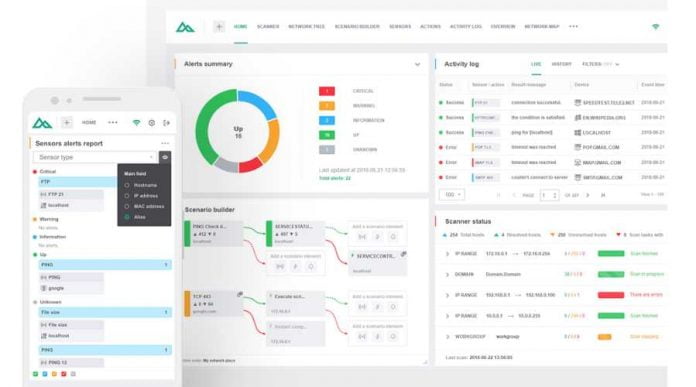
As an administrator, ping monitoring is one of the techniques you’ll have to use to check the network device’s availability. Ping monitoring is where the user would ping a device and wait for the device’s response, then the monitor would assess the device’s connection strength based on its response time.

By using a pin scanning software tool, you can monitor your devices to tell whether the device is up or down. Monitoring your network in this kind of way will give you a clear view of the key device’s health. in this article, we’ll give you a list of benefits of using a ping monitoring system.

It Probes the Routes and Measures you Network’s Performance

By recording the responses (or Echo Replies) and sending ICMP requests from devices around the network, a ping monitoring software can effectively and quickly know the device’s performance. And if you employ other types of content packets and maintenance, it can also determine the what type of device it is and its capabilities.

Collect Information on the Device’s Network Availability

Without having a powerful ping monitor, a lot of companies would less likely be able to achieve their company’s regulatory and legal requirements, which would help keep up their technical network infrastructure. This is especially important for businesses with critical applications that need to always stay online.

Sharing and Reusing Configurations and Scenarios

Security should never be alone, even mid-sized companies would need to consider collaborating their work to help simplify their technical innovations and their resilience in the cyberspace. This way, IT administrators will make sure that their networks would be able to maintain a planned performance baseline, even on an environment that continuously changes.

It Can Increase Your Profits

Local networks with well-performed maintenance can boost up your profits at a fast pace. Studies show that your choice of tools and utilities can be essential for technological innovation and maintains a strong position in the market. Therefore, it would be best if you get a ping monitoring system to satisfy the needs of demanding companies.

Records and Monitors Your Uptime Statistics

If you are looking for a good ping monitoring system, make sure the software will come with great reporting capabilities, and its performance level could easily exceed the achievement of most open source projects. This is with the basic ICMO packets, as well the effectivity of using custom TCP and UDP packets.

Conclusion:

In our world’s fast-moving networking, the use of ping monitoring systems has become a need for managing the device’s network, and pinging a device is one of the easiest and best ways to use if the device has performance issues.

In some cases, if you are looking carefully to spot a problem on your device, you can easily prevent downtime issues before they start. But if the device did go down, you’ll be able to tell it immediately by using effective software for ping monitoring. Therefore, you’ll have to make some research about what’s the best system software out there.

5 Best Open Source Terminal Emulators For Linux

Best Open Source Terminal Emulators For Linux

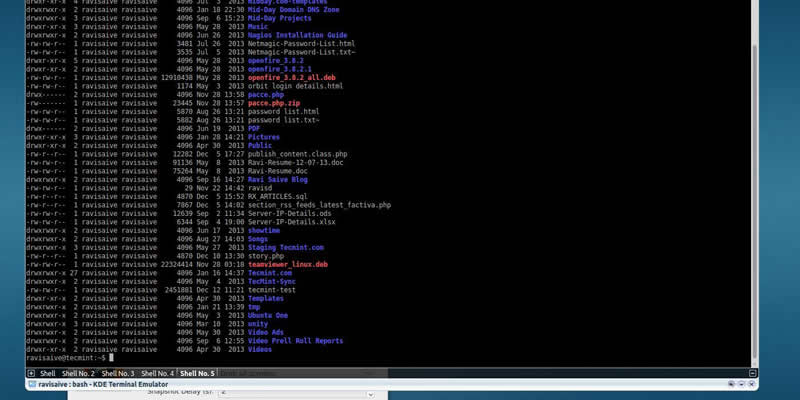
Terminal emulators are programs that imitates a video terminal within some other display architecture. Or we can say  terminal emulators have the ability to make a given computer appear like an actual terminal or client computer networked to a server or mainframe.

A terminal window allows the user access to a text terminal and all its applications such as command-line interfaces (CLI) and text user interface (TUI) applications.

Also Read : A-Z Bash Command Line for Linux

In this article we are going to list 5 best open source Terminal emulators for Linux,which are light weight and have some good customizable options.

Best Linux Terminal Emulators :


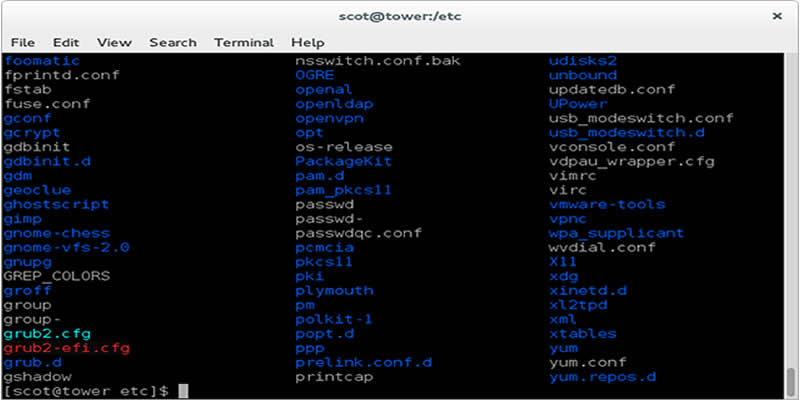
1. GNOME Terminal :

Best Open Source Terminal Emulators For Linux

GNOME terminal is a built-in terminal emulator for GNOME desktop environment developed by Havoc Pennington and others.

It support colored text, a variety of themes, transparency, mouse interaction, multiple tabs etc. Users also can create multiple profiles for his/her account and can customize configuration options.

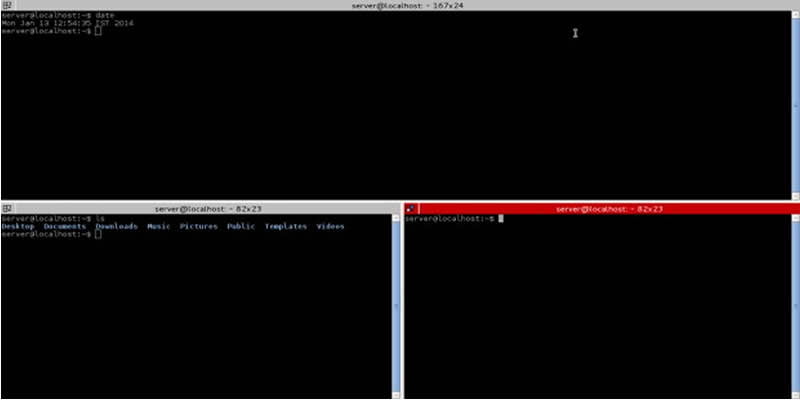
2. Terminator :

Best Open Source Terminal Emulators For Linux

Terminator is based on GNOME Terminal. It is inspired by programs such as gnome-multi-term, quadkonsole, etc. in that the main focus is arranging terminals in grids.

Notable features are — a number of keybindings, saving of layouts, and the ability to type to multiple terminals at the same time.

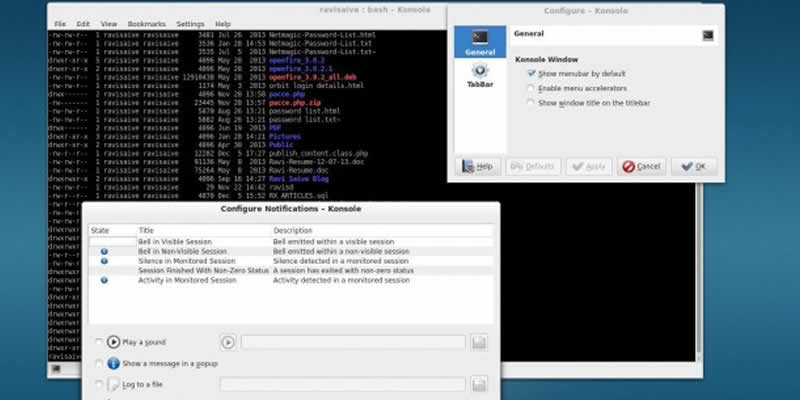
3. Konsole :

Best Open Source Terminal Emulators For Linux

Konsole is a free and open-source terminal emulator which is part of KDE Applications.

Features includes — supports bi-directional text display, tabbed terminals. translucent backgrounds, split-view mode, directory and SSH bookmarking, customizable color schemes, customizable key bindings, notifications about silence or activity in a terminal, incremental search and also export of output in plain text or HTML format.

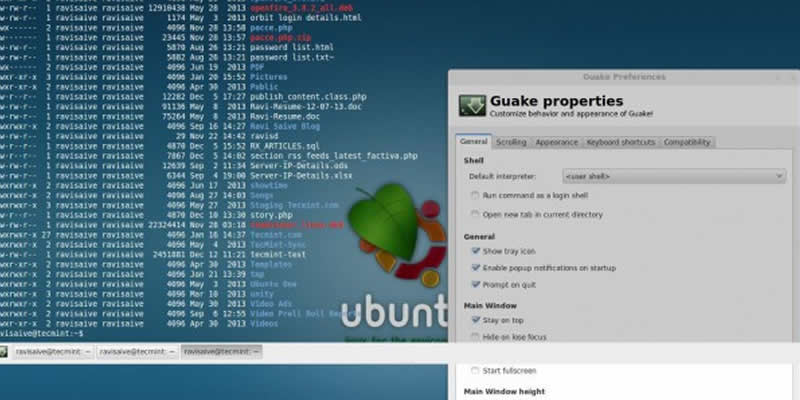
4. Guake :

Best Open Source Terminal Emulators For Linux

Guake is a dropdown lightweight terminal emulator made for the GNOME desktop environment. Guake’s style of window is based on an FPS game, and one of its goals is to be easy to reach. Guake is mostly written in Python and has a little piece in C.

Features includes — smooth integration of terminal into GUI, appears when you call and disappears once you are done by pressing a predefined hotkey (F12 by default), transparency support, multi tab, plenty of color palettes, customizable hotkeys for tab access, reorganization,  multi-monitor support (open on a specified monitor, open on mouse monitor) and open URL to your browser.

5. Yakuake :

Best Open Source Terminal Emulators For Linux

Yakuake is a drop-down terminal emulator based on KDE Konsole technology. It is very much similar to Guake terminal emulator in functionality. It’s design was inspired from fps consoles games such as Quake.

Features includes — smoothly rolls down from the top of your screen, tabbed interface, configurable dimensions and animation speed, skinnable and sophisticated D-Bus interface.

So which one is your favorite ? And also if you know any other good Terminal emulators let us know them in comments.

Why Choosing A Good Host For Your Website Is Important

Choosing A Good Host For Your Website

Your website is a key marketing tool. In building your website, it is best that you are well aware of which type of build suits your business needs, and this includes knowing which website host to get. Hosting is an integral part of your website, as it acts as the site’s backbone and stores the data that will be shown on your website whenever someone accesses it. Whenever a person would access your website, it then connects to the host to locate the information that answers a query, and the data will be communicated to your website, which will be displayed on the page. An unreliable host means a sloppy site for you.

If you’re new in the digital world and had just transitioned your business, there’s no need to fret as there are resources available online in the form of videos and articles that can help you understand the basic concepts of web hosting. There are also reviews about the best web hosts that you can check out, such as the one found in makeawebsitehub.com. There are also online communities and forums that can answer some of your questions.

As a start, however, here are some basic information about hosting and reasons why your site must be on a good host:

Types of Web Hosting:

  • Shared hosting – The server or host is being shared by two or more websites that may be owned by others.
  • Cloud hosting or virtual server – This is composed of many servers that store a website’s files. If one server fails, some backups support the website data, so it is unlikely to experience downtime.
  • Dedicated hosting or server – This is an allocated server for one website only. No other sites are sharing with this. There’s more control on the owner’s end.

Importance of Choosing a Good Host

1. There will be minimal to zero downtime

A reliable hosting provider with a proven track record can guarantee you 99.9% of no downtime. If there will be a quick downtime, it has to be scheduled for general maintenance purposes. It is crucial that your website is up almost all the time for your customers to always have access to it whenever there is a need for them too.

2. You can rely on 24/7 support

Major hosting providers do not only promise a reliable and fast hosting service, but also round-the-clock customer service support. They acknowledge that they are in the business where people use it 24/7.

In addition, a good hosting company like this one VPS Hosting in Pakistan makes sure that the quality of support their clients get is an excellent one. They require their specialists to be friendly and efficient. Clients can expect a timely resolution of their concerns.

3. In preparation for your website’s future expansion

To cater to the traffic increase brought about by your business growth, your hosting company must have the capability to scale and upgrade your hosting seamlessly to provide your needs, especially if you are considering to expand your site’s features. For a business, the flexibility and the response time of your hosting provider to attend to your needs is very crucial, as lost time can mean lost money. You definitely aim to grow your business, so it’s better to consider plans even at an early stage.

4. To avoid loss of potential clients

If you get your hosting services from an unreliable provider, chances are your site may encounter frequent downtimes. Every minute that your website is not accessible means wasted potential clients. Each client could have meant more revenue for you, but because of the downtime, they weren’t able to reach you by the time they initiated contact.

Since you’ll be getting your hosting from a reliable hosting provider, the scene is entirely different: each visitor will have the chance to view your offers efficiently. As a result, some of them may be converted into sales. Aside from that, if their experience on the site is great, then they will eventually become loyal customers.

5. SEO ranking will not be negatively impacted

Every time your site is not accessible and a user searches for it, search engine crawl bots will look for your website. During the crawl, when the bot can’t find your website, it will negatively impact your Search Engine Optimization (SEO) ranking. When a bot would find your site every time someone searches for something on Google, your page visit increases, thus affecting your site authority and, in turn, your site ranking on search results. If your website is down when the bot searches for relevant sites that would answer the user’s query, that’s a diminish on your page accessibility, thus affecting your ranking.

Your SEO ranking is safe and will be improved if your website has a good hosting provider as it will experience very minimal downtime. The bot will take note of your website as a reliable one.

6. You can rely on them in securing your website

There is no such thing as a completely hack-proof website. Even the websites of the biggest corporations get hacked. However, you can be confident that a good host will back up all your files. Once you encounter issues on your website, you can expect that data can be restored from their end.

Conclusion

Above are the reasons why a good host is essential to your website. There are many available providers that offer good hosting. Take some time to do some research and always keep in mind that price shouldn’t be your main deciding factor. Compare prices but do not forget the points mentioned. Customer support, reliability, and flexibility must be among the top deciding factors for you.

Protect Your Business with these Core Cybersecurity Tips

Protect Your Business

When running a business, it is imperative to be aware of the fact that cybercriminals can target your organization. Whether you run a small or a large establishment, it is wise that you implement a functional and robust cybersecurity strategy. With ottomatik.io plan, it will give the best protection to your business. This article rounds up core cybersecurity tips that you should know.

Set cloud security for your business

Cloud security is one of the most crucial cybersecurity measures to keep in mind. Understand all about cloud security and maintain regular good habits when working on different cloud storage platforms. Remember the security and reputation of your business and data are very crucial. Build the best reputation by working on cloud security using the best cloud solutions, updating your security systems regularly and keeping your account safe.

Protect Your Business 1
Image Credits: lynda.com

Secure, manage and lock your devices

Cybercriminals are advancing their technologies, and they can hack into your systems through different devices. In this light, secure and manage all your devices including tablets and smartphones. Your employees who access business information through their gadgets should also secure them. Employing such a security measure and discipline helps to protect your system from malware that often spread through;

  • Smartphones.
  • External hard drives.
  • Flash drives.

Creating this awareness also helps to create a culture where employees value the security of their devices and that of computer systems used by the company.

Protect Your Business 2
Image Credits: pctechmag.com

Do not click on suspicious or unknown emails

This is also a core cybersecurity tip that can protect your business from possible attacks. Such emails could contain a virus targeting various systems in your organization. Therefore, you need to instruct your employees to ignore such emails. Let them contact higher authorities so that proper security measures can be employed before clicking on the mail.

Use a cloud computing monitoring app

In today’s world of digitization, it can still be hard to keep a close eye on what employees are doing with vital company information and resources. This is why you should have a robust cloud computing monitoring app that enhances your business cybersecurity. You can opt for cloud security vendors that offer a quality monitoring system as one application, or those that provide a feature that is already embedded. The latter is known as a Cloud Access Security Broker solution (CASB). Whatever the solution you settle for, ensure it matches the exact needs of your business based on how secure is your working environment.

Proper backup

Similarly, you need a proper backup solution for your business. This is a core IT security for all businesses. With a solid backup solution, you not only enhance the protection of your business against cybercriminals, but you also build solid trust amongst your clients. This allows you to get the most out of your business.

It is important to note that with proper backup, the security of your information is guaranteed because of the effectiveness of the solution. Backup all important information, and in the event of downtime, restore your data smoothly. With a solid backup, you will instantly get a notification of unauthorized changes critical to your system’s configuration. As such, you will be able to protect or even use a more secure backup system to safeguard your business.

Have a secure digital perimeter

Regardless of the size of your business, you need a secure digital perimeter as it secures your business from external invasion.

  • Use the best antivirus.
  • Create a strong firewall.
  • Have an antispyware that will work best for your business.

While this software can be relatively expensive, they guarantee higher levels of protection and security. They offer quality protection against any malicious software. For your Wi-Fi network access, it is imperative that you use a unique and complex password for added security.

Protect Your Business 4
Image Credits: ytimg.com

Have a response plan

While running a business, consider yourself a target and design a response plan in the event of unforeseen attacks. Sensitive data including internal documentation, marketing data, client details, and IP can be breached when least expected. Therefore, you need an effective response plan that will swiftly mitigate and limit the scope of the attack.

A reliable and solid response plan will not only prevent major damages, but it will also help your business to get back on track within the shortest time possible. It also keeps you away from deep legal and financial trouble. The rule of thumb is to choose a plan that is realistic and simple to enact.

With these tips, you also need to stay vigilant, learn more about modern cybersecurity trends, possible dangers, and make cybersecurity for your business a priority.

Review: Use iBoysoft Data Recovery for Mac to Rescue Files from Unbootable Mac in 2020

Recover Deleted Data On Mac

Mac computers are trusted by users because of their hardware endurability, system stability, and data security. However, since it is a digital device, there are chances for system crash like any other digital tools. A Mac may fail to boot up after a major OS upgrade, the use of Boot Camp, or virus infections to the startup volume.

It might stun you when your Mac can’t finish starting up because you didn’t expect the Mac would fail one day and leave the files on it inaccessible.

Is it possible to restore the files from the unbootable Mac? Is it possible to fix the issue and make the Mac boot? We believe you are having many questions. Don’t worry. In this review, you will know a tool called iBoysoft Data Recovery for Mac, which can help you in this upset situation.

Why choose iBoysoft Data Recovery for Mac for unbootable Mac data recovery?

  • No bootable disk needed — Most free and paid data recovery applications only support creating a bootable disk on a good Mac and get files off the computer. What if you don’t have an empty disk and another Mac for creating a bootable disk? The iBoysoft developers come up with a revolutionary solution to rescue files from the non-booting Mac – launching the software directly on the troubled Mac from Recovery Mode. No bootable disk is needed and no installation is needed either.
  • Simple and successful recovery — Restoring files from an unbootable Mac is not complicated. The command line to launch the software is simple and the files are only a few clicks away with its clear and friendly interface.
  • Lost APFS partition recovery — For accidentally deleted or lost APFS partitions on Mac’s hard drive, the software can find them and extract important data from them.
  • Support Encrypted APFS — The iBoysoft application is one of the few data recovery applications that support encrypted APFS-formatted volumes.
  • Excellent compatibility — The software has updated and maintained to be perfectly compatible with the latest macOS 10.15 Catalina. In addition, it supports a large range of Mac OS back to OS X 10.7.
  • Flexible data recovery patterns — The software has a quick scan and deep scan modes for searching for deleted or lost files. In addition, it supports resuming the scan results for later recovery by saving session in a special format and uploading it to the software later.

How to rescue data from an unbootable Mac?

The data retrieving process is very straightforward and doesn’t need any previous experiences.

Step 1: Restart the Mac and hold down Command + R keys.

At first, you need to restart the Mac by pressing the power button or utilize the Restart option after clicking on the Apple logo on the screen, and immediately press down Command + R keys. Remember to act fast before the Mac chimes.

Don’t let go of the keys halfway. If you see the loading bar processing slower than usual, it means you have done right and the Mac is booting into Recovery Mode. If your Mac can’t boot into Recovery Mode, try to restart the Mac and hold down Command + Option + R or Command + Option + Shift + R to boot the Mac into Internet Recovery Mode.

Step 3: Enter the password.

Then you need to put in the correct administrative password and click Continue to allow you to make any changes to the Mac.

Step 4: Verify Internet connection.

Make sure the computer has a stable and strong Internet connection through Wi-Fi, hotspot, or a wired network.

Step 5: Choose Terminal from Utilities at the top menu.

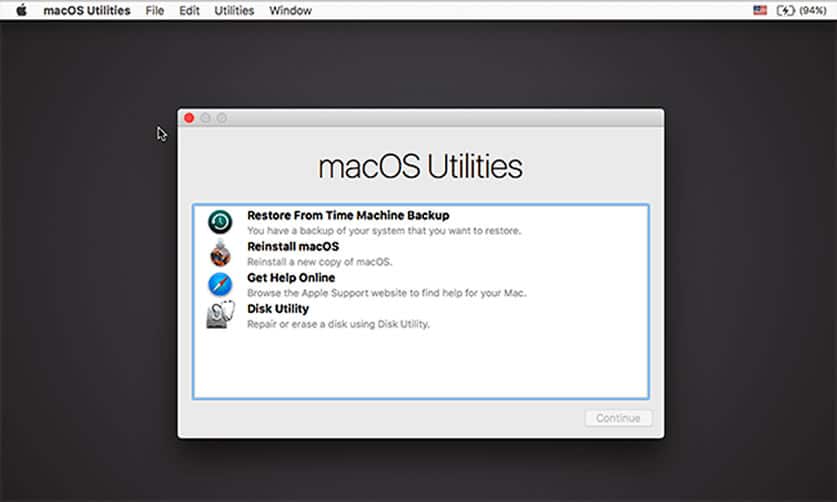
The startup of Recovery Mode is complete until you see the macOS Utilities (or OS Utilities) in the middle of the screen. Click on Utilities at the top menu where the Apple logo is and choose Terminal from there.

iBoysoft Data Recovery for Mac

Step 6: Run the command line to launch the software.

iBoysoft developers keep making the command line simpler and simpler. You can find its latest and simplest command line to launch the software in this frequently updated guide.

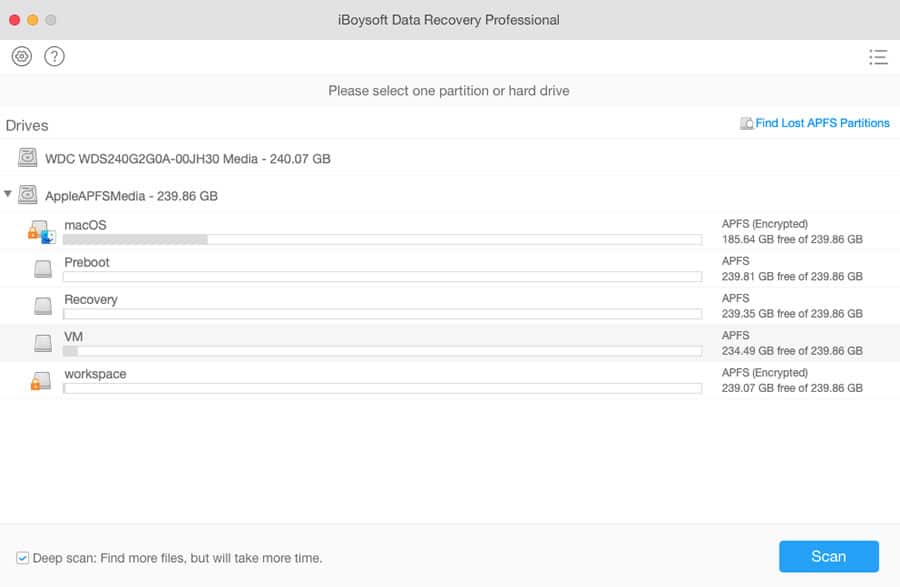
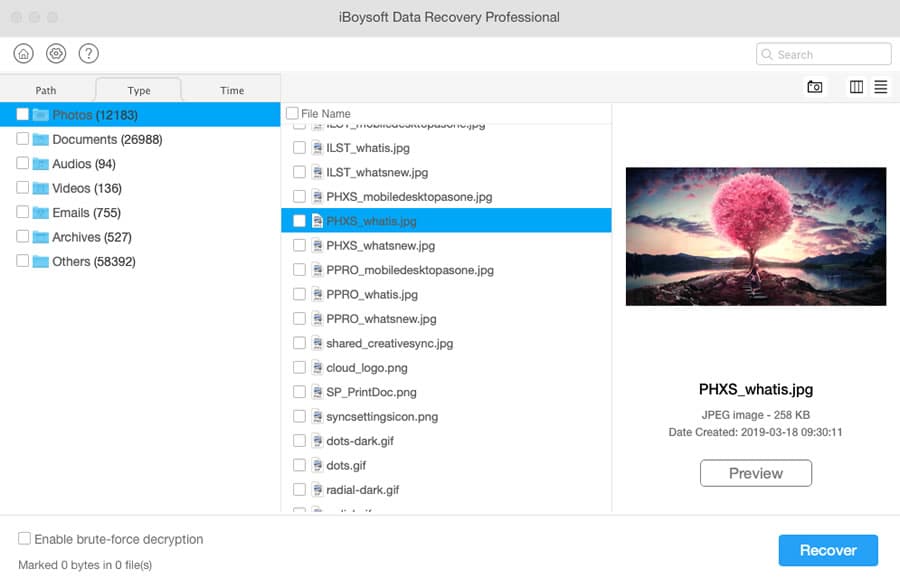
Step 7: Select the Mac HD and scan for files.

All detected volumes will be listed. You can choose the whole disk or one volume to scan for files. Remember to keep a Deep scan ticked, because it will scan for the disk or volume thoroughly for most files and even for old deleted files.

iBoysoft Data Recovery for Mac

Step 8: Select the files you want to get back and click Recover.

The software provides file filters and pre-recovery preview to help uses better select wanted and recoverable files. Use them to cut down the files that need to be restored. Besides, keep in mind to save the recovered files to an external drive and don’t exit the software until you are sure important files are back.

iBoysoft Data Recovery for Mac
Conclusion

When your Mac is not starting up, it doesn’t necessarily mean that your Mac is about to be dead and the data on it is permanently lost. A professional data recovery program can easily get the files off the unbootable Mac. Among them, iBoysoft Data Recovery for Mac is the most cost-effective with all its features, pricing at $99.95.

5 Tips to Keep Yourself Safe from Hackers

Keep Yourself Safe from Hackers

WannaCry became the biggest ransomware after it held hostage at least 200,000 computers in 150 countries. These computer systems ranged from hospitals, businesses such as FedEx and personal computers.

Cybersecurity is a major concern in today’s technological era where everyone uses technology for multiple reasons ranging from paying utilities to socializing.

With such increasing usage comes increased cases of hacking. Therefore, it’s only important that you know how to protect yourself against hacking with these 5 tips.

1. Use Two-Factor Authentication

Two-factor authentication is a fantastic and secure way to ensure hackers never access your valuable data. In this method, you’ll be required to enter two sets of passwords. First, you’ll enter your usual password, for example, on an email account.

Afterward, the emailing service will text or call you with a temporary code which you must enter in order to access your account. Without the temporary code, you’ll be denied access. This way, even if a hacker figures out your password, they’ll need the code to access your account.

Then there’s the FIDO key which is a physical USB. This USB will work as a house key and you’ll use it to access specific accounts. If you don’t plug it in, then no one, not even you can access your account.

2. Use VPNs

A virtual private network, VPN, is a private and secure tunnel you can use to send and receive data online. By creating a secure tunnel, you can avoid snooping and interference.

You can also use a VPN to change or mask your location as you access the internet. This will also allow you to bypass censorships imposed on certain jurisdictions. However, you must be careful with the type of VPN software you’ll use if you didn’t how to create one.

Keep Yourself Safe from Hackers 2

3. Use Different Passwords

Many people have a one-password for all accounts system. This means if a hacker obtains access for a single account, then they can access all other accounts which put your data at risk.

For this reason, cybersecurity experts recommend using password managers which come up with complex passwords. These passwords contain symbols, letters and numbers, making it difficult for a hacker to guess or even crack your password.

4. Share with Caution

It’s now easier than ever to share content with people online thanks to technological advancements.

However, this ease and convenience come at a price, especially for the ignorant internet users. For example, sharing nudes online puts you at risk of exposure and a damaged reputation.

Even if you delete them afterward, the internet never forgets and can come to haunt you later on in life.

The same goes for your financial information. The bottom line is, only share data online you are comfortable sharing and increase your online security awareness. Learn more by visiting this page that explains all the different ways to keep yourself and coworkers safe.

Even though this doesn’t guarantee you won’t be hacked, it’s important to mitigate risks from a personal level.

5. Use an Antivirus

An antivirus is a software installed on computers and mobile devices to keep them safe from malicious software such as viruses and also deter suspicious activities. If you don’t do anything else, at least install antivirus software.

Look at it as the first line of defense for your data stored on any device. Once the software detects suspicious activity, you’ll get a notification with a recommendation on how to proceed. With this, a hacker will have to work 10 times as hard in order to bypass it.

Today’s world revolves around the internet and technology in general. With multiple interconnected systems, it’s important to keep your data safe and secure in order to have peace of mind. By implementing the tips outlined in this article, you’ll avoid cases of account hacking and leaked information.