Home Blog Page 182

UltFone Android System Repair: Best Android Repair Software App [2022]

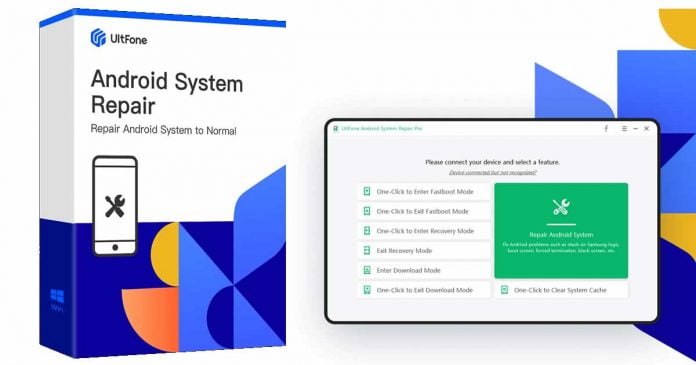
UltFone Android System Repair

Have you ever met your Android smartphone stuck in a reboot loop? Have you ever found it hard to enter and exit download mode on Android? Did you have difficulties entering and using Android recovery mode? Is your phone on, but the screen is black? Has it frozen? Is the touch screen not working? Are apps constantly crashing? Does the camera fail?

All Smartphone users should have at least one App to fix Android errors. Even when we prefer one of the most stable and customizable operating systems, it is not free from flaws. It is normal to see over time, its operation can compromise the performance of the equipment.

Do not panic. UltFone Android System Repair can fix any Android system issue one might encounter and bring your dead phone back to life in minutes. UltFone Android System Repair allows you to fix any Android issues in just a few clicks and follow the on-screen instructions.

Why Does UltFone Android System Repair Deserve to Be the Best Android Repair Software App

UltFone Android System Repair is a robust App for all mainstream Android devices and Android OS versions. This Android repair tool can fix more than 150 Android system problems without knowing anything about it. You literally just need to connect your Android phone or tablet to PC, open the program, tap a couple of buttons, and that’s it — your problem will be fixed!

Features make it Deserve to Be the Best:

  1. Beginner-friendly and Android Professional: (95% Success) Solve 150+ Android system issues like black screen, stucking on Boot Screen,Samsung logo easily.
  2. Freely Use 1-Click to enter and exit Fastboot mode on Android
  3. Free and easy to enter & exit Android recovery mode and download mode.
  4. Wide Compatibility: 1000+ Android Models Supported.

 It is one of the best tools for both beginners and Android professionals — just by following the instructions on the screen you can easily fix the different problems that regularly occur in the Android system.

UltFone Android System Repair 1

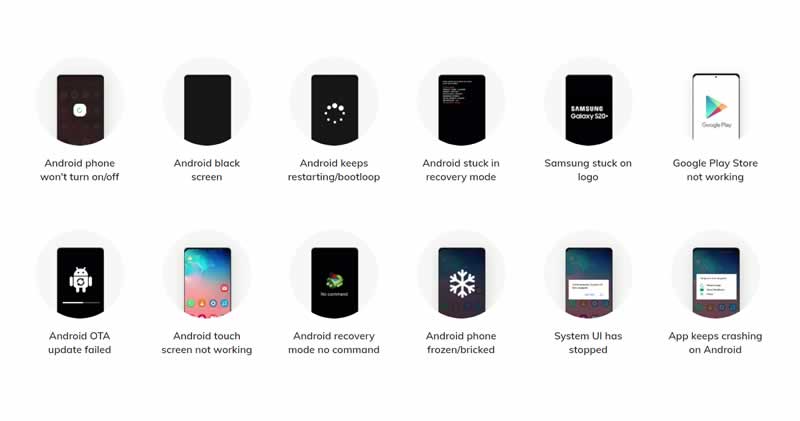
A multitude of bugs that can be fixed by UltFone Android System Repair:

  • Smartphone won’t turn on/off
  • Shows black screen
  • Keeps restarting/bootloop
  • Stuck in recovery mode
  • Google Play Store is not working
  • Android OTA update failed
  • Device’s touch screen is not working
  • Recovery mode no command
  • Phone frozen/bricked
  • System UI has stopped
  • App keeps crashing

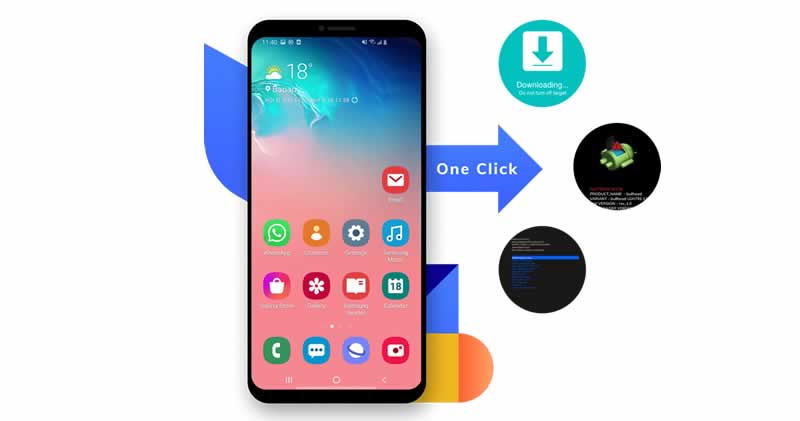
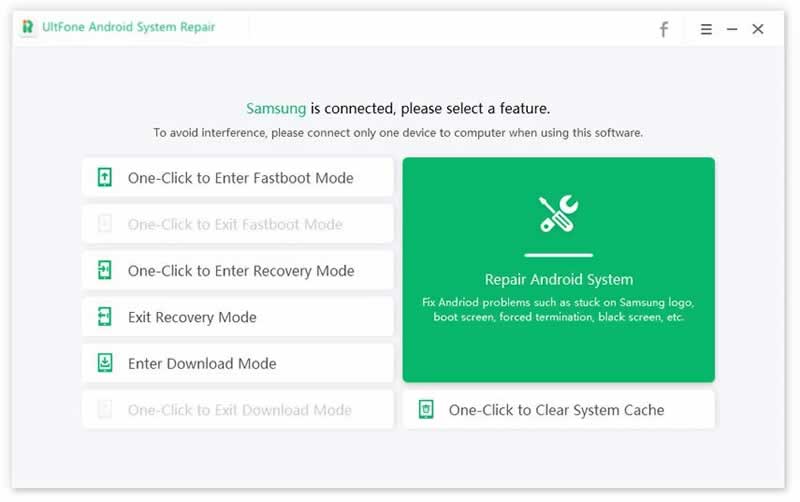
With UltFone Android System Repair tool, you can enter Android recovery mode, fastboot mode and download mode with one click away. This Android system repair tool supports 1000+ Android phones and tablets from Android 2.0 to Android 12.

UltFone Android System Repair 2

How Does UltFone Android System Repair Repair System Android

To use UltFone Android System Repair, you must first download it for free from its official website. Once installed, connect your Android device to the PC with a USB cable and then follow these steps. However, all the options for how to repair the Android system are straightforward.

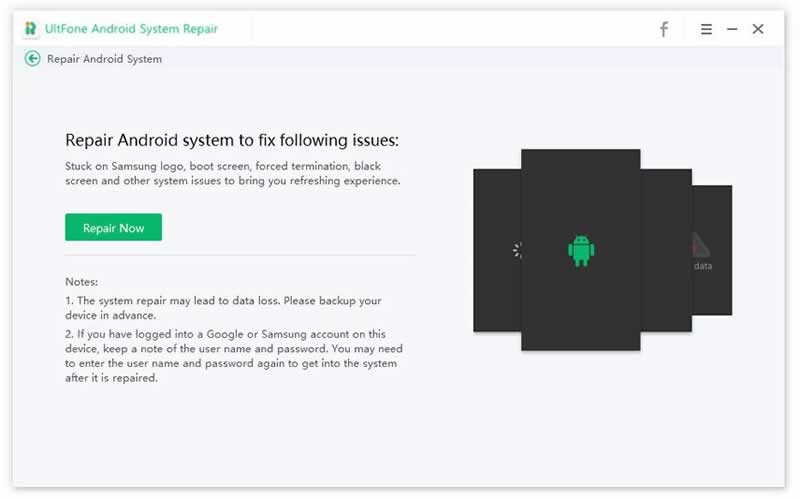
1. Launch the program and choose “Repair Android System”

UltFone Android System Repair 3

2.Please click the “Repair Now” button in the next screen to continue.

UltFone Android System Repair 4

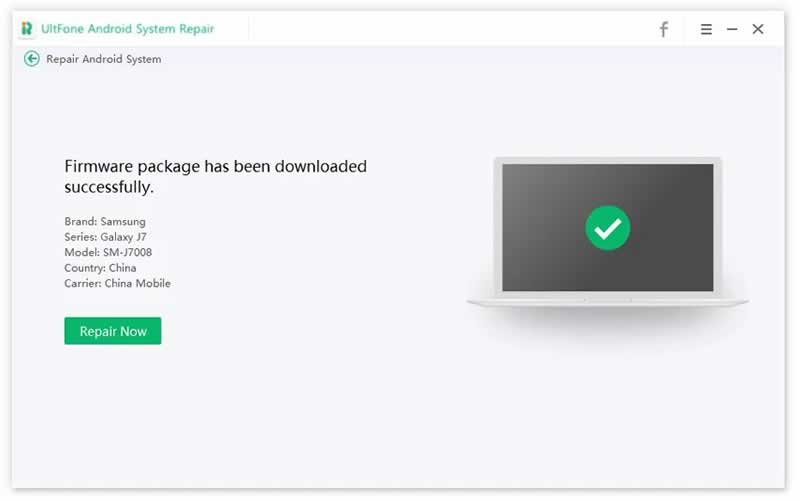
3.Select device info and download the firmware package. You can click the Repair Now button after the firmware is downloaded successfully. Then Start repairing Android to normal.

UltFone Android System Repair 5

Trial Version VS Paid Version

UltFone Android System Repair comes as the trial version and paid version. In the free version, you can only repair a couple of Android problems. To extend its full potential and functionality, you can purchase the monthly license, which costs only $19.95 or $29.95 for an annual subscription where you can use the program on 5 devices, 1 PC, and free updates for 1 year, among other advantages. If that is not enough, you can opt-in for a Lifetime License packed with all features for $39.95 with lifetime free upgrades. Also, the company offers 30 Days money-back guarantee free.

FAQ

Conclusion

UltFone Android System Repair is the best free Android repair tool we can currently find in the market, as it can solve the deepest and most complex Android system problems, so there is no easier way than this tool.

Uncharted Creator Amy Hennig Is Working On A Star Wars Game

Amy Hennig Is Working On A Star Wars Game

Uncharted creator Amy Henning will be working through her development studio Skydance New Media to make an “action-adventure” game based on the Star Wars Universe.

Skydance New Media and Lucasfilm Games announced the collaboration and stressed that the game would have a storyline based on an “original story”.

This isn’t the first time Amy Hennig has been involved in the development of a Star Wars game. However, the first experience didn’t end well. Hennig was involved in the development of Star Wars 1313, that Visceral Games title that stunned millions of fans with its first demo. Unfortunately, a series of obstacles, including creative differences, caused the game to be cancelled by EA. This also meant the closure of Visceral Games and the departure of the writer.

Now, five years after that departure, Amy Hennig once again has the opportunity to embark on an adventure in the Star Wars universe. This time, however, her project is fully backed by Lucasfilm.

Skydance New Media is currently creating several projects at once. Last October, it was announced that it was developing a narrative blockbuster adventure game under license from Marvel. It is assumed that it could be a game about Daredevil.

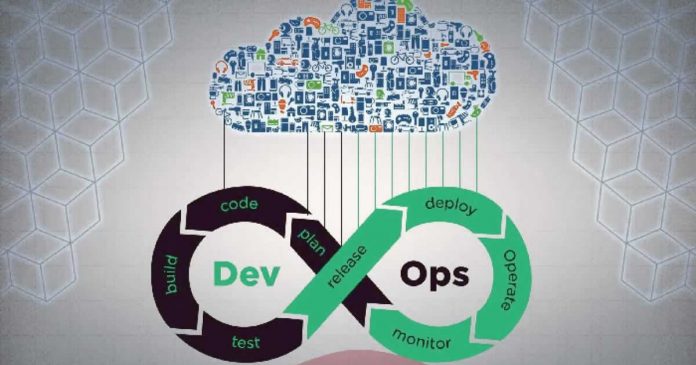
DevOps vs. Cloud Engineering: What’s the Difference?

DevOps vs. Cloud Engineering

There are a lot of buzzwords in the technology world, and it can be challenging to determine what they mean and how they differ from one another. Two of the most popular buzzwords right now are “DevOps” and “cloud engineering.” But what do they mean? How do they compare? And which one is suitable for your organization?

What is DevOps, and what is cloud engineering?

DevOps is a set of principles and practices that aim to reduce the friction between software development and operations. The goal is to enable faster, more frequent deployments while maintaining high levels of quality and security.

Cloud engineering is a relatively new discipline that focuses on designing, building, and operating cloud-native systems. Cloud-native systems are designed to take advantage of the unique characteristics of cloud computing, such as scalability, elasticity, and pay-as-you-go pricing.

Both DevOps and cloud engineering share some common goals, such as increasing speed and agility while reducing costs. However, they differ in their focus and approach. DevOps emphasizes collaboration between developers and operations teams, while cloud engineering takes a more holistic view of the entire system.

There are some critical skills required for each role. For cloud engineering, the essential skills include distributed systems design, microservices architecture, Infrastructure as Code (IaC), and DevOps principles, as mentioned in JFrog. For DevOps, these skills include: automation, configuration management, monitoring and logging, Continuous Integration/Continuous Delivery (CI/CD), and containerization.

How can you decide which is suitable for your organization?

The best way to decide which is suitable for your organization is to assess your needs and objectives. DevOps may be a good fit if you’re looking to increase speed and agility while reducing costs. If you’re looking to take advantage of the unique characteristics of cloud computing, then cloud engineering may be a better option.

Here are a few pointers you could look out for:

  1. If you want to focus on improving your organization’s speed and agility, DevOps is the way to go.
  2. If you want to take advantage of the unique characteristics of cloud computing, such as scalability and flexibility, then cloud engineering may be a better option.
  3. If you’re looking for a role that emphasizes collaboration and communication, then DevOps is the way to go.
  4. If you’re looking for a role that emphasizes technical expertise, then cloud engineering may be a better option.

What are the critical skills required for each role?

The key skills required for a DevOps engineer are:

  1. Strong communication and collaboration skills
  2. Experience with automation and configuration management tools
  3. Ability to work in a fast-paced, ever-changing environment

The key skills required for a cloud engineer are:

  1. Technical expertise in cloud computing platforms and technologies
  2. Strong understanding of networking concepts
  3. Experience with automation and orchestration tools

How can you get started in DevOps or cloud engineering?

If you’re interested in a career in DevOps, the best way to get started is to gain experience with automation and configuration management tools. You can also look into taking a course or certification in DevOps.

If you’re interested in a career in cloud engineering, the best way to get started is to gain experience with cloud computing platforms and technologies. You can also look into taking a course or certification in cloud engineering.

Both DevOps and cloud engineering are growing fields with plenty of opportunities for those with the right skillset. If you’re interested in either discipline, the best way to get started is to gain experience with the relevant tools and technologies. You can also look into taking a course or certification in DevOps or cloud engineering. Whichever route you decide to take, make sure to stay up-to-date on the latest trends and developments in these rapidly changing fields.

Pros and cons of DevOps vs. cloud engineering

There are pros and cons to both DevOps and cloud engineering. Here are a few of the key advantages and disadvantages of each approach:

DevOps Pros:

  1. Increased speed and agility
  2. Reduced costs
  3. Improved communication and collaboration

Cons:

  1. Requires significant cultural change: DevOps is not just about the tools; it’s also about changing the way your organization works
  2. Can be difficult to scale: DevOps relies on close collaboration and communication, which can be challenging to maintain in large organizations

Cloud Engineering Pros:

  1. Utilizes the unique characteristics of cloud computing platforms
  2. Greater flexibility
  3. It can be easier to scale than DevOps

Cons:

  1. Requires specialized knowledge and skills
  2. It can be more expensive than DevOps. Cloud computing platforms typically charge by the hour or the number of resources used.

Top Strategies For Successful App Development For Startup

Android apps black bg

The enterprises and the startups’ businesses both work differently, the business model of the startups and enterprises is very different from each other. In addition, the corporate culture and budget expectations of both startups and enterprises are radically different. The most special thing about the enterprise is that they have some rules, that they have set for brands and budgets, while startups face many restrictions, including time and budget constraints. Despite all these differences, when it comes to app development for startup and enterprises businesses, both have the same goal: to create an app.

App development depends on many factors, but regardless of the size of your business, here are some tips that can play a key role in making your application better and more successful.

Purpose Of Application Development

App development for startups and enterprises depends on your purpose as you know there are already a lot of software and applications in the market, but your app that will set you apart from this software and applications and differentiate it from other apps is to know that

  • What are the problems in the market you are going to solve?
  • What are the existing applications and software on the issues that are running in your target market?
  • Is there an effective solution already?
  • Can you suggest a better solution?

Knowing all these facts, you need market research because only market research can tell you whether your solution will be the most effective for the market.

Target Market

A target market is a market that lets you know who your customers will be and what community, segment, or industry you are going to focus on in the market.

For the better target marketing, you have to know about the market

Demographics

  • What age are your products or services for customers?
  • What will be the gender of your customer?
  • What country, city, or place does your customer belong to?
  • How much education should your client have?

What do they think?

  • What should be the personality of your customer?
  • What behavior can your customers possess?
  • What are your customer values?
  • What are your customers’ interests?
  • What’s your customer’s accent?

 What could be their action?

  • Your customers can buy
  • Your customers can donate
  • Your clients can advocate 

Challenges

Which problems are your customers currently facing, that you can solve?

Motivations

What are the motivations that can attract your customers to you? 

Access

How can you reach your customers, and what channels to use?

You need to know about the target market, whether you are a recognized brand or you are going to start your business. You need to pay attention to your target market, especially when you are confident. Make sure your product or services are perfect for your target market.

Application Design

The most important question is what kind of design your application should be, and the development of your app depends on it.

The design of your app should be excellent and different from your competitors in the market. But that doesn’t mean you have to make it too complicated to distinguish your app from its competitors and make it the most difficult because of its aesthetic appeal. Your app should be simple with good design so that the person running your app can quickly understand how they can access your business features.

Keep Upgrading Your App

Keep upgrading your iOS and Android apps with the latest updates. Many enterprises and startups do not pay attention to upgrading their app, which causes their app to slow down and sometimes cause problems. Even if your app is not affiliated with the newly upgraded software of iOS and Android, your app may start giving errors and stop working therefore, it is important to keep upgrading your app as per the requirement of the iOS and Android software.

Build The Fastest App

The speed of your app is heavily involved in the succession of your app. If the speed of your app is not good or it takes a long time to download data from your app or buffering is happening too late, then it is possible that your users will uninstall your app because application users like to run those apps that do not require them to be patient. If your app has these issues, you’ll need a line of negative reviews on your App Stores Make sure you have the fastest and all its features working perfectly.

App Testing

Before launching an app on Apple Store or Google Play Store, you must test your app because if your customers give negative reviews about your app on Google Play Store or App Store. So there is nothing worse than that because it can pave the way for your business to sink before it even starts. That’s why it’s important to test your app over and over again until you can be sure that your app is working perfectly and supports all devices. You can only release it in the market once you are convinced.

Monetization

You decide what kind of monetization model you want to create for a mobile app.

You can choose two types of monetization models, the first is the freemium model and the second is the price-based model.

Promotion

There are many ways to promote an app. You must create an effective promotion strategy for your app to reach your customers easily. Promotion strategies are the best way to reach your customers and it also helps you to increase your profit margins. People get information about your app only with the help of promotions. If no one knows you then why would anyone take interest in downloading your app? This is where ASO experts can be utilized to enhance your app’s promotional strategies and boost visibility among potential users.

Keep Moving Forward

There is a general perception regarding software and mobile applications that once a software or mobile application is developed it is completed. But as per the guidelines of Altamira this is not true, growth stops only when you stop and stagnate. You need to be aware of the market and your business in the market. Be aware of issues and events so you can adapt to the market and further improve your app.

‘Edit Tweet’ Button Has Already Started Showing Up On Some Profiles

Twitter Edit Tweet Button

The button to edit tweets has been a long-desired dream for Twitter users. This pipe dream, once seemingly unattainable, will soon become a reality. The ‘Edit Tweet’ button has already started to appear on some people’s profiles. However, at the moment, it seems that it can’t be used.

On April 16, Dylan Roussel of 9to5Google commented along with some screenshots that the edit button on Twitter was now available on his account. Of course, this feature hasn’t been officially launched, and although Roussel has confirmed that he has it, he also says he can’t use it yet.

https://twitter.com/evowizz/status/1515321565214347265

However, it looks like Twitter Blue Labs will start testing it “in the coming months,” according to Digital Trends. Because of this, it looks like Twitter is very serious about its new feature.

Twitter is on the threshold of a major change, and we’re not just talking about its owners. The inclusion of an edit button marks a clear change of intentions in the social network, and soon we could see many other surprises.

GitHub Began Blocking Accounts Of Russian Companies And Developers

GitHub Blocking Russian Companies And Developers accounts

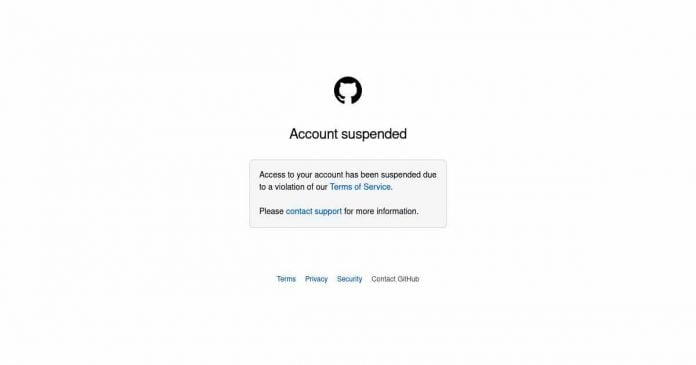
Microsoft-owned code host Github apparently began blocking the accounts of numerous Russian developers and companies last week. Content previously hosted under these accounts is also no longer available, as Bleeping Computer reports.

The background to the blocks is apparently the sanctions imposed by the US on Russian companies in the wake of the Ukraine war.

Blocking on GitHub began on April 13th. For two days, hosting blocked several dozen companies and developers. According to the report, the source code repositories of Sberbank Technology, Sberbank AI Lab and Alfa Bank Laboratory are affected. These were initially deactivated and then also deleted from Github. In addition to the projects of the organizations, numerous private accounts of developers were also affected by the blocking.

Some of the affected developers write about the blocking of private accounts on Twitter. The blocking of individual developer accounts seems surprising, since no direct sanctions have been imposed on the individuals themselves. The developer Vadim Yanitskiy, who among other things contributes to the Osmocom project, suspects that the blocking is related to his former work for Positive Technologies. Developer Sergey Bobrov also wrote on Twitter that his temporary suspension was implemented because of sanctions against a former employer.

In March 2022, shortly after the start of the Russo-Ukrainian War, Github declared that it wanted to be the home of all developers, including those in Russia. As a US company, however, Github must abide by any sanctions. For years, Github did not offer its services in Iran.

WhatsApp Communities: New Feature To Manage Several Groups Of The Same Theme At The Same Time

WhatsApp Communities

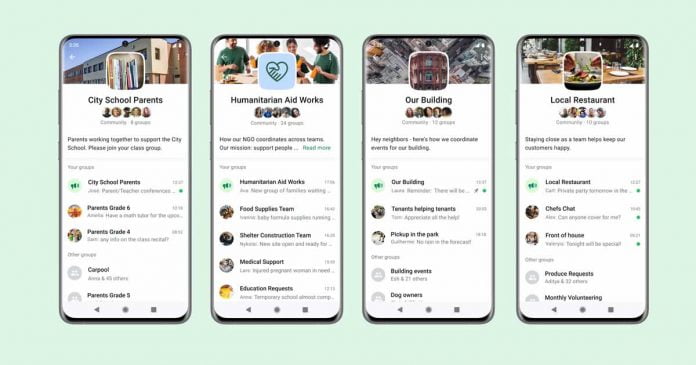
After several months since its first announcement and after a few weeks of testing, WhatsApp has finally officially announced the imminent implementation of its new Communities features and emoji reactions for messages in its next update of the application available to the general public.

WhatsApp Communities will allow us to bring together different groups under the same structure and will offer us a series of additional tools aimed at improving the organization and management of our conversations.

Communities do not come to replace the groups, but feeds on them and, based on its tools, seek to reduce the disorder that usually exists in these, such as the endless amount of messages that, on many occasions, makes us lose important information.

The administrators, who will be in charge of managing these spaces, will be able to choose which groups (new or existing) will be part of their Community. They will also have the necessary permissions to delete messages or files that they consider inappropriate for everyone. These communities will continue to use the end-to-end encryption used by the service in group and individual chats.

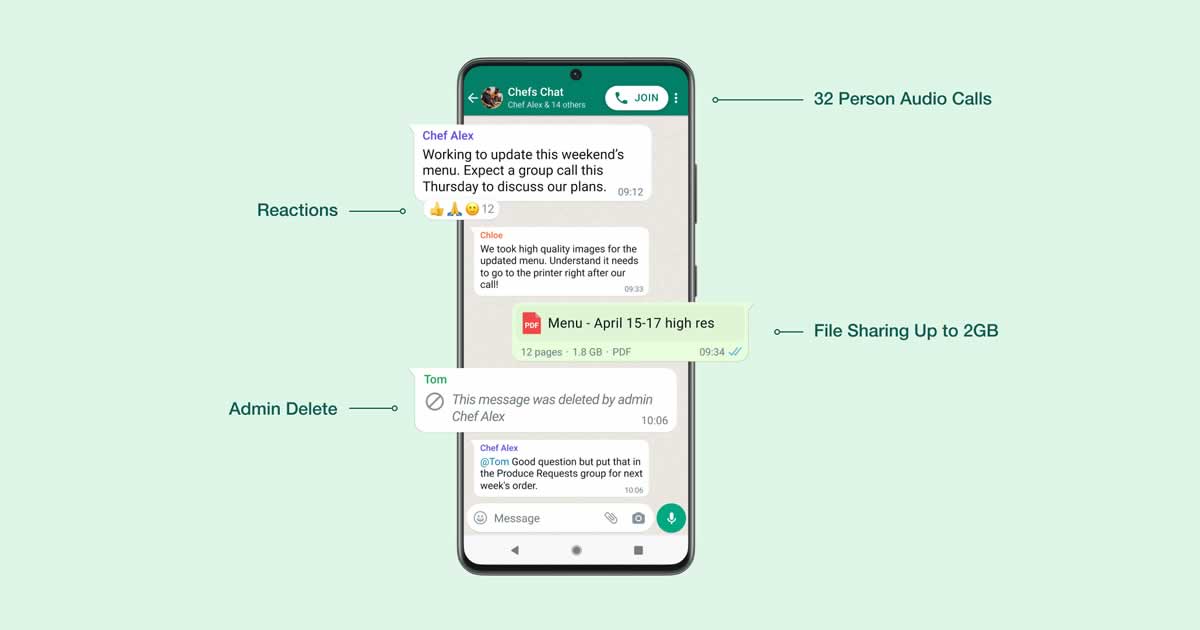
Along with the addition of the WhatsApp communities for the better management of the different groups, Meta has also announced some other improvements:

  • From now on, it will be possible to react to the message with emojis, a feature that we have had for a long time on Telegram, Instagram, Messenger.
  • Files up to 2 GB in size can be sent.
  • Voice calls can now be up to 32 participants.
WhatsApp Reactions

The Communities will be made available to all users in the coming months and aim to mark a new chapter for Zuckerberg’s messaging app, which will no longer be just a private communication tool but will aim to become a much more versatile and complete tool, also for large organizations and professional realities.

Is mCommerce Becoming The Idealistic Approach To A New Generation Of Sales?

Using and managing smartphone

mCommerce is the future of sales – so experts predict. The share of mobile commerce from retail e-commerce sales surpassed $3.65 billion. It’s a rapidly evolving concept that bends to the needs of a new generation of shoppers. Over 75% of people now shop online at least once a month, with many reporting it’s far more convenient to open a phone and shop online. New studies even find that 53% of eCommerce sales will now come from mCommerce. 

Still, is mCommerce the idealistic approach to a new generation of sales, and if so, what complications are there to consider? Let’s explore.

What Exactly Is mCommerce?

mCommerce is simply mobile commerce – the art of shopping using a mobile device or tablet. We’re arguably in an era that heavily relies on cell phones and tablets, with the average person spending 4.8 hours of the day scrolling their life away. Still, this opened the door to a new era of shopping that’s here to stay. What started out as responsive websites that opened on a cell phone has now transitioned to the likes of sophisticated brand apps and even social commerce – the art of shopping using mCommerce, but through a social media app.

Some say mCommerce also birthed online banking and paying bills. Technically, shopping, online banking, and bills intertwine. 

Essential Considerations

mCommerce for sales isn’t as easy as making a website responsive to cell phones or creating an app to facilitate sales. The website has to load and operate seamlessly so as not to discourage shoppers. Did you know that when a website doesn’t load within two seconds, shoppers close it down and look elsewhere? You can imagine what they would think if a website took longer than two seconds and had poor design and usability related to responsiveness. 

One of the emerging trends is mCommerce apps – but they also come with essential considerations related to coding and security. A study by Arxan Technologies revealed between 75% to 97% of apps on the IOS and Android app stores have been hacked. That’s often related to weak coding and errors that can be identified by Static Application Security Testing (SAST). Hacks can lead to sensitive data leaks and a whole lot of trouble for brands that have to salvage a reputation. 

One last consideration is that the shopping experience must be hassle-free and seamless. That relates back to creating a responsive website that shoppers can access from any cell phone device and making the experience the same across all channels. Testing, feedback, and enhanced features will all help to achieve that. A reliable app will produce reliable results – and in 2021, people spent 82 billion hours scrolling through mCommerce apps. Incorporating a sophisticated app is also part of the increasingly popular omnichannel – a multichannel sales approach – shopping experience.

Is It The New Generation Of Sales?

Yes, without a doubt. mCommerce may once have only appealed to the digitally inclined generations – but it’s an evolving trend that every generation is embracing. There are an estimated 187 million mobile shoppers to capture the attention. And, considering on-the-go shopping is becoming increasingly popular post-pandemic rather than visiting the shop floor, there has never been a better time to invest in mCommerce.

Lately, there has been a rapid acceleration in mCommerce attributed to a few advancements in technology. 5G, for example, provides better connectivity than we’ve ever experienced – connectivity once plagued the upward trajectory of mCommerce because people found it too difficult to have the connectivity to shop. There’s also the fact that people are more addicted to their cell phones than ever before – the average person taps their phone every ten seconds to check for social updates or to start browsing.

Mcommerce is one of the most exciting developments for brands related to the already thriving eCommerce industry. It opens up a new channel for sales and has since opened up an even newer channel for sales in the form of social commerce. Brands have the potential to capitalize on the growing industry by providing shoppers with a somewhat more direct route to their brand. mCommerce truly is the future of on-the-go sales and shopping in general.