Home Blog Page 191

5 Best Linux Laptops: Which One Is Right for You?

Keylogger Found In Several HP Laptop Models

Linux is becoming more and more popular each year, and for good reason. It’s a powerful operating system that offers a lot of flexibility and options. If you’re looking for a Linux laptop, you’ve come to the right place. This article will discuss five of the best Linux laptops on the market right now. We’ll take a look at their features and benefits, so you can decide which one is right for you!

1. Dell XPS 13 Developer Edition

The Dell XPS 13 is an excellent choice for those who want a Linux laptop with great performance. It features a 13.3-inch display with a resolution of 3200×1800 pixels (QHD), and it comes with an Intel Core i7 processor and 16GB of RAM.

It also has a 512GB solid-state drive, perfect for storing your files and programs. Plus, the XPS 13 Developer Edition comes pre-installed with Ubuntu Ubuntu 14.04 LTS, which is a very easy-to-use operating system for beginners.

2. ThinkPad X1 Carbon Gen 9

The ThinkPad X-series is Lenovo’s flagship line of Linux laptops, and the X1 Carbon is one of the best models. It comes with a 14-inch display, an 11th Generation Intel Core i7 processor, and 8GB of RAM. It also has a 512GB solid-state drive and features Thunderbolt ports and USB-C ports. Best of all, it comes with Fedora 33 Workstation edition pre-installed and ready to go!

Another advantage of the ThinkPad X-series laptops is that they are very durable. The carbon fiber and magnesium alloy chassis make them resistant to drops and shocks, while the keyboard is spill-resistant. Lenovo tested the laptops on 12 military-grade tests including extreme temperatures, sand and dust exposure, shock testing, and drops.

3. System76 Serval WS

The System76 Serval WS is a powerful 17-inch high-end laptop that comes with the powerful AMD Ryzen 9 PRO 3900 CPU. It can handle up to 64GB of RAM and up to 4TB of storage. It comes with the Nvidia RTX 2070 GPU. This powerful AMD Ryzen laptop is great for CAD and video editing, as well as gaming when needed.

The System76 laptops come with the Pop!_OS operating system pre-installed, which is a Ubuntu-based Linux distribution. It has all the drivers and software you need for your System76 laptop pre-installed so you can get right to work.

4. Star Labs StarBook

The Star Labs StarBook is a portable Linux laptop that can run Ubuntu, Manjaro, or other mainstream Linux distributions. It comes with the Intel Core i7-series CPUs and up to 64GB of RAM.

The StarBook is a great choice for users who need a portable Linux laptop with lots of power. It’s also one of the most affordable laptops on this list, making it a great value for the money.

5. Purism Librem 14

The Purism Librem 14 is a Linux laptop that comes with the PureOS Linux distribution pre-installed. It has an Intel i7 10710U CPU, up to 64GB of RAM, and a 14-inch IPS screen.

Thanks to its hardware kill switches for the webcam, microphone, and WiFi, it’s also one of the most secure laptops on this list.

This 14-inch laptop is a great choice for users who need a secure Linux laptop with lots of power. Unfortunately, it’s also one of the most expensive laptops on this list, but its features make it worth the price.

Conclusion

These are the five best Linux laptops on the market today. No matter if you’re looking for a powerful laptop that runs Ubuntu or a secure laptop with PureOS pre-installed, one of these laptops is sure to fit your needs.

5 Link-in-Bio Tools That Get Your Social Media Audience to Take Action

Social Media Audience to Take Action

Are you looking for ways to build a loyal community around your personal or company brand? Do you want to skyrocket brand awareness, build your influence across social platforms and drive organic, high-intent website traffic? Wouldn’t it be great if you could generate qualified leads and drive more sales without escalating marketing costs?

If you’ve answered “yes” to any of the above questions, chances are you’re already working on a social media marketing strategy.

Social Media Linking: Benefits and Limitations

With more than 3.6 billion users worldwide, social media has emerged as one of the most powerful digital marketing channels. It’s a great medium to distribute the content you create, showcase your products, create a buzz about your brand, and establish a personal connection with your target audience.

Despite all its benefits, social media marketing has a few shortcomings. One of the biggest limitations is that platforms, like Instagram and TikTok, don’t let users add any clickable links to their posts. Even if you include a URL in your caption, it won’t add a hyperlink to the desired web page. While there’s an option to add a URL in your bio, your options are restricted to a single link.

That makes it difficult for business owners and marketers to compel their audience to take desired action. Even if you add a link in the bio, you’ll have to change it every time you implement a new marketing campaign.

That’s where link-in-bio tools step into the picture. These tools let you create a custom landing page where you can add links to various content assets and product pages. All you need to do is add the landing page URL to your bio.

A simple Google search for link-in-bio tools will overwhelm you with options. But it’s worth noting that all these tools aren’t created equal. In the following sections, we’ve handpicked the top link-in-bio tools that’ll help you drive website traffic and sales. Let’s take a look.

1. LinkFolio

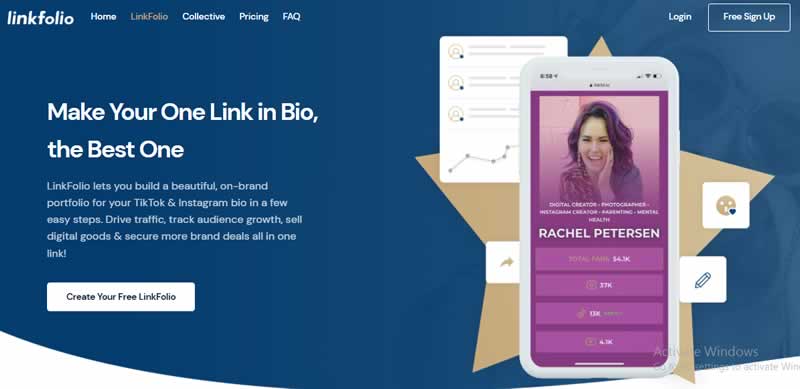
Developed by the people from influencer talent agency FamePick, LinkFolio offers all the features you’d expect from a standard link-in-bio tool. What sets it apart is the ability to sell products and services and directly collect payments on the LinkFolio landing page.

LinkFolio
Image via FamePick

That makes it suitable for new-age content creators who are looking to make money through online courses, digital products, and merchandise. Also, it comes with an in-built contact form that simplifies lead generation.

2. LTX.bio

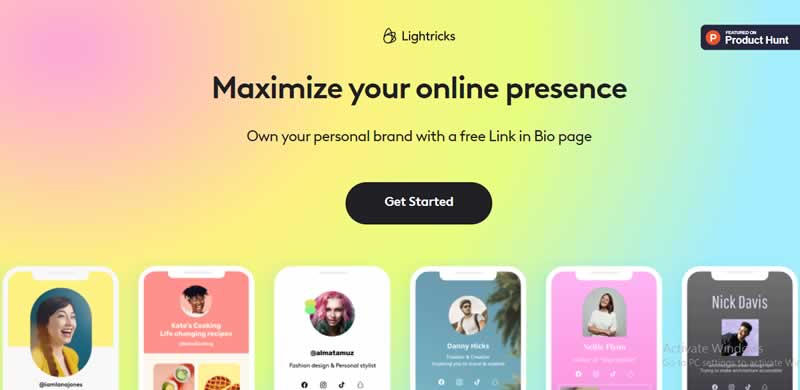
Developed by Lightricks, LTX.bio is a feature-packed social media bio link tool. It comes with a ton of sophisticated features that let you boost audience engagement and compel them to take the desired actions. Whether you want to get more newsletter signups or drive Instagram followers to product pages, you can add a wide array of calls-to-action (CTAs) using the tool. You can even use it to aggregate your latest posts from social media platforms.

LTX.bio
Image via LTX.bio

The best part is that LTX.bio offers a native “tip jar” tool to collect donations from your followers. It’s particularly useful for content creators who are looking to monetize their social media communities.

3. Linktree

Linktree is one of the most popular link-in-bio tools, and it offers a host of features, including customizable landing pages and in-depth audience analytics. You can even retarget users on Facebook and Instagram using the Facebook Pixel.

Linktree
Image via Linktree

The best part is that you can schedule links to appear and disappear from your Linktree landing page, which is nice for creators promoting timely brand collaboration content.

4. Campsite.bio

Campsite.bio is a simple and intuitive tool that lets you build a customized landing page, and add unlimited links to product pages, blog posts, and social media profiles. It supports integration with Mailchimp and Google Sheets as well.

Campsite.bio
Image via Campsite.bio

Also, you get access to detailed visitor analytics to identify the best-performing links. You can even schedule links for upcoming campaigns, as well as retarget visitors with Facebook Pixel and Google Ads.

5. Milkshake App

Unlike other link-in-bio tools in our list, the Milkshake app is a full-fledged website builder. You can use it to create an awesome-looking website with a few easy clicks. You can add a shopping cart and payment functionality to your website, as well as add buttons, to let followers call, message, or email you.

Milkshake App
Image via Milkshake.app

What sets it apart from other website builders is that the Milkshake app is optimized for mobile devices. Also, you can choose from a broad spectrum of customizable web page templates and themes.

Closing Thoughts

Whether you’re using social media to monetize an audience, build brand awareness or generate sales, a link-in-bio tool will help you improve audience engagement. While we’ve listed the most useful tools, it’s up to you to choose one that fits your unique needs.

10 Best Mozilla Firefox extensions of 2022

Mozilla Firefox extensions

Like Google Chrome extensions, Mozilla Firefox extensions brings many features to your desktop browsing experience. In this article, we are sharing some of the best Mozilla Firefox add-ons you should consider installing.

Mozilla Firefox will be always the first choice desktop web browser of most users who prefer privacy. Since Google Chrome is still the web browser with the most number of users, Mozilla Firefox has its own place. Unlike Google Chrome, Firefox uses a limited amount of RAM and provides better privacy and security. Like Chromium by Google, Firefox by the Mozilla Foundation is also a free and open-source web browser.

If you are a Firefox user, then you know how much it’s better than Google Chrome. But are you utilizing the potential Mozilla Firefox web browser?

Here are some of the best Firefox extensions for you to enrich the web browsing experience.

Best Mozilla Firefox extensions:

1. LeechBlock NG

LeechBlock NG is a Firefox extension that is going to increase your productivity at work and at home by blocking those time-wasting websites that distracts you. All you need to do is specify which sites to block and when to block them. In LeechBlock NG, you can specify up to 30 sets of sites to block, with different times and days for each set. You can block sites within fixed time periods (e.g., between 9 am and 5 pm), after a time limit (e.g., allow up to 10 minutes in every hour), or with a combination of time periods and time limit (e.g., allow up to 10 minutes in every hour between 9 am and 5 pm).

2. Undo Close Tab

We all know how to open a last close tab, but how about opening a tab that we closed before that. Undo Close Tab allows you to restore the last closed tab with just one button click and gives you access to the list of 25 recently closed tabs in the button context menu.

3. Dark Reader

When it comes to the mobile platform, we all love dark mode option in apps. But the majority of websites online now comes with a simple white background, which is really irritating when we browse during the night. Dark Reader Firefox extension is the perfect option for Firefox users to enable dark mode on every website and take care of your eyes.

4. Image Search Options

Reverse image search option in Google is one of the top search engine hacks you can do to get a different version of the image you saw online. And Image Search Options is a powerful Firefox extension that further simplifies the reverse image search features for you. With this tool, you can set a customizable context menu options to the right-click menu of images which allows for fast and efficient use of many reverse image search engines.

5. Enhancer for YouTube

Need an advance YouTube experience, then you should definitely install Enhancer for YouTube Firefox add-on. Enhancer for YouTube comes with features to improve your user experience on YouTube. This highly customizable and easy-to-use Firefox extension allows you to remove ads from videos, automatically play videos every time in 4K, HD, or any other preferred format, loop videos, use custom themes, pin video player, execute your own actions using JavaScript and ton of other things.

6. Bitwarden

Bitwarden is a secure and free password manager extension for Firefox with cross-platform support. With Bitwarden you can easily store all of your logins and passwords while conveniently keeping them synced between all of your devices.

7. Facebook Container

Facebook Container developed by Mozilla itself prevents Facebook from tracking you around the web. So how it works — Facebook Container works by isolating your Facebook identity into a separate container that makes it harder for Facebook to track your visits to other websites with third-party cookies.

8. Private Bookmarks

We all have our own secrets — sometimes maybe it even looks like a URL. And Private Bookmarks extension for Firefox is a tool to protect such URLs. Private Bookmarks enables a special password-protected bookmark folder encrypted with your chosen password.

9. Touch VPN

Need for VPN nowadays in inevitable. To protect our privacy and to unblock any blocked website we need a VPN and Touch VPN is the best one that we can integrate with Mozilla Firefox. With this free unlimited VPN, you can surf the web freely, securely & anonymously.

10. uBlock Origin

Even though Firefox blocks trackers by default, some users prefer ad-blockers. uBlock Origin is an efficient blocker that can load and enforce thousands of more filters than other popular blockers out there and uses limited memory.

So how you rate this list of Mozilla Firefox extensions? If you know some other helpful extensions for Firefox, do comment below.

New Infrastructure Bill Opens Doors for MSPs

Managed Service Provider stories

In 2020, cyberattacks cost governmental agencies approximately $18.9 billion in downtime and recovery costs. This massive figure should illustrate the extent to which ransomware and cyberattacks continue to plague the public sector. 

That, of course, costs taxpayers billions of dollars, so it’s a concern for the public and federal, state, and local governments. For this reason, the recently passed $1.2 trillion Infrastructure bill has become so critical. In addition, the bill provides some much-needed help to state and local government agencies regarding funding their cybersecurity initiatives.

There has never been a better time for Managed Service Providers (MSPs) to offer their services to state and local governmental agencies and help them understand all the provisions of this critical infrastructure bill. As a result, many will need guidance to receive the maximum portion of the grant money entitled to them. 

By partnering with Acronis SCS, MSPs will be able to take full advantage of our cutting-edge cyber protection suite, as well as our certified backup and security solutions. The bottom line to your company will be a more substantial customer base and a surge of increased profits, so it’s definitely worth your while to pursue this opportunity.

To make it easier for you, we’re diving into the critical initiatives within this bill that will help your public sector clients get truly #CyberFit. 

Supporting Cyber Security Projects Even for Rural Areas 

The bill designates $1 billion over four years for the State, Local, Tribal, and Territorial (SLTT) grant program. It provides federal cybersecurity assistance, and these grants stipulate at least 80% to local governments and 25% of that earmarked for rural areas. 

Funding for rural areas provides some overdue and badly needed support to upgrade power infrastructure, improve drinking water, and give rural communities upgraded bridges and roads. 

As an MSP, your firm is well-positioned to work with government agencies to ensure they receive their full allotment of these grants and identify critical projects where funding would be especially beneficial.

Protecting Critical and Vulnerable Infrastructure From Cyber Attacks 

One of the Infrastructure bill’s provisions calls for a $250 million grant program that can deliver assistance to protect critical infrastructure against cyberattacks. 

The Rural and Municipal Utility Advanced Cybersecurity Grant and Technical Assistance Program awards will help utilities safeguard against and respond to cybersecurity threats. In addition, since states and cities must outline how they plan to spend the grant money, you as an MSP can work with your public sector clients to prepare a report on this topic so that the agency receives all entitlements. 

Protection for Vital Resources: Water 

The infrastructure bill also establishes a Clean Water Infrastructure Resilience and Sustainability program. Emergency funding is now available to respond to digital attacks on public water systems. In addition, there are grants available to help critical water systems increase their ability to deal with cyberattacks, natural hazards, and extreme weather. 

As a knowledgeable MSP, you can advise and assist agencies in preparing their requests for grant money to help increase their security from cyberattacks. 

Another provision within the bill tasks the Cybersecurity and Infrastructure Security Agency (CISA) to develop a list of public water systems deemed vulnerable to cyberattack. 

The agency will then create a plan to provide voluntary technical and cybersecurity support to those threatened public water systems. An amendment to the Safe Drinking Water Act details that the EPA Administrator will provide technical assistance and monetary grants to states for assistance with emergencies arising from cybersecurity events. 

These are other areas where you could provide invaluable assistance to state and local government agencies by specifying exactly which areas require more protection and how the grant money could help manage that. 

Why Should Government Agencies Select an MSP Partnered With Acronis SCS?

With the vital funding necessary to protect state or local governments from cyberattacks, agencies must develop a plan and invest wisely. So why should they choose you as an MSP partnered with Acronis SCS? Below you’ll find some of the best selling points you can offer your clients regarding our technical capabilities and solutions.

For one, Acronis SCS Cyber Protect Cloud is a FIPS 140-2 certified, HIPAA compliant, and CJIS-verified solution built specifically for the US public sector. It helps address critical gaps related to a lack of network visibility and the prevalence of legacy IT systems. 

Additionally, the highest level of data encryption is achievable because of our FIPS 140-2 certification, which is fully compliant with all requirements specified by the Federal Government. 

Also crucial is the fact that Acronis SCS is all about being US-based. That means our support and data centers are 100% domestic, and all our employees are US citizens. 

The full suite of features offered in Acronis SCS Cyber Protect Cloud ensures that state and local government agencies with safe and reliable backup, protection from ransomware, and the ability to sync and share files seamlessly. Our flexible and easy-to-use solutions include mix-and-match functionalities, plug-and-play capabilities, and pay-as-you-go pricing. As a subscription-based model, Acronis SCS Cyber Protect Cloud makes a point of offering these kinds of flexible licensing models. In addition, the monthly pay-as-you-go model reduces up-front investment, providing cost savings and easier budgeting. 

Why MSPs Should Partner with Acronis SCS to Serve their Public Sector Clients

Regardless of whether you as an MSP are brand new to the public sector vertical, or if you’ve been offering solutions geared for state and local governments for years now, you can benefit tremendously by partnering with Acronis SCS. 

You will be able to leverage our extensive knowledge, experience, sales support, and superior products to help you achieve your goals as a Managed Service Provider. In addition, you’ll be able to avoid virtually all the compliance holdups and delays and start profiting right away.

Regardless of the requirements of a particular client, we have the capabilities of meeting and exceeding them. You can be confident that you’ll never be at a loss for having adequate technology and service. Our cross-functional mix of cyber security and data protection tools is comprehensive and fully integrated to provide maximum functionality. 

It will be a strong selling point to offer your clients complete control of all endpoints in their network from one central and highly capable console.

With the kind of cybersecurity funding government agencies will receive through this massive infrastructure bill, there is never a better time for MSPs to go after state and local government clients. So take the first important step by partnering with Acronis SCS. We’ll do everything in our power to support you in getting clients #CyberFit. 

Comparing the Wide Area Network Solutions Available For Your Business

Wide Area Network Solutions

If you’re considering adopting a Wide Area Network (WAN) for your business, you might consider a software-defined WAN (SD-WAN). An SD-WAN simplifies IT infrastructure control and management by providing a network structure that securely connects users to their applications. We’ll explain how SD-WAN works in more detail in this article. 

How Does SD-Wan Work?

The SD-WAN provides centralized control over a virtualized WAN to make branch office deployment easier. In addition to replacing branch office routers, it creates an overlay network independent of WAN transport. Customers can control application service policies at the application layer to optimize performance. 

Application Awareness

Application awareness is one of the main features of SD-WAN. Each application gets translated into policies that the network must abide by based on its SLA requirements. Active traffic and application monitoring enable excellent quality of experience anywhere – on-premises, in the cloud, or SaaS.

Automation and Control

In addition to unified control and management, SD-WAN encourages using automated policies. It improves visibility and IT insights into devices, applications, users, and networks. By doing this, IT can define, control, and change business requirements across their branches, data centers, cloud, and SaaS platforms.

NextGen

A more advanced SD-WAN will meet business objectives, make deployment more flexible, and ensure future-proof IT operations. Next-generation SD-WANs understand application service level agreement needs to formulate network policies. Monitoring networks and applications ensure a high-quality user experience, whether onsite or in the cloud. 

Unified Control and Management

Control and management are unified and provided through a user-friendly interface that promotes an automated policy-based framework. As a result, IT can monitor applications, devices, users, and networking, ensuring the company meets all business objectives. 

That allows IT to set, control, and modify business rules across branches, data centers, and cloud or software-as-a-service platforms.

The central management process eliminates time-consuming and error-prone configuration via template-based workflows. SD-WAN workflows in the cloud allow automatic propagations and reliable deployments.

Branch offices, cloud providers, or a data center can use SD-WAN. Incorporating cloud-based network services in place of single-function proprietary appliances improves network integration, virtualization, and multilayered security approach. That means organizations can eliminate redundant, single-function devices that create unnecessary risk, complexity, and cost. 

By automating and programmable cloud-native platform, ID no longer must manage WAN complexity and set up and manage network and security devices.

Deploying SD-WAN

SD-WAN Templates

A next-generation SD-WAN that uses templates can utilize workflows that help the system run smoothly. Utilizing templates improves productivity and streamlines deployment processes while employing a modular approach. 

Several branch offices or groups of branch offices can use the same SD-WAN configuration templates. Automating repetitive, tedious tasks with pre-defined configuration templates is easy. 

Complexity is masked by removing the need to understand all of the steps involved in achieving a specific goal. Templates apply the correct configurations automatically when elements are selected. 

Simplifying Operations is Key

SD-WAN makes provisioning simpler because it provides a central controller to push configurations to SD-WAN endpoints at branch offices.

IT professionals configure templates with smaller, manageable, and modular building blocks. Users receive different permissions, eliminating the need to build monolithic configurations. Administrators have the option of mixing and matching elements. 

Conclusion

That’s what you need to know about how SD-WAN works. As you consider what kind of network you want for your business, look at the benefits of SD-WAN and think about whether it might be a good option for your business.

Privacy Sandbox: Google To Protect Privacy By Limiting The Data That They Collect From Their Android Users

Android Privacy Sandbox

With a so-called Privacy Sandbox initiative, Google wants to improve data protection for the Android operating system in the future.

Today, we’re announcing a multi-year initiative to build the Privacy Sandbox on Android, with the goal of introducing new, more private advertising solutions. Specifically, these solutions will limit sharing of user data with third parties and operate without cross-app identifiers, including advertising ID. We’re also exploring technologies that reduce the potential for covert data collection, including safer ways for apps to integrate with advertising SDKs.” — the search engine group said in a blog post.

The privacy sandbox for Android is based on initiatives for the web and should offer the opportunity to “improve user privacy without putting access to free content and services at risk.”

We could say that Privacy Sandbox would be to Android what App Tracking Transparency is to iOS.

The first phase for such a concept had already become known in June 2021 last year. Google announced in an email to Play Store developers on June 2, 2021, that it wants to “give users more control over their data and strengthen security and privacy.” Accordingly, Play Store users should be able to deactivate the advertising ID in the future.

In any case, the implementation of Privacy Sandbox on Android will not imply an immediate elimination of advertising tools as we know them today. According to Google, they will continue to support existing “ad platforms” for at least two years while new solutions are incorporated.

Chrome OS Flex: Google Allows You To Turn Your Old Windows And Mac PCs To A Chromebook

Chrome OS Flex

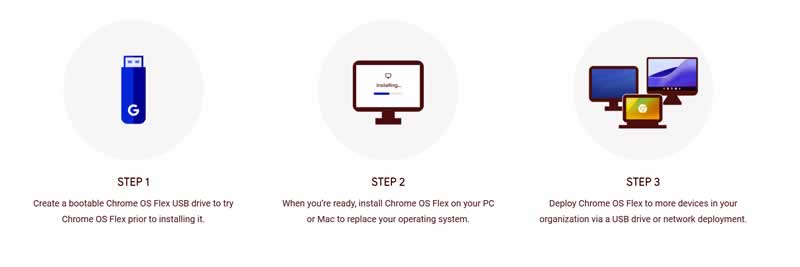
Google has released Chrome OS Flex, a way to turn old Windows and Mac devices into Chromebooks by replacing their operating system.

The Chrome OS Flex presented is based on a distribution of the system’s free open source code that has been available for some time — Cloudready.

Chrome OS Flex is clearly a continuation of the Cloudready idea. In fact, all Cloudready users will be upgraded to a stable version of Chrome OS Flex as soon as it becomes available.

Chrome OS Flex integrates the same graphical interface and basic tools that we already find in Chrome OS — including the Chrome browser. Of course, there is support for the synchronization of settings and bookmarks. In addition, we will have at our disposal Google Assistant and various integrations with Android devices.

One of the most striking features of Chrome OS Flex is that, like the standard version of the operating system, it does not require a high-performance computer to be able to install it. This means that you can run it on old Macs or PCs to give them a second wind.

Minimum requirements for Chrome OS Flex:

  • Processor: Intel or AMD x86 64-bit.
  • RAM memory: 4GB.
  • Storage: 16GB.
  • BIOS: full administrator access.

Beware, Google points out that some Chrome OS Flex features, such as support for Google Assistant or synchronization with Android, may not be available on computers that fall short of specifications. This includes those that even meet the minimum requirements.

Another thing to consider is that Chrome OS Flex does not support the Play Store or Android apps. In fact, at least for now, Mountain View has no intention of adding this support.

Above all, it’s free. The update cycles should correspond to those of Chrome OS, and the installation should be simplified by a uniform image and a USB installer.

Chrome OS Flex Installation

How to Shoot Your First Short Film: Top 3 Tips

Shoot Your First Short Film

Are you aspiring to be a filmmaker but don’t know how or where to start? This article will give you the top 3 tips that you can use to shoot your first short film. 

If you need help with formats and resolution for your videos, you can use an online video converter. It’s easy to use, offers unlimited conversion, and most importantly, it’s free!

What Is a Short Film?

A film or movie is a sequence of moving pictures compiled with sounds to make a whole story. According to statistics, 30% of adults aged 44 and below watch movies every day, 27% of which are young adults. This shows that movie watching is a usual activity for entertainment and leisure.  

On the other hand, short films do not have more than 40 minutes of running time and are produced with a limited budget. Compared to full-length movies shown in theaters with huge funds for special effects, famous actors, and longer running time, how can you make your short film stand out? 

Here are the top 3 tips for shooting your first short film:

Tip Number 1: Know the Process

There are three primary processes of making a short film: planning, filming, and publishing.

Planning

It’s the stage where you need to make an effective plan for your movie. Here’s how:

  • Budget Efficiently – Your budget will depend on you, but remember, this is just your first film. It’s better to limit funds than go all out and lose a lot of money.
  • Focus on Your Content – Develop the film’s concept, script, and story writing. 
  • Prepare Your Storyboards – It looks like a comic with a series of drawings representing the scenes you will be filming. Having a storyboard is essential as it will help you, your cast, and your crew visualize everything.
  • Choose Your Actors and Crew – It will be hard to get a famous actor with a limited fund, but you can ask and bring your friends to act for you or be part of your crew.
  • Think About the Needed Materials and Equipment – Know what you’ll need so you don’t end up wasting time looking for them during filming. You’ll also decide whether to buy or rent your equipment at this stage.
  • Scout Your Shooting Location – Ensure that the site is suitable for filming in terms of lighting and sounds. You’ll also need to check if you’ll need any permit to shoot there. 

Filming

After planning and ensuring everything is complete, you can now start filming. 

  • Prepare for the first day of filming and arrive at the location early.
  • Call your cast and crew for a brief meeting and allocate time for your actors to rehearse their lines.
  • Strictly follow your schedule and shoot order as planned.
  • Always film scenes more than what you need to use as a backup.

Publishing

This process is the most complex and most stressful. Here is how you make a final version and post your movie.

  • Review all the footage and audio of each scene. Reorganizing and making backup files is essential too.
  • Make your first edit using the video editing software you’re familiar with. Always check the visual, lighting, and sound effects or music you used.
  • If needed, make a second round of editing, do a final check and formatting.
  • Save, upload, and publish your first-ever short film.

Tip Number 2: Prepare Everything 

Here are the materials and devices you need to prepare:

  1. Good Script and Storyline – A video or motion picture cannot be called a movie without a storyline or script. It can be something that you create yourself, but you can also borrow or hire someone to write it for you.
  2. A Wonderful Crew – You can work independently, but it’s better to have supporters to help you with the work. Hiring a great and effective team will make your first filmmaking experience easy. It’s also good to learn how to collaborate with others more effectively.
  3. The Stars in Your Film – They are the people who will give life and portray the characters in your movie. They will be the ones who will provide emotions and make the scenes more realistic.
  4. Good Quality Camera – Professional cameras are expensive but a good investment in filmmaking. If you are on a tight budget, you can use your phone to film.
  5. Light and Sound Equipment – Make sure that you have enough working equipment with extras if needed.
  6. A Good Video Editing Software – It gets complicated here, but you shouldn’t worry as you can always use what you have. For example, IOS users can use iMovie, and if you are using Windows, you can edit your videos using Windows Movie Maker. 

Tip Number 3: Cater to Your Viewers

A movie without viewers is not a successful movie. Do not forget to think about who your potential audience should be. They are just as important as the budget, running time, cast, and story in filmmaking. Always think of what or who will be your viewers or what type of movies they want to see. Documentaries, animation, fiction, musical, comedy, drama, and thrillers are just a few of the many movie genres you can choose from.

You can research or survey and ask people what type of movies they are into. Search what movie is trending or visit sites and see what films have the most significant number of views. If you plan to make money in uploading your movie on any video-sharing platform, you should be familiar with what type of users will see your short film. Knowing your target viewers and what they want to watch will make your short movie successful.

Conclusion

Many famous filmmakers started their careers by making short films, and even the first-ever movie published is a short film. It was a stepping stone to many aspiring filmmakers. You also don’t have to spend much money on equipment and other things. Besides, if your short film is successful, it could attract people willing to fund your following projects.