Home Blog Page 242

Tim Berners-Lee Will Auction The Source Code Of The World Wide Web As NFT For Charity

Source Code Of WWW As NFT

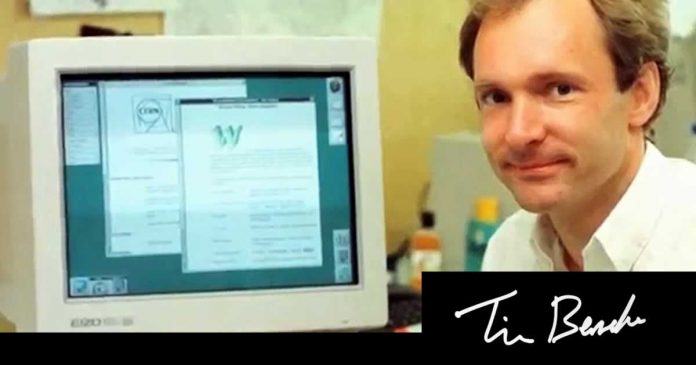
The creator of the World Wide Web, Tim Berners-Lee, decided to sell the source code that he used to create the modern internet as an NFT. The auction will be online and will be held by the auction house Sotheby’s and the proceeds will be donated to charity.

According to Sotheby’s, the auction called “It Changed Everything” will be held online from 23 to 30 June. The starting bid price will be $1000.

According to Sotheby’s, the NFT to be auctioned consists of four elements. On one side are the original files that contain the source code written by Tim Berners-Lee. There are approximately 9955 lines of code written between October 3, 1990 and August 24, 1991, and include the implementation of HTML, HTTP, and URI. Also included are original HTML documents that explained to early users how WorldWideWeb worked.

https://twitter.com/the_lynx_eyed/status/1404824540807577608

On the other hand, the buyer also receives an “animated visualization” of the code being written. The clip is just over 30 minutes long and is black and white, with no audio.

In addition, the NFT includes a digital “poster” representing the complete code. This is an SVG graphic 841 millimetres wide and 1189 millimetres high, which was created by Berners-Lee in Python from the original files. In the lower right corner, it incorporates the graphic representation of the signature of the creator of the WWW.

Lastly, the package incorporates a Markdown letter written by Berners-Lee this year. In it, the computer scientist reflects on the code and its creation process.

Three decades ago, I created something that, with the help of a huge number of colleagues around the world, became a powerful tool in the hands of humanity. Speaking of the World Wide Web, what pleases me most is that it was created as a result of cooperation,” – Tim Berners-Lee said ahead of the auction.

According to the BBC, Berners-Lee’s decision has come as a surprise because in the past, he refused to patent his invention. In any case, as it is an initiative with charitable purposes, it is understood that the creator of the WWW does not intend an economic profit. In addition, the source code of the WWW has been publicly available for years.

Also, the creator of the internet spoke about the new format of sales. He called NFT “the latest fun creation” on the web and the most convenient way to prove ownership of an item.

5 Best Online Video Editors for TikTokers and YouTubers in 2021

Video editing articles and news

Good filming for sure plays a huge role, but to freshen up your content and add a few dynamics, engage your audience, and call to action, you’d better edit everything you shot.

Some might think that editing a short vine will take a hundred years to understand all these gimmicky video editors with millions of extra features. But no. All you need now is a high-speed network connection and yowza – you’re almost a brand new Youtube star! This article will unveil the 5 best online video editors that you can use for free.

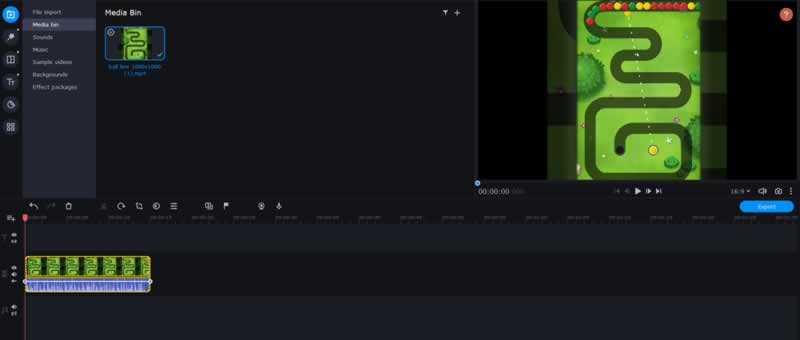
1. Movavi Video Editor Plus

The program quickly caught on due to its user-friendly interface – you can master the basic tools within 20 minutes. The project developers make sure that every untrained amateur can relish their programs. And since any beginner naturally becomes a competent user over time, this app provides two levels of complexity: advanced and simplified.

Drag-and-drop controls make editing as easy as possible. Just download a video or song from your laptop or record from a webcam. Here, you will also find built-in content like music, short videos, stickers, and much more.

Movavi Video Editor Plus

With Movavi, you can:

  • use chroma key, effects, slow-mo
  • apply filters including artistic effects, color, and adjustments
  • add smooth or dynamic transitions
  • crop and rotate
  • improve stabilization
  • add personal logo
  • create a collage
  • save videos in MP4, MOV, AVI, MP3, GIF formats
  • use a free video editor online for quick and easy video editing

Pros: top choice for a novice editor (has initial hints); great range of tools; simple, user-friendly interface; high conversion speed in comparison with analogs, MacOS version.

Cons: not suitable for extensive and super complex projects with many layers; limited feature set for super professional video editing; no screen recording and converting.

2. WeVideo 

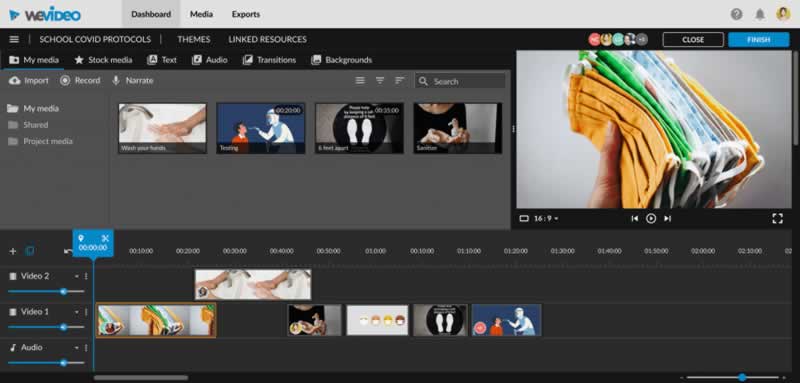
It is one of the most recommended online video editors that are freely available on the Internet. The key advantage of this powerful app is its cross-platform nature, which makes access available from any computer, so you have no need to install any extra software. Since the files are uploaded to cloud storage, you can access them anytime and from anywhere.

WeVideo is a freebee; nevertheless, you can get some paid features that promote your opportunities. Create a custom logo, use screen-recorder or add songs from a large library of non-copyrighted music.

WeVideo

What does it offer?

  • chroma key, Ken Burns effects
  • playback speed
  • collection of stock video, photo, audio integrated into the app
  • transitions between scenes, slow motion
  • voiceover

Pros: the most used social media sizes: square, vertical or horizontal; a powerful set of functions, cloud storage, advanced text editing, multi-track editing, and storyboard.

Cons: many limits in the free plan; most interesting functions are supported only in the paid service; the impossibility of working on large complex projects due to the low speed of data exchange with a remote server.

3. ClipChamp 

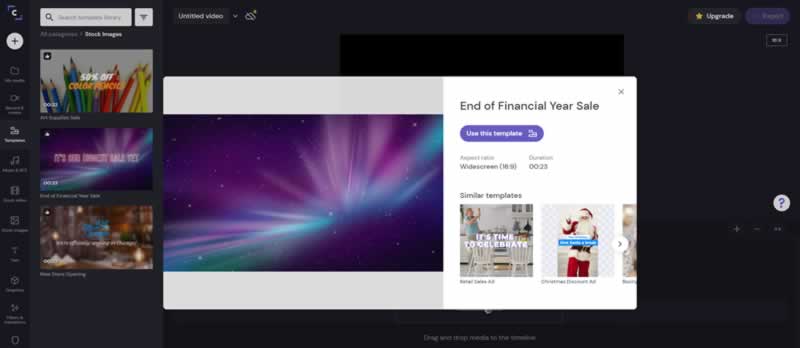
It is a one-box solution for video enthusiasts. It allows novice moviemakers to complete video editing in a very short time as it provides an integrated guide.

You can choose different aspect ratios for social media accounts, and the ready-made video can be directly saved to Google Drive. However, you need to register with your Google or Facebook account before using this online video editor. As an alternative you could also check out this AI video generator to creador de videos ia.

ClipChamp

Features:

  • video compression and conversion
  • transitions, filters, templates
  • text editing
  • basic color correction settings
  • different aspect ratios of the canvas
  • audio and video library

Pros: straightforward app for non-professional users; super quick render; great tutorials.

Cons: loss of quality of the final video; available for Google Chrome only.

4. Kizoa

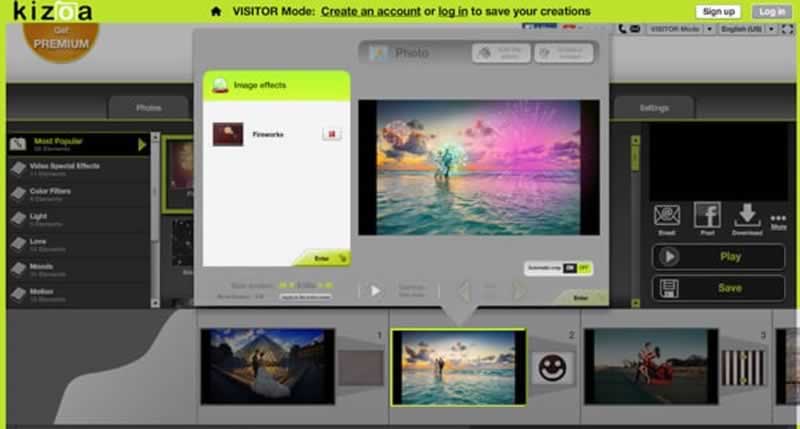
It is a user-friendly and edgy editor that provides a multitude of features, including cutting video into short vines, assembling photos, applying special filters and transitions, working with animations, and overlaying music. Hundreds of templates and options can help to rock your content.

Kizoa is also positioned as cloud storage for photos and videos. We should also highlight the ability to download, store and work with RAW files for photos. You can create and name albums, set tags for easy searching. There is also a function to upload media content directly from Facebook.

Kizoa

Feature set:

  • adding keywords to tags when uploading to social media
  • a bunch of photos and video templates, transitions, effects
  • an audio library with songs you can use on YouTube

Pros: many templates; simple editor for newcomers; upload to social media.

Cons: significant restrictions in the free trial version; registration is a must.

5. Magisto

Magisto is called the program that turns your amateur videos into engaging, memorable movies. How is this possible? The developers of this service have created special software that can analyze the video sequence and automatically highlight the brightest moments and scenes. It’s able to understand who the main characters of the video are, what is its theme and main mood. Accordingly, AI selects the appropriate effects and sound design.

Just within minutes, your video stories are ready to share. By the way, it’s a great helper for those who want to create marketing videos and product videos with unprecedented scale and effectiveness.

Magisto

Magisto software is available for iOS, Android, and Windows.

Delve into:

  • maximum autonomy, as videos are compiled by AI
  • opportunity to make slideshows with music, video collages
  • if you don’t like the result, there is an opportunity to modify it manually
  • you can upload the result to personal accounts directly from the app

Pros: available from mobile and desktop; adjusting video sequences, effects, and music using artificial intelligence.

Cons: minimal control of the result on your part; only SD quality is available for free; the program focuses on shorter videos up to 10 minutes maximum.

Summary 

The online video editors described here are only a small part of existing ones. Each program has its advantages and disadvantages – choose according to your taste and skills.

However, dear future TikTokers and YouTubers, remember that the creation of cool videos demands a creative and unconventional approach and, of course, knowledge of the editing toolkit. To “cultivate” creativity in yourself, train your visual experience and learn from the best and brightest. Good luck, guys!

Coming Soon Windows 11: Microsoft Announced The End Of Support Date For Windows 10

Coming Soon Windows 11

Windows 10 has been around for so long that it is almost unthinkable for us to have another operating system on our computer. Now it looks like “Next Generation Windows” Windows 11 is around the corner.

Recently, Microsoft has confirmed that support for Windows 10 will end on October 14, 2025. The decision covers the Home and Pro versions of the operating system.

Windows 10 was released in 2015, and the end of support comes when the system turns 10 years old. So, on the one hand, this means that Microsoft is sustaining its ten-year support cycle, as has happened with previous editions. On the other hand, it is possible that this modification reflects the future of the platform after the announcement on June 24.

With this movement, Microsoft shuts the rumours that Windows 10 would be the last operating system of the firm. Inevitably, the fact that Windows 10 has its days ‘numbered’ implies that there has to be an operating system to succeed it.

While it is true that it is not known when the support document was updated, the fact that it was updated days before the event that will unveil the “the biggest Windows update in the last decade” should be an indication that Microsoft is already planning to take a leap further.

iOS 15 and iPadOS 15: Apple’s Safari Can Use Browser Extensions

Safari WebExtensions

Apple announced at WWDC 2021 that Safari could use browser extensions on iOS 15 and iPadOS 15. This opens up completely new possibilities for mobile devices.

This was previously reserved for Safari for Macs. The extensions are compatible across operating systems. This means that developers do not have to write a separate extension for each operating system. In the future, this could even be possible across browsers because Apple, Google, Mozilla and Microsoft are working on standardizing the extensions under the name WebExtensions.

The functionality of the browser can be significantly expanded with browser extensions. In addition to the usual ad blockers and VPN extensions, there are also interesting extensions known to web developers that are helpful for error analysis. Extensions, with which the appearance and functionality of websites can be expanded using custom CSS, are also included.

Apple made it clear at its developer conference that their use is associated with some security risks and that the user must therefore give his consent when websites are processed with them. In addition, the URL bar should indicate when an extension is active. The approval can be given over a period of time specified by the user.

Apple has already integrated support for web extensions in desktop Safari.

Elon Musk: Tesla Will Accepts Bitcoin Again On One Condition

Tesla and Elon Musk

According to Elon Musk, Tesla will only accept Bitcoin as a means of payment again when the environmental balance of the digital currency improves significantly.

The announcement has been made, as usual, through his Twitter account. As a benchmark, Musk stated, “reasonable (~50%) clean energy usage by miners with positive future trend, Tesla will resume allowing Bitcoin transactions.” As a result, the Bitcoin price rose slightly.

Past few months Musk had made several announcements regarding Bitcoin which caused the price of the digital currency to fluctuate. The American tycoon, owner of Tesla and SpaceX, announced last February the investment of $1.5 billion in Bitcoin and confirmed that Tesla would accept this cryptocurrency for the purchase of its vehicles. Later Musk rectified and affirmed that the company was going to stop offering Bitcoin as a payment method due to the high environmental impact of mining this virtual currency.

Elon Musk has also responded to a Cointelegraph twitter post about the allegations by Magda Wierzycka, Sygna CEO. Wierzycka indicts Elon Musk of manipulating Bitcoin prices in order to sell a large part of his initial investment at highs, and asked the US Securities and Exchange Commission to investigate the tycoon for alleged price manipulation of Bitcoin.

On the contrary, Musk claims that Tesla sold ten percent of its Bitcoin holdings to prove that Bitcoin could be easily liquidated without moving the market.

How to master social media marketing?

Fans Into Social Media Followers

Have you ever felt that you are not getting satisfactory outcomes from social media marketing? It may happen for a lot of reasons. But, you can enhance your knowledge and skill in social media marketing to get the maximum result. In this post, we are going to share how you can master social media marketing gradually. Let’s know the keys.

Start small

You can’t be a social media marketing expert overnight. So, stop thinking about excessive things. Social media marketing is a huge field that will take time to learn. You can start small and enhance your knowledge and capacity gradually. For instance, you can open a Twitter account and learn about the micro-blogging site step by step.

Master social network features

The majority of social media platforms are well equipped with tons of essential features. Facebook has introduced messenger rooms recently. Instagram has brought IGTV for longer high-resolution videos. Like the same way, each social network has some unique features that you need to master gradually.

Learn constantly

Learning has no alternative to developing your social media marketing skill. You should even follow your competitors and learn from them how they are doing well. Learning is a lifetime process. Since technologies are constantly improving, social networks also upgrade their algorithms and features accordingly. So, you should read constantly from smm panel blogs to keep you updated.

Experiment different things

In social media marketing, you will never get equal results by following the same strategy. Remember that your focus always should be to improve the outcome of each campaign. If you are just starting out, get ready for a lot of experiments because you don’t know what will work. 

Try organic growth

The paid campaign is the shortest and quickest way to get more followers and engagement. But, they aren’t the permanent way to go. A continuous paid campaign can be costly for small businesses. If you have no or a tight budget for marketing, you must know the way to grow a social media profile organically. There are several effective strategies for social media organic growth. You need to know each of them thoroughly and apply them with patience until you see results.

Manage time like a pro

Social media marketing skill is not going to help you alone. You need to learn about perfect time management as well. Divide your time into several portions and allocate them where needed. For instance, you should keep a certain time to reply to peoples’ comments along with creating good content.  

Maintain a to-do list

Don’t you like to maintain a to-do list? Let us explain that a to-do list is one of the most practiced things of most marketing experts. Social media marketing is a huge combination of a number of tasks. Chances are you will miss or forget one accidentally that will ruin the entire effort. A to-do list will make you organized and focused.

Track your performance

You should track your performance to evaluate the quality of your work. After each campaign, note everything in detail and compare them with each other to explore which one was the best and how you are doing.

Colorful And Nvidia Will Soon Open A Graphics Card Museum

Graphics Card Museum

Colorful recently moved to the New Generation Industrial Park in Shenzhen, China, and in this complex, in collaboration with Nvidia, has now opened the first museum on the evolution of GPUs and graphics cards from their beginnings in the 1980s to the present day. The manufacturer also exhibits rare models.

In addition to historical Nvidia graphics cards such as the first Geforce card Geforce 256, the museum will also exhibit other GPUs — including competitors. Visitors can find out which products have been sold by brands such as Ati, some of which no longer exist, and which were then taken over by AMD.

Graphics Card Museum 1

In addition to Nvidia, ATi and AMD, graphics cards from IBM, 3Dlabs, Intel, S3, Trident and 3dfx can also be found in the “Colorful GPU Museum”. One of the rarest GPUs in the collection is the Intel i740, Intel’s first and only GPU in the dedicated graphics cards section. With Intel Xe and the graphics cards DG1 and DG2-512, the manufacturer dares a new foray against AMD and Nvidia.

In addition to exhibits, Colorful probably also offers activities in the museum. The focus is on racing setups with an 8K panorama display, a racing chair, steering wheel, pedals and a high-end gaming system. 

First Facebook Smartwatch Would Be Launched Next Year: Equipped With Two Cameras And Heart Sensor

Facebook Smartwatch

Facebook is working on its first smartwatch. Next summer, the Facebook smartwatch will be launched, which will feature two cameras with one that can be undocked for independent use.

First, it would have a camera on the front of the smartwatch whose primary function would be for video calls, while on the back, it would be one with 1080p resolution and autofocus to record scenes when we undock it from the main body of the watch.

In fact, according to The Verge, Facebook would already be negotiating with other brands to create accessories that allow the camera to be connected to other things, such as a backpack.

It would allow LTE connectivity, it would have a heart rate sensor like the Apple Watch and it will have 3 colors: black, gold and white. Although undoubtedly the most interesting option of the Facebook smartwatch is that it would serve as an input and control device for Facebook’s mixed reality glasses.

Of course, Marc Zuckerberg wants with this new wearable device to start creating products that reach more people since it is currently impeded by the almost domination of companies such as Google or Apple.