Home Blog Page 258

Setting Up Your Own Home Server With UCS

programmer managing server

You’re looking for a way to set up your own private cloud for your family or friends, including a mail server, calendar, and file sharing capabilities? You’re looking for an alternative to Gmail, Google Docs, and Dropbox, which is not only open-source but also guarantees that control over all your data remains with you alone? It’s not that complicated, really. 

Now, you’ve probably heard that Linux is the preferred operating system in this case, but what if you’re a Windows or macOS user? In this article, we’d like to introduce Univention Corporate Server, a Linux system with a graphical configuration interface and an included App store in which you find around 90 further applications from well known open-source vendors, providing easy and fast access to mail, video conferencing, cloud services, chat programs, password management, and many other services– an ideal open-source operating system for your own home server. And don’t worry: you don’t have to stop using Windows or Mac if you don’t want to. 

After describing the installation process, we’ll give a quick overview of the included system administration tools. We’re also going to show how to install and upgrade software and how to share files with other users by integrating Nextcloud in your UCS environment. In the end, you’ll find some advice on how to set up your own mail server and links to the UCS documentation. 

Please note that this is an exemplary setup only. The installation wizard is very capable and should guide you through the installation process smoothly. However, if there appear to be any obstacles, you will find answers to many questions in the Univention Help Forum. You can also ask individual questions there, of course. 

Univention Corporate Server: A good Choice

Univention Corporate Server (UCS) is a Debian-based enterprise Linux distribution with an integrated management system for central and cross-platform administration of computers, users, and services. While it is mainly used in professional environments, private users can also benefit from its features since it’s really easy to set up and administer. Here are some cool features of the Open Source operating system:

  • Graphical administration in your preferred web browser
  • App Center for simple installation of about 90 applications e.g. Nextcloud, Rocket.Chat, OpenProject, Open-Xchange, SuiteCRM, and many more 
  • An online portal for easy access
  • Simple integration of additional services via Open Standards like SAML and OpenID Connect for Single Sign-On
  • Identity Management for central administration of users/groups and their permissions
  • Network Management including DHCP and DNS
  • Client and Infrastructure Management for Windows, Mac OS X and Linux Desktops or Servers (including Active Directory compatible Domain Services)

In Univention Corporate Server, there is no need to fiddle with configuration files in a text editor, although you can do this if you want to. Most users should be happy with the web interface for installing apps, managing domains, computers, printers, user accounts, network shares, and more. UCS can operate as stand-alone distribution but can also be your main server and manage other Linux, Windows, and macOS computers.

What you need

The first question most people ask is: “Do I need a physical machine to run my own home server?” Well, no, you don’t – there is always the possibility to rent a virtual or dedicated root server from a hosting company. If renting a server from an external provider is not an option, and you don’t have a spare computer, then you can run UCS as a virtual machine on one of your other machines. For this article, we’ve decided to install Univention Corporate Server in our local network on our own hardware. A computer with 2 GB RAM and 10 GB on the hard drive should be good enough, but you probably need more space if you’re planning to store photos, videos, and other documents.

Keep in mind that running the server on your own network does give you more control over your data but is not ideal if you frequently access the machine from the outside over a slow internet connection. If you’re planning to access your own server from the Internet, you need a broadband internet connection with enough upload bandwidth and a public IP address as well as a corresponding DNS entry:

  • A public IP requires the configuration of your router so that it can pass on requests to your local UCS server. The configuration depends on the router and often also on the Internet Service Provider. For most routers, you should be able to find HOWTOs online.
  • A publicly resolvable DNS entry is available from providers like Free DNS or similar.
  • A publicly resolvable DNS entry is available from providers like Free DNS similar.

There are plenty of tutorials on the web about public and private IPs, about port forwarding and opening ports on your router/firewall, so we won’t go into detail here. Let’s get started with UCS!

Downloading the Image and booting the Installer

Go to the UCS download page and download the ISO image, which is available for the amd64 architecture (64 bit). You can burn a DVD or create a bootable USB medium to install Univention Corporate Server on a physical machine. Alternatively, use the ISO image to install the operating system on a virtual machine. The UCS download section also offers pre-installed images for VMware and VirtualBox. The UCS installer includes support for the Unified Extensible Firmware Interface (UEFI) standard and can start systems with activated SecureBoot. Make sure to adjust your BIOS settings to boot the computer from DVD or USB.
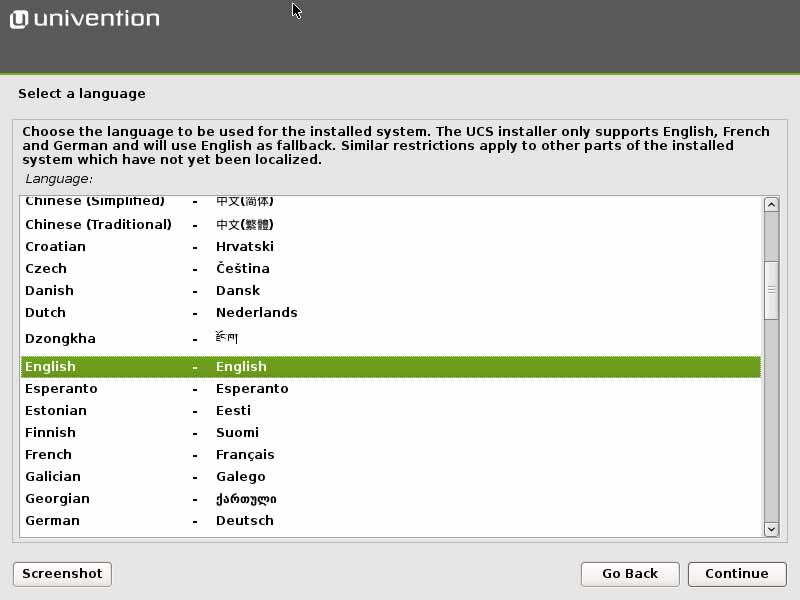
language-settings

After selecting language and time zone, the installer will help you to partition your hard disk and then install the base system. In most cases, you can stick to the default settings. That includes the automatic network configuration via DHCP. Once the base system has been installed, the actual UCS configuration begins.
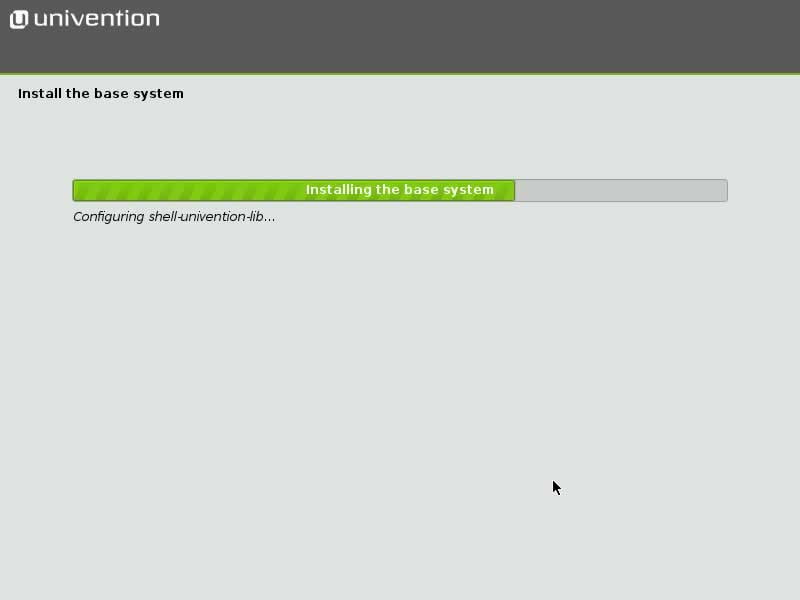
base system

Configuring UCS

First, the installer will ask you to select your domain settings. You can create a new UCS domain (default), join an existing Active Directory domain, join an existing UCS domain or skip the domain configuration. In most cases, the default settings are fine – since you’re probably installing the first and only UCS machine in your local environment, select “Create a new UCS domain.” The following dialog asks for your name and a valid email address to where your personalized license key will be sent to.

The actual activation of the UCS license happens later, in the web-based administration interface. You don’t need to pay for the license: UCS is not just Open Source Software (GNU AGPL), but also freely available in form of the UCS Core Edition. For more information about the license models, please visit the Univention website.
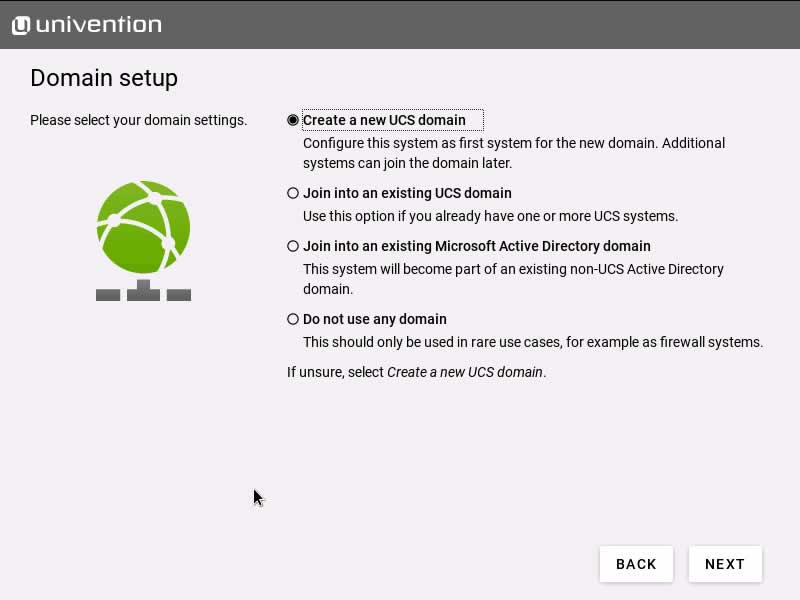
new-domain

Next, enter the hostname: the first field expects the fully qualified domain name (FQDN) of your UCS machine, and the second field (LDAP base) is suggested based on the FQDN’s settings. The fully qualified domain name is the name under which your computer can be accessed in the network. Since many UCS services depend on this setting and it’s not that easy to change this at a later point in time, you might want to put some thought into this. For a single Home Server, which shall be made available using the above mentioned DDNS services later, we recommend to use the FQDN registered in the external DDNS service.

In the “Software configuration” dialog you can select the first few services to be installed on your UCS machine. We’ve decided to install the graphical desktop environment (KDE) and the “Active Directory-compatible domain controller” so that we can set up file sharing in the local network later. Don’t worry about forgetting something important – it’s quite easy to install additional apps and services later on.
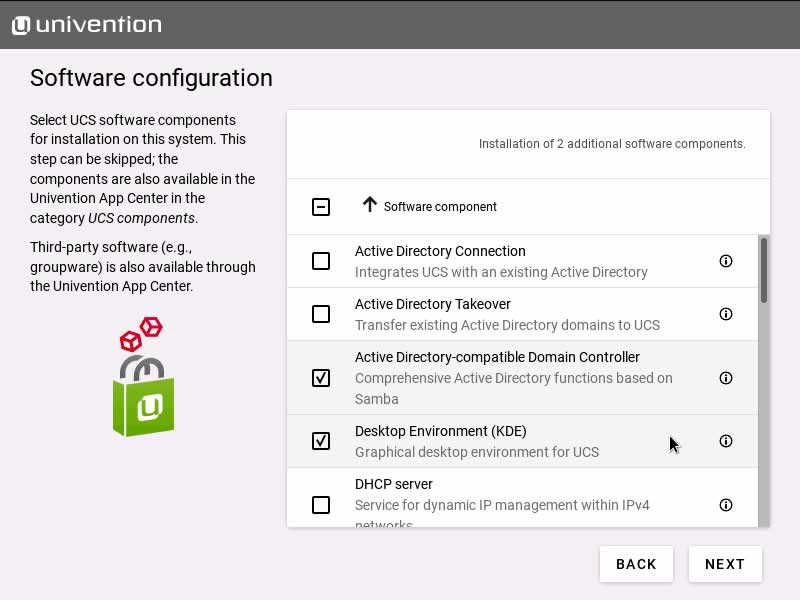
software-select

After hitting “Next” the installer will present you with a summary of all settings. By default, the box “Update system after setup” is activated which means the installer will download and install all the latest patches, errata and app updates after the initial setup. If your internet connection is slow, feel free to skip this and install available updates later.
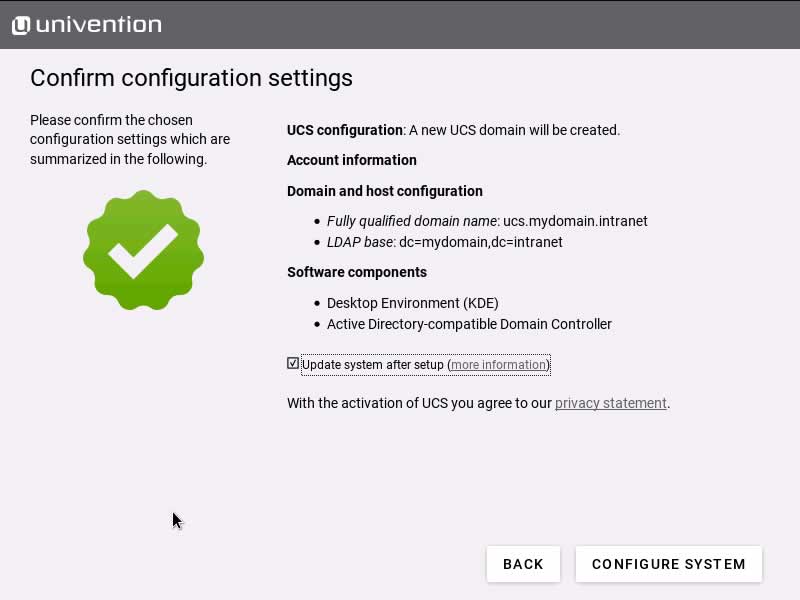
summary

Depending on your hardware and the speed of your internet connection, this will take some time. Click “Finish” to reboot your machine after the installation.

Quick Overview: Portal and Univention Management Console

After you’ve restarted your UCS computer, log in to start the graphical desktop environment. Enter “Administrator” as your username and the root password you configured during the installation. As mentioned above, one advantage of the UCS system is the graphical configuration via its web interface. To start it, click the launcher in the lower left corner and select “Server Administration”.

The web browser Mozilla Firefox now presents the Univention Portal where all locally installed applications are listed (default: “System and domain settings” and a link to the Univention blog).
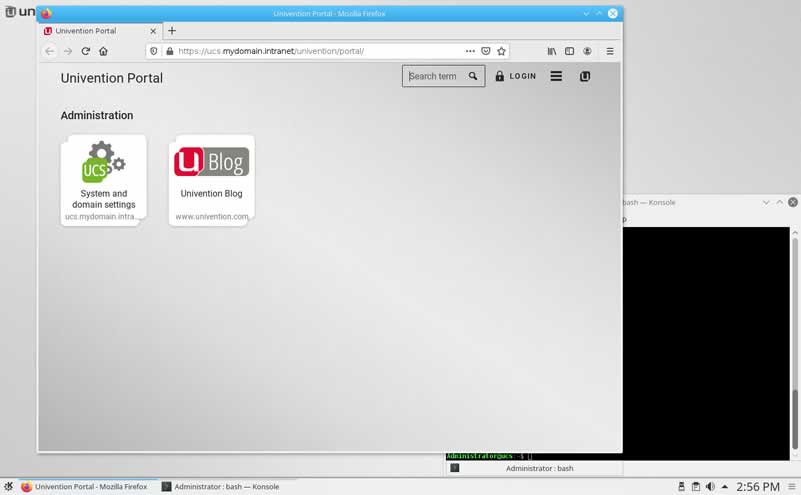
portal

Click “System and domain settings” to log in (username: “Administrator”, password: root password) and enter the Univention Management Console. The UMC is the central place for web-based administration of your UCS computer. By default, only members of the “Domain Admins” group can access all modules. You don’t need to worry about this for the moment, since the account “Administrator” has been granted all the necessary permissions.
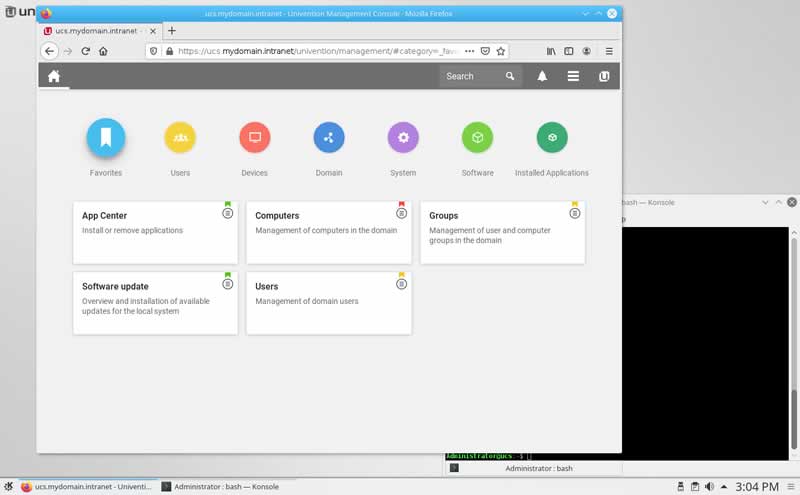
umc

 Now, before you make any changes to your UCS server, open the menu in the top right corner and select “License”, followed by “Import a new license”. Upload the license key from the file you received in an email or copy & paste it into the text field.

Software Installation and Upgrade

You can install additional software using the Univention App Center (module “Software” / “App Center”). After opening the App Center you can see installed and available software components. The applications are provided by third party vendors and by Univention itself. There is a “Search” field and you can filter the applications by using the “App Categories”. Click on an application to display a description, the manufacturer, screenshots and more.
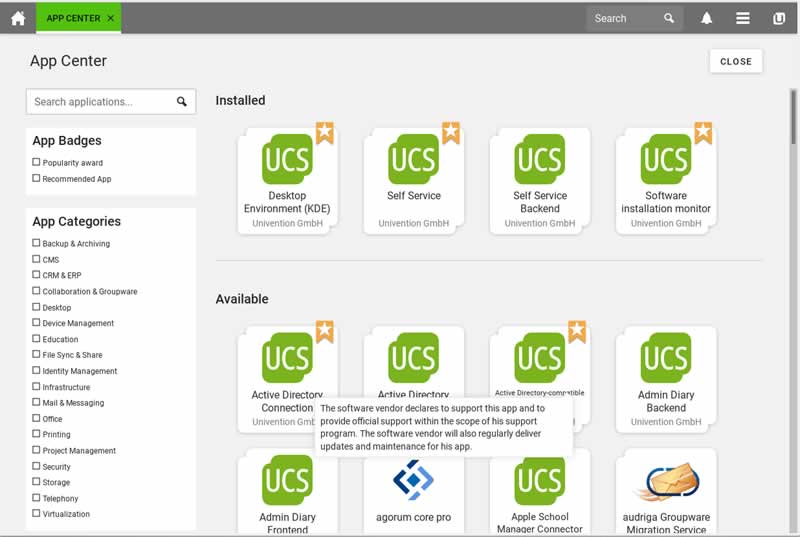
app-center

Every time the Univention developers publish software updates or a new UCS version, you will receive a notification in the menu. Follow the link to install release updates, package updates or App Center updates. The dialog also shows if it’s necessary to reboot the UCS server after an upgrade.
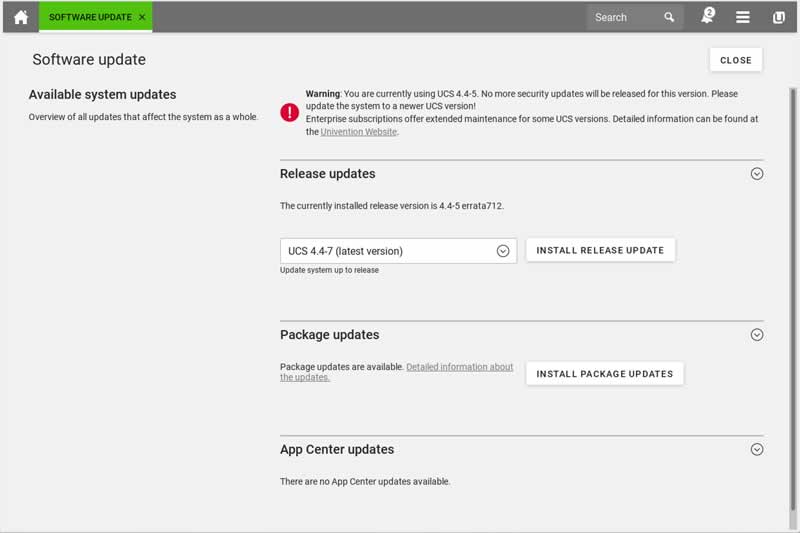
software-update

Setting up your own cloud by integrating Nextcloud in UCS

In the UCS App Center, you’ll find several apps for file sharing and synchronizing. For this article, we’ve decided to install Nextcloud Hub to set up a local content collaboration platform. After selecting and installing the app, you can access your private cloud via “https://ucs.mydomain.intranet/nextcloud” in your web browser. Use your UCS credentials (username and password) to log in.

Nextcloud Hub consists of several components, including Nextcloud Files for sharing files with other users. There is also Nextcloud Talk for private audio/video conferences and text-based chats and Nextcloud Groupware which integrates a calendar, contacts, and mail. There are apps for Android and iOS in the respective app stores.
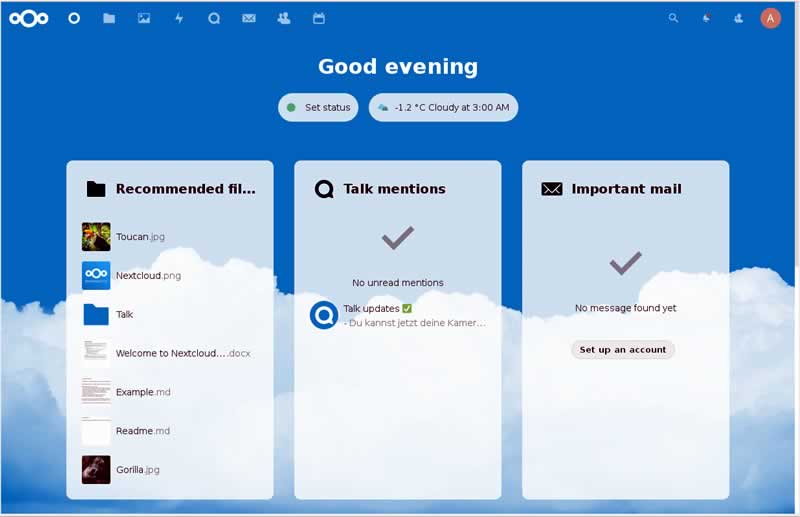
nextcloud

 If you want to send emails from Nextcloud, you need to set up a mail server first. In UCS this is not really complicated, as you will see.

Setting up a Mail Server

First, visit the App Center and install the app “Mail Server”. This will install a complete mail server including Postfix (Mail Transfer Agent, MTA), ClamAV (virus scanner), SpamAssassin (blocking spam), and Dovecot (Mail Delivery Agent, MDA). The MTA is used for outgoing mails and the MDA for incoming mails (IMAP and POP3).

The default configuration uses the UCS domain which you defined during the installation (“ucs.mydomain.intranet” in our example), but it’s possible to set up further mail domains via the module “Domain” / “Mail”. An article on the Univention blog describes how to assign email addresses to users and how to send emails to external servers and domains.

Last but not least: Installation of Let’s Encrypt

As mentioned in the beginning, making the UCS Home Server available to the Internet is a good idea to access your Files and Mails from everywhere in the world and get a real replacement for other Clpud Services. To secure this, SSL encryption is used for example for HTTPS.

SSL encryption is based on certificates, which are created while installing UCS as “self signed” certificates. By default these lead to warnings in the browser and other clients like the Nexcloud App. Via the installation of a trusted certificate with “Let’s Encrypt” you can solve that. The corresponding app can also be found in the App Center.

After installation, open a configuration mask by clicking on “App Settings”: enter here the domain(s) you registered for public access, separated by spaces, and checkmark the services that should use the certificate. In our example the certificate should be used in Apache, Postfix and Dovecot. With a click on “Apply changes” a certificate will be created and integrated into the services.

Great Learning Experience

As you can see, running your own server and offering a private cloud, mail services and more to other users is not complicated. With Univention Corporate Server, it’s simple to administer the system and install additional software – have a look at the App Center and give it a try. Here you can find many more Open Source programs, including groupware, project management, backup, and office applications. If you have any questions, have a look at the documentation. Apart from the quick start guide, there is also the handbook for administrators and a separate manual for users.

5 Things to Consider When Purchasing a Workstation for CAD

using a CAD tool to design

When working in architectural and construction design, you are going to need something more powerful than your standard office computer. To handle the huge strain that comes with CAD software and maximize productivity, you are going to have to invest in a suitable workstation.

With there being an array of CAD workstations available on the market, it can be a daunting task to choose the best one for you. So what makes a good workstation? Let’s investigate what you must consider before making that big investment.

What is a workstation? 

Think of a workstation as a more advanced desktop computer. What makes a workstation different is that it is designed with a specific purpose in mind; it could be video editing, graphic design, science or, in this case, computer-aided design. 

A workstation will come with a faster processor than an ordinary computer so it can perform and run to the high standard needed to carry out tasks. 

Budget

Budget may be the first thing you consider when choosing a suitable CAD workstation. Having a budget in mind before you go on your search will be very helpful in narrowing down your options. Working within your budget is the best way to save both time and money. Manufacturers will want your business – in sharing your budget with them, they will be more than happy to help you choose the best CAD workstation for you. 

Processor

The central processing unit, or CPU, serves to process and execute a computer’s instructions. You may have seen the CPU referred to the ‘brains’ of the computer. When you’re carrying out very graphically demanding tasks, you’ll need a workstation with a sufficient amount of processing power. 

Modern-day processors come with multiple cores, with most having at least four but some going beyond 12. The more cores you have, the more actions you’ll be able to run simultaneously. Each core serves to run numerous calculations to execute commands given by computer programs. The speed at which these calculations are performed is referred to as clock speed, or ‘frequency’, which is measured in gigahertz (GHz). 

In the case of a CAD workstation, it is recommended to look for a processor with a clock speed of around 3.6 GHz with a minimum quad-core processor. 

Graphics Card

In order to enhance processing power and take the strain off of the CPU, your CAD workstation will also have a graphics processing unit (GPU). It can be a part of the computer’s motherboard or processor, but it can also be part of a graphics card where it’s able to perform more powerful tasks. 

The GPU’s primary use is to render images and bring graphics to your screen. If you’re looking to make some truly impressive graphics then you’ll need a decent graphics card. You are seriously penalising yourself if you have an up-to-scratch GPU. Not only will graphics render slowly, but the performance of your workstation will take a hit. 

Most workstations will already have a graphics card installed. However, it’s worth making sure that it’s powerful enough in order to handle the graphically-demanding tasks you’re going to perform. It’s also important to ensure the graphics card in your CAD workstation is future-proof. You don’t want a graphics card that will soon become obsolete and unable to do the job you require. So you’ll need to look for a graphics card with the highest possible specifications within your budget.  

Storage

There are two options open to you when it comes to storage: a hard disk drive (HDDs) or a solid-state drive (SSDs). Both of these store data in different ways. 

The more traditional of the two are HDDs, which are metal disks with a magnetic coating. HDDs spin at high speed, reading and writing data on the disk. Typically they hold more storage than SSDs, with some capable of holding up to 10 terabytes (TB) of data. 

What sets SSDs apart is that they have no moving parts – “solid-state”. The SSDs are considerably faster than the hard drive counterparts because of their electrical circuitry. The means that loading times will be faster and more tasks can be performed simultaneously. Where they fall is in the storage capacity — at the moment, they max out at around 4TB of storage. However, as technology advances, it would be reasonable to assume that storage capacity would increase over time. 

Memory (RAM)

In your job, you’ll be creating numerous large files and running multiple applications concurrently. Random-access memory, or RAM, temporarily stores information that your computer will need to access. It plays an important role in your computer’s ability to perform everyday tasks and load applications. RAM is measured in gigabytes (GB).

With advancements in modern-day software, RAM becomes an increasingly important factor for CAD workstations. It’s crucial to ensure that you have sufficient RAM in order to carry out the tasks your job requires. Ultimately, the amount of RAM that you’ll need comes down to the software you use. You’ll need at least 8GB for basic CAD software, but for more advanced 3D applications, you’ll require a minimum of 16GB. You can add more RAM to a workstation so, as technology advances, you can upgrade in line with software requirements. 

Summary

Choosing the right CAD workstation for you is a lengthy process but in taking your time, you’re ensuring you reach a suitable choice. With CAD workstations being so pricey, it’s crucial to remember these things to consider. 

As technology is advancing at an ever-impressive rate, you’ll want to make sure that you have a CAD workstation that will get you through the years to come. Whether it’s by purchasing the very top-end workstation today or having one that is very customizable, you don’t want to have to go through the buying process every few years. 

Consulting reviews is a good way to see if you’re getting a good value. So take your time and do your research. 

FlexiHub: Share USB Devices Over Ethernet And Access Them Anywhere In Realtime

FlexiHub USB over Ethernet

We use so many devices these days that are connected via USB — smartphones, printers, scanners, webcams, etc. Of course, a USB cable is usually required to use these devices. This is ideal when the device you want to use is right here next to your computer. But what if you urgently need to use a device (or two) in another office or at home while at work or traveling? And how is it possible?

There comes the importance of an incredibly powerful system — USB over Ethernet.

USB over Ethernet is a way to share USB-based devices over Ethernet, Wi-Fi, or the internet. Basically, you’ll be controlling and accessing data of USB devices like printers, flash drives, and webcams from another computer.

There are many programs available in the market to implement such a system. And FlexiHub is one such USB over Ethernet software capable of making the USB ports of a computer “flexible“. FlexiHub acts as a sort of virtual USB hub that allows you to share any device connected to a USB port of a computer on the internet with another computer connected to the network.

USB over Ethernet with FlexiHub

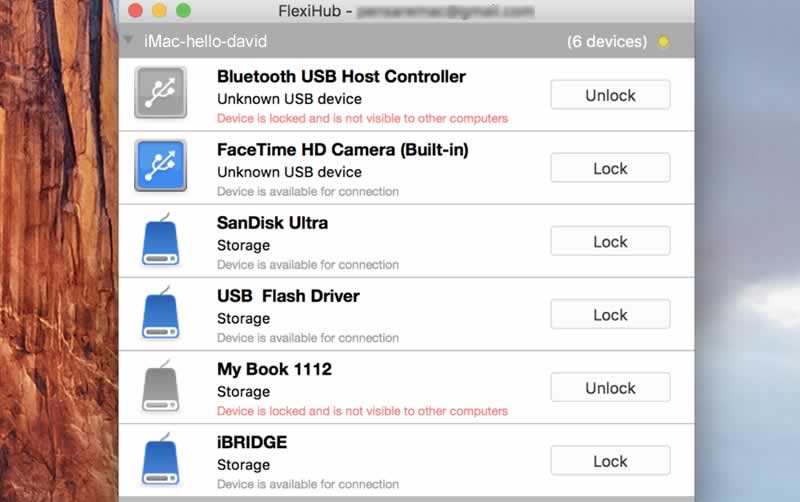
FlexiHub is basically a control panel having to be able to activate and manage all the various USB devices connected to the computer. The activation of the service and the operation is really simple and immediate, so much so that with a few clicks, you are ready to use it.

FlexiHub allows, for example, to view the contents of a USB stick connected to your home computer directly from your office, perhaps even miles away, in another city, country, or even on a different continent. Just be connected to the internet, install the FlexiHub application on both computers, create your own account for sharing, and that’s it.

FlexiHub 1

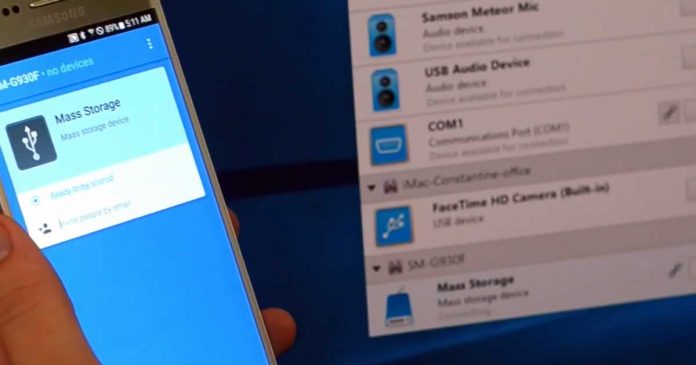
As soon as it is activated, the program already returns a list of connected USB devices. The nice thing is that it can recognize them and distinguish them by type, for example, smartphones, printers, audio devices, and so on. 

Advantages offered by FlexiHub

  • The unique USB sharing technology
  • Secure Link: The security communications used by FlexiHub feature 2048-bit SSL encryption, which allows for an additional layer of data protection. Therefore, there is no risk of data being lost en route on the network.
  • Communication to private server: FlexiHub sends traffic through its own redirect server, so connected computer does not need a static IP address.
  • FlexiHub enables you to share USB over a network even without the locally installed drivers. The software recognizes the type of device automatically when a USB peripheral is connected to your computer, which makes it very easy to connect remote USB devices.
  • Traffic Compression: Once traffic compression is enabled, it speeds up interaction with specific USB devices and reduces internet traffic. In the case of devices such as scanners where data is transferred in an uncompressed state, FlexiHub allows compression and transfers with the best compromise between speed and compression.

FlexiHub is a multi-platform application and is available not only for Mac, but also for Windows, Linux, and Android. Like all valuable services, this too is, of course, paid and requires the subscription. However, it comes with a 7-day free trial.

Kobalos: Unique Multiplatform Malware Threatens Supercomputers Around The World

Summit - powerful supercomputer on the planet
Source: ORNL

After analyzing attacks against several large supercomputers in Asia and America, ESET security researchers warn of a new type of malware directed especially against supercomputers.

The new malware has been called “Kobalos,” and that was no accident. Kobalos was the name of a creature from Greek mythology, a kind of goblin, famous for causing great problems to mortals despite how small it was.

This small software, which is capable of doing much more than the scarce storage space it occupies, may appear. In fact, it is so complex that it is capable of affecting not just one but three different operating systems — Linux, BSD, and Solaris. But in addition, researchers suspect that it might be possible to make it affect Windows systems.

It’s rare to see this level of sophistication in Linux malware,” say the researchers, who became suspicious of an attack targeting supercomputers while working with CERN’s security team.

Kobalos is what is known as a “backdoor”, and therefore allows an attacker to enter the infected computer to install more malware or to steal data.

Usually, Kobalos does nothing on the system. It just installs itself in an executable and waits for a connection to a specific TCP port. Only when the attacker makes the connection, Kobalos is able to give him access rights to remote file systems and allows him to open terminals with which to control the system.

This attack is especially dangerous because only one command is necessary to turn any infected server into a C2 (command and control) server, from which a larger-scale attack can be directed. To do this, Kobalos can also connect infected computers to each other.

The worrying thing is, researchers still do not know what the intentions of the creators of this malware were — for example, if the goal was to steal data, use supercomputers for some purpose, or simply hijack it.

Commander One: Advanced Dual-Panel File Manager Combines With FTP Client For Mac

Commander One

Are you on a hunt for the best Finder alternative for your Mac? 

Tired of creating and switching between tabs, you want to control a lot of actions using shortcut keys and have a convenient two-panel interface — then you should better check out Commander One.

Commander One is an alternative super-powered enhanced version of macOS Finder. With this advanced file manager navigating your folders, moving, copying, pasting your files, locating cloud storage resources, a whole host of everyday activities as well as plenty of customizable options are available with ease.

Dual-panel file manager you need

Fast and powerful, yet easy to use, it provides all the features you need to have complete control over all files on your computer or network drives. Commander One brings file management to the next level.

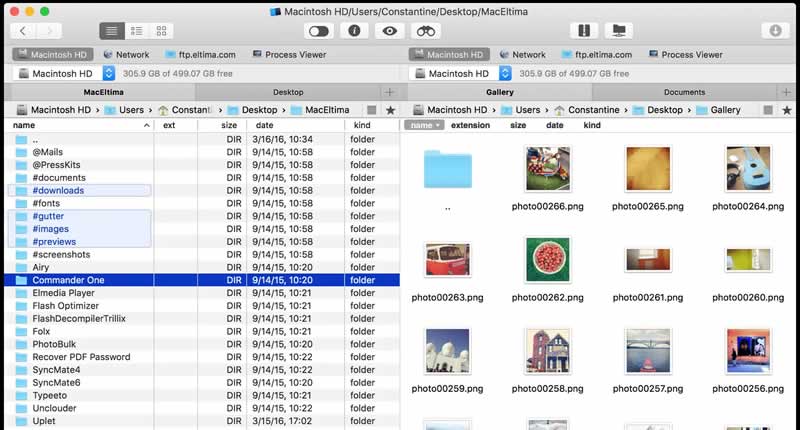
Commander One comes with a dual-panel file manager with tab support. Integration of dual-panel interface greatly increases the ability to work with files since you do not need to open, close, and switch from one tab to another.

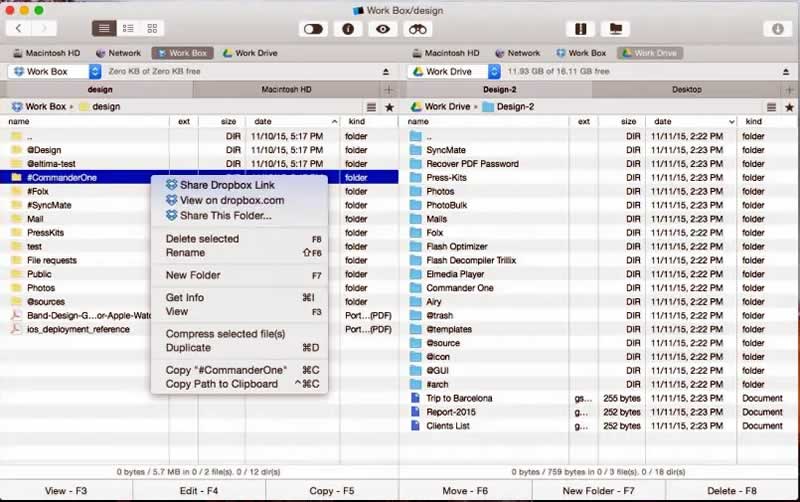
Commander One 1

The built-in viewer supports documents, images, multimedia files, and HEX. Local search allows you to search for information anywhere, including compressed files. The RegExp function will expand your regular expression search criteria. Spotlight functionality is integrated into the search engine appendix. All actions are mapped with keyboard shortcuts that can be reassigned helps you to leave your mouse behind.

Alternative to FileZilla for Mac

In addition to being an excellent file manager, the application can also be your best choice of FTP program for Mac.

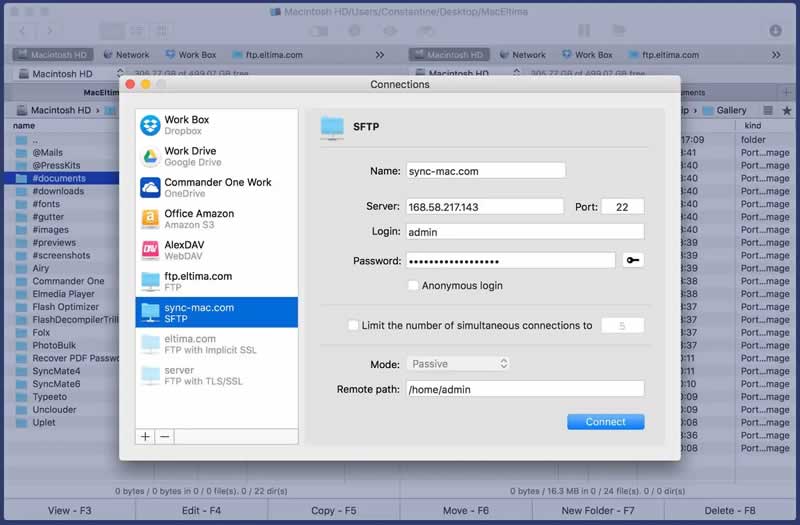
This alternative to FileZilla for Mac supports the FTP, SFTP, FTPS and WebDAV protocols, as well as cloud services such as Amazon S3, Dropbox, Google Drive, Microsoft OneDrive. 

Commander One 2

However, it should be mentioned that all connection login credentials are stored securely in macOS Keychain. In addition, it ensures additional protection to your online connection and establishes encrypted file transfer between remote servers/cloud computing services and your Mac.

One of the best features of Commander One FTP client for Mac is, it ensures the fastest and most efficient upload and download processes possible. It enables the simultaneous transfer of multiple files while also having a queue function to avoid bandwidth bottlenecks. Optionally, users can also set a limit on the connections that can take place when connecting to the corresponding FTP server.

Commander One 3

It is available as a free version and an extended pro version with all functions, which is available for free during the first 15 days of use.

Commander One comes with more features than the Finder, and it works very fast. The application has everything that needs to satisfy ordinary users, and the most advanced, who value the ability and experience with the double-panel file managers with a great FTP client for Mac.

Tools Every HR Rep Needs To Succeed

businessmen

As an HR representative, you’ll be used to performing a daily balancing act. With so many responsibilities and so little time, every move you make has to be a strategic and time-effective one. It’s true that to succeed in HR, you need grit and determination, as well as strong organizational skills. You also need to consider yourself a “people person”; however, as helpful as these tools and traits can be in this demanding role, they aren’t enough on their own.

Most HR reps are good, but what do you need to be great? To rise head and shoulders above the others and make a real difference to the business you work for and the employees who are ultimately relying on you to guide them through the entire employee lifecycle?

Read on to discover the tools every HR rep needs to succeed.

The right HR software

You may have the right personality and temperament to succeed in HR; however, that doesn’t mean you have to battle on alone. Knowing when to invest in HR software can help your services and talents go from adequate to exemplary within moments. The right software can help you stay connected across the business, all whilst encouraging employees to take command of their own personal data and learning process.

HR software with good functionality means you’ll be able to access the systems and the files you need securely on any device, whenever you need them. Managing the employee lifecycle has never been easier with fully tailored onboarding plans, training platforms, and fully operational payroll services. This kind of software helps you to prioritize other pressing issues and responsibilities, safe in the knowledge that employees and other departments are in safe hands. Speak with the experts at ciphr.com for more information on HR software.

Strong communication skills

You’re probably a people person, but are you someone who really commands authority? You can be a pleasant person, but in the health and safety information, you’re giving new employees really sinking in? A good HR rep has no issue speaking in front of crowds, but a great HR rep commands them. Working on your communication skills will not only ensure that onboarding processes are absorbed and adhered to, but it also means employees are more willing to come to you with issues and concerns, simply because they know you’ll get things done.

And finally, a hands-on approach

When most people think of HR reps, they picture them tucked away in an office somewhere, usually behind a teetering pile of paperwork. Although this image is too far from the truth, if you’re an HR rep with the drive to succeed, you may want to take on a more hands-on approach.

Getting out of your office and frequenting the areas where employees work and meet will help them become more familiar with you. This means they’re more likely to come to you with problems and questions. This, in turn, makes employees happier and inspired to work harder and stay within the business for long.

Final thoughts…

Becoming an effective and exceptional HR rep is easier when you follow these steps. Speak with ciphr.com for more information on HR software.

Why Are Offshore Developers So Popular?

Emerging Programming Languages

Using offshore developers is becoming more and more common as the days go by, and it seems like they are exceeding expectations. If you are not experienced in this industry and outsourcing, then you may not see the potential benefits that offshore developers can offer you.

This post will highlight the reasons why offshore developers are so popular and why it is a good option. Here we go and let’s get right into it.

Cheap Labor

The first and most obvious reason is that you are going to get access to talent at a much cheaper option. Outsourcing in all areas of business has always been attractive because you can outsource to a group of people that do not charge as much for their hourly rate.

It not only makes sense to save money, but they might even be better at your desired task than your in-house team. More on that later in this post. Being able to access cheap talent and not have to deal with paying a fortune is such a big deal for business owners.

Saving money and getting great service from an offshore developer could be a game-changer for your balance sheet.

More Experience

If you need some sort of software or application developed and your team is not experienced, then outsourcing makes a ton of sense to any smart business owner. Outsourcing to a team overseas that is experienced and more knowledgeable than your current team is obviously smart.

It will lead to fewer headaches if you can access better talent and end with a better ending than if you let your in-house team tackle a project that they can’t do. It is pretty common for successful business owners to use offshore developers to their advantage because they are such a great resource.

It is tough to compete with the level of expertise that some developers have because of their extensive experience.

Promotes Growth

The last point that makes offshore developers attractive is that it really promotes a lot of growth. You really are expanding your workload as a company when you hire more people to complete tasks, and that is going to usually lead to more revenue.

As I am sure you know, increasing your revenue numbers will lead to more opportunities for your business to expand and dominate the competition. Outsourcing is something that can lead to your business being able to do more and create more opportunities in your market in a variety of ways.

Hopefully, all three of these points made sense to you and resonated in some way in your professional life. If you are a person that is a decision-maker to hire an offshore development company, then this post should have cleared up a few of your concerns.

Outsourcing work can be a great strategy when it goes as planned, but it can be a nightmare if you do not do it correctly. There are a lot of resources out there that can help you with finding the right developers and managing them.

Why travel affiliate programs are the next big thing in Affiliate Marketing?

travel and technology

So, you must be thinking what are travel affiliate programs? Let me explain.

Travel affiliate programs are programs that offer promotion of brands and display links of travel companies. Every time someone uses those links and buys tickets or products through them, you get a commission for it from the companies that you promoted. Travel affiliate programs consist of companies like Hotels.com, Agoda, Expedia, Trivago, VRBO, Marriott, Etihad, KLM, and many more, which are all there to suggest you anything related to the different aspects of traveling from booking a flight, hotel room, or even attraction tickets at your destination of choice.

Everyone loves traveling and wants to explore the entire world, whether if it’s going on a vacation to relax from work, go to historical locations and have an adventure or to meet your family after a long time who live far away from you.

The essence of traveling all remains the same but to ensure you have the best experience during that time is the main problem. Therefore, travel companies play their role over there and give you the best experiences so you can relax and not worry about anything. In 2019, Global Economy spent 9.25 trillion USD on Travel and Tourism, and about 1.46 billion international arrivals worldwide were recorded. In 2020 however, things took a massive turn for the worst as COVID-19 spread all around the world and this restricted travel companies as all traveling was closed, and a whole of 42% decrease in revenue was seen from the previous year.

Why are travel affiliate programs the next big thing?

Surely things went down in 2020, but with everyone in quarantine the entire year not being able to go out, it has only made this feeling inside every one of going out and travel; hence a major increase in traveling can be seen within the next few years after the pandemic ends. Travel companies are going to benefit a lot from the upcoming sales as people would rush to visit places worldwide. Hence joining a travel affiliate program from Trivago, Hotels.com, VRBO, or KLM would be the best decision you can take right now. Regardless of whatever happens, travel affiliate programs always earn more than any other affiliate marketing program in the world and relatively have a much higher rate for commission for the sellers. 

The excitement to go out and travel is only going to rise the longer the pandemic lasts so once the pandemic is over, we can assure you that you will be seeing airports packed with people and everything overbooked from flights up to hotels and restaurants.

Each year countries spend millions and even billions on their tourism so that people can visit their countries and explore. With such a big market, travel affiliates are more than just the next big thing. 

Traveling Made Easy!

In the modern world, traveling without a doubt is made easier for anyone who has an average annual income. There are many countries that are way cheaper than others to visit, such as Taiwan $34/day, Romania $33/day, Georgia $30/day, Greece $40/day, Croatia, $40/day, Turkey, $40/day, etc. You can experience one of the best countries and enjoy the amazing views and places that they have to offer. Companies will even make it easier by offering discount packages. These affiliate programs make it easy for us to go and explore different countries with an all-around package that consists of flights, residence, food, and other fun activities for the entire family. 

Most families go on tours which are quite possibly the most energizing things about traveling. There are bunches of companies that offer guided visits to tourists. Each company offers different packages depending on the situation and even have an option for saving money. Furthermore, affiliate advertisers can profit by promoting the services of these companies. 

One thing surely did affect such travelling companies and that was the question

Is it safe…? Is it trustable….? 

But to that problem the companies insured their customers that all their services were safe and protected and of high quality. With that out of the way, the companies could now start benefiting from sales.

Countries that travel the most

According to different reports, Finland tops the charts with 7.50 trips of traveling per person per year. Finland is followed by Americans, which is at 6.70 trips, Sweden with 6.00 trips, Danish with 5.3 trips, Norwegians 5.20, residents of Hong Kong and New Zealand with a similar of 4.30 trips, Canadians about 4.10, Australians 3.80 and the French with a total of 3.50 annual trips. You can only imagine the amount of revenue that would have been made from each person who has traveled.

With such stats traveling affiliate programs target specific countries more than the other as they know which countries are more likely to use them and give results and like this, it benefits both the sellers and the buyers. Investing is much simpler, and you being in an affiliate program, would know what your audience wants and likes.

We don’t want you missing out on the next big thing so here’s a list of some high paying travel affiliate sites that you can apply for. Thanks to Indoleads which makes it extra easier for affiliates and provide good affiliate programs for you to choose from. Travelling is only one of the few categories it has for you. You can find all the given programs over there.

Best travel affiliate programs

Expedia.com:

Expedia was founded in 1996 and is an online travel shopping company that offers you to book hotels, cars, trips all in one go from your device. It’s an easy, fast, and secure method to solve your travelling problems.

Commissions are up to 11% plus extra revenue.

Hotels Combined:

Want to save money? Hotels overbooked for the holidays?

Hotels combined got you covered, find the hotel you need according to your expenses and have a great stay.

Commissions are up to 2$ per lead.

Booking.com:

Booking.com is a travel agency that helps you have reservations in hotels, restaurants in more than 266 countries all around the globe. 

Up to 40% commission.

Travelspayout:

Travelspayout is the easiest way to solve the heart of your travelling problems. They instantly resolve and help you out as they believe in customer satisfaction.

Commissions up to 70%.

Cruise Direct:

If you love the sea and enjoy those wavy travels then cruise direct is the one for you, with it helping you book a cruise trip from one destination to another.

Commission is 3%.

Agoda:

Agoda keeps you updated with the best hotels, resorts at best prices. Agoda is also one of the most trustable travel communities.

Commissions are up to 5%.

TripAdvisor:

When it comes to travelling and restaurant bookings, TripAdvisor is one of the oldest players in the game and yet it is still going strong with millions of people using it daily around the world.

Up to 50% commissions.

Trip.com:

STA affiliate program is one of the most popular travel related affiliate programs among youth and hotel travel bloggers which pays you great commission on flights and tours.

10% commission.

Wego:

Wego is an exclusive affiliate network to all the travel bloggers and marketers who want to earn some cash. It makes you promote travel products using their extensive number of affiliate products to choose from.

Up to $0.80 per click.

Lonely Planet:

It is the biggest travel guidebook publisher in the world where it publishes magazines, travel guides, eBooks and so much more.

Up to 15% commission.

Other Affiliate Programs you can consider from Travel Website/Apps 

Hotels.com pays one of the highest commissions of up to 6% for bookings, while VRBO and Stayz pay 2.6% commission. FeWo-direkt.de from Germany and Abritel.fr from France also pays up to pays 2.6% commission on successful transactions.

Hotel Brand Affiliate Programs Geo Payout

Marriott International Affiliate Program pays 3-5% commission while Homes & Villas by Marriott International pays 3% for worldwide bookings

Airline – Flight Apps 

Jazeera Airways pays the commission of 2.5% for successful bookings while Etihad Airways pays 2% commission and KLM Airlines gives 1-15% commission.

Travel Affiliate Programs have a wide range of products to sell. Such products like power banks, tents, cameras, water bottles, suitcases, travel pillow, etc. all from big brands like Amazon. Some affiliate programs let you compare hotels and see the best hotel for yourself. It can be expensive or cheap, but the best part is that you can save money with the best package for a good trip. Others offer you to book flights, hotels, car renting etc. 

And some even give guidebooks of people who have experienced the place so you can tell if it’s worth your money or not. With such things on the line, one will be able to get more traffic on the affiliate links. With more traffic, sellers would be able to earn a lot more and may even get bonus revenue from these travel-based companies. Getting traffic on such products and packages is relatively easier as everyone enjoys traveling or wants to be preprepared for any upcoming travel plans. 

 Getting better at travel affiliate programs

There are a few things you should know when you want to get better at travel affiliate programs. 

  1. You need to do your research about the number of affiliate programs based off traveling and what they have to offer which you can use for your audience. 
  2. Knowing about the countries yourself and knowing what products would be best for your customers. 
  3. You’re most likely going to encounter a lot of people who would be going to a destination for the first time so telling them what is worth it and what is not would be best. Having known where to go and where to not just doesn’t help save time but also money.
  4. Do not ruin anyone’s experience by recommending them a place that they will regret in the future. Ask them what they are expecting to see or what they would want the experience to be like.
  5. Have a great impression on your audience, so they come back to you every time. Like that, you are going to get loyal and satisfied customers and would lead to you having the best ratings on the market.

One of the Affiliate Networks that can help you start your affiliate marketing journey in travel affiliate programs is Indoleads.com. Indoleads offers almost all of the affiliate programs mentioned in this article and has a convenient affiliate marketing marketplace where you can search these programs and get started for free.