TSMC announced that it will hold a ceremony on December 29th to celebrate the start of mass production using the 3nm process.
The ceremony will be held at TSMC’s Fab 18 at the Science Park in Tainan, Taiwan. The event will celebrate the installation of the last facility at the fab and will also detail plans to expand 3nm production in the coming years.
With the start of volume production on the 3nm process, this technology will be the latest technology TSMC uses for commercial production. Next year, mass production of the N3E process, which produces chips with better yields based on 3nm technology, is scheduled.
TSMC’s 3nm process will adopt FinFET (FinField-Effect-Transistor) technology as before, in contrast to Samsung, which has adopted GAA (Gate-All-Around) FET in advance. The new 3nm process is said to be 10-15% faster and 25-30% more energy efficient than the 5nm process, which went into mass production last year.
Orders for TSMC’s 3nm process are anticipated from global companies like Apple and Intel. Apple, in particular, is said to be using TSMC’s 3nm process to make Apple’s silicon, the M2 Pro and M2 Max, which are expected to be used in the new MacBook Pro.
Like Samsung, TSMC is also working on a more sophisticated 2nm process, building a 2nm fab in Hsinchu with plans to start mass production in 2025.
The 2nm process will be the first process for TSMC to adopt the GAA structure. As a result, even greater performance improvements are expected compared to the 3nm process.
In early December, Hsinchu Science Park Authority Director Wayne Wang said that TSMC plans to build a 1nm process fab in the Longtan section of Hsinchu Science Park, but TSMC itself has not made this statement.
Redmi has launched the new Redmi K60 series of smartphones in China. The lineup includes the Redmi K60, K60E and K60 Pro models. These devices boast OLED displays with a screen size of 6.67 inches and a refresh rate of 120 Hz, all three with 2K resolution.
The Redmi K60E is powered by the MediaTek Dimensity 8200 chipset, while the Redmi K60 and K60 Pro are equipped with Qualcomm Snapdragon 8+ Gen 1 and 8 Gen 2 chipsets, respectively. The Redmi K60 Pro also features a new type of built-in storage, UFS 4.0, while the other two models use UFS 3.1.
In terms of cameras, the Redmi K60E has a 48MP main camera, the Redmi K60 has a 64MP sensor, and the Redmi K60 Pro has a 50MP Sony IMX800 sensor. All three models also include 8MP ultra-wide-angle cameras and 2MP macro modules. 20MP and 16MP sensors represent the front cameras on the Redmi K60E, K60 aand K60 pro.
In terms of battery life, the Redmi K60E and K60 have 5,500mAh batteries with 67W fast charging support, while the Redmi K60 Pro has a 5,000mAh battery with 120W fast charging. The Redmi K60 and K60 Pro also have 30W wireless charging capabilities.
All three models run on the MIUI 14 shell, based on Android 13, and come equipped with various features such as dual SIM card slots, a 5G module, WiFi 6, Bluetooth 5.3, GPS, NFC, IR, and a USB Type-C port.
The Redmi K60E, K60, and K60 Pro will be available for purchase in China at prices of CNY 2,200 (around $330), CNY 2,400 (around $360), and CNY 3,400 (around $510), respectively.
Proxies can be very helpful in a variety of situations. They can help you stay anonymous while browsing the internet, bypass geo-restrictions, and speed up your connection. They also provide an additional layer of security to protect your data from being accessed by third parties. By using a proxy server, your IP address is hidden and all your traffic is routed through the proxy server which can help protect your identity and data from potential attackers.
Additionally, proxies can also be used to access content that is blocked in certain countries. This is possible by connecting to a server located in another country that has access to the restricted content.
HTTP/HTTPS proxies are the most popular and widely used type of proxy due to their simple setup and compatibility with most web browsers. HTTP/HTTPS proxies act as a gateway between your computer and the internet, allowing you to access websites or services that might otherwise be blocked.
The main difference between an HTTP/HTTPS proxy server and a SOCKS5 proxy server is that an HTTP/HTTPS proxy only works with web traffic, while a SOCKS5 proxy can handle any type of traffic. An HTTP/HTTPS proxy is also much easier to use than a SOCKS5 proxy, as it does not require any additional configuration.
If you’re looking to verify if your free proxies are working correctly, you should use a free proxy checker. This tool can help you quickly and easily detect any issues with your free proxies, such as latency, downtime, and more. It can also help you determine whether your free proxy is properly protecting your privacy by checking for IP leaks or other data breaches. With a free proxy checker, you can minimize the risk of using free proxies while maximizing their potential to keep your online activities secure and anonymous.
HTTP/HTTPS proxies also provide a higher level of security as your IP address is not visible to the websites you are accessing, and all data sent from your computer and to the proxy server is encrypted. However, this can also be a disadvantage as it is slower and more prone to latency than a SOCKS5 proxy due to the extra encryption layers.
In contrast, a SOCKS5 proxy provides faster speeds as it does not require any encryption or additional setup. It also offers greater flexibility in terms of the type of traffic it can handle as it is not limited to web traffic. Furthermore, a SOCKS5 proxy is usually country-specific and may not support certain types of traffic. For example, a france proxy will only provide access to content available in the region.
That being said, for those who need fast speeds and greater control over their internet connection, a SOCKS5 proxy can be an excellent choice. However, this comes with a tradeoff, as your IP address and data will be visible to anyone you are connected to or accessing content from. This makes SOCKS5 proxies less secure than HTTP/HTTPS proxies.
Ultimately, the choice between an HTTP/HTTPS proxy server and a SOCKS5 proxy server comes down to your needs. If you are looking for a secure connection, an HTTP/HTTPS proxy is the best option. However, if you need faster speeds and more flexibility with your traffic types, then a SOCKS5 proxy may be the better choice.
Limited protocol support (only works with web traffic)
SOCKS5 Pros:
Supports authentication so you can access only authorized resources
Capable of handling multiple protocols (not just web traffic)
SOCKS5 Cons:
No encryption, making it a less secure option
More complex to configure than HTTP/HTTPS proxies.
What’s better in 2022 HTTP/HTTPS and SOCKS5 proxies?
In 2022, both HTTP/HTTPS and SOCKS5 proxies will continue to be viable options for users. However, the advantages of each one may vary depending on the user’s needs. For those looking for more secure connections, an HTTP/HTTPS proxy is likely to remain a better option due to its encryption layers which protect data from being visible to third parties.
For those looking for faster speeds, SOCKS5 proxies are likely to remain the better option due to their lack of encryption layers and ability to handle all types of traffic. As technology advances, new protocols may emerge which could offer even greater security and speed than either HTTP/HTTPS or SOCKS5 protocols, but until that happens these two proxy types will remain the most popular choices.
Conclusion
In conclusion, HTTP/HTTPS and SOCKS5 proxies both have their advantages and disadvantages in 2022 depending on the user’s needs. Both are viable options for users looking for secure connections and fast speeds. Ultimately, it is up to the user to decide which type of proxy is best suited to their specific needs.
Check out the complex culture and history of the Anonymous hacker group.
2. How Anonymous Hackers Changed the World
This documentary is about hacking group Anonymous different hacks that changed the world.
3. The Internet’s Own Boy: The Story of Aaron Swartz
Aaron Hillel Swartz (November 8, 1986 – January 11, 2013) was an American computer programmer, entrepreneur, writer, political organizer, and Internet hacktivist. He was involved in the development of the web feed format RSS and the Markdown publishing format, the organization Creative Commons, the website framework web.py, and the social news site Reddit, in which he became a partner after its merger with his company, Infogami.
On January 6, 2011, Swartz was arrested by MIT police on state breaking-and-entering charges, after connecting a computer to the MIT network in an unmarked and unlocked closet and setting it to download academic journal articles systematically from JSTOR using a guest user account issued to him by MIT. He committed suicide while under federal indictment for his alleged computer crimes. This documentary tells about his life.
4. Hackers Wanted
This film both follows the hacking adventures of famous hacker Adrian Lamo and uses them as a microcosm for the macrocosm of struggles faced by emerging trends of thought – from the criminal to the philosophical.
5. Secret History of Hacking
A documentary focuses on the history of hacking focusing on Captain Crunch, Steve Wozniak, and Kevin Mitnick.
6. Hackers Are People Too
Hackers do laundry. Hackers like movies. Hackers are people and could be your neighbours, your brother, your friends. Presenting a portrait of the hacking community, created by the community themselves, this film breaks down negative stereotypes by letting hackers show you that they are really no different from anyone else.
7. Def Con: The documentary
A film about the world’s largest hacking convention and its 20th year running. Filmed over the summer of 2012 and containing hundreds of hours of interviews, parties, presentations, and spectacle.
8. TPB AFK: The Pirate Bay Away From Keyboard
The documentary is about the founders of the Pirate Bay.
9. In the Realm of the Hackers
The hacking documentary is about two Melbourne teenage hackers are known as Electron and Phoenix who stole a restricted computer security list and used it to break into some of the world’s most classified and supposedly secure computer systems.
10. Hackers World: Anonymous investigation
A rare sit-down interview with a member of the infamous collective “Anonymous”.
11. 21st Century Hackers
Tells the hackers of the 21st century and how safe is our online data and privacy.
12. The Hacker Wars
The Hacker Wars gives you a clear view of the front lines of the high-stakes battle over the fate of the Internet, freedom, and privacy.
13. Web Warriors
Web Warriors is a documentary that defines the conflict, establishes the stakes, and reveals the combatants in the escalating global battle taking place in cyberspace.
14. Dark Web Fighting Cybercrime
IBM Security teamed up with Atomic Entertainment and Science Channel to help educate people about cybersecurity and take them behind the scenes of the fight against cybercrime.
15. Chasing Edward Snowden
This hacking documentary briefly covers NSA analyst-turned-whistleblower Edward Snowden and his escape from American authorities to Hong Kong and later to Russia, after leaking classified information about global surveillance programs used by the American government to spy on people around the world and other nations activities.
Hope you will get some encouragement from these documentaries about hacking and hackers. Soon we will update the list with more of them.
Migration of data is important to keep track of all the changes we have done to the database. It helps in special cases when a person needs to roll back to a certain state. The migration is essential to record each version of the database. One of the advanced databases is the PostgreSQL database, which needs high maintenance and management.
PostgreSQL is an open-source database, which supports both SQL for relational and JSON for non-relational queries. So, there are many PostgreSQL database migration tools which help in backup, restore and import the backup data to the PostgreSQL database.
To move data from the source to the destination, PostgreSQL database migration is used. It helps you to transfer and move data between different IDE’s, databases and servers. PostgreSQL provides various efficient features like multiple platform compatibility, high power locking system, efficient server-side software utilities, SQL complaint standard based on ANSI, supports architecture like client-server networks and SLL with logs. Selecting a PostgreSQL migration depends on the requirements of your business and demand. For newbies, it is recommended to use the special version PostgreSQL migration tool with compatibility of different databases migrating process. For optimizing query, a query tool of PostgreSQL will be better suited for your solution.
How to create PostgreSQL migration
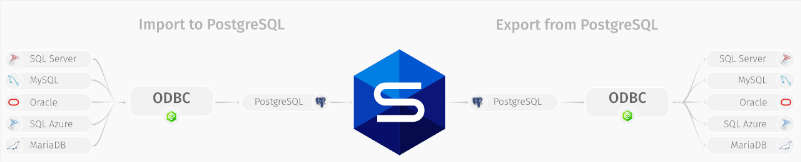
You can also migrate to and from the PostgreSQL database in a few steps. Take an example, where you want to migrate to a PostgreSQL database.
Firstly, we need the ODBC driver to select the import data inside the Data Import wizard,
Then do the required options like server selection, database and data to be retrieved,
Lastly, you need to import the job and see the result.
Alternatively, to migrate from the PostgreSQL, follow these steps.
You need to configure the ODBC driver for the connection to destination DBMS server,
Save the template to eliminate repeating the same steps,
Finally, export the job and view the result.
Best PostgreSQL migrations tools
There are many PostgreSQL migration tools, let’s see some of the tools.
1. Pgloader → it loads data into PostgreSQL from different sources. The COPY PostgreSQL set of rules are used to stream data in the server and maintain errors log in reject.log and reject.dat files. The most prominent features of pgloader are as follows
supports different file formats for example IBM files, db3, csv
data transformation like features
compressed files like gzip, tar or zip reading ability
support for tag language like html
discovery for target schema
SQL commands
frequent migrations
rules for casting defined by users
discovery of schema
2. Ora2Pg → open-source tool to move MySQL or Oracle data to the PostgreSQL schema. It basically generates a script (SQL) based on the data and schema of your current database and triggers it into a PostgreSQL database. The highlighted features of the Ora2Pg are as follows.
it exports database schema containing the indexes, sequences, views and tables with all types of keys (primary, foreign and unique key)
it exports all the rights and privileges of users
it exports a table by specifying its name
it exports all the data or a specific depending on the WHERE clause
it exports types of users and full views as tables
shows full view of the Oracle database content
it exports full view tables and many more
Example of using dbForge Studio for PostgreSQL for migration
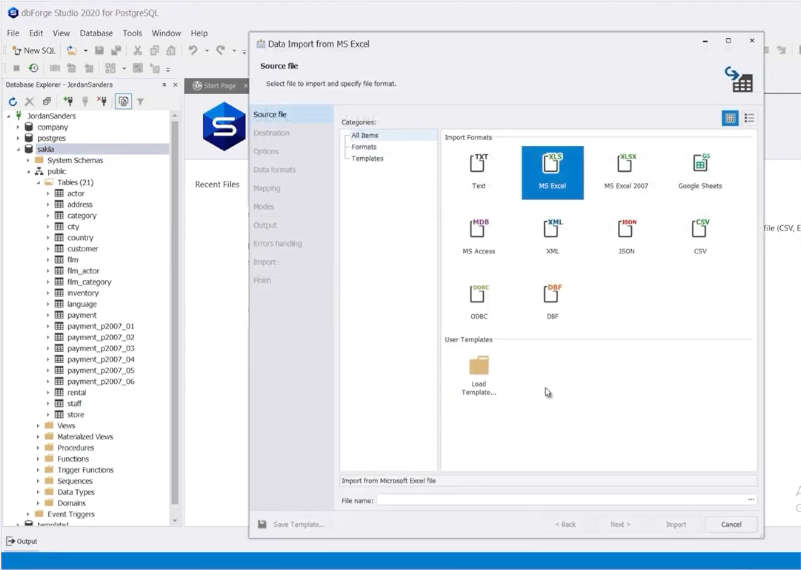
Suppose we are importing data using dbForge Studio for MySQL from the .xls file. Select the database → right click and select Tools → Import Data.
Step 1: Select the file to import and specify the file format and Press Next.
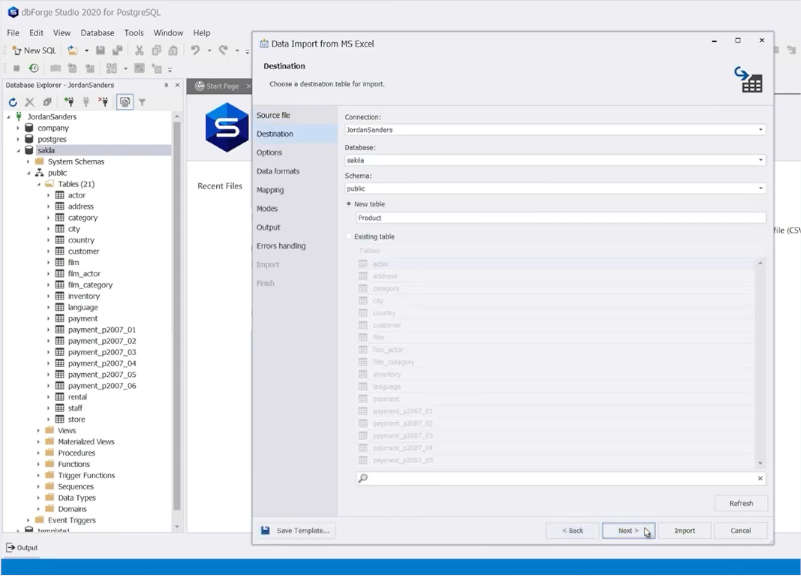
Step 2: On the Destination page, choose the Target table, you can either import the existing table or create a new table for imported data and Press Next.
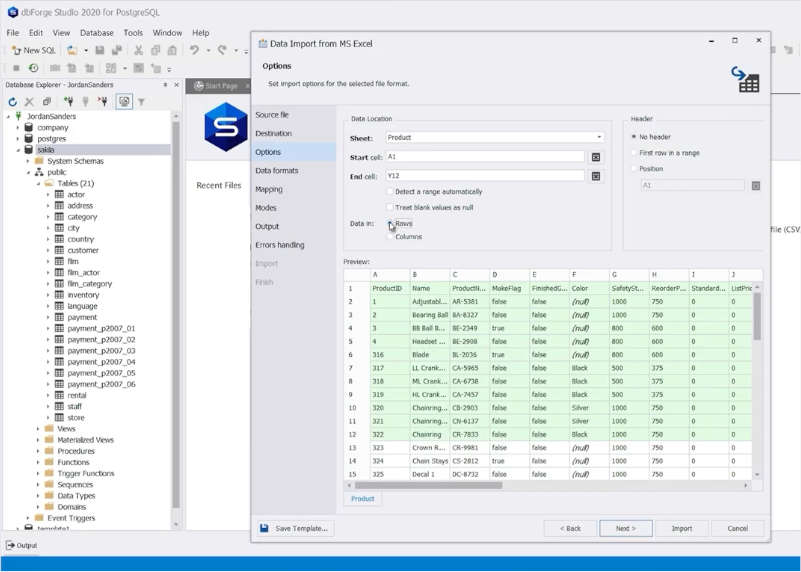
Step 3: On the Options page, select the range of cells to import. You can also select the Headers with imported data columns and press Next.
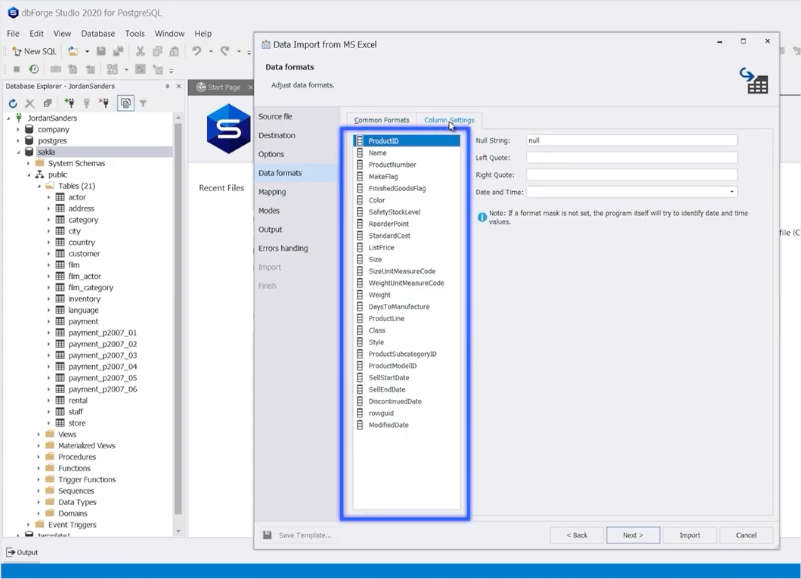
Step 4: On the data formats page, you can format all the columns or do a setting for each column separately and press Next.
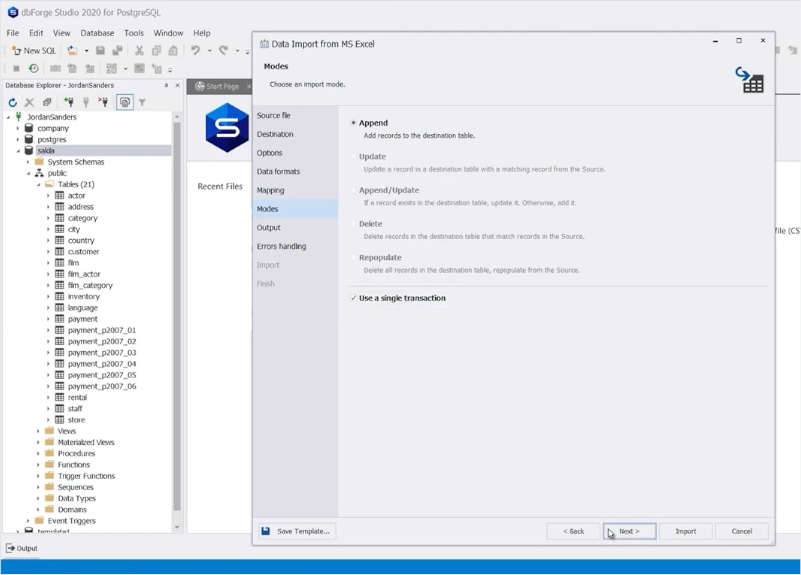
Step 5: On the Modes page, it allows append, update, delete and to repopulate and press Next.
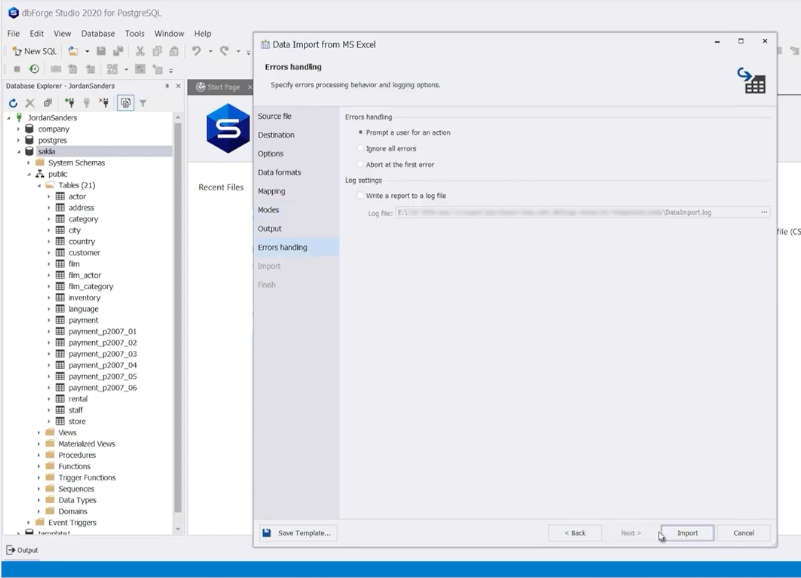
Step 6: On the Error handling page, you can define the error processing rule and then press Import as a final step.
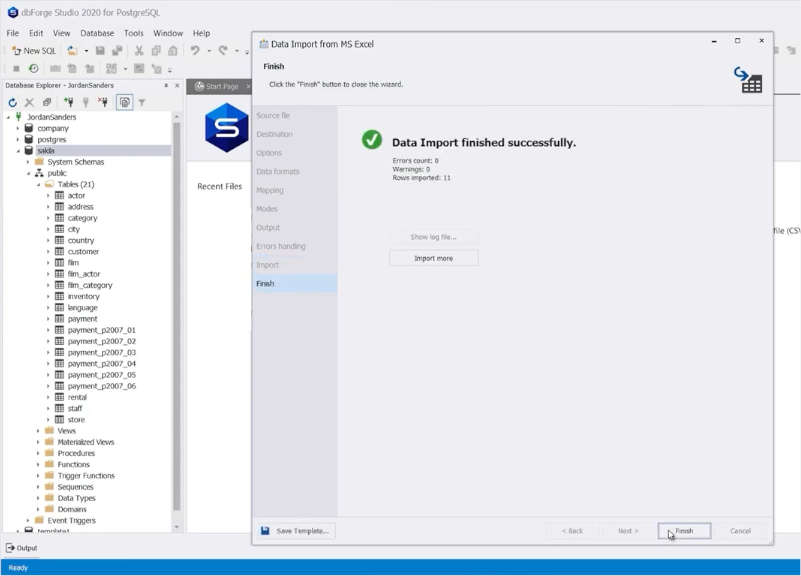
Step 7: The screen shows the Data Import finished successfully message on the screen.
Summary
Migration is an important as well as a risky task as it involves data to move from a source to a destination, which is sometimes a different engine. For this purpose, testing of migrating is essential at each step of database migration.
Apple’s iPhone 14 Pro and 14 Pro Max were expected to come equipped with a more powerful graphics processor with ray tracing support, but due to problems with energy efficiency, the company was forced to abandon the innovation.
The mobile processor, scheduled for release in 2022, was designed to support ray tracing, a technology that enhances graphics and makes them more realistic and believable. Engineers reportedly presented fully functioning prototypes, but testing later revealed that it consumed high power, leading to rapid discharge and overheating. This flaw was discovered late, prompting Apple to release the A16 processor in its current form and abandon its plans for the current generation of processors.
The Information reports that the incident was unprecedented in Apple’s chip development history and is the reason why the iPhone 14 Pro only shows modest improvements in graphics performance.
As a result of the failed plans, Apple restructured the department of developers responsible for the new GPU and removed some key individuals from the development process.
It is unclear at this time whether Apple will try to reintroduce a more powerful graphics processor with ray-tracing support in future versions of the iPhone. However, it is worth noting that the company has a track record of introducing new technologies and features in its products, so it is not out of the question that it could revisit the idea in the future.
In the meantime, users will have to make do with the A16 processor, which, while not as powerful as originally planned, is still a significant upgrade over the previous generation of processors.
Microsoft Windows 11 has already made waves with the addition of tabs to its File Explorer, which has greatly increased user convenience. Now, it seems that the company is taking things a step further by adding a tab function to Notepad as well.
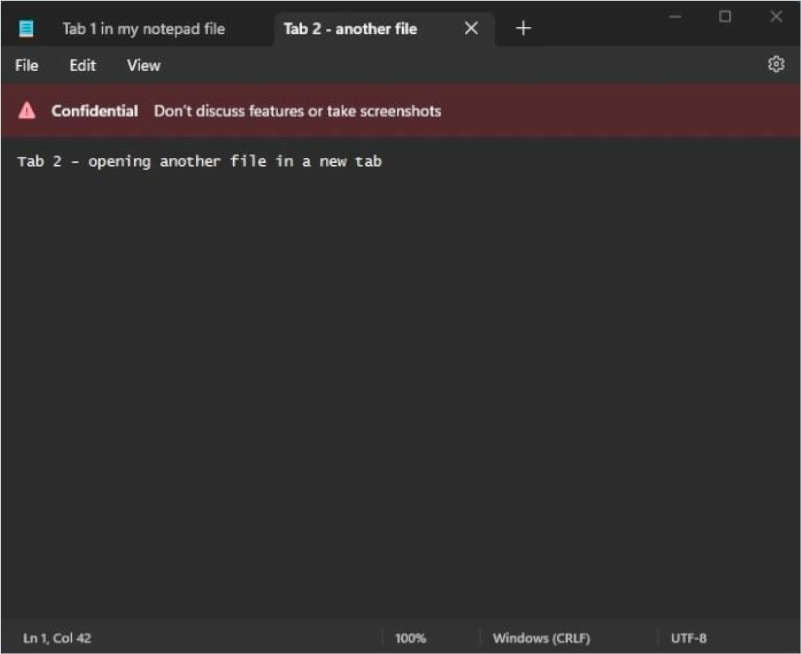
Although an official announcement has yet to be made, a senior product manager at Microsoft accidentally posted a tweet showing an image of the new tabbed Notepad interface, which has since been deleted.
After introducing tabs to File Explorer in October as part of the Windows 11, version 22H2 update, Microsoft has now going to add tabs to Notepad. This move towards a tabbed interface for Windows apps suggests that we may see more built-in Windows apps adopting this feature in the future.
Microsoft has been working towards introducing a tabbed interface to its operating system since the days of Windows 95. Including tabs in Explorer and Notepad demonstrates the company’s dedication to enhancing the user experience. While it is still unclear when the tab function will be officially rolled out for Notepad, it is certainly something that users will be looking forward to.
When looking for a game development service, it is important to take into consideration several factors that can help you make the right choice. Here are five tips to consider when choosing a game development service such as iLogos.biz:
First, research the company’s portfolio of projects and see if they have experience in the type of game you’re looking to create. It is important to ensure that the team behind the project has a strong understanding of the different aspects of creating a great gaming experience. Furthermore, iLogos.biz has an impressive portfolio of games ranging from casual mobile games to AAA titles for console platforms.
Second, consider the company’s customer reviews and ratings as well as their customer support services. Look for feedback from people who have used their services and make sure that they are professional and attentive to your needs. Moreover, iLogos.biz offers extensive customer support services with round-the-clock assistance available in multiple languages.
Third, review their pricing structure and decide if it fits within your budget constraints or not. You don’t want to go over budget just because you chose a more expensive service provider than necessary! Fortunately, iLogos.biz provides competitive pricing on all its services so you know exactly how much each part of your project will cost before committing any money down.
Fourth, see what platform(s) they specialize in and check if it matches up with your desired end product or not. This is important because some companies may be better equipped at developing certain types of games than others due to their expertise in particular software packages or platforms such as iOS or Android for mobile gaming apps. As an experienced provider of cross-platform game development solutions, iLogos understands the challenges faced by developers when creating quality titles across multiple devices and platforms simultaneously.
Lastly, find out what extra features they offer beyond just basic game development such as marketing support or porting services from one platform to another if needed later on down the line. With iLogos you get access to additional services like localized versioning for international distribution and certified testing for smooth integration on major app stores worldwide which makes them an ideal partner for successful global market penetration with your next release!
How to create a successful video game project brief
When it comes to video game development, ensuring that you have a solid project brief in place is key to success. This document will outline all the important aspects of your game project, from the initial concept to the target audience and everything in between. By taking the time to create a comprehensive project brief, you can avoid many of the common pitfalls that occur during game development. iLogos.biz is a professional game development services company with years of experience creating successful video games. We can help you take your project from conception to completion, working with you every step of the way to ensure that your game meets all your expectations.