Home Blog Page 116

Meta Pays $725 Million to Settle Privacy Lawsuit Related to Cambridge Analytica

Meta office and employees news

Meta has agreed to pay $725 million to settle a longstanding class action lawsuit over the Cambridge Analytica scandal. The $725 million settlement is the largest amount Meta has agreed to pay to settle a private class action lawsuit and is also the largest monetary return to date in a data privacy class action lawsuit. However, Meta said it did not admit any wrongdoing as part of the settlement.

The case dates back to 2014, when Cambridge Analytica, a political consultancy firm, used a third-party company to gather personal data on Facebook users under the guise of personality tests.

The data collected by the company was intended to be used for profiling and targeting Facebook users in the United States to help Donald Trump’s 2016 presidential campaign.

The incident was uncovered in 2018 by an investigation by The Guardian and The New York Times, which revealed that personal data had been collected from approximately 50 million Facebook users (later found to be 87 million). The revelation prompted multiple lawsuits and a #deletefacebook campaign.

Facebook users whose data were collected became the subject of a class action lawsuit. Facebook previously paid $5 billion to settle an FTC lawsuit against the company and $100 million to settle a US Securities and Exchange Commission lawsuit for misleading Facebook investors about its data use.

Cambridge Analytica filed for bankruptcy in 2018 after intense media and regulatory pressure and scrutiny. Meta has settled the lawsuit, but the company and its are facing several other lawsuits on the topic, and the matter is far from over.

OpenAI’s ChatGPT Poses Threat to Google

OpenAi ChatGPT

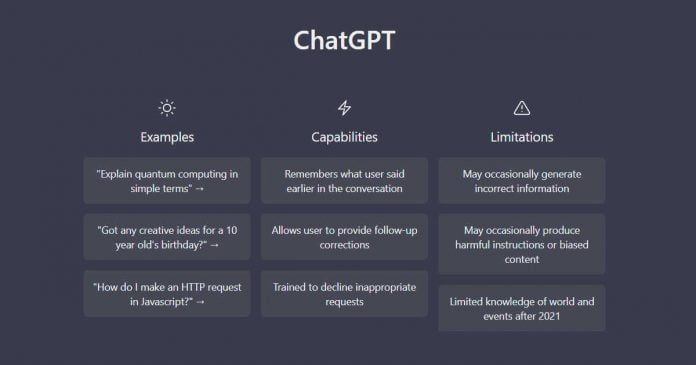
Google has announced that the ChatGPT AI chatbot from OpenAI poses a threat to its search business due to its potential impact on advertising revenue. According to The New York Times, in response to the possible danger posed by ChatGPT, Google CEO Sundar Pichai has restructured the organization’s internal divisions.

ChatGPT is a popular example of an AI-based internet conversation partner that can directly answer human questions and carry on a conversation similarly to two people talking. 

The OpenAI research lab released the ChatGPT project, and Google was once one of the developers behind the technology behind it. Google also has its alternative to ChatGPT, the LaMDA system, which gained attention when one of the company’s engineers announced that it had become conscious. This is still far from the truth, but the situation shows how much chatbots have advanced in recent months. Google views ChatGPT as a major success, prompting Pichai to declare a “code red” and realign the work of numerous groups within the company.

Google is particularly concerned about the impact that ChatGPT could have on its search business model, which relies heavily on advertising revenue. ChatGPT can rethink search queries, understand context, and redirect users to other, more relevant sources, potentially rendering the traditional search model unnecessary. As a result, Google has decided not to use ChatGPT in its search algorithms or integrate it into its search system.

Instead, the company is focusing on developing and releasing new AI-based projects in response to the threat posed by ChatGPT. These projects include a program for creating works of art and images based on descriptions and making the existing LaMDA chatbot technology available to more users.

Google’s reliance on advertising revenue makes it vulnerable to emerging new technologies, such as ChatGPT, which could potentially disrupt the search industry. However, the company will inevitably have to confront the challenge of working with such technologies or risk being left behind in a rapidly evolving digital landscape.

Microsoft Fined €60 Million by French Authorities for Misuse of Advertising Cookies

Microsoft company news and stories

French authorities ordered US tech giant Microsoft to pay €60 million ($64 million) after being found guilty of violating local regulations. The country’s privacy watchdog, the National Commission for Technology and Liberties (CNIL), imposed a fine for Microsoft’s misuse of advertising cookies.

When a user visits a website, a web server creates and transmits a user’s web browser one or more “cookies,” which are little informational files. They are commonly utilized for marketing and to customize the user experience.

In a statement, CNIL said that Microsoft’s Bing search engine does not allow users to opt-out of cookies easily enough. An investigation by French officials concluded that cookies were stored on their terminals without their consent when users visited this site. The watchdog added that these cookies were used, among other things, for advertising purposes. Additionally, the CNIL discovered that there was no option that made rejecting the placement of cookies as simple as accepting them.

The watchdog explained that Microsoft received a third share of profits from third-party advertising, which was accumulated through data collected through cookies. Microsoft now has three months to bring its services into line with French regulations. If it fails to do so on time, it faces an additional fine of €60,000 for each day of delay.

Last year, the CNIL fined Google and Facebook €150 million and €60 million, respectively, for similar violations. Microsoft has faced numerous investigations in the EU over the past decade, resulting in fines totalling €2.2 billion.

LastPass August Data Leak Much More Serious Than Initially Reported

Hackers Compromised LastPass

The August data leak at password manager LastPass was much worse than initially thought, according to a statement from the company. The hackers were able to steal personal data, including encrypted passwords, as well as user and organization names, physical addresses, emails, phone numbers, and IP addresses.

It was previously believed that the hackers had accessed LastPass’s cloud using data from a past hack. Still, the company has now revealed that the attackers were also able to extract the keys and credentials needed to download backups stored in the LastPass cloud. 

Using a dual storage container decryption key and a cloud storage access key that was taken from Lastpass’ development environment, the attacker was able to access the company’s cloud storage. In addition, the hackers gained access to user storage, which includes URLs, encrypted logins and passwords, and autofill data.

LastPass emphasized that the most sensitive fields are protected by 256-bit AES encryption, which can only be bypassed with a key derived from the user’s master password. The company stated that hackers could only access accounts if they obtained the master key, making it important for users to make their master password as resistant as possible and not use it on other sites. 

LastPass said that it is working with cybersecurity firm Mandiant to investigate the incident and is rebuilding its entire working environment. The company has also notified law enforcement and relevant regulators of the breach.

Users of LastPass are advised to make their master password at least 12 characters long, change the settings of the Password-Based Key Derivation Function (PBKDF2) key generation standard, and not use the same master password on other sites. The company has also provided more detailed recommendations in its blog.

Despite the data leak, LastPass remains one of the most popular password managers, with over 33 million people and 100,000 businesses worldwide. The company has also advised users to take additional security measures, such as enabling two-factor authentication, to protect their accounts.

Why is an LMS a Necessary Tool for HR Managers

businessman working online

LMS software is rapidly growing into a critical component of a company’s digital workplace framework, especially as more companies look to embrace remote-first or blended management and operation approaches.

In truth, learning management platforms have grown exponentially over the last ten years. This expansion indicates that an LMS like Thinkific is now not only something that businesses use or something that is “good to have” but has progressed into a necessity.  

Let’s first define an LMS before we examine the reasons for it.

What is a learning management system?

A team can access a variety of tools to enhance knowledge through the use of an LMS or learning management system. Team leaders can monitor learners’ progress within the same online training hub by looking at course success rates. At the same time, employees can access the training curriculum and learning materials like e-learning courses and practice questions.

What benefits arise with using an LMS? 

Employers will gain a lot when using an LMS for learning, such as:

Savings in time: Using an LMS to generate your firm’s training course will save time compared to using more standard technologies, like external training sessions that require long transit times or days off from the job. 

Versatile: With an LMS, staff members can log out of their online training programs whenever it is useful, whether every normal weekday or whenever they feel driven to learn. In contrast to conventional training programs, which have scheduled intervals, dates, and locations, this degree of versatility is accessible.

Centralizes learning resources: Learning management platforms keep all learning resources, including training classes, standardized tests, activities, and predictive analysis, in a central site. By doing so, it is much simpler for team leadership and followers to find the information they necessitate, and there is no need to store content on various systems and risk losing valuable data.

Advantages of an LMS HR team

It can be challenging to stay focused when so many things compete for your attention. Teams in human resources have many responsibilities. They must oversee strategic initiatives like new employee orientation, employee retention, and performance and manage day-to-day administrative work like handling queries and staff ailments.

In HR, an LMS will be vital because it provides staff with the tools they need to handle daily admin tasks and deliver long-term methods that add more value. Let’s see how:

Promotes employee autonomy: 

A recent HR review study noted that job tasks take up 20% of HR’s time. Queries for a leave of absence and medical care are two examples of administrative work that the employees should manage instead of HR.

You can empower your staff to work autonomously and free up your valuable time from low-value duties by using an LMS to train them on submitting requests on your vacation bookings.

Enhances employee engagement:

A strong personal growth program is the foundation of employee satisfaction, and engagement, a crucial organizational goal for HR. Employee retention simply cannot expand without sufficient learning and development.

By putting money into an LMS that feeds your teams’ desire for knowledge, you can increase motivation in the workplace. For even greater participation and motivation, search for learning management systems that include game mechanics like questionnaires, badges, and scores.

example-of-lms-quiz

Incorporate gamified learning components like quiz questions to encourage participation.

Enhances performance management: 

Since course enrollment and achievement rates are extensively assessed within the system, using an LMS makes it much simpler to track and evaluate staff performance.

HR managers can spot any employees having difficulty with a specific course using this valuable information, at which juncture they could provide extra support. Additionally, you can recognize learner action patterns and use this data to improve your training courses.

Bottom Line

An essential tool for HR managers is an LMS. It facilitates the various HR processes, such as onboarding, paperwork, and training, and aids HR Managers in organizing numerous training sessions. Thus, a learning management system must be implemented to make a training program successful and reduce the workload of the manager of the human resource department and the functional managers.

Microsoft Releases Preview of Android Subsystem for Windows 11 Based on Android 13

Run Android Apps on Windows 11

The Android subsystem for Windows 11 is updated — Microsoft brings a first preview version based on Android 13. The update, with version number 2211.40000.7.0, is currently being distributed to members of the WSA preview program. 

According to Microsoft, this version should contain some performance improvements in addition to Android 13. Apps should start up to 50% faster in situations without competing workloads, and mouse input has been improved, as has clipboard stability. There should also be fewer problems when changing the size of app windows and playing media files.

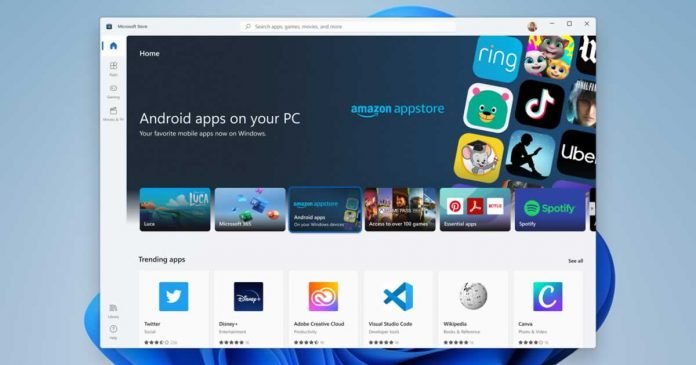
However, the official app selection remains limited, with users continuing to rely on Amazon’s app store. The selection of applications is still small, especially compared to Google’s Play Store. It is possible to sideload Android apps, and alternative app stores such as Aurora and F-Droid can also be installed. However, Google apps and the framework still do not run reliably in the WSA.

Currently, WSA on Android 13 is available to a limited number of users, and it is not yet known when the update will be available to all Windows 11 users. Testing updates can take several weeks to a couple of months before being finalized.

The purpose of the Windows Subsystem for Android Preview is to test an early version of WSA, separate from the Windows Insider build, so that Microsoft can gather low-risk feedback for all future PC users with the new built-in version of WSA and fix potential bugs before the release.

Samsung to Launch Next-Generation 12nm-Class DDR5 DRAM in 2023

Samsung 12nm DDR5 DRAM

Samsung announced the next-generation 12nm-class DDR5 DRAM that achieves transfer speeds of up to 7.2Gbps.

The DDR5 DRAM developed by Samsung uses the industry’s first 12nm process technology and has already been evaluated for compatibility with AMD. AMD has already fully moved to DDR5 with their latest Ryzen 7000 series.

Samsung’s 12nm class DRAM leverages the latest DDR5 standard and delivers transfer speeds of up to 7.2Gbps. This is equivalent to processing two 30GB UHD movies in just one second. Power efficiency has also been improved, with power consumption reduced by up to 23% compared to conventional DRAM. It is ideal for data centres, artificial intelligence (AI) applications, and powerful next-generation computing systems.

Next-Gen Samsung 12nm DDR5 DRAM

The key to realizing the new DDR5 DRAM was a new high dielectric constant material that increases the capacitance of the cell and a unique design technique that improves critical circuit characteristics. In addition, by adopting EUV (Extreme Ultraviolet) lithography, it has achieved the industry’s highest die density level and improved wafer productivity by 20%.

Aiming to start mass production in 2023, Samsung plans to expand its lineup of DRAMs using this cutting-edge 12nm-class process technology to a wide range of market sectors and work with industry partners to support the rapid spread of next-generation computing.

Several Approaches To Achieve In Sprint Test Automation

Sprint Test Automation

Automated testing is a critical part of the software development process, and there are many ways to achieve automated testing. This post will discuss several approaches to achieving in-sprint test automation. We will also examine how each approach can be used in sprint test management to help you streamline your testing process. Stay connected for further updates on this topic!

What is In-sprint Automation?

During an application testing procedure known as “in sprint automation,” automation is used for end-to-end testing, including test case generation, planning, implementation, and reporting — all inside the confines of a single sprint.

  • In-Sprint Automation is a hot new technique in the world of software development. By automating repetitive tasks during the software development process, this type of test automation can help teams to improve their efficiency and productivity.
  • In addition, In Sprint Automation can help to reduce the number of bugs in a final product, making it more reliable and robust.

Hence, it has become immensely popular with software development teams looking to gain a competitive edge. If you’re not already using it, now is the time to start!

In-sprint Automation Best Practices

In today’s era of constant change, businesses must continuously find ways to improve efficiency and get products to market faster. One way to achieve this is through in-sprint automation, which can help teams work smarter and faster. Here are 6 of the best practices for implementation of the same.

1. Ensure that the whole QA team participates in the in-sprint automation

For any automation process to be successful, it is important to have the entire QA team on board. This includes QA analysts, developers, and management.

2. Create transparency for automated in-sprint processes

Building transparency around the process ensures success with in-sprint automation. This means creating clear goals and objectives for the automation effort and ensuring that everyone on the team is aware of them.

3. Use the most basic levels of virtualization and abstraction for each testing sprint.

In-sprint automation should use abstraction and virtualization to the lowest level possible. This will help improve the tests’ accuracy and make them more reliable.

4. Expand automation capabilities for testing with each sprint

As the team becomes more comfortable with the process, they should go deeper into the automation capabilities for each sprint. This will help improve the process’s efficiency and make it more effective.

5. Create a living document 

To keep track of the process involved in this technique, it is important to create a living document. This document should be updated regularly and should be accessible to everyone.

6. Prioritise test design

When it comes to In-sprint Automation, the design of your tests is critical. You need to ensure that your tests are designed in a way that they can be easily automated.

In-Sprint Automation Testing Challenges

While it offers several benefits, this testing also comes with its own set of challenges.

1. Varying Requests or Last Minute Modifications

One of the main challenges over here is that it can be difficult to accommodate varying requests or last-minute modifications.

When working in a sprint, there is often very little time for changes or additions. As a result, ensuring that your QA automation tool can handle these requests quickly and efficiently is important.

2. Lack of Documentation

Another challenge is that it can be difficult to track all the changes made during a sprint. Since automation is often used to handle repetitive tasks, it can be easy to forget to document the changes. This can make it difficult to track a project’s progress or replicate the results of a previous sprint.

3. Repeated Regression Cycles

One of the most common challenges is that it can often lead to repeated regression cycles.This happens when a team changes the code and then runs the automation tool to test the changes. However, the automation tool may find that the changes have caused other parts of the code to break.

Advantages Of Using In-sprint automation Approach

Here are some benefits of the in-sprint test automation approach

  1. In-sprint test automation can help improve the quality of deliverables and make software roll-outs faster and easier.
  2. By introducing new features or capabilities into the software early on, in-sprint test automation can help ensure that they get adequate and optimal test coverage from the very first build. This can help save time and improve quality overall.
  3. In-sprint test automation can increase efficiency by automating tasks that are often repetitive and low-value. This can free up time for testers to focus on more important tasks.
  4.  It can improve communication and collaboration between different teams by providing a common platform for automating tasks and sharing results. This can help reduce confusion and improve the overall quality of the software development process.

Final Words

In-sprint automation is a process that can help to improve the efficiency of your software development process. There are multiple ways to achieve it. However, be aware of its challenges. By understanding these challenges, you can be better prepared to overcome them.