Home Blog Page 203

Snapdragon 8 Gen 1: Qualcomm Announce Its Latest Flagship Mobile Chipset

Snapdragon 8 Gen 1

The first day of the Snapdragon Tech Summit 2021 brings the announcement of the new Snapdragon 8 Gen 1 mobile platform, which will be used in the top-of-the-range smartphones expected in 2022.

Snapdragon 8 Gen 1 — a name that identifies the first product that Qualcomm presents combined with the new way of indicating product names. A few days ago, the San Diego company announced its intention to adopt a new nomenclature for its products, separating the Qualcomm and Snapdragon brands and going to indicate products for mobile systems with a single number structure flanked by a generation indicator.

Snapdragon 8 Gen 1 comes to improve six aspects — 5G connectivity, camera sensors, AI, gaming, audio and security — which are just the most important elements today when we seek to acquire a new Android smartphone.

It is manufactured in 4nm and is the first Qualcomm processor to be built under the Armv9 architecture. The Kryo CPU has a first 3.0GHz Cortex-X2 main core, three Cortex-A710 cores that clock at 2.5GHz, and four Cortex-A510 cores that stay at 1.8GHz. 

Regarding the performance offered by this new chip, the American company advises that it has been improved by 20% in power and 30% in efficiency compared to its predecessor. New Adreno GPU that promises a 30% improvement in graphics rendering and a 25% improvement in energy efficiency.

The new chip integrates substantial improvements to the camera, however, the company has gone one step further and announced an agreement with Sony to jointly develop chips and sensors at the company’s San Diego headquarters. The new Snapdragon 8 Gen 1 brings mobile phones closer than ever to professional cameras. It does so thanks to Snapdragon Sight technology, which includes the first 18-bit ISP created for mobile devices. It captures more than 4,000 times more data from the camera than its predecessor, allowing it to handle better dynamic range, color and sharpness at speeds of up to 3.2 gigapixels per second.

Around connectivity, there are improvements thanks to the fourth generation of its own Snapdragon X65 5G modem with support for 10Gbps speeds and paired with the FastConnect 6900 Mobile Connectivity system to offer the best speeds of WiFi 6.

Qualcomm wants to take the real step forward with this chip when it comes to the use of artificial intelligence. Snapdragon 8 Gen 1 comes with the 7th generation QualcommAI engine, which is equipped with the ultra-high performance and efficient Qualcomm Hexagon processor.

Four times faster than before for a Snapdragon 8 Gen 1 chip with Bluetooth LE Audio and the company’s latest AptX Lossless wireless audio technology.

Finally, Qualcomm has included the new Trust Management Engine and supports the Android Ready SE standard with support for digital car keys, driver’s license, ID cards and more.

The first Android phones that will feature the new Snapdragon 8 Gen 1 chip will be launched later this year, and among them, we have manufacturers such as Xiaomi, Nubia, Motorola, OPPO, realme, SHARP, Sony, Black Shark, Honor, iQOO, Vivo, OnePlus and ZTE.

Sony Patents A Smartphone Based PlayStation Controller

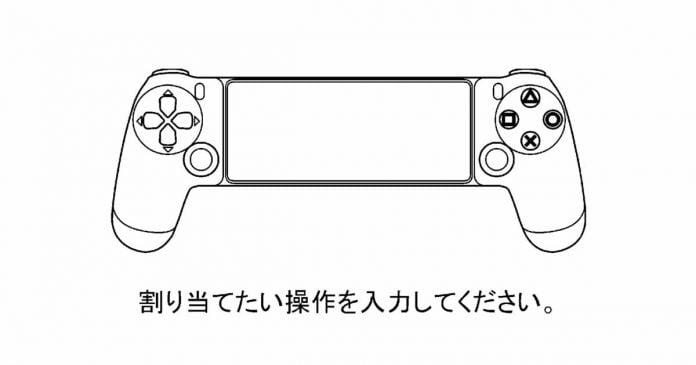
Smartphone Based PlayStation Controller

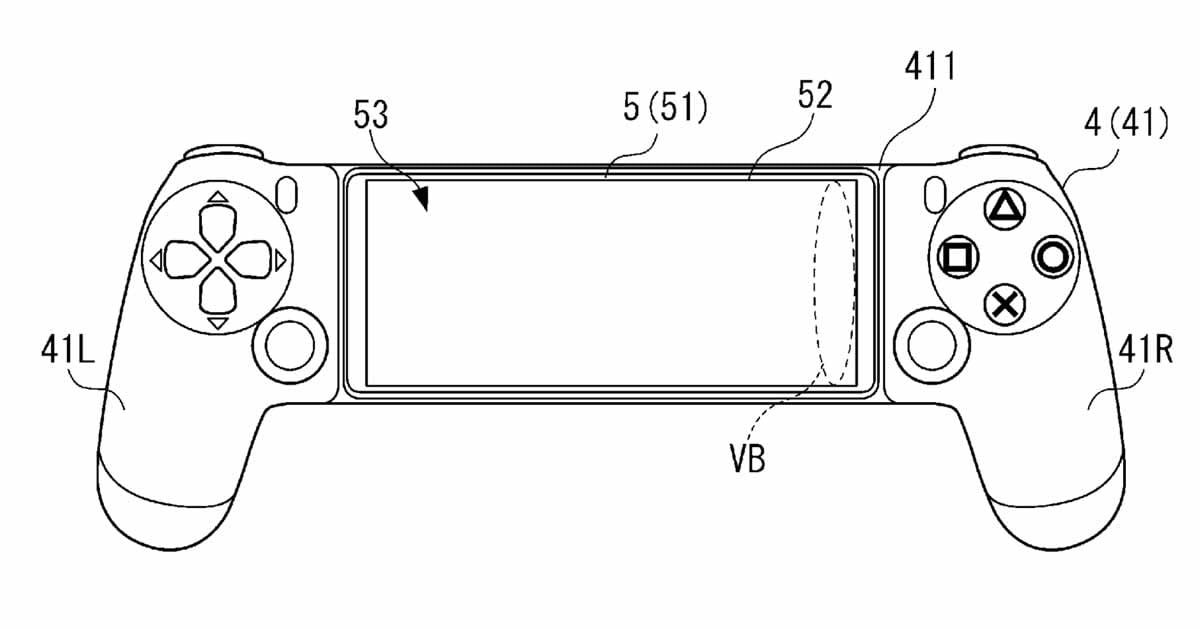
Sony has filed a patent for a version of the DualShock specifically for mobile gaming. According to Videogames Chronicle, the Japanese company has just patented a new console control in which we can fit our smartphone.

A smartphone could be clamped in the middle of the gamepad so that the users can see their games right in front of their eyes and control them with the usual operation of the Playstation.

The coupling is likely to work most easily via Bluetooth — after all, it already works with the currently available input devices. Alternatively, you could also use connecting plugs.

Smartphone Based PlayStation Controller patent

On the other hand, the patent for this controller also makes us think about the possibility that Sony finally wants to give a greater push to its PlayStation Now and PlayStation Remote Play services, thus probing the possible arrival of some subscription and game model in the cloud similar to the one currently offered by Xbox.

As always, remember that at the moment, it is only a patent, so it is currently not clear if we will even see this new PlayStation controller or when, although it is undoubtedly quite positive news in the face of Sony’s recent expansion into the mobile gaming market.

Top 7 Proven Tactics to Increase Your eCommerce Conversion Rates

eCommerce Website Development

eCommerce is a broad topic that encompasses many elements, starting from region-based commerce to international online retail. 

E-merchants should have a clear view of what eCommerce is, how it works, and, more importantly, what eCommerce isn’t.

But how big is eCommerce? The global eCommerce market is expected to hit $6.388 million by 2024. Check out the chart below to see the eCommerce sales projections. 

eCommerce sales projections

We should anticipate more accelerated growth rates in eCommerce. E-merchants should brace themselves with adequate tips and tools to have a share of the increasing number of global buyers.

Having a sound eCommerce conversion rates strategy is necessary for eCommerce. The conversion rate is the percentage of visitors who purchase from your store. 

This article will explain some of the top eCommerce practices that will improve your conversion rates. 

1. Install an SSL Certificate on Your Website

Online shoppers have become more sceptical about the websites they use to shop. This is following an alarming surge in the number of fake websites. 

Continued financial frauds and identity thefts have created a much savvier society. Website visitors now clearly understand some of the indicators of unsafe websites. 

Buying and installing an SSL certificate is now more essential than ever before. SSL certificate is not only a cybersecurity additive but also a psychological one. 

Websites with an SSL certificate make web visitors feel more secure while browsing and buying from the website. The reason you are having high cart abandonment and low conversion rates might be that your customers feel insecure during their checkout process. 

The remedy to this is to buy and install an SSL certificate. The HTTPS status alone is enough to convince your visitors that your site is secure. 

Choosing the right kind of SSL cert is as important as buying and installing one. For ecommerce ventures installing a wildcard cert is highly recommended. With this single cert, you can afford premium security to the chosen main domain and an unlimited number of first-level subdomains under it. 

Some of the best SSL certificates you can choose to work with include RapidSSL Wildcard SSL, Comodo Essential SSL Wildcard, and GlobalSign Wildcard SSL. 

2. Offer Coupon Codes

Offering coupon codes is a great way to increase your eCommerce conversion rates. 

The idea of having your visitors come to your website with coupons already in their hands makes them more likely to purchase, more than a regular shopper who has to pay the full price. You can leverage sites like Groupon and Woot to give your customers such coupons

3. Speed Up Your Website

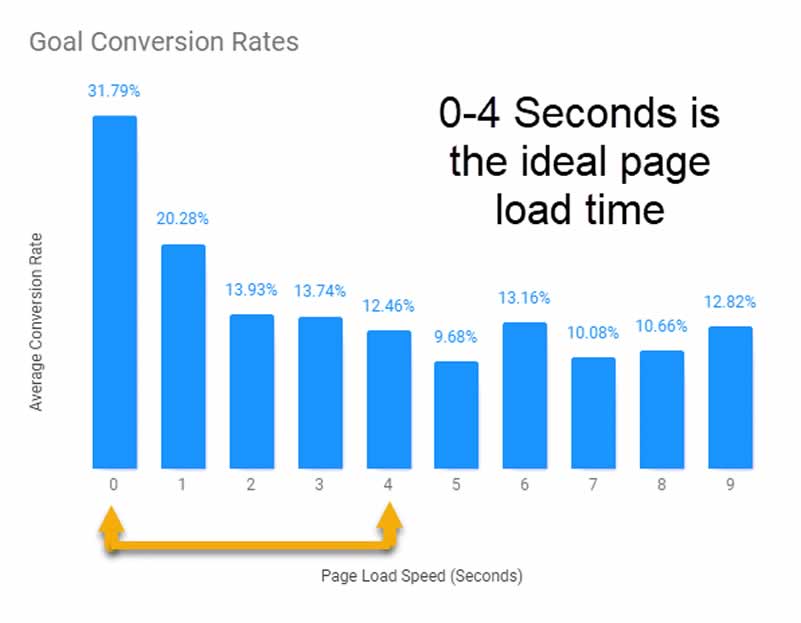
Website speeds can make or break your conversion rates and your eCommerce store, for that matter. How fast does it take for your web pages to load in the browsers? You should know that every second is crucial for the success of your eCommerce store. 

Page load speeds have a direct impact

Page load speeds have a direct impact on your conversion rates, as shown by the graph above. Improving your page loading speed will positively impact your conversion rates and, consequently, your sales and revenues. 

4. Have Clear Calls to Action

Having clear Calls to Action is another vital strategy that will increase your conversion rates and sales. 

You might have a great website, selling great products, and having fine images, to the point that your website visitors love everything about your website. Your website just made them curious, and they will want to do more than just seeing. But what mechanisms do you have to bring them on board? 

Let your CTAs tell them they can have everything done just by the click of a button. Good Calls to Action will instil a sense of urgency in your visitors. 

They will provide you with a great opportunity to psychologically capitalize on their impulse and push them to make purchases, thereby increasing your conversion rates. 

5. Address the Possible Causes of Cart Abandonment

One of the biggest problems that eCommerce store owners face today is cart abandonment. 

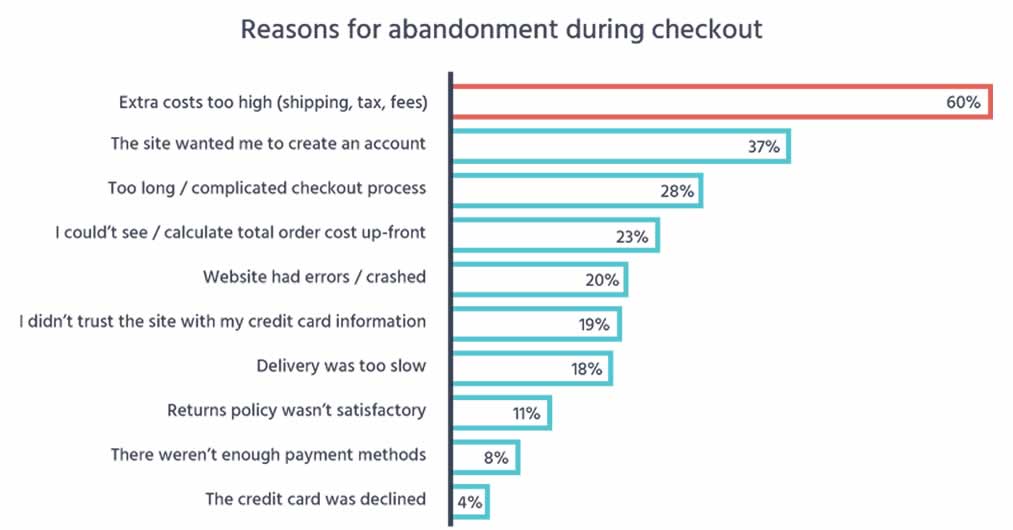
According to Statista, more than 88% of shopping carts were abandoned in March 2020, and Baymard Institute reveals that the average cart abandonment rate is 69.80%. It is clear that cart abandonment has become a menace, and eCommerce store owners should rise to the occasion to find a lasting solution to it. 

The graph below summarizes the reasons for cart abandonment. 

Causes of Cart Abandonment

To increase your conversion rates, you must eliminate all possible causes of cart abandonment. In doing so, you will soon realize increased sales and revenues. 

6. Have a Mobile-friendly Website

Mobile devices have changed how we do things. Today, many people shop online using their mobile devices, and Statista has shown that 61% of eCommerce visits happen via smartphones. 

Mobile phones have thus presented eCommerce store owners with a golden opportunity to increase their conversion rates in sales. It is an opportunity you cannot afford to overlook. 

If your website is not optimized for mobile friendliness, believe me when I tell you that you have missed out on a lot of traffic. Google offers a mobile-friendly test that you can use to check whether or not your website is mobile-friendly. 

If you discover that your website is not mobile-friendly, you should take the necessary steps to optimize it for mobile-friendliness.

7. Harness the Power of Social Media

Having an excellent social media presence will go a long way toward improving your conversion rates. As you know, most people go on social media platforms to search for products and information that they find relevant. Today, most people around the world are using social media. 

As an eCommerce store owner, you should leverage the power of social media to bring in more customers to your store. You should ensure that you have active social media accounts such as Facebook and Twitter. 

You can use such platforms to tell the public about your products and services and direct them to your website. It is a great strategy that will increase your conversion rates and your sales. 

Wrapping it Up

One thing you have to know about eCommerce is that your conversion rates will not just increase miraculously. You must invest and work for them. 

This article has explained some of the top best practices that will boost your conversion rates. These tips apply to both the startups and the stores that have been in business for some time. It is always important that you use multiple steps for maximum results. 

Uses Of Function Keys [F1-F12] In Windows

Uses Of Function Keys

How many of you know all the uses of Function Keys. We see them every day on the keyboard, but in reality, there are few people who know their real functions. Knowing their uses and applications could make it easier for you to interact with the PC. represent shortcuts that 

As the name implies Function Keys or F Keys represent shortcuts with different functions assigned to each key that makes working on the computer easier. 

Sometimes we use them with the combination of Alt and Ctrl too. The first row of all keyboards is served as Function keys. There are totally 12 Function Keys starting from F1 to F12. In Some modern laptops, we have to press one additional button named “Fn” along with Function keys to work them. So let discuss each Function Key briefly.

Uses Of Function Keys

F1 Key

  • F1 key almost everywhere is used for “Help”. If you are using windows OS and needed help anywhere then press F1 key, this will open up help window for you.
  • Sometimes F1 key is used to enter the BIOS (press F1 when your computer is about to boot).
  • Combination of Win + F1 keys will open the “Help and Support» Microsoft Windows.

F2 Key

  • Rapidly rename the chosen file or folder. Works in all adaptations of Windows.
  • Alt + Ctrl + F2 – Opens the Document as a Microsoft Word.
  • Ctrl + F2 – Opens the Preview window in Microsoft Word.
  • Frequently to enter the BIOS.

F3 Key

  • In the MS-DOS charge line or in Windows, press F3 to rehash the last summon.
  • Win + F3 – Advanced Search window opens in Microsoft Outlook.
  • Shift + F3 – Changes the content in Microsoft Word, from upper to lower case or capital letters at the start of each one expression.
  • In the event that I am not mixed up it is the F3 key which will cause the Application«Control» computers Apple, running Mac OS X.

F4 Key

  • This opens the location bar, in the event that you press F4 in Windows Explorer and Internet Explorer.
  • Rehash the last activity (MS Word )
  • Ctrl + F4 – Closes the window open in the present window, for example, a tab in the program
  • Alt + F4 – Closes the system window in Windows.

F5 Key

  • Refreshes the present page (works in all advanced programs), and additionally redesign the desktop or open organizers in Windows.
  • Running a slide demonstrate in Powerpoint.

F6 Key

  • Move the cursor in the location bar (additionally works in numerous advanced programs).
  • Ctrl + Shift + F6 – opens Document in Microsoft Word

F7 Key

  • Mostly used for spelling and grammar in a document programs Microsoft (Word, Outlook, etc.)

F8 Key

  • Pressing F8 key while your PC is about to boot will result into booting your PC in Safe mode.

F9 Key

  • The F9 key does not have any functionality in Windows. It may, however be used in some individual programs. To find out if it is available in the program you are using, bring up the program’s help screen and type in the words function key.

F10 Key

  • Activates “Menu” in the open organizer window.
  • Shift + F10 – works same as the right mouse click.
  • Pressing F10 while your system is booting will show you BIOS Information.
  •  F10 is used to enter the hidden recovery partition on computers Sony.

F11 Key

  • F11 Key will take you to Full screen mode and it can be used and work in any Browser.

F12 Key

  • Opens the “Save As” in Microsoft Word.
  • Shift + F12 – Saves a document in Microsoft Word.
  • Ctrl + Shift + F12 – Prints a document in Microsoft Word.
  • F12 key will open up Inspect element box in any Browser.

If you guys know more uses of Function Keys Comment Below.

How To Make Your PDFs Visually Appealing? Tips & Tricks

PDFs Visually Appealing

Wherever you look online, you’re bound to find at least several PDF-enhancing apps and tools. But do you really need all of these? 

True, PDFs are great for e-books, catalogs, presentations, proposals, and more because they can keep the content in the format the author intended. However, there are times when it’s difficult to understand the visual elements that make a PDF (or document, in general) pop.

After all, you only have a few seconds before a reader will give up and move to the next vendor (usually, your direct competitor). 

So if you are looking for ways to make your PDFs visually appealing without investing in advanced design tools, here are a few tips to get you started:

#1: The Power of White Space

We already know that a block of text is the worst thing you can do when trying to present ideas and concepts in a written format. In fact, if you want to make sure no one will ever read your creation, you should put everything in one big block. 

On the other hand, just spacing your text and making sure it is browsable at first sight may not be enough for your readers. This is where the white space will show its power!

But what is white space? 

In design, white space is the empty space left on a page, in various key points, to create an airy visual experience and guide the reader’s eye on the most important sections of the page. The same happens with text – make use of the white space to guide your readers. 

#2: Some Basic Tools

Even if you don’t like investing in advanced tools, you still need a few basic ones to help you get a grip of various document formats. For instance, a PDF converting tool that can turn PDFs into other formats and vice-versa is great to have around. 

Another great tool is Canva since it has a drag and drop interface that most beginners can use. This pdf editor tool works well with small PDF files and can produce commercial print-ready documents. 

#3: PDF Templates

The easiest way to create a gorgeous PDF, whether we’re talking about a book or a two-page presentation, is to use a pre-designed template. When using a template, everything is already arranged on the page and you just have to replace or edit various elements to include your content in the template. 

Overall, this job is easy to do and doesn’t require any technical knowledge. Plus, you can find a bevy of free templates online, so you have a wide range of options. 

#4: Headings, Headings, Headings

Readers nowadays don’t have the patience or the determination to read a text start-to-end. That’s why you have to first help them understand why your content is valuable and what it can do for them. And this is where headings come in. 

The headings break up the text and give the reader an idea of the main topics of discussion in the text. Also, it makes any document easier to browse, so everyone can read only the parts that are interesting to them.

Warning: There is such a thing as using too many headings! Following the old rule that everything good turns bad if used too much, headings can get annoying fast if used in excess. The most commonly used headings are H1, H2, H3, and H4 but you should only use them when the text demands it. 

#5: Use Visuals

The best way you can make PDFs more visually appealing is to, well, use visuals. Anything from images, graphs, charts, sketches, and more can help readers understand the content better and increase the appeal of the document, in general. 

However, try to refrain from using visuals that don’t enhance the content in one way or another. Visuals that are there just to be there don’t do much for the overall appeal of the document and needlessly increase the size of the file. 

Wrap Up

Overall, when it comes to creating stunning PDFs it is all about content arrangement and the use of visuals. Still, if you work with various documents, you should also learn how to manage your PDFs more efficiently since it takes time and patience to start from scratch. 

Facial Animation Takes A New Leap: Ziva Dynamics Showed The Most Realistic Face In Unreal Engine 5

ZRT FACE TRAINER

Last February, Epic Games announced MetaHuman Creator, an ultra-realistic character editor that aims to revolutionize the entertainment industry along with video games. The first technical demonstration was enough to surprise everyone with the potential of the tool. However, Epic isn’t the only one interested in taking advantage of Unreal Engine 5 when it comes to character realism.

Ziva Dynamics, a company based in Vancouver, Canada, is surprising the entire industry with ZRT Face Trainer, a facial animation technology whose level of realism is impressive. 

The ZRT Face Trainer, which works in conjunction with Unreal Engine 5, is currently in beta, but the company has explained that the most complex expressions of a human being can be made in real-time. This application has been developed for all types of characters regardless of gender, ethnicity or species — so it could only be a preview of what we could see even in the Metaverse.

According to Ziva Dynamics, the technology is built on top of an extensive library of 4D data and proprietary machine learning algorithms. In total, according to Ziva Dynamics on its website, this library weighs 15 TB and offers up to 72,000 faces and facial poses. In just one hour, the program will make the best facial animation for a character in the history of the gaming industry. 

In the following video, published as a demonstration, you can see the face generated in real-time on the left and the real model on the right:

Although Ziva points out that the ZRT Face Trainer is still an experimental technology, launching a beta is a key step to see the light of day in the near future. Obviously, the feedback from animators and developers will be crucial to improve their performance, which for now is already outstanding.

If you work in the sector and are interested in trying it, you can request access from the following link. Although the demo showed was created using Unreal Engine 5. Although, ZRT Face Trainer will not be exclusive to the Epic Games graphics engine.

Apple AR Headset Would Arrive In 2022: Will Offer A Performance Similar To The M1 Chip

Apple AR Headset

Apple AR headsets are showing signs of life again. The project has been the subject of rumors for years without having a clear launch date. The analyst Ming-Chi Kuo puts the issue back on the table — assures that the model will be unveiled next year and provides technical information.

According to Ming-Chi Kuo’s latest research report shared by MacRumors and 9to5Mac, Apple’s mixed reality glasses will be ready by the end of 2022 and would include a processor similar to the one we see in Mac with Apple Silicon.

Specifically, Kuo mentions that Apple AR headsets could integrate two processors. The main one will offer performance similar to the M1 chip that the company includes in its Macs. Meanwhile, the secondary SoC, which is classified as a “low-end” processor, would be in charge of monitoring the sensors.

Apple’s AR glasses will also have two micro OLED screens from Sony with 4K resolution — this may indicate that the AR headset will also support virtual reality technologies.

Ming-Chi Kuo emphasizes that Apple’s AR glasses will not require an iPhone to be connected. That is, they will be able to function independently. Therefore, it contradicts the latest reports from The Information, which claimed that this mixed reality headset would need to communicate wirelessly with an iPhone or iPad or a Mac in order to process more advanced tasks.

After the launch of the Facebook glasses, there is still the expectation of seeing what Apple has been working on for several years. Apple could announce its first augmented reality glasses together with the iPhone 14. For Kuo, Apple’s goal is to replace the iPhone with AR in 10 years, and these glasses would be the first step to achieve this. 

3 Ways to Fix Android Phone Not Detecting SD Card

Android Phone Not Detecting SD Card

Most Android users use SD cards to extend the storage space. It’s a great opportunity to store more pics and videos. But sometimes, an SD card may become a real problem. Have you already seen the notification that your mobile phone is not reading an SD card? Then, you know how annoying it can be. There are many reasons why this may happen: the broken card; the software is outdated, etc. It doesn’t matter what has led to the problem.

You just need to calm down and check if the easiest solution works for you or not. Just remove the SD card from your Android phone and insert it again. If you see the same notification on the screen of your mobile, you should apply the methods listed below. Check what they are and choose the one that fits you best when the SD card is not showing up on Android. Let’s have a look at how to fix your phone and recover photos from an SD card, if you have lost them.

Method 1: Use a Card Reader and Your Computer

If you have tried to reboot your phone and failed, then try this method. Here are a few steps you need to make: 

  • Insert the SD card into the card reader. After you insert the card in the system, choose “My Computer.”
  • Find an SD card and choose the disk. 
  • Find “Tools” and start the check of the repair drive. (It is in the section of error-checking).
  • Eject the card when the process of the drive repair is finished. Check if the method was effective for your situation – put back the card to see if there is the same “not detected” problem or not. 

If the method didn’t help you to deal with the issue, apply the next one. 

Method 2: Update the SD Card Driver

One of the reasons why your Android mobile may fail to see the card is that your card driver hasn’t been updated. You need to take several steps below to improve the situation: 

  • Connect your card to the computer and click on “My Computer.”
  • Choose the device manager and find the USB Serial bus controller.
  • Now, update the software of your card driver.
  • Wait for some time until the software is installed and restart the computer system.
  • Have a look if the mobile can see your SD card or the method wasn’t effective for you.

Method 3: Format the SD Card

Haven’t you managed to fix the error using the previously described methods? Then, you proceed to the card formatting. “But what if I have valuable data on the card?” – The formatting will lead to data loss but don’t start panicking. You can restore it quickly and effectively using Disk Drill software. So, follow the instructions for the card formatting without any worries.

  • Open your computer and locate the card.
  • Click on the card and choose “Format.”
  • Start quick formatting.
  • When it is over, insert the card into your Android mobile to check if the problem has been resolved.
Disk Drill data recovery tool

Hope that you will fix your problem successfully by applying one of the methods above. In case the only method that worked for you was the SD card formatting, download the Disk Drill data recovery tool to restore files. It won’t take you long. Moreover, you can restore up to 500MB for free. You just need to launch the software, and it will scan the device for the files that can be recovered. The tool is helpful even for the formatted card. You will get the list of files available for recovery and will be able to get back the necessary information easily.

Video Tutorial: