Home Blog Page 222

Almost Two-Thirds Of Internet Traffic Comes From Bots

automated bots

In the first half of 2021, the volume of traffic from malicious bots increased significantly, leading to an increase in automated attacks on organizations, according to a September report from Barracuda Networks.

According to the report, almost two-thirds (64%) of internet traffic comes from bots, while 39% of traffic comes from the activity of malicious bots.

These quite advanced bots always try to bypass conventional defences and always try to carry out their harmful activities without being detected. Of these, the most common of those detected are those that act on eCommerce applications and on access and login portals to services.

While some bots like search engine crawlers are good, our research shows that over 60% of bots are dedicated to carrying out malicious activities at scale. When left unchecked, these bad bots can steal data, affect site performance, and even lead to a breach. That’s why it’s critically important to detect and effectively block bot traffic.” — said Nitzan Miron, VP of Product Management, Application Security, Barracuda.

The region with the most malicious bot traffic is North America, accounting for 67% of malicious bot traffic, ahead of Europe (22%) and Asia (8%). According to the report, the majority of harmful traffic is generated in data centres, but in Europe, it is more likely to come from hosting services, specifically VPS and residential IPs.

Bots are usually automated, but malicious bots were designed to work mostly during business hours. This is because the programmers of these bots prefer to hide their activity among the traffic generated normally by humans to avoid suspicion.

The company points out that although some bots are good, many are dedicated to carrying out harmful activities on a large scale, and if they are not controlled and monitored, they can steal data, affect the performance of websites and even cause security breaches. 

MediaTek Overtakes Qualcomm In Smartphone SoCs Sales

Mediatek Dethroned Qualcomm

The Taiwanese manufacturer MediaTek once again snatches the first position in the smartphone SoCs sales from Qualcomm.

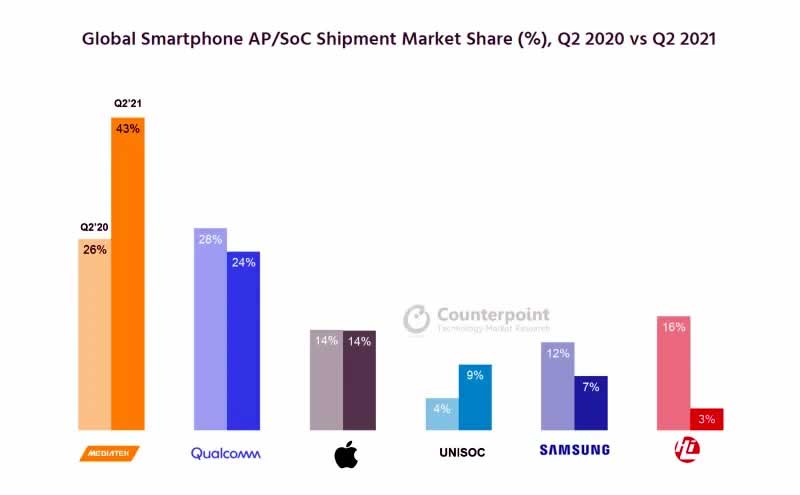
MediaTek was able to increase its market share for smartphone SoCs and application processors in the second quarter of 2021 compared to the second quarter of the previous year from 26 to 43 percent and thus overtake Qualcomm, whose market share fell from 28 to 24 percent in the same period.

MediaTek Dimensity line processors have become one of the most viewed in current smartphones, mainly the most affordable category. This panorama has hit Qualcomm again, which has lost its leadership for more than a year.

Market shares for smartphone SoCs in Q2 2021

With an unchanged market share of 14 percent, Apple follows in third place, while HiSilicon has fallen from 16 to only 3 percent because Huawei was no longer able to manufacture the Kirin SoCs due to the US trade restrictions.

Samsung’s market share also fell from 12 to 7 percent, but this is mainly due to the fact that the company relies on Qualcomm and MediaTek as SoC suppliers for more smartphones. Unisoc’s growth, on the other hand, is due to the use of its own SoCs by Honor, Realme and Motorola and the increased acceptance of these processors in China.

Overall, the market for smartphone SoCs grew by 31 percent year-on-year in the second quarter, which can be attributed in particular to the growth in the 5G area and the pandemic-related lower sales in the second quarter of 2020, according to Counterpoint Research.

Qualcomm continues to dominate the 5G modem business with a market share of 55 percent — not least due to the company’s use of a 5G modem in Apple’s iPhone 12 series.

Tips to Troubleshoot Your Internet Connection

Increase Internet Speed In Windows

When it comes to residential internet, many things can go wrong. No internet connection or service is perfect. You may face different sorts of issues. However, if these issues persist, you need to change your internet service provider. You deserve better.

Nevertheless, if these issues occur once in a while, you shouldn’t rely entirely on the internet provider. Signing up with a well-reputed provider that has efficient customer service and affordable prices should be the goal. This ensures peace of mind. You may qualify for affordable plans as well. We recommend getting CenturyLink for all those exciting features, seamless connectivity, and unlimited monthly data.

However, certain issues are quite basic and do not require the attention of an expert. For all those issues, we came up with tips to troubleshoot the internet connection. Try these simple hacks and if nothing works, you can always call customer support.

Try a different Device or Website

If you are experiencing slow internet speeds than usual, you need to check whether the problem is limited to that particular device or website. How to figure that out? Simple! Just get another device and try opening that website on the other laptop or tablet. Moreover, you can ask the people in the house whether they are facing the same issue while accessing the internet or not. 

If not, the issue can be with the device or website, the internet connection is fine. You can always restart the device and try the same website after a while to check. 

Perform an Antivirus Scan

Our systems are not that important but they still are prone to attacks from malware or viruses. The internet speeds usually slow down tremendously when malware or virus enters the system. Therefore, you must have a good antivirus program. There are paid ones as well. It’s a great idea to run a scan and make it one of your regular practices to eliminate any spyware, malware, or virus. Malware can indeed cause slower internet connectivity. Therefore, you should protect your device to the fullest. Sometimes, the internet providers also give a security suite free with the subscription. 

Run a Speed Test

Speed tests are very crucial in determining the network capability. We pay for the internet and expect the designated internet speeds in return. If the provider cannot get us the promised speeds, it is not worth it. Whenever you doubt slower internet speeds, just run a random speed check to find out. This will give you an insight into your internet connection. The general rule is to run a speed test during and after peak hours. You may experience slower internet speeds during peak hours.

Check your modem or router 

You should also check your modem or router if you are experiencing slower speeds. The modems and routers have LED indicators. If you do not see these lights on, the reason may be their disconnection from the source. You should power it again in this scenario. Therefore, just take this opportunity to reset your modem and router. Unplug all the cables from the equipment. Wait for 5 mins and then turn on the power. This will reboot your internet connection. The LED lights on your equipment should blink. This is a sign of connectivity. 

Upgrade your Router

The router technology gets better and better with time. If you have an old, worn-out router, you may experience slower internet speeds. The internet device may not be able to support the internet speeds you have. Therefore, upgrade your old router to the one with the latest networking standard. These new routers will not only enhance your speeds, but you will also get good signal strength in the corners. 

Try Switching to Ethernet

The Ethernet wire works wonders. It ensures smooth connectivity and your online games run great as well. 

Conclusion 

If nothing works for you, call the customer service of your internet provider. The expert technicians will guide you through. If there is a problem with the internet connection, they might send someone over to fix the issues for you. Therefore, just hang in there and trust the process. In most cases, these simple hacks will do wonders. 

Apple Plans To Build Chips Using RISC-V Architecture

Apple Using RISC-V Architecture

Apple is looking for an engineer specializing in RISC-V, an open-source architecture instruction set that allows device manufacturers to create their own chips without having to pay a license or royalty. This is confirmed by a job announcement for a “RISC-V High Performance Programmer”.

The explanation of the position makes it clear, however, that Apple will by no means crush the previous APs (Application Processors) such as the ARM-based M1, but rather that RISC-V should be used as a complement to the previous instruction set architecture for embedded controllers.

ARM and RISC-V are both ISAs (Instruction Set Architectures), which in turn form the basis for the actual micro-architecture. Apple has been very successful in implementing this for many years, although the focus was primarily on ARM-based implementations.

The iPhones and iPads typically have systems-on-a-chip such as the A14 Bionic, whereas current Mac systems have M1. The established T1/T2 designs also use ARM cores and this is exactly where Apple should start with RISC-V.

According to the job posting, it is looking for a programmer to work in the Core Operating Systems Group. This is responsible for embedded subsystems including their hardware/software that are used for iOS, macOS, TvOS and WatchOS. Specifically, a position is vacant for the Vector and Numerics Group, which is subordinate to the Core Operating Systems Group, which covers a special focus.

The group deals with computer vision, machine learning, and audio, signal and video processing. Apple is looking for expertise for the vector extension of RISC-V in order to operate low-level computation for, for example, 2D multi-layer convolution, for Discrete Fourier Transform (DFT) and for Fast Fourier Transform (FFT) with a view to Speech synthesis and encryption — this is where Siri would come to mind.

Compared to an embedded ARM core, whether developed in-house or licensed, this should increase efficiency and reduce costs. Apple does not have to pay any fees for RISC-V, and the same performance tends to be achieved with less chip area and more power per watt than with ARM.

It can therefore be assumed that, in the medium term, all kinds of iOS, macOS, TvOS and WatchOS devices will be equipped in some form with hardware that at least partially integrates RISC-V technology.

How To Transfer WhatsApp Messages from Android To iPhone Without Computer

Transfer WhatsApp Messages from Android to iPhone

Are you thinking of switching from Android to iPhone, or if you have recently become a proud of an iPhone, you may have a big problem before you — transferring WhatsApp chats from Android.

WhatsApp has become one of the most commonly used communication platforms as now it’s safer to use such an encrypted messaging service. But the problem occurs when we switch to a new phone, especially to a new platform, like from Android to iPhone — all our encrypted WhatsApp chats get deleted. Till now, there is no foolproof way to transfer WhatsApp from Android to iPhone without losing a single chat.

Is there any way to transfer Whatsapp messages from Android to iPhone without pc?

WhatsApp transfer means moving the data contained on WhatsApp from one device to another. With iTunes, iOS users already have a rather efficient solution, but one that still has some pitfalls, such as its being slow and the user’s fear of losing data. These are legitimate concerns, so people look for other solutions. 

The process of transferring WhatsApp/WhatsApp Business chats from Android to iPhone, or vice versa, can become more or less complex, depending on the application we use. Here are some of the methods that will assist you to transfer WhatsApp messages from Android to iPhone.

Transfer WhatsApp Messages from Android to iPhone via Export Chat

Export Chat option is a WhatsApp feature that allows users to email or export their entire WhatsApp conversation. You can save all your WhatsApp conversations as drafts. The disadvantage of WhatsApp Email Export is that it doesn’t exactly transfer WhatsApp from Android to iPhone — you can read all of your previous conversations, but you won’t be able to view them in the WhatsApp messaging app.

To do Export Chart in WhatsApp Messenger, 

  • Open WhatsApp.
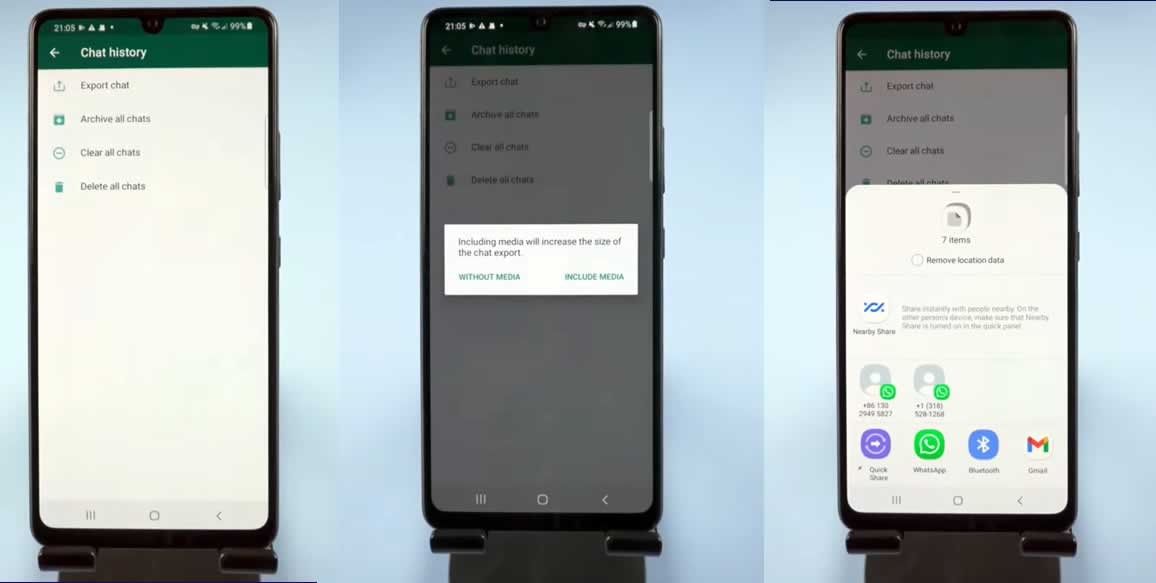
  • Click on Settings > Chats > Chat History > Export chat.
  • Now select the WhatsApp chat you want to transfer; you can also choose to attach media or without media.
  • Next, choose email or any other preferred method to draft or send your WhatsApp conversation.
Tenorshare iCareFone for WhatsApp Transfer App 0

Transfer WhatsApp Messages from Android to iPhone via iCareFone

Tenorshare iCareFone for WhatsApp Transfer App is one of the best trusted third-party tools to transfer WhatsApp messages from Android to iPhone without computer. iCareFone allows you to quickly and easily transfer WhatsApp from Android to iPhone only with a USB OTG cable.

How to transfer WhatsApp from Android to iPhone with iCareFone WhatsApp Transfer?

1. First, install Tenorshare iCareFone for WhatsApp Transfer App on Android.

2. Next, on your Android device, go to Settings > Chats > Chat backup and tap on the ‘Back Up’ button. Also, make sure the back up to Google Drive option is set as ‘Never’.

Transfer WhatsApp Messages from Android to iPhone

3. When the back up is finished, open iCareFone for WhatsApp Transfer Android app and tap ‘Transfer to iOS’ — you can see the recent WhatsApp back up file.

Transfer WhatsApp Messages from Android to iPhone

4. Tap that WhatsApp back up file and then choose ‘Ok’ to make sure this file to do the back up.

Transfer WhatsApp Messages from Android to iPhone

5. Now connect Android and iPhone devices with a USB OTG cable and authorize iCareFone for WhatsApp Transfer to access your iOS device.

Transfer WhatsApp Messages from Android to iPhone

6. Now a pop up on Android phone will ask you to install WhatsApp on iPhone. So install WhatsApp on iPhone from App Store. Once finished, open WhatsApp on iPhone that tap the ‘Continue’ button on Android.

Transfer WhatsApp Messages from Android to iPhone

7. Now you need to do verification on Android device — enter your phone number to verify. When the analysis is finished, tap ‘Next’ to check out the type of data on your WhatsApp back up file.

Transfer WhatsApp Messages from Android to iPhone

8. Now tap ‘Start’, which will alert you to disable the ‘Find My iPhone’ option. So go to iPhone settings, tap Apple ID and choose ‘Find My’ and enter your Apple ID Passcode to turn off the ‘Find My iPhone’.

Transfer WhatsApp Messages from Android to iPhone

Once done, again open WhatsApp on iPhone and tap ‘Turned Off’ on Android phone.

9. It may take a few minutes, do not try to do anything on both devices. When your Android smartphone shows ‘Transfer Completed’, iPhone will restart itself.

Transfer WhatsApp Messages from Android to iPhone

10. Now open WhatsApp on iPhone and log in with the same phone number. That’s it your all WhatsApp chat has been successfully transferred with iCareFone for WhatsApp Transfer App.

With iCareFone for WhatsApp Transfer, you can not only transfer WhatsApp messages from Android to iPhone but also from Android to Android without pc.

Compared to any other method, transferring WhatsApp messages from Android to iPhone with iCareFone for WhatsApp Transfer is the best and easiest one.

Facebook Apologizes For AI Labeling Black Men As “Primates”

Facebook

Facebook has apologized after the social network’s artificial intelligence labelled videos of black men as “primates”.

According to The New York Times, the video in question belongs to the British newspaper Daily Mail. It was uploaded to Facebook on June 27, 2020, shows black men in altercations with white civilians and the police. Below the player, the social network’s recommendation algorithm asked users if they wanted to “Keep seeing videos about primates?.”

Facebook apparently didn’t find out about the issue until a few days ago, when Darci Groves, the company’s former content design manager, tweeted about the error on Thursday after a friend clued her in on the misidentification.

Facebook deactivated the recommendations based on artificial intelligence as soon as it became aware of the matter.

Facebook spokeswoman Dani Lever has already apologized for this “unacceptable mistake” and made the following statement to The New York Times: “As we have said, while we have made improvements to our A.I., we know it’s not perfect, and we have more progress to make. We apologize to anyone who may have seen these offensive recommendations.

It is not the first time that neural networks of various companies have made such mistakes. In 2015, Google algorithms tagged photographs of two black men with the “gorilla” tag, after which the American media discovered that Google had removed the word “gorilla” from its search and tag databases altogether.

BrakTooth Vulnerabilities In Various Bluetooth SoCs Put Billions Of Devices At Risk

BrakTooth Vulnerabilities

Security researchers at the Singapore University of Technology and Design have found 16 security flaws in commercially used Bluetooth stack implementations, which they summarize under the name “Braktooth”. 

According to researchers, these vulnerabilities in the Bluetooth Classic [BR / EDR] protocol can be used to perform a variety of malicious actions, from initiating device failures to executing arbitrary code and taking control of a vulnerable system.

The BrakTooth vulnerabilities affect SoCs from a number of manufacturers, including Intel, Qualcomm, Texas Instruments, Infineon (Cypress), and Silicon Labs. 

The researchers examined 13 Bluetooth chipsets from 11 different manufacturers. Since many end devices use the same Bluetooth chips, they assume at least 1,400 affected products. The chips are built into laptops, smartphones, IoT devices or speakers. Overall, the problems are likely to affect billions of devices.

Among the vulnerable devices, experts indicate Microsoft Surface laptops, Dell desktops, as well as several models of smartphones based on Qualcomm chips.

In order to exploit the security gaps, an attacker only needs to be in the vicinity of the vulnerable device. And he needs an “inexpensive ESP32 development kit” with a specific firmware and a PC running the tool. For none of the gaps do you have to pair or authenticate beforehand.

Not every device that uses an affected Bluetooth chipset is unsafe; the researchers made clear. Nevertheless, it may be affected by impaired Bluetooth connectivity. “The overall security of an end-product, which has an internal chipset with firmware flaws, depends on how much the product relies on such a vulnerable chipset for its main functionality.”

The team of scientists informed the manufacturers about the vulnerabilities more than three months ago. However, only Espressif Systems, Infineon and Bluetrum have released the corresponding patches. The Texas Instruments security team said they would only create a patch if customers asked for it. The rest of the vendors are conducting their own investigation and have not yet named the exact dates for the release of the fixes.

Crysis Remastered Trilogy Will Be Released On October 15

Crysis Remastered Trilogy

The Crysis Remastered Trilogy presented by Crytek in June 2021 now has a release date — the game will be released on October 15, 2021.

With the release, Crytek wants to have completely redesigned the series. Crysis, Crysis 2 and Crysis 3 are then available individually or in a package in a remastered version.

Crytek has now significantly revised Crysis Remastered compared to the first appearance almost a year ago, Part 2 and Part 3 should appear in better shape right from the start.

The three Crysis parts are to come for the PC, the Xbox Series X and Playstation 5. Surprising, a release for the Nintendo Switch is also planned.

While there are no real limits to the resolution and frame rate on the PC, for the next-gen consoles from Sony and Microsoft, Crytek specifies a frame rate of 60 fps in 4K. The original version of Crysis from 2007 ran just as smoothly in 720p at 30 fps. All three remastered parts should get improved lighting effects, visually more beautiful figures, weapons and environments. High-resolution textures are also provided.

The Crysis Remastered Trilogy for the PC as well as the Microsoft and Sony consoles will cost $49.99. Also, all three parts can be purchased individually, with each game costing $29.99.

The PC version will be available exclusively from Epic, while the console versions will be available in Microsoft, Sony and Nintendo stores.