Home Blog Page 229

How Will Touch Screen Technology Help Retailers This Holiday Season?

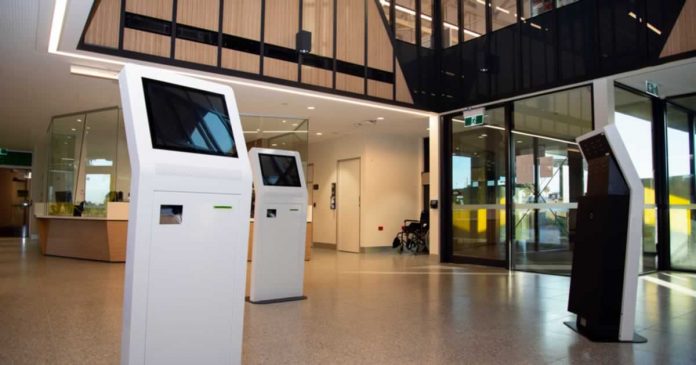
interactive touch screen kiosks

Retail shops can benefit from using interactive touch screen kiosks in a variety of ways. These days, customers expect an interactive and personalised purchasing experience. This cutting-edge technology can improve your customers’ overall shopping experience, while also increasing sales and providing you with useful data.

According to Fujifilm’s market study, face-to-face interactions with customers can help your business to succeed. However, with advances in digital technology, more retail businesses are turning to self-service options to boost their efficiency, as well as customer service. As a result, retail shopping has become easier for both the business and the consumer, thanks to interactive touch screen kiosks.

However, positive and memorable interactions are also important for shoppers. According to Oracle, 81% of European shoppers are willing to spend a higher price for a better shopping experience. However, capturing customers in-store while competing with retail giants such as Amazon.com necessitates taking further steps, prompting merchants to use innovative technologies such as digital signage to create engaging experiences across retail locations. As a result, consumers are more engaged with brands, and sales have climbed by 32%.

Using digital signage can help your brand to remain contemporary and modern. With Christmas just around the bend, touchscreen-based digital signage can provide significant advantages for your retail business.

What is an Interactive Touch Screen Kiosk and How Does it Work?

An interactive touch screen kiosk is a device that customers can engage with and use to search for products. Specifically, customers can use their fingertips to touch the screen and obtain essential information about the availability of their favourite brands, ordering, and self-payment alternatives on the customisable touch screen kiosk.

What are the Benefits of Digital Signage for Retailers?

The appeal of digital signage is one of the reasons for its effectiveness. Traditional signage can be attractive; nevertheless, it lacks the flexibility of a digital sign, which can display a large amount of content. Electronic systems are also interactive, which attracts customers within the store.

Digital signage is a cost-effective way for small businesses to boost sales and advertise in-store events. Furthermore, it can help with brand development by highlighting information that supports the image that retailers wish to project. It can also boost visibility if placed in crucial areas of the business; as a result, a digital sign entices customers and communicates information about the store’s brand plus merchandise.

Over time, more and more retailers have begun to use digital signage to attract customers, since it allows for speedier connections with target consumers in various locations. Using this technology enables store owners to immediately receive feedback, allowing them to respond promptly. Furthermore, because there is no need for printing, production costs are reduced, leading to significant savings over the long term.

Using Targeted Messages to Increase Brand Awareness

It is important for retailers to send out relevant and timely messages that match their brand, products, or campaign in today’s fast-paced retail environment. Brand recognition has been proven to rise by 48% when using digital signage displays. As a result, shoppers are more likely to recognise merchants who use digital signage.

Attracting New Customers and Increasing Store Traffic

Storefront locations with digital signs have seen an increase in foot traffic. When observed in-store, 74% of consumers are effectively enticed to dynamic digital media displays, according to Fujifilm’s market study. In addition, digital signage displays boost store traffic by 33%.

Operating Costs Have Dropped

By using an interactive touch screen kiosk, you can lower your business’s operational costs by reducing your number of staff. This cutting-edge technology may be used to answer customer inquiries, check the availability of certain products, and provide specific product information, empowering customers while also lowering your overhead expenses.

Furthermore, there are no training costs involved with a touch screen kiosk. Product catalogues and other data can be loaded into the kiosk software and accessed with a single push of a button.

Increasing Sales

Let’s face it: owning a business is pointless unless you’re making sales. It can be tough for a human sales assistant to understand what is going on in the shopper’s head and to determine which promotion or new product to make available in order to enhance sales.

Using an interactive touch screen kiosk, on the other hand, can significantly increase your sales. It can present promotional messages and recommended products without appearing overbearing because it has a record of the customer’s buying behaviours and favourite brands. Additionally, this technology may present bundle deals with comparable products, allowing customers to save money while increasing sales.

Self-Serve Kiosks Reduce Wait Times

Standing in lines is one of the most stressful aspects of the holiday shopping season, and retailers do everything they can to minimise them. However, labour expenses and space constraints restrict retailers’ ability to lower wait times. This is why so many retailers are switching to self-serve kiosks and other service-enhancing touch screen devices. These innovative devices shorten lines and increase customer service, especially when employees who were previously stationed behind the counter are moved to the shop floor.

Stress is Reduced by Using Digital Displays

The first half of the battle is getting customers into your business; the second half is keeping them there long enough to select the appropriate present and make a purchase. Creating a positive and engaging client experience during the holidays is more difficult than ever, due to large crowds, overworked personnel, and shopping fatigue. Lines at the cash register are one of the most stressful aspects of the customer experience. Digital displays may reduce stress and anxiety, and they’re a fantastic place to place fun and instructive promotional content.

Efficient Payments

One of the most effective ways to speed and secure client payments at the point of sale is to use touch screen kiosks in retail. Customers can use this technology to finish the checkout process swiftly and securely while using a variety of payment options. Additionally, such kiosks can be utilised to show clients promotions and other offers before checkout, further boosting sales.

Insights on the Consumer Journey

The age of big data and analytics is upon us, revolutionising traditional retail marketing. Customer insights may be acquired in a unique and efficient way using digital interactive kiosks. The interactive kiosks can save information such as psychographics, demographics, buying patterns, and behaviours of large numbers of customers. Every organisation is driven to plan focused marketing initiatives by this priceless customer data. 

The days of mass marketing are long gone. In turn, touch screen kiosks make it easier to deploy tailored marketing campaigns to ensure that your company caters to each client’s specific needs and preferences.

Final Words

There are numerous advantages to employing touchscreen technologies and displays in your organisation. Touchscreens are available in a variety of sizes, from small ones for use in elevators to large display panels that can be mounted on the wall or erected as standalone display kiosks.

There is no end to how you can employ touchscreen and electronic directories in your business, with the number of apps and customisations already available and continuing to increase and grow. Isn’t it time to upgrade to contemporary technology and retire your old displays?

Galaxy Z Fold 3 And Galaxy Z Flip 3: Samsung Announces Two New Smartphones With A Foldable Display

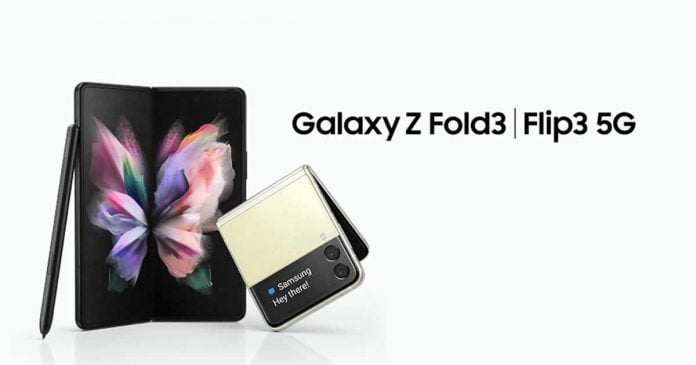
Galaxy Z Fold 3 And Galaxy Z Flip 3

Samsung has introduced two new smartphones with a foldable display — The Galaxy Z Fold 3 and the Galaxy Z Flip 3 — which arrive with a slightly renewed design and a lot of power.

Compared to their predecessors, the new Galaxy Z Fold 3 and Galaxy Z Flip 3 is thin, water-resistant phones, as they have IPX8 certification, which are made of more resistant aluminium, which incorporates Corning Gorilla Glass Victus on the outside and a new protective layer on the inner screen that provides 80% more durability. The quality of workmanship stands out positively in both models.

Galaxy Z Fold 3

The Galaxy Z Fold 3 has a 6.2-inch external display that has a resolution of 2268 x 832 pixels and a frame rate of up to 120 Hz. However, the interesting thing about the Samsung Galaxy Z Fold 3 comes on the main screen. When unfolded, the terminal boasts a 7.6-inch Dynamic AMOLED panel with a resolution of 2208×1768 pixels, 374 dpi and a refresh rate of 120 Hz.

Galaxy Z Fold 3

The first thing that stands out, beyond its folding feature, is that it now integrates a hidden camera under the screen. This new generation of under-display camera currently only has 4 megapixels, compared to 10 megapixel sensor that is located at the top of the secondary screen. The vertically arranged triple camera of the Samsung Galaxy Z Fold 3 is composed of main, ultra-wide-angle and telephoto sensors of 12 megapixels each. It is worth mentioning that the telephoto incorporates a double optical stabilization system, autofocus, 2x optical zoom and 10x digital zoom.

The Fold 3 uses Qualcomm’s Snapdragon 888 with an integrated 5G modem. The RAM is 12 GB, while the storage (UFS 3.1) will be available in 256 and 512 GB variants. The battery, meanwhile, is 4,400 mAh. In addition, it supports 25W fast charging. Also, the Galaxy Z Fold 3 is, for the first time, compatible with the Samsung S Pen.

The Samsung Galaxy Z Fold 3 will be available from August 27 in Phantom Black, Phantom Green and Phantom Silver colors and it is priced at $1,799.

Galaxy Z Flip 3

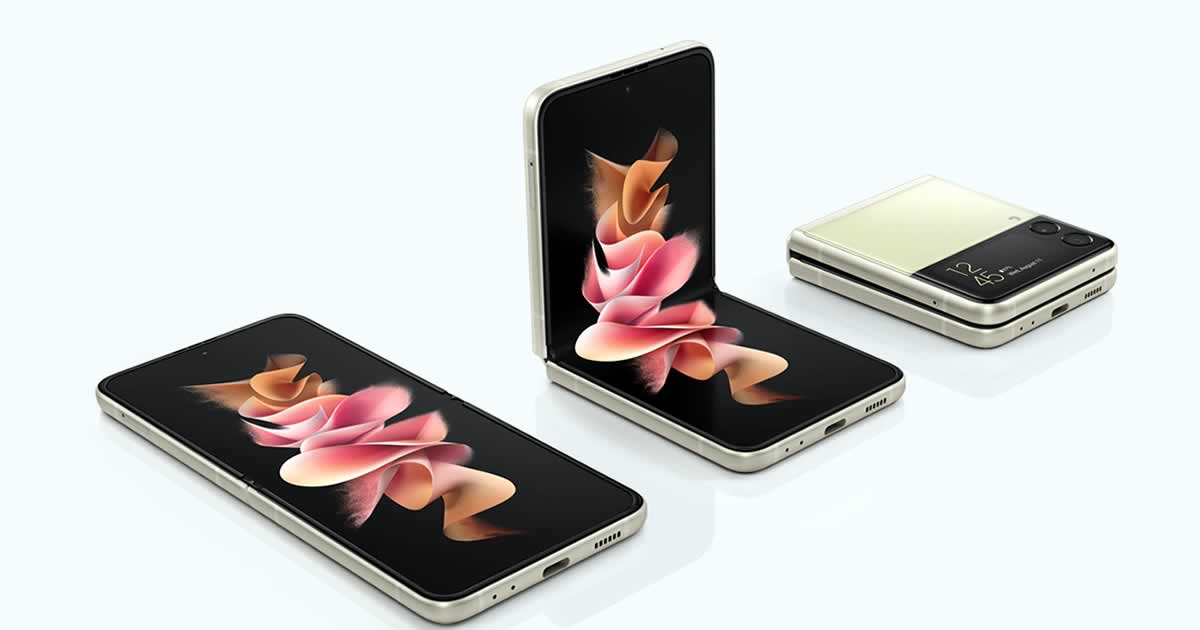
Like its predecessor, the Galaxy Z Flip 3 is a clamshell smartphone. The clamshell structure measures 86.4 × 72.2 × 17.1 mm when closed and just under half as thick 166.0 × 72.2 × 6.9 mm with the same weight of 183 g. As with the Galaxy Z Fold 3, the housing and hinge, which is protected against the ingress of water in accordance with IPX8, are new.

Galaxy Z Flip 3

With the current generation of folding smartphones, Samsung wants to ensure that buyers no longer have to compromise on the manufacturer’s other series. A less sensitive aluminium alloy for the chassis and a more robust display film that is less likely to scratch and show signs of use should also contribute to this.

The primary screen still measures 6.7 inches and works with practically the same resolution in 22: 9 format with an adaptive refresh rate of 120 Hz. The external Super AMOLED screen grows, being 1.9 inches in size (compared to 1.1 inches on the Galaxy Z Flip), and offers better image quality. A panel that now allows you to access different settings, such as volume or brightness, see notifications, control music, and even see the viewfinder to take a selfie with the rear camera.

Inside, you also saw the powerful Qualcomm Snapdragon 888 processor, which is accompanied by 8 GB of RAM and 128/256 GB of internal storage. The battery has a capacity of 3,300 mAh with fast charging of 15 W by cable and wireless charging of 10 W. The Samsung Galaxy Z Flip 3 arrives with Android 11, 5G and a variety of sensors, such as an accelerometer or barometer.

As for photography, it has a dual rear camera configuration consisting of the main lens and an ultra-wide angle of 12 megapixels each. While on the inner screen, you saw a 10 megapixel sensor.

The Samsung Galaxy Z Flip 3 comes in seven colors — cream, green, black, lavender, grey, white, and pink and will also be available on August 27 at a price of $999 for the 8/128 GB version and $1199 for the 8/256 GB model.

Norton Is Acquiring Avast For $8.6 Billion

Norton Is Acquiring Avast

NortonLifeLock (formerly Symantec) buys the Czech antivirus software competitor Avast. As the US company, Norton announced on August 11, 2021; the purchase price is $8.6 billion.

The agreed but not yet approved merger is valued at a total of $ 8.1 billion to $8.6 billion. Avast shareholders are entitled to a combination of cash and newly issued NortonLifeLock shares. However, the shareholders of both companies, as well as the relevant regulatory authorities, have yet to approve the merger. The transaction is currently expected to close in mid-2022.

Upon completion of the merger, NortonLifeLock Chief Executive Officer Vincent Pilette will remain CEO of the new company. The group will have headquarters in Tempe, Arizona, and Prague. Avast boss Ondrej Vlcek will become president and member of the board of directors, the companies announced. The stock exchange company resulting from the merger will unite over 500 million users, including around 40 million direct customers.

NortonLifeLock Inc. from Arizona, formerly known as Symantec Corporation (1982 to 2019), has more than 3,600 employees and generated sales of almost $2.5 billion last year. With around 1,700 employees and just under $900 million in sales, Avast Software (founded in 1988) is not even half the size. Both companies have their origins in the 1980s and operate internationally. 

Although, there is no information about Avast and Norton’s plans after the acquisition, so anything could happen. Maybe Norton would remain as a paid software for those who seek greater security, while Avast would continue to exist with a freemium model, as it has been up to now. The point is that both programs would belong to the same company.

In December 2020, NortonLifeLock bought the German antivirus software manufacturer Avira. The purchase price was $360 million. In 2016, Avast acquired another provider of antivirus software, AVG.

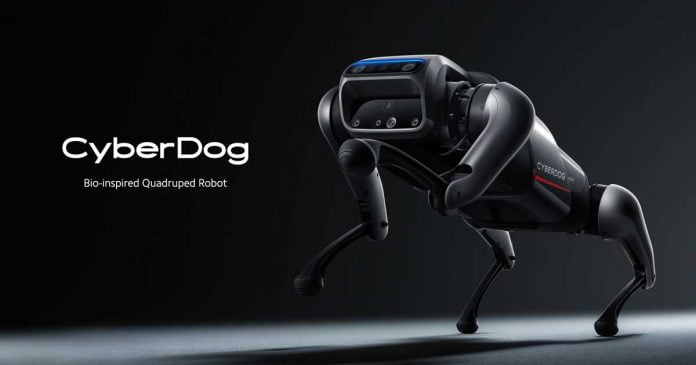
CyberDog: Xiaomi Launches An Open-Source Robot Dog

Xiaomi CyberDog

At the launch of the Mix 4 and the Mi Pad 5, Xiaomi surprised everyone with its own open-source robot dog — CyberDog.

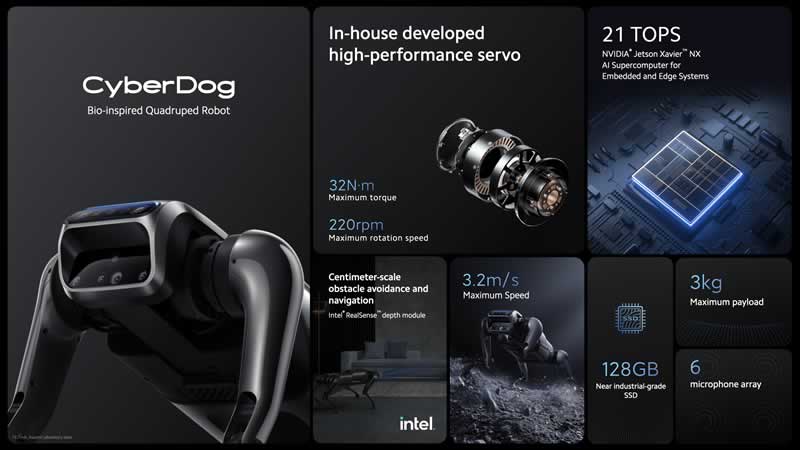
CyberDog, which is highly reminiscent of Spot from Boston Dynamics, is Xiaomi’s most advanced robot, with up to 6 built-in microphones and the best of Intel and Nvidia inside.

During the official announcement, Xiaomi addressed CyberDog as a “bio-inspired quadruped robot” and an open-source companion dog — this means that developers from all over the world can freely work and experiment on it. 

According to Xiaomi, “Robotics enthusiasts interested in CyberDog can compete or co-create with other like-minded Xiaomi Fans, together propelling the development and potential of quadruped robots.”

The Cyberdog moves at a speed of almost 12 km/h and weighs 3 kg. It is equipped with an Nvidia Jetson Xavier NX. This uses six self-developed cores with ARM’s 64-bit technology ARMv8.2. The CPU is made up of two faster and four slightly slower cores. There are also 384 graphics cores with Volta technology, including 48 tensor cores and two special deep learning accelerators. The NX can access 8 GB of LPDDR4 RAM and 16 GB of eMMC.

According to Xiaomi’s announcement, the CyberDog is a true beast that features a navigation and obstacle detection system that is accurate to the centimeter. This is made possible by the implementation of the Intel RealSense D450 depth module, accompanied by interactive AI cameras and ultra-wide-angle “fisheye” cameras.

Xiaomi CyberDog specs

The CyberDog has high-performance servo motors, developed by Xiaomi to make it as versatile as possible. According to the Chinese company, the maximum torque is 32-newton ·meters, while the rotational speed reaches 220 revolutions per minute. This allows CyberDog to be fast, agile and have a wide range of movements.

As we mentioned already, Xiaomi’s CyberDog comes with a navigation system that allows you to analyze your environment and interact with great fluidity. But this is not all. The robot dog also comes equipped with an arsenal of sensors that provide “instant feedback” to guide its movements. In addition to cameras, it includes touch and ultrasonic sensors and GPS modules, among others.

It has facial recognition to follow its owner and obey him so that it can follow him wherever he goes, even if there are obstacles in the way. It is controlled by a remote or from its own application. In addition, it supports voice commands.

It also has USB-C and HDMI ports and a 128 GB SSD so that developers can take advantage of them and experiment with new software and hardware. Furthermore, the company has committed to establishing a robotics laboratory for engineers interested in advancing innovations.

Xiaomi insists that it has built the CyberDog in order for it to be adopted by the open-source community. In fact, the robot itself has been created using open-source algorithms.

Xiaomi has launched 1000 units of the CyberDog at a price of 9999 yuan (just over $1500), aimed at “fans of the brand, engineers and robotics enthusiasts.

Top 6 Methodologies That Simplify Custom Software Development

Custom Software Development

Software development methodologies are basically algorithms of the development process. They regulate what happens and in what order. Different software development methodologies offer different approaches, along with particular advantages and disadvantages. To maximize the efficiency and the end result quality, it’s very important to choose the one that suits your requirements and can be easily utilized by the team.

Software design methodology allows the programmers to systematize the whole project from the beginning. Most of them include the planning stage and dictate which particular development aspects go after each other. Some of them are repeated in particular software design methods, some are not.

That’s what distinguishes them from each other. As said before, they all suit certain purposes, meaning that they focus on separate aspects of the project. For example, Agile focuses on regular discussions between team members for receiving feedback and improving the quality and performance. But Waterfall is just a simple step-by-step algorithm of sequential instructions.

Experienced programmers and professional custom software development services have already tried most of the software design methodologies. They know the differences and when to switch between them. But beginner devs often choose the wrong ones and fail to effectively develop the product because of it.

So, to help all the aspiring program creators out there, we made a list of the best methodologies.

Waterfall

Let’s start with the Waterfall. It’s probably the easiest to understand and the most linear of them. It’s a simple plan that consists of 6 instructions:

  1. Analyzing the requirements
  2. Creating the design
  3. Implementing everything
  4. Testing
  5. Deployment and verification
  6. Maintaining the ready product

It’s what could be called the traditional method. You analyze what you need to do, then you create a general (and detailed) design of the program, outlining everything and defining how it will look. Creating a template of some sort. Then, you write the code itself and implement all the features you need.

Now, test it for bugs and other issues to make sure everything works as intended. After that, you just need to verify that it fits the requirements and is ready to be released. From now on it’s just a matter of keeping the application in working condition.

This algorithm fits inexperienced teams the best, as it’s very easy to understand. However, to be able to use it efficiently, the team needs to clearly understand the objectives and follow instructions precisely.

Rapid

Rapid, also known as RAD, maximizes the speed of the development process and allows its users to adapt to the constantly changing circumstances on the market. It works like this:

  1. Requirement analysis and planning
  2. Construction of the code
  3. User design
  4. Creation of the prototype
  5. Repeat 2,3,4
  6. Testing
  7. Cutout

The repetition of the construction, design development, and prototype creation allows you to easily and rapidly adjust and change whatever you need. In this fast-paced world of software, it’s the perfect methodology to be always ready for unpredictable circumstances.

But keep in mind that you need experienced developers who know what to do as well as big budgets in order to benefit from using Agile. That’s because the teams need to be able to approve each new application version that comes after the repetitive construction cycle.

Agile

Agile software design methodology looks somewhat similar to our previous mention, Rapid. It depends on the repetitive process too, due to which different iterations of the single program with small adjustments and new features are released regularly. However, it focuses more on the communication and discussion of each version.

Agile algorithm looks like this:

  1. Backlog (Plan)
  2. Iteration (Collaborate)
  3. Deliverables (Deliver)
  4. Get the feedback during a daily review
  5. Go back to 2 and create a new iteration.

So, as you can see, a regular review of each iteration is the key part here. The teams communicate in real time and analyze what works as intended and what could be improved to suit the requirements.

And those discussions are what make Agile ineffective for large companies because it’s basically impossible to hold such conferences every day with a huge amount of workers, even if they are professionals. It’s just too inefficient. Also, beginner programmers normally can’t utilize this methodology to their advantage either, because of the lack of experience.

However, for small and mid-sized companies that have top-level specialists, it’s one of the best options. As the name suggests, it’s agile, meaning that it can be adapted rapidly to any situation, while still maintaining the quality of the product due to daily reviews and adjustments.

DevOps

DevOps doesn’t look like a usual methodology. It’s more of a closed cycle of constant work and improvement. The whole process could be described as follows:

  1. Plan
  2. Code
  3. Build
  4. Test
  5. Release
  6. Deploy
  7. Operate
  8. Monitor
  9. Repeat

That means, the whole cycle of developing the program is repeated from scratch, Unlike Agile and Rapid, which only repeat particular processes to create a new iteration. What makes it appealing for businesses, is the strategic value and the constant work on the project, which is both effective and profitable.

The strategic value lies in the cooperation of different departments and teams. For example, operations, design, development, and quality assurance teams need to work together all the time, releasing the top-quality product, honing their skills in teamwork, and gaining precious experience.

Software Development

Lean

Lean development methodology was named after the lean manufacturing algorithms of Toyota. Those algorithms proved to be the most effective on the market, bringing Toyota to the top. But how are they applicable to software development? Well, it’s pretty simple.

Instead of creating a series of processes with repeating (or not) parts, Lean focuses on removing all the non-essential aspects of the development process. Maximizing efficiency on every step is the top priority here, along with always maintaining the best quality.

This makes creating applications a few times faster. They might not have additional features, but they suit the requirements perfectly, are easy to manage and maintain. Also, Lean considers the skill development of the works one of the crucial parts, so developers are encouraged to learn and progress.

Basically, it’s not just a methodology, but a vision of the workflow, the mindset of every developer in the team. All of them constantly analyze the development process to find bottlenecks and increase efficiency everywhere it’s possible.

Prototype

Why waste time on a fully-made product if there’s still a 100% chance the customer won’t like all of it and will ask for changes? That’s the key principle in Prototype methodology. It focuses on creating a prototype that fits all the requirements and is tested by the customer. The plan could be described like this:

  1. Analyzing requirements
  2. Repeating
    1. Design
    2. Prototyping
    3. Customer evaluation
    4. Reviewing and adjusting
  3. Developing the product
  4. Testing
  5. Maintaining

That means until the prototype is absolutely ready, the product won’t be released. This allows saving tons of money and time because you only need to develop and approve the prototype, instead of the polished version. But of course, the final product needs to be based on a prototype, too.

Because many companies fail to satisfy their customers because they add too many unnecessary or undebated features after the prototype has been approved. The wrong expectations and the potential losses due to too many prototypes are the pitfalls of this methodology, so it suits experienced teams the most.

To Wrap It Up

Software development methodologies represent the most crucial part of every business – planning. They outline the whole process and determine where the team needs to focus. They become a software development analog of a business strategy. And as we all know, choosing and creating the right strategy can either bring you tons of profits or destroy your business, so analyze carefully and don’t make rash decisions.


Xbox Cloud Gaming Comes To The Xbox App On Windows 10

Xbox Cloud Gaming news and stories

If you want to use Xbox Cloud Gaming (xCloud) on your Windows 10 PC, you no longer have to go through the browser. From now on, game streaming should also be possible directly via the Xbox app.

The Redmond giant just announced that the beta version of Microsoft’s cloud gaming service can be enjoyed from the Windows 10 Xbox app for members of the Insider Program in the 22 countries in which the service operates.

In this way, with just a controller and a decent internet connection, users can play all kinds of Xbox video games without the need for dedicated hardware.

A new ‘cloud games’ section will be added within the app, with access to all xCloud games. With this, testers who have Xbox Game Pass Ultimate will be able to enjoy more than 100 games directly from their computer or continue a game that started on a console, all thanks to xCloud.

According to Jason Beaumont, associate director of experiences at Xbox, the firm has added, “some new features to help you get started, including easy-to-access information on controller and network status, social features to stay connected with friends, and the ability to invite people.

The app will provide a number of new functions for game streaming, including an easy-access check for the controller and network status and the extended invites with which users can invite other people to their games.

Gigabyte Ransomware Attack Leaked Confidential Documents Of Intel And AMD

Gigabyte news and stories

Taiwanese PC and hardware manufacturer Gigabyte has suffered a ransomware attack, and hackers behind this attack claim to have copied more than 100 GB of data — including confidential documents from Intel and AMD that are not intended for the public.

Gigabyte confirmed to the Chinese news site United Daily News about the cyber attack that affected a small number of servers. After the attack was discovered, Gigabyte took the servers offline and notified law enforcement agencies.

According to Bleepingcomputer, the ransomware group RansomEXX is believed to be behind the attack. RansomEXX claims to have acquired up to 112 GB of data in the form of documents.

These documents, according to the hacker group, contain confidential material from AMD and Intel, as well as American Megatrends, one of the world’s largest hardware vendors. RansomEXX has, in fact, already warned that it is going to publish all the documents and sell them on hacker forums if no ransom is paid. The amount of the Gigabyte ransom demand is currently unknown.

Although this case is especially tricky since the interests of up to 4 different companies are involved, cybersecurity authorities always recommend not paying ransoms, despite the consequences. And the fact is that the payment of said sum is not a guarantee of anything — the hackers may also publish the documents or even worse, get paid and then re-sell copies of the documents to the highest bidder in hacker forums, making even more money.

“Apple Is Rolling Out Mass Surveillance To The Entire World”: Edward Snowden And Other Experts Criticizes Apple’s Plans To Fight Child Pornography

malware attack in apple app store

Apple has announced the addition of a new cryptographic monitoring system, CSAM scanning, with iOS and iPadOS to limit the distribution of child pornography. The company said it will now scan photos from iCloud and Messages for pornographic content with children using machine learning. 

However, many experts are appalled at Apple’s plans under the pretext of protecting children — they believe Apple’s new measures as potentially dangerous.

Whistleblower Edward Snowden called Apple’s digital inspection a tool of mass surveillance. He warns, “they can scan for anything tomorrow.”

The Electronic Frontier Foundation (EFF) criticized Apple in an article and noted that the implementation of the new measures opens up potential backdoors in a secure encryption system.

According to EFF, Apple now has a “fully built system just waiting for external pressure to make the slightest change.” With “change” means that Apple could scan for anything instead of child pornography.

The organization indicated that scanning content with a specified database could lead to dangerous use cases. For example, in a country where homosexuality is a crime, the government “might require the classifier to be trained to restrict apparent LGBTQ+ content.”

Matthew Green, a security professor at Johns Hopkins University, said the people who control the database that identifies sensitive photographs have too much power.

Whatsapp boss Will Cathcart also criticizes this: “This is an Apple built and operated surveillance system that could very easily be used to scan private content for anything they or a government decides it wants to control.” writes on Twitter.

The question is also open how Apple wants to deal with demands from other governments that want to search for certain content.

Apple wants to scan the photos directly on the users’ devices. For this purpose, hashes are to be created from the existing files and compared locally with a database that contains hashes of known child pornographic material. The database should be updated regularly with updates from iOS and iPadOS. If a threshold value from several analyzes or vouchers stored in the iCloud is exceeded, the system should sound the alarm, and Apple checks the content manually.

Apple has not yet responded directly to public criticism. According to 9to5 Mac, the person in charge said in an internal mail that “Apple acknowledges the ‘misunderstandings’ around the new features, but doubles down on its belief that these features are part of an ‘important mission’ for keeping children safe.”