Home Blog Page 228

Obsolete Tech Gadgets That Are Too Hard to Throw Away

Obsolete Tech Gadgets

The impact of modern technologies in our daily lives is immense, and can never be denied. Some of the most basic requirements of our lives these days are only feasible with the use of technical gadgets and innovative software. Any functional upgrade in a technological sector tends to bring newer dynamics, making the previous versions obsolete. However, some of these gadgets prove to be difficult to throw away because of the emotional attachment that might have grown towards the device over time.

Many modern devices carry out tasks that once required separate devices to achieve. The latest computers and mobile phones offer astonishing features that older gadgets used to provide, but in a compact, and limited capacity. It is remarkable how rapidly the best pieces of technology get outdated nowadays. This article takes a walk down memory lane and lists some of the most popular devices that once ruled the tech scenario, but has become completely irrelevant these days.

Typewriters

The introduction of typewriters to the public occurred as early as the 1500s and was revolutionary at that time. This was a major upgrade to the conventional way of writing using a pen and paper. Until the invention of computers, the use of typewriters was the most convenient way to, say, write a book or scribe documents.

Websites like postroadvintage.com provide a wealth of information and images about vintage gadgets that serve as a reference for people failing to relate to some devices mentioned in this article. If you bump into a typewriter these days, make sure you take a photo, as you might not get another chance to see one soon.

Calculators

Calculators are still used in academic and corporate sectors but are swiftly fading away from the scenario. Computers, mobile phones, or even smartwatches have calculators pre-installed these days, making it unnecessary to carry a separate, dedicated calculator along.

While modern calculators contain various functionalities, some older versions are very simple and lack certain features available today. Calculators these days come with the capacity to display graphs, solve algebraic equations, and store numeric data. Those features were unheard of in older version calculators available to the masses.

Landline Telephones

There was once a time when phone calls required significant effort due to the nature of landline telephones. These are wired gadgets that are quite large relative to modern-day mobile phones. One of the main reasons for landline telephones to become obsolete is their lack of portability. A connective wire is needed to operate these gadgets, which totally beats the purpose of modern-day phone usage.

Since its origination in the early 1800s, landline telephones have transitioned through many modifications in design and utility. Children these days do not even recognize the old rotary telephones that were once widely used around the world. The act of spinning a circular dial to input phone numbers was an iconic scene to witness, despite the inconvenience associated with it. Modern smartphones have streamlined the entire process of placing a phone call. By the time you make the call, talk to the person on the other side, and hang up, a rotary phone might still be taking inputs from you.

Pagers

Pagers and beepers were once the go-to devices for making emergency, one-way communications during the late 1900s and early 2000s. Many variations of these gadgets were available, serving different purposes that were once unimaginable. For the first time ever, people were able to send short texts and reminders to others. Making a phone call is too elaborate a task when all you need is to convey a short message.

The introduction of smartphones instantly made the use of pagers obsolete, as a mobile gadget can efficiently do more than the simple task of sending messages. Despite the sheer drop in their global demand, pagers and beepers sustained their popularity for quite some time due to the deep impact they already had in the lives of people.

Floppy Disks

Modern data storage devices like pen drives, hard-disk drives, or solid-state drives have severely depleted our memory of once using floppy disk drives as our primary gadget for storing data. Introduced in the 1970s, these flat, compact disks could store a little less than 1500 kilobytes of data. While this figure does seem negligible compared to newer technologies, it certainly was more than enough during its glory days.

The major problem associated with floppy disks was their susceptibility to magnetic fields and heat. They were not very durable and used to get corrupted easily even with minimal issues. With the exponential rise in file sizes over the years, due to advancements in the software industry, floppy disks were eventually replaced with larger data storing devices. Most modern computer systems do not even include any floppy disk feature.

CDs and DVDs

CDs and DVDs revolutionized the digital video playback industry because of their compactness, “abundant” storage space, and overall ease of use. Hundreds of millions were spent in this sector during their days of eminence, as they provided the perfect opportunity to manipulate, share, and store videos, audios, and other files of various formats.

These disks were extremely durable and portable, leading to even higher demand amongst the common people. Problems like the presence of a nearby magnetic field did not affect their functionality, which proved to be a big advantage over floppy disks. From massive games to stacks of corporate documents, CDs and DVDs could store them all during that era.

Feature Phones

Children nowadays find it hard to believe that mobile phones did not always feature a touchscreen display. Bulky, buttoned phones were the standard in past days. The most impressive games that could be played in those phones were Tetris or Snake. Sending a text message required way more effort on a buttoned interface than on the sleek displays we use nowadays.

Although feature phones are still in use, it is a rare scene to witness. Chances are, a person pulling a feature phone out of the pocket, also owns at least one smartphone. The immense amount of functionalities in a smartphone completely beat a feature phone any day and is slowly but surely pushing them out of the picture.

Conclusion

Nowadays, younger generations have limited or no idea of some of those gadgets mentioned in this article, as those have already become obsolete. While newer technologies exist to solve the problems laid bare by older ones, it is certainly intriguing to learn about the predecessors of some of the most implemented devices and gadgets of today.
Intel Arc: Intel Unveiled The Branding For Its Own Gaming Graphics Cards

Intel Arc

In a world dominated by Nvidia and AMD GPUs, Intel has unveiled its new brand of high-performance graphics, Intel Arc, that will cover hardware, software and services designed to win over the end-user. 

The first product, known internally as ‘Alchemist’, will arrive in the first quarter of 2022. The following generations will be codenamed ‘Battlemage’, ‘Celestial’ and ‘Druid’ and will also appear under the new Arc branding.

The new Intel ARC products will build on Intel X, a scalable graphics and compute architecture focused on performance and functionality. According to the company, its high-performance graphics solutions, by combining X and LP, HP and HPC microarchitectures, will deliver “advanced computing efficiency and scalability.” They will also be accompanied by “open and accessible software tools.” The firm thus declares war on the two companies that have the current monopoly of graphics cards — AMD and Nvidia.

This first generation of Intel ARC products will offer variants for desktop computers, as well as notebooks. Intel also confirms that this first generation of Intel Arc will support Ray-Tracing technology based on hardware and with supersampling based on artificial intelligence.

We do not yet know which exact models will be launched with this new platform, but of course, users will be the main beneficiaries.

Parallels Desktop 17 For Macs With M1 Now Supports Windows 11

Parallels Desktop 17 For Macs

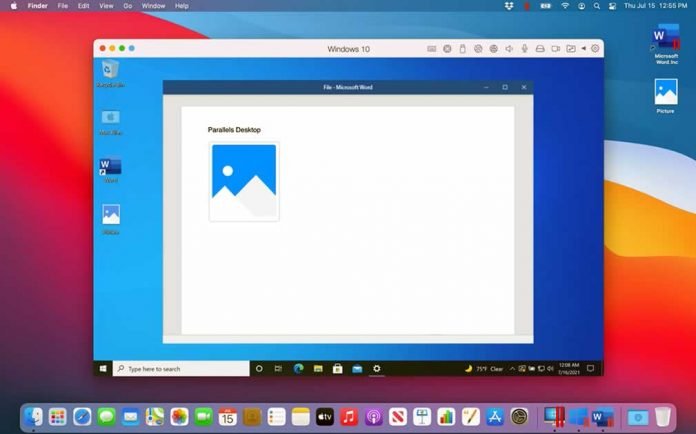
Parallels Desktop 17, one of the best virtualization tools for Mac, adds support for Windows 11 and improves the performance and experience on Mac computers with an M1 chip.

Parallels Desktop 17 allows access to Windows 11 and all the functions of the Microsoft operating system, both on Apple computers with an Intel processor and on computers with an M1 chip. It also adds compatibility with macOS 12 Monterey. Users can create a virtual machine for both operating systems by simply running the program and without requiring a reboot.

To use Windows 11 in a virtual machine, Parallels Desktop 17 adapted its installation wizard and developed a virtual TPM chip. The ARM Insider Preview of Windows 10 can still be started on Macs with an Apple M1 chip.

The software also works faster than the previous version. According to the manufacturer, virtualization software is up to 38% faster to resume when using Windows, Linux, or macOS, while boot and disk performance on Windows 10 ARM is up to 33-20% faster.

Performance is also optimized for 2D graphics, which are up to 25% faster. On the other hand, the new version integrates a screen driver that improves the response and synchronization with video and games when using a virtual machine. Parallels Desktop 17 for Mac also supports USB 3.1, allowing the use of additional USB storage devices.

SpaceX Will Launch The CubeSat Satellite To Broadcast Advertisements In Space

SpaceX Space Advertisement Satellite

Elon Musk’s SpaceX, together with Canadian startup Geometric Energy Corporation (GEC), will launch CubeSat into space to broadcast advertisements.

GEC wants to put a satellite that displays announcements on a screen into orbit and record them with a camera so that they can be broadcast live over the internet. It will use SpaceX’s Falcon 9 rocket to carry its CubeSat satellite model to Earth orbit in a few months.

Samuel Reid, CEO and co-founder of GEC, has explained the details of this project in an interview with Business Insider. It ensures that companies and individuals will be able to buy a pixel of the screen to place their ad and that later they will be able to be seen on YouTube and Twitch. Advertisers are expected to pay for ad placement with cryptocurrencies such as Ethereum and Dogecoin. 

To place an advertising banner, advertisers have to buy tokens to claim, locate, and design a pixel on the display screen. There will be five types of tokens to choose from — Beta for the X coordinate, Rho for the Y coordinate, Gamma for the brightness, Kappa for the color, and XI for the time. The Gamma and Kappa tokens allow people to control what their pixel will look like, while the XI token determines how long it will last for.

GEC has not yet announced how much it will cost for tokens required for advertising on an orbital billboard will cost, or how much it will cost to launch CubeSat.

Facebook Messenger Now Offers End-To-End Encryption For Voice And Video Calls

Spammers Are Using Facebook Messenger To Spread The Notorious Locky Ransomware

Facebook is expanding end-to-end encryption in its messenger service. In the future, voice and video calls can also be completely encrypted, as the social network announced on August 13, 2021.

According to Facebook, “The content of your messages and calls in an end-to-end encrypted conversation is protected from the moment it leaves your device to the moment it reaches the receiver’s device. This means that nobody else, including Facebook, can see or listen to what’s sent or said.

Since 2016, Facebook Messenger has already enabled end-to-end encryption for individual text chats. Now the social network plans to test end-to-end encryption in group chats too. This should then also apply to voice and video calls.

There are also plans to expand the functionality of access settings to include encrypted chats. According to the information, this affects access to the chat list, who can see the message requests and who can send messages to the user at all.

On the other hand, the social network announced that it would begin a limited test to activate end-to-end encryption on Instagram direct messages. The peculiarity is that this feature will be optional and will be available in existing conversations or in new chats between users who follow each other.

Apple Defends CSAM Technology And Clears The Miscommunication About New Child Protection Measures

Apple Inc

It has been a busy week for Apple after unveiling its new tool, CSAM monitoring system, to protect minors. The announcement of Apple plans to scan the photos of iPhone and iPad users for child pornography before they are uploaded to iCloud did not go all well with the public.

In a background paper published on August 13, 2021, the company explains the details of the planned monitoring function. Among other things, the question of which databases should be used to compare users’ photos with known images of abuse.

According to the document, the photos should be scanned directly on the users’ devices and not on the iCloud servers. For this purpose, hashes are created from the existing files and compared locally with a database that contains hashes of known child sexual abuse material (CSAM). Also, the hash values ​​of user photos should be compared not just with one but with two or more databases.

The on-device encrypted CSAM database contains only entries that were independently submitted by two or more child safety organizations operating in separate sovereign jurisdictions, i.e. not under the control of the same governmentMathematically, the result of each match is unknown to the device. The device only encodes this unknown and encrypted result into what is called a safety voucher, alongside each image being uploaded to iCloud Photos. The iCloud Photos servers can decrypt the safety vouchers corresponding to positive matches if and only if that user’s iCloud Photos account exceeds a certain number of matches, called the match threshold.” — Apple writes.

Apple assumes that this threshold should initially be 30 hits. This value contains a high safety margin, which reflects a worst-case assumption about the actual performance of the system. The value can still be changed after an empirical evaluation. However, a false positive should only occur in a user account in one out of a trillion cases.

The company assured that the same software for the procedure would be distributed worldwide on all devices. Therefore it is not possible to change the hash algorithm, the threshold value or comparison software individually for certain users.

If the hit threshold is exceeded, Apple carries out a further database comparison to rule out possible false hits on the devices. Only then should Apple employees check whether the photos complained about actually contain abuse material. “In which case they disable the offending account and refer the account to a child safety organization – in the United States, the National Center for Missing and Exploited Children (NCMEC) – who in turn works with law enforcement on the matter.”

Valve Is Working With AMD To Make Steam Deck Compatible With Windows 11

Steam Deck

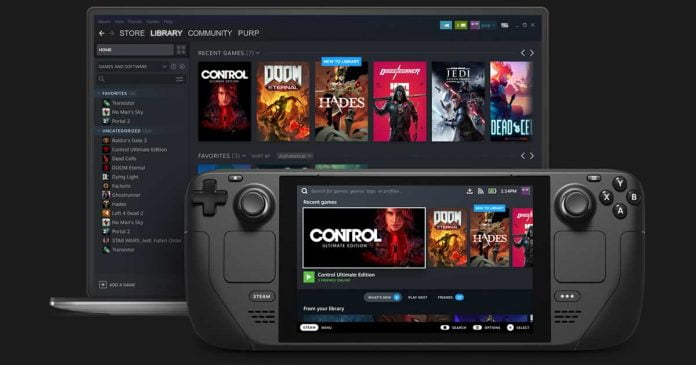
Valve has confirmed that it is working with AMD to make the Steam Deck fully compatible with Windows 11 — good news for those who do not want to limit themselves to SteamOS, the operating system that will be offered by default with the handheld console.

This was announced by a Valve Steam Deck designer, Greg Coomer, in an interview with PC Gamer. Now Steam Deck support the current version of Windows 10, and questions remain as to the true compatibility with Windows 11 and its complex hardware requirements like TPM 2.0.

There’s work looking at TPM just now,” Coomer said, referring to the controversial security chip that is mandatory in Windows 11. He also added that they are in discussion with AMD to make sure the Steam Deck is compatible with the aforementioned BIOS-level component. He added, “there’s nothing to indicate to us yet that there’ll be any issues with Windows 11.”

Valve has to make the Windows 11 compatibility adjustments directly with AMD. This is because the TMP required by the new operating system communicates directly with the processor. The Steam Deck features a custom AMD Zen 2 CPU.

The current support of Windows 10 on Steam Deck opens the door to games that are not compatible with SteamOS 3.0. And, as if this were not enough, the possibility of using Xbox Game Pass or titles from the Epic Games Store.

While the default operating system, Steam OS 3.0, is a Linux-based solution that uses Proton to run games created for Windows. This does present some challenges — compatibility with all titles included in the Steam catalog, including the very popular Apex Legends, Destiny 2, PUBG, Fortnite and Gears 5.

Compatibility issues in Proton revolve around the “anti-cheat” system. This protects players from cheating that can negatively affect the multiplayer experience. To resolve the issue, Valve is working around the clock with BattlEye and Easy Anti-Cheat to get support ready before the Steam Deck launch.

Review Of Fastreel Online Video Editor

Fastreel Online Video Editor

What Is Fastreel?

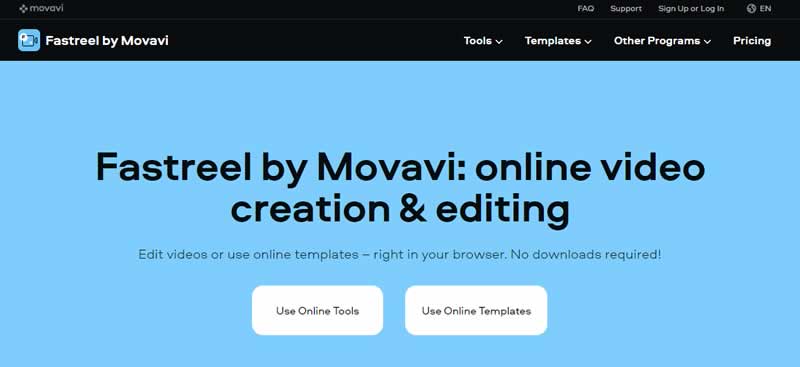
Fastreel is an online video editor that lets you create short clips from scratch, enhance footage, and use templates to speed up the video-making process. This web service is developed by Movavi, a company that stands behind some other cool multimedia tools like Movavi Video Editor and Video Converter.

Fastreel is a great alternative to desktop software, as it works in any browser – Mozilla Firefox, Google Chrome, Opera, Safari – which makes it available for Windows and macOS users.

You don’t have to download and install anything on your computer. Fastreel requires just a stable Internet connection, so you are good to go even without powerful hardware.

Fastreel Online Video Editor 1

Overview of Main Features

Basically, there are two ways to edit video online with Fastreel:

  • use tools
  • use templates

Depending on your goals, you can choose whatever suits you best. Either way, you are left with quick and easy-to-use tools.

Templates

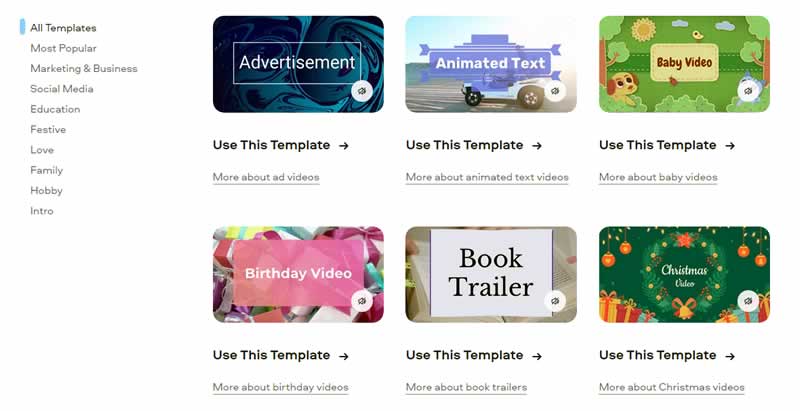
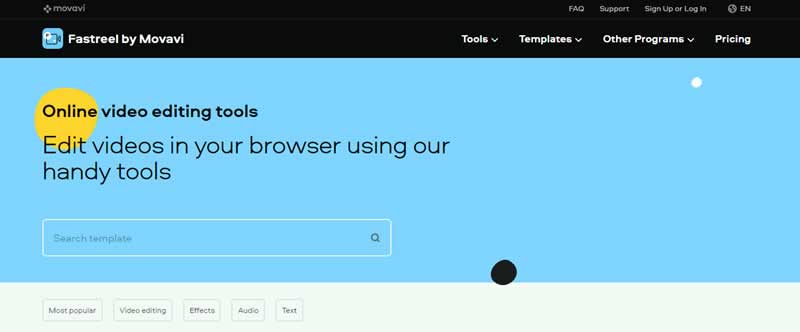
Ready-made templates come in handy when you don’t want to spend much time thinking about the design of your video. There are plenty of options matching every possible video type: an advertisement, a birthday video, an explainer video, a promo, a resume, and lots more. You can use the selected template right away or click under it to learn helpful information about the type of video you’re about to create and tips on making it better.

Fastreel Online Video Editor 2

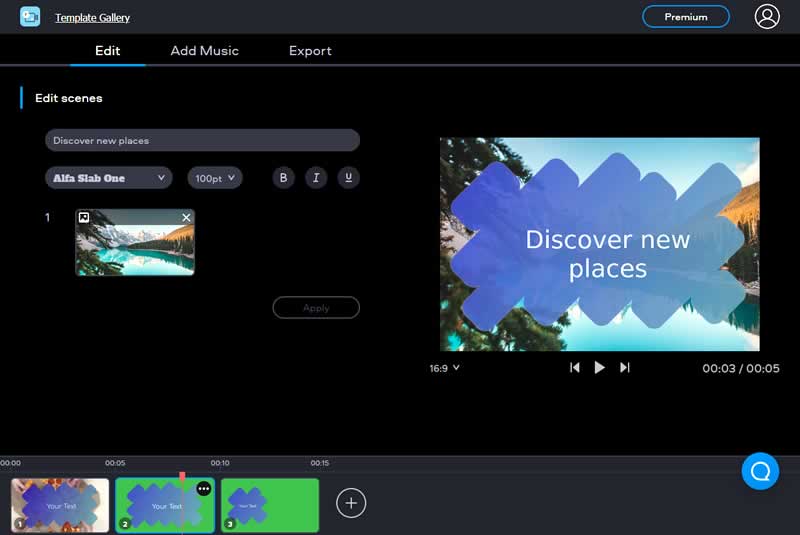
When you click on a template, Fastreel will take you to the editing mode where you can customize the clip:

  • Add more scenes or remove the unnecessary ones
  • Rearrange the scenes’ order
  • Add text and edit its font and size
  • Add one of the royalty-free soundtracks and edit the volume
Fastreel Online Video Editor 3

Toolkit

There are many tools and special effects, from basic trimming and muting to more advanced split-screen and stop-motion features.

Fastreel Online Video Editor 4

Basic Enhancing Tools

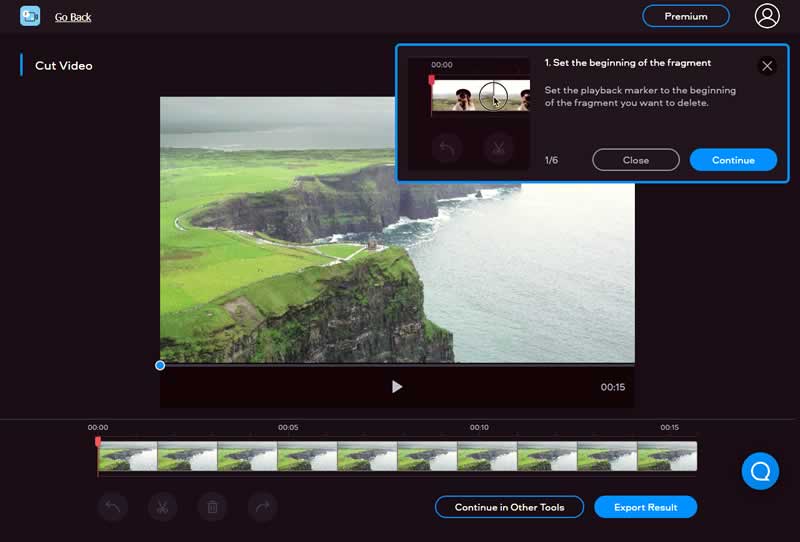
First and foremost, Fastreel enables you to cut video online. This is probably one of the most fundamental options you need in an editor. The timeline has handy markers, so you can select the parts you need and the ones you want to remove. This means you can record everything in one take and then cut out the bad pieces. However, Fastreel has a limit of 500 MB in total, so keep this in mind when you upload the footage.

Fastreel Online Video Editor 5

Other basic tools let you do the following:

  • Merge videos
  • Compress files
  • Add a watermark
  • Crop videos
  • Flip and rotate clips
  • Resize video files
  • Add captions
  • Mute videos
  • Add music
  • Add filters

Mind you, the tools are very easy to use, but each tab also gives you a short guide when you first launch an instrument.

Special Effects & Advanced Tools

You don’t really expect much from an online editor. However, Fastreel has some interesting features that you can sometimes find in professional software:

  • Make a stop-motion video. This tool turns your footage into a cartoon-like video. You need to choose the clip rate (0.2, 0.4, 0.6, 0.8, 1, or 1.5), and the algorithm will extract the frames accordingly.
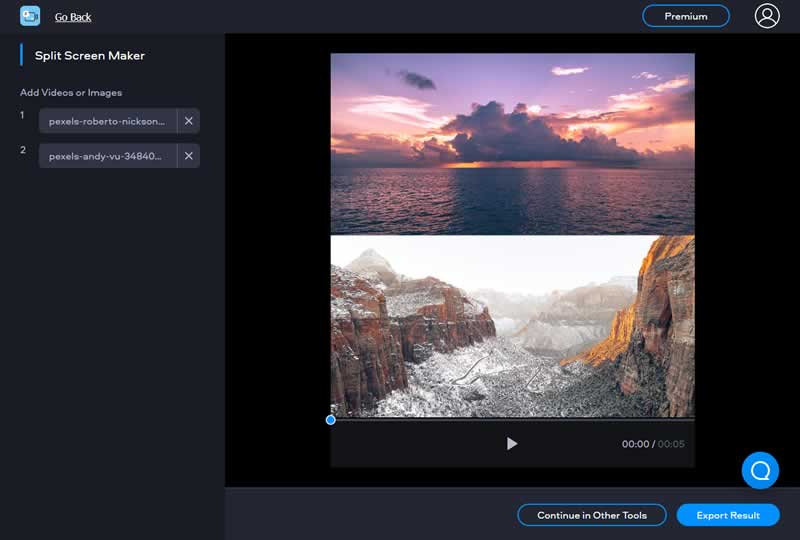
  • Make a split-screen video. With this tool, you can make a collage of up to four videos or images. You need to select a grid of appropriate size (1:1, 16:9, or 9:16), the number of files (2 – 4), upload the footage, and export the result.
Fastreel Online Video Editor 6
  • Change video speed. This feature lets you make the video up to four times faster or slower. You can also keep the sound or mute it.
  • Loop a video and reverse a video. These two options help you create something interesting out of your clip – repeat it several times or make it go backward.
  • Add subtitles. With this function, you can embed SRT files into videos. This feature is a real lifesaver as you don’t have to spend time finding extra tools to do it – you just have it in your editor.

Moviemaking

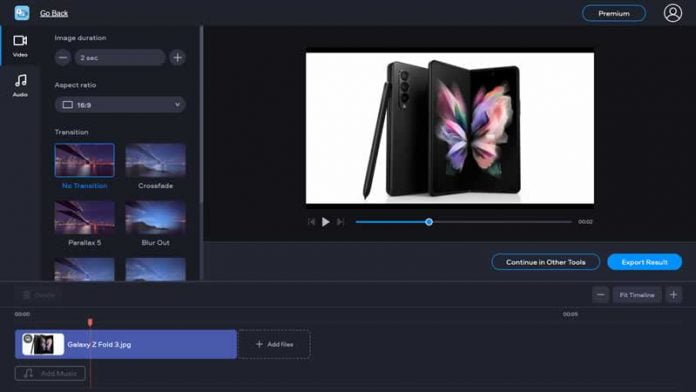
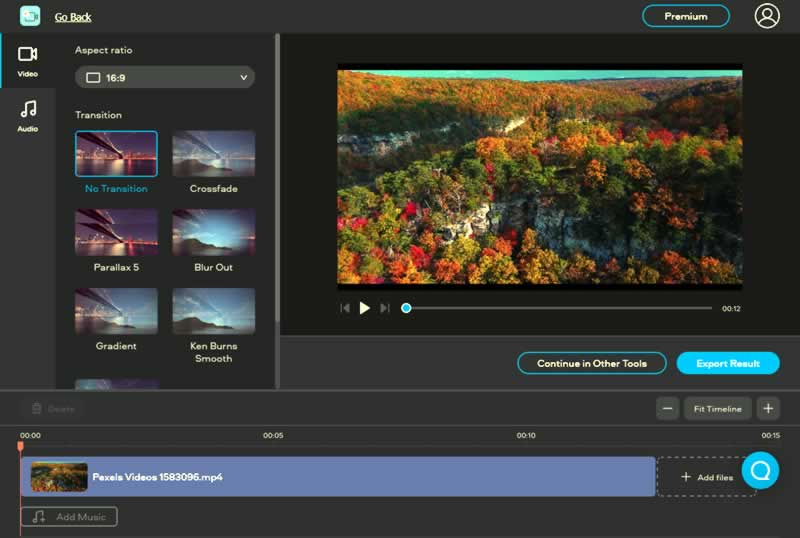
Last but not least, let’s talk about creating movies from the ground up. If you have enough footage, you can create a separate project where you can join clips with transitions and add background music. The moviemaking features are available under the “Make a video” and “Make a slideshow” tabs.

Fastreel Online Video Editor 7

However, I find it lacking some of the essential features in the moviemaking mode. You cannot add text, apply color filters, or trim clips. Of course, you can do it with other tools, but it seems strange that you have to switch tabs just to make some edits. Plus, all the tools are available only with the premium account. But we’ll discuss it later on.

Import and Export Options

Fastreel is quite versatile when it comes to supported formats. It accepts images (JPEG, PNG, and GIF), video files (MP4, MOV, MKV, AVI, and WMV), and audio files in MP3. You can also upload files from the connected Dropbox account. But your imported files shouldn’t exceed the size of 500 MB in total.

As for the export, you can save the results in MP4. Fastreel first saves it to its cloud storage and gives you a link to access it for 24 hours. You can also upload the results to YouTube, but strangely enough, only if you work with templates.

Is Fastreel Worth It?

Although Fastreel is essentially a free video maker, meaning you can access all the tools and save the results, it will overlay a watermark on the output files. The pricing offers two premium plans:

  • The single premium for a one-time export without a watermark – $5.95 per video
  • The unlimited premium for multiple exports and access to all tools at a time – $19.95 per month. Alternatively, you can select an annual subscription for $9.95, which results in $119.40 billed annually.

The single premium may seem a bit overpriced, considering the fact that you will have to pay one more time if you want to use another tool. The unlimited premium plan seems reasonable in price because it gives you access to a lot of tools that desktop software is capable of. You won’t, however, find good desktop tools for that price.

You can check out Fastreel Online Video Editor here.