Home Blog Page 227

Elon Musk Unveiled The Tesla Bot: A Humanoid Robot Aims To Replace Humans In Various Tasks

Tesla Bot

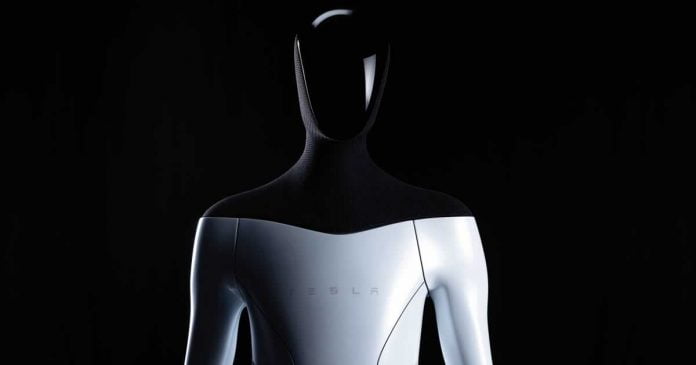
Tesla intends to surprise the world with his first humanoid robot designed to replace humans in risky and tedious tasks in the near future. During the AI Day event, Elon Musk has unveiled the Tesla Bot.

Tesla Bot is a humanoid robot that looks nothing like scary science fiction machines and more like a store mannequin — without the functions that the company promises that it will have, and that would make it direct competition with the Boston Dynamics robots.

Tesla Bot 1

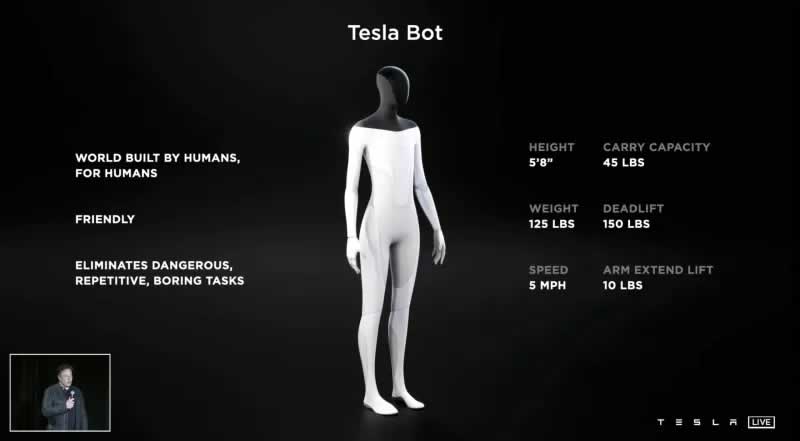
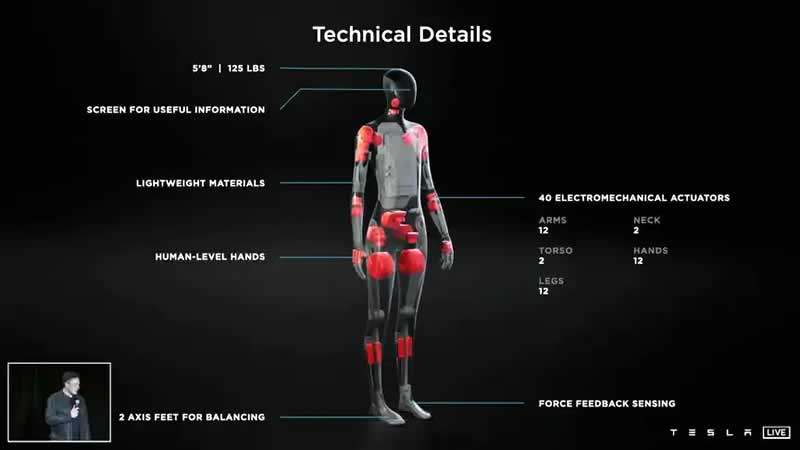
According to the company, the Tesla Bot will aim to replace humans in “risky, repetitive and boring” tasks. The Tesla Bot measures 176 centimeters in height and weight below 60 kilos. With the entire body in white, except for the shoulders and head that are covered in black, the company assures that it can carry 20 kilograms and move at a speed of 8 km/h, thanks to 40 electromagnetic actuators in its joints.

Tesla Bot 2

The humanoid would have a screen on its head and eight cameras and is intended to showcase and test the artificial intelligence skills of Tesla smart cars and its supercomputer Dojo, specializing in autonomous driving simulations to get cars to move without human interaction.

Tesla’s goal, according to Elon Musk, is to have the first prototype of the Tesla Bot ready by 2022. Tesla Bot 1.0 will focus on helping with general tasks, but Musk did not rule out that eventually, the robot could serve as something else.

How Much Does a Virtual Private Server Cost

Virtual Private Server news and stories

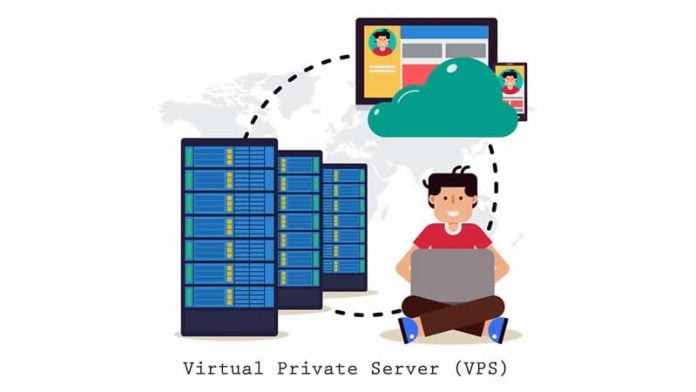
Virtual Private Server or VPS in short, is a crossbreed between the two extremes of web hosting: Shared Hosting and Dedicated Servers. Web developers, e-commerce owners, and other digital organizers can run into all sorts of dilemmas relating to the sort of hosting web service that best fits their requirements.

A very important factor that dictates their decisions is pricing the various options they have to choose from. In this budgeting regard, VPS is, as we’ll discover, a surprisingly affordable package when it comes to buying affordable web hosting facilities that also deliver highly on performance, security, and user control. In this article, we will be analyzing the hybrid nature of the VPS and its effect on the general pricing of the server.

What exactly makes the VPS a unique kind of server

What sets the VPS apart from the Shared Hosting and Dedicated Server plans is that this service creates multiple virtual servers from a larger physical server through virtualization. These virtual servers are private in that they are reserved for the users.

The features that grant the VPS this ability are due, in part, to virtualization technology. This is used by Hosting Providers to create individual virtual servers and compartments from a larger physical server by putting a virtual cloak onto the server’s OS. Each compartment can install its software and OS, but it is also allocated a dedicated amount of RAM and CPU resources. This makes the VPS a sort of virtual dedicated server within a larger physical server.

Cost differences between the VPS and other service plans

The above exposition of how a VPS functions give us an idea of how its pricing may play hybrid nature. Since the VPS puts your website onto a shared physical server, the cost of maintaining that server is shared (as is the case with shared hosting).

So while the VPS is essentially a form of a virtual dedicated server, it achieves this at a much lower cost than a regular dedicated server. This is because the latter owns the entire server and maintains the cost of running it as well. However, at the same time, owing to its uniqueness and the partial ownership of resources by the website owner, the VPS is still more expensive than a regular shared hosting server.

Ideal Costs for a VPS

Depending on its configuration, a VPS could cost somewhere between £20-100 per month. Most VPS hosts only offer servers running Linux-based operating systems. Hence, servers with an environment of Windows compatibility would be a bit difficult to find and consequently more expensive.

Considering this, the pricing options for VPS hosting at Beeks Group can serve as a good standard to measure VPS prices. With Data Centers all over the globe, including the ambitious Equinix SG1 in Singapore, the group has dedicated itself to interconnectedness and integration within the international financial markets. There, you can choose from three different hosting options with different configurations and resources.

For instance, a VPS with 2.5 GB RAM and 1 vCPU costs £27 per month, while a VPS subscription with 6.6 GB RAM and 4v CPU costs around £85 per month. All three subscriptions support both Linux and Windows OS and are therefore highly recommended.

Conclusion

In this article, we discussed the hybrid nature of the VPS and how this leads to it being much cheaper than a Dedicated Server while having much of the powers the latter gives. Examples of what can be regarded as a standard price for different VPS hosting have been provided for readers to examine further. I hope that the article was a useful guide to the general pricing of a VPS service and why this pricing is appropriate for a VPS.

Windows 11 ISO Officially Available For Download For The First Time

First Insider Build Of Windows 11

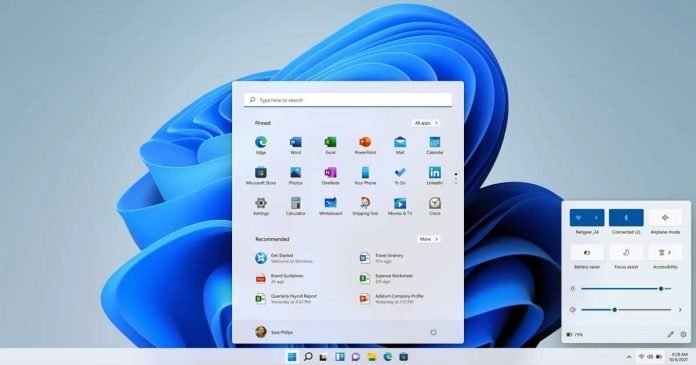
Microsoft has released the new Insider Preview Build 22000.160, and for the first time, an official Windows 11 ISO is also available for download. 

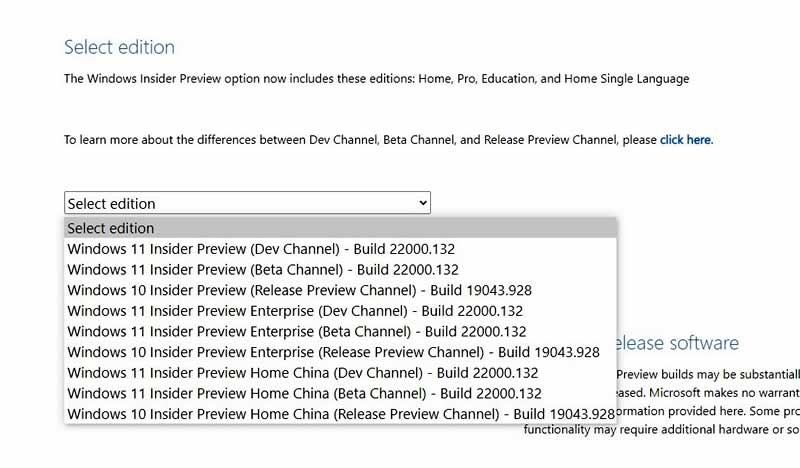
However, the available Windows 11 ISO is not the latest build, 22000.160 but rather the older build, 22000.132, which then needs to be updated accordingly.

Not much has changed since the first two developer releases officially classified as beta, Build 22000.100 and 22000.132. Microsoft only made changes to the “Alarm & Clock” application and the behavior of the operating system in case of updates or reboots.

With the official ISOs available for everyone to download, users can test this Windows 11 experience for themselves and report any issues or bugs.

How to download Windows 11 ISO?

If you want to test the ISO of the new operating system first-hand, you can do it from the Windows Insider Preview download page.

From here, you can get the ISO we are talking about. If you don’t see the option to download Windows 11, it’s because you’re not enrolled in the Insider program, or you haven’t signed in to your account.

download Windows 11 ISO

Microsoft has summarized further information on the release of Windows 11 Insider Preview Build 22000.160 on its Windows Blog.

Tesla Building Its Own Supercomputer With Specially Developed “D1” Processors

Tesla Project Dojo

Tesla is building the world’s most powerful supercomputer, called Dojo — which is supposed to deliver more performance with less consumption and less space. Dojo should achieve over 1 ExaFLOPS.

After Tesla has already designed the hardware for its electric cars with the FSD (Full Self Driving) chip, the D1 processor is the counterpart for the Dojo supercomputer. Tesla combines thousands of these chips, and the first racks are due to be installed soon.

Tesla D1 Processor

For the training of artificial neural networks, Tesla currently relies on three clusters that work with a total of 11,544 Nvidia GPUs. A smaller cluster with 1,752 GPUs, 5 PB NVMe storage and InfiniBand adapters for networking the components is used for automated labeling, while two larger clusters, one with 4,032 GPUs and 8 PB NVMe storage and one with 5,760 GPUs and 12 PB NVMe storage, for the training with a total of 9,792 GPUs are responsible.

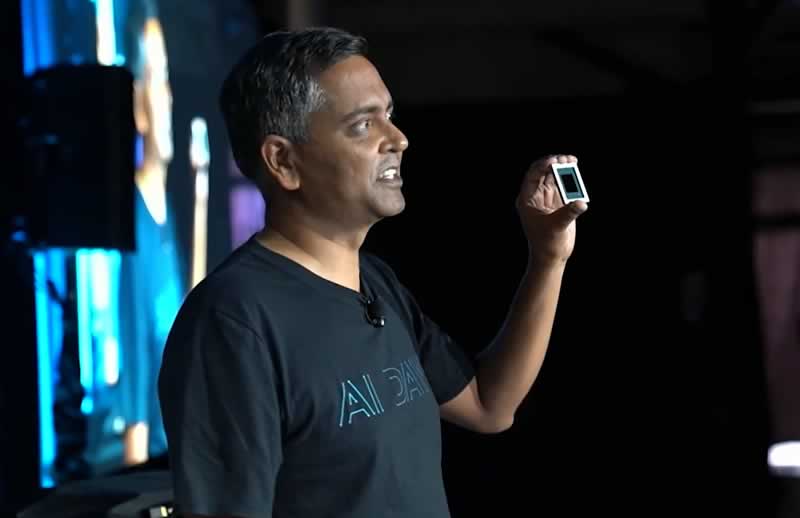
With “Project Dojo”, Tesla wants to build its own supercomputer architecture. Ganesh Venkataramanan is responsible for Project Dojo, who explained the structure of the processor and the supercomputer at Tesla AI Day.

The centerpiece is the specially developed D1 chip with 50 billion transistors from 7 nm production on an area of ​​645 mm². The processor provides a computing power of 362 TFLOPS based on BF16 and CFP8 (Configurable Floating Point 8) and 22.6 TFLOPS for FP32. Tesla specifies the TDP of the chip with 400 watts.

A D1 consists of 354 training nodes, each of which is home to a 64-bit superscalar CPU with four cores, which is specially designed for 8 × 8 matrix multiplication and the formats FP32, BFP16, CFP8, INT32, INT16 and INT8. Training nodes have a modular structure and, according to Tesla, can be linked in all directions via a “low latency switch fabric” with an on-chip bandwidth of 10 TB/s. Tesla spans an I/O ring around the D1 with 576 lanes of 112 Gbit/s each for an off-chip bandwidth of 4 TB/s per side.

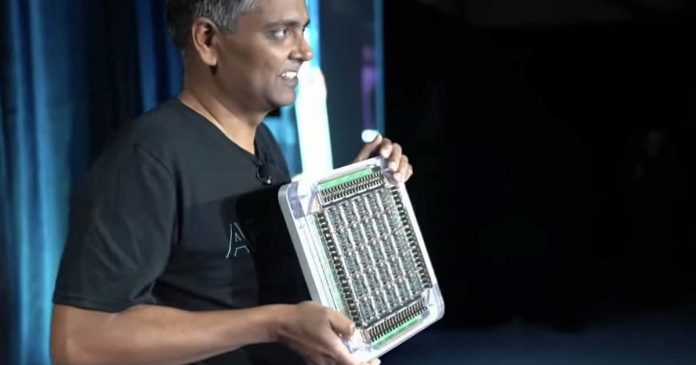
The total of 1,500 D1 chips are not directly linked to one another, but are combined in 5 × 5 units on a so-called training tile. Training Tile is then also the unit of measurement that Tesla uses for the entire Dojo supercomputer. 25 D1 dies are combined in a fan-out wafer process to form a training tile, which in turn has its own I/O ring with 9 TB/s in four directions and thus a bandwidth of 36 TB/s has.

Tesla calls the Training Tile the largest “organic multi-chip module” currently in the industry. For the design, Tesla had to develop completely new tools that did not exist before. A training tile of 25 D1 delivers 9 PetaFLOPS BF16 or CFP8.

The energy is supplied vertically via a self-developed voltage regulator module that is applied directly to the fan-out wafer. In addition to the electronic structure with a 52 volt DC power supply, Tesla also independently developed the entire mechanical structure, including cooling. The latter must be able to dissipate waste heat of at least 25 × 400 watts only for D1, but including the other components, the solution is designed for 15 kilowatts.

The finished module has a volume of less than a cubic foot, explains Tesla, which corresponds to around 28 liters. Last week Tesla put the first functional training Tile into operation at a clock rate of 2 GHz with limited cooling on a bench table for test purposes.

Tesla, in turn, combines the training tiles in trays of 2 × 3 tiles and two of them in a cabinet, so that more than 100 PetaFLOPS are available per server cabinet with a bidirectional bandwidth of 12 TB/s. The end product is the finished Dojo supercomputer “ExaPOD” with 120 training tiles distributed over 10 cabinets and a total of 3,000 D1 chips, which in turn have a total of 1,062,000 nodes. Tesla gives the total computing power with 1.1 ExaFLOPS for BF16/CFP8.

Upon completion it will stand for the world’s fastest AI training supercomputer with four times the performance, 30 percent higher performance per watt and five times smaller footprint — at the same costs as before with Nvidia.

What Can We Expect From High-Tech Homes Of The Future?

Smart home news and stories

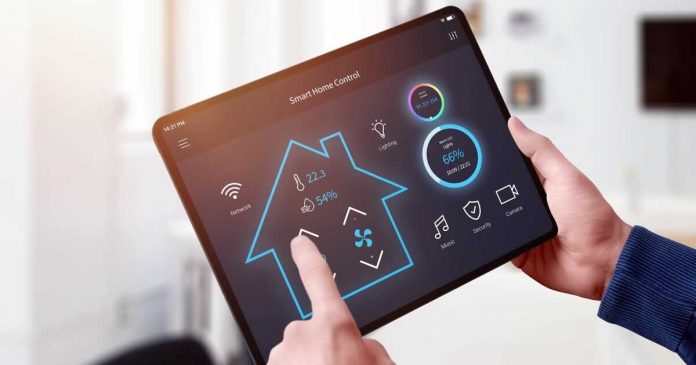
There was a time when we used to imagine high-tech homes with automatic lights and smart motorized outdoor sun shades that function on their own. But today, high-tech smart homes are very much a part of reality. And they are not just convenient, thanks to technology, but also stylish and in a way, cost-efficient too.

Smart homes are all about leveraging technologies. You will be able to control your home lighting, security systems, entertainment systems, heater, and even window shades without budging an inch.Smart appliances integrated with a centralized hub will work in harmony, just the way you want. The benefits of smart homes are many. They offer you added comfort, flexibility, security, and convenience. And these high-tech homes are very functional too. You will be able to control everything using only your Smartphone, even when you are not at home!

Smart home technology is dynamic, and it is evolving exponentially with each passing day. If you want to buy a high-tech home or upgrade your existing one, you must prepare for the upcoming trends. It will help make the addition easier, and you will have a future-proof home. Let us now explore what to expect from the high-tech homes of the future.

Automated Robots and Systems

Automated robots have already been introduced to the commercial market, and they will take up the residential spaces soon. You can get robot vacuum cleaners, which can clean your floor easily on instruction. Automated appliances or heating/cooling systems are popular as well.

Artificial Intelligence (AI)

AI functionality is capable of understanding your needs and making your home appliances work accordingly. Thus, this technology will play a critical part in making your smart homes more convenient for you in the future.

Health Monitoring

Smart homes are becoming more sophisticated with upgrades in technology. Your home will soon be able to monitor your health and activities. It will give you reminders to exercise, eat well, and drink water when needed. Smart homes will be able to monitor your health to make it better.

Smart Delivery Boxes

Letterboxes are an integral part of our homes even to date. But as technology progresses and you upgrade your home to a smart one, your letterboxes will be converted to smart delivery boxes. It will receive and store valuables and parcels when you are not present at the property. They will be equipped with cutting-edge technologies to improve their security and access control.

As technology advances rapidly, many other ways of upgrading smart homes to smarter homes will open up. Hopefully, there will also be ways to ensure sustainability using smart home technologies, for a greener and healthier environment.

Intel Announces Alder Lake: 12th Generation Of Intel Core Processors

Intel Alder Lake

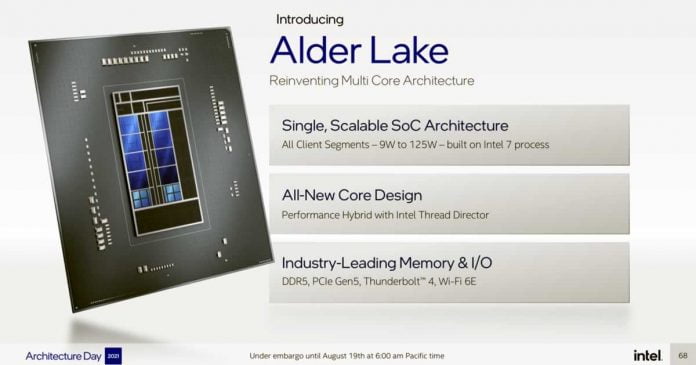
Intel has announced its 12th generation of Intel Core processors called Alder Lake.

Alder Lake will be the first mainstream Intel CPUs to feature a mix of high-performance and low-power cores — which is common across mobile SoCs today.

The new Intel Alder Lake CPU comes with 16 cores, 8 of them for performance and the rest for energy efficiency. It also increases up to 24 threads and supports DDR5 RAM, as well as a 5th generation PCI Express interface that doubles the band speed compared to the fourth generation PCIe. The graphics are equipped with a Gen12.2 (Xe), an iGPU that multiplies the performance of the Gen12 (Xe) by two.

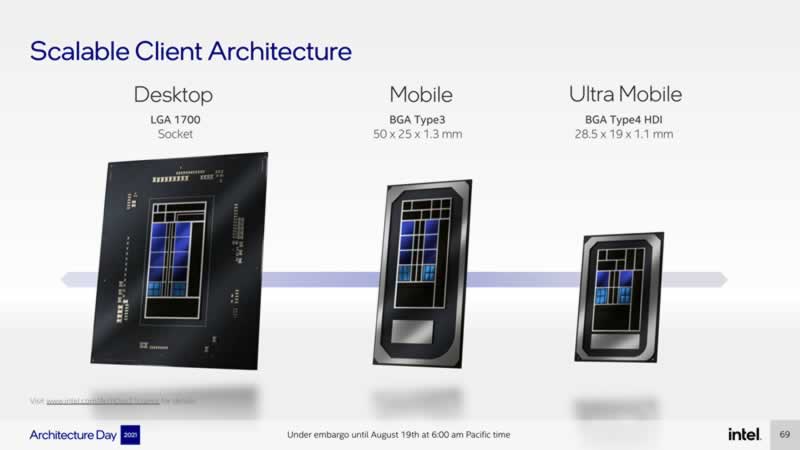
The new 12th generation Intel Core launches the LGA-1700 socket platform and two form factors: BGA Type 3 for Mobile, with dimensions of 50 X 25 x 1.3 mm, and BGA Type4 HDI for Ultra Mobile, with 28.5 x 19 x 1.1 mm. They also add compatibility with Thunderbolt 4 and WiFi 6E.

Intel Alder Lake 1

Alder Lake will be based on Intel 7. Behind this is the manufacturing process 10 nm Enhanced SuperFin, which was renamed a few weeks ago

Sapphire Rapids

In parallel, Intel has announced a new generation of Intel Xeon scalable processors, called Sapphire Rapids. 20 cores and 40 threads are added, plus support for DDR5 RAM and PCI Express 5.0. The new server processors work on Intel 7 architecture and include multiple tiles that allow for higher bandwidth and low latency.

Additionally, the company has launched a new x86 microarchitecture, which improves CPU performance, artificial intelligence and dynamic range. The company has also included the Intel AMXm, improving operations by up to 8 times over the VNNI.

The new Intel processors will begin to arrive from the fall of this year, just in time for the launch of Windows 11.

Forcing Edge: Microsoft Makes It Harder To Change The Default Browser In Windows 11

Forcing Edge in Windows 11
Image Credits: The Verge

Microsoft is known for its extremely aggressive methods of promoting the Edge browser in Windows 10. Now in with the upcoming Windows 11, the company is going to unnecessarily complicate the ability to change the browser and other default applications.

Microsoft is making a lot of positive changes to the user interface of Windows 11, making it easier and more convenient, but in some areas, the new OS is only getting more complex.

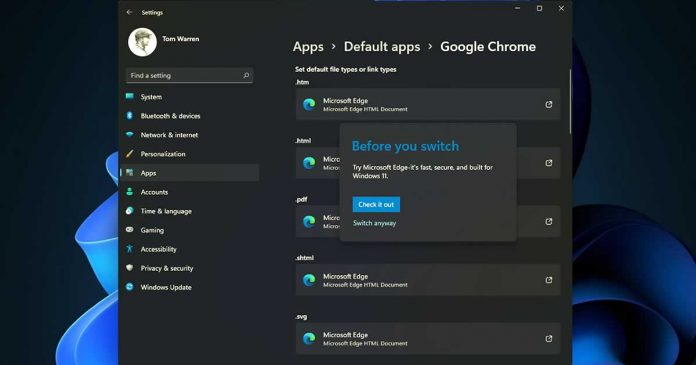
As in Windows 10, when you install a new browser and open a web link for the first time, a prompt will appear on the screen — “Always use this app” — allowing you to select and set a default browser other than Edge. If you forgot to check “Always use this app“, the default settings will never be changed. And you just have to go to Settings> Applications> Default applications and choose there, which we want the default browser to be.

According to The Verge, Microsoft changed the way Windows 11 assigns default apps, which means you now need to set defaults by file or link type. Now, instead of a single switch, you have to set values ​​for different types of files or links separately. In the case of Chrome, the browser will have to be manually selected for HTM, HTML, PDF, SHTML, SVG, WEBP, XHT, XHTML, FTP, HTTP and HTTPS. Any file that you haven’t changed by default will automatically open in any previously installed application. In most cases, this is the Microsoft Edge browser.

This is an unnecessarily lengthy process compared to Windows 10, which allows you to quickly and easily switch email, maps, music, photos, videos, and default web browser apps. 

Developers from Google, Opera, Firefox and Vivaldi are unimpressed with Microsoft’s changes to Windows 11 default apps.

We have been increasingly worried about the trend on Windows,” says Selena Deckelmann, senior vice president of Firefox.

Microsoft has a history of doing this, and it seems they are getting progressively worse,” says a Vivaldi spokesperson in a statement to The Verge.

“It’s very unfortunate when a platform vendor is obscurifying a common use case to improve the standing of their own product,” says Krystian Kolondra, Opera’s head of browsers.

Hiroshi Lockheimer, head of Android, Chrome and Chrome OS, on Twitter criticized the changes and expressed hope that the final version of Windows 11 will have a different mechanism, as it contradicts Microsoft’s claims to be the most open, with ‘the most choice.’

Choosing default apps isn’t the only problem third-party browser developers face in Windows 11. Microsoft ignored the default browser choice when searching in Windows 10, and its new taskbar widget forced users to use Edge regardless of the user’s choice. Windows 11 continues this trend, with search still forcing users to switch to Edge, and there is now a new dedicated widget area that also ignores browser default settings.

It appears that Windows 11 widgets will ignore a user’s default browser choice and open Microsoft Edge for the content instead,” says a Brave spokesperson.

Microsoft justifies these changes by giving Windows users more control over their default applications.

With Windows 11, we are implementing customer feedback to customize and control defaults at a more granular level, eliminating app categories and elevating all apps to the forefront of the defaults experience” says a Microsoft spokesperson to The Verge. “As evidenced by this change, we’re constantly listening and learning, and welcome customer feedback that helps shape Windows. Windows 11 will continue to evolve over time; if we learn from user experience that there are ways to make improvements, we will do so.

The developers of other browsers hope that all these changes will not survive until the final build of the system, which should be released in early 2022.

Obsolete Tech Gadgets That Are Too Hard to Throw Away

Obsolete Tech Gadgets

The impact of modern technologies in our daily lives is immense, and can never be denied. Some of the most basic requirements of our lives these days are only feasible with the use of technical gadgets and innovative software. Any functional upgrade in a technological sector tends to bring newer dynamics, making the previous versions obsolete. However, some of these gadgets prove to be difficult to throw away because of the emotional attachment that might have grown towards the device over time.

Many modern devices carry out tasks that once required separate devices to achieve. The latest computers and mobile phones offer astonishing features that older gadgets used to provide, but in a compact, and limited capacity. It is remarkable how rapidly the best pieces of technology get outdated nowadays. This article takes a walk down memory lane and lists some of the most popular devices that once ruled the tech scenario, but has become completely irrelevant these days.

Typewriters

The introduction of typewriters to the public occurred as early as the 1500s and was revolutionary at that time. This was a major upgrade to the conventional way of writing using a pen and paper. Until the invention of computers, the use of typewriters was the most convenient way to, say, write a book or scribe documents.

Websites like postroadvintage.com provide a wealth of information and images about vintage gadgets that serve as a reference for people failing to relate to some devices mentioned in this article. If you bump into a typewriter these days, make sure you take a photo, as you might not get another chance to see one soon.

Calculators

Calculators are still used in academic and corporate sectors but are swiftly fading away from the scenario. Computers, mobile phones, or even smartwatches have calculators pre-installed these days, making it unnecessary to carry a separate, dedicated calculator along.

While modern calculators contain various functionalities, some older versions are very simple and lack certain features available today. Calculators these days come with the capacity to display graphs, solve algebraic equations, and store numeric data. Those features were unheard of in older version calculators available to the masses.

Landline Telephones

There was once a time when phone calls required significant effort due to the nature of landline telephones. These are wired gadgets that are quite large relative to modern-day mobile phones. One of the main reasons for landline telephones to become obsolete is their lack of portability. A connective wire is needed to operate these gadgets, which totally beats the purpose of modern-day phone usage.

Since its origination in the early 1800s, landline telephones have transitioned through many modifications in design and utility. Children these days do not even recognize the old rotary telephones that were once widely used around the world. The act of spinning a circular dial to input phone numbers was an iconic scene to witness, despite the inconvenience associated with it. Modern smartphones have streamlined the entire process of placing a phone call. By the time you make the call, talk to the person on the other side, and hang up, a rotary phone might still be taking inputs from you.

Pagers

Pagers and beepers were once the go-to devices for making emergency, one-way communications during the late 1900s and early 2000s. Many variations of these gadgets were available, serving different purposes that were once unimaginable. For the first time ever, people were able to send short texts and reminders to others. Making a phone call is too elaborate a task when all you need is to convey a short message.

The introduction of smartphones instantly made the use of pagers obsolete, as a mobile gadget can efficiently do more than the simple task of sending messages. Despite the sheer drop in their global demand, pagers and beepers sustained their popularity for quite some time due to the deep impact they already had in the lives of people.

Floppy Disks

Modern data storage devices like pen drives, hard-disk drives, or solid-state drives have severely depleted our memory of once using floppy disk drives as our primary gadget for storing data. Introduced in the 1970s, these flat, compact disks could store a little less than 1500 kilobytes of data. While this figure does seem negligible compared to newer technologies, it certainly was more than enough during its glory days.

The major problem associated with floppy disks was their susceptibility to magnetic fields and heat. They were not very durable and used to get corrupted easily even with minimal issues. With the exponential rise in file sizes over the years, due to advancements in the software industry, floppy disks were eventually replaced with larger data storing devices. Most modern computer systems do not even include any floppy disk feature.

CDs and DVDs

CDs and DVDs revolutionized the digital video playback industry because of their compactness, “abundant” storage space, and overall ease of use. Hundreds of millions were spent in this sector during their days of eminence, as they provided the perfect opportunity to manipulate, share, and store videos, audios, and other files of various formats.

These disks were extremely durable and portable, leading to even higher demand amongst the common people. Problems like the presence of a nearby magnetic field did not affect their functionality, which proved to be a big advantage over floppy disks. From massive games to stacks of corporate documents, CDs and DVDs could store them all during that era.

Feature Phones

Children nowadays find it hard to believe that mobile phones did not always feature a touchscreen display. Bulky, buttoned phones were the standard in past days. The most impressive games that could be played in those phones were Tetris or Snake. Sending a text message required way more effort on a buttoned interface than on the sleek displays we use nowadays.

Although feature phones are still in use, it is a rare scene to witness. Chances are, a person pulling a feature phone out of the pocket, also owns at least one smartphone. The immense amount of functionalities in a smartphone completely beat a feature phone any day and is slowly but surely pushing them out of the picture.

Conclusion

Nowadays, younger generations have limited or no idea of some of those gadgets mentioned in this article, as those have already become obsolete. While newer technologies exist to solve the problems laid bare by older ones, it is certainly intriguing to learn about the predecessors of some of the most implemented devices and gadgets of today.