Home Blog Page 226

EA Opens Free Access To Five Of Its Accessibility Patents To All Developers

Electronic Arts news and stories

Electronic Arts is opening patents for a number of its technologies to make games more accessible to users with disabilities. EA has announced that starting today, it is offering its accessibility patents to anyone who wants to use them.

The company boasts some of the most powerful accessibility options in the video game industry. The same ones used by some of the most successful games on the market, such as Battlefield, FIFA, The Sims or Apex Legends. In addition, EA also makes free access to accessibility technology available to any developer.

The patented systems are designed to help players with a variety of speech, hearing, vision and cognitive impairments. EA also notes that it will not sue developers for using these particular patents.

List Of EA Accessibility Patents With Free Access:

The ‘Ping System’ — used in Apex Legends. It helps people with hearing, cognitive and speech disabilities who have difficulty communicating. It addresses this problem by allowing players to communicate contextual visual and audio commands and announcements through simple, assignable controller inputs — instead of a headset and microphone.

Three of the five patents that the initiative will affect relate to technologies that make video games more accessible to players with visual impairments. These technologies are already widely used in popular EA games, including the Madden NFL and FIFA franchises. The proprietary toolkit automatically detects and modifies colors, brightness and contrast in-game to improve the visibility of objects of similar brightness. This allows players to better perceive and interact with the content.

EA has also posted the source code on GitHub for its color blind accessibility tools. With the published code, any developer can use Electronic Arts technology without paying royalties or stopping to develop their own accessibility technology.

The fifth patent concerns audio customization technology designed to help gamers with hearing impairments. This technology modifies or recreates music that is tailored to the hearing characteristics and preferences of this category of users — taking into account all the restrictions they may face. Now it is not yet used in any of the company’s games.

List of all patents can be seen on the official EA Patent Commitment page to improve accessibility. Electronic Arts also encouraged all developers with the necessary resources to make the most of the patents listed above.

EA says it plans to add patents for future accessibility-related tech, as well as open more of its technologies.

Top Tools For Creating Marketing Presentations Of 2021

Creating Marketing Presentations

Marketing presentation is one of the most powerful tools you can use when you need to introduce new ideas. There is no better way to show to your colleagues that you came up with a brilliant concept on how to increase sales and speed up your company’s growth than to present it on a big screen.

However, most of us use the default software we already have on our laptops to create presentations. Though these tools can be really awesome, they probably don’t have all the features and add-ons you don’t even know you need.

So today, let us show you the tools that can step up your game and help create presentations that will bring every person on your side. Without further ado, let’s get started!

Canva

Canva is one of the most popular online platforms for marketing presentations filled with various free presentation templates for your business purposes. The platform also offers templates for newsletters, business cards, brochures, and even infographics.

Basically, Canva is an all-in-one online website, and you can make absolutely any kind of business presentation using the platform. The website has thousands of designer layouts for you to choose from, but if you have something else in mind, you can upload your own images or pick something from Canva’s big library of stock photos.

Canva has three basic plans: free, which is more than enough to create basic marketing presentations, and two paid ones: from $9,99 and up if you need more tools for your presentations.

PowerPoint

PowerPoint, like Xerox or Pampers, became almost a synonym to a standard software for marketing presentation. It was created back in 1987, and to this day, PowerPoint strongly holds its market leader position. The program is regularly updated, so it follows modern trends in presentations and has a wide range of tools to help you create exactly what you need.

It is more restrictive than other online and offline programs, but PowerPoint is very intuitive and if you need a simple presentation to present your marketing strategy to people, it may be the option for you. As an addition, PowerPoint can be used both on PC and Mac computers and even on Android and iOS smartphones.

The program is included in the Microsoft Office suite, and it starts from $69,99 a year for one user.

Keynote

This presentation tool for Mac users is included in almost all Apple gadgets nowadays. The program is free, which is a big advantage for small companies or marketers who rarely create presentations.

Despite being free, Keynote showed to be a very good software with a nice design, easy drag-and-drop functionality, an intuitive interface, and many other features that help users customize their presentations.

Keynote is undoubtedly one of the top tools for marketers who use Apple devices, and if you value simplicity and easy experience, you will love Keynote.

Creating Marketing Presentations 1

Screencapture

This tool is not for creating presentations itself, but it is one of those extra things you need in our day and age. When in 2020, the world was forced to leave its workplace, video marketing presentations became a new norm.

Nowadays, we can show our presentations and share them with others on our laptops while still being at home. So, it is only logical to use a Screencapture video camera online to record while you present your ideas. This way you will have the presentation forever and can send a copy to your colleagues that missed it. 

Screencapture is that free online recorder that is easy to use, and you can even edit your videos on the website. Did we mention it is free?

Presentation Assistant

Another awesome helper with your presentations is Presentation Assistant. Like it’s said on their website, this program is “a cute assistant in presentations.” It has many tools for zooming, highlighting, capturing, spotlighting, and annotating on your screen.

You can easily point to the part of your presentation you particularly want to emphasize, thus expanding the definition of a simple presentation this way. If you want to purchase this assistant, it will cost you only $29,95.

Zoho Show

Another online tool that helps you create content for marketing purposes and make it unique and brilliant. Zoho Show provides professional templates that were created with marketers and business owners in mind. It has different variations for Apple, Android gadgets, Chrome extension and can be integrated into Slack, Jira, or Confluence.

With Zoho Show creating a professional marketing presentation will take you almost no time, and the result will be outstanding. Its website also has a blog, user guide, and numerous videos with tips for marketers on how to create a truly unforgettable presentation.

Its numerous features will allow you to add animation, charts, and different fun things into your presentation to make them look not only professional but convincing. It is one of the best and most flexible presentation-making tools we have on the market today, and it is truly an advanced instrument for serious companies.

Conclusion

With the list of tools we presented you today, you will be able to make any kind of marketing presentation. From “Best social media platforms to use for marketing in 2021” to “What creativity means in marketing today,”: you will find a template that will perfectly highlight everything you want to say to your audience. It will be easy, quick, and no frustration at all!

So if you want to create the best presentation without a need to delete files after files (you know, not the best quality presentations) you’ve created, check the tools we reviewed today and start making outstanding presentations today. 

Xiaomi Will Leave The ‘Mi’ Brand For Its Products

Xiaomi brand news and stories

Future Xiaomi products will not arrive under the ‘Mi’ brand, as confirmed by the company. Thus, the firm’s phones will bear the name of the model in their names without the company’s ‘Mi’.

According to XDA Developers, Xiaomi has confirmed that the nickname ‘Mi’ that until now was used in practically all the company’s devices will no longer be present. It is something that we already saw and that we did not realize a few weeks ago, when Xiaomi presented its latest smartphone, the Xiaomi MIX 4 that did not carry the ‘Mi’ brand.

The main reason for this decision is due to Xiaomi’s huge expansion in recent months. The company wants consumers to associate its products and smartphones with the ‘Xiaomi’ brand and not with ‘Mi’. Therefore, future mobiles, smart products or accessories will simply be called ‘Xiaomi’ and the corresponding model number.

Xiaomi has provided the following statement through their Spokesperson:

Starting in 2021 Q3, Xiaomi’s product series “Mi” will be renamed to “Xiaomi”. This change will unify our global brand presence and close the perception gap between the brand and its products. This change may take some time to take effect in all regions.

With the introduction of the new brand identity, two distinct product series will sit beneath the parent brand. Xiaomi products represent the pinnacle of technology and offer a premium experience. Redmi products bring big innovation at a more accessible price point and are aimed at younger audience. This differentiation is also reflected in our updated logos, with both the Xiaomi and Redmi logotypes under the parent brand logo.

The product series naming convention — Xiaomi and Redmi — will also be applied to our ecosystem and IoT products over time.

Android Will Allow You To Control Your Phone Using Facial Gestures

Camera Switch Android accessibility feature

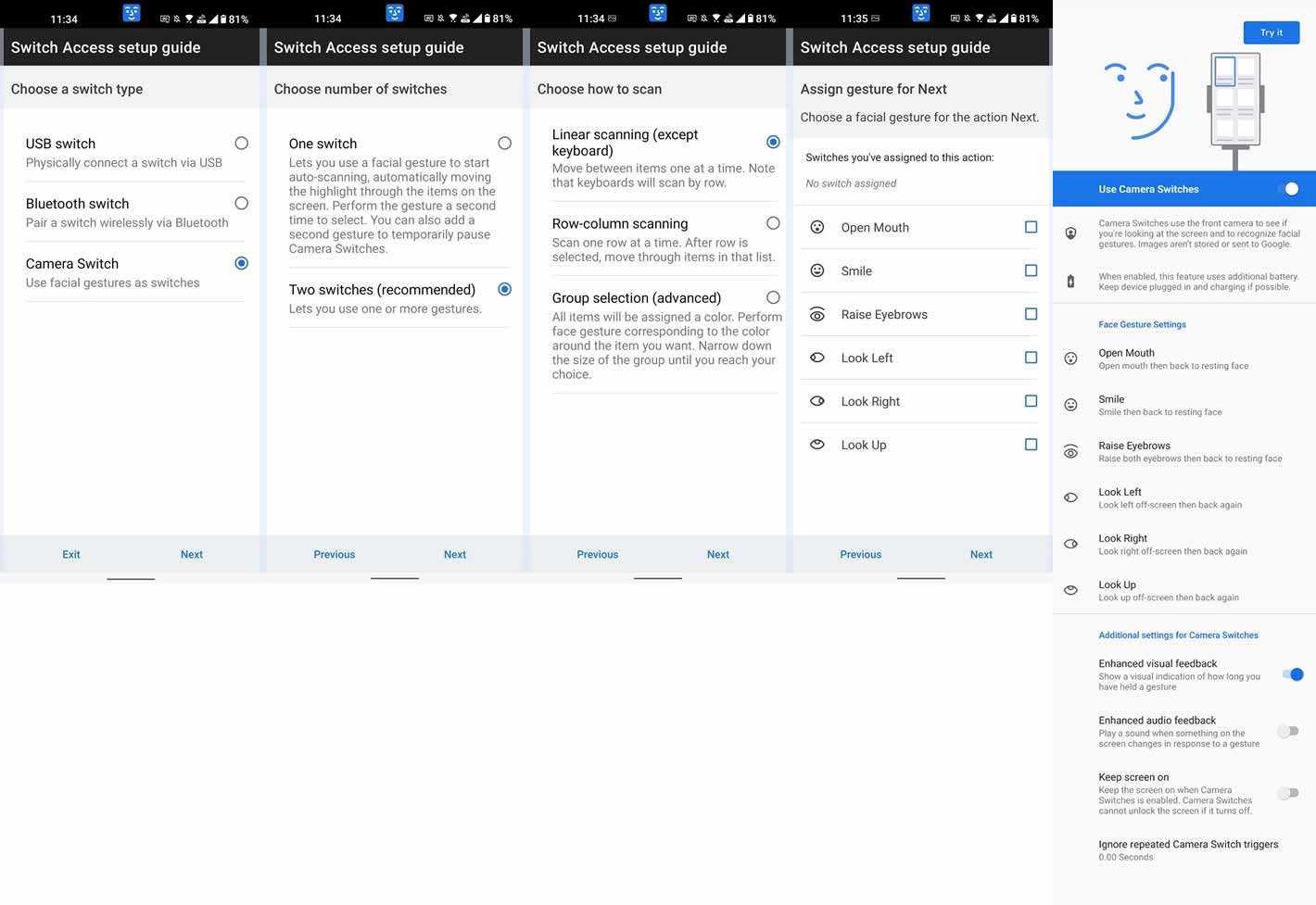
Google is developing a new accessibility feature for Android that will allow you to control your phone using a smile or raised eyebrows.

The new feature is called Camera Switch, introduced in the 12th version of the Android Accessibility Suite, which was released with the fourth beta of Android 12. The new version of the application is not yet available on Google Play, but there is an APK file that can be downloaded to test the new service, as XDA Developers explains. However, it is unknown if the Google Android team plans to officially release this tool for previous versions of Android.

Android Camera Switch

The new feature allows users to use facial expressions to access a range of controls. There are six gestures in the application — open mouth, smile, raised eyebrows, look to the left, look to the right, look up. For each of them, you can assign a specific action — for example, open an application, go to settings, scroll and others. 

Also, users will be able to adjust the “sensitivity” of the service when recognizing facial expressions, which should exclude the possibility of accidental activation.

As XDA Developers writes, the new accessibility feature could negatively affect power consumption. Ideally, phones should be connected to the network while it is in use.

The arrival of the new feature alongside the latest Android 12 beta suggests it will be officially launched as part of the operating system update later this year. 

Future iPads Will Go From Being Made Of Aluminium To Titanium Alloy

iPad Pro M1

According to sources cited by DigiTimes, Apple is considering creating future iPads with a titanium alloy body that will replace the aluminium-based metal used in current models. In addition, they will use a new PVD (Physical Vapor Deposition) solution to increase the scratch resistance of the device.

Although stainless steel and aluminium are resistant materials, they have the problem that daily use can affect their final appearance. Titanium solves this problem, providing robustness, especially in the face of day-to-day inclement weather. In addition, its glossy finish can make it more attractive to the end-user.

The statement follows a similar report last month that high-end models in Apple’s 2022 iPhone lineup will ditch the existing aluminium and stainless steel body design in favor of titanium due to the latter’s greater strength and durability.

Unfortunately, we do not know how this would affect the price of the iPad, as it could increase production costs and therefore make these tablets more expensive.

How to increase the accessibility of Your Social Media Content

Fans Into Social Media Followers

Social media content accessibility: make it less stressful for others

It’s time to make your content more accessible online. Social media has become a crucial part of our lives. Businesses start to join the movement and create social media accounts to make their services more visible on the web. If you have a business page and share the content with the followers, you should consider the audience of your page. It is important to ensure the accessibility of the posts and informative communication. 

Content accessibility: how do you treat the term? 

If we take a less global perspective, we should refer to the number of followers that can see your business page online. But when it comes to content accessibility, it refers to the problem of disabled people who can’t easily reach the information on the page. Different disabilities make it impossible to enjoy the content on the web easily. These people are potentially disabled. They can experience hearing loss, some issues with their blindness. It also refers to people with dyslexia. 

There are so many such cases. People around the world suffer from different types of disabilities that can make them feel abandoned on the web. If you want to make your content accessible to everyone, you should take care of the accessibility of the content. Some businesses develop new strategies for their online content, and others use transcription services for qualitative research to help catch difficult words. Considering the number of people with disabilities, the decision towards content accessibility should be made. 

How to make content online more accessible?

Why should businesses join the movement and work on accessibility? First off, it is morally correct to take care of those followers who experience difficulties with consuming the content. And the second reason is the flow of new customers. When you make your content understandable for a bigger number of people, you can get more clients. The reasons to join the initiative are clear. Now let’s see what steps you can take to make accessibility a reality. 

Alternative text is a nice idea

Do you know what the alternative text is? These are the human-generated transcripts that offer a short description of the photo. When you post a photo, you should add a small text and describe in short what is on the picture. You can use this feature when listing on Facebook. When editing the picture, you will find the necessary button and add the text automatically. Instagram also offers Advanced Settings, where you can work on the alternative text. 

Work on the closed captions

To make it helpful, it is important to use the highest quality services. This step is a perfect idea for those with hearing loss. If a person is deaf, English subtitles won’t be very helpful. But closed captions can change the situation and make the understanding better. There’s a difference between these two notions. Subtitles follow the speech and are focused on the words only. But closed captions are more versatile in sounds. Closed captions catch a wide range of sounds, such as a doorbell ringing, birds singing, and other background noises. 

Who else may need help from the closed captions? Users without a fluent knowledge of the language would much appreciate the effort. By following the captions, it is easier to learn the language and follow the natural flow of information. In some cases, you don’t even need to work on the closed captions. They are fully available on certain platforms. If you post videos on Facebook or YouTube, you should only click on the button to add the captions. When a company offers the content transcribed to disabled users, it makes it more accessible to everyone. 

Don’t use custom fonts that often

People with disabilities use specific assisting technologies to be able to read the content online. When the tool experiences a specific customized font, you can’t get the proper transcription of the sentence. It is difficult for disabled people to catch the information when it’s written in bold, italics, or with the help of other unusual fonts. 

Work on the hashtags

A lot of people are using screen readers to help them get information online. And when a screen reader comes across the hashtags, it will most likely perceive the content as several letters rather than full words. But you can change it easily. If you capitalize the words, your hashtags will be more accessible to disabled users. It is also a nice choice for people with dyslexia. 

Emojis aren’t the best option

When posting some content, you may want to add a specific emoji to show your mood and make the text more entertaining. But the thing is that emojis can be quite distracting for people with disabilities. The screen readers will try to explain what the emoji looks like in the middle of the regular sentence. And it is difficult to catch the sense of the sentence. How can you improve it? If you need an emoji, try to insert it at the end of the sentence. If you put it in between the words, it will make things sound even worse. 

Make use of the contrast 

The contrast in colors is a must. There are so many people with color blindness. They can’t differentiate most of the shades. And when you post a picture in the same color scheme, disabled people can’t get the sense of the picture. If you set high contrasts between the background and actual picture or text, it is easier to look at the screen and get the idea of it. 

Final Thoughts

Posting content online is a responsible task. When you manage a business account, you can’t close your eyes to real problems. There are people with disabilities who may follow your page. And your task is to try to eliminate the difficulties with reading the content. These steps aren’t complicated. They take some time. But at the same time, they do a great job and help people who experience different issues with their health conditions. 

What apps can help you create your interior design?

interior design apps

Nowadays, technology can be quite useful on a daily basis, especially when talking about visualizing the new interior of one’s house or flat before it is already finished (or even started). What human invention can help with that? The numerous apps for smartphones and tablets, which can help you with almost any side of an interior design project. 

Applications for decoration, redevelopment, measurement and modeling or decoration ideas: discover the apps that can change your life and keep you from making some awful mistakes.

MagicPlan: a measurement and modeling app

The first app we’d like to bring to your knowledge is MagicPlan. Whether you are looking to sell or buy real estate, remodel or even renovate, whatever you want to do and whatever your situation may be, this app will make your life easier.

With MagicPlan, all you have to do is take photos of your rooms, then, optionally, annotate the photos (to indicate doors, windows, cupboards, etc.). Once done, the application measures the room itself and draws the plan to scale, including your annotations! It’s almost like magic, being widely used to make plans, hence the name, no doubt. And how can one start thinking about interior design without a plan of the empty canvas

Autodesk Homestyler: a home decor app

With Autodesk Homestyler, you have to take a picture of your room and validate the measurements (which you would have previously obtained thanks to MagicPlan, of course). Then, you can start playing the role of the little interior decorator.

Connected to the catalogs of various online vendors, the app will let you choose paints, wallpapers, flooring and furniture to use in decorating the room, from scratch. That’s why we believe this is the ideal app for a major renovation.

Home Design 3D: a redevelopment app

Less practical and more complex to implement, Home Design 3D is much more complex if you want to carry out redevelopment tests BEFORE starting the construction or renovation work. With this application, you’d need no photos: you will enter dimensions to draw your plan in 2D then in 3D, before fitting it out.

You will then be able to navigate in your 3D plan and see what your different ideas look like. Thanks to this, you will be able to choose the plans you prefer, depending on the layout you’d want.

Houzz: a decorating ideas app

Houzz gives one access to a gigantic database of decorating ideas – millions of photos of dressing rooms, bedrooms, living rooms, etc. classified by room type, style and so on.

In short, with Houzz, you have an almost unlimited source of inspiration to make your choices and start your interior design plan!

Now, let’s talk less about the technical side of the project and more about inspo.

using phone

Pinterest – the ultimate app for inspiration

Without a doubt, this is the #1 application for all decoration enthusiasts! When one starts, they can never stop. 

Pinterest is a social network that works by sharing and “pinning” content between users. There, people share their decorative images, pieces of advice, reports on various topics, through inspiration boards. It’s up to you to pin the visuals that speak to you in your boards and reproduce all the noted advice at home!

Instagram – the app that knows all the actual decoration trends

A staple for years, the Instagram social network is the perfect application for getting inspired and even meeting decoration enthusiasts. Subscribe to inspiring accounts and actively follow the posts of your favorite architects, online second-hand dealers and other decoration brands. 

But beware! With Instagram, it is sometimes difficult to let go of the smartphone, because it is there that you’ll get struck by all the information on new decor and designer inspiration!

Kozikaza – an application for making house plans and 3D simulations

With Kozikaza, you can draw your house plan at the right dimensions like a real interior designer, add partitions, doors, windows, change the floor and even put furniture from your favorite decoration brands (like nfoutlet.com)! The 3D view also allows you to walk around your house plan! If you do not know of Kozikaza, you will love it for your future decoration projects!

Pantone Studio – an app to find the perfect colors for your interior

This is the best app for color lovers! Needless to say, Pantone is the world reference in terms of colors, with its worldwide color chart of more than 3000 shades! With the Pantone studio app, you can, for example, capture a color from nature and edit it. 

The application also offers a harmonious palette to go with a shade of your choice – quite useful when you want to add color into your decoration and learn how to match the shades.

IKEA Place- an augmented reality app to visualize furniture at home

This application from IKEA allows one to visualize the furniture of the Swedish giant directly in their living room, with the help of augmented reality. 

It is hyper practical to genuinely realize the volumes of an item, but also to render a particular piece of furniture of the brand in its future decoration. For the moment, only certain products are visible in augmented reality, but this very practical service is 100% valid!

BONUS: THE TOOLS INTEGRATED IN YOUR SMARTPHONE

These basic tools are often lost in a folder called “unnecessary things” on your phone, but can be used during renovations! For example, all iPhones have a level.

In addition, all modern smartphones are equipped with a flashlight, which is extremely convenient when working in dark corners.

IN CONCLUSION

Of course, you can also call on an architect or interior designer to redefine your decor or interior design. Experienced professionals and up to date with trends, they know how to listen to their customers to create original interiors that resemble them. 

Still, remember that these apps are just a few of the hundreds of interfaces that can help you save some money. Whether it is for project planning, for design inspiration or to have a tool kit on hand, your smartphone or tablet can be a very useful tool in renovations!

Do not hesitate to share these apps with your friends and find out what they use for different designer, maintenance or renovation jobs.

And if you’re all into IT and app lifehacks, find out more about a cool photoshop trick just here https://techlog360.com/create-a-water-drop-text-effect-using-photoshop/ !

Is Your Data Ready for Machine Learning?

Artificial Intelligence in Neuro Sciences

Artificial intelligence and machine learning technologies have recently become popular in the corporate sector, but most companies don’t figure out how to use their data correctly and how they can benefit from it.

Today, most of the companies’ data remains scattered, raw, or otherwise not ready to use in machine learning models, so business cannot benefit from AI. In this case, there can be no operational optimization, products personalization, and future needs forecasting.

So, before you decide to implement a machine learning platform in your business, make sure your data is ready for this.

How Much Data Is Enough for Machine Learning?

You should start machine learning development planning in your company by answering the following questions:

  • What do we want to know?
  • What do we want to forecast?
  • How will it affect the company profit?

It helps you to figure out what data the company will need, to what extent, and where you can find it. But the amount and types of data your business will need also depends on the machine learning model you are going to use — supervised or unsupervised.

A supervised machine learning model is applied most often and forces the model to search for specific results. This type of training requires a reasonable amount of tagged data, but it also enables powerful predictive models to be created.

An unsupervised machine learning model includes raw data evaluation to identify patterns and anomalies. For example, you can identify potential cyberattacks analyzing security logs. The amount of data that is needed depends on the future model functionality.

Your data should reflect the actual situation in the real world, otherwise your model would have low predictive validity. Therefore, you will need three different pools of data:

  1. For model training.
  2. For accuracy test.
  3. For testing the whole system before its start.

You Need Pure Data Values for Machine Learning

Data cleansing for machine learning, its origination, and labeling are mundane tasks that include de-duplication, data consistency checking, etc. It takes a long time to collect data and convert it into the necessary format, but if you do it incorrectly, the data cannot be used.

Raw data marking may be required in a variety of situations. For example, when you have a lot of reviews, and it is necessary to determine and tag the sentiment of statements, for example, sarcasm or other stuff incomprehensible for the model. Or when you have many unstructured random images and need to tag them to help the machine learning model understand what it is looking at.

In some cases, you can use a mix of raw and structured data to recognize such stuff as comments and entries from a CRM database.

Machine Learning Implementation: How to Start

Today, there is a growing number of projects that provide model building services based on customer data — machine learning as a service. This service is provided by some world corporations, but the work with them is still too expensive, and the functionality is limited by a certain platform commonality.

In this case, a suitable solution is a cooperation with a provider who will develop a model based on external or your own data meeting all company requirements.

It helps a business gain a competitive advantage, for example, with identifying disloyal customers and offering them some additional bonuses or better terms. With machine learning, you can forecast delivery of goods to stores based on their annual attendance or the current and future needs of the population based on reviews and comments from social networks. Machine learning also helps automate processes and makes them more efficient.