Home Blog Page 225

How to Build an OTT Platform: Cost and Features

OTT platforms

Major discoveries and innovations have become the norm in today’s world. OTT services are no different. Apple, Amazon, Netflix, Facebook, YouTube, Hulu, HBO GO, Sling, and other major digital industry giants support the OTT industry. Over-the-top services are used by about 51% of households in the US. 

With the huge market size of video application services, the business interest is growing rapidly. To build an OTT platform, it is vital to keep in mind all the features it should have. Read on to learn the details and make better decisions regarding your OTT application development project.

Choosing a Niche

There are many streaming platforms available in the OTT market, including Netflix and Hulu. By choosing a content niche, you can narrow the audience base for your content. A sports app for kids or kids’ apps for adults could be built. It is possible to develop an OTT app that can satisfy everyone’s needs.

Features to Prioritize

Search bar

If you decide to launch a video streaming app, you should provide people with a variety of genre options in the search bar so they can watch a stream on your channel. There should be an easy way for viewers of all ages to locate the search bar.

User profile

Every user desires personalized accounts. The user profile feature can be introduced to accomplish this. Their personal video streaming experience will be enhanced if they save their account details on the platform.

Content should be multilingual

It is important for your video streaming app to attract a large audience. By considering which languages are most familiar to the public, the demographics can be increased. Netflix’s OTT success couldn’t be achieved by solely focusing on one language. Cell phones are the most popular means of streaming videos. To earn good business through your content delivery network, you must adopt custom mobile app development in different languages.

Introduce Social Features

Many of the OTT video apps are popular because of their user-friendly designs that control the audience. Trending videos and series are mostly watched through sharing. The number one secret to becoming popular like Netflix is allowing users to share their viewing on social media sites. It will facilitate easy promotion and organically attract other users by enabling social sharing. Direct links to popular social media networks will increase your channel’s growth.

List to watch later

Make a list of your viewers’ favorite shows and videos so you can attract more viewers. Some companies develop custom mobile apps that alert people when something new is added to their watch list. The recorded Watch Later list will allow viewers to enjoy the live shows even if they are not too exciting.

In-app purchases

Many companies develop mobile apps offering in-app purchase options to increase their business. There is an in-app purchase principle underpinning all subscription-based video content and transaction-based video content. An effective plan needs to be developed by the mobile app development company to introduce such features. Major users appreciate this feature for the fluidity it provides when transferring money.

Download functionalities

It’s imperative to provide users with the ability to download video content when building an OTT app. On many popular OTT platforms, users can download the content to view offline in the app. Netflix and Hulu, for instance, have long provided OTT platforms like their offline viewing feature.

Social media login and sign-ups

Using social media credentials should be an option for signing up and logging in. The OTT platform’s popularity will increase on social media sites through this campaign. 

Choosing a Subscription model

  • AVOD: Video-on-demand applications that rely on ad-supported networks are referred to as add-centric networks. To generate revenue from streaming videos, advertisers are used. Host, compensate, produce, and monetize content.
  • TVOD: Transactional video on demand is when users pay per view. Users either pay once to get lifetime access to the content or rent a given piece of content for a short period.
  • SVOD: This subscription-based video-on-demand feature is used by sites like Netflix. By paying the standard rate, subscribers may subscribe to a particular hour. Examples include Apple, HBO, and Hulu.

OTT Platform Development Costs

OTT video applications will become more expensive to develop and maintain as more features are added. You can expect to pay between $50,000 and $200,000 for an OTT video application. After you have developed your app plan, you will have to hire video app developers or try the auto-coding approach.

Your choice of technology stacks will determine the price of your streaming channel. It is also important to consider where the application development firm or team is located to establish an accurate cost estimate.

Conclusion

Your OTT app development needs to take into account various important factors. They include costs, features, and a subscription model. Ultimately your app is a business, so intensive cost-revenue analyses should be conducted beforehand.

Google Will Pay Apple $15 Billion To Remain The Default Search Engine In Safari

Apple and Google are partnering

Google has long been known to pay Apple a hefty sum each year to make sure it remains the default search engine on iPhone, iPad, and Mac.

Analyst at Bernstein reports Google will pay Apple $15 billion to have its search engine remain the default option on Apple products in 2021. This will be the record amount that Apple will receive from Google. Previously, Google payments did not exceed $12 billion.

The analysts’ forecast is based on the analysis of Google’s costs of attracting traffic and Apple documents. Bernstein analyst Tony Sacconagi believes that in 2022 Google will pay Apple $18-20 billion to remain the default search engine in Safari.

Despite criticism of Apple using Google as the default search engine in browsers for iPhones, iPads and computers, the company explains that Google Search is the most popular search engine in the world today, familiar to almost all users. Therefore, the latter prefer to deal with what is familiar to them. 

Although, Apple is working on its own search engine for its platforms and may replace Google with it in future.

Apple Patents A Dual-Display MacBook With Virtual Keyboard

Apple Dual Screen MacBook

The US Patent and Trademark Office (USPTO) has granted a patent to Apple for a dual-display MacBook with a virtual keyboard that replaces the traditional keyboard.

According to Patently Apple, this patent for a dual-screen MacBook was filed by Apple three years ago, but the company won it recently.

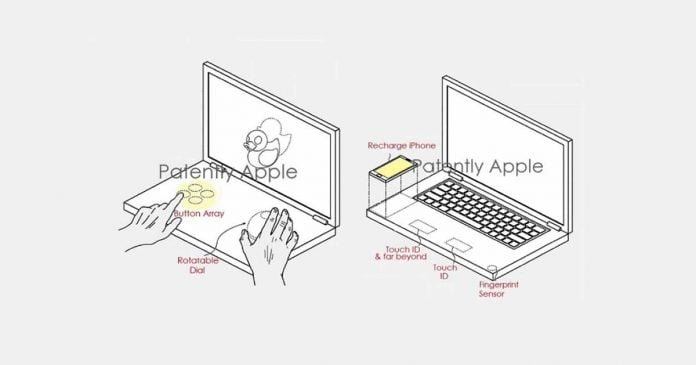
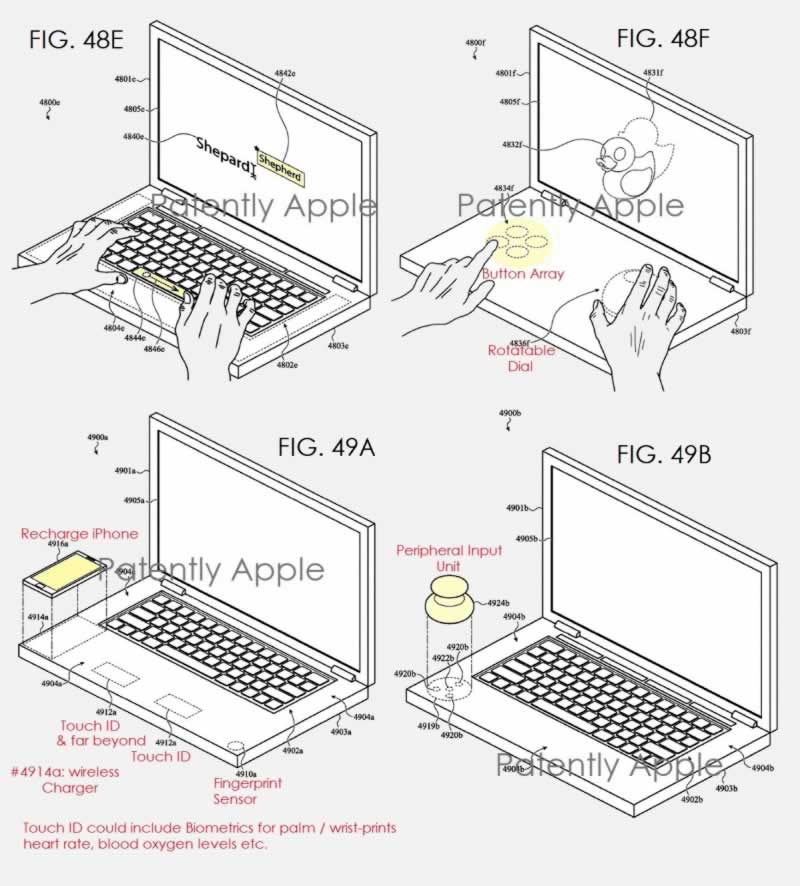
The patent shows a dual-display MacBook with a virtual keyboard in a traditional layout. According to the patent report, the secondary MacBook screen would display different virtual keyboard layouts. Thus, users would be able to opt for a traditional key layout or opt for a more ergonomic alternative. The ability to move the position of the virtual keyboard is even mentioned, among other customizations.

Apple Dual Screen MacBook 1

Take into account that Apple’s patent for the design of a dual-screen MacBook also includes biometric sensors. And the integration of a wireless charger is even mentioned in order to pass power to devices such as the iPhone or the Apple Watch just by resting them on the laptop. 

It is unknown if Apple will be able to implement all of these features in a future MacBook. So far, users are expecting a refreshed MacBook Pro without the Touch Bar, with more ports and a miniLED display.

The advantages of making tax digital

Tax Digital

There is one thing that cannot be denied in the wake of the Coronavirus pandemic and that is, digital agility is essential for both your personal and professional life. We have all needed to adapt how we live and how we operate business, and this applies to tax administration. With the government initiative of making tax digital you do not have to worry about physical paperwork, you will get access to real-time tax information and fewer costly mistakes.

All UK businesses that have a taxable turnover above the VAT threshold of £85,000 need to use the government’s Making Tax Digital (MTD) service to keep and submit records digitally. In making this switch you will be able to take advantage of the key benefits.

1. Less Paperwork to Worry About

You probably dread having to sort through all your receipts and invoices and documents every year. MTD-compliant software means you can keep an eye on all your incomings and outgoings online. All you have to do is check that all the data is right and up to date each quarter, no more bothersome paperwork to sift through.

2. Going Digital Means Easier Bookkeeping

General bookkeeping is much easy when conducted online rather than using more traditional methods. Tax software means you can log on and easily track tax dates, upcoming bills and any repayments owed in seconds. You can make informed business decisions quickly and there will be no nasty surprises creeping up on you. This is one of many ways you can modernise and simplify your systems – by streamlining your accounting through digitalisation, you can save valuable time that could be better spent on other aspects of your business. There is nothing worse than financial updates propping up when you have a project to work on or new customers coming in that need your attention. But now, you will be ready for anything because all your tax and financial information will be stored and sorted for you.

3. Fewer Mistakes (that Cost You Money)

Tax returns are complicated and time-consuming and there is no guarantee that they will be 100% correct when you submit them. You are also subject to fines if you miss the deadline for filing tax returns. MTD-compliant software means you will never have to worry about such easily avoidable mistakes.

4. Real-Time Tax Information

Instead of waiting until you submit your tax return to view all the important information, you can keep an eye on things all year. This gives you a better idea of what you owe and has everything in order long before the tax return deadline hits, and it is much better for making informed business decisions.

5. Always Have the Funds Needed

It is easy to lose track of the dates and have tax returns sneak up on you when you do not have the necessary funds available. This can be a huge problem even if your company is a thriving one. You will never lose track of important dates with MTD meaning you will always be prepared when it comes around.

WhatsApp Working On Implementing Reactions To Messages Similar To Those Of Facebook

WhatsApp message reactions feature

WhatsApp is working on a function that will allow you to react to messages using emojis — a feature that many apps have long had, such as Instagram, Twitter, Signal, Slack, and Facebook Messenger.

According to WABetaInfo, WhatsApp has been working on a function for reactions. These, presumably, will work like the rest of the reactions that we can see in other social networks.

Message reactions on WhatsApp can be done through emojis that can be attached to each chat bubble. The goal is to express an emotion quickly, something that can help make the conversation more fluid. For example, if the sender sends a funny message, the recipient can react with the popular emoji of the face crying with laughter and thus convey that they are amused.

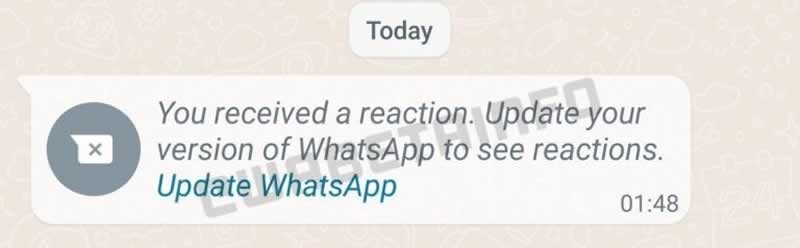
The development of this function seems to be very premature. It has not yet reached the trial versions and there are no images showing what exactly the reactions will be like. The aforementioned source, however, has shared a screenshot where a notice appears suggesting the implementation of this feature in the coming weeks.

WhatsApp message reactions

The possibility of reacting to a message will not be the only novelty that will come to WhatsApp. Recently, WABetaInfo revealed that the messaging app will be available for iPad and Android tablets thanks to the multi-device function. This feature will allow you to use the app on several devices at the same time, without the need to log out of an account or the main device is connected to the internet. Furthermore, multi-device WhatsApp will synchronize the chats so that it is possible to follow the conversation on any screen.

30 Years Of Linux: A Hobby That Changed The World

30 Years Of Linux

Linux has been around for 30 years. Even if the first Linux kernel was only released on September 17, 1991, August 25, 1991, is generally considered to be the birth of the free Linux operating system, as the chief developer Linus Torvalds published a corresponding announcement on Usenet on that day. 

From then, the free and open operating system spread in various forms virtually everywhere. From cloud computing to smartphones, from IoT to machine learning and Artificial Intelligence — today it is difficult to find a technological space in which Linux does not have a clear leading role. Even Microsoft has given up on that battle for years!

30 years ago, on August 25, 1991, the then 21-year-old student Linus Torvalds published a corresponding announcement in the Usenet topic group “comp.os.minix” — the place where people discuss about the Unix operating system Minix, and promised a free operating system for i386 , that should start as a hobby project.

Happy 30th birthday linux
Image Credits: Reddit

At that time, Linux was still released under a proprietary license from Linus Torvalds, which prohibited commercial use. Since this approach stood in the way of the spread of the operating system, Linux became free software and was placed under the GNUv2 license.

After 30 years, it can no longer be said of a hobby project, and Linux has become an indispensable operating system kernel.

For thirty years, Linus Torvalds has led the development of the Linux kernel, inspiring countless other developers and open source projects. Linus also created Git in 2005 to make it easier to manage the kernel development process, since then Git has grown into a popular version control system trusted by countless open source and proprietary projects.

The Best Converter To Have In Order To Convert Spotify To MP3

Spotify news and stories

Spotify is one of the leading music streaming platforms with a lot of songs amounting to about 60 million in total. This would be a lot greater if the songs can be accessed and enjoyed offline by the free users as well, but unfortunately, offline listening is for the Spotify Premium users alone. So, the best that you could do about this is to have Spotify songs converted to an output format which can be played offline and which can be played in any audio player you want. So, in that case, the question must be how do you convert Spotify to MP3? Is it possible for you to convert Spotify to MP3? What are the most recommended converters that can help you convert Spotify to MP3?

To know the answer to all these questions, you must take time to read this post for it will be helpful enough for you in solving your problems about how to convert Spotify to MP3. This will also help you a lot to play your favorites with ease and comfort.

Part 1. Can You Convert Spotify To MP3?

With the convenience it offers to have Spotify songs played offline, we cannot deny the fact that most of the Spotify users are wishing to have their Spotify favorites converted into an audio format that will definitely help them make this possible. But expect that you may find a hard time to do this because Spotify songs and tracks are DRM protected. When you say DRM protected, it means that the songs are not playable in just any device that you want to use. The songs are only playable on devices that are authorized and supported by Spotify. Having the songs protected by DRM means that the songs are not also convertible to any output format that you want. So, the question here is how to convert Spotify to MP3? MP3 being one of the output formats that are very accessible in almost all gadgets.

Despite the fact that Spotify songs are not convertible to MP3 because of DRM and some other law related issue concerning this, you can still make this happen. So, in order to convert Spotify to MP3, you would need the help of a powerful tool that can work well with Spotify and most especially, can do the job perfectly.

Part 2. What Is The Best Spotify To MP3 Converter?

If you are looking for the most powerful and most effective tool that can help you convert Spotify to MP3, your pick must be no other than “TuneSolo Spotify Music Converter”.

Here is the list of the best features of “TuneSolo Spotify Music Converter”.

  1. “TuneSolo Spotify Music Converter” can help you enjoy your favorite Spotify songs even if you are not connected to any network by letting you download as many songs you have chosen. You must be aware already of the fact that you can only download songs and have them played offline if you have subscribed to Spotify Premium. But with “TuneSolo Spotify Music Converter”, you can have these songs enjoyed offline even if you have no subscription to begin with or even if your subscription is cancelled already.
  2. As what was discussed in the first section above, Spotify songs are DRM protected which is the main responsibility for not having the songs played in a lot of devices. But with “TuneSolo Spotify Music Converter”, you can play these songs on as many devices as you want.
  3. With “TuneSolo Spotify Music Converter”, you can have the songs you have downloaded converted to MP3 format and any other output formats including AAC, WAV, FLAC and many more. Once the songs are successfully converted, you can finally enjoy them for offline listening.
  4. If you wish to use “TuneSolo Spotify Music Converter”, you will not have to wait for a long time until the songs have finished converting because it can convert Spotify to MP3 five times faster than the usual speed of conversion. It can finish the job in just a couple of minutes and is literally enabling you to save a bunch of your time and use this saved time to do some other activities that you want.
  5. If you are worrying about losing some important information of Spotify songs, well you do not have to worry anymore because “TuneSolo Spotify Music Converter” can retain the most significant information of Spotify songs that is mainly needed to identify Spotify music. It can keep the metadata information and ID3 tags of songs.
  6. Now if the organization of output files is your issue, you will not encounter any problem about this if you have decided to use “TuneSolo Spotify Music Converter”. You can modify the arrangement of your files by artist or by album or by any category you prefer to have. This will help you save a lot of your time as well because it will be a lot easier for you to locate a specific file.
  7. Another good thing with using “TuneSolo Spotify Music Converter”, you will be entitled with unlimited free updates and support from the technical team once you have any question in using the app or whenever you encounter any problem while using this.

Here are the easy steps that you have to follow to convert Spotify to MP3 using “TuneSolo Spotify Music Converter”

  • The first thing that you have to do is to download “TuneSolo Spotify Music Converter”. You can get this app from the application store. If you are done with downloading the app, have it installed and running on your device as well.
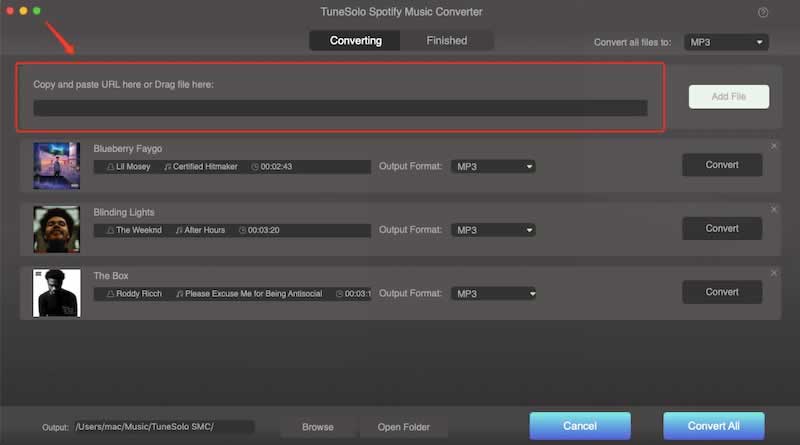
  • Next thing to do is to have the Spotify songs uploaded into the converter. You can do this process by just having the song files dragged and dropped into the converter. Another method to upload the files is to copy and paste the song links into the converter.
convert Spotify to MP3 1
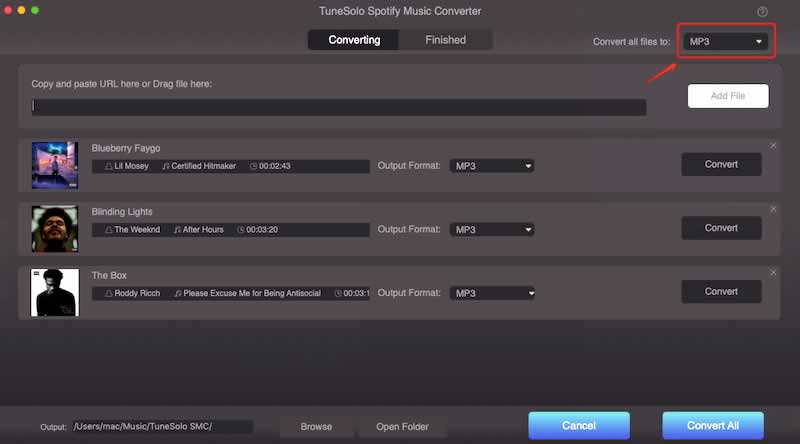
  • Now, you have to select the output format from the list of formats available. Click on MP3 format.
convert Spotify to MP3 2
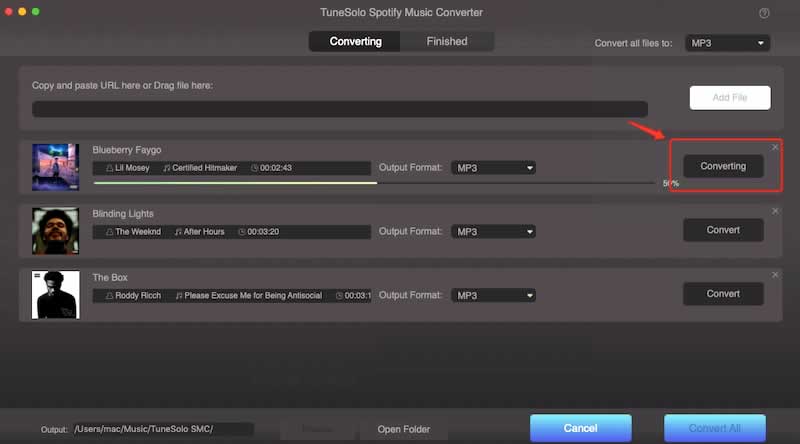
  • Now that you have selected the MP3 format, you may now click on the button of “Convert All” to start the process of conversion.
convert Spotify to MP3 3
  • If you want to review and get the successfully converted songs, you may click the “View Output File” button.

Part 3. How Can I Convert Spotify To MP3 For Free?

For those who are not interested in downloading some tool into their devices, there are many converters over the net that can help you as well to convert Spotify to MP3. What is great is that you can use them without limit and without paying any cent. Below are the three recommended Spotify converters online that you can totally use for free.

AllToMP3

First on the list of Spotify converters that can help you convert Spotify to MP3 for free is the “AllToMP3” converter. “AllToMP3” is accessible and works well with Mac, Linux and Windows computers. If you wish to use this converter, you must know that it can help you have all the songs or tracks you got from Spotify already in MP3 format. One good thing with “AllToMP3” converter is that it has the capability to keep the important information of the Spotify songs including the title, the artist’s name, the album’s name, artwork and its genre. 

With “AllToMP3”, you won’t be bothered or worried enough with regards to the resulting quality of the sound. It guarantees you a high-quality audio which will surely make you satisfied. What is also great with this free converter is the convenience it offers when using this app. It can do the job by just having the URL of your selected Spotify song or tracks copied and pasted into it.

One important thing that you must know about “AllToMP3” converter is that it is not connected with Spotify meaning that it is not directly working with the said application. It does the job by just having the link of the Spotify songs you have pasted be examined and studied, recover all the significant information related to the songs and then have them searched in different music libraries found online. Once your pasted Spotify song link was found from one of the music libraries, “AllToMP3” will now start the process. 

Once it matches, it will begin downloading the particular song which is already in MP3 format once finished. This helpful converter that can help you convert Spotify to MP3 for free is very safe to use. The only drawback that can be found from this converter is that it may not be successful to find all the song links that you have pasted to it, especially if the songs you are trying to download are new and were just released. And also, the fact that Spotify is holding over a million of songs and albums, music libraries online will really have a hard time to keep up with this big quantity. So, it is more effective to try using it in finding old songs or albums.

Audacity

Another one in the list of free converters that can be of great help to convert Spotify to MP3 is “Audacity”. Actually, the thing that I love the most with this Spotify music converter is that the way it does the job is very simple to understand. You will just have to play any Spotify songs or tracks from any audio player you have and “Audacity” will start doing its job to record and capture the sound and have it released in MP3 format or any formats available once the recording is done.

“Audacity” Spotify converter is also working well with Mac, Windows and Linux computers. And take note, you can also use this converter for free.

Spotify & Deezer Music Downloader

If the goal is to convert Spotify to MP3 for free, “Spotify & Deezer Music Downloader” is definitely on the list. “Spotify & Deezer Music Downloader” is an extension of Chrome. This converter enables you to download your favorite albums and playlists from Spotify and any other music streaming platforms by adding a download button in every song from the said music resources. The thing that you must do is to just download the “Spotify & Deezer Music Downloader”, have it installed and running in the device you are using. 

You should remember that you can always have this application from the Chrome extension store. Now that the application is running, you will only have to sign in using your Spotify account and then download the songs or albums you have chosen to have. You should note that there is no way to do a batch download, and you will really have to do the job of saving the songs one by one. Another thing to be reminded of about “Spotify & Deezer Music Downloader” is that it also makes use of music libraries found online so there would be a time that you may encounter an error downloading the songs you selected particularly in some cases when it did not successfully locate or matched the songs with them.

Conclusion

There are a lot of converters that can easily be searched and found online which can help you to convert Spotify to MP3. You can search some that are free to use like the three free Spotify converters that I have discussed above. Some may not be able to give you the quality of sound that you’ll be satisfied with and some may give you a headache for so many errors and problems encountered by using them. So, it is really a must to choose the right tool that will help you achieve your goal which is to convert Spotify to MP3. If that is the case, the best pick would always be “TuneSolo Spotify Music Converter”. With all the features and easy steps in using it that were explained above, you can really have the quality audio you are mostly looking for.

Oppo Introduces MagVOOC: Its Alternative To Apple’s MagSafe

Oppo MagVOOC

Shortly after Realme has introduced its magnetic wireless charging technology, MagDart — which is a copy of Apple’s MagSafe, Oppo has followed suit by introducing MagVOOC, its own practically the same alternative.

At the event 2021 China International Smart Industry Expo, OPPO revealed to the audience how its magnetic wireless charging standard is. Together with the announcement of MagVOOC, Oppo presented three conceptual products with support for the new technology — MagVOOC ultra-thin portable magnetic charger, MagVOOC vertical magnetic wireless charging dock, and MagVOOC magnetic suction wireless charging power bank.

The first is a 20W charger in horizontal format, while the second is vertical and has up to 40W of power. In addition, Oppo has followed in Apple’s footsteps and has presented its own attachable external battery. The vertical support, which keeps the phone suspended in the air, can charge 4,000 mAh in about 56 minutes. The smallest charger literally looks like the Realme but changed color, being compatible with the 20W AirVOOC standard. This one can charge 4,500 mAh in 2 hours.

Oppo MagVOOC magnetic wireless charging

Oppo has not yet announced the timing of the release of real models of the named devices.

Oppo also unveiled its latest advances in smartphone-car interoperability — digital car key, Oppo Find X3 and Oppo Watch 2 remote car functions, and car fast charging.

The digital car key allows users to use Oppo smartphones to unlock the car via Bluetooth. The presence of a mobile network is not required for the digital key to work.

With Oppo Find X3 or Oppo Watch 2, users can remotely turn on the air conditioner via the app and also locate the car in the parking lot with a special alarm sound.

In addition, users can take advantage of Oppo’s Advanced Car Fast Charger, which supports the Oppo 65W VOOC standard and 40W VOOC wireless fast charging while on the move.