Home Blog Page 249

Why Do Webmasters Appreciate PDF Format?

PDF documents stories

PDF format has evolved from the PostScript language, created by Adobe Systems. It allows you to save photos, vector graphics, texts of different layout complexity in one document. A PDF document is cross-platform while maintaining the accuracy of displaying content to the smallest detail. More about the convenience of PDF for webmasters read below.

Publishing and Indexing Opportunities

PDF is a convenient format for publishing articles and news on the Internet. It is perfectly indexed by search engines and can include multiple protection levels against copying, printing, changing, etc. Even if you use the Coolutils Outlook to PDF converter to arrange and store your files, this format will secure all the data from inappropriate usage.

Besides, with the help of PDF documents, it is convenient to distribute files for printing or reading from the screen. Unlike HTML pages, a PDF document looks similar in the viewer and any browser. Meanwhile, the HTML page view can vary due to the user’s browser settings — fonts, graphics loading, etc. These factors do not affect the view of the document.

With the help of the format, it is very profitable to distribute advertising texts, e-books, statistics, technical and reference documentation. It is quite versatile and can be read even on old smartphones with Java support. For authors of articles and scientific works, PDF offers a high protection level against text copying. At the same time, all documents are perfectly indexed by search engines and are available for reading.

One of the crucial advantages of the format is its indexing capacity and minimal load on computer resources. If you put very large text in an HTML document, then search engines may not index it. In some SE, the declared weight of an HTML page for indexing does not exceed 300Kb. Search engines will index PDF documents with ease.

Alternative Formats

The PDF format is more convenient than Microsoft Word. Word files are also well-indexed but poorly protected. In the Word file configurations, you can set protection for opening a file and modifying it. However, such protection will lead to the fact that a document will not be indexed by search engines. It should be recognized that the Word program is precisely a word processor and is not intended to create secure documents.

Several other formats may become alternatives — DJVU, CHM, and others. But they all have serious disadvantages compared to PDF if you want to create and distribute secure documents.

Business meeting 2

How to Create PDF Format?

An all-in-one tool for creating PDF documents is a software package from Adobe. For example, a dedicated creation program is Adobe Acrobat. Besides, many other solutions are available for users. For instance, various converters are in great demand. The created document can be converted to PDF at any time by specifying the necessary settings — rights, graphic resolution, and others.

Not all files on the site should be distributed in this format, but some will benefit from this type of online posting.

How To Select An IT Support Company

IT Support selection

Usually, in the initial stages of a business, an entrepreneur handles everything in running their company. For many, hiring an IT firm may not be necessary at the time. As the business expands, however, they become aware of their need for an expert. After all, these professionals can help improve data security and eliminate service delays. They also assist with retrieval in case of data loss.  

Today, most firms are outsourcing rather than permanently employing IT support staff. That way, they reduce operational costs. If you’re considering outsourcing, contact a firm like ShipshapeIT. If you know anyone who recently hired an IT support company, you can also ask them for recommendations. There are many factors to consider, and this guide will help you select the best one for your needs.

Read on to learn how to select an IT support company for your business.

Advantages Of Hiring An IT Support Company 

Since IT firms specialize in support services, your business will benefit significantly from hiring one. Using their extensive knowledge of information technology, they can offer cutting-edge solutions to improve your company’s productivity.  

However, hiring permanent IT employees in your firm can be costly. There’ll be times when there won’t be much for them to do. Still, you’ll be required to pay them regularly. That’s why you should consider outsourcing your company’s IT support; it’ll spare you such expenses. You will only pay for their services when the need arises.

In addition to cutting costs, having a technical team will help you reduce risks. They will perform regular monitoring, which ensures that your systems work at the optimum level. Also, they’ll help identify internal threats such as system and hardware failure. Surveillance can also help protect you from cybersecurity risks. These threats include malware, phishing, fraud, or password theft. Regular monitoring will ensure that these IT issues are mitigated or don’t occur at all. This factor will save your business plenty of resources and time. In turn, you’ll boost productivity.

What Makes A Good IT Support Company?

If you’re considering collaborating with a support team, how can you select the best company? Certain characteristics will make the suitable organization stand. 

Consider the following factors:

A Considerate Contract Term Agreement

business meeting

For IT support contracts, most firms prefer flexible deals. An alternative to that would be short-term agreements. They usually avoid signing two- or three-year engagements with an unproductive company. These agreements will force you to stick with them despite their poor performance. While the IT support firm enjoys payment, your company will suffer.

Therefore, ensure you don’t become a victim. At first, consider agreements that are 30 to 60 days long. These contracts will allow you to test other providers in the market, and in time, you’ll identify the best. On the other hand, flexible agreements will allow you to withdraw from any contract. This is a good option to have in case your IT support company isn’t providing effective solutions. 

Within the contract clauses, ensure that every service has a stipulated price. Also, consider companies that are transparent with their packages. The firm should not have side charges for specific services. You also shouldn’t be paying for services in your subscription that you won’t be requiring.

Do They Have Experience In Your Industry’s Systems?

A support firm with experience in your industry’s software, applications, and hardware is most preferable. They should provide advice on your business’s most suitable tools if you don’t have reliable equipment. Their solutions should efficiently lessen interruptions. The processes they offer should also enhance the performance of your structures. 

However, if you already have a sturdy setup, your IT support service provider should be able to navigate through it. The team should also be able to understand the structure fast. Their familiarity with the system you have in place will allow them to troubleshoot issues quickly after grasping the company’s processes. 

The technical team you pick should be willing to offer extra help in ensuring that all systems are running smoothly. A good organization will also show interest in your success. They’ll offer you a technological guide on how you can achieve your intended goals.

Where Are They Based?

The proximity of one of the company’s agents or the firm itself to your workplace matters. You can never fully predict when you’ll need onsite support. You’ll need a company that can get to you as fast as possible to solve time-sensitive issues like firewall malfunction. If the IT support company is too far away from you, you’ll be forced to get help from a nearby expert in the meantime. It’ll then cost you unnecessary fees.

In case you have several branches in various areas, inquire about how they’d deal with that issue. It’s best to avoid contracting two different companies, which will only increase costs. 

The Firm’s Expertise 

To understand how qualified an IT support company is, ask for their certifications. These qualifications will help you distinguish how much the firm will impact your business. Identify if the enterprise has previously received any certifications from credible organizations. Also, inquire if they’re continually training their staff, too. Ask for personal certificates from a few members of the support team.

Groups that provide training to their staff are most recommendable. The team members should have sufficient and updated knowledge of all technological facets of IT. It shows that the employees are up to date with the current IT trends. It also guarantees that, in case of unprecedented challenges, they’ll be able to respond efficiently.

Regular Monitoring Of Systems

The ideal IT support company should ensure regular monitoring of all IT facets. These aspects refer to computer networks, programs, and hardware. By ensuring vigilant checkups, they can quickly identify a concern before it affects the business. 

This strategy extends from a proactive approach to solving issues. You want to avoid a support team with a reactive approach—those who wait for the company to reach out to them with a concern. The latter will cost you a lot of time and resources. 

Before agreeing with the company, first identify how often they’ll monitor your systems. They should also advise you whether they consider the proactive or reactive approach to systems management.  

The Company’s Reputation

For a company to develop its credibility, it has to steadily build its name for years. Fortunately, it’s easier to identify a reputable company today. Customers are always leaving reviews on a company’s websites regarding the quality of the service they received. You’ll also find comments on their social media channels that could help you distinguish if they’re right for you. 

Alternatively, you can ask for references from other companies within your industry. Some may help, while others may not be willing to offer sufficient information. If this is the case, ask for referrals from trusted friends or family members.

Quality Data Security Services

IT Support executive

Data security is one of the most pressing issues companies face today. There are always new loopholes that threaten the security of data. The firm you pick should be experts in data protection. Their responses to information safety should be of the highest quality. They must incorporate the most advanced solutions to secure your business’s data. 

They should also teach your employees the current and most common risks and present ways to prevent them. It’s best to identify potential threats fast and prevent further losses. To identify their expertise in data security, refer back to qualifications, certifications, and previous experience. 

Price

An affordable company is preferable. In many instances, you’ll find that a business offering quality services may overprice you. On the other hand, companies with cheaper rates may offer substandard services. Depending on your budget, find a balance between the two. With enough research, it’s possible to find companies that provide quality services and charge appropriately. 

To find the right company, visit a few offices. During these visits, ask for their quotes and compare them with other service providers. A good team is transparent and eager to offer extra support regardless of your budget.  

Fast Response Time

When systems are down, you’ll be highly disadvantaged as a business enterprise. You could lose potential clients, and the time wasted can’t be recovered. Therefore, you’ll need a team that responds promptly to your calls. Before signing an agreement, you should first identify how long it’ll take to send someone to the premises if a device malfunctioned.

In case of network issues, how fast are they likely to resolve the matter? Many IT problems don’t have simple solutions. You have to make sure that this company is not overmarketing itself. To ensure this, they should show you evidence of some problems they’ve resolved for previous clients. This data should also include the estimated time they took to address the issue.

Flexibility

While you grow, your IT provider should be able to handle all services efficiently. Identify if the team will be able to move with you as you expand. In case you’ll open other branches, ask how the firm will cover this. Also, inquire how much the charges will increase if your business advances to new markets.

IT Support company
Conclusion

Quality IT support is essential in the growth of any modern business enterprise. They’ll offer cutting-edge solutions in data security, data backup, and systems management. These factors will contribute to the success of your business. Your ability to compete in the market will depend on your support team’s expertise.

To identify the best IT crew, establish the firm’s expertise, reputation, and experience in your industry. The cost of their services should be affordable without compromising the quality of their services. Consider companies that offer short-term or flexible contracts. The company should also have agents closer to you in case of emergencies. Lastly, the support team should guarantee regular monitoring of systems to ensure everything runs smoothly. This factor will help to boost productivity.


How to Find the Best Internet Connection for Your Business?

Choosing an Internet Service

A high-speed internet connection has become an important necessity for businesses nowadays. This particular technology can have a huge impact on the way your company runs its daily operations. For instance, instead of maintaining traditional finance books, you can digitize your accounts on Google Sheets, which would be readily available whenever you need them. 

In addition to this, you can also share these sheets with your shareholders with the help of an active internet connection. Moreover, the internet helps you stay in touch with your organization even if you are out of the country for a vacation. With so many promising features and benefits that the internet has to offer, installing one is a dire need for almost every enterprise. 

The major obstacle in this aspect is finding an internet provider that understands the needs of your organization and presents you with a plan that suits you perfectly. This is where we come in to save you from the trouble of going through an extensive procedure of locating and scrutinizing top internet providers for businesses.

In this article, we will list down all the top-ranking internet providers that are suitable for business entities of all sizes. So, without further ado, let us get started!

How to Choose the Best Internet Provider for Your Business?

When it comes to selecting an ISP for your business, numerous factors need to be taken into account before you can finalize your decision. These factors include:

Speed of the Connection

There is no doubt in the fact that high-speed internet service can enable you to work more effectively and efficiently, but how fast should be your internet is the real question. For an organization with more than 50 employees, you need at least 940 Mbps of internet speed via fiber-optic internet on a dedicated line so that your network is not shared with other residents in the area. If you go for a shared network, you will not receive the desired speeds during peak business hours due to high traffic. Nevertheless, if you were a small-scale business with only a handful of employees, an internet plan with 400 Mbps of internet speeds on a dedicated line would be enough.

Cost of the Service

There is a fine line between the cost of the service and the speed of the connection. If you are a small enterprise with minimal internet requirements, you do not have to pay thousands of dollars each year for your internet service. On the other hand, if you are a large corporation that consistently needs to stay online to receive orders, then a high-tier internet plan is recommended so that you do not come across any network-related obstacles. Business internet plans usually start from $49.99 per month for up to 200 Mbps of internet speeds.

Type of Network

Today, different types of internet connections are available in the market and it is quite possible that you find only one type of internet service in certain areas. Therefore, the area your business operates from plays a major role in the kind of network that you are eligible for, especially if your company is located in rural areas where, more often than not, only satellite internet is available. Other internet types include DSL, Cable, Fiber, and Fixed Wireless. Fiber-optic internet is usually preferred by businesses that need incredible speeds to get their work done swiftly. Similarly, cable internet also transmits quality internet speeds but at a slower rate than fiber. DSL and fixed wireless connections are recommended for companies that do not have direct access to fast networks.

What Features to Look for in a Business Internet Provider?

The most important feature that businesses should look for in a provider is its customer service. How quickly can the provider resolve your issue if your internet is down? Are there any compensations that the provider is willing to offer if the problem arises from its end? How often do other customers face an internet outage from this provider?

Being a business organization, you cannot afford to lose your internet connection because losing network means losing clients, and eventually revenue. Therefore, we recommend choosing a provider that promptly resolves the issue in case of an emergency so that your business does not have to suffer from heavy losses. If you are looking for such a provider, we confidently vouch for Spectrum Internet as it offers incredible internet speeds with utmost reliability. In addition to this, Spectrum Internet prices are highly affordable as it caters to the needs of all sorts of business corporations. The company houses an outstanding customer support team that would instantly resolve your issue when you file a complaint. So, sign up for this amazing internet service, and start running your online operations without any worries.

Top 3 Online Video Converters to Work With Multimedia Files

Video editing and converter

Almost every modern user has ever been faced with the need to convert a video from one format to another or to change the video picture resolution. And there may be different reasons for that. You may need to download a video to a mobile phone without a media file taking up a lot of space on your gadget. You can slightly lower the quality and reduce the video resolution in order to save some space on the device. 

Besides that, video converters allow coping with incompatible formats. Not all people have codecs on their computers for MKV, SWF, MOV, etc. So if you want to watch video downloaded from the Internet or filmed on a camera, you will need to convert the multimedia to the common AVI format. In this case, you can play a video clip on any computer with no issues or lags.

No matter what the case of yours is, there is always a solution! A video converter program comes to the rescue. In this post, we will take a look at the top three most convenient online video converters that you can use to process multimedia files regardless of their format and specs. Let’s dive deep into the key features of every solution so that you could pick the one that works best for you.

#1 – Online Video Converter

Online video converter by Movavi is one of the simplest apps available on the web. You can use the solution right in the browser without installing a software pack on your PC (if you do not want to). The application comes with a pack of functions for a standard audio and video conversion. 

Although the conversion speed of this web-based app is quite high, the online version of the program cannot process large video files, the file size is limited. But you can always use its desktop version to process heavy files and high-res videos. 

The latter also comes with a whole pack of editing tools. Besides that, with the desktop version of the app, you are given the opportunity to adjust the video quality and even select your preferable video parameters. The solution is capable of converting multiple videos at the same time regardless of their size.

#2 – 123apps Video Converter

123apps.com is an online service of free web applications designed to work with multimedia files. Need to perform various operations with different types of files? Need to trim a song, convert videos to other formats, or reduce a file size? To cope with all the above, you do not need to have multiple programs running on your pc. For one-time use, it is irrational to install specialized software on a computer, agree? With the 123apps tool, all the operations are carried out online right in the interface of a single solution.

The online service has free tools for working with multimedia and helps the user to solve problems of processing or converting different files and archives. With 123apps, several applications are available in a single location – all running on a remote server on the Internet.

The main service features of the app:

  • Trimming or joining audio files;
  • Convert audio to other formats;
  • Cropping or recording video;
  • Convert video online to other formats;
  • Sound recording;
  • Unpacking archives online.

The best thing about the 123apps solution is that provides access to free applications that you can use right from your browser online. Of course, it is not as powerful as Movavi Video Converter, but it can still process some small media files for you.

#3 – Convert to Video Files Online

It is a free universal media transcoder that perfectly integrates most of the popular audio/video codecs and tools into an all-in-one solution. Just like top open-source Android apps, it has a flexible and extensible architecture and converts digital media from one format to another by compressing files on the fly. On the homepage of Fileve-Conversion.com, you will find multiple online applications that you can use to work with multimedia assets. All the operations are performed in the browser window, without the need for you to install third-party software on your pc.

Files-Conversion.com is effective in converting video files to various formats, with fast converting speed and excellent video quality. It can trim any segments, combine and sort them to create a creative clip. On top of that, Files-Conversion.com can crop the frame size to remove any unwanted area from the video image. 

What to Choose?

All the above tools have proven to be the most convenient online video converters. They support a wide range of formats, process files fast, and do not require any installations. You can simply open the site of the converter right in the browser and convert videos for free. 

Everything is easy. However, when it comes to heavy files or high-res videos, you will need a powerful solution at hand. This is where Movavi Video Convertor comes in handy. There is a desktop version of this tool, which is specifically designed for large files and batch conversions. The program is quite powerful and uses smart algorithms to process the data. Feel free to test out the service – install a trial software pack of the convertor and use the tool with no charge until the end of your free 7-day trial.

How to play hidden Surf game in Microsoft Edge

play hidden Surf game in Microsoft Edge

Recently Microsoft has rolled out the new Chromium-based Edge browser for Windows 10 users via Windows update.

The brand new Microsoft Edge is really attracting the attention of many users has become a great alternative to Chrome and Firefox. 

Although some people in the Windows community is very annoyed with Microsoft’s new move of forcing the Chromium Edge on users by taking over their entire computer upon startup. 

Microsoft Edge is working exactly like Chrome, uses a Microsoft account to synchronize data instead of Google account and has many additional features that make it perfect for surfing the internet. 

We all know Chrome’s notorious RAM and CPU hogging nature, and this the main area Microsoft Edge has sorted out — Chromium Edge uses less than half of the RAM and CPU of Google Chrome.

Hidden Surf game in Microsoft Edge:

Now back to the topic, we all know there is a hidden Dinosaur game in Google Chrome, which activates when we go offline or when there is no internet connectivity. Similarly, Microsoft also included a nice and fun game called Surf Game for all users, playable even when the computer is offline.

So how to play this hidden Surf game in Microsoft Edge?

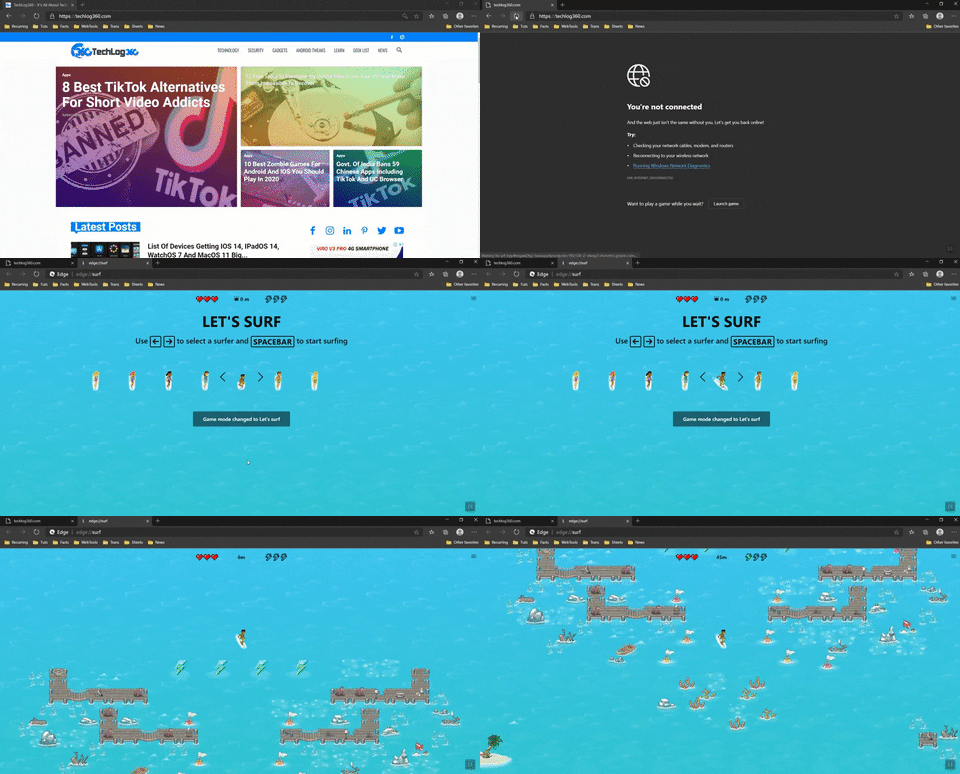
Unlike the Dinosaur game in Google Chrome, Surf game in Microsoft Edge can be played both offline and online mode. To play in offline mode, simply tap on the “Launch Game” button to play Surf Game on Chromium Edge.

giphy

Now to play even when you are online, enter this URL ” edge://surf/ ” on Edge address bar to start to play Surf game on Microsoft Edge online.

More about Microsoft Edge Surf game:

In the beginning, you can choose the type of surfer to ride and then start the game, hitting the Enter button on the keyboard. To play, use the arrow keys on the keyboard or use the mouse, a joypad, or using your finger on the touchscreen.

The game includes three different modes: Endless mode, Time trial mode, and Zig zag mode. You can switch modes via the game settings menu.

In Endless mode — you have to go as far as possible, avoiding obstacles. Also, you can add lives by taking the hearts you see along the way and increase your speed by collecting the boosts.

In Time trial mode — you have to find the shortest and fastest possible route to get to the end. Here you can find coins to shorten the stopwatch even more.

In Zig zag mode — is a bit like an endless slalom race on skis, where you have to go through doors or checkpoints, without skipping one.

5 Trends for Managing Fleets in Today’s Modern Tech World

Managing Fleets in Modern Tech World

When it comes to examples of big data’s benefits in business, the shipping and logistics industry should immediately come to mind. Fleet management traditionally done with paperwork and spreadsheets was immensely time consuming, and prone to errors that could cost a company chunks of money.

With new technological trends in fleet management, shipping and delivery companies are saving a fortune in manpower spent on paperwork, and saving even more with optimized routes for increased delivery speeds, reduced fuel consumption, and better vehicle maintenance. Let’s examine some of those trends for managing fleets in today’s modern tech world.

Electronic Logging Devices

In December 2017 the ELD mandate was signed by congress, which required commercial vehicle operators to record their hours of service (HoS) electronically. This mandate addressed several problems with paper logging, notably errors made by fatigued drivers, and misrepresentation of service hours.

One of the biggest benefits of the ELD mandate is fleet managers being able to track bad driving behaviors. If a trucker commits bad driving habits such as excessive acceleration and hard cornering, it will show in their ELD data, greatly increasing accuracy in performance reviews.

Adoption of Electric Fleet Vehicles

Electric fleet vehicles are coming equipped with a range of useful technology, but workers in fleet management face a hurdle in adopting them. Phasing out older vehicles and purchasing newer models is a costly endeavor in the current market, but electric vehicles are expected to become more competitively priced in the near future.

One of the primary benefits of electric fleets is eliminating fuel costs, but companies have also been enjoying the benefits of newer synthetic oils in the meantime as well. Today’s synthetic oils have change intervals of up to 15,000 miles, compared to traditional oils that are recommended to be changed every 3,000 to 5,000.

Autonomous commercial fleets

If any technology can create major disruption in the trucking industry, its autonomous vehicles. A massive landscape shift towards autonomous vehicles is on the not-so-distant horizon, which will massively skyrocket profitability and productivity for fleet managers, but potentially disrupt millions of jobs. There are an estimated 3.5 million truck drivers in the United States, with around 8 million employed in the trucking industry overall.

It’s also argued that autonomous vehicles will terminate a lot of jobs, but also create new ones. These new jobs will mainly be in robotics and electrical engineering, as well as accounting and management.

Remote fleet management

With software integrated between a truck’s on-board diagnostics, and remote management software, fleet managers are able to get incredible amounts of data from individual trucks, at a glance. Mandatory rest breaks are easier enforced, such as the remote disabling of an engine electronically, and on-the-road diagnostics can also be performed such as brake, steering wheel, and airflow system calibrations for different weather scenarios.

An important part of remote fleet management is real-time visibility, so newer models of trucks are being equipped with ways to always stay internet connected, such as the next trend.

Building 5G infrastructure

5G infrastructure is being laid out across highways, and since the trucking industry uses highways the most, it stands to immediately benefit. With 5G coverage across the nation, fleets will have reliable, high-speed connectivity during every mile of the journey, allowing for uninterrupted remote fleet management and GPS tracking.

Fleet dispatchers will be able to send updated routes through route optimization software, instantly alerting drivers to weather and road conditions. Uploading vehicle data also plays a role, such as a driver being able to access online company portals in remote, rural areas.

Why You Should Go For End-To-End Software Development

coding developer

Nowadays, instead of software development, most people go with end-to-end software development. It is a good option for startups.

In end-to-end development, the developing team create the software from scratch. It helps you to build customized software for your business needs.

The best thing about this process is that it is mostly done by the same team of developers. The team doesn’t change as they have to develop all the aspects of the software from the beginning.

It is also known as full-stack software development. The developing team takes care of front-end as well as back-end development. There are no two different teams.

Why Should You Go for End-to-End Development?

There are many reasons why you need to go with full-stack software development. It helps you to develop the software without any hassle or communication problems.

  • One Point of Contact:

When you choose this development service, there is only one point of contract. As all the development work is done by only one software development company, there is only one point of contract. It helps you to communicate with developing companies easily without any problems. 

  • Low Cost:

When you give the software development contract to one company, it will help you to save a lot of money. It is cheaper than developing the front-end and back-end separately. As the cost is low, it will help you to develop the software within the budget. Startups, as well as small scale businesses, can go for this approach.

  • Single Contract:

Another benefit of using this service is that you have to make only one contract with one developing company. You don’t have to make multiple contracts with different software development companies. It will help you to save a lot of time and paperwork.

  • Well Defined Process:

It is a well-defined process as all the software is developed from scratch by the same team of developers. They have to undergo the entire process of development planning, designing, content creation, front-end development, back-end development, testing, deployment, etc. As the team of developers follow the process, it helps them to smoothly develop the software.

  • Builds Trust:

It helps you to build trust between the clients and the end-to-end development company. Clients can easily trust the developers as they are building the app from scratch. When both the parties communicate with each other, it builds trust.

  • Reduce Time:

This service helps you to save a lot of time. You don’t have to approach two different companies or wait separately for both the companies to complete the project. When a single team of developers complete a project, it helps them to save a lot of time.

  • Detect Bugs:

It helps the developers to detect the bugs easily in the software. They can easily test the software and find out all the bugs in it.

  • Manage Changes Easily:

As a single team of developers are developing the project, it helps them to easily make the changes after detecting the bugs.

  • Easy Execution:

It makes the transition and execution process easy. The developers can easily transition from front-end to back-end for executing the project.

All you need to know about GTA: Online Cayo Perico Heist before starting it

NPCs In GTA 6

For the first time since 2013, GTA: Online is transporting you beyond the borders of Los Santos to the island Cayo Perico, a private island in the Caribbean, off the coast of Colombia. I you haven’t played GTA V yet, you have to have a feel from the base game to get the full experience from the new DLC, the best way to get the game is to look up GTA 5 cd key and find the best price available, alternatively, you can use Gamecamp where you can see price comparisons for all type of games. 

The Cayo Perico Heist was introduced to GTA Online as part of the newest title update and has been a highly-anticipated mission for dedicated fans. Announced on December 15, this new heist, features an assortment of new vehicles, weapons, and radio stations. The Cayo Perico update was also the first map expansion to come to GTA Online, with a new private island, owned by the melancholic infamous drug dealer, El Rubio. El Rubio has taken sensitive documents away from the Madrazo crime family and is trying to blackmail them. The Madrazos have asked for your help to steal them back. You must go via the Russian submarine operator named Pavel, to infiltrate Cayo Perico and bring back the documents!

To start The Cayo Perico Heist, you’ll need to do take care of one thing: You’re going to need to have a good amount of spare cash lying around.

First, you’ll need to be a VIP, CEO, or Motorcycle Club President. You can register in the SecuroServ section of the Interaction Menu to become one.

If you don’t already own a Penthouse at the Diamond Casino and Resort, you’ll need to purchase one. Head on over to the Diamond Casino and head inside and approach the customer service desk. You will need to use the Penthouse computer to purchase a Penthouse. Once you own a Penthouse, you’ll gain access to The Music Locker, a club in the basement of The Diamond. You are now all set to start the heist!

When you first log in on GTA after the update, you will receive a text from Miguel Madrazo, who will arrange a meeting at The Music Locker. Enter the Diamond Casino and Resort, take the elevator down to The Music Locker. Once you reach the bottom, exit the elevator and head down the spiral staircase. You will see a door to your left. Open it to enter the club. Once you are inside, make your way through the dance floor and head to the VIP section on the left to initiate a short cutscene.

After you meet with Miguel Madrazo, he will ask you to infiltrate Cayo Perico and steal back some sensitive files the drug lord “El Rubio” has in his control.

Once the meeting is concluded, you’ll need to spend $2.2 million on the GTA Kosatka submarine which you will use to travel to your destination, this may be a big amount but the payout is worth it. You can find your new submarine on the map and the Services Menu will allow you to call a dinghy to transport you to the submarine. Once you reach the Kosatka and step aboard, you will meet with submarine operator, Pavel.

That’s all you need to start! you can plan out your heist according to your teams liking!