Home Blog Page 34

Darknet vs Dark Web vs Deep Web vs Surface Web — The Hidden Layers of the Internet

Darknet vs Dark Web vs Deep Web vs Surface Web

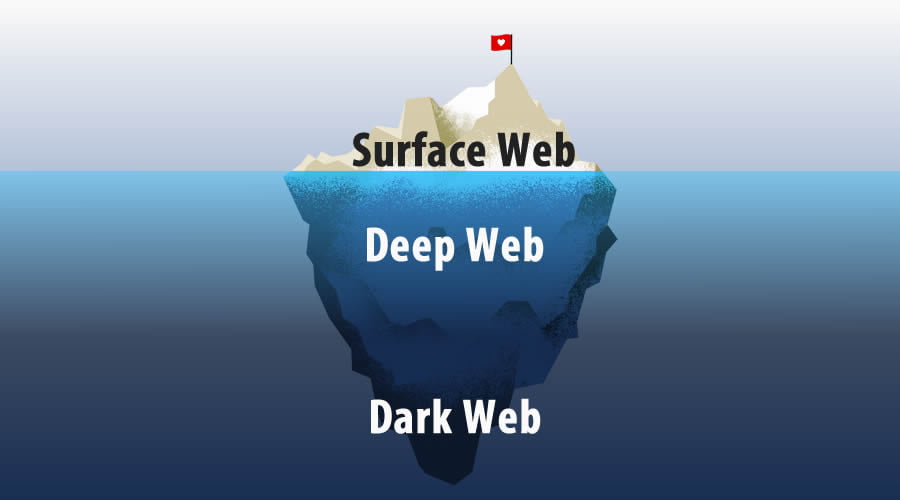
You’re surfing the internet, scrolling through social media, or perhaps doing some online shopping. It all seems so straightforward, right? But what if I told you that the internet is like an iceberg, and you’re merely skimming the surface?

Did you know only about 4% of the internet is accessible through search engines like Google and Bing. The remaining 96% of web content is only accessible with special tools and software — anonymous browsers and other protocols beyond direct links or credentials.

The internet is a vast, intricate landscape with multiple layers, each serving a unique purpose and audience. In this article, we’ll guide you through a journey into the lesser-known realms of the World Wide Web: the Surface Web, the Deep Web, the Dark Web, and the Darknet. Prepare to uncover the mysteries that make up the internet’s complex ecosystem.

Quick Reference Guide:

Feature/AspectSurface WebDeep WebDark WebDarknet
AccessibilityEasily accessibleRequires login or subscriptionSpecial software needed (e.g., Tor, I2P)Invitation and special software required
Search EnginesIndexed by Google, Bing, etc.Not indexedNot indexedNot applicable
ContentPublic websites, blogs, forumsAcademic databases, private dataIllegal activities, political activismPrivate networks, often encrypted
AnonymityLowModerateHighVery High
Legal StatusLegalMostly legalMix of legal and illegalLegal but can be used for illegal activities
Percentage of WebAbout 4%Approximately 90%Less than 1%Not quantified
ExamplesFacebook, Wikipedia, News sitesMedical records, academic journalsSilk Road, whistleblower sitesPrivate P2P networks, some parts of Dark Web
Primary UseGeneral browsing, informationResearch, private transactionsAnonymity, often illicit activitiesHighly secure, anonymous communication

Surface Web

The Surface Web is just the tip of the iceberg in the grand scheme of the World Wide Web. It’s the part of the internet that’s indexed by search engines like Google and Bing. These search engines use algorithms to crawl through web pages, indexing them so they can be easily found by users. This is the realm of the internet where Search Engine Optimization (SEO) reigns supreme. Companies and individuals alike compete for the coveted first-page search results, employing a myriad of tactics from keyword stuffing to backlinking.

Moreover, the Surface Web is also the most monitored and regulated part of the internet. Government agencies, corporations, and hackers can track your activities with relative ease. Cookies follow you around like digital breadcrumbs, helping (or haunting) your online experience by tailoring ads specifically for you. And let’s not even get started on data collection and privacy concerns.

Although the Surface Web is highly diverse with the bustling marketplace of ideas, products, and services, and yet, despite its vastness, it is just a small slice of the internet pie. Estimates suggest that it makes up only about 4% of the total internet. 

Deep Web

The Deep Web is a repository for all things not indexed by traditional search engines. This includes academic databases like JSTOR, private social media posts, online banking accounts, and subscription-based platforms like Netflix or premium news outlets. Even your personal email account resides in the Deep Web.

Contrary to the ominous tone often associated with its name, the Deep Web is not inherently illegal or immoral. In fact, it serves as a vital function in preserving privacy and housing information that shouldn’t be readily available, such as medical records or confidential business documents.

Accessing the Deep Web isn’t as mysterious as you might think. You do it every time you log into your email account, check your online bank statement, or access a digital library. Specialized search engines and databases like DuckDuckGo or the academic database PubMed can also serve as gateways to this hidden realm.

The Deep Web is the backbone that holds vast amounts of critical, private data that is essential for the functioning of businesses, governments, and individuals. Understanding its scope and how to navigate it is crucial for digital literacy, online privacy, and cybersecurity.

Dark Web

The Dark Web is often portrayed as a digital Wild West, a lawless frontier teeming with outlaws and shady characters. While it’s true that the Dark Web can be a haven for illegal activities — think drug trafficking, arms sales, and even human trafficking.

Access to the Dark Web requires specialized software, most commonly Tor (The Onion Router) or I2P (Invisible Internet Project). These tools anonymize your online presence, making it difficult for anyone to trace your activities back to you. This level of anonymity is what sets the Dark Web apart from its more accessible counterparts.

Contrary to popular belief, not everyone on the Dark Web is a criminal. In fact, the Dark Web serves as a refuge for political dissidents, whistleblowers, and journalists who operate in countries with oppressive regimes. Edward Snowden, for instance, used the Dark Web to leak classified information about the U.S. government’s surveillance programs.

The Dark Web has its own economy. Websites with .onion extensions act as marketplaces for both legal and illegal goods. You can buy anything from rare books to pharmaceuticals, but remember, the lack of regulation makes it a risky venture. Cryptocurrencies like Bitcoin and Monero are the currencies of choice, further enhancing the anonymity of transactions.

It’s also worth noting that the Dark Web is a hotbed for hackers. Cybersecurity threats like ransomware often originate from this space. Forums exist where hacking tools and stolen data are bought and sold. Therefore, if you venture into the Dark Web, robust cybersecurity measures are not just advisable; they’re essential.

Lastly, the Dark Web is not a static entity. It’s constantly evolving, with websites appearing and disappearing like phantoms. Law enforcement agencies worldwide are working tirelessly to shut down illegal activities on the Dark Web.

Darknet

Darknet is not a place but rather a way of connecting. It’s a network within a network, a secure haven that operates under the radar of mainstream internet traffic.

The Darknet employs unique protocols and technologies to create a private, encrypted space. Unlike the Surface Web, where your IP address is an open book, the Darknet uses onion routing or other anonymizing techniques to mask users’ identities. This is achieved through specialized software like Tor or I2P. These tools route your internet traffic through multiple servers, encrypting it at each step, making it exceedingly difficult to trace. The Darknet provides a level of privacy and security that the Surface Web simply cannot offer.

Like the Dark Web, Darknet also hosts illegal activities. One of the most infamous aspects of the Darknet is its marketplaces. Sites like Silk Road have gained notoriety for facilitating the trade of illegal goods. However, it’s worth noting that these markets are just a small fraction of what the Darknet offers. There are also forums for political discourse, libraries of academic papers, and even social networks that prioritize user privacy.

Wrapping Up

The internet is a complex ecosystem with layers that go far beyond our daily Google searches. Understanding these layers is crucial for online privacy and cybersecurity. So the next time you log on, remember: there’s a whole hidden world out there, waiting to be explored — or avoided.

Keyless Entry Systems Are The Future: How to Integrate Them Into Your Property

Keyless Entry Systems

When it comes to apartments, gated communities, businesses, and commercial buildings, physical keys are destined to become a thing of the past. In this blog post, we’ll explore why physical keys need to go and why keyless systems deserve to be the future of access control for properties with a high volume of users.

The Cons of Keys

Keys have allegedly been around since the 6th century BC and were invented and used by ancient Romans for simple locks. Today, we still use keys alongside keycards and key fobs.

The problems with all physical keys are as follows:

  • They are easy to lose! – Being handy and portable also means keys are lost in a variety of creative and inconvenient ways. Worst of all, you can often lock your keys inside of the property they open.
  • Replacements are costly – Depending on how complex a key is, most properties are forced to charge a hefty fee when a resident or employee loses theirs and needs a replacement.
  • Keys can be stolen – Keys can be given to strangers or stolen as easily as they can be lost. This is a major security risk for your property, especially for commercial businesses.

In addition to the above problems, most entry systems that use physical credentials have no way of verifying who and when someone enters a property. Many physical entry systems are also lacking special features such as video, WiFi, and smartphone connectivity.

The Future of Keyless Entry Systems

The future of keyless entry systems involves mobile-based access control systems such as video intercoms and keypads. Mobile-based access control means that after downloading a corresponding app and verified by property management, users can enter a building just by tapping a button on their phone. Most importantly, by eliminating the need to carry around a key, property managers can review entry log details, such as who entered the building, time, date, and what credentials they used.

Furthermore, mobile-based access control systems and a corresponding app make guest access easier than ever before. Now, visitors can receive a temporary virtual key with an access code they can use to enter the property. With virtual keys, they are customized to either expire after being used once or remain active for certain durations.

Of course, with a mobile-based access control system, property managers can both assign and remove permissions as needed. For instance, if a resident moves out of an apartment, property managers don’t have to worry about the resident still having access to the building.

Meanwhile, keypad door locks work as an effective keyless entry system. So, look out for the best systems that feature PIN codes assigned to each user. Temporary PIN codes should also be supported for guests and visitors.

Overall, with advancing technologies, it’s important to look at the systems that have served us for (in the case of metal keys) thousands of years and see just how we can improve our lives and evolve with the times.

Qualcomm and Google Partner to Introduce RISC-V Processors in Wear OS

RISC-V Processors in Wear OS

Qualcomm has teamed up with Google to launch its first-ever SoC featuring a RISC-V CPU as the main processor for smartwatches. This new chip, tentatively named RISC-V Snapdragon Wear, is designed to power Google’s Wear OS — a derivative of the Android operating system. 

The RISC-V architecture, renowned for its open-source nature, offers a compelling alternative to the more costly ARM chips. Manufacturers can now develop their own chip designs without the burden of license fees. Although Qualcomm had previously dabbled in RISC-V CPUs for its Snapdragon smartphone SoCs, those were merely embedded microcontrollers.

With an eye on the burgeoning wearables market, Qualcomm’s latest venture could catalyze the mass adoption of RISC-V CPUs in consumer electronics. For Google, this partnership serves as a crucial testing ground for the large-scale implementation of RISC-V CPUs in its Android ecosystem. The tech giant believes that this “expanded framework will help pave the way for more products within the ecosystem to take advantage of custom CPUs that are low power and high performance.”

While the integration of RISC-V CPUs in Android smartphones hasn’t been explicitly confirmed, it’s a logical next step. Google has already laid the groundwork by incorporating RISC-V support into Android’s source code a year ago and collaborating with the RISC-V Foundation.

The collaboration between Qualcomm and Google is expected to attract more manufacturers to the Wear OS platform. The initiative adds significant weight to the growing interest in RISC-V processors, which have already caught the attention of major tech players like Intel and Apple. With companies like Fossil and Xiaomi having previously incorporated Qualcomm chips into their Wear OS smartwatches, this new development is likely to pique further interest.

This announcement comes in the wake of Qualcomm’s strained relationship with ARM, which culminated in a legal dispute in 2022 over licensing agreements. The new venture could potentially serve as a counter-move against ARM’s market dominance.

While specific details about the new RISC-V based chips remain under wraps, Qualcomm and Google are clearly committed to strengthening the Wear OS ecosystem.

How Can UPDF Become the Advanced Competitor of Adobe Acrobat Among All PDF Editors?

UPDF is the best alternative to Adobe Acrobat

From academic papers and business contracts to e-books and government forms, PDFs are the go-to format for preserving document layout and integrity. They bridge the gap between different operating systems and devices, ensuring that a document appears the same whether you’re viewing it on a Mac, a PC, or even a smartphone. Their universal compatibility and secure nature make them ideal for sharing and storing sensitive information.

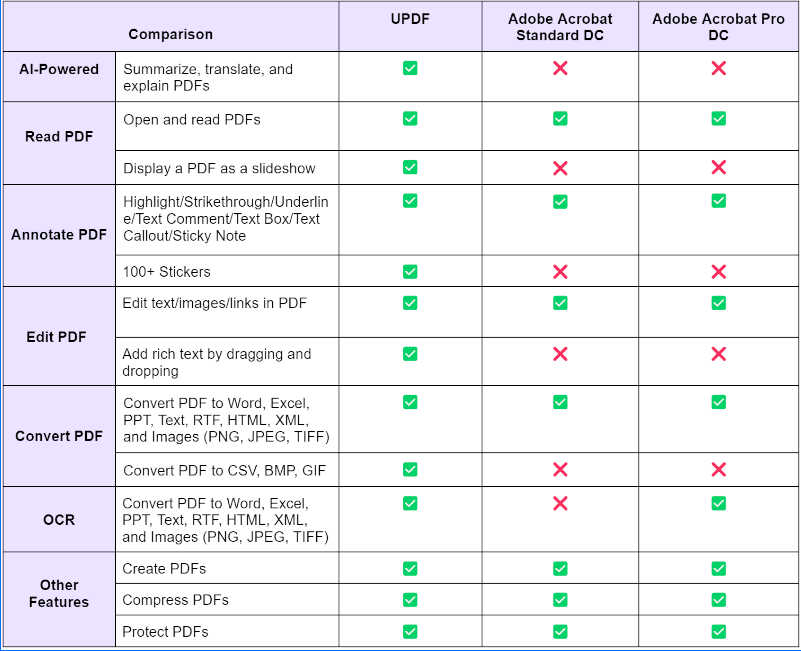
And to make the PDF processing easier for everyone today, we are going to introduce to an AI-powered PDF tool named UPDF. Compatible across all platforms — Windows, Android, macOS, iOS, and even iPadOS — UPDF has rapidly ascended the ranks to become Adobe Acrobat’s fiercest competitor. And if that’s not enough to grab your attention, UPDF is currently running a promotion where you stand to win an iPhone 15 and Airpods, and get 58% off on UPDF Pro with AI added-on

Getting in-depth into UPDF:

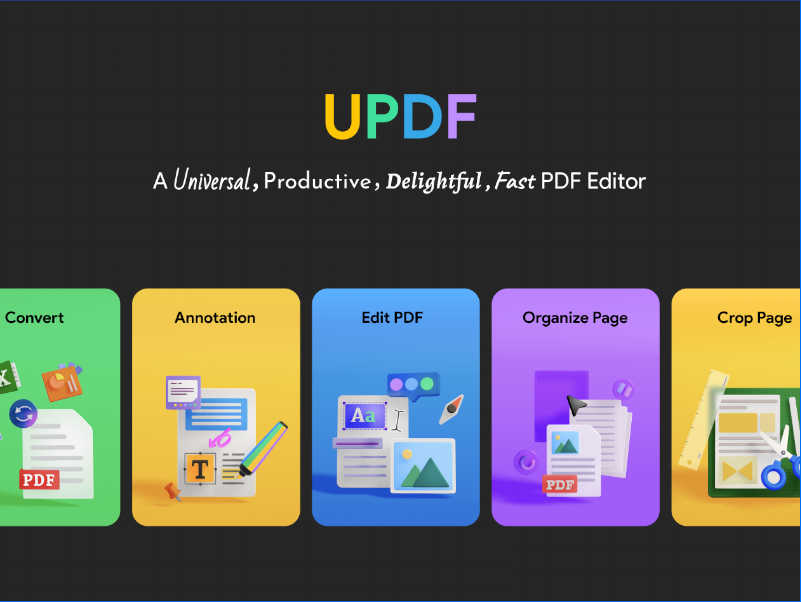
With its intuitive interface and powerful features, UPDF makes a must-have tool for anyone who deals with PDFs regularly. Here some of the key features:

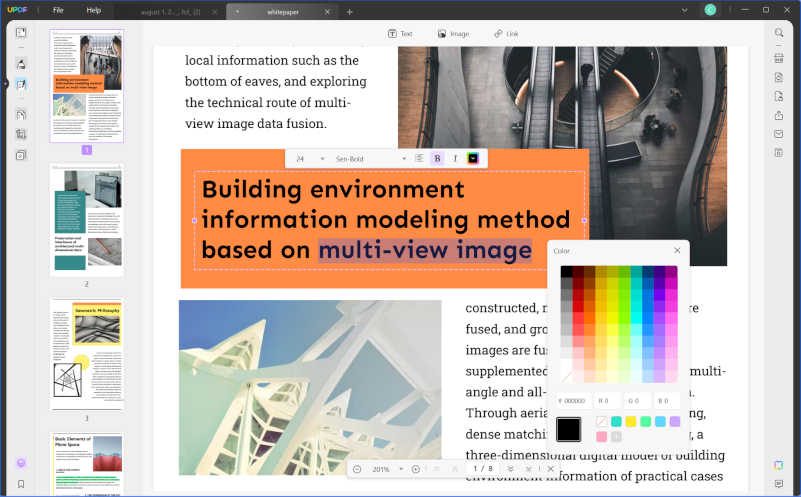
  • Edit Text and Images: UPDF allows you to edit text and images just like you would in a Word document. You can change fonts, resize text, and even reposition images without leaving your PDF.
UPDF Edit Text and Images
  • Convert PDFs with Ease: Need to convert your PDF to another format? UPDF has got you covered. It supports conversions to Word, Excel, CSV, PowerPoint, RTF, and even image formats like PNG, JPEG, BMP, TIFF, and GIF.
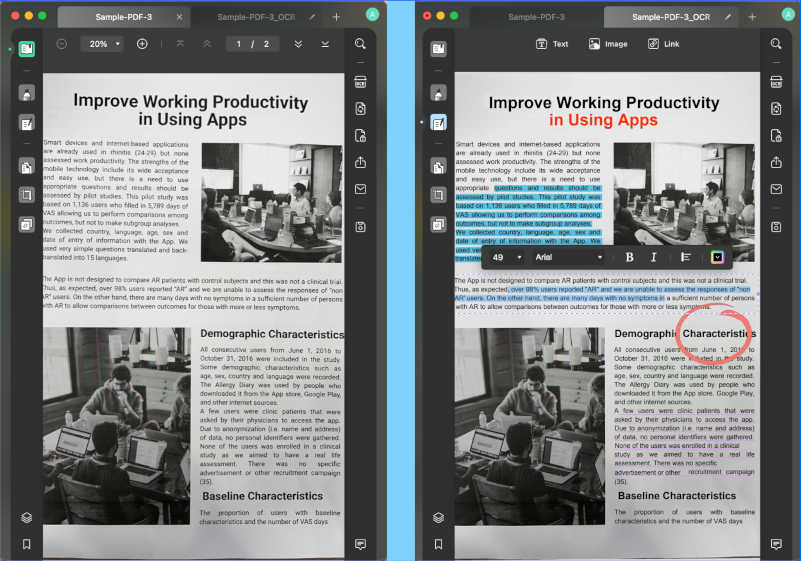
  • OCR Capabilities: Scanned a document and saved it as a PDF? UPDF’s advanced OCR feature can identify text in over 38 languages, transforming your scanned PDFs into editable and searchable files.
UPDF OCR Capabilities
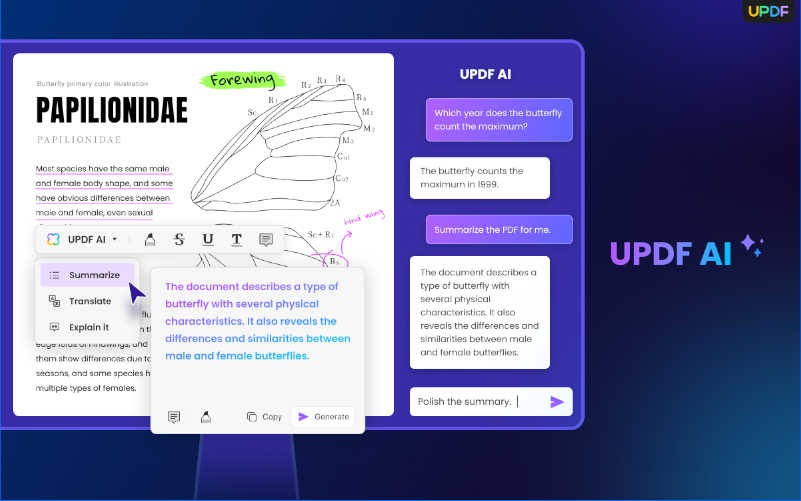
  • UPDF AI: UPDF AI takes things to the next level. It can summarize long PDFs, translate content into different languages, and even provide explanations for better comprehension — all in just a few clicks.
UPDF AI
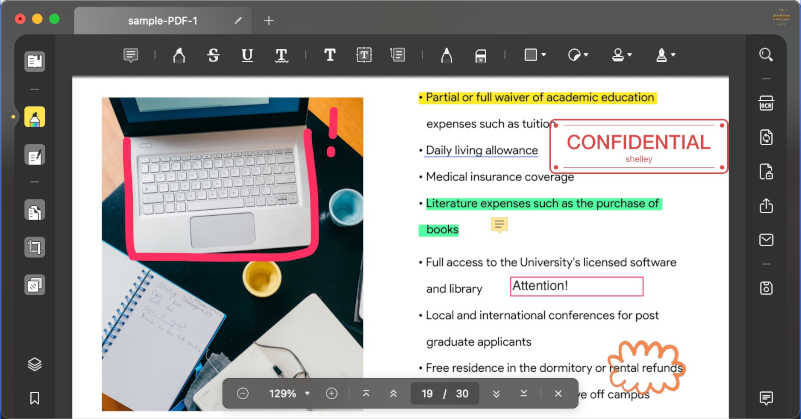
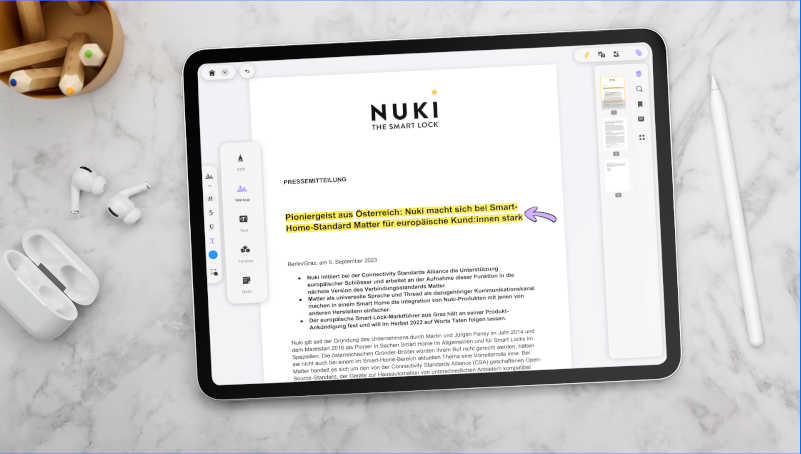
  • PDF Navigation and Annotation: Reading and annotating PDFs is a breeze with UPDF. It offers a variety of annotation tools, including text highlights, shapes, and more.
  • Manage Your PDF Pages: Whether you need to extract, rotate, rearrange, or delete PDF pages, UPDF makes it simple and efficient.

Why do we think UPDF is the best alternative to Adobe Acrobat?

For many years, Adobe Acrobat has been the go-to software for PDF editing, conversion, and signing. However, there is now a new alternative in the market that is challenging Adobe’s dominance and providing a compelling option for users. UPDF is an excellent alternative to Adobe Acrobat, and it offers a wide range of features that make it a great choice for PDF editing. So now we will explore the reasons why UPDF is a compelling Adobe Acrobat alternative.

1. A Wallet-Friendly Choice:

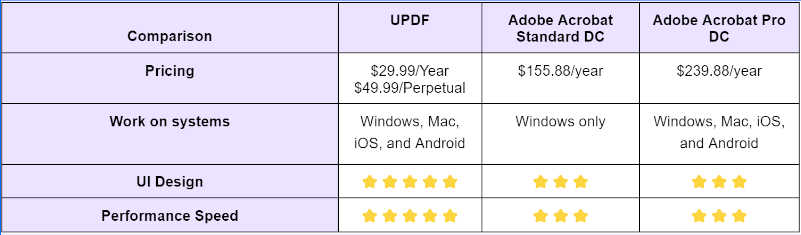
Let’s start with the elephant in the room — the cost. Adobe Acrobat Pro DC comes with a price tag of $239.88 per year. UPDF, however, offers a far more budget-friendly option at just $29.99 per year. That’s a staggering difference, especially for small businesses and individuals who are looking for quality without breaking the bank.

UPDF Wallet-Friendly

2. Clear and Intuitive User Interface:

One of the most compelling reasons to consider UPDF over Adobe Acrobat is its user interface. Adobe Acrobat, while powerful, often overwhelms users with its complex and cluttered interface. UPDF, on the other hand, offers a clean, intuitive interface that even a first-time user can navigate with ease.

UPDF Clean UI

3. Universal Compatibility:

Adobe Acrobat subscription is limited to Windows, but UPDF takes compatibility to the next level. With a single-user license, you can use UPDF across Windows, Mac, Android, and iOS platforms. This is really helpful for those who work across multiple devices and need a seamless experience.

UPDF Universal Compatibility

4. Simplicity Meets Functionality:

Many users find themselves in a dilemma:

  • They don’t have the time to learn complicated features.
  • They don’t need many of the professional, in-depth features that come with high-end software.
  • They’re not ready to invest in professional software, but free products just won’t cut it.

UPDF addresses these pain points by offering a user-friendly interface that doesn’t require a steep learning curve. It provides the essential features that meet the needs of the average user, without overwhelming them with professional-level tools. And all of this comes without the need for a hefty investment.

UPDF Functionality

5. A Feature-Rich Experience:

From customizable stickers that add a personal touch to your documents, to a drag-and-drop text feature that simplifies the editing process, UPDF brings a fresh perspective to PDF editing. It even offers unique features like presenting PDFs as slideshows and an affordable OCR tool for scanned documents. And let’s not forget the AI Assistant that can summarize, explain, and translate your PDFs. In short, UPDF provides a feature-rich experience that is not only comparable to but, in many ways, exceeds that of Adobe Acrobat, making it a compelling choice for a wide range of users.

UPDF Feature-Rich

Conclusion:

So, as we wrap up, the question isn’t whether you should consider UPDF as your go-to PDF solution. The real question is, can you afford not to? With its unparalleled features and user-friendly interface, UPDF is setting new industry standards. Maybe at first, you can try the free version to get familiar with the tool. But we advise you to upgrade to UPDF Pro and unlock the program’s full capabilities. Also, UPDF is currently offering an incredible 58% discount on their Pro version with an AI add-on and stand a chance to win a prize worth $599 and free orders.

The New Cost of Tweeting: X Introduces $1 Annual Fee

Twitter Bird Logo to be Replaced with X

X, formerly known as Twitter, has announced a $1 annual fee for new users. This decision, effective immediately in New Zealand and the Philippines, marks a significant departure from the platform’s long-standing free-to-use model.

The fee is not a revenue-generating tactic, according to company statements. Instead, it serves as a measure to combat the proliferation of bots and spam on the platform. “This new test was developed to bolster our already successful efforts to reduce spam, manipulation of our platform, and bot activity,” the company said.

The announcement has elicited a range of reactions from the public. While some see it as a necessary step to maintain the platform’s integrity, others question the implications for user privacy and data security.

Elon Musk, who acquired the social media giant nearly a year ago, supports the fee as a way to “fight bots without blocking real users.” He has previously expressed his ambition to transform X into an “everything app,” a platform that goes beyond social networking to facilitate direct purchases and other transactions.

The new fee comes at a time when X is grappling with advertising challenges. Many major brands have withdrawn their advertising campaigns due to concerns about content moderation. The recent appointment of Linda Yaccorino as CEO aims to restore advertiser confidence, although questions remain about the platform’s long-term strategy.

While the fee is currently limited to new users in New Zealand and the Philippines, there is no official word on when it will be expanded to other countries. Existing users are exempt from the charge.

Xiaomi Introduces HyperOS as the Successor to MIUI

Xiaomi Introduces HyperOS

For over a decade, Xiaomi phones have used an operating system called MIUI. But now, Xiaomi is switching gears. They’re introducing a brand-new operating system called HyperOS.

HyperOS isn’t just for phones. It’s designed to integrate the entire ecosystem of Xiaomi products, spanning over 200 categories. From smart home devices to cars, HyperOS is set to become the central nervous system of Xiaomi’s ever-expanding universe.

The new OS is a fusion of “deeply evolved Android” and Xiaomi’s self-developed Vela system. This blend rewrites the underlying architecture, laying the groundwork for the “Internet of Everything.” Xiaomi CEO Lei Jun elaborated on Weibo, stating that the new system aims to support tens of billions of devices and connections in the future.

HyperOS will make its grand entrance with the launch of the Xiaomi 14 series. While the exact release date remains under wraps, the phones are expected to be unveiled following the launch of the Snapdragon 8 Gen 3 processor on October 24. The Xiaomi 14 and Xiaomi 14 Pro are rumored to feature a 6.4-inch and 6.7-inch screen, respectively, both boasting a 1440 x 3200 pixels resolution.

Xiaomi HyperOS is not just a replacement for MIUI; it’s a vision for the future. As Lei Jun puts it, the new OS is “preparing a public base for the Internet of Everything for tens of billions of devices and tens of billions of connections in the future.”

Intel Core 14th Gen Desktop Processors: A Closer Look at the Core i-14000 Series

Intel Core 14th Gen Desktop Processors

Intel lifted the curtain on Intel Core 14th gen desktop processors based on the tried-and-true Raptor Lake architecture, and will be available for pre-order starting October 17, 2023.

This Raptor Lake Refresh, also known as the Core i-14000 series, features six new models that promise to redefine performance standards, particularly in the gaming arena. The lineup includes three K-models and their KF counterparts without integrated graphics, priced similarly to their predecessors.

Intel claims that the new series offers a 23% increase in gaming performance compared to its leading competitor, AMD. However, these claims have yet to be substantiated through independent benchmarks. The new processors are designed to offer more cores and higher boost frequencies, aligning with the company’s focus on desktop performance.

Core i9:

The Core i9-14900K and its variant, the 14900KF without an integrated graphics unit, are the flagship models of this new series. These processors feature a total of 24 cores, including 8 P-cores and 16 E-cores. Only the P-cores support Hyper-Threading, resulting in a total of 32 threads. The maximum clock speed has been increased from 5.8 GHz to 6 GHz. The processors also support DDR5-5600 RAM and retain the same L2 and L3 cache sizes as their predecessors.

Core i7: 

The Core i7-14700K and its variant, the 14700KF, represent a significant upgrade over the previous generation. These processors now feature 20 cores, divided into 8 P-cores and 12 E-cores, with a maximum of 28 threads. The maximum boost clock has been increased by 200 MHz to 5.6 GHz. Additionally, the L2 cache has been increased from 24 MB to 28 MB, and the L3 cache from 30 MB to 33 MB.

Core i5:

The Core i5-14600K and its variant, the 14600KF, show no significant changes compared to their predecessors. These processors continue to feature 14 cores, divided into 6 P-cores and 8 E-cores, with a maximum clock speed of 5.3 GHz.

Compatibility and Connectivity:

All new models are compatible with existing Z790 and Z690 motherboards, eliminating the need for additional hardware purchases. They also support upcoming Wi-Fi 7 and Bluetooth 5.4 technologies, although these features will be enabled through external chips. The processors come with integrated modules for Wi-Fi 6E and Bluetooth 5.3 and support Thunderbolt 4 and Thunderbolt 5.

Specs at a Glance:

FeatureCore i9-14900K/KFCore i7-14700K/KFCore i5-14600K/KF
ArchitectureRaptor LakeRaptor LakeRaptor Lake
Cores & Threads24 (8P+16E), 3220 (8P+12E), 2814 (6P+8E), 20
Clock SpeedUp to 6 GHzUp to 5.6 GHzUp to 5.3 GHz
Cache32 MB L2, 36 MB L328 MB L2, 33 MB L320 MB L2, 24 MB L3
RAM SupportDDR4-3200, DDR5-5600DDR4-3200, DDR5-5600DDR4-3200, DDR5-5600
Intel Core 14th Gen Desktop Processors Specification