Home Blog Page 118

Amazon India Quietly Launches Prime Gaming

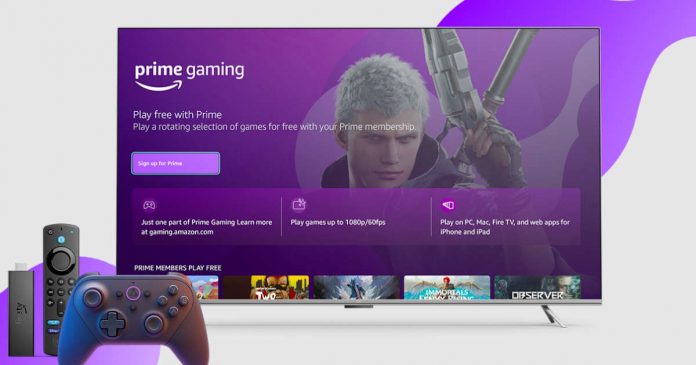
Amazon Prime Gaming

Amazon India has quietly launched Prime Gaming, a service that provides access to the latest and trending video games for Amazon Prime subscribers in India. 

Unlike Netflix Gaming service, with Amazon Prime Gaming, subscribers can access games on the official website and download them for free on their Windows PC. To celebrate the launch of Prime Gaming, Amazon is offering free games such as Brothers: A Tale of Two Sons, The Amazing American Circus, and Doors: Paradox through the Amazon Games app, which is currently available for the Windows platform.

Regarding modern AAA titles, Amazon offers in-game content for popular games such as Call of Duty: Warzone 2.0 and Modern Warfare 2, Destiny 2, FIFA 2023, Rogue Company, and more. Users must log in to third-party game stores such as Epic Games Store, Bungie, Activision, or Rockstar Games to claim these games and bonuses. Users must purchase these games separately to access in-game content, such as the showdown bundle on Call of Duty or the zero chill ultimate team pack in Madden 3. The in-game content from Prime Gaming will unlock special weapons, features, or new capabilities.

Prime Gaming has in-game content for many popular AAA titles, including GTA: V online, Red dead online, PUBG, Deathloop, Battlefield 2042, and more.

Regarding pricing, Amazon Prime Gaming is included with the Prime subscription. You can access Prime Gaming for free in India if you are a Prime subscriber. For those not already subscribed to Prime, Amazon offers a monthly subscription for Rs 179, a quarterly subscription for Rs 459, and an annual subscription for Rs 1,499. This includes free shipping, access to Amazon Prime Video, Prime Music services, and Prime Gaming.

Amazon Prime Gaming provides Indian users access to various games and in-game content, including popular AAA titles and free games. With new content and games added every month, this service will surely be a hit with gamers in India.

How To Install Google Chrome Extensions And Firefox Extensions On Android Browser

Install Google Chrome extensions on Android

What if I say, now you can easily install Google Chrome extensions and Firefox extensions on Android browser.

We all love Google Chrome — despite being a RAM eater, we all installed and use Google Chrome as our primary web browser on our PC because of its features like bookmark and history syncing with Google and Chrome extensions to ease up our tasks — that were missing in other chromium-based browsers. Like Chrome, Mozilla Firefox for desktop also supports account synchronisation, extension, and addon installation on the browser.

But when comes to smartphones, both Google Chrome and Firefox fail to implement some of their desktop features to the Android platform — like we can’t install Google Chrome or Firefox extensions on Android version. Although recently Mozilla has added this feature on Android, now you can install Firefox extensions on Android browser. Don’t know why Google is not adding this feature on Chrome for Android but another Chromium-based browser is here to solve this issue.

Install Google Chrome extensions on Android:

Knowing users’ needs, in its latest update, Kiwi Browser based on Chromium added support to Chrome extensions where users can easily install useful Chrome extensions on Android and use them just like in Chrome for desktop.

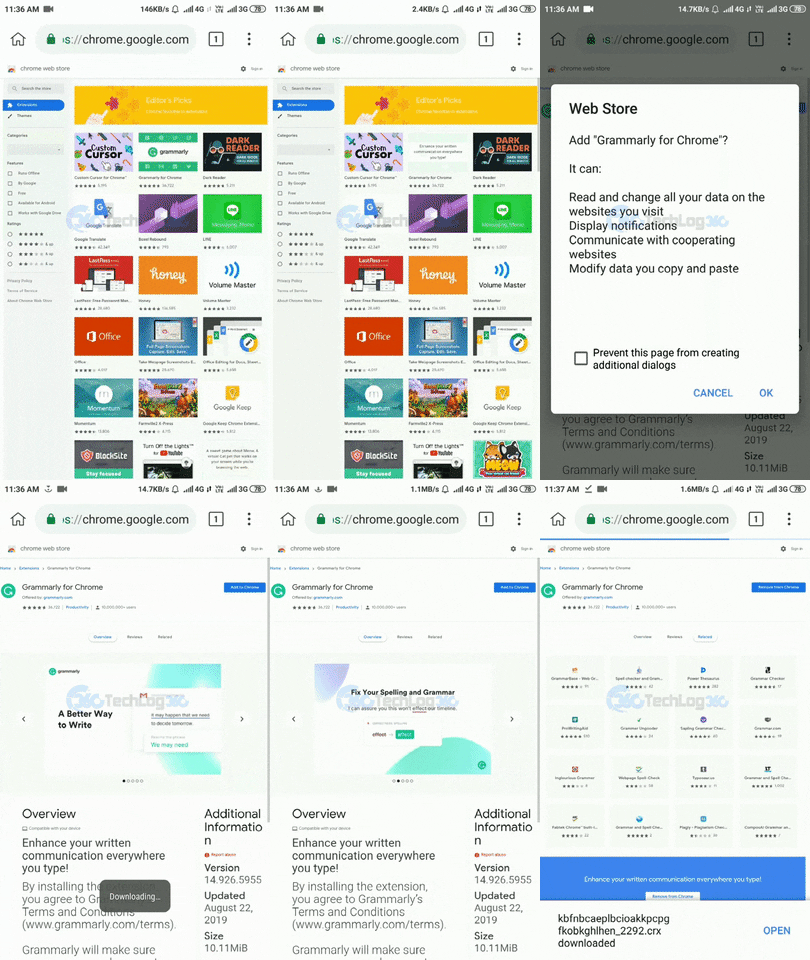
Follow these steps to install Chrome extensions on Android using Kiwi Browser:

1. Install the latest version of Kiwi Browser from Google Play.

2. First, we have to enable extension support on Kiwi browser. For that enter ” chrome://extensions” in the address bar and enable “Developer mode“.

Install Google Chrome extensions on Android

3. Next, go to Chrome store on desktop mode and choose the extension you like to install by tapping “Add to Chrome” button.

Install Google Chrome extensions on Android

4. That’s it. Also, you can see all installed extensions and disable or remove them by going to “options > Extensions

Install Google Chrome extensions on Android

Apart from Chrome extensions support, the Kiwi browser also comes with many other features like night mode with customizable contrast and grayscale mode, a custom Downloads folder, and external download manager support. It also comes with a built-in adblocker or you can easily install your own adblocker. The only thing missing in Kiwi Browser is bookmark cloud syncing but it can solve d to an extent by the bookmarks import/export feature.

Looking at all browsers available for Android, the Kiwi browser is the only one that let you install Chrome extensions.

Install Firefox extensions on Android:

As it’s a new feature recently added to Firefox for Android, for now, you will be able to install a selection of plugins specifically recommended by Mozilla. But in the future, it is not ruled out that you can install any Firefox extension on Android browser.

To get started, you can take a look at the add-ons compatible with Firefox for Android. For now, they are few, but the list will grow over time.

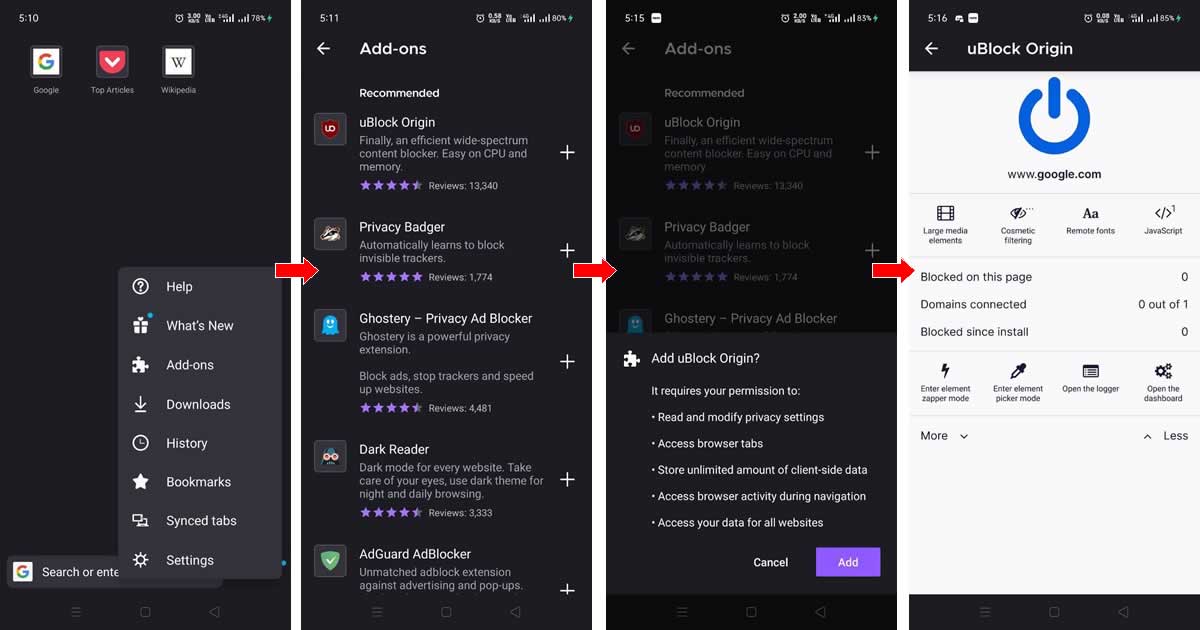
Let’s see how to install extensions on Firefox for Android. It’s easy and fast, and it will make your Firefox work much better.

1. If you have the latest version of Firefox for Android, you will find the add-ons in the Firefox drop-down menu.

2. Now you see the list of add-ons compatible with Firefox for Android.

3. From the list of add-ons, click on the + symbol, and a message will appear asking if you want to install the said add-on and the permissions it needs to function. By clicking on Add, you will confirm the installation.

4. Depending on the plugin, you can customize its operation or simply activate and deactivate it temporarily.

Install Firefox extensions on Android

How to Create a Perfect Pop-Up Window in 3 Simple Steps

Perfect Pop-Up Window

Want your website to attract more email subscribers? Or perhaps you’d want to provide customers who buy at your online business a special discount? It sounds like you need a pop up if you’re attempting to accomplish any of these things. Despite their negative image, pop-ups are crucial in online marketing. A pop up typically converts at a rate of about 3%. However, with a little effort, you can narrowly target your audience and increase conversion rates to above 5% or even 10%.

Sounds promising? In this post, we’ll outline the best pop-up builders and demonstrate how to make a pop-up that converts in just 3 easy steps. 

How to create a pop-up in 3 steps:

Set your goals 

I advise you to start by determining the purpose of your pop-ups before you start designing them. This will assist you in selecting the best pop-up form template for your requirements. Pop-ups frequently assist in achieving the following objectives:

  • Collecting email signups
  • Promoting an offer
  • Saving abandoned carts

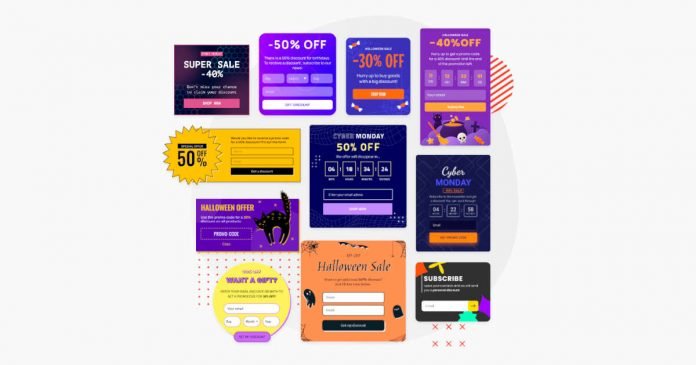
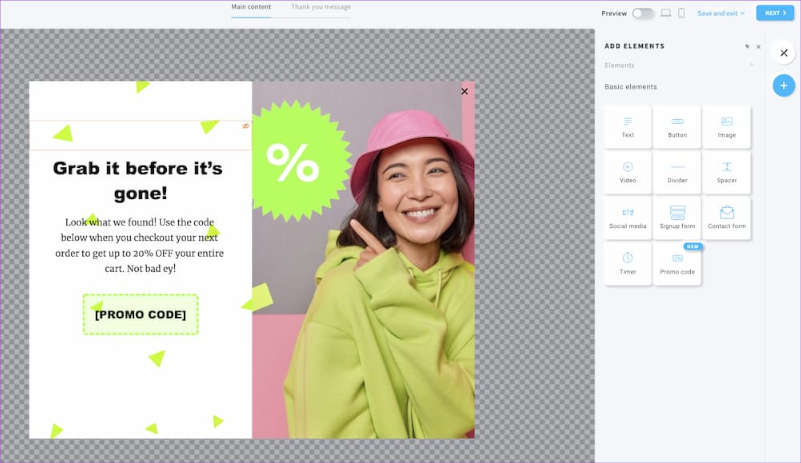
If you aim to save abandoned carts, you should consider using a pop-up that can suggest a call-to-action button (CTA) or/and a special discount code:

Perfect Pop-Up Window 1

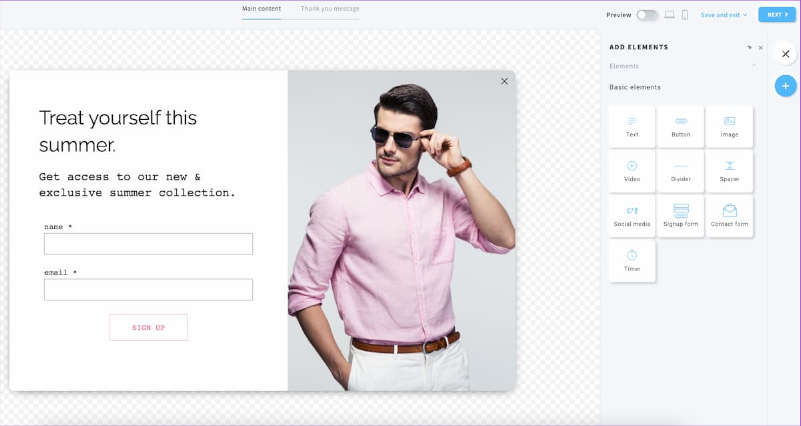
Use a pop-up form with input fields, such as name and email address, if you want to gather signups for your email marketing list:

Perfect Pop-Up Window

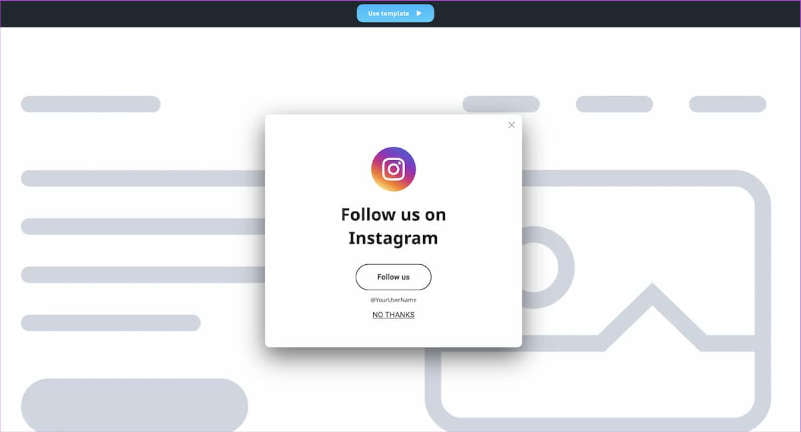
It suffices to have a pop-up window containing your sales page’s URL, a picture, some text, and a CTA button when marketing an offer.

Perfect Pop-Up Window

Remember, that most pop-up builders include a variety of pop-ups, including:

  • Entry pop-ups that appear right when a person enters the website;
  • Exit-intent pop-ups emerge when a user’s cursor departs from the main window in an attempt to shut the tab;
  • Pop-ups that display after a user has spent a certain length of time on a website are known as time-delayed pop-ups;
  • After a user has scrolled down a certain amount of a page, scroll pop-ups may appear;
  • When a user clicks on a pop-up button, one-click pop-ups will appear.

These pop-ups provide many ways to engage a user. For example, entry pop-ups appear more frequently than time-delayed pop-ups, but they also frequently have lower conversion rates.

You may further limit who will see your pop-ups by adding the following criteria:

  • The page(s) on which your pop-up window should or shouldn’t be displayed;
  • How frequently the pop-up form will appear;
  • When the pop-up form should disappear;
  • Who should view your pop-up form;
  • Which devices should display your pop-up form;
  • In which countries your pop-up should be visible.

All these options might feel a bit overwhelming at first. Thus, our advice is to start small.

Find a proper pop-up builder 

These days, pop-up form builders include several useful features that would be challenging to add on your own. The majority of pop-up form builders include:

  • Pop-up form templates that are already established can expedite the design process;
  • Using targeting choices, you can connect with even the most niche audience;
  • The ability to edit and preview your pop-up forms will help you make sure they look beautiful wherever and whenever they are shown.

Naturally, these features vary amongst various pop-up form builders. You should consider which tool will be most cost-effective and suitable for your particular use case. 

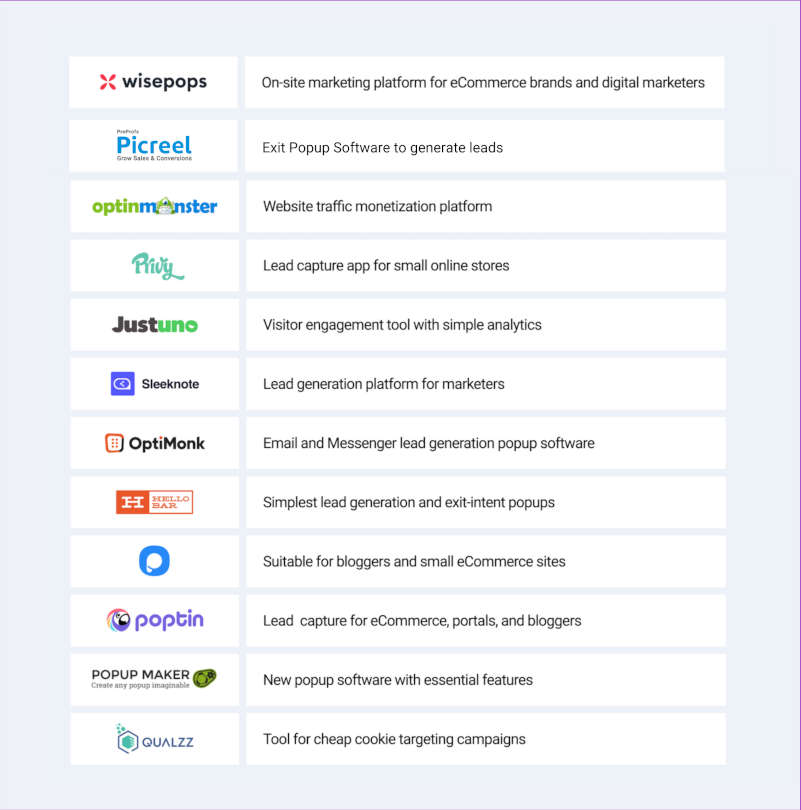
The list of the top pop-up builder tools for beginners can be seen below:

Perfect Pop-Up Window

Tip: Find a builder that can be easily combined with the rest of your marketing resources and the best marketing software currently on the market.

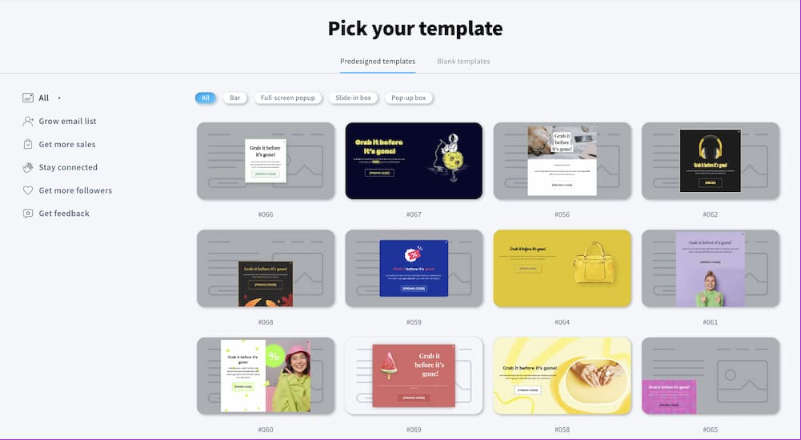
It’s time to select your pop-up template and enter your text after establishing your aim and locating the appropriate tool. Feel free to spend a few minutes perusing the templates offered by the majority of pop-up builders. Remember that you can completely alter the template, so don’t worry if it doesn’t immediately fit your logo.

Perfect Pop-Up Window

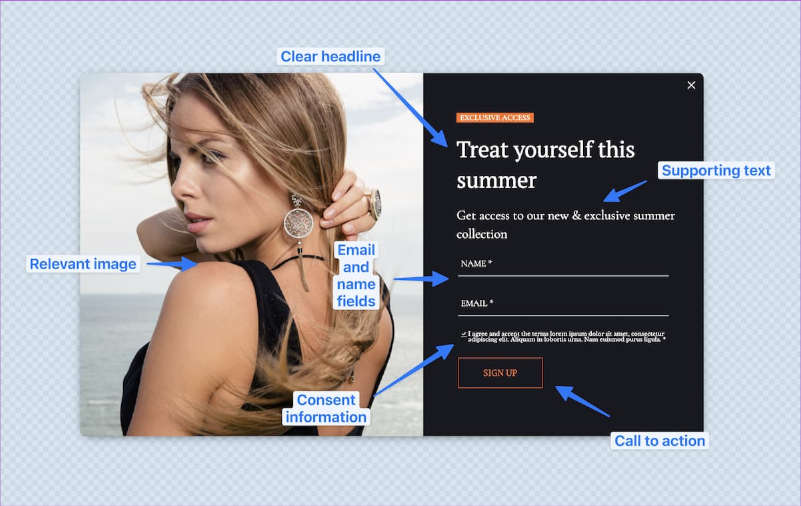
It’s time to alter the template and add your content after you’ve chosen it. Most pop-ups consist of:

  • A clear headline;
  • A detailed explanation of the offer;
  • An image relevant to the offer;
  • Fields for name and email field;
  • CTA button to either navigate to the offer page or submit the form;
  • Consent details outlining who will process the data and how;
  • Unchecked checkboxes allow site visitors to affirm their desire to join the list.
Perfect Pop-Up Window

Preview and publish

Check how your pop-up form appears on desktop and mobile devices by previewing it in your pop-up builder. Click save and move on to the installation phase if everything seems good.

The majority of pop-up creators will produce a piece of Javascript code that you must then install on your website.

The optimal approach is as follows:

  1. If you have a WordPress site, head over to the Appearance > Theme file editor > Theme header, and paste your Javascript code at the bottom, right before the </head> part.
  2. Find a block that allows you to insert your code and paste it there if your website was created using another website builder.
  3. Use a solution that can put external Javascript code on your website for you, such as Google Tag Manager.

Keep in mind that you may always improve your pop-ups after you press the publish button. To make sure your pop-ups reach the most promising audience, you may improve your message, design, and targeting.

Start building your first pop-up today

The only technically challenging component of the procedure, as you have learnt today, is the installation step. There shouldn’t be anything preventing you from growing your email list or utilizing pop-ups to promote your offerings as we covered everything in our thorough overview.

How To Create A Strong Password? How To Safeguard Your Super Secure Password From Hackers?

create a strong password

Let’s be honest — we’re far too negligent with our passwords. Everyone has done it — using the same password for many accounts to make it simpler to remember. And because no one has harmed our accounts thus far, we believe our passwords to be strong.

Are you sure you are using a strong password for every online account? Do you follow all necessary precautions to safeguard your super secure password from hackers?

Still ambivalent? Then this article is for you.

A password for your online account is more than something that grants access — it protects your online data; it protects your privacy. But it also doesn’t mean simply creating a password shields your data from hackers. Else you should make sure that how strong your password is and that you are following all necessary precautions to protect your secure password from a possible data breach.

Almost any inexperienced hacker can now brute-force your password. According to some information security experts, guessing a typical user’s password takes roughly three hours.

How to create a strong password?

Creating a strong password is not a hectic task. There are many online password generators out there to do it for you. But passwords created by those generators are some random characters in a senseless way. I am sure you wouldn’t remember them next time when you try to log in. So create one by yourself. Create one with words that you font of — that you remember without noting it anywhere. But make sure the password is strong enough to withstand a cyber attack.

Here are some tips for creating a strong password. Tweak your current password according to these tips.

1. Avoid easy-to-crack passwords

First, avoid the most generic type of passwords. Like “12345“, “<yourName>123“, “QWERTY“, names of close family members or friends, your name, words in the dictionary, common names etc. All these are considered weak passwords and easy to hack.

2. A long password is always a strong password

Yes, long passwords are always strong passwords because a password with all lowercase 6 characters can be hacked within 10 minutes. So prefer at least 10-15 character length for your password. And don’t forget to string an easily remembered phrase together to create a password that’s harder to crack.

eg: Password: techlogwebmaster360

3. Add complexity with additional characters

Simply making the character length to 10-15 is not a strong password. Tweak your password by adding additional characters and the use of upper case letters, numbers and symbols. Passwords like these are difficult to crack, may be impossible.

eg: Password after tweak: #TECHlogwebm@$ter360

Follow these tips next time while creating a password. Just know, the easier is a password to remember, easier it is to crack. While, the harder a password to remember, harder it is to crack.

How to safeguard your super secure password from hackers?

Now you have a strong password. Make it more secure by following these tips.

1. Double check websites you enter login credentials

Always be cautious about websites you enter your username and password. Because may cybercriminals can compromise your account with a mere phishing attack. So don’t forget to double each time.

  • Check the website is protected with SSL certificate — URL starts with https://.
  • Check domain name spellings.

2. Don’t share your passwords

Whatever you do, don’t let other people know what your passwords are. Don’t brag that all your banking information and other important accounts are protected by a password that is your child’s name and birthday. And if someone needs access to your account for anything, don’t tell them the password. If you must give them access to an account, type your information in yourself.

3. Change passwords every 3 months like a toothbrush

It will be safe if you change your passwords every 3 months. Changing passwords often is important because passwords are sometimes stolen without the knowledge of the victim, and stolen passwords often aren’t used immediately. They’re collected, sold to organized crime, rebundled and resold, and left unused for some time. Even if you’re not aware your password was stolen, if you change it periodically you may change it before a thief has an opportunity to use it.

4. Activate Two-Factor Authentication

Even strong passwords aren’t 100 percent hacker-proof. This is where two-factor authentication comes in handy. This means that to access your accounts, you not only enter a password but also verify that you’re accessing your account by either confirming through an auto-sent email or text message or by biometrics. This gives your accounts an extra layer of protection.

5. Use a different password for different accounts

This is important, always use different passwords for different accounts. Means different password for your Email account or social network account. Because if your password is stolen in a data breach then you should expect that the crooks will try it out on Facebook, Twitter, WordPress and any other websites they think you might be using too.

I know for some people it is hard to remember different passwords, so they mostly use the same passwords for their all online accounts. Remember, today’s web browsers, can save passwords for each account, and if you do forget, almost every website allows you to retrieve and/or change that password or use password manager apps like Keeper.

Every day we come across the news regarding hackers compromising different accounts. The fact is that most of them are happened due to the implementation of weak passwords for your online accounts. Hackers compromise your personal accounts by different methods. In fact knowing the anatomy of data breach sometimes doesn’t protect your online data.

So upgrade your security with a better password — a strong password, a super secure password — today itself. Because your online data is precious and you are the only one responsible for it, so make sure you have done all the necessary steps to safeguard it.

Why is a strong password important?

A good password keeps you secure online. Every day, brute-force assaults and numerous data breaches occur, impacting personal and professional accounts. As a result, each account requires a unique password to secure your personal information and funds.

Should You Use Password Managers?

Using password managers is a great move. The password manager will assist you in changing passwords on your accounts on time and will automatically provide you with a strong password when creating a new account.

Google Developing AI Model To Decipher Doctors’ Handwriting In Prescriptions

Google Developing AI Model

Google has announced that it is developing an artificial intelligence (AI) model that can decipher hard-to-read handwriting, focusing on notes and prescriptions written by doctors. 

The search giant made this announcement at its annual conference in India on Monday, December 19th. Google demonstrated this feature during the event, showing its ability to detect drug names in a handwritten prescription.

There are currently no details on when this new text transcription feature is expected to launch. It is known that there is still a lot of work to be done before this system is ready for the real world.

The new feature will be part of the Google Lens utility, which is currently built into the search engine. Google Lens is a multi-purpose AI-based object recognition tool that can be used to detect objects and translate languages. Currently, the Google Lens app can already be used to digitally transcribe handwritten notes, although this function depends on the legibility of the handwriting. 

Doctors are known for their often-poor handwriting, so this new feature could be very useful. Patients will be able to take a picture of a prescription from a doctor, and the AI will be able to decipher the prescribed medications. Google is working closely with pharmacists worldwide to implement this feature.

If implemented, this feature could help to improve patient care and potentially even save lives. It is not yet known when the feature will be made available, but it is clear that Google is working hard to make it a reality.

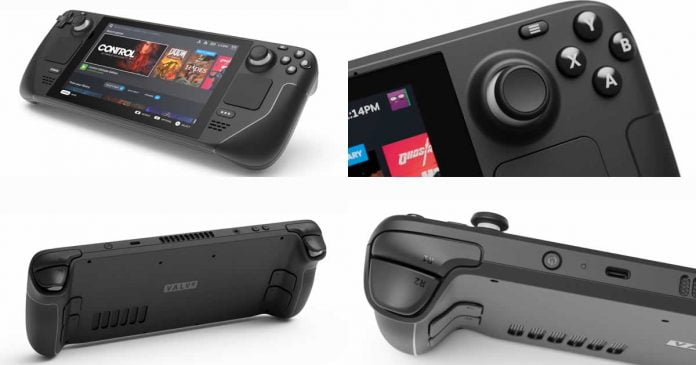
Valve’s Steam Deck Console Continues to Evolve

Steam Deck Handheld

Valve’s Steam Deck handheld console has proven to be a hit among gamers since its launch, thanks to a range of hardware and software optimizations that have made it a standout in the market. 

The Proton compatibility layer, in particular, has allowed the successful playing of Windows games on Linux. Recent updates have further increased the number of fully compatible games to over 2,500, with twice as many being playable on the console.

Despite its success, Valve is not resting on its laurels and is constantly working to improve the Steam Deck. In a recent interview with The Verge, developers Lawrence Yang and Pierre-Loup Griffais discussed some areas they focus on in future updates.

One of the main areas of focus is the battery, which has recently undergone some optimizations. While the battery is glued in place, making it more difficult to replace than other components, the new revisions of the Steam Deck have applied the glue in a different way to make it easier to detach. 

Another area that Yang and Griffais are looking at is the display, with the possibility of incorporating an OLED display to improve picture quality. This is based on customer feedback and test reports indicating that upgrades in this area are often requested.

While there are no plans for significant improvements to the hardware, the developers are focusing on software features for future updates. Yang and Griffais indicated that most of their efforts are currently being directed towards the software side to continue to improve the overall user experience on the Steam Deck.

Despite its popularity, the Steam Deck is still far behind the Nintendo Switch in terms of sales. While the one million unit mark was reportedly broken in October, the Switch has sold over 140 million units. However, Yang and Griffais are not concerned about the sales figures, stating that the efficiency of the AMD SoC specifically developed for the Steam Deck is so good that commercially available notebook components may not reach it. They also mentioned that keeping the performance constant offers other advantages, such as allowing customers to easily assess the performance they are getting and allowing developers to better adapt their games to the Steam Deck during development.

In terms of future development, Yang and Griffais stated that the focus would be on the Steam Deck, but they are open to collaborating with third parties on the project. They also mentioned that while they would like to continue working on the Steam Box and the Steam Controller, there are currently insufficient resources to pursue these projects in parallel.

Overall, it’s clear that Valve is committed to continuously improving the Steam Deck and providing a top-notch gaming experience for its users. With a focus on the battery, display, and software, and the possibility of collaboration with third parties, the future looks bright for the Steam Deck.

Elon Musk Has Put His Job As Company CEO In The Hands Of Twitter Users

Elon Musk and Twitter

After relaunching the Twitter Blue subscription, now Elon Musk asked users to vote in a poll on Twitter on whether he should leave his position as CEO of the social network. 

After 8 hours of the survey, the poll ended with over 17 million votes, with 57.5% of users voting in favour of a change in leadership and 42.5% voting against it. 

Shortly after the poll began, Musk tweeted that people should be afraid of their desires because they can come true, and those who seek power are the least deserving of it. He also stated that major changes to the social network’s policy will now be accompanied by polls.

Twitter has faced criticism recently for introducing a rule prohibiting the promotion of other social platforms. The firm said that it would stop allowing free marketing of certain social media platforms, which might result in the banning of connections to rival websites — potentially leading to the blocking of links to competing sites such as Facebook, Mastodon, Trump’s Truth Social, Tribel, Post, and Nostr. 

The policy sparked widespread backlash, with many referencing a June post by Musk condemning closed ecosystems. The rule was later reversed, and the relevant posts were deleted from the Twitter Support channel and guidelines.

Shortly after the takeover, Musk stated that he did not want to be the permanent CEO of Twitter. He is only serving in the role until existential crises are resolved. He has also said that the CEO’s job requires someone who can like pain and keep Twitter alive. It is unclear how the recent poll result will impact his role as head of the social network. However, Tesla stock saw a 5% increase following the end of the poll.

Musk has stated that he will follow the result of the poll, although it is unclear at this time what the implications will be for his role as CEO.

Dell Introduces Concept Luna Modular Laptop: Repair And Upgrade Without Screws Or Glue

Dell Concept Luna Modular Laptop

Dell has introduced the Concept Luna, a prototype for a revolutionary modular laptop that can be taken apart in less than a minute without using screws or glue. This marks a significant improvement from Dell’s previous modular laptop concept, which required glue and screws to attach certain components.

Dell revealed in a video presentation that the Concept Luna could be opened and all parts removed in less than a minute. The components are similar to LEGO blocks in that they readily slip together. A notable characteristic is that the laptop lacks a single cable. Therefore the user will not have to deal with this issue.

To disassemble the Concept Luna, all users have to do is clamp a special hole in the laptop’s case with a pin, remove the insert above the keyboard, and then access the desired component, such as the speakers, battery, fan, motherboard, or display. This makes it easy for users to repair or upgrade their laptops by simply replacing a faulty component with a new one or swapping out an old component for a newer one.

The concept behind Concept Luna is to create more maintainable and environmentally friendly gadgets. Allowing users to easily replace faulty components reduces the need for electronic waste and makes it easier for people to reuse and recycle their old devices.

At this time, it is unclear when Concept Luna will be available for commercial implementation. However, the concept has the potential to revolutionize the way we think about laptop repair and maintenance, making it easier and more convenient for users to keep their devices in good working order.

It could also help reduce the amount of electronic waste that ends up in landfills, making it more sustainable for individuals and the planet. To do this, Dell has even created a system based on robots that identify laptops and extract components that may be useful. With this, they would reduce the environmental impact and automate the process, saving resources.

The current Concept Luna prototype is a Dell-Intel collaboration based on 12th-generation (Alder Lake) processors.