Home Blog Page 144

Intel Revealed Its New 13th Generation Raptor Lake Processors

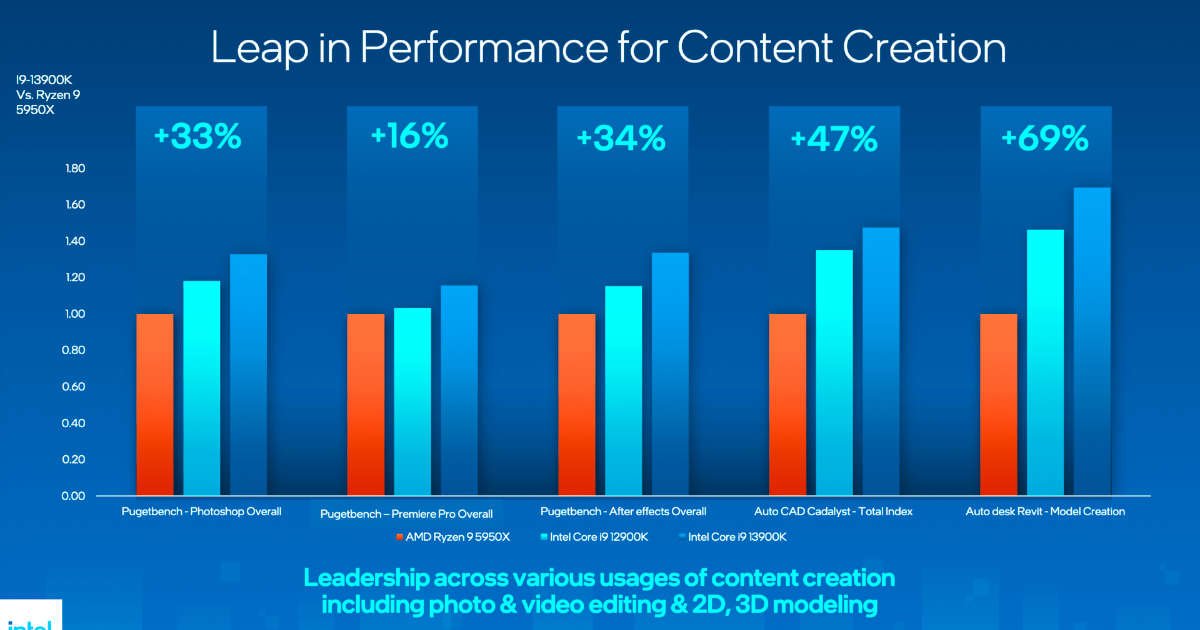
Intel 13th Generation Raptor Lake Desktop Processors performance

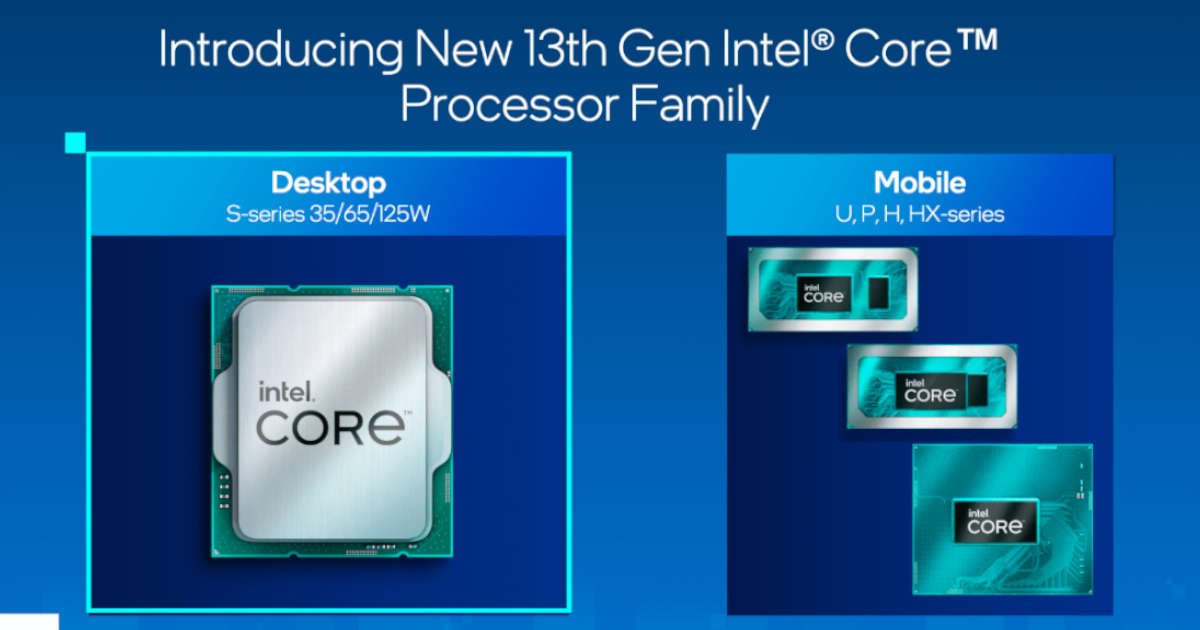
Raptor Lake, Intel’s 13th generation of processors, was officially unveiled. The processors are high-end models designed for gamers and content creators.

CEO Pat Gelsinger presented six new processors based on Core-i-13000 at Innovation 2022 — three ranges of processors are offered in options with and without integrated graphics — two Intel Core i5, two Core i7 and two Core i9. Spread over all areas, the Raptor Lake generation should contain over 50 processors.

Intel 13th Generation Raptor Lake Processors released

Raptor Lake is the refresh from Alder Lake that was pushed in at fairly short notice for CPU conditions in order to bridge the time until Meteor Lake in the coming year. The basic architecture remains the same, but Intel has tightened a few adjustment screws, together with a further optimized 10 nm process, and also made more clock available. The result is the fastest Intel processors, which will face AMD’s Ryzen 7000 series.

Intel 13th Generation Raptor Lake Processors

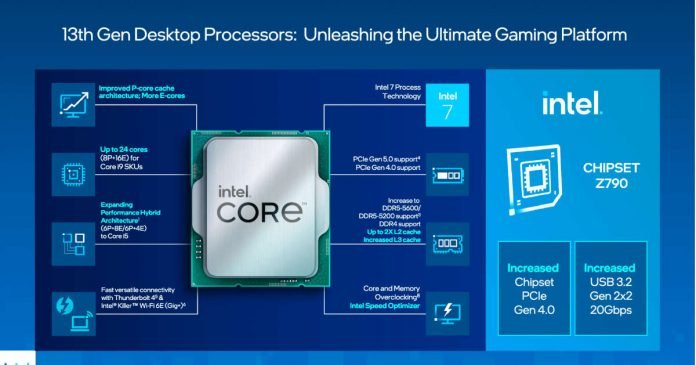
Intel has improved its manufacturing process on the P cores, offering a higher frequency and up to 2MB of L2 cache per core, a significant jump from the previous generation’s 1.25MB. E-efficiency cores went from 2MB to 4MB per cluster of four.

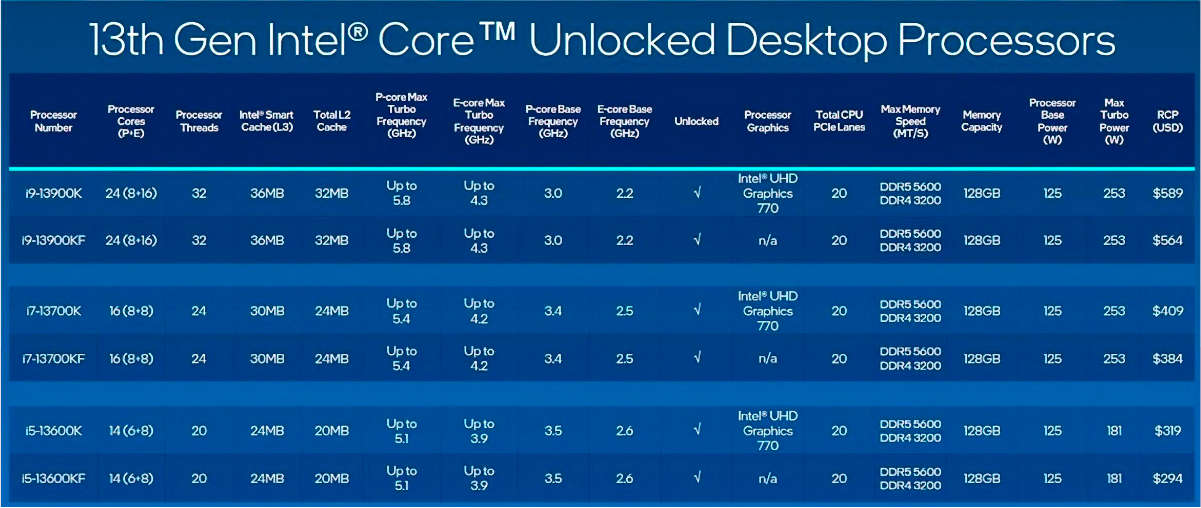
Presented Raptor Lake Processors:

  • flagship Core i9-13900K and Core i9-13900KF
  • medium Core i7-13700K and Core i7-13700KF
  • more affordable Core i5-13600K and Core i5-13600KF

The cheapest processor (of the presented) Intel Core i5-13600KF was estimated at $294, and the flagship Core i9-13900K at $589. The average Core i7-13700K will take $409 out of your wallet.

Intel 13th Generation Raptor Lake Processors price

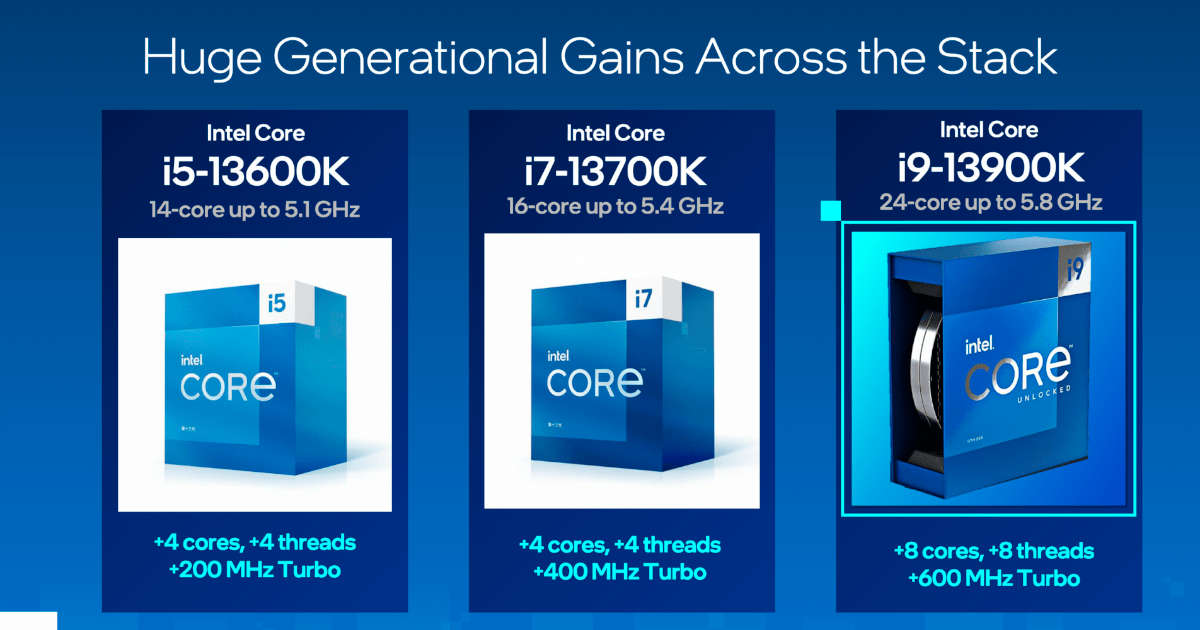
Compared to the 12th generation, the Core i9-13900 K/F processors integrate two new E-core clusters (16 cores), while the Core i5 and Core i7 processors added one E-cluster each. In terms of speed, the P cores received a boost of up to 600 MHz on the Core i9s, while the E cores are 400 MHz faster than their predecessor.

The Intel Core i9 13900K advertises 15% more performance for a single thread and a 41% increase in multithreaded performance.

Intel 13th Generation Raptor Lake Processors performance

Intel made some comparisons with previous generation Ryzen models showing how the Core i9 13900K outperforms the Ryzen 9 5950X by more than 50% in games like Marvel’s Spider-Man or Arcadegeddon, as well as titles like Far Cry 6 by a lesser percentage, F1 22 and The Riftbreaker. The company said its new processor offers a gain of 24% in games and up to 34% in applications for content creators compared to the 12900K.

In addition to the support of DDR4-3200, the memory controller has been revised and now supports DDR5-5600 compared to DDR5-4800 on Alder Lake. A key difference from the Ryzen 7000 is that Intel offers DDR4 memory support in Raptor Lake. With DDR5 memory prices almost doubling right now, more people will think twice before migrating to an architecture that doesn’t support the cheaper RAM.

Raptor Lake processors use the LGA 1700 socket and are compatible with 600 series motherboards via a BIOS update. However, the 13th generation comes with the new Z790 chipset that offers support for a USB 3.2 connection, up to 20 PCIe 4.0 lanes and 16 PCIe 5.0 lanes.

Intel confirmed that its Raptor Lake processors will be available starting October 20.

WhatsApp Reveals A Critical Vulnerability In Older Versions Of The App

WhatsApp and Telegram

WhatsApp has announced the discovery of a critical vulnerability which, fortunately, has been fixed in the most recent version of the application. Still, it could compromise the security of users who have not updated to the latest version on Android and iOS.

In the changelog of the update launched on September 23, a bug was discovered that can allow an attacker to exploit all the overflow to allow them to execute malicious code on the victim’s smartphone after launching an ad hoc call specially prepared to exploit it. 

Simply put, it can let an attacker exploit the flaw to obtain remote code execution in an established video call to manipulate the bug to trigger a heap-based buffer overflow and take complete control of WhatsApp Messenger. 

Remote code execution vulnerabilities are a critical stage in the installation of malware, spyware, or other malicious software on a target system because they provide attackers with an advantage that allows them to further compromise the system via methods such as privilege escalation attacks.

The vulnerability has been tagged as CVE-2022-36934, having a severity score of 9.8/10 on the National Vulnerability DatabaseCVE scale, which is the highest score.

The WhatsApp versions that are affected by the bug:

  • WhatsApp for Android older than v2.22.16.12
  • WhatsApp Business for Android before v2.22.16.12
  • WhatsApp for iOS before v2.22.16.12
  • WhatsApp Business for iOS before v2.22.16.12

Thats why, it is recommended that all users download the latest update to protect against possible issues. However, it is unclear how the Whatsapp video call can be used to exploit this bug.

PS5 Is Renewed: Gets New 6nm AMD Oberon Plus Processor

Renewed PS5

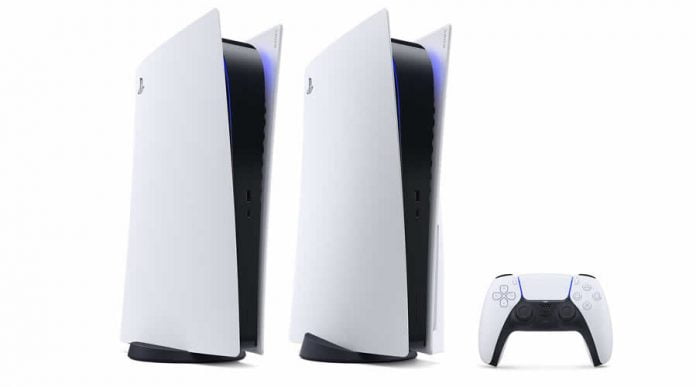
The latest revision of the PlayStation 5, the model 1200 or CFI-1202, which after the first generation (model 1000) and the first refresh (model 1100), is the second revision of Sony’s Zen 2 RDNA 2 gaming console, features a new 6nm AMD Oberon Plus custom APU and higher efficiency.

So far, what was known above all was that the console was becoming lighter. A lot has changed inside — the PCB has been changed in many places and is now a bit more compact. In addition, the processor is manufactured in a new manufacturing process. As a result, the cooler can be smaller and correspondingly lighter.

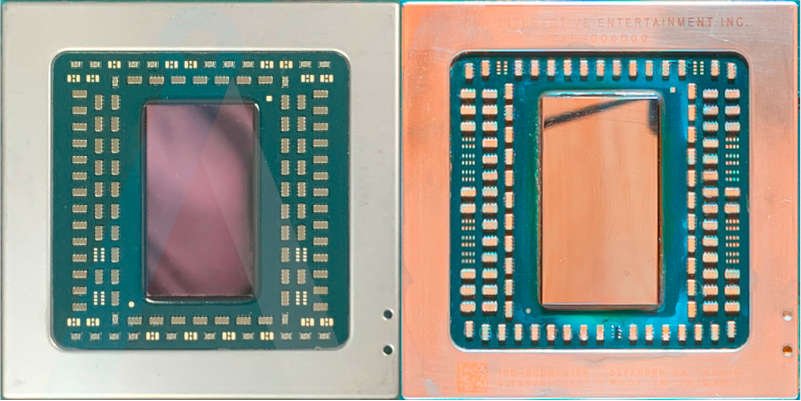
Compared to its Oberon predecessor — which was manufactured at TSMC using the N7 process (7 nm DUV) and had an area of ​​around 300 mm² where new revision Oberon Plus has shrunk to less than 260 mm² thanks to the N6 node (6 nm EUV).

AMD Oberon Plus and Oberon
AMD Oberon Plus (TSMC N6) and Oberon (TSMC N7) (Image Credits: Angronomics)

For consoles, it is important that the architecture exactly matches the older revisions. This ensures that all games work on every Playstation 5 without adjustments. The now outdated Zen 2 cores remain unchanged. The reason is simple — console games are often developed much closer to the hardware than PC titles. This means that the hardware can be used better, and bottlenecks are avoided.

https://youtu.be/21vJ9XBozeI

In addition to an 18.8% higher transistor density, the N6 node is more economical than its predecessor with the same performance. Accordingly, the new console needs less power than its predecessors. And Sony’s primary goal for the new revision of the PlayStation 5 is to reduce production costs.

US Whistleblower Edward Snowden Is Now Also A Russian Citizen

Edward Snowden Russian Citizen

Russian President Vladimir Putin granted Russian citizenship to former US intelligence official Edward Snowden on September 26, 2022.

The Russian government has signed a decree granting Russian citizenship to 75 foreigners, including Snowden. The CIA analyst is now a Russian citizen after almost 10 years of residing in the country. Although Edward Snowden did not renounce his US citizenship, his passport was revoked by US authorities.

In 2013, Snowden revealed the extent of electronic surveillance by the US secret service NSA. On the run, he was stranded at an airport in Moscow with a cancelled US passport and applied for asylum in Russia, where he has lived ever since. In 2020, Russia granted Snowden permanent residency. And in late 2020, he confirmed that he and his wife filed for Russian citizenship to avoid a possible separation from their son.

US authorities have been demanding for years that he return to the United States to face criminal charges of alleged espionage. Snowden himself has refused to return for years because he fears he will not receive a fair trial there.

iTop Screen Recorder: Powerful Free Windows Screen Recorder And Video Editor

iTop Screen Recorder review

A screen recorder is an application used to record whatever you are doing on your screen. In today’s time, screen recorders are in constant demand for a wide range of creators as everyone wants to starts their own tutorial YouTube channel.

Today we will introduce you to one of the greatest free screen recorders available for Windows — iTop Screen Recorder. It comes with a clean and beginner-friendly interface for recording important content as needed in HD quality without any glitches in it. 

Is iTop Screen Recorder safe and good?

You don’t have to worry about whether the iTop Screen Recorder has security issues or not, and almost all antiviruses approve it. You need to be easy about the safety of your device and don’t wonder about the iTop Screen Recorder virus. Moreover, you won’t have to worry about questions like “Is iTop Screen Recorder safe?” After knowing what iTop Screen Recorder is, you should have a look at these main uses and advantages of the tool.

Uses of iTop Screen Recorder

Video conference recording

If you are in an online conference meeting and want to ensure that you and your colleagues get all the points discussed later for better reference. iTop Screen Recorder helps you to record your live conference with one button.

Recording movies and shows

Want to watch a live movie but have to go to work? Or do you want to watch a soccer match, but for some reason, you can’t right now? You can record your favourite live TV shows and movies by pressing the iTop Screen Recorder key and starting the recording in high quality as if you were watching it live.

Record and edit music files

With iTop Screen Recorder, you can extract audio from video clips and edit them. So, enjoying your music has now become easier. Thanks to iTop Screen Recorder, you don’t have to keep your screen on while playing a song.

Scheduled Recording

It allows you to start and stop recording at certain times, making recording as simple as possible.

Online Class Recording

Today, many educational institutions are giving their lectures online for the convenience of students and instructors. iTop Screen Recorder allows you to record these live sessions and rewatch them whenever possible.

Game Recording

Many YouTubers use screen recording to record live-action games they are playing online. Then edit it and upload it. A screen recorder is a very important tool for YouTubers whose content is exclusively gaming. Now you don’t have to worry about finding a good screen recorder, iTop Screen Recorder got you covered.

Editor

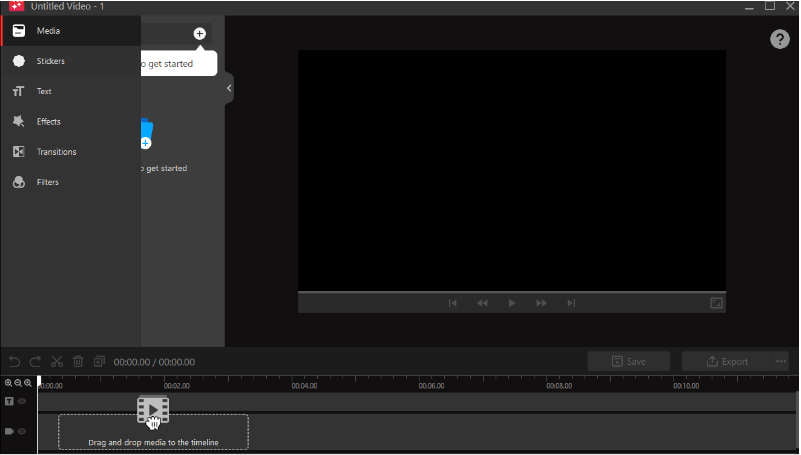
Editing your video and audio is now a snap thanks to the revamped built-in powerful editor tool. You may have your chosen clip ready in minutes by adding, altering, cropping, or moving elements around. Furthermore, it now enables multi-track visual editing and allows you to modify both recorded and local films frame by frame.

iTop Screen Recorder video editor

To make your video more active, iTop Screen Recorder adds various video editing functionalities, including animations/stickers, transitions, effects, captions/subtitles, filters, and more. You may share high-quality movies (4K supported) in a variety of aspect ratios and formats, such as MP4, MP3, GIF, AVI, and TS.

Add Annotations When Recording 

To make your videos more attractive, you can add doodles such as Pen drawings, Rectangle, Oval, Line, Arrowheads, and Texts in your videos while recording.

Professional Game Mode 

By adopting advanced GPU rendering & encoding technology, the professional game recording mode is totally different from the other common game recording tool. You can record HD videos for various 2D/3D games anytime with no lag. It ensures you to record high-quality game videos at up to 60 FPS without frame dropping.

Customize Your Watermark

You can record without a watermark by unticking the checkbox before ‘No Watermark’ in Settings. To protect your videos from being copied, it also allows you to create your exclusive watermark with your customized characters, fonts, colours and sizes too.

Convenient Hotkeys

You can easily and quickly start/stop recording or take screenshots with hotkeys while recording. Meanwhile, you can also use hotkeys for some popular video editing functions.

Pros:

  1. Very user-friendly screen recorder with a simple UI. Capture your PC games with just a few clicks or hotkeys.
  2. iTop Screen Recorder Utilize the hardware acceleration of NVIDIA, AMD, and Intel to record gameplay without experiencing any lags or frame drops, with minimal CPU load.
  3. It supports High-quality screen recordings. You can Record games in 4K UHD, 1080p 60fps FHD with 0 quality loss. It also supports many different output formats like MP4, MKV, AVI etc.
  4. It also has a built-in professional video editor to make editing easy for you.  
  5. It has a unique function called Denoiser to eliminate background noise and current noise in the video.

Cons:

  1. Only supported to Windows
  2. Some features like recording 4K video, customising watermark, scheduling recording etc require paid license
iTop Screen Recorder denoiser

How to record video with iTop Screen Recorder?

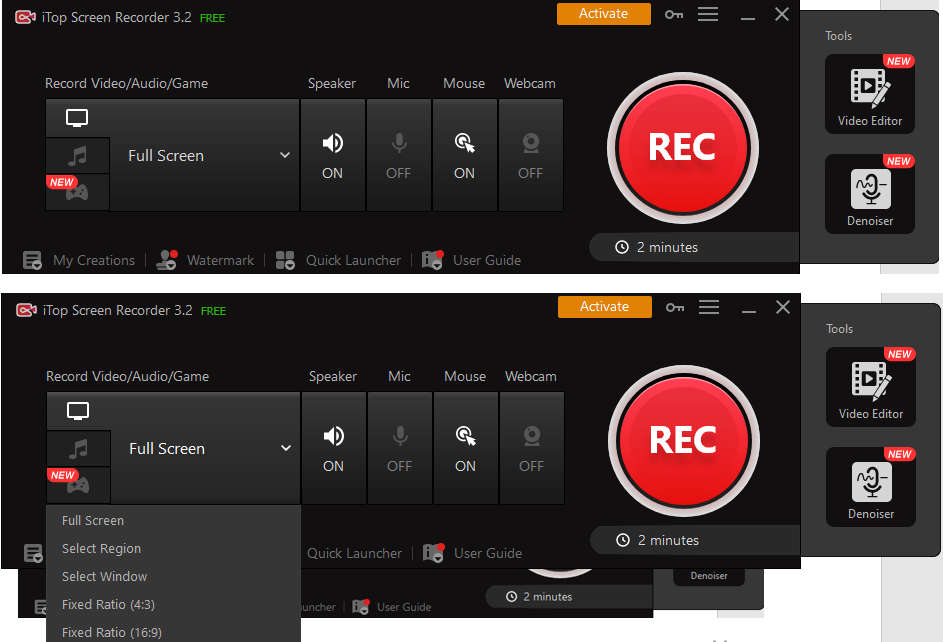
Now let’s see how to record your screen. Only three steps are required to record on the iTop Screen Recorder.

iTop Screen Recorder
  1. First, you need to set your preferences. Do you want to record the full screen, or if you want to cut it short, select from the given options.
  2. Then you need to record the selected screen with various add-ons like mic turned on, mouse pointer shown or even record with your webcam on. Go to the on-screen options and start recording immediately. You have to press the Recorder key.
  3. After recording the video, you need to save your video. Now it’s up for editing. The built-in editing features of iTop Screen Recorder make it stand out.

iTop Screen Recorder is an ideal screen recorder and video editor for anyone who has the need for easy and smooth screen recording, professional video editing, and convenient sharing of popular online video platforms. However, you must upgrade to the Pro version to remove the watermark from your recording. Still, you can remove the watermark, do basic edits, and also get a denoiser at a reasonable price.

“Virtually Unrecoverable” Vulnerability Allows PlayStation Consoles To Be Hacked

Sony PlayStation 5

Known for hacking Sony consoles, hacker CTurt has discovered, as he claims, an almost “virtually unrecoverable” vulnerability in the PlayStation 4 and PlayStation 5 consoles. A security hole named mast1c0re allows hackers to install homebrew applications and various software mods on the console.

The vulnerability exploits a bug in the software that runs PS2 games on PS4 and PS5. When the compiler grants special permissions to execute code at a low level, the user can take control of the execution and gain access to the underlying hardware. 

To do this, you need to use known vulnerabilities in emulated projects, that is, in PS2 games. The method relies on errors in the JIT compilation used by the emulator, letting a hacker write his code and inject it into the system. The console will accept it and recognize it as safe. 

CTurt explained that as a result, it is possible to program the system to run other games from legacy consoles through the official emulator. He also described that the process of infiltrating the system is quite complex.

To exploit the problem, you need to use an already hacked copy of the game — the enthusiast managed to succeed with the help of Okage Shadow King. He showed how, when starting the Okage game, Shadow King accessed the built-in functions and pointed the emulator to the ISO file with another project on the local network.

He also explained that in the future, through the vulnerability of the emulator, it will be possible to download pirated copies of the game for the latest generation consoles. CTurt emphasized that it would be nearly impossible for Sony to close this gap, as the emulator is built into every copy of the game rather than existing as a standalone program.

CTurt informed Sony about the found Mast1c0re vulnerability a year ago through a reward program. However, the company’s developers have not yet fixed the problem and are unlikely ever to fix it. 

According to the developer, the problem lies not in the console’s firmware but in that part of the program code contained in PS2 games. In this case, it is almost impossible to fix the hole — for this, you will have to exclude support for old games on consoles and remove all projects from the PlayStation Store.

Drive Thor: Nvidia Unveils Next-Gen Superchip For Autonomous Vehicles

Nvidia Drive Thor

Nvidia announced Drive Thor, the next generation automotive-grade system-on-a-chip for safe and secure self-driving cars. 

Drive Thor delivers up to 2,000 TFLOPS of performance while reducing overall system costs and can be used in autonomous driving and driver assistance, parking, driver and occupant monitoring, digital instrument clusters, and in-vehicle infotainment (IVI). It integrates intelligent functions such as rear-seat entertainment into one architecture.

This next-generation superchip features cutting-edge AI capabilities first introduced in the Nvidia Hopper multi-instance GPU architecture, along with Nvidia Grace CPUs and Ada Lovelace GPUs

With MIG supporting graphics and computing, Drive Thor uniquely enables IVI and advanced driver assistance systems, and domain separation allows time-critical processes to run simultaneously without interruption. It will be available for the 2025 models and will help speed the production roadmap by delivering better performance and advanced features to the market.

In a sign of the transportation industry’s support for this new supercomputing architecture, Geely-owned automaker Zeekr will integrate Drive Thor into its next-generation electric vehicle, which goes into production in early 2025.

Drive Thor replaces Nvidia Drive Atlan and replaces Drive Orin, which is currently in production and delivers 254 TOPS of performance.

Features of Nvidia Drive Thor

Drive Thor offers multi-domain computation and separates autonomous driving and IVI tasks. Individual functions are well powered by dozens of electrical control units dispersed throughout the vehicle. Drive Thor enables manufacturers to efficiently integrate many functions into a single SoC. This eases supply constraints, simplifies vehicle design development, and can result in significant cost savings, weight savings, and cable reduction.

Drive Thor’s 8-bit floating point (FP8) capabilities are another asset. Developers lose neural network precision when moving from 32-bit FP data to 8-bit integer format. Drive Thor features FP8 accuracy of 2,000 TFLOPS, allowing you to move to 8-bit without sacrificing accuracy.

Drive Thor uses the inference Transformer Engine. This engine enables Drive Thor to accelerate the inference performance of transformer deep neural networks by up to 9x — which is most important to support large-scale and complex AI workloads related to autonomous driving systems.

With its latest NVLink(R)-C2C chip interoperability — C2C chip work can be shared, scheduled and circulated across the link with minimal load. This enables automakers to build software-defined vehicles with ample compute headroom, flexibility, and continuous upgradability through secure software updates over the air.

Drive Thor is designed to deliver the highest level of functional safety. Nvidia is the only firm that takes a consistent approach to safety across all systems, from the data centre to the automobile. Safety is built into every stage of Nvidia’s development process, including design, manufacturing, and vehicle operation.

Drive Thor SoCs and AGX boards are designed to meet the ISO 26262 standard. Additionally, Drive Thor SoCs and software are designed and manufactured following ISO 21434, which provides a pathway for compliance with regulatory security regulations such as UNECE Rule 155.