Home Blog Page 145

What You Need to Know about Robotization of Your Life

Smart home news and stories

What devices can I buy to make my own robotic domestic space without overpaying for the installation of a ready-made system?

A smart home is a comprehensive concept, and you can realize your idea with the help of various technical solutions.

Smart home systems are either wired or wireless. If you’re planning to build a private home, you might want to consider building a truly custom-wired system. It reduces the chance of errors related to dead batteries and ISP outages.

Such a robotic home can be very flexible, and the infrastructure can be completely invisible, hidden behind baseboards and electrical panels. The home plan you want needs to be designed in advance – at the stage of organizing the wiring. In addition, the cost of such embedded solutions is much higher than a set of equipment like an electric linear actuator by Progressive Automations witha simple design and easy application.

Embedded solutions are more related to construction work than to buying gadgets, so in most cases, ordinary users prefer to buy equipment that can be installed in an already finished apartment or house.

Before creating your own customized smart home system, you need to determine the purpose for which this solution is implemented. Typically, goals come down to the following options:

  • Home security (from the penetration of thieves, gas and water leaks, fires, etc.);
  • Saving resources (adjusting heating, powering electrical appliances);
  • Climate control and regulation of environment parameters (for example, illumination, temperature, and air humidity);
  • Convenience (controlling the color and brightness of lighting, curtains, multimedia devices, kitchen appliances in the absence of the owner of the house, etc.).

More often than not, tasks overlap in one way or another. The set of equipment that you need to buy and, accordingly, the scenarios for its use depend on the goals (for example, turning off all electrical appliances when the owner leaves the house, turning on the warm floor in the morning shortly before the household wakes up, starting the washing machine or pump at night).

General principles of organization

Regardless of the communication method, a smart home consists of the following elements:

  • Controller (hub) – a control device that connects all elements of the system with each other and connects it with the outside world;
  • Sensors (sensors) – devices that receive information about external conditions;
  • Actuators are devices that execute commands. There are a lot of such devices, and their range is almost unlimited. These can be automatic sockets, smart kettles, pipe controllers, etc. Actuators are components that turn on/off, regulate pressure, and actuate all commands in practice.

Some solutions can combine a sensor, an actuator, and a controller at the same time – for example, a smart socket. In addition, there are cloud solutions: the role of the hub is performed by a program that runs in the cloud. Ready-made cloud solutions allow you not to go into the study of the technical implementation of a smart home system.

However, there is a non-illusory risk that in just a couple of years the manufacturer will no longer support the outdated cloud system – and it’s good if the smart home can be switched to a local mode of operation. In the worst case, gadgets will simply have to be thrown away. This is partly why the number of servers for local home automation has been on the rise lately. At the same time, all new devices can be connected to one hub, expanding the smart home according to the constructor principle.

Alas, there is no single standard for combining devices into a smart home system. Therefore, when buying equipment, you will either have to choose the ecosystem of a certain manufacturer or build a smart home using a router that supports several communication protocols at once.

The gadgets used in the smart home system most often support not only the usual Wi-Fi and Bluetooth communications but also the more exotic Z-wave and Zigbee protocols. The last two provide not very high-speed and powerful channels, but devices that use them can work for a year on one battery. Therefore, Wi-Fi and Bluetooth are often used in smart refrigerators and coffee makers, while the other two are used in leak sensors, smart curtain rods, etc.

The Ways Robotization Can Change Your Life

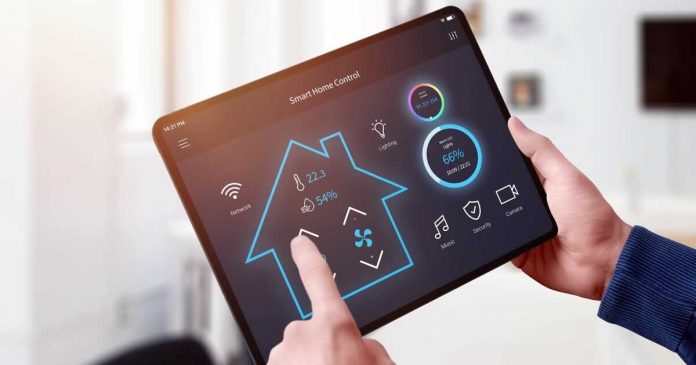
A robotic home ensures the coordinated operation of all electrical equipment. Externally, a cottage with an installed smart home system is not much different from an ordinary house. Nothing in the interior and exterior of the house betrays that it has a modern control system. From the outside, only beautiful switches are visible, as well as bright and colorful touch screens, located on the walls in convenient places, such as in the living room or in the kitchen. One touch on the screen and the lighting turns on smoothly, the curtains close, music starts playing, etc. Everything is now under control.

Google Working On Open-Source Alternatives To Dolby Vision And Dolby Atmos

Google news and new stories

After many years of experience with open-source audio and video codecs, Google is apparently also working on the implementation of free alternatives to Dolby formats — Dolby Vision and Dolby Atmos.  

This is reported by Protocol, citing an internal presentation that the team was able to see, and the plan is known as Project Caviar. According to the so-called Project Caviar, HDR formats and a format for 3D audio are to be implemented.

Dolby Vision is an advanced HDR format used in the top 4K TVs, while Dolby Atmos is supported in most top soundbars and is currently a huge selling point.

The big idea Google promises manufacturers is that the two new formats would be royalty-free, meaning manufacturers wouldn’t have to pay Google a fee to include support. According to some reports, Dolby Vision can cost up to $3 per device to include, while the cost of Dolby Atmos is unknown. AV aficionados will note here that there is already a royalty-free alternative to Dolby Vision: HDR10+

It looks like YouTube is Google’s main focus — the streaming site currently supports basic HDR (known as HDR10), but not the more advanced version of Dolby Vision or HDR10+. And it doesn’t support any 3D audio standard —the two currently in use are usually Dolby Atmos and DTS:X, but Atmos is by far the best-supported option.

However, the new formats would also benefit Android phones. iPhones include support for Dolby Vision and Atmos, but you don’t usually get it on Android. Samsung does support HDR10+ and Dolby Atmos.

Google is surely hoping it can persuade Netflix, Disney and others to support its new formats, so you can get the same quality of HDR and audio on all Android devices when streaming as you get on iPhone.

There’s no good reason for Dolby to be fooling around here. The price of including Dolby Vision and Dolby Atmos support in the hardware is a notable chunk of the total price for something like streaming, which allows hardware manufacturers to avoid these costs. 

However, Dolby has essentially been left to cement the idea that its formats are the best way to watch, which will be very hard to reverse. Dolby doesn’t charge streaming services to support Dolby Vision or Atmos, which is why they’re used on Netflix, Apple TV Plus, Disney Plus, Paramount Plus, Blu-ray and more. Dolby has embedded its name as the thing you need if you want the best quality movies and TV.

So purely on the desirability and name recognition, Google faces an uphill battle. Even if Google’s new formats are as good as Dolby’s, they’ll still struggle to make people believe they are — and Dolby will improve its performance to ensure people stick with them.

Remember that Google is not the first company to try to design an alternative to Dolby formats. Samsung, in particular, resisted for a long time before co-developing HDR10+ as a royalty-free alternative to Dolby Vision.

Proxies: A Solution Marketing Agencies Can Benefit From

PC laptop business

Social media has become a driving force in today’s world. It connects people across the globe and provides marketing opportunities to businesses. It’s rare to find someone without a social media account these days. It’s even rarer to find a company that doesn’t take advantage of the marketing benefits social media grants. 

However, just because social media has become the next best thing doesn’t mean everyone is equally good at it. That’s where marketing agencies step in, providing curated content for their clients.

Yet, the inherent struggle marketing agencies face when managing multiple accounts makes their job challenging. Proxies from providers like Smartproxy provide a solution to that struggle and make the job of a marketing manager much more effortless.

Running a Marketing Agency

Marketing agencies provide services where they manage their client’s social media platforms. It includes regular posts, keeping up with the trends, and creating new advertisements. Whether the business is small or large, using a marketing agency ensures you’ll have quality content on your Instagram, Twitter, and Facebook.

We know the struggle marketing agencies face when managing more than one social media account. It’s especially true if each account is run from one device or IP address. If you manage over five accounts from one IP address, chances are you’ll be regarded as a bot. It can result in an IP ban or frozen account. Proxies are a way to bypass that issue entirely.

Social Media Proxies

There are proxies for use on platforms like Facebook, Instagram, and Twitter. Social media proxies are also called virgin residential proxies and offer better security against the risk of blocked accounts and other benefits. Unlike shared proxies, which other parties use, virgin proxies have never before connected to social media platforms. 

It’s a clean slate and ensures no other activity is flagged from that IP address. Further, some proxies are specifically geared towards a particular platform. Facebook, Twitter, and Instagram proxies are examples of some you’re able to use and ensure the accounts you manage are safe on that platform. This is especially true for Instagram, which quickly bans an account they believe is run by a bot.

Benefits of Proxies

We’ve discussed the main benefit you enjoy when using proxies: disguising your IP address as another one. However, that’s not all the benefits that proxies provide. It minimizes the risk of conducting your business online, ensuring hackers can’t access your accounts, and better safeguards your identity. It’s overall an effective tool to ensure your online activities are safer.

Instagram Proxies

Instagram is one of the most popular platforms and has also become a great platform to market your business or products. Often, Instagram is the main platform a marketing manager has to run. Managers can quickly end up running more than 20 accounts at a time.

Marketing agencies have hundreds of clients. It means they run hundreds of Instagram accounts, with more than one account per client at times. This quickly leads to challenges as Instagram is fast to block accounts it believes are run by bots.

Banned IG Accounts

Instagram tracks the IP addresses of accounts. It tends to quickly ban multiple accounts or flag IP addresses that have too many accounts linked to it. Blocking accounts is Instagram’s way of trying to minimize spam accounts and stop scams aimed at its users. 

However, whether you’re a legitimate business with multiple accounts or an Instagram, Facebook, and Twitter manager, it’s easy to get caught up in this and have your accounts blocked. Instagram proxies are a reliable way to ensure it’s no longer a problem.

Manage Multiple Instagram Accounts

An Instagram proxy generates a new IP address linked to an actual location and device, ensuring you are seen as a real person on all your different accounts. Using a specific Instagram proxy also ensures it’s linked to a proper ISP (internet service provider) and looks like a regular residential IP address. This is the best way to prevent the accounts you’re managing from being blocked, as it looks like everyday residents are the owners. 

The Solution For Marketing Agencies

Proxies might not be the cure-all solution to the issue of multiple accounts becoming banned. However, it’s undoubtedly the best solution for marketing agencies. A proxy is an intermediary between the social media platform and the account manager. It lessens the chances of multiple accounts being blocked. 

As a social media manager with dozens, if not hundreds, of clients under your wing, it’s essential to deliver what the client wants consistently. If the accounts are being banned and flagged constantly, it’s impossible to provide outstanding service. Further, it lowers clients’ trust in the brand, as the account is taken down constantly. Proxies are a start to ensuring your accounts are safe and allow you to manage content effectively for multiple clients.

Google Tensor G2 Turned Out To Be Weaker Than Last Year’s Snapdragon 888

Google Tensor G2 benchmark

The Pixel 7 series is expected to be launched this fall, featuring the next proprietary Google processor, “Tensor G2”. Google has said the processor will offer enhanced features for photos, videos, security and voice recognition but didn’t provide details.

Although, the benchmark test results of the new Google Tensor G2 chip have been revealed. Google is jointly developing the Tensor G2 with Samsung.

Android developer Kuba Wojciechowski has shared the results of his research on Twitter about what the Pixel 7 Pro and its Tensor G2 chip bring in terms of performance — spec-wise does not appear to have changed much.

The information appeared on the Web, according to which the latest Tensor G2, used in the upcoming Pixel 7 and 7 Pro, managed to score only 1068/3149 points in the Geekbench 5 test. For comparison, last year’s Snapdragon 888 from Qualcomm scored 1115/3581 points.

Looking at the specs, it appears that Google hasn’t made many changes to the CPU cores employed between last year’s Tensor and this year’s Tensor G2. The combination of two Cortex-X1 cores, two Cortex-A76 cores and four Cortex-A55 cores is the same, but the clock frequency is slightly improved. Combined with these slight speedups and the use of a smaller 4nm die size, the multi-core benchmarks of the Tensor G2 and Pixel 7 Pro seem to improve by around 10%.

Given the architectures adopted by Google, it is evident where the difficulty lies and why the Google Tensor G2 is not capable of competing with the Snapdragon 8 Gen 1. The Qualcomm chip uses a much higher CPU configuration since it has a Cortex-X2 core at 3 GHz, three Cortex-A710 cores at 2.5 GHz and four Cortex-A510 cores at 1.8 GHz.

However, the Pixel 7 Pro’s Tensor G2 will likely improve GPU specs significantly. Switching from Mali-G78 to Mali-G710 promises 20% better performance, 20% better power efficiency, and 35% better for machine learning applications, one of the keys focuses of the Tensor line.

Google intends to equip the Tensor G2 with a next-generation Tensor Processing Unit (TPU) — codenamed “Janeiro” — and the Pixel 7 series will benefit from this. We also know that the Pixel 7 Pro is likely to have 12GB of RAM, similar to the Pixel 6 Pro

If these performance numbers are confirmed in the final version of the Google Tensor G2, this SoC will fall somewhere in the current mid-range and will not be considered a flagship-level smartphone.

It is clear that when the Snapdragon 8 Gen 2 launches, scheduled for the end of the year, the Google Tensor G2 will position itself even worse and will be framed directly in the mid-range.

Pros And Cons Of Blockchain Technology

Blockchain tech

Although there are many advantages to the blockchain and disadvantages, do you know why it is now a necessity?

Blockchain is a data warehouse mechanism that makes it hard or impossible to compromise, alter, or manipulate the system. Its advancement provides significant benefits across numerous industries, providing high security in environments devoid of trust. Because of its decentralized nature, it has advantages and disadvantages.

Suppose you’re a project manager trying to figure out what your team needs to create a blockchain-based custom solution. In that case, you should consult blockchain development services. They collaborate with blockchain creators and enthusiasts to integrate enterprise blockchain applications in which you can launch your company quickly and effectively if you have a different front end and a well-established back end.

This guide will differ the benefits and drawbacks of blockchain technology and how to work around any issues.

BLOCKCHAIN TECHNOLOGY: PROS AND CONS

PROSCONS
Streamlined EcosystemPerformance Redundancy
DisintermediationLack of Internal Resources
Excellent DataComplex Process for Verifying Signatures
Security and Resilience
Transparency and Invariability
Speedier Transactions
Decreased Trading Costs
Enhanced Traceability
Innovative Value Chain and Business Model

Principal Benefits of Blockchain Technology

Here are the key advantages of blockchain technology today and why organizations and individuals are eager to adopt it.

STREAMLINED ECOSYSTEM

Most of you may consider blockchain a complicated system due to the various processing stages each business must go through. Blockchain technology excels at condensing complex processing phases into a small number of steps. 

DISINTERMEDIATION

The first thing you obtain with blockchain is a distributed system that eliminates intermediaries. 

Mediators receive a cut of every service provided. When you perform multiple benefits, it adds up. It could lead to widespread corruption, which takes advantage of trading and customers for personal gain. As a result, getting rid of them solves the trust issue.

EXCEPTIONAL DATA

Blockchain provides excellent data since the distributed ledger creates a consensus mechanism that hackers cannot break into and prohibits anyone from changing or adding information to the ledger. As a result, blockchain eliminates inaccurate data and human errors.

SECURITY AND RESILIENCE

It provides security and resilience to every user. As data is stored within the system, it ensures no single point of failure or element controls it, resulting in a secure platform that no one can hack or cheat.

TRANSPARENCY AND INVARIABILITY

Cryptographic hash prevents file and data erasure. Every block has a fixed “Hash” code. If the ID code is changed, it is impossible to generate the same “hash” code or ID again.

Because the ledger is open to all users, it will notify the other users if someone tries to modify the hash ID.

SPEEDIER TRANSACTIONS

When compared to conventional dealings, this automation allows quick transactions. 

Traditional financial institutions can take up to a week to process, whereas blockchain takes only a few seconds. This technology outperforms the speed of conventional banking undertakings in a matter of seconds.

ENHANCED TRACEABILITY

Product monitoring is critical when delivering goods to customers. Blockchain ensures that you can track your items from beginning to end and exchange assets.

DECREASED TRANSACTION COSTS

It offers lower dealings fees in exchange for a faster trading procedure. 

Traditional banking charges a small fee, but if used frequently, the cost accumulates and becomes more expensive than blockchain technology transaction services.

INNOVATIVE VALUE CHAIN AND MARKET MODEL

Blockchain provides a fresh perspective on how market innovation should evolve. It is the solution to the industry’s current problems, which include data breaches, theft, hacking, and other devious market issues. 

Here are the benefits when incorporating automation into your business:

  • It adds value to your company by enhancing reliability
  • Increases ROI (Return on Investment).

Major Drawbacks of Blockchain Technology

Along with its benefits, this technology has brought some drawbacks to the market.

PERFORMANCE REDUNDANCY

This technology must go through a more laborious process than a centralized server. If the system’s ledger is updated, all endpoints must update. The process is redundant due to distributed ledger’s inherent requirement that each node has a replica of the ledger system.

LACK OF INTERNAL RESOURCES

Since blockchain is new in the market, few knowledgeable developers are available to work on it. However, when developing your company’s blockchain solution, the best course of action is to outsource a team offering blockchain development services to assist you with this process.

COMPLEX PROCESS FOR VERIFYING SIGNATURES

This technology’s complexity necessitates using the “Elliptic Curve Digital Signature Algorithm” (ECDSA) when verifying signatures. Here’s why:

  • Each undertaking in the system will require an encryption key signature verification.
  • It requires that the operation occurs in the correct nodes, which can be a complicated process, particularly for non-technical users.

Final Word: 

As with any other system, there are advantages and disadvantages to using blockchain. Despite these constraints, many industries are beginning to adopt blockchain because of the benefits that satisfy most consumers.

When incorporating blockchain into your business, the best advice is to speak with blockchain development service professionals who thoroughly understand the industry. They offer creative blockchain-based solutions to enhance and launch your startup without overspending.

G Cloud: Logitech Announces Portable Console For Cloud Gaming

Logitech G CLOUD Gaming Handheld

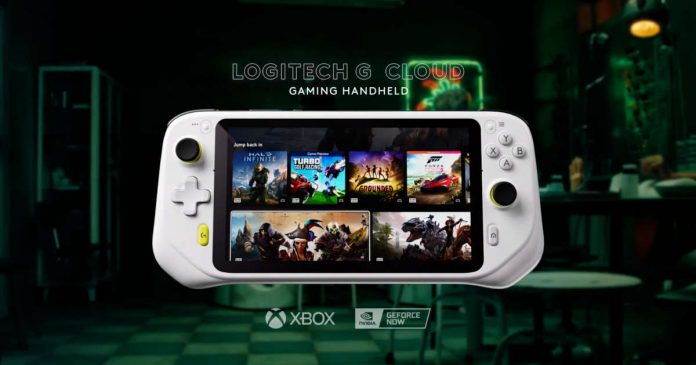
Logitech G, in collaboration with Tencentannounced the Android 11-based portable gaming console Logitech G Cloud. 

Logitech G Cloud is a product intended for cloud game services and is compatible with Xbox Cloud Gaming and Nvidia Geforce Now. Tencent cooperated in designing the software of the G CLOUD Gaming Handheld, and since Android is also installed, it is possible to use Android applications too. 

Although Google Play apps and games can run locally, however, the G Cloud does not focus on Android games but cloud gaming.

The main specifications are a 7-inch 1920 x 1080 full HD IPS liquid crystal display with a refresh rate of 60 Hz and 450 nits of brightness. It is multi-touch compatible, powered by 2.3 GHz octa-core Snapdragon 720G, dual-band WiFi with 2 x 2 MIMO, and Bluetooth 5.1. USB-C terminal for charging, microSD slot.

The essential game controls are analogue sticks on the left and right, cross keys on the left, ABXY buttons on the right, LR bumpers and analogue triggers on the left and right. After that, the home button, G button, start select option button, etc. It doesn’t have rear buttons or a touchpad, but it does have a 6-axis motion sensor. 

In addition to the stereo speakers, it has a 3.5mm headset port, and the USB-C port also supports USB audio. Bluetooth audio supports Qualcomm’s aptX Adaptive codec. If your wireless earphones or headphones are compatible, you can connect with relatively low latency and high sound quality.

It does not have a SIM slot or a modem for mobile networks, as it is intended for streaming — obviously, high-speed WiFi connectivity is a must.

The body size is 256.84 x 117.21 x 32.95mm, and the weight is 463g. Compared to other handheld game consoles like the Nintendo Switch, which is 242mm wide and weighs 420g, the G Cloud is slightly larger and heavier. On the other hand, the Steam Deck is 298mm wide and weighs 669g, so the G Cloud is clearly lighter and smaller.

The main strength of the G Cloud is its long battery life of about 12 hours. Compared to game consoles that need to run games locally, the Nintendo Switch is 4.5 to 9 hours, depending on the game, and the Steam Deck is 2 to 8 hours. Steam Deck is a PC game console, so the load varies greatly depending on the game and settings. 

The quick menu on the G Cloud allows you to limit GPU functions and power consumption finely, so if you don’t care about real-time graphics and frame rate, you can make a lot of trade-offs for a better battery backup.

The Logitech G Cloud is priced at $349and will be available in the US on October 17. Still, pre-orders are available on the official website for early adopters for a limited quantity with a price tag of $299.

GeForce RTX 4000 Series: Nvidia Announces GeForce RTX 4090 and 4080

GeForce RTX 4090

Nvidia announced the GeForce RTX 4000 series, which uses the next-generation GPU Ada Lovelace architecture. 

The RTX 4000 series uses TSMC 4nm. Ray tracing and DLSS also evolved to the third generation.

The Ada Lovelace installed in this GeForce RTX 4000 series uses TSMC 4nm, and the AD102 GPU, which is the top GPU, is equipped with 76 billion transistors, nearly three times the 28 billion transistors of the conventional GA102 GPU, and CUDA cores. 

In this Ada Lovelace, the Tensor Core responsible for deep learning has been evolved to the 4th generation, and the RT Core responsible for ray tracing is updated to the 3rd generation, which will significantly improve the performance of ray tracing and DLSS.

Only a brief explanation about Ada Lovelace was given during the announcement, and it is expected that further information related to that will be released in the future.

In addition, for this GeForce RTX 4000 series, a total of three models, the top model RTX 4090 and the high-end models RTX 4080 16GB and RTX 4080 12GB, are scheduled to appear.

Nvidia GeForce RTX 4090: Performance is double that of RTX 3090

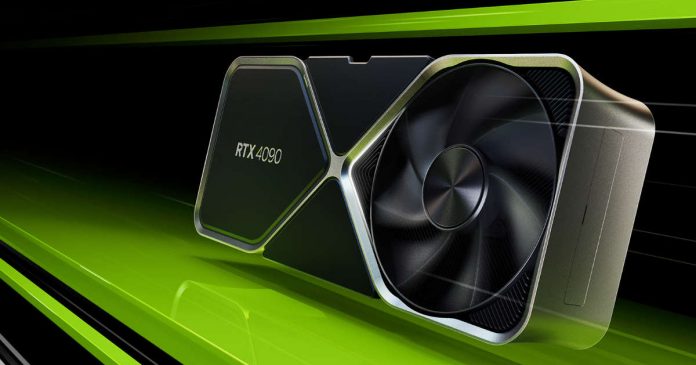
The Nvidia GeForce RTX 4090 has appeared as Nvidia’s top model, equipped with an AD102-300 GPU, 16384 CUDA cores, and a maximum operating clock of 2.52 GHz. which is about 2.3 times the performance that was available on the GeForce RTX 3090. The VRAM is equipped with 24 GB of GDDR6X, the bandwidth is about 1 TB / s, and the performance has significantly improved. Boasts a power consumption of 450W, and the RTX 4090 Founders Edition is equipped with 12VHPWR as a power supply.

The RTX 4090 will be available for $1599 from October 12th, 2022. The RTX 4080 with 12GB will be available for $899, while the 16GB will cost $1199.

What You Should Consider When Choosing A Short Throw Projector?

Short Throw Projector

Invest in a short-throw projector if you are searching for an office presentation solution to help your business thrive. These projectors are easy operation and provide numerous benefits compared to traditional projectors.

When using this projector, everyone can see the projection, which makes it ideal for group presentations and brainstorming sessions.

Furthermore, it has a large screen size that makes it possible to share ideas and obtain feedback from others. Short-throw projectors do not need much space to set up and operate, so they are easier to use than conventional projectors.

When considering buying a short-throw projector, think about the following:

1. Size and Resolution

A projector’s resolution is the number of displayed pixels. A higher resolution translates to more detail in the display, which is essential when showing fine details in items such as spreadsheet data or text documents. When choosing a short-throw projector, ensure that you factor in the size of the room where you will set it up, including the distance between the projector and the wall or screen.

Ensure that your chosen short-throw projector suits the type of content you intend to project. A higher resolution is an idea for gaming and movies. For school and business, a low-resolution projector is best. Wemax Nova provides a variety of short-throw projectors to suit all types of office spaces.

2. Lamp Brightness

A greater lumen rating means the projector produces a brighter image. This is significant when using the projector in a room with plenty of ambient light. Lamp brightness is measured in lumens, and the higher the brightness, the easier it becomes to see what is being projected.

Today, we have smart short-throw projectors that deliver much more brightness than conventional business projectors that would work better in a dim room to project a decent picture.

3. Throw Ratio

This refers to the distance between the projector and the wall or screen divided by the image width. A projector with a lower throw ratio means you can place the projector nearer the wall or screen. Short-throw projectors usually have a ratio of less than 1.5, and standard projectors have a throw ratio of 2 or more.

For example, Wemax Nova 4K UHD short throw projector has a 0.23 throw ratio, making it easy to project an 80-inch-wide image less than a meter away.

4. Easy to Use

Ensure that the short-throw projector you choose is easy to use and set up. Ideal models are plug-and-play, meaning you don’t have to fiddle with complicated settings. The Wemax Nova, for instance, can instantly turn a room into a video conferencing area without additional costs. With special driver-free wireless projection, the projector is compatible with all devices, enabling users to connect and get going instantly, saving hassle and precious time.

5. Connectivity Options

Usually, short-throw projectors have VGA and HDMI ports and USB inputs to enable connecting to computers, laptops, and other devices. Before you purchase the projector, ensure that you check connectivity and input options. Also, some have built-in speakers, which are useful for presentations. Others are equipped with an Android operating system for easy and quick wireless projection, together with productivity apps that enable seamless presentation.

6. Portability

An essential factor to consider when choosing a short-throw projector is portability. It would be excellent to carry it around and set it up anywhere, depending on your preferences. For instance, a portable projector would be ideal if you intend to use the projector for business and school presentations. Alternatively, a projector for home use need not be portable.

7. Extra Features

Some projectors are available with extra features that can eventually be useful. It is essential to evaluate a projector’s extra features and whether the feature will be useful for your specific use case.

For instance, some short-throw projectors have an innovative dustproof sensor that keeps away dirt from the color wheel to guarantee great color accuracy and efficiently prolongs the life of the projector. Others have protection against dust, hair, and other particulate matter, which guarantees an excellent experience. It also helps prevent dust and germ transmission between presenters.

8. Budget

The cost of these types of projectors greatly varies. Before looking, consider what you can afford for your projector and how much more you are willing to spend. Bear in mind that a highly-priced projector does not it’s the best. It is vital to balance functionality and price.

Conclusion

When selecting a short-throw projector, you have a few things to consider. Do your research, consider the above points, and be sure of what you want. Know the room you will use, its light control, and how the projector will be placed. Lastly, you can hire a professional to install your system to ensure the optimal functioning of the projector.