Home Blog Page 166

Why You Should Install a VPN on All of Your Devices

VPN security news

Installing a VPN (Virtual Private Network) on your devices is one of the best things you can do to protect your privacy and keep your data safe.

VPNs are extremely versatile and can be used on a variety of devices, including smartphones, laptops, and desktop computers. VPNs can help you protect your online privacy by encrypting your internet traffic and preventing your ISP from tracking your online activity.

If you value your privacy and security online, then installing a VPN on all of your devices is a no-brainer. Here are some reasons why you should consider installing a VPN on all of your devices.

1. Increased Privacy and Security

When you connect to the internet, your device broadcasts a unique identifier called an IP address. This identifier can be used by websites and online services to track your activities and preferences. A VPN creates a secure connection between your device and a VPN server, masking your IP address and preventing websites and services from tracking you.

2. Bypass Censorship and Geo-Restrictions

Installing a VPN on all of your devices is the best way to bypass censorship and geo-restrictions. A VPN encrypts your traffic and routes it through a server in a location of your choice, allowing you to access blocked content and websites.

Perhaps you live in a country with strict internet censorship laws, or maybe you want to access geo-restricted content like Netflix US. Either way, a VPN is the best way to bypass these restrictions.

3. Protect Your Data from Hackers and Thieves

A VPN is a vital tool for keeping your data safe from hackers and thieves. By installing a VPN on all of your devices, you can keep your information and passwords secure, as well as your browsing history and location. A VPN encrypts all of your traffic so that no one can see what you’re doing or where you’re going and since it hides your IP address, you can remain anonymous.

4. Reduce Your Exposure to Malware and Viruses

VPNs encrypt your data so that it cannot be read by third parties, including hackers and the government. This prevents malware and viruses from being able to steal your information or track your activity.

5. Avoid Being Monitored by Third-Party Advertisers

VPNs are a great way to keep your online activity private and secure. By installing a VPN on all of your devices, you can avoid being monitored by third-party advertisers. These advertisers use tracking technologies to follow your online behavior and then sell that data to other companies. 

With a VPN, however, your traffic is encrypted and your IP address is hidden – making it much more difficult for these advertisers to track you.

6. Access Blocked Websites and Content

A VPN is a service that allows you to connect to the internet through a server run by a VPN provider. By doing so, you can bypass geographic restrictions and access websites and content that are blocked in your location. Similarly, using a VPN allows you to keep your data secure when using public Wi-Fi networks. 

Installing a VPN on all of your devices is a good way to ensure that you always have access to the content and services you need, no matter where you are.

7. Keep Your Internet Connection Fast and Reliable

If you’re not using a VPN, your ISP can see everything you do online. They can track which websites you visit, what time you visit them, and how long you stay. This information is valuable to them because they can sell it to advertisers. But when you use a VPN, your ISP can only see that you’re connected to a VPN server. They can’t see which websites you visit or what you do online. This means your data is safe from prying eyes.

In addition to keeping your data safe, a VPN can also improve your internet speed and reliability. If you live in an area with a bad internet connection, a VPN can make your connection faster and more reliable.

A VPN is a valuable tool for anyone who wants to keep their data safe and improve their internet speed and reliability.Learn more about your internet speed here.

8. Save Money on Travel

If you’re planning a trip, a VPN can save you money on airfare, hotels, and car rentals. Airfare prices are based on demand, and airlines use cookies to track your search history and raise prices accordingly. 

But if you connect to the internet through a VPN, the airline will only see that you’re connected to a VPN server. This means you can search for flights without being tracked, and you may be able to find better prices.

Similarly, hotels and car rental companies use cookies to track your search history and raise prices accordingly. But if you use a VPN, they will only see that you’re connected to a VPN server. This means you can search for hotels and car rentals without being tracked, and you may be able to find better prices. A VPN is a valuable tool for anyone who wants to save money on travel.

9. Improve Your Online Gaming Experience

If you’re a gamer, a VPN can improve your online gaming experience. When you use a VPN, your traffic is encrypted and your IP address is hidden. This means that hackers and scammers can’t target you. Additionally, some gaming servers are located in different countries. By connecting to a server in another country, you can bypass geo-restrictions and access games that are otherwise unavailable in your location. A VPN is a valuable tool for anyone who wants to improve their online gaming experience.

10. Use a Public Wi-Fi Network Safely

Public Wi-Fi networks are convenient, but they’re also dangerous. When you connect to a public Wi-Fi network, anyone on the same network can see what you’re doing. This includes the network administrator, who can see everything you do.

But if you use a VPN, your traffic is encrypted and your IP address is hidden. This means that no one on the network can see what you’re doing. Additionally, some VPN providers offer security features, such as malware protection and firewalls.

And So, To Sum Up:

VPNs are important for a variety of reasons. They keep your data safe, improve your internet speed and reliability, and can even save you money on travel. If you’re not using a VPN, now is the time to start.

Top Android Apps For Bloggers, Writers and Authors

Using mobile apps

If you are a blogger, writer, or an author and you want to share your work with the world, this article is for you. The digital age has seen a sea change in how people consume information. While there was a time when reading was restricted to a few privileged people. Today, anyone can read news articles and reviews on their preferred device without any restrictions. And to feed this insatiable hunger for content, bloggers have become a major force in the digital universe. 

They write about everything from fashion to food — even if they don’t consider themselves as writers. That’s where these apps come in handy! As a blogger or writer, you need apps that support your creative vision and let you get things done fast. So here are our top recommendations for Android apps for bloggers, writers and authors:

Byword

If you want to write and publish your content on your phone or the web, Byword is the best Android app for you. With this app, you can write, organize, export, and publish your content to multiple platforms. You can export your content in Markdown or Textile format so you can easily import it into most blogging platforms like WordPress, Blogger, or Medium. You can also use the free WordPress plugin and Adsy content writing service. When it comes to exporting, you can export your content as a PDF, HTML, ODT, EPUB, or MOBI file. 

The Android app for blog also comes with a social media publishing tool that lets you schedule content for your Facebook timeline, Twitter, Reddit, and Pinterest posts. The app also lets you add photos and create social media previews. You can also track your metrics and see your daily stats. You can also create and edit Word documents on your phone. This is especially useful if you need to edit your content on the go.

Instapaper

If you are a frequent reader, you know that the last thing you want to do is bring your books and magazines with you when you travel. That’s where Instapaper comes in handy. You can use it to collect and organize all your articles, reviews, and tutorials. You can then choose to read them later or delete them. You can also set up Reading Lists so that you can easily find the content you want. You can also set up alerts so that you don’t forget to read an article later on. 

This is especially useful if you work with long-form content like tutorials. You can also use Instapaper to share articles from other apps like Pocket or other social media sites like Reddit. According to geekrar.com, you can also use it to create a Reading List for books that you own on your phone. And if you own a tablet, you can set up a separate Instapaper account for it too.

Views4You

No matter how brilliant your content is, reaching your audience can sometimes feel like an uphill battle. That’s where Views4You comes in. It is the best site to buy Twitter followers and boost your presence. Views4You provides authentic followers, likes, and comments to enhance your Twitter profile and engagement. Whether you’re looking for more organic growth or targeted followers from specific countries, this platform delivers with fast and secure transactions.

    What’s more, Views4You extends its services beyond Twitter, offering support for platforms like YouTube, Facebook, and Instagram. Bloggers can amplify their social media reach effortlessly by investing in their high-quality services. With real, active followers interacting with your posts, your engagement rates will soar, helping you gain more visibility and credibility online.

    Photza

    If your article has a lot of photos and you want to do professional retouching, this is an ideal and inexpensive solution – cheaper than a photographer, better than FaceTune. Take pictures with your phone and order retouching from Photza. For little money, you get the perfect content for your blog. Also, if necessary, you can ask to compress photos for publication on the web. Get the best possible quality with a small file size.

    DraftJS

    If you are a writer or an author, you know how crucial it is to go back and edit your content. And that’s where DraftJS app for blog writing comes in handy. With this app, you can create and edit content on the go. You can use it to create blog posts, articles, or even draw diagrams and flowcharts. Customers can set it up with your Google account and access your drafts from your web browser.

    You can also sync your content with Evernote, Google Keep, or Dropbox so that you can easily find it later on your computer. And if you own a smartphone, you can set up a DraftJS account for it too. This lets you make money with writing and keep all your content in one place. You can also create and edit content offline, which is especially useful when you are traveling.

    Sumome

    If you are a blogger, you need to know how many people are reading your content and how they are engaging with it. That’s where Sumome comes in handy. With this one of the best Android apps for writers, you can track your readers, the amount of time they spend on your content, where they drop off, and what content they read next. You can also set up multiple user accounts so that you can track various people reading your content. Customers can use the app’s content editor to create your own custom content like a blog post, guide, or quiz. Then, you can share the content with your readers so that they can start engaging with it right away. You can also set up email and push notifications so that you are always aware of what’s happening with your content.

    MilaNote

    If you are a writer and you want to sync your content across multiple platforms, you will love MilaNote. With this app, you can easily create, edit, and publish your content on the web, iOS, or Android. You can also easily import your content from other blogging platforms like WordPress or Medium. You can export your content as Markdown, HTML, or PDF files. And if you own an iPhone or an Android, you can set up an account for it too. This way, you can access all your content from one place. You can also use it to create and edit content on the go and offline.

    Pluot

    If you are a content marketer, you will know how important it is to track your keywords and content topics. That’s where Pluot comes in handy. With this app, you can easily track your content and see the top topics and keywords that people are searching for related to your content. You can also set up a content calendar so that you can easily see your content topics and track their progress. You can also use the app’s content editor to create your own custom content like blog posts, guides, or e-books. You can also use the editor to create Bot Commands to automate your content publishing, and to make Quizzes to test your content. You can also use the editor to create Polls to ask your readers questions and track their responses. The editor also lets you create Diagrams, Flowcharts, and Timelines to visually present your content.

    Bize

    If you are a blogger and you want to publish your work on the web, you need to use a structured writing tool like Bize. With this app, you can easily create a structured outline for your content and publish it on the web. You can also use it to publish your content on iOS, Android, or your Amazon Kindle device. This app is a great content editor to create your own structured content like a blog post, guide, or e-book. You can also use the editor to create Bot Commands to automate your content publishing. Customers can also use the editor to create Quizzes to test your content. You can also use the editor to create Diagrams, Flowcharts, and Timelines to visually present your content.


    Microsoft Edge Wants To Be A Browser For Gamers

    Microsoft Edge Gaming Browser

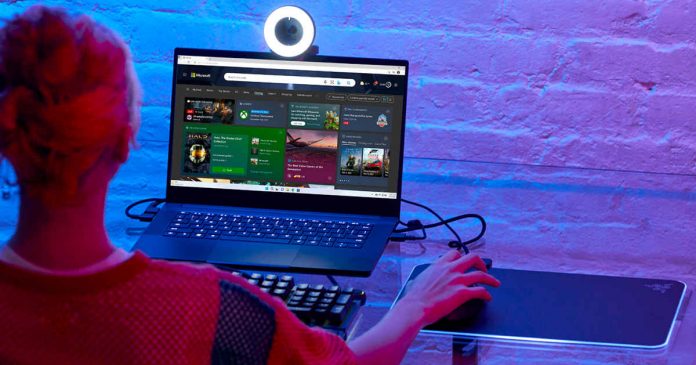
    Microsoft to make Edge the browser of choice for gamers. The new options in version 103 of Microsoft Edge make it easier and more direct than ever to access cloud gaming and even free games.

    Earlier in June, at the Xbox & Bethesda Games Showcase, Microsoft revealed that it was working on additional gaming features for the Edge. With the release of Edge 103, these features become available in the stable version of the browser.

    Microsoft’s idea is to enhance the gaming capabilities of Edge and Windows 11, offering new tools for gamers who spend their time in front of the PC.

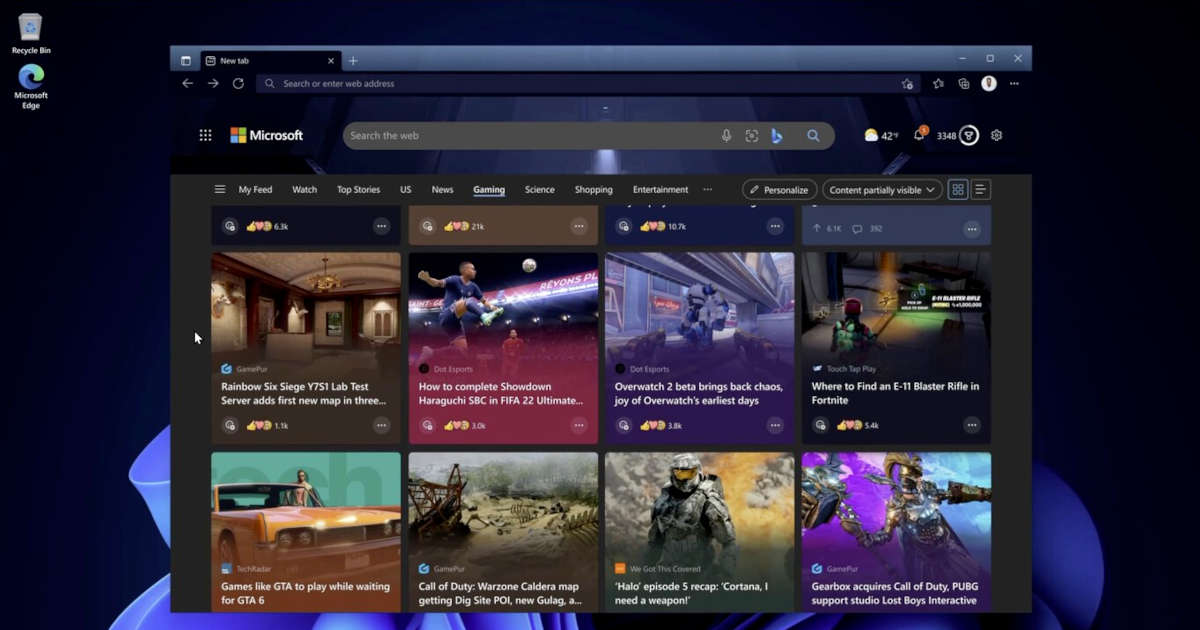
    The homepage has a new Games tab with game recommendations from Xbox Cloud Gaming and various news articles, as well as a new dedicated Games menu with free browser games.

    Microsoft Edge Gaming Browser update

    Xbox Game Pass Ultimate subscribers who enjoy cloud gaming options also have some exciting news — the arrival of the Clarity Boost option, which had been available in preview versions of the browser, and which allows streaming games to be seen with more clarity and definition than in other browsers. According to Microsoft, this technology provides “spatial scaling improvements that make streaming games look crisper in Microsoft Edge on Windows 10 and 11.”

    Microsoft Edge Clarity Boost

    Finally, another game-related feature is the new Efficiency Mode. When you launch a game on a PC, Edge automatically minimizes resource consumption, so the game gets more CPU power and more memory to work with. It is a resource management system designed to speed up the performance of the browser when playing.

    Instagram Testing Automatic Age Verification By Scanning Your Video Selfie Using AI System

    Instagram Automatic Age Verification

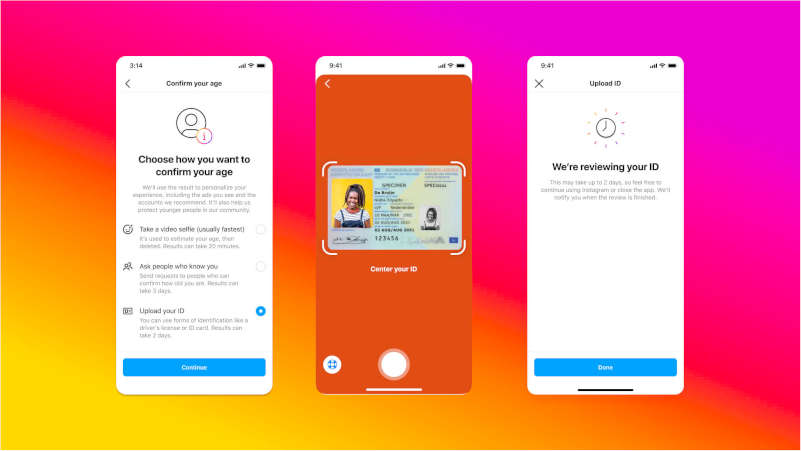
    Instagram is testing automatic age verification based on video selfie in the United States.

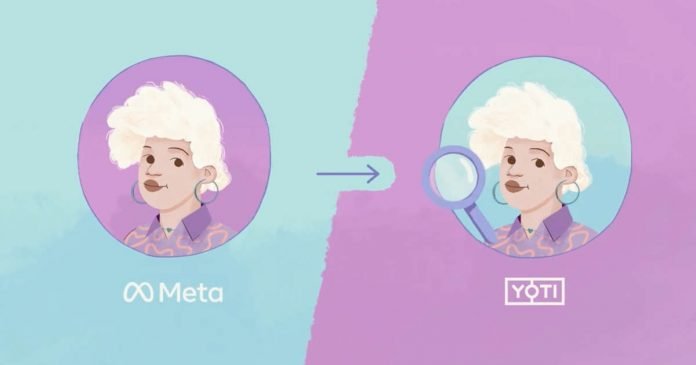
    The users are asked to upload a clip, which is then evaluated by the partner company Yoti, as it claims uses artificial intelligence to determine the age.

    After successfully completing the verification process, the video will be deleted from both Meta and Yoti. Although the AI system can estimate the age of the users, it is not designed to recognize their identity, Instagram emphasized.

    The automatic age verification is only intended for users aged 13 and over. The age limit stems from US child protection regulations, and online platforms are coming under increasing pressure to comply. Instagram also restricts contact with adults and the display of advertising for users under the age of 18.

    The new verification method using AI system will not allow teenagers to circumvent social network age restrictions. Also, adults who mistakenly registered as teenagers will also be able to use it. It is necessary to be over 13 years old to use Instagram, but for years many minors have broken this rule due to the lack of controls.

    Although Yoti tools are widely used and approved by the British government and German regulators, the system does not provide 100% accuracy, but it often comes out with fairly correct estimates. The degree of accuracy differs depending on age, gender and skin color.

    Instagram Automatic Age Verification steps

    Also, to verify age, the user can provide identification such as a passport or driver’s license. The document will be stored on the servers for 30 days.

    Instagram also integrated a third method to verify your age — Social Vouching. Three of the user’s friends over the age of 18 must verify their age. Social Vouching will randomly select people from a list of six people. You can’t add relatives to it. Selected users will be asked to verify their age.

    PCI-SIG Unveiled The Latest PCI Express 7.0 Standard: Eight Times Faster Than PCIe 5.0

    PCIe standard

    At the PCI-SIG Developers Conference 2022, the new PCI Express 7.0 standard was announced. 

    The PCI-SIG consortium, which deals with the development and standardization of PCI, announced that the final specifications of the new bus version will be adopted in 2025 and likely hit store shelves in 2027.

    PCI Express 7 specification

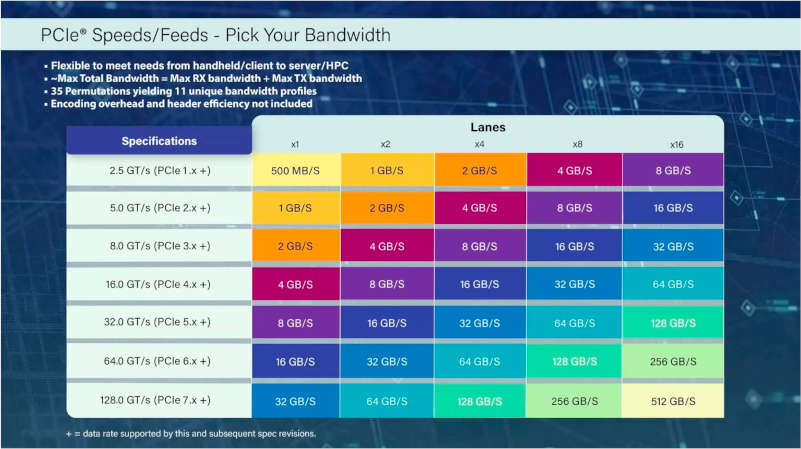
    A single PCIe 7.0 lane can provide data transfer rates of up to 128 GT/s (gigatransactions per second) or 32 GB/s. Thus, 16 PCIe lanes in duplex (both directions) will be able to transfer data at speeds up to 512 GB/s, which is twice the capabilities of the PCIe 6.0 standard. And an SSD with a PCIe 7.0 x4 interface can theoretically provide read and write speeds close to 64 GB/s in each direction — the limit of upcoming drives with PCIe 5.0 x4 is 15.7 GB/s.

    PCIe 7 Speed

    Other key features include improved power efficiency, low latency, and backwards compatibility with previous generations. However, PCIe 7.0 will require shorter traces to achieve these speeds, so motherboards can become more expensive as they are more likely to require additional components and thicker PCBs.

    Amazon Alexa Will Be Able To Speak In The Voices Of Deceased Loved Ones

    Amazon Alexa To Speak In The Voices Of Deceased Loved Ones

    As part of the re:Mars conference, Amazon introduced a new feature for the Alexa that will make the voice assistant to speak in the voices of departed loved ones.

    During the demonstration, it was possible to see how a device configured with this new version of Alexa read a story to a child with the voice of his deceased grandmother.

    In the demo, a child would say to an Echo, “Alexa, can Grandma finish reading ‘The Wizard of Oz’ to me?“. After responding with her usual robotic voice, Alexa immediately switched to a softer, human-like voice, apparently mimicking the voice of the little boy’s relative.

    According to Amazon, Alexa should be able to imitate voices even if she has only heard a minute of audio material from the person to be imitated. “We are undoubtedly living in a golden age of AI, where our dreams and sci-fi come true,” Amazon’s Head Scientist for Alexa Rohit Prasad said at the event.

    In addition to the fact that you can imitate the voices of dead people, you can imitate the voices of the living. For example, politicians or stars. All you need is a voice sample for this.

    Amazon apparently did not comment on the possible misuse of such technology at the event. If the voice imitation is of high quality, there are various scenarios in which such technology can be used for things other than reading a bedtime story — for example, making phone calls under a different name.

    Why you should limit your Instagram presence and how to do that

    limit your Instagram presence

    Why you should limit your Instagram presence and how to download Instagram video

    According to the latest surveys, the first thing people usually do when they wake up is scrolling their social media. We have got used to this massive information flow. We’ve got so used to it, that we’ve even become addicted to it, and can’t imagine our life without it. However, maybe you’ve noticed a great mental health decline. Of course, it has something to do with the rise of social media. And Instagram, one of the most popular social webs nowadays, is definitely guilty of this pressing problem. 

    There are many reasons for this issue. One of them is that now we’re not only concerned about our lives and problems. We have a lot of other people, their problems and other information to be concerned about. Sometimes, we don’t even know these people in person. And when we have something to be concerned about, we will definitely find something to stress about as well. Is this enough to make you limit your Instagram presence? If not, we have many more reasons and tips on how to become more independent of Instagram and other social media. But first, we will advise you about the service, which is meant to help you to visit Instagram less and filter the information you consume. 

    With the help of Instagram videos downloader by Toolzu you will be able to download Instagram video and photos privately and legally. The service is absolutely free. It will help you to stay up-to-date, even if you decide to quit social media, because of the reasons we’re now going to mention.

    Information overflow

    There is nowhere to hide from a huge amount of information we’re constantly getting from different sources. It’s difficult not to be aware of anything because there is always the way you can find out about the latest news and trends, even accidentally. The fact that we find out about something against our will is pretty depressing. Especially, considering the fact that a lot of information we get can cause negative emotions. 

    That’s why filtering is very important. While social webs keep suggesting different recommendations, you should stay conscious and try to consume only something you really need to know. Otherwise, there is a risk of overwhelming your brain and spoiling your mood. Filtering information is the best way to avoid sad consequences. This is one of those cases when knowing less is better than knowing everything.

    Vanity Fair

    People enjoy posting themselves and showing their followers the best sights of their lives. Instagram is like a museum, where all the exhibitions are perfect and polished. Beautiful people drive fancy cars to get to their luxury mansions while wearing very expensive fashionable clothes. However, when you leave the museum, you see that life is significantly different from the way you’ve seen on Instagram. And your life is not that perfect in the first place. 

    This contrast causes a lot of frustration. Real life seems unfair, and the fancy world from Instagram seems so far away. 

    It’s important to understand the difference between real and fake. It’s normal for people to show only nice sights of their being. Nevertheless, life outside social media can be different. Notice the surrounding beauty, but don’t get frustrated if your life doesn’t look like the life of some social media influencer.

    Self-esteem decline

    Instagram users also enjoy sharing their career achievements or how nice their families and friends are. Sometimes, it is difficult to see, especially if your boss has recently shouted at you, or you’ve had an argument with your family member. Other people’s success may make us feel as if we are a failure, even if it’s not true. It seems like all the things, which are difficult for you, are easy for Instagram users.

    Don’t believe in a perfect picture. There are always a lot of things going on behind the scenes. Remember that everyone has their struggles and issues. That’s why we should treat each other with kindness and respect. Moreover, the first person you should treat with kindness and respect in this case is yourself. Learn not to compare yourself with other people, and fight your curiosity when it comes to other people’s lives. 

    Quitting social media is a serious step. However, limiting your presence and information filtering is something all of us can do. These are efficient ways of avoiding the consequences mentioned in the article.  

    How To Invest in Crypto with Maximum Efficiency?

    crypto trading

    One of the most interesting stories that can encourage people to invest in cryptocurrency is the case of Cooper Tarly in 2017 when an investor bought bitcoin and ether for a couple of hundred dollars, and four years later became a millionaire. Many want to repeat this path of success and are looking for promising investment options.

    Unfortunately, finding a reliable crypto exchange and buying the first currency that comes across is a dubious path to success. Let’s understand the basics of investing and find out how to choose and buy the best digital money.

    Basics

    In general, cryptocurrencies are digital money, the technology of which is created on a blockchain basis. Each block of information refers to the previous one, they are securely encrypted and hackers cannot somehow change the data. And this is one of the reasons why investors are willing to put in such an asset.

    On the other hand, cryptocurrencies can hardly be called stable, and investments in these tokens can be quite speculative. For example, the well-known Bitcoin changed its value from 12 thousand dollars to 67 thousand dollars in 2021. In addition, some tokens may be illegal at all, which is why the choice of an investment option requires special attention.

    How To Invest in Tokens?

    If you want to save funds in digital money, then there are several working ways:

    • purchase tokens directly and store them in cold or hot wallets;
    • invest in the assets of a cryptocurrency company or funds;
    • become a miner and receive a reward for work in digital money.

    You can also lend tokens or use liquidity pools (in this vault, customers can pick up a currency pair and exchange one value for another, having commissions or certain interest charged for this).

    How To Choose a Cryptocurrency?

    After learning the basics and ways of investing, devote maximum time to choosing the right cryptocurrency. As a rule, professionals in this field use two principles to select a token:

    1. Fundamental analysis: studying information about the coin, the history of creation, white paper, the principle of operation, financial performance, the size of the community, etc.
    2. Technical analysis: statistics on asset price fluctuations and trading volume. The basis of this analysis lies in the fact that the market automatically includes all known data in the total price of a token, and its price directly affects the attitude of potential buyers towards it.

    Explore All the Risks

    Also, for investment efficiency, think about how to reduce the risks of theft or loss of an asset — take care of a reliable digital wallet. Choose tokens with consumer protection to be able to appeal to transactions. Additionally, always keep in mind the high volatility and peculiarities of the regulation of this area in different countries.

    If we crown it all, investments in crypto assets can be called quite promising. With sufficient study of the features of the sphere, you can avoid risks, find a suitable token and get a pretty good extra income.