Home Blog Page 167

Dimensity 9000+: MediaTek Flagship Processor With More Power And Efficiency To Compete Against Qualcomm

MediaTek Dimensity 9000 Plus

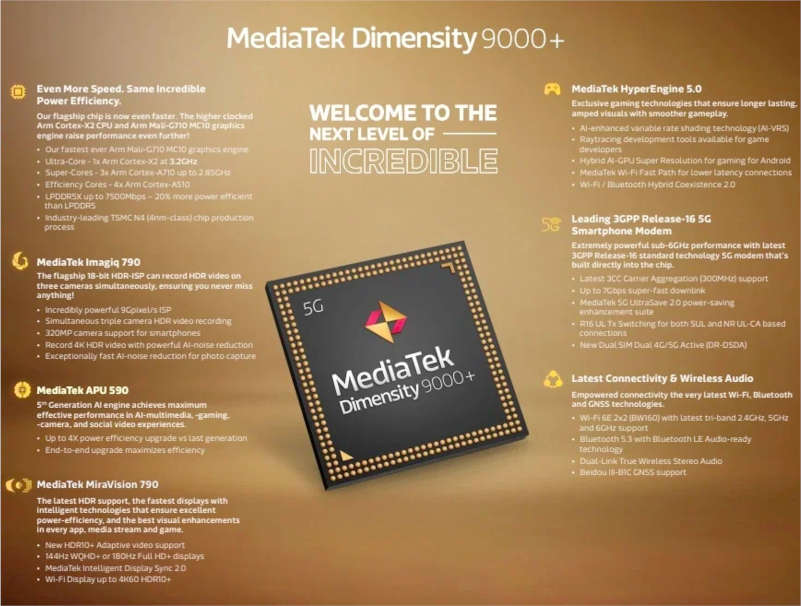
MediaTek announced its first 4nm flagship processor Dimensity 9000 last November. The manufacturer is now introducing the Dimensity 9000+ chipset, which is a minor upgrade over its predecessor and at the same time an answer to the Snapdragon 8+ Gen 1.

Dimensity 9000+ is an interesting improvement over the previous version, clocking in at 3.2 GHz (compared to 3.05 GHz on the non-Plus model). The GPU, a Mali-G710 MC10, has also been upgraded. According to MediaTek, we can expect more than 5% increase in CPU performance and more than 10% improvement in GPU performance.

The Dimensity 9000 Plus is still manufactured by TSMC in 4nm and includes one 3.2GHz Ultra-Cortex-X2 core, three 2.85GHz Super Cortex-A710 cores, and four effective Cortex-A510 cores with a frequency of 1.8 GHz.

MediaTek Dimensity 9000 Plus Features

The chip comes with an Imagiq 790 ISP image signal processor that supports 18-bit HDR video recording from up to three cameras simultaneously, while a 320-megapixel sensor supports 4K HDR and AI noise reduction. The SoC supports LPDDR5X memory, and is equipped with Bluetooth 5.3 and Wi-Fi 6E adapters, the latest GNSS standard, and also has a 5G modem.

The MediaTek Dimensity 9000+ will be released in the third quarter of this year, but as of now, the company has not revealed which devices will be among the first to feature this new processor.

iOS 16 And macOS Ventura Will Allow You To Bypass CAPTCHAs

iOS 16 Bypass CAPTCHAs

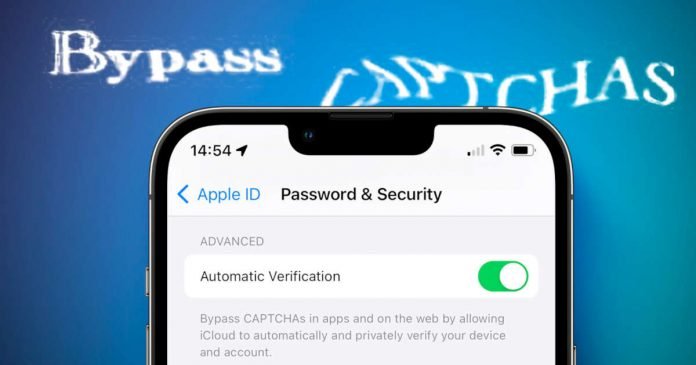
Tired of confirming that you are not a robot? Don’t worry; when updating your iPhone to iOS 16, Apple will include a new feature on your device that will allow you to bypass CAPTCHA implemented on some websites.

CAPTCHAs are sequences of letters, numbers or images that are alienated in such a way that, ideally only real people can decipher them. And Apple’s Private Access Tokens is “a powerful alternative that help you identify HTTP requests from legitimate devices and people without compromising their identity or personal information.”

According to Apple, iOS 16 will completely bypass such CAPTCHA prompts for apps that accept Private Access Tokens. No personal information such as the e-mail address or telephone number should be passed on, and the IP address should not be determined either. Automatic bypassing of CAPTCHAs can be enabled in iOS 16 security settings.

The feature has been added to Apple ID > Password & Security > Automatic Verification. According to Apple, the system will automatically check the device and Apple ID account in the background, which will confirm that a user is a person and not a software bot. In the early beta versions of iOS 16 and iPadOS 16, automatic verification is enabled by default. 

Apple co-developed the feature with Fastly and Cloudflare. The option will work not only in iOS 16 but also in macOS Ventura.

Epic Online Services Enables Crossplay Between Epic Games Store And Steam

Crossplay Between Epic Games Store And Steam

Epic Games has unveiled a new free developer tool to help enable crossplay support between the Epic Games Store and Steam.

The free developer toolkit allows you to link user accounts so that the system will allow you to log into the same server even if the games are purchased from a different digital store. Thus, you will be able to receive and send friend requests, as well as respond to them from the same place regardless of the store. Also, the Epic Games Store will allow you to join multiplayer games across various platforms.

Of course, for this change to take effect, the tool will have to be enabled by the developers of each game.

But Steam isn’t the only store aiming to support the Epic Games Store. In the future, the developers promise to add support for other stores, Linux, macOS, as well as mobile platforms and consoles.

The United States Also Wants To Introduce Single Mobile Charging Port

USB-C single mobile charging port

The United States, following the European Union, plans to adopt a single charging port for smartphones.

Last Thursday, a group of US senators published an open letter to the US Department of Commerce asking to approve USB-C as a single standard for the US market.

The initiative was put forward by Senators Ed Markey, Elizabeth Warren and Bernie Sanders. Senators called such a decision by the European Union “wise.”

According to senators, the transition to a single charging standard will reduce the amount of plastic and electronic waste. They noted that after buying a new device, the user simply throws out the charger if the connectors do not match. In addition, it will greatly enhance the convenience for consumers.

The company that will suffer the most from the adoption of a single type of charging connector is Apple — many of Apple’s gadgets use proprietary Lightning chargers. According to some insiders, Cupertino has already tested USB-C in future iPhone models. Manufacturers of other electronics in the majority, have long since switched to USB Type-C.

All You Need To Know About Mobile App Testing

Mobile Application Security

More and more complex software products for gadgets are appearing on the market and they need to be tested by specialists. That is why mobile application testing services have become an independent area of QA, which is actively developing in recent years. In this article we will get to know:

  • What mobile apps are like;
  • What is the difference between testing such software products;
  • What tools must be mastered by a tester;
  • How to deal with the most common defects;

Mobile app types

All applications can be divided into three types.

1. Mobile Web Apps

The most common type, which easily allows websites to be displayed on a variety of devices. These are not apps in their pure form, but mobile-adapted site interfaces with active functionality. Web applications are cross-platform, they do not need to be installed, and they are quite easy to use. Other advantages of this type of software include fairly simple and fast development. But web applications also have disadvantages – they need to be connected to the Internet to work, limited security, and low performance.

2. Native applications

Such applications are developed only for a particular platform and take the most out of a particular operating system. Native applications can use other resources of the gadget: camera, navigator, contacts list, and so on. They are characterized by wide functionality and high speed.

But these applications have disadvantages, too: low platform coverage in comparison with mobile web applications, high development costs, and the need to make regular updates.

3. Hybrid apps

Unlike native apps, hybrid apps are developed for multiple platforms simultaneously and are written in a universal language. Such a product can be placed in the storerooms, and there is no need to release a new version every time to update it. It is enough to add all changes to the server. The drawback of such applications is the visual style. After all, the development of an application for a specific platform is based on a single guideline. And the interface of a hybrid app loses the recognizable features of the operating system.

How to test mobile applications

Mobile application development is different from desktop applications. Therefore, in the process of testing as well, the engineer is obliged to make checks due to the nature of software products. For example, it is necessary to check the installation of updates.

Operating system developers are constantly improving platforms and making them safer and more productive. This also forms new requirements for mobile applications. The user should not experience any difficulties in the update process. What if the user doesn’t install new versions in time? How will the app react to this? The tester looks for answers to these questions.

Testing helps reveal the application’s reaction to unpredictable user actions. Imagine, an unlocked gadget is in your pocket or bag, and the app must correctly handle a set of chaotic and incoherent actions.

Another type of testing – assessing the quality of different types of connections. This testing takes place in a laboratory environment, where it is possible to recreate the most realistic communication conditions. This type of test demonstrates how the application will behave in non-standard situations, for example, when the Wi-Fi signal is barely detectable.

The team on a project can consist entirely of mobile app testers or remain combined. This depends on the specifics of the product being tested. An outsourcing company may have only a few mobile software QA specialists or a large department. In this case, a novice can build a career from junior to lead. Product companies may also have their own QA department.

Mobile applications testing tools

The QA engineer’s toolkit is quite rich: emulators, beta-testing services, programs for statistical data collection, and so on. Let’s look at them in more detail.

Emulators

Emulators are programs that emulate the behavior of other devices. The main advantage of emulators is that they help to test complicated scenarios which are not recommended for real cell phones (if the tests can damage the device).

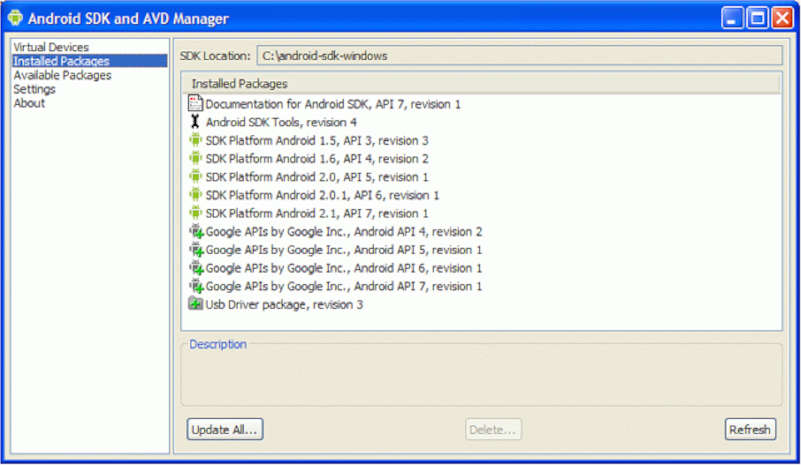
Android SDK and AVD Manager

Today it is easy to find emulators for all the common operating systems. For example, the Android SDK allows you to run debugging and source code testing. In addition, you can get the results in real-time.

Beta-testing services

As a reminder, beta testing is active work with the almost-ready version of the product to find all possible bugs and their further elimination.

The Beta Family is a free service that allows you to create an account and download a beta version of the application. After that, you can send an invitation to test the software and then analyze the results.

Statistics gathering

Statistical information about how users work with the application will not be superfluous. You will find out which features attract users the most, and which mistakes they make.

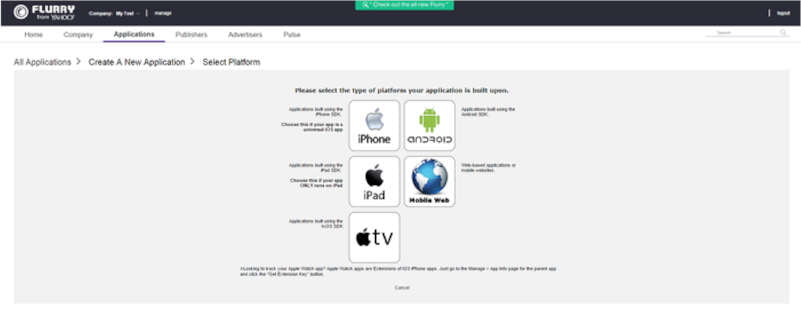
Select platform for app

You’ll also get statistics about which OS versions are most frequently encountered by app users and the representation of your app on the geographical map. You can get such data using data collection solutions. Examples of the most common free systems are Google Analytics, Flurry, BugSence, Apsalar.

Telegram Premium Is Now Official: Price And Included Features

Telegram Premium

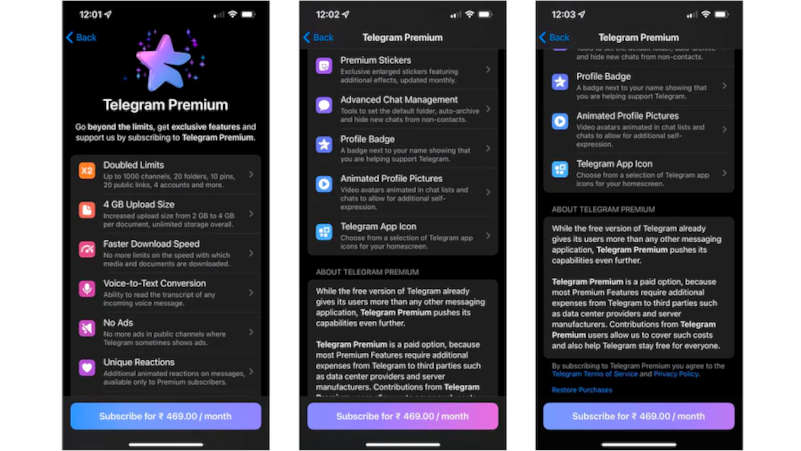
Telegram announced at the beginning of June the future availability of Telegram Premium, and it’s now official

Telegram Premium service gives users the possibility of accessing exclusive functions and features in exchange for paying a monthly fee — something that, in addition, will allow the company to obtain income directly from users and not from advertisers.

The subscription will allow Telegram to add what users have been asking for and, at the same time, keep “the most feature-packed messenger on the planet” free. Telegram Premium almost doubles all the limits in the application.

Telegram Premium features:

  • Upload files up to 4 GB to the application
  • Accelerated download of photos, videos and documents at maximum speed
  • You can follow up to 1000 channels
  • Create up to 20 chat folders, each of which will fit up to 200 chats
  • Connect the fourth account in the application
  • Pin up to 10 chats in the main list
  • Save up to 10 favorite stickers
  • You can also write a longer bio and include a link in it
  • Voice messages can be converted to text
  • Full screen stickers with animation
  • More ways to respond to messages: 10+ new emojis
  • Availability of animated profile pictures
  • Special Telegram Premium badge for premium users that appears next to their name in the chat list, chat headers, and member lists in groups
  • New exclusive app icons
  • Disable ads in channels
Telegram Premium features

Telegram has released version 8.8 on the Apple App Store, which introduces the Premium tier for $4.99 per month and soon, the feature is going to be available for Android users too.

Why You Need Meeting Management Software in the First Place

Board Management

This might shock you, but studies have revealed that one out of three business meetings turns out to be unproductive due to insufficient planning. Moreover, almost 50% of senior-level executives believe that the time they spend in meetings is wasted. In the business context, these figures are alarming for the management.

However, the question stands – what are the possible reasons behind unproductive executive business meetings? Here are some common mistakes that management makes before and during meetings:

  • No clear meeting agenda and last-minute changes (that are often not communicated to the participants)
  • No effective way to record meeting minutes and important decisions made
  • Insufficient access to documents during the meetings
  • Improper reporting of meeting minutes and no follow-up actions

Boardsoftware: Effective business meetings

The next question should be, how to solve the above-mentioned problems? There are several high-end meeting software solutions, but most of them do not cover all the dimensions (agenda building and distribution, document sharing, meeting minutes distribution, etc.) of business meetings.

However, virtual boardsoftware is a comprehensive paperless meeting solution specifically designed for board or executive-level meetings. Read on to learn more about virtual boardroom software and how you can use it for productive business meetings.

What is a board portal?

A board portal or board management software is a board meeting management tool globally used to ensure smooth communication between senior company officials and arrange business meetings.

Board portal software is also a safe, online data storage facility where company management can store important documents and board material. Corporations, associations, trade unions, and non-profit organizations use board software for online board meetings, data sharing, and deal-making.

Why is the board portal a suitable solution for productive business meetings?

Board management software streamlines online board meetings from all aspects. Here is how.

1. Meeting agenda builder

Preparing and distributing meeting agenda is among the initial steps of a business meeting. With the virtual boardroom software, the management can easily prepare meeting agendas using customizable templates in the board portals. These templates are designed according to different industry practices. Boardroom management can also create meeting agendas from scratch.

The next step is to share the agenda with all the participants and seek their recommendations. The management can upload the meeting agenda in the boardroom and ask members to add suggestions or comments in real-time. 

Alternatively, the agenda can be shared individually, and the changes can be incorporated into the final draft. Once the agenda is approved, the final version can be shared within the board software.

2. Calendar management and instant notifications

Another good thing about board portal software is that the management can prepare business calendars for the whole year in advance and share that calendar with the concerned members. This helps participants prepare better for the meetings.

Apart from that, boardroom members can get instant notifications about all the activities and updates in the boardroom. If there are any changes in the meeting agenda, all concerned members will be notified immediately; this helps avoid last-minute surprises.

3. HD video conferencing tools

High-end video conferencing tools are very important for online board meetings. Virtual boardrooms have built-in HD video conferencing tools, and you can also integrate third-party apps like Zoom for video conferencing.

What makes board portals a better option than many other meeting management tools is that meeting participants can engage in video conferencing and access meeting documents at the same time.

Apart from that, members can use screen markers while discussing any report or company document. It helps in grabbing the attention of all the meeting participants.

4. Online voting and electronic signatures

Modern board portals are equipped with online voting tools that can be used during business meetings. If a meeting is being conducted to approve or reject a motion or proposal, meeting participants can cast online votes in virtual boardrooms. The votes can be cast publically or anonymously.

In addition to that, the electronic signature feature in boardrooms is very handy in signing documents, agreements, or contracts online.

5. Meeting minutes preparation and distribution

Virtual board portal software gives you the ease of recording and finalizing meeting minutes real quick. The meeting manager or corporate secretary can use meeting minutes templates or create new ones. Minutes can be signed by the chairperson within the boardroom and shared with all participants.

6. Fast document access

Board management software are also cloud-based document storage facilities where the management can store board material or documents required for meetings. These documents may include financial statements, meeting agendas, past meeting minutes, etc. Boardroom members can access these documents whenever they want.

7. Easy follow up

Board software allows the management to regularly communicate with the meeting participants and stay updated on their progress related to tasks assigned during the meetings.

Summing it up

Insufficiently planned business meetings not only waste the company’s resources but also waste precious time of meeting participants. Using top-notch meeting management software like board portals helps you easily manage business meetings from start to end and make the follow-ups a lot easier.

Meta Launches Avatars Store: A Virtual Clothing Store For Metaverse Avatars

Meta Launches Avatars Store

Mark Zuckerberg announced the launch of the Avatars Store on Facebook, Instagram, and Messenger — a virtual boutique where you can buy clothes to dress up your 3D avatar for the metaverse.

Meta’s plans to open it so that any developer can create clothes and sell them in the metaverse, a business where Facebook will surely keep a percentage of each transaction. The virtual store will launch in the US, Canada, Mexico and Thailand on June 20th. Item prices are not yet known. 

The Avatars Store will have clothing from Balenciaga, Prada, and Thom Browne. Zuckerberg assured that he would be happy to add more brands to the partners and transfer their products to virtual reality as soon as possible.

Meta Avatars Store

This initiative is one of Mark Zuckerberg’s steps toward creating a metaverse, a three-dimensional digital space in which the virtual and real worlds are connected using AR and VR technologies.

In February, the company introduced 3D avatars for Instagram and allowed them to be used across the entire Meta ecosystem, including Facebook and Messenger. This year Meta also opened its first physical store to attract more users to the world of virtual reality.