Home Blog Page 176

The 3 Factors To Consider When Choosing A Keyboard

Computer keyboard

One of the least thought about items that makes a big impact on our daily lives is the computer keyboard. We typically spend hours a day clicking away at it so it definitely deserves more thought. If you are getting a new computer, or are looking to replace a broken keyboard then you need to consider the purchase carefully to get the most out of the new one. 

There are so many types of keyboards to consider, including virtual ones and there is no one-size-fits-all that works for everybody. What makes one perfect for me might be terrible for you. The way to choose is to look for certain factors that you need for your particular situation. In this article, we will go over several of them so you know what to look for to find the ideal keyboard for you. 

1. How you plan to use it

If you have ever read anything about keyboard facts then you are likely aware that there are specific keyboards for specific functions. For example, if you are a gamer then the keyboard you use should be one specifically designed for the gaming functions that will make it easier for you to play games on your PC.

On the other hand, you may need a keyboard that is ergonomically designed for long periods of typing. There are keyboards that are split into two halves to give you a lot of flexibility to be able to type without stressing your wrists or fingers. 

Then there are keyboards that are designed for use in different countries and languages. These have special characters that you won’t find on any old keyboard. If you need to be able to switch to Cyrillic, for example then you will need a keyboard that has that function built-in. 

2. Compatibility

You may have your eyes set on a certain type of keyboard that you feel is perfect for you. However, this doesn’t mean that it is going to work on your system. There are compatibility issues that can pop up that you’ll need to consider before buying a keyboard. 

For instance, if you have an older computer that uses the last generations of USB cable then you may not even be able to plug the new keyboard in. If it is wireless you will need to have enough USB slots for the receiver. 

Then, make sure that you will be able to download the software needed to connect the keyboard to your system. 

3. Wired or wireless?

It may seem like a no-brainer to go for a wireless keyboard since it can be used anywhere and creates less clutter on your desk. However, there is the issue of compatibility and even interference with other devices nearby. You will also need to be buying batteries on a regular basis with a wireless keyboard. 

A wired keyboard is tricky since you have to use it within a certain space on your desk since it has to connect by wire. And, it can also end up getting in the way of other items you have on your desk. 

FIDO Standard: Apple, Google And Microsoft Collab To Integrate A Single Passwordless Authorization Standard

FIDO Standard Passwordless Authorization

Apple, Google and Microsoft have collaborated to adopt a passwordless login system to access websites and apps on their devices and platforms.

The launch of the new technology is scheduled for 2023. A single standard for passwordless login based on cryptographic keys was developed by the FIDO (Fast IDentity Online) Alliance in conjunction with the World Wide Web Consortium.

The companies announced their support for FIDO Alliance standard to enable passwordless sign-in across all of their platforms. That is, FIDO passwordless login standards will be available in their mobile platforms, desktop and browsers, as well as operating systems over the course of the coming year — this includes Android, iOS, Windows, macOS, Chrome OS and Microsoft Edge, Google Chrome and Safari.

FIDO Alliance standard to enable passwordless sign-in

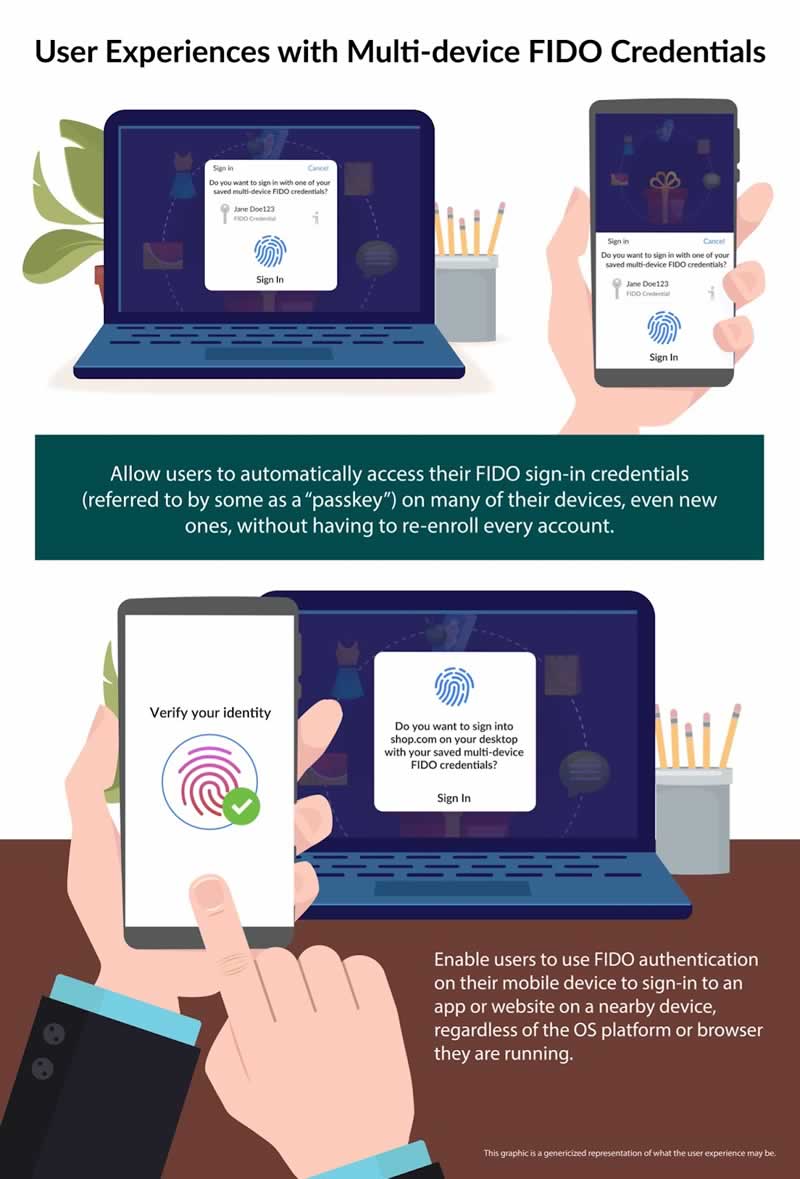
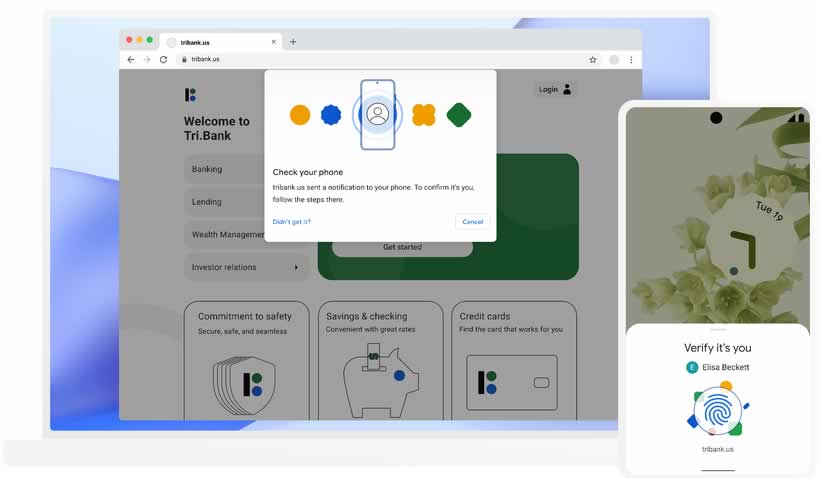
The smartphone will become the main authentication device in applications, websites and other digital services, according to a Google blog. Biometrics or PIN code will be used for entry. Security will be provided by a unique passkey crypto token, which is transferred between the smartphone and the website. The system has the ability to connect to the cloud so that new devices can also be incorporated under your same account.

Google Passwordless Authorization

You will only need to use biometric scans (such as your face or finger) or a device PIN to log in at every step. These efforts are supposed to prevent successful phishing attacks that trick the user into sharing passwords with hackers and scammers. 

Also, users are exempted from having to remember passwords or login details on all their platforms, and it will avoid having to use the same password for many services.

China Wants To Replace Foreign-Brand PCs And Software With Domestic Alternatives Within Two Years

China Wants To Replace Foreign-Brand With Domestic Alternatives

China has instructed central government agencies and state-backed companies to replace foreign-brand PCs and software with domestic alternatives within two years. The decision follows China’s decade-long campaign to replace imported technology with local alternatives.

According to Bloomberg sources familiar with the matter, it would replace at least 50 million PCs at the central government level alone. This will affect the sales of US groups HP and Dell Technologies, which are the largest PC brands in the country after Chinese manufacturer Lenovo.

China intends to completely abandon foreign equipment at the level of state institutions in order to stop depending on the United States and other geopolitical rivals that can impose their sanctions on the country.

As the first step, China will support Linux-based operating systems to replace Microsoft’s Windows. According to one source, one of the leading providers of such tools is Chinese software developer Standard Software. 

The PC replacement project is expected to be completed within two years. The publication notes that China is likely to abandon only the PC and software brands, but not hard-to-replace components like processors and GPUs. Some agencies, including state media and cybersecurity authorities, may continue to purchase foreign equipment with special permits.

Best 3 Video Overlay Software on Windows & Mac 2022

Video Overlay Software on Windows and Mac

Video overlay can add professionalism and clarity to your videos, making them an easy solution to elevate your final products. Whether you’re doing your work, posting on social, or simply growing your designing skills, adding appropriate video overlays will wow your audiences.

Overlays are useful in a variety of scenes. Many people use overlays to achieve these effects:

  • edit green screen videos
  • make the PiP effect
  • stamp the logo or stickers on the top of a video
  • showcase the person who is speaking in a voiceover
  • add aesthetic effects to videos
  • add masks over portions of a video

Ask anyone who wants to elevate their video quality, absolutely convenient and easy-to-use video overlay software with practical features will be of great help. Therefore, we have tested dozens of software and list the best three video overlay software, both paid and free, for Windows or macOS, currently available. 

  1. WorkinTool VidClipper on Windows
  2. Adobe Premiere Pro on Windows, macOS, and Linux
  3. Final Cut Pro on macOS

We are going to analyze the three software in terms of price, features, degree of difficulty, and using speed. 

1. The Best Video Overlay Software-WorkinTool VidClipper

Best for: Beginners, professionals, and people in between 

Supported OS: Windows

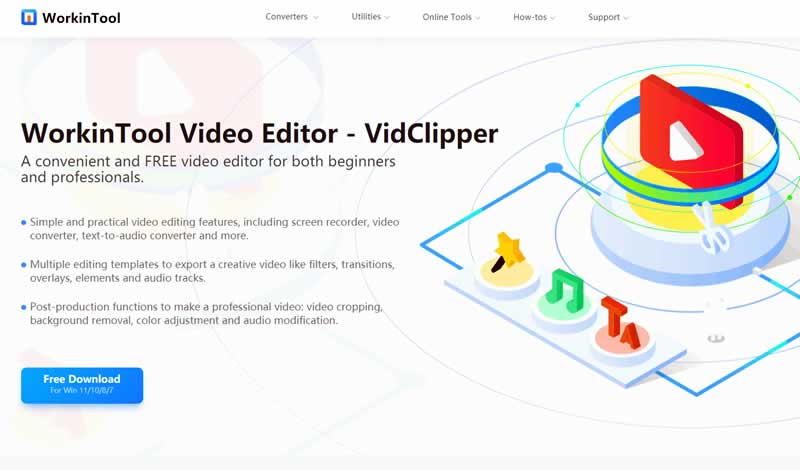
WorkinTool Video Editor

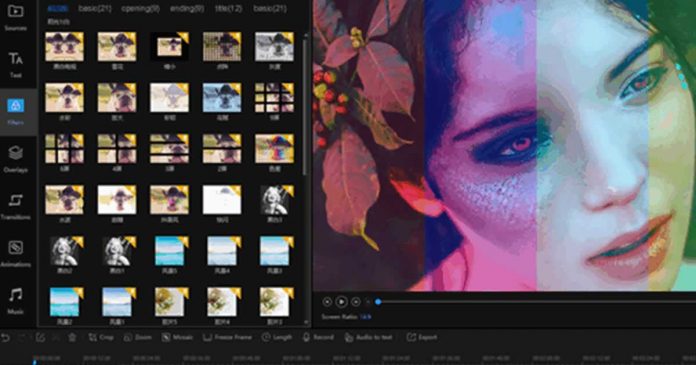
WorkinTool VidClipper caught my attention when I tried it for the first time. I believe you’ll be amazed by its simple interface, practical features, and smooth processing speed as well. It is a powerful video editor equipped with multiple video editing features. 

For the basic features, you can use predefined video templates without limits, including 70+ overlay effects, 100+ stylish texts, 170+ special effects, 350+ transitions, 60+ filters, 70+ animations, and 300+ background music and sound effects. All of these ready-made templates are utterly free without any license payment and personal registration. 

Meanwhile, one of my favorite things about WorkinTool VidClipper is that it doesn’t come with limits on audio or video layers which means you can overlay whatever quantities of videos and images on any positions of videos. You can refer to online tutorials of adding overlays for edits to gat familiar with this program.

In addition, a series of editing tools are built into this program, like screen recording, video converting, text-to-speech converting, auto reframe, video splitting and merging, cut-out image, video template, and watermark removal. I like the video converting feature very much because it means you can add any kind of video format into this converter and convert them to widely-used video formats, such as MP4, AVI, MOV, WMV, MKV, and even GIF.

Reasons to download

  • Utterly free price
  • Simple and clean interface
  • Easy to start for both beginners and professionals and everyone in between
  • Smooth processing speed
  • It can automatically save your adjustments during editing.
  • Multiple output formats

Reasons to avoid:

  • It can’t export video in 4K and 2K resolution. 
  • The maximum size you can export is 1080P.

2. Edit Video Overlay with Adobe Premiere Pro

Best for: Professionals

Supported OS: Windows, macOS, Linux

Edit Video Overlay with Adobe Premiere Pro

Adobe Premiere Pro is widely considered as the benchmark and industry-standard video editing and overlay software. Similarly, it is another top-quality tool that provides a range of features. Overlays and the PiP effect are some of this program’s specialities. 

You can select among more than 6,400 high-quality video clips from Adobe Stock and freely add them to your videos, not to mention the basic predefined overlays. And what surprises me is that a new captioning workflow makes it easier to add, split, and format captions. That is to say; you can apply a wealth of text options for titles and captions in any method.

For the basic editing features, you can make adjustments to video color, text, effect, and output formats and apply them to multiple videos and audio tracks. There is no limit on video tracks as well. In addition. Other tools, like learning tools, auto reframing, auto-remixing, and auto-assigning of music tracks make it easier to take over the main tasks needed for overlaying a video.

Reasons to download

  • 10K high-resolution
  • Abundant features
  • Unlimited number of Video Tracks
  • Multiple output formats

Reasons to avoid

  • High cost at $20.99/mo
  • Intimidating interface for nonprofessionals
  • High CPU and GPU usage and slow response on ordinary computers

3. Add Overlay via Final Cut Pro

Best for: Professionals

Supported OS: macOS

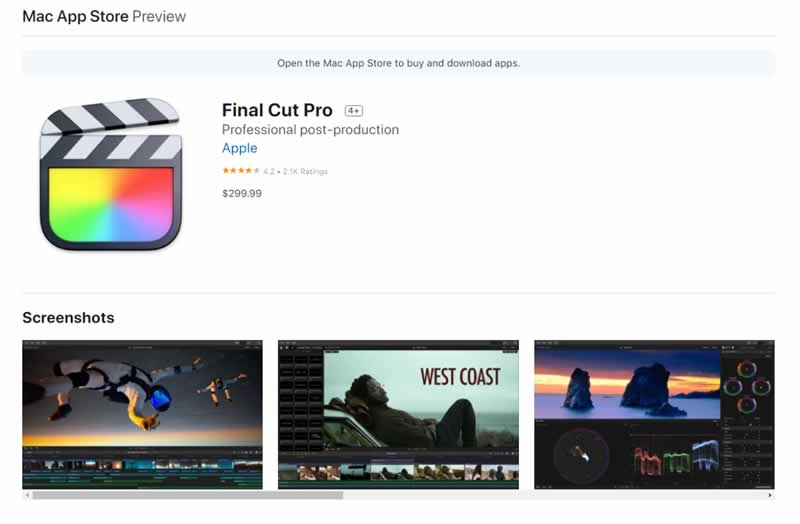
Add Overlay via Final Cut Pro

Final Cut Pro is a professional video editing program designed for Apple users. It is a video editor that manages to strike that fine balance between powerful and feature-rich yet easy to use and fun.

With 150+ caption templates, 90+ high-quality transitions, 120+ animation templates, and 130+ overlays including filters, blur effects, backgrounds, and textures, adding overlays to video becomes a piece of cake.

More importantly, I really like its Smart Conform feature, which is similar to Premiere Pro’s auto-reframing option that can tailor your video to chosen size to fit smartphone screens and different social media formats. 

In addition, useful features like magnetic timeline, clip connections, compound clips, facial auto analysis, and auditions will help you organize, arrange, and trim clips more efficiently. It’s the most attractive point for me because it can save my time and editing space to a large extent.

Reasons to download

  • 90-day free trial
  • 4K high-resolution 
  • Revolutionary features like magnetic timeline
  • Unlimited number of Video Tracks

Reasons to avoid

  • High cost at $299, and the free version has some limits on time and functions.
  • Nontraditional time line-editing may turn off longtime pro editors.
  • Hard and complicated for beginners

Summary

Increasing trends of stories and social platforms make video editing become more and more significant. Learning how to overlay a video, a convenient and powerful program will be of great help. 

You can find dozens of video overlay software on the market and each of them allows you to add overlays to video. However, editing programs differ in features, processing speed, the complicity of interface, and price of charge. Finding a program that meets your requirements and suits your skill level is the first step to success.

If you are a longtime pro editor, choose Adobe Premiere Pro and Final Cut Pro as you like. If you are a beginner or novice in video editing, try WorkinTool Vidclipper, it won’t let you down!

Thanks To Microsoft, Play Fortnite For Free On iOS and Android With Xbox Cloud Gaming

Play Fortnite For Free On iOS and Android With Xbox Cloud Gaming

Fortnite, one of the most popular battle royale from Epic Games in recent years, has been unavailable for both iOS and Android for quite some time. The litigation of Epic Games against Google and Apple’s practices regarding the usage of their stores caused both to remove the programme from the App Store and Google Play.

Now with the help of Microsoft, Fortnite has come back to life on iOS and Android via Xbox Cloud Gaming (xCloud).

Now the hardware of your mobile or tablet will not matter since Xbox Cloud Gaming has announced that Fortnite can be played completely free of charge — you’ll only need a good internet connection. And it has been enabled for both Android and iOS users.

To play Fortnite on iOS and Android, players will need to go to the Xbox website in a web browser and then sign in with their Microsoft account. After that, players can jump into the game with touchscreen controls or an Xbox controller.

The company has confirmed in a statement that it will work to bring more free games to the platform and that they can be played in this way, without the need for installation or subscription to the service.

Xbox Cloud Gaming is only available in 26 countries around the world, and more than 10 million people have streamed games on said platform. For now, Fortnite is the first title that comes to the platform for free. For smooth use of xCloud, Microsoft recommends a mobile connection with at least 10 Mbps download speed or a 5 GHz WiFi network. 

Android 13 Will Block Permissions For Apps That It Considers ‘Abusive’

Android 13 Will Block Permissions For Dangerous Apps

A few days ago, Google launched the first official beta of Android 13, which comes with some changes from the developer preview that was previously released.

In this first beta, we have already been able to see some new features. And one of the main ones is that the Android 13 takes app permissions seriously. 

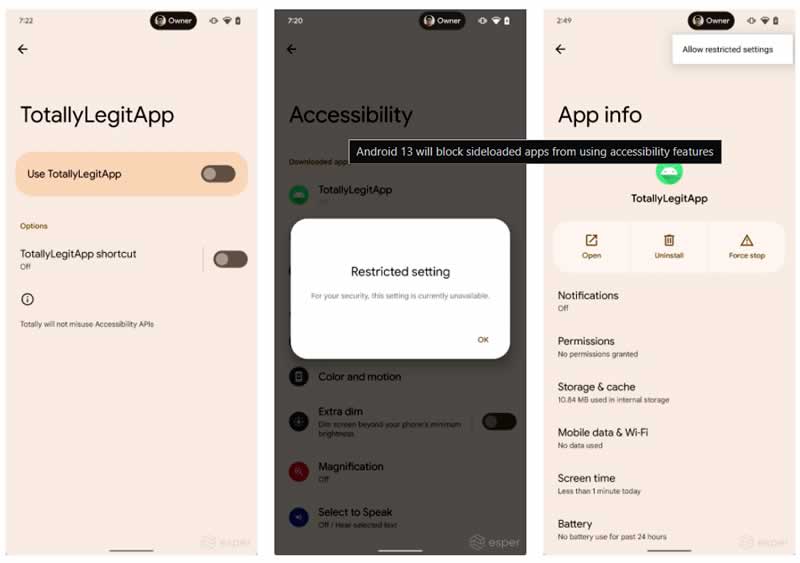
It seems that Android 13 will not allow you to grant permissions to certain applications that it considers ‘abusive’. This seeks to protect users and prevent the people behind these apps from accessing your personal data. It is an automatic configuration, so if you want to deactivate it, you will have to dig into the settings. These restrictions will apply to apps that are downloaded and installed outside of the Play Store.

Android 13 Will Block Permissions For sideloading apps

Of course, Android will not entirely prohibit permissions to these types of applications. In case you are looking to modify them for a specific application, you can do it. The good thing is that Android 13 creates a more secure environment for those users who have no idea how app permissions work on their phones.

If you want to grant permissions to applications that you have installed by methods other than the Play Store, you only have to activate one option — ‘Allow restricted settings’, a function that will allow you to grant or deny permissions to this type of apps and services.

A-Z Bash Command Line for Linux — Also Included Bash Commands PDF

A-Z Bash Command Line for Linux

Bash or Bourne Again SHell is a Unix shell or main command-line interface and the command language was written by Brian Fox released in 1989. Bash command line typically runs in a text window, where the user types commands that cause actions. Bash can also read commands from a file, called a script. It has been distributed widely as the shell for the GNU operating system and as a default shell on Linux and OS X.

Also recently Microsoft announced during the 2016 Build Conference that Windows 10 has added a Linux subsystem that fully supports Bash and other Ubuntu binaries running natively in Windows.

Features of Bash:

Like the other GNU projects, the bash initiative was started to preserve, protect and promote the freedom to use, study, copy, modify and redistribute software. It is generally known that such conditions stimulate creativity. This was also the case with the bash program, which has a lot of extra features that other shells can’t offer.

Bash command provides the following features:

  • Input/output redirection
  • Wildcard characters (metacharacters) for filename abbreviation
  • Shell variables for customizing your environment
  • Powerful programming capabilities
  • Command-line editing (using vi- or Emacs-style editing commands)
  • Access to previous commands (command history)
  • Integer arithmetic
  • Arithmetic expressions
  • Command name abbreviation (aliasing)
  • Job control
  • Integrated programming features
  • Control structures
  • Directory stacking (using pushd and popd)
  • Brace/tilde expansion
  • Key bindings

In this article we are going to list A-Z Bash command line for Linux (and also included bas command PDF file) or we can say list of Linux commands. I think the below bash command line table will be helpful in your Linux journey.

A-Z Bash Command Line:

All Bash Command LineFunction
A
 alias Create an alias
 apropos Search Help manual pages (man -k)
 apt-get Search for and install software packages (Debian/Ubuntu)
 aptitude Search for and install software packages (Debian/Ubuntu)
 aspell Spell Checker
 awk Find and Replace text, database sort/validate/index
B
 basename Strip directory and suffix from filenames
 bash GNU Bourne-Again SHell
 bc Arbitrary precision calculator language
 bg Send to background
 break Exit from a loop
 builtin Run a shell builtin
 bzip2 Compress or decompress named file(s)
C
 cal Display a calendar
 case Conditionally perform a command
 cat Concatenate and print (display) the content of files
 cd Change Directory
 cfdisk Partition table manipulator for Linux
 chgrp Change group ownership
 chmod Change access permissions
 chown Change file owner and group
 chroot Run a command with a different root directory
 chkconfig System services (runlevel)
 cksum Print CRC checksum and byte counts
 clear Clear terminal screen
 cmp Compare two files
 comm Compare two sorted files line by line
 command Run a command – ignoring shell functions
 continue Resume the next iteration of a loop
 cp Copy one or more files to another location
 cron Daemon to execute scheduled commands
 crontab Schedule a command to run at a later time
 csplit Split a file into context-determined pieces
 curl Transfer data from or to a server
 cut Divide a file into several parts
D
 date Display or change the date & time
 dc Desk Calculator
 dd Convert and copy a file, write disk headers, boot records
 ddrescue Data recovery tool
 declare Declare variables and give them attributes
 df Display free disk space
 diff Display the differences between two files
 diff3 Show differences among three files
 dig DNS lookup
 dir Briefly list directory contents
 dircolors Colour setup for `ls’
 dirname Convert a full pathname to just a path
 dirs Display list of remembered directories
 dmesg Print kernel & driver messages
 du Estimate file space usage
E
 echo Display message on screen
 egrep Search file(s) for lines that match an extended expression
 eject Eject removable media
 enable Enable and disable builtin shell commands
 env Environment variables
 ethtool Ethernet card settings
 eval Evaluate several commands/arguments
 exec Execute a command
 exit Exit the shell
 expect Automate arbitrary applications accessed over a terminal
 expand Convert tabs to spaces
 export Set an environment variable
 expr Evaluate expressions
F
 false Do nothing, unsuccessfully
 fdformat Low-level format a floppy disk
 fdisk Partition table manipulator for Linux
 fg Send job to foreground
 fgrep Search file(s) for lines that match a fixed string
 file Determine file type
 find Search for files that meet a desired criteria
 fmt Reformat paragraph text
 fold Wrap text to fit a specified width
 for Expand words, and execute commands
 format Format disks or tapes
 free Display memory usage
 fsck File system consistency check and repair
 ftp File Transfer Protocol
 function Define Function Macros
 fuser Identify/kill the process that is accessing a file
G
 gawk Find and Replace text within file(s)
 getopts Parse positional parameters
 grep Search file(s) for lines that match a given pattern
 groupadd Add a user security group
 groupdel Delete a group
 groupmod Modify a group
 groups Print group names a user is in
 gzip Compress or decompress named file(s)
H
 hash Remember the full pathname of a name argument
 head Output the first part of file(s)
 help Display help for a built-in command
 history Command History
 hostname Print or set system name
 htop Interactive process viewer
I
 iconv Convert the character set of a file
 id Print user and group id’s
 if Conditionally perform a command
 ifconfig Configure a network interface
 ifdown Stop a network interface
 ifup Start a network interface up
 import Capture an X server screen and save the image to file
install Copy files and set attributes
 ip Routing, devices and tunnels
J
 jobs List active jobs
 join Join lines on a common field
K
 kill Kill a process by specifying its PID
 killall Kill processes by name
L
 less Display output one screen at a time
 let Perform arithmetic on shell variables
 link Create a link to a file
 ln Create a symbolic link to a file
 local Create variables
 locate Find files
 logname Print current login name
 logout Exit a login shell
 look Display lines beginning with a given string
 lpc Line printer control program
 lpr Off line print
 lprint Print a file
 lprintd Abort a print job
 lprintq List the print queue
 lprm Remove jobs from the print queue
 ls List information about file(s)
 lsof List open files
M
 makeRecompile a group of programs
 manHelp manual
 mkdirCreate new folder(s)
 mkfifoMake FIFOs (named pipes)
 mkisofsCreate an hybrid ISO9660/JOLIET/HFS filesystem
 mknodMake block or character special files
 moreDisplay output one screen at a time
 mostBrowse or page through a text file
 mountMount a file system
 mtoolsManipulate MS-DOS files
 mtrNetwork diagnostics (traceroute/ping)
 mvMove or rename files or directories
 mmvMass Move and rename (files)
N
 ncNetcat, read and write data across networks
 netstatNetworking information
 niceSet the priority of a command or job
 nlNumber lines and write files
 nohupRun a command immune to hangups
 notify-sendSend desktop notifications
 nslookupQuery Internet name servers interactively
O
 openOpen a file in its default application
 opOperator access
P
passwdModify a user password
pasteMerge lines of files
pathchkCheck file name portability
pingTest a network connection
pkillKill processes by a full or partial name
popdRestore the previous value of the current directory
prPrepare files for printing
printcapPrinter capability database
printenvPrint environment variables
printfFormat and print data
psProcess status
pushdSave and then change the current director
pvMonitor the progress of data through a pipe
pwdPrint Working Directory
Q
quotaDisplay disk usage and limits
quotacheckScan a file system for disk usag
R
ramram disk device
rarArchive files with compression
rcpCopy files between two machines
readRead a line from standard input
readarrayRead from stdin into an array variable
readonlyMark variables/functions as readonly
rebootReboot the system
renameRename files
reniceAlter priority of running processes
returnExit a shell function
revReverse lines of a file
rmRemove files
rmdirRemove folder(s)
rsyncRemote file copy (Synchronize file trees)
S
screenMultiplex terminal, run remote shells via ssh
scpSecure copy (remote file copy)
sdiffMerge two files interactively
sedStream Editor
selectAccept keyboard input
seqPrint numeric sequences
setManipulate shell variables and functions
sftpSecure File Transfer Program
shiftShift positional parameters
shoptShell Options
shutdownShutdown or restart linux
sleepDelay for a specified time
slocateFind files
sortSort text files
sourceRun commands from a file ‘.’
splitSplit a file into fixed-size pieces
sshSecure Shell client (remote login program)
statDisplay file or file system status
straceTrace system calls and signals
suSubstitute user identity
sudoExecute a command as another user
sumPrint a checksum for a file
suspendSuspend execution of this shell
syncSynchronize data on disk with memory
T
tailOutput the last part of file
tarStore, list or extract files in an archive
teeRedirect output to multiple files
testEvaluate a conditional expression
timeMeasure Program running time
timeoutRun a command with a time limit
timesUser and system times
touchChange file timestamps
topList processes running on the system
tputSet terminal-dependent capabilities, color, position
tracerouteTrace Route to Host
trapRun a command when a signal is set(bourne)
trTranslate, squeeze, and/or delete characters
trueDo nothing, successfully
tsortTopological sort
ttyPrint filename of terminal on stdin
typeDescribe a command
U
ulimitLimit user resources
umaskUsers file creation mask
umountUnmount a device
unaliasRemove an alias
unamePrint system information
unexpandConvert spaces to tabs
uniqUniquify files
unitsConvert units from one scale to another
unrarExtract files from a rar archive
unsetRemove variable or function names
unsharUnpack shell archive scripts
untilExecute commands (until error)
uptimeShow uptime
useraddCreate new user account
userdelDelete a user account
usermodModify user account
usersList users currently logged in
uuencodeEncode a binary file
uudecodeDecode a file created by uuencode
V
vVerbosely list directory contents (`ls -l -b’)
vdirVerbosely list directory contents (`ls -l -b’)
viText Editor
vmstatReport virtual memory statistics
W
waitWait for a process to complete
watchExecute/display a program periodically
wcPrint byte, word, and line counts
whereisSearch the user’s $path, man pages and source files for a program
whichSearch the user’s $path for a program file
whileExecute commands
whoPrint all usernames currently logged in
whoamiPrint the current user id and name (`id -un’)
wgetRetrieve web pages or files via HTTP, HTTPS or FTP
writeSend a message to another user
X
xargsExecute utility, passing constructed argument list(s)
xdg-openOpen a file or URL in the user’s preferred application
xzCompress or decompress .xz and .lzma files
Y
yesPrint a string until interrupted
Z
zipPackage and compress (archive) files
Special Characters
.Run a command script in the current shell
!!Run the last command again
###Comment / Remark

Now you know almost all bash command lines and for future reference we also included a bash command PDF for you.

Also check out other command lists too:

YouTube Go Will Cease To Exist August Of This Year

YouTube Go will be discontinued

YouTube Team has announced that YouTube Go will be discontinued this August because it has become an unnecessary app.

Google launched YouTube Go in 2016 as part of Android Go. At the time, it was meant for developing markets as a lighter alternative to the traditional video-sharing app for people who had low network connectivity or data rates beyond their reach.

One of the most obvious reasons is found in the continuous updates that the main YouTube app has received so that it works better in those countries where the quality of the connection is worse, or the devices do not reach the minimum standard for it to work.

So YouTube Go has simply ceased to be necessary in the scenarios for which it was created.

YouTube Go was deployed in 130 countries and initially, it was going to be a vital app for those countries with certain technical limitations. Users did not have the possibility to comment, publish and create content — integral parts of the user experience of the video-sharing platform.

Now it becomes another one of those apps that the great G withdraws from Google Play.