Home Blog Page 187

How To Download Instagram Images And Videos Within A Minute

Download Instagram Images

Instagram, the popular image-sharing social platform owned by Facebook Inc. Millions of pictures and videos are uploaded on Instagram every day, the majority of them are from celebrities, popular brands.

Most of the images are high quality even after editing. And the main thing is we can only upload images and videos through their Mobile App. And we can’t download any image or video directly from Instagram.

But never mind, there is always a solution for every problem. In this tutorial, we will guide you on how to download Instagram images and videos within a minute to your PC and smartphone.

Download Instagram Photos, Videos, And Stories To PC:

To download Instagram photos, videos, and stories to your computer within seconds, we are using a tool called Toolzu.

Toolzu is not just an Instagram downloader else it is the best powerful online tool out there for users to explore and downloads Instagram photos, videos, and stories or even Instagram profile pictures using InstaDP stories tool from any public account to your device, enjoy them when you are offline.

To download Instagram images and videos:

  • Open a post on Instagram and copy its link.
  • Paste the link to the input line on the Instagram image/video downloader page and click Download.
  • Click Download once again to confirm the action.

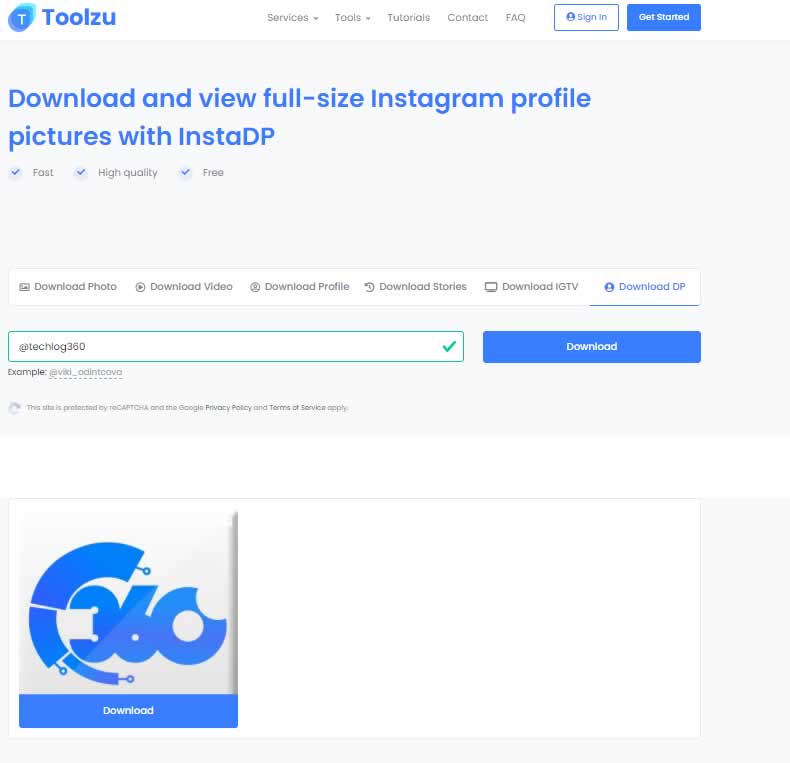
To download Instagram DP:

  • Copy any Instagram profile username
  • Paste the username, for example, @username, in InstaDP tool field and tap on Download.
InstaDP tool

Main Features of Toolzu:

  • Save Instagram photos from any browser, any OS
  • Download Instagram photos and videos.
  • Download Instagram Stories
  • Download Instgram DP with InstaDP tool
  • Use go-to Instagram Downloader to download IGTV videos
  • No apps download and sign-ups, save content online

With its cross-platform support, Toolzu is an excellent free online platform for power Instagram users.

Download Instagram photos, videos, and stories to Android and iOS:

First, Login to your Instagram account and search for the image or video you want to download. Now below the image or video ypou can see three dots on right corner, click it.

From the pop-up option choose ” Copy Share URL “.And now its copied in your Clipboard.

download instagram images and videos 1 [TechLog360.com]

Install ” InstaGrabber ” from Google Playstore. For iOS users — InstaGrabber.

Open InstaGrabber and click on the ” Paste ” button. Now you can see your image or video whose URL was copied from Instagram. And finally hit ” Save Image ” or ” Save Video “. That’s it.

download instagram images and videos 2 [TechLog360.com]

So hopes you like this tutorial. Now download Instagram images and videos directly to your PC and Android smartphone within seconds.

Nvidia Instant NeRF Neural Network Transform 2D Photos Into 3D Scenes In A Few Seconds

NVIDIA Instant NeRF

Nvidia announced a technology called Instant NeRF (Neural Radiance Field), which uses artificial intelligence to transform images in a 2D dimension into 3D scenes.

This technology is a neural rendering model that learns and assimilates high-resolution 3D content in a few seconds, having the ability to render these images in just milliseconds.

It takes just a few seconds to train the model using dozens of photos and the camera angles they were taken from. After that, it is able to generate a 3D scene in just “tens of milliseconds”. Like other NeRF techniques, it requires images taken from various positions. And for photos with multiple subjects, photos taken without much movement are preferred, otherwise, the result would be blurry.

The technique is based on a hardware encoding that NVIDIA refers to as a “multi-resolution hash grid”, designed to be performed efficiently by its GPUs. It also works with traditional GPUs, but those equipped with Tensor Core or specific hardware for calculations related to artificial intelligence will produce the results in less time.

According to NVIDIA, Instant NeRF will allow you to train robots and help autonomous driving systems, as it will make it easier for the machine to understand the sizes and shapes of an object in the real world. In addition, the company also believes that there is potential for applications in the areas of entertainment and architecture, where technology can be used to generate 3D models of the environment more easily.

See the technology in action through the following video released by Nvidia:

Apple Planning A Subscription Service For iPhones And iPads

Apple hardware subscription for iPhones

Apple is said to be planning a hardware subscription for iPhones and iPads that should ensure continuous income.

According to Bloomberg, Apple could be developing a subscription model for iPhones and iPads. This model would allow anyone to have an Apple device by paying a monthly fee.

In addition, after a period of time, this subscription would allow users to choose whether they want to keep that specific model or continue paying to be able to upgrade to a more recent model.

Apple is currently offering the iPhone Upgrade Program in the US. Customers receive a new iPhone every 12 months. According to the report, the new subscription service should come onto the market at the end of 2022 or as late as 2023. Insurance services such as Apple Care could also be integrated into the subscription.

The project is still in development, the people, who declined to be named, told Bloomberg. It would allow Apple continuous revenue. Currently, Apple is selling fewer and fewer iPhones the closer the launch of a new generation is.

5 Ways To Prep Your Staff for a Big Team Meeting

Business collaborations

Holding team meetings is an excellent way to get everybody on the same page and keep everyone updated on important company business. However, holding effective team meetings is easier said than done. If you don’t properly prepare your staff, it could result in a failed meeting. This can happen if: 

  • The staff meeting doesn’t result in the desired outcome
  • Employee engagement is nonexistent during the entire meeting
  • You’re unable to cover your meeting agenda because you ran out of time
  • Your meeting runs well over schedule

With that in mind, the following are a few tips on how to prepare your staff for your next meeting.

1. Speak With Your Team In Advance

Effective team meetings require teamwork. Before your staff meeting, take a few minutes to speak with everyone individually. Find out if they have any information they need to share, concerns to raise, or questions to ask.

This information can help you make the meeting more productive by helping determine what your meeting goals should be. Additionally, you can determine who among your staff should be included as meeting participants and be given time to speak.

2. Choose A Topic Of Discussion

Once you’ve talked to your staff, identify what the purpose of the meeting should be. This will help keep things focused and on track. Create an action plan that includes all of the agenda items you want to go over. These could include:

  • Changes to company policy or procedures: If your company has made any changes to its policies or procedures, this is the time for a meeting to discuss them.
  • Project updates: Allow team leaders to provide status updates on milestones, deadlines, roadblocks, and key insights. Be sure to relay any concerns, updates, or requirements from upper management to your team.
  • New team members: If you’ve recently added new team members, introduce them and let everyone know what their role is on the team.
  • Company news: Anything newsworthy can be shared. For example, company events that your team should be aware of, such as an upcoming tradeshow or a team-building event.
  • Recognizing the work of an individual or team: Take the time to recognize an employee who went above and beyond to complete their tasks. Doing so can boost staff morale and set a positive tone for the meeting.

3. Put Together Meeting Materials

You should prepare all of your meeting materials ahead of time. Certain materials can make sharing information easier and help keep you on track, which results in more productive meetings. The following are a few examples of materials you can put together for a team meeting:

  • Project overview: If your team is starting on a new project, put together a project overview that includes an introduction to the project, its goals, the team working on it, and a timeline. An overview can be useful as well if you plan to speak about an existing project.
  • Company policy update: If your company has made any changes to its policies or procedures, put together a policy update document that includes the changes and how they impact your team.
  • Presentation: If you have a lot to cover during a meeting, a visual presentation can help make the meeting more engaging for your staff. For example, you could set up digital signage in your meeting room to outline various points, display charts, graphs, run videos, and more.
  • Meeting Notes: Make sure one of your staff members is responsible for taking meeting notes. Consider giving them a meeting note template to use.

4. Send Out An Agenda In Advance

It’s important to be well organized if you want your team meeting to run smoothly. Sending out a clear agenda gives everyone a heads-up on what to expect. The following are a few tips on creating a team meeting agenda:

  • Schedule each item on the agenda: To avoid going over the allotted time, schedule a time for each item on the agenda. Be sure to let those who are speaking know how much time they’ll have so they can adequately prepare.
  • Set aside time for questions at the end: Make sure you set aside time at the end of the meeting for questions and concerns. Be sure to let everyone know that there will be time for everyone to speak at the end so that they can take notes and prepare their questions.

5. Plan Remote Meetings Carefully

If you plan to hold virtual meetings, then you need to be diligent about getting the necessary information out to your staff. Send out several emails to your staff informing them about the specific meeting time, and give them a link that they can use for check-in. Let them know ahead of time as well as on the day leading up to the meeting as a reminder.

The more carefully you prepare your staff for your team meetings, the more productive and successful they’ll likely be. Use these five tips to prep your staff for your next meeting to ensure the desired outcome.

Google Uses The Messages And Phone Apps To Quietly Collects Private Data From Android Users

Google Messages And Phone Apps Collects Private Data

The humongous amount of data that Google and other internet giants collect from their users, as well as the use they make of it, has been a matter of debate in recent years. Although more privacy measures have been created and Google promised to end tracking — new studies reveal that they continue to keep collecting more private information than they say and with no possibility for people to avoid it.

According to a study by Trinity College Dublin, conducted by Prof. Doug Leith at the CONNECT SFI Research Center for Future Networks — the Messages and Phone applications for Android collect and send data to Google without users’ consent, which represents a clear violation of their privacy.

With Messages and Phone applications, two apps that are pre-installed on most Android smartphones — the company receives, among other things, the telephone numbers, the communication time or the hours at which the communications were made through the applications.

The Messages app tells Google every time a message is sent or received. The information sent includes the time and a hash (an identification code created from the text of the message) that uniquely identifies the message. This allows Google to find out if and when two phones are communicating.

The Messages app transmits the sender’s phone number to Google, so combining data from communicating phones reveals both phone numbers.

Phone, Google’s official phone calling app, tells Google every time a phone call is made or received. The information sent includes the time and duration of the call. This allows Google to find out if two phones are calling each other, at what time, and for how long.

The data sent to Google is tagged with the phone’s Android ID. This is tied to the phone’s Google user account and typically the personal data (email, phone number, credit card details, etc.) of the person involved in a phone call or message SMS. 

This information is sent through channels integrated into Google Play services and in the analytical data of Firebase, the platform developed by Google for the creation of mobile apps and Web services. Google does not offer a way to prevent the sending of this data.

The biggest problem is not only the privacy issue itself but also that the user is not aware that part of their private data is shared with Google servers.

After the publication of the study, Google assured those responsible that it would make changes to the Messages and Phone applications.

Why Using a Free Proxy Is Never a Good Idea: The Risks Involved

proxy servers

When we mention proxy servers, we usually think of enhanced privacy and security they provide to users. When they act as a gateway, they provide us with one more layer in our security “net”. But is that always the case? In the beginning, we can divide proxies into free and paid ones. And with that, we can’t help but think that maybe what is free is not always the best.

Free usually means they are not putting heavy investment in backend hardware or encryption. You’ll likely see performance issues and potential data security issues. So how can you check your proxy or how can you identify a better way to go?

One way to go from there is a free proxy list. Free proxy lists are collected by scanning the web for computers with open connections. Proxy lists, unlike free proxies, require setup and work best with web scraping tools, automation software, and other apps. They differ from free web proxies, which are websites that let you enter URLs and surf through them. Such websites often have known hosts (for example, VPN services) and are best suited for quickly unblocking a resource of browsing from a different location. There are a plethora of free proxy list providers like Proxyway, FreeProxyList, etc.

Let’s look at the pros and cons of using a free proxy because as with everything they also have good and bad sides. When we talk about major concerns regarding free proxy usage there are two: honeypotting and data leaks. 

The main reason we are using protective techniques like proxies is to minimize the possibility of losing our data. Today our personal, bank, or other information such as our login name and password is floating around the internet and it is up to us to make them as secure and safe as possible. One disadvantage of using a free proxy is that data is always visible to its host. When we use free proxies, the data is visible to a third-party host as well, and they can collect all our information, making it much less secure and prone to data leaks. Not only that but third parties can monitor all users’ actions on visited websites which is a major footprint that can be saved and used with ill intent. 

One other way users’ data can be vulnerable is due to a lack of encryption and security protocols. What does that mean? Well, users can connect or send requests through a certain encrypting proxy. But even those encrypting proxies can refer their job to unencrypted channels which then use servers that do not support encryption. This usually means that proxy is not allowing usage of security protocols such as HTTPS and is also deliberately modifying the code of websites to inject ads or other malicious content. This is of course a major vulnerability and the possibility of data leak or malicious data usage is big. 

Honeypotting is one of the luring tactics that can be very tempting for proxies. Honeypot represents a network-attached system set up as a trap to lure cyber attackers and detect, deflect and study potential threat attempts that can compromise the security and data integrity of certain organizations. The function of a honeypot is to represent itself on the internet as a potential target for attackers — usually, a server or other database where potentially sensitive information can be seen — and to gather information and notify defenders of any attempts to access the honeypot by unauthorized users.

Although there can be some cases when a free proxy is not risky and can be useful for example for a quick, anonymous check or when you need browsing from a different location, a safer and better option would be to opt for proxies offered by providers as a freemium. Rather than making money from users directly, an ecosystem freemium model charges third-party developers or apps. An example would be the Google Play Store. 

Users can download and use the app for free forever with no loss of functionality. Google makes its money from the brands that sell through the store. On Proxyway website there is information and a detailed explanation of best choices for free proxy lists such as ProxyScrape, Free-proxy, Spys. They offer frequently updated proxy lists so you can avoid dead IP addresses and proxies and also different filtering options so everyone can choose a proxy for themselves. You can explore the proxy world with all its benefits for a much more affordable price. There are many providers in the field and usually, there is something for everybody.

Nothing Confirms The Phone (1), And Will Come With Nothing OS

Nothing Phone (1)

In the live stream called “The Truth”, the founder of the startup Nothing, Carl Pei, announced the smartphone Nothing Phone (1) and has also shown the first brushstrokes of Nothing OS based on Android.

Nothing Phone (1) will be the company’s first smartphone, a terminal that we still don’t know what it will look like but we do know that it will be designed somewhat differently from the rest of smartphones. A blog post explains the plans in a little more detail but without revealing too much.

The Nothing Phone (1) should appear with a Snapdragon processor — the company does not reveal which one. The smartphone is said to have an “iconic design” and be integrated into an ecosystem with “seamless connectivity”. The device is to be delivered with Nothing OS, an Android fork that is supposed to be based relatively heavily on pure Android.

Nothing OS

The first foretaste of Nothing OS should be available from April 2022. The ROM can then be flashed onto selected smartphones — which will be revealed later.

The Nothing Phone (1) is the second product from Pei’s new company. Previously, Nothing has already presented the wireless headphones Nothing Ear (1), which were launched in July 2021.

5 Top Ways To Use Technology To Enhance Your Business

Business discussion

The digital age is here, and it’s been here for quite a while, so it’s only natural that businesses will look for ways to use technology to enhance their business. Apart from data security, you can use technology to take your business to the next level.

All it takes is a splash of digital marketing, a bit of good SEO (Search Engine Optimization), and some business tools that make everything easier. Here are 7 ways you can use technology for your business’s benefit.

1. Digital Marketing Across Social Media

One of the top ways to enhance your business through the use of technology is digital marketing. This is something every business should turn to because it results in business promotion in the long run.

The most prominent way you can use digital marketing strategies is through social media. Facebook Ads are a popular tool among marketers that aim to increase the revenue of a business.

You can also enhance your business by creating a blog on social media. By consistently posting video content on your blog, you can raise brand awareness. To boost it you can also find your own editing style to make your clips recognizible. Use free video editor with no watermark to experiment.

2. Search Engine Optimization

The first thing most people do when they look for a product is search the web. This is how most people reach yours or any other eCommerce business. To lead people to your website, you need to use SEO.

SEO methods and tools are used to optimize your website for search engines. When people search on the web, your website should be on the first results page. Here are some SEO tips that will take your business to the next level:

  • Importance of search intent: Target keywords that are most likely to be used by people from your target audience. It’s important to get the words relevant to the users searching for answers online.
  • Page speed optimization: Make sure that the loading speed of your web page is fast. Nobody enjoys waiting for eons for something to load.
  • Optimization for mobile: Most people surfing the internet are doing it on their phones. That’s why you need to think about making a mobile-friendly website. Making a website mobile-friendly will bring you more potential customers.
  • Image optimization: Even the images you upload to your website should be optimized for the search intent of your potential customers. Instead of using names like “1234.jpg,” use descriptive names such as “phone_app.jpg.”
  • Relevance of content: The most important thing is that your content needs to be relevant to the user. If the quality of the content is bad, and the content is irrelevant, most people will likely bounce from the page.

3. Project Management Tools

The thing that makes a business flourish is a fit organization. Management must do its part, and using top business tools can help the entire company run excellently. Opting for project management tools can also take your business to the next level, and here’s how:

  • Planning: Project management tools help with the effective planning of tasks and their scheduling. This means that most ideas you have in mind will be smoothly executed thanks to the organizational features of the software.
  • Collaboration: These tools provide a thorough ground for collaboration, especially in remote working environments where anyone can contact anyone. Inquiries get resolved faster, and issues get tackled easier.
  • Data access: Thanks to cloud computing, most project management tools offer storage for companies. This makes accessing and sharing important documents easy for the employees.
  • Task delegation: Most project management tools have a feature that lets managers assign tasks to people best suited for them. So, instead of passing the tasks on to the next person on the ladder, you can immediately assign them to the right one.
  • Budget management: Each task or piece of the project needs a certain amount of budget dedicated to it. Project management tools can help measure and assign budget portions to different project segments.
  • Improved productivity: Thanks to all the previously mentioned features of project management software, employee productivity is boosted. So, these are some of the more important business tools.

4. Enhance Customer Service

Customer service rating

There are ways you can use technology to enhance your customer experiences. One of the most important points of having a great customer experience is providing great customer service.

One of the easiest ways to make customer service more effective is by getting your employees the correct training, but also by integrating multiple channels into your business’s customer service program.

Instead of focusing on taking care of customer inquiries using a phone, you can also integrate email, website chatbots, social media messaging, etc. Including many channels means that your business is reachable and people won’t have a hard time getting their questions answered.

It’s also a great idea to provide a presentation online for the most frequently asked questions. When you make a good presentation, there’s a chance that you’ll reduce the traffic on your customer service program and the customer will be much more satisfied.

5. Online Payment for Ecommerce Business

Finally, when you have an eCommerce business, one of the best things you can do to promote it, and one of the best business tools you can use, is online payment. Online payments are a great option because they’re:

  • Extremely convenient: There’s no need to go to the physical store and pay for the product because you can pay for it online. Once you pay for the product, all you need to do is wait for it to get delivered.
  • More economic: Believe it or not, you save money through online payments because the transfer costs might not be included.
  • Contactless: Nowadays, contactless payment is becoming increasingly popular, and there are good reasons for it. It’s just another convenience.
  • Instant: The best thing is that you don’t have to wait because it happens immediately. No loading time. It’s as good as NFC on your debit card. Just type in the info and it’s done.

Conclusion

Consider these 5 ways to use technology to enhance your business. These will take your business to the next level. Don’t forget about business promotion on social media, it’s one of the most important aspects of digital marketing.

Finally, even if you use only one of these ways, your business will flourish a bit, but if you combine them all, there’s no stopping you.