Home Blog Page 188

Asahi Linux For Apple Silicon Reaches Alpha Status

Asahi Linux

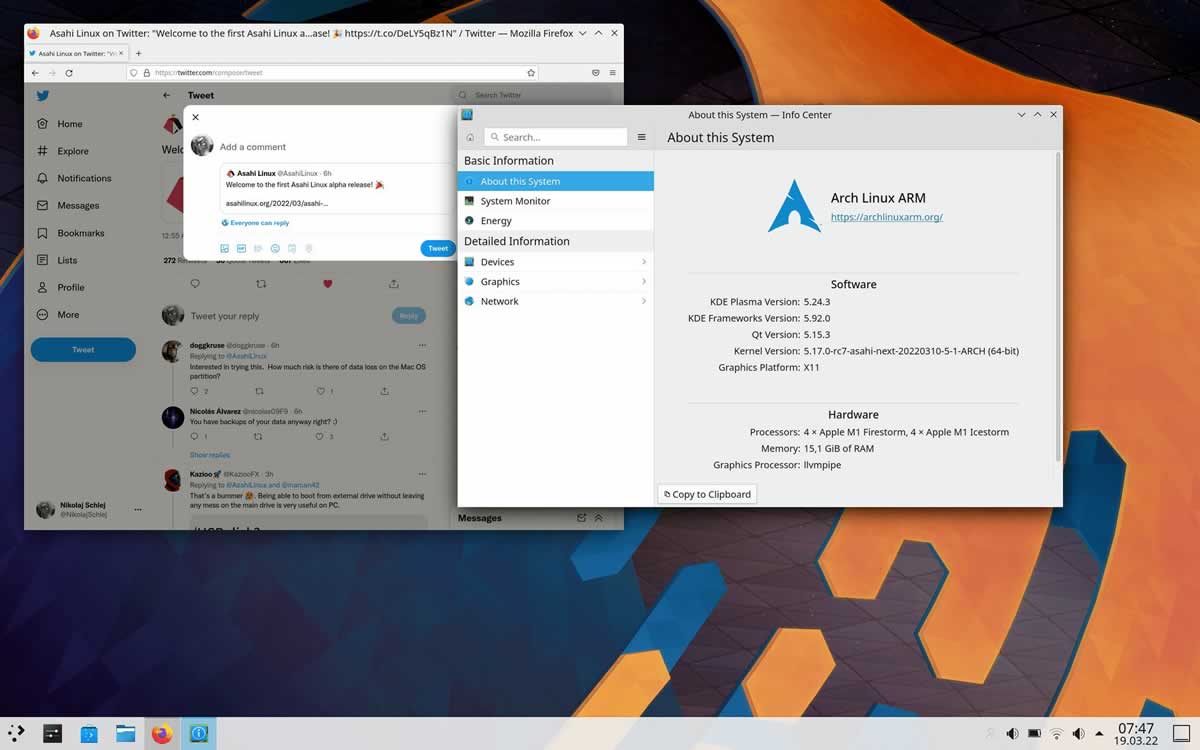
On March 18, 2022, the developer Hector Martin announced a release of the alpha version of the Asahi Linux distribution kit for Mac on M1, M1 Pro and M1 Max chips. The M1 Ultra and thus the Mac Studio are left out in the first alpha version for the time being.

Hector Martin took on the project of porting Linux to Mac with the M1 in early 2021. He is assisted by other developers, including Alyssa Rosenzweig, who reverse-engineers the GPU drivers for the M1 chip — Asahi Linux is intended to be a fully functional Linux distribution for the MacBook Air, MacBook Pro, the iMac and Mac mini.

Asahi Linux is based on the Arch Linux package. It contains a stock set of applications and comes with the KDE Plasma desktop. The Asahi Linux distribution is built using the regular Arch Linux repositories, and all specific changes, such as the kernel, installer, bootloader, auxiliary scripts and environment settings, are moved to a separate project repository.

Asahi Linux Alpha

The first alpha of the free operating system that has now been released assumes the following system requirements:

  • M1, M1 Pro or M1 Max
  • MacBook Air, MacBook Pro or Mac mini
  • At least 53 GB of free hard disk space
  • macOS 12.3 (“Monterey”) or newer
  • An active internet connection

These components are supported and work properly on the Asahi Linux distribution Alpha for Mac on M1 chips — Wi-Fi, USB2 (Thunderbolt ports), USB3 (Mac Mini Type A ports), Display (no GPU support) , NVMe drives, Ethernet port, card reader, cover close sensor, built-in screen (framebuffer only), keyboard, touchpad, keyboard backlight control, CPU frequency switching, battery status, headphone jack, HDMI output (Mac Mini).

The developer of the project promises to soon add support for USB3, built-in speakers and a screen controller (backlight, V-Sync, power management).

Not supported or stable — DisplayPort, Thunderbolt, HDMI port on MacBook, Bluetooth, stock GPU graphics acceleration, video codec hardware acceleration, Neural Engine, touchpad, CPU power saving modes, video camera.

The author explained that in order to test the operation of the Asahi Linux alpha for Mac, it is better to use Dual-Boot. The project has summarized what is already working and in which respect the developers still have a lot of work to do on its official blog.

What is a Brushless DC Motor and What is it Used For?

Brushless DC Motor

DC motors are used in a variety of different industrial and commercial applications. They are available in two forms – brushed and brushless. Depending on the specific application, one type may be preferable over the other.

Regardless of whether a brushed or brushless motor is being used, the speed, torque, and position of the motor can be tightly controlled. The level of control is much higher in a DC motor than it is in an AC motor.

What is a Brushless DC Motor?

Brushless motors are commonly referred to as BLDC Motors or electronically commutators motors (ECM). Unlike brushed DC motors, they do not contain brushes to help spin the motor inside the machine.

BLDC motors use an electronic closed-loop controller that can switch direct current (DC currents) inside the motor. They contain permanent magnets that rotate around an armature that is fixed in place. The commutator that is typically found in a brushed motor is replaced by an electronic control unit. 

This switch produces a magnetic field that can rotate the motor in phases or pulses. When the current is switched through the windings, either the direction of the current is reversed or turned off, causing torque in one direction.

Inside a BLDC motor are sensors that help to regulate the rotational degree of the motor and control the frequency of pulses. The sensors send information to the control units inside the motor that activate the rotator coils in phases.

When Are Brushless DC Motors Used?

Brushless motors are preferred over brushed motors in many applications because they have higher durability and require less maintenance. Their power-to-weight ratio is high and they can generate speed with high efficiency.

The brushless nature of the motor eliminates direct contract, meaning there is less friction in the motor. For this reason, BLDC motors are able to last longer and are less prone to wear and tear.

These advantages make brushless DC motors ideal for motors that are used frequently and continuously. BLDC motors are more versatile than brushed alternatives. They can be used in large, powerful industrial machinery. 

Construction sites and warehouses often contain several pieces of equipment that contain brushless motors. For example, linear motors, servomotors, and warehouse robotics usually require a BLDC motor to function.

Applications for brushless DC motors include:

  •  Electric cars, bicycles, and other tech-first automobiles
  • Hand-held power tools
  • Washing machines
  • Record players, CD or DVD players, and turntables
  • Hard drives
  • Air conditioning or heating systems
  • Electric fans

Generally, brushless DC motors are used where reliability and longevity are vital. For example, the engine inside a car needs to function properly every day and is often running continuously for long periods of time. 

Using a brushless motor inside the engine will ensure that the vehicle runs smoothly for the driver. The same applies to aircraft engines.

100+ Best Web Design Tools of 2022

100 Best Web Design tools to boost your designing career

Are you a web designer? Then you should check this awesome list of web design tools to boost your designing career.

Web designing is one of the top paying IT jobs out there. As you know, designing a website not only means putting some CSS codes to a style of an HTML structure. Most times you have to hand on some third-party tools to ease up your job.

Works like prototyping the website design, creating a logo, choosing the best color codes, selecting a catchy font style and lots more needs to be done after a lot of research. I know it’s time-consuming and it will affect both developer and client. However, a lot of tools to help web designers are available online but most of us don’t know which one is best — so we are going to help you with that task.

Whether you area web designer in a company or working as a freelancer, these web design tools list is going to be a cheat sheet for your whole journey.

100+ Best Web Design Tools


Web Design ToolsFeatured
Logo Design
FreeLogoDesign (Free)Create logos easily with their large selection of logo templates
Designevo (Free) Create awesome looking logos with ease
 Logotype Maker (Free) Random generation of logos for your company
 Logo Makr (Free) Simple logo creator with flat icons materials
DesignMantic (Free) Enter company name, select your industry, and it will generate a logo for you
 SquareSpace (Paid) Create cool logos by drag and drop
 Logo Genie (Paid) Logo Genie makes logo design easy and fun
 Logo Garden (Paid) Automatic generation of logos
 Logoshi (Paid) Draw a messy sketch and get a cool modern logo
 Logaster (Paid) Make a decent logo without any design skills
 Logo Maker (Paid) Generate hundreds of potential logo and modify them online
 Graphic Springs (Paid) Choose logo template,modify and then download
Typography
 Google Fonts (Free) Find and use high-quality fonts for your projects
 Fontstruct (Free) Online font-building tool, fonts can be shared and downloaded
 Type light (Free) A fully functional, Open Type font editor
 Fontface Ninja (Free) Identify that cool font on the page you are browsing
 1001 Fonts (Free) Huge library of fonts
 Font Squirrel (Free)  Best database of free fonts
 Typecast (Free) Create visual and semantic designs that put type first
 Font Flame (Free) Tinder for font pairing. Hate it or use it
 What Font is (Free) Upload image and easily find its font
 Adobe Typekit (Paid) Get access to a huge bundle of premium fonts
Graphics Editors
 Gimp (Free) Open source editor for editing and retouching images
 Blender (Free) Open source 3D creation
 DAZ 3D (Free) To create realistic humans and animals in 3D
 BeFunky (Free) Huge library of fonts
 Pixlr (Free) Online image editor
 Aviary (Free) Photo editing mobile app for Android/iOS and the Web
 Photoshop (Paid) One of the best tools in the industry. Perfect for enhancing photographs, designs, and 3D artwork
 Illustrator (Paid) To build beautiful vector arts
 Affinity (Paid) Photo editing tool. For Mac only
 DrawPlus (Paid)  Create amazing logos, drawings and designs, at a reasonable price
Colors
 Color Hunt (Free) A curated collection of beautiful colors
 TinEye (Free) Determine your colors and search images with the perfect color combination
 ColorZilla (Free) Perfect extension for picking colors from a web page
 Unclrd (Free) A browser extension that turns every website into black and white
 Paletton (Free) Tool for creating color combinations
 Adobe Color CC (Free) Generate and save various color schemes
 Coolors (Free) Color generator for your designs
 Colicious (Free) Just press space bar and generate new color
 Hex Color Tool (Free) Color picking tool
 Pictaculous (Free) Color palette generate from PNG, JPG and GIF
Prototyping
 HTML5 UP (Free) Responsive and customizable HTML5 templates
 Napkin (Free) App for designing quick mocks on your iPhone
 Weld (Free) Draw your website online, just the way you want it
 Sketch (Paid) The perfect tool for UI and UX design. But only compatible with Mac
 Proto.io (Paid) Mobile app prototyping tool that allows you to create fully interactive mobile app prototypes
 Moqups (Paid) HTML5 based web app for making wireframes, UI designs, prototypes, and mockups
 Flinto (Paid) Sketch interactive prototypes from static images
 Balsamiq (Paid) Wireframing and mockup tool with a high focus on usability
 Axure (Paid) Quickly design prototypes from your computer and share them
 POP (Paid) Helps you to transfer your pen + paper ideas to a real working prototype
Stock Photos
 Pexels (Free) A massive database of stock photos you can use everywhere
 New Old Stock (Free) Vintage photos from the public archives
 Superfamous (Free) Huge collection of nature and are wider-angle shots
 The Pattern Library (Free) A huge number of patterns and textures
 Unsplash (Free) 10 new photos every 10 days
 FoodiesFeed (Free) Free food photos
 Death to the Stock Photo (Free) Free stock photos to your email every month
 Free Refe Photos (Free) Huge list of images. Mostly landscape and nature photos
 Little Visuals (Free) High-resolution landscape and building photos
 Gratisography (Free) A massive database of free photos
Stock Graphics
 GraphickStock (Free) An unlimited number of high-quality, royalty-free photos, vectors and illustrations
 Brusheezy (Free) Free Photoshop brushes, patterns, textures, and much more
 Iconfinder (Free)Search engine for free icons
Brushez (Free) Huge collection of free Photoshop brushes
 Vecteezy (Free) Huge variety of vector asset including icons and illustrations
 Font Bundles (Paid) Home of premium fonts and font bundles
 The ispot (Paid) Premium illustrations from top level artists
 Round Icons (Paid) The biggest icons bundle in the world
 Webalys (Paid) Premium icons by Vincent le Moign
 Illustrio (Paid) Extensive library of images
Infographics
 Vizualize.me (Free) Create your infographic or resume
 Canva (Free) A simple design tool to create anything you need
 Infogr.am (Free) Online tool for infographics and interactive charts
 Venngage (Free) Easy infographic maker
 Draw.io (Free) Online tool for making flow charts, process diagrams and network diagrams
 Piktochart (Free) Natural infographic design to create high-quality graphics
 Visme (Free) Online presentation and infographics tool with 1000′s of templates and graphics
 Easel.ly (Free) Resume and infographic templates
 Gliffy (Free) Online diagramming tool
 Visage (Free) A simple design tool for creating visual content
Collaboration
 Lingo (Free) With Lingo, you can build and share libraries of visual assets
 Bounce (Free) An easy way to share your ideas on any website
 Marqueed (Free) Markup and discuss images online. Pretty useful for Photoshop
 Zeplin (Free)  Collaboration app for frontend developers and UI designers
 Cage (Free) Nice dashboard to collaborate with team and clients
 GoVisually (Paid) One of the top tools to collect client feedback for your projects
 TrackDuck (Paid) It allows leaving feedback right on a website or image file
 Red Pen (Paid) Drag and drop your design and get the feedback from your friends
 Usersnap (Paid) It lets you take screenshots of web pages and annotate them
 InVision (Paid) Prototyping, collaboration and workflow platform
Inspiration
 Dribbble The biggest community of designers and place of their work
 Behance Discover the latest work from top online portfolios by creative professionals
 Muzli Daily design inspiration
 Awwwards The best efforts by developers, designers and web agencies in the world
 Design You Trust Design blog and a huge community sharing latest trends, news, portfolios, fashion design, and creative ads
 Really Good Emails Huge collection of well-designed emails
 Fubiz One of the most popular creative publications covering the latest creative news
 Designspiration Pinterest-style board of high-level design inspiration
 Mobile Patterns A library of iOS and Android screenshots for your inspiration
 One Page Love Gallery showcasing the best single page website designs

That’s it — if you know any other web design tools, comment below we will add them to the list.

C Programming Examples Every Beginner Must Know

C Programming Examples for Beginner

C Programming is one of the widely used programming languages of all time. It was developed by Dennis Ritchie between 1969 and 1973 at Bell Labs, and used to re-implement the Unix operating system.

C programming language is almost used in every field like developing operating systems, web development, software development. Speed, stability, and near-universal availability are some reasons for choosing C over interpreted languages. C has directly or indirectly influenced many later languages such as C#, D, Go, Java, JavaScript, Limbo, LPC, Perl, PHP, Python, and Unix’s C shell.

In this article, we are going to share some C programming examples that every C beginner must know. These are basic C programs, that is going to help newbies who just stepped in C programming world. So try them out :

1. C Programming – Hello World

#include<stdio.h>
int main()
{
printf("Hello world");
return 0;
}

Output

Hello world

Check out how to write “Hello, World !” program in different programming languages.

2. C Programming – Performing Arithmetic Operations

#include<stdio.h>
int main()
{
int a,b;
printf("Enter two numbers:");
scanf("%d%d",&a,&b);
printf("Sum=%d difference=%d product=%d quotient=%d",a+b,a-b,a*b,a/b);
return 0;
}

Output

Enter two numbers: 6 3
Sum=9 difference=3 product=18 quotient=2

3. C Programming – Find Area Of Circle

#include<stdio.h>
int main() 
{
float radius, area;
printf("\nEnter the radius of Circle : ");
scanf("%d", &radius);
area = 3.14 * radius * radius;
printf("\nArea of Circle : %f", area);
return 0;
}

Output

Enter the radius of Circle : 2.0
Area of Circle : 6.14

4. C Programming – Find Greatest In 3 Numbers

#include<stdio.h>
int main() 
{
int a, b, c;
printf("\nEnter value of a, b & c : ");
scanf("%d %d %d", &a, &b, &c);
if ((a > b) && (a > c))
printf("\na is greatest");
if ((b > c) && (b > a))
printf("\nb is greatest");
if ((c > a) && (c > b))
printf("\nc is greatest");
return 0;
}

Output

Enter value for a,b & c : 15 17 21
c is greatest

Also Read : Top 10 Cloud Programming Languages

5. C Programming – Find Even Or Odd

#include<stdio.h>
int main()
{
int n;
printf("Enter a number:");
scanf("%d",&n);
if(n%2==0)
{
printf("Number is even");
}
else
{
printf("Number is odd");
}
return 0;
}

Output

Enter a number: 4
Number is even

6. C Programming – Display Factors Of A Number

#include <stdio.h>
int main()
{
int n,i;
printf("Enter a positive integer: ");
scanf("%d",&n);
printf("Factors of %d are: ", n);
for(i=1;i<=n;++i)
{
if(n%i==0)
printf("%d ",i);
}
  return 0;
}

Output

Enter a positive integer: 60
Factors of 60 are: 1 2 3 4 5 6 12 15 20 30 60

7. C Programming – Check Prime Number

#include <stdio.h>
int main()
{
int n, i, flag = 0;
printf("Enter a positive integer: ");
scanf("%d",&n);
for(i=2; i<=n/2; ++i)
{
// condition for nonprime number
if(n%i==0)
{
flag=1;
break;
}
}
if (flag==0)
printf("%d is a prime number.",n);
else
printf("%d is not a prime number.",n);
return 0;
}

Output

Enter a positive integer: 29
29 is a prime number.

Also Read : What Is Programming And What Do Programmers Do?

8. C Programming – Check Leap Year

#include<stdio.h>
int main()
{
int year;
printf("Enter a year: ");
scanf("%d",&year);
if(year%4 == 0)
{
if( year%100 == 0)
{
// year is divisible by 400, hence the year is a leap year
if ( year%400 == 0)
printf("%d is a leap year.", year);
else
printf("%d is not a leap year.", year);
}
else
printf("%d is a leap year.", year );
}
else
printf("%d is not a leap year.", year);
return 0;
}

Output

Enter a year: 1900
1900 is not a leap year.

9. C Programming – Adding ‘n’ Numbers

#include<stdio.h>
int main()
{
int i,n,sum=0;
printf("Upto how many terms you want to find the sum:");
scanf("%d",&n);
for(i=1;i<=n;i++){
sum = sum + i;
}
printf("Sum is %d",sum);
return 0;
}

Output

Upto how many terms you want to find the sum: 10
Sum is 55

10. C Programming – Factorial Of A Number

#include <stdio.h>
int main()
{
int n, i;
unsigned long long factorial = 1;
printf("Enter an integer: ");
scanf("%d",&n);
// show error if the user enters a negative integer
if (n < 0)
printf("Error! Factorial of a negative number doesn't exist.");
else
{
for(i=1; i<=n; ++i)
{
factorial *= i;              // factorial = factorial*i;
}
printf("Factorial of %d = %llu", n, factorial);
}
return 0;
}

Output

Enter an integer: 10
Factorial of 10 = 3628800

11. C Programming – Generate Multiplication Table

#include <stdio.h>
int main()
{
int n, i;
printf("Enter an integer: ");
scanf("%d",&n);
for(i=1; i<=10; ++i)
{
printf("%d * %d = %d \n", n, i, n*i);
}
return 0;
}

Output

Enter an integer: 9
9 * 1 = 9
9 * 2 = 18
9 * 3 = 27
9 * 4 = 36
9 * 5 = 45
9 * 6 = 54
9 * 7 = 63
9 * 8 = 72
9 * 9 = 81
9 * 10 = 90

12. C Programming – Fibonacci Series

#include <stdio.h>
int main()
{
    int i, n, t1 = 0, t2 = 1, nextTerm = 0;

    printf("Enter the number of terms: ");
    scanf("%d",&n);

    // displays the first two terms which is always 0 and 1
    printf("Fibonacci Series: %d, %d, ", t1, t2);

    // i = 3 because the first two terms are already dislpayed
    for (i=3; i <= n; ++i)
    {
        nextTerm = t1 + t2;
        t1 = t2;
        t2 = nextTerm;
        printf("%d, ",nextTerm);
    }
    return 0;
}

Output

Enter the number of terms: 10
Fibonacci Series: 0, 1, 1, 2, 3, 5, 8, 13, 21, 34,

Also Read : Top 10 Programming Language That Will Help You to Get Dream Job

13. C Programming – Number Is Positive Or Negative

#include <stdio.h>
int main()
{
    double number;

    printf("Enter a number: ");
    scanf("%lf", &number);

    if (number <= 0.0)
    {
        if (number == 0.0)
            printf("You entered 0.");
        else
            printf("You entered a negative number.");
    }
    else
        printf("You entered a positive number.");
    return 0;
}

Output

Enter a number: 12.3
You entered a positive number.

14. C Programming – Reverse String Without Using Library Function

#include<stdio.h>
#include<string.h>
int main()
{
char str[100],rev[100];
int i,len=0;
printf("Enter a string");
gets(str);
for(i=0;i<=100;i++)
{
if(str[i]=='\0')
{
break;
}
len++;
}
for(i=0;i<=len-1;i++)
{
rev[i] = str[len-i-1];
}
printf("reverse of the string is %s",rev);
return 0;
}

Output

Enter a string Johnson
reverse of the string is nosnhoJ

15. C Programming – Display English Alphabets

#include <stdio.h>
int main()
{
    char c;

    for(c='A'; c<='Z'; ++c)
       printf("%c ",c);
    
    return 0;
}

Output

A B C D E F G H I J K L M N O P Q R S T U V W X Y Z

16. C Programming – Palindrome

#include <stdio.h>
int main()
{
    int n, reversedInteger = 0, remainder, originalInteger;

    printf("Enter an integer: ");
    scanf("%d", &n);

    originalInteger = n;

    // reversed integer is stored in variable 
    while( n!=0 )
    {
        remainder = n%10;
        reversedInteger = reversedInteger*10 + remainder;
        n /= 10;
    }

    // palindrome if orignalInteger and reversedInteger is equal
    if(originalInteger == reversedInteger)
        printf("%d is a palindrome.", originalInteger);
    else
        printf("%d is not a palindrome.", originalInteger);
    
    return 0;
}

Output

Enter an integer: 1001
1001 is a palindrome.

17. C Programming – Armstrong Number

#include <stdio.h>
int main()
{
    int number, originalNumber, remainder, result = 0;

    printf("Enter a three digit integer: ");
    scanf("%d", &number);

    originalNumber = number;

    while (originalNumber != 0)
    {
        remainder = originalNumber%10;
        result += remainder*remainder*remainder;
        originalNumber /= 10;
    }

    if(result == number)
        printf("%d is an Armstrong number.",number);
    else
        printf("%d is not an Armstrong number.",number);

    return 0;
}

Output

Enter a three digit integer: 371
371 is an Armstrong number.

18. C Programming – Create Pyramid

#include<stdio.h>
 
int main() {
   int i, j;
   int num;
 
   printf("Enter the number of Digits :");
   scanf("%d", &num);
 
   for (i = 0; i <= num; i++) {
      for (j = 0; j < i; j++) {
         printf("%d ", i);
      }
      printf("\n");
   }
   return 0;
}

Output

Enter the number of Digits : 5
1
2 2
3 3 3
4 4 4 4
5 5 5 5 5

19. C Programming – Reverse A Number

#include <stdio.h>
int main()
{
    int n, reversedNumber = 0, remainder;

    printf("Enter an integer: ");
    scanf("%d", &n);

    while(n != 0)
    {
        remainder = n%10;
        reversedNumber = reversedNumber*10 + remainder;
        n /= 10;
    }

    printf("Reversed Number = %d",reversedNumber);

    return 0;
}

Output

Enter an integer: 2345
Reversed Number = 5432

20. C Programming – Swap Two Numbers

#include <stdio.h>
int main()
{
      double firstNumber, secondNumber, temporaryVariable;

      printf("Enter first number: ");
      scanf("%lf", &firstNumber);

      printf("Enter second number: ");
      scanf("%lf",&secondNumber);

      // Value of firstNumber is assigned to temporaryVariable
      temporaryVariable = firstNumber;

      // Value of secondNumber is assigned to firstNumber
      firstNumber = secondNumber;

      // Value of temporaryVariable (which contains the initial value of firstNumber) is assigned to secondNumber
      secondNumber = temporaryVariable;

      printf("\nAfter swapping, firstNumber = %.2lf\n", firstNumber);
      printf("After swapping, secondNumber = %.2lf", secondNumber);

      return 0;
}

Output

Enter first number: 1.20
Enter second number: 2.45

After swapping, firstNumber = 2.45
After swapping, secondNumber = 1.20

These are some of the C programming examples that will help beginners in their coding journey. If you need more C programming examples please comment below and also share your doubts.

Also Read : Important Programming Languages for Hackers

IR Websites: Why You Need to Specialize Your Focus

Modern IR website workstation showing iPad MacBook and Mac computer

For an investor relations website to be truly effective, it needs to be tailored to your unique position on the Street.

In today’s age, an IR site is where investors turn to make decisions about their portfolio, including the most important one, like buying shares in your company.

But simply having a digital presence is the bare minimum. The investors relations websites that drive results are the ones that cater to a company’s unique objectives.

Investor Websites Help Visitors Make Decisions

An oft-quoted report from the Brunswick Group underscores the importance of having an IR site up and running.

After questioning 537 institutional investors, the study found 92 percent of investors visit a company’s IR website when investigating an issue. Nearly three-quarters (72 percent) say the IR intelligence they find there has influenced decision-making in the past.

The report concludes that companies should improve their investor sites by offering rich content and personalized experiences, providing regular updates with relevant information.

What is Your Relevant Information?

The best investor website has beautiful design and simple functionality to help you direct visitors to relevant information. But more importantly, investor relations consulting firms recommend building a unique site catering to the type of information you’re sharing.

So what does that mean in practice? The top investor relations consulting firms hone their focus to three main areas.

1. Initial Public Offering (IPO)

Before ringing the bell, you first have to file your intention to go public. There are a lot of financial hoops to jump through at this stage to ensure you’re sharing necessary data and meeting compliance.

Beyond the black and white of your financials, it’s also an opportunity to introduce your brand’s story, sharing your history and hopes for the future.

The best investor websites strike a balance between your financials and corporate branding to attract the right mix of investors. A premium site grows alongside you, updating your information and messaging to reflect your goals once you’re fully public.

2. Special Purpose Acquisition Company (SPAC)

A SPAC takes a different road to capital than a typical IPO. As a blank check company, SPACs form strictly to raise money through an IPO so that it can merge with an existing private company.

In many ways, this process creates a shortcut to becoming publicly listed. While SPACs have two years to complete the merge, some raise enough capital in a matter of months.

Things change rapidly in the SPAC world, so you need a SPAC website that can keep up with your schedule. The best investor websites can go live in as little as two weeks, guaranteeing 99.9% uptime.

And just like a traditional IPO site, a SPAC website must evolve alongside your acquisition, meeting compliance and branding benchmarks long after you go public.

3. Environmental, Social, Governance (ESG)

No longer an IPO or SPAC? Your IR site may still need an upgrade long after you’re public. If you’re trying to highlight your value as a sustainable or ethical company, you’ll want a dedicated site where you can share these insights.

A good ESG site supplements a traditional IR site, as it gives you a dedicated space to really dig into these issues, expanding on your initiatives and sharing reporting.

Bottom Line

This year, concentrate on your IR site to elevate your investor relations strategy and make sure you deliver relevant information. You’ll find attracting and converting visitors easier by curating your site to your objectives.

What Are Phishing Scams And 10 Tips To Avoid Them

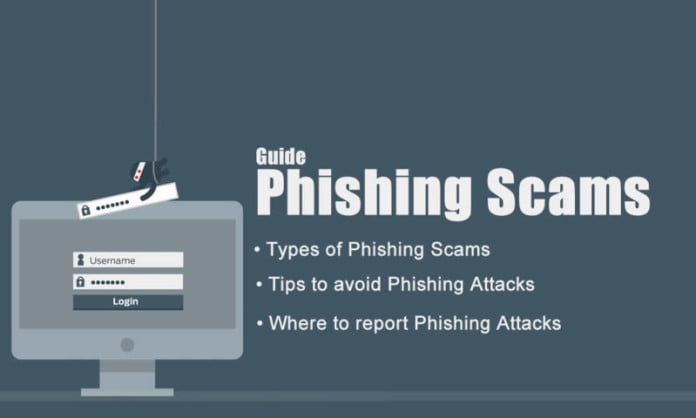
phishing scams guide

Cyber criminals are using different mode of attacks to get your personal data, Phishing Scams are one of them.

What is Phishing?

Phishing Scams are typically fraudulent email messages appearing to come from legitimate enterprises (e.g., your university, your Internet service provider, your bank,your online social account). These messages usually direct you to a spoofed website or otherwise get you to divulge private information (e.g., password, credit card, or other account updates). The perpetrators then use this private information to commit identity theft.

Phishing Scams are usually done through email messages, websites, and phone calls are designed to steal money. Cyber criminals can do this by installing malicious software on your computer or stealing personal information off of your computer.

Cyber criminals also use social engineering to convince you to install malicious software or hand over your personal information under false pretenses. They might email you, call you on the phone, or convince you to download something off of a website.

How To Find Phishing Email?

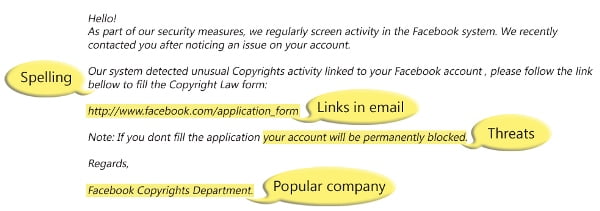
Here is an example of what a phishing scam through an email message might look like.

phishing scams email_example

Spelling and bad grammarCyber criminals are not known for their grammar and spelling. Professional companies or organizations usually have a staff of copy editors that will not allow a mass email like this to go out to its users. If you notice mistakes in an email, it might be a scam.

Beware of links in email: If you see a link in a suspicious email message, don’t click on it. Rest your mouse (but don’t click) on the link to see if the address matches the link that was typed in the message. In the example below the link reveals the real web address, as shown in the box with the yellow background. The string of cryptic numbers looks nothing like the company’s web address. Links might also lead you to download some files. These kinds of file are known to spread malicious software.

phishing scams links

Threats: Have you ever received a threat that your account would be closed if you didn’t respond to an email message? The email message shown above is an example of the same trick. Cyber criminals often use threats that your security has been compromised.

• Spoofing popular websites or companies: Scam artists use graphics in email that appear to be connected to legitimate websites but actually take you to phoney scam sites or legitimate-looking pop-up windows. Cybercriminals also use web addresses that resemble the names of well-known companies but are slightly altered.

Beware Of Phishing Phone Calls Too

Cyber criminals might call you on the phone and offer to help solve your computer problems or sell you a software license. So don’t fall in these types of unsolicited phone calls (also known as cold calls) to charge you for computer security or software fixes. Once they’ve gained your trust, cyber criminals might ask for your user name and password or ask you to go to a website to install software that will let them access your computer to fix it. Once you do this, your computer and your personal information is vulnerable.Treat all unsolicited phone calls with skepticism. Do not provide any personal information.

10 Tips To Avoid Phishing Scams:

Here is some tips to avoid Phishing Scams keeps you from taking the bait and becoming a victim.

1. Take an Active Role

Internet links, phone calls and emails sometimes harbor ill intent. Many phishing schemers attempt to trick you in to giving up personal information like bank account and Social Security numbers. It is important to be extra cautious when information is requested through one of these avenues. For example, if you receive a phone call from someone claiming to work for your bank, hang up the phone and call the number on the back of your debit card.

2. Install Antivirus Software

The best antivirus software programs, such as Bitdefender and Kaspersky, have antiphishing functionality that protects your identity. Install the software on all of your devices, and keep it up to date.

3. Avoid Popups

Many phishing scams involve pop-up screens that ask for information like passwords and zip codes. To prevent identity theft, avoid entering personal data in those popups.

4. Filter Your Emails

Phishing scams might involve email messages that mimic those from legitimate or trusted sources. To protect yourself, look for tell-tale signs of phishing emails, including domains that don’t match the supposed source and suspicious threats that attempt to scare you in to taking a specific action.

5. Match Receipts to Statements

Keep the receipts for every purchase you make both on and offline. Then, compare them to your bank and credit card statements when they arrive every month. If you find suspicious charges, report them to your financial institution immediately.

6. Keep Personal Data Out of Correspondence

Don’t send your bank account, Social Security number or credit card information via email. If a scam artist hacks your email account, he or she enjoys unrestricted access to every email you have sent. Additionally, consider changing your email password on a regular basis and using unique passwords for every account.

7. Enter Fake Passwords

To test the legitimacy of a website, enter your username and a fake password first. If the site doesn’t flag the password as incorrect, you know you’ve landed on a fraudulent site, and the creators want to capture real passwords. Only take this step once, as some organizations lock accounts after too many failed log in attempts.

8. Practice a Friends-Only Policy

When you receive links, attachments or other media, avoid accessing them unless you recognize the sender. Since email accounts sometimes fall victim to hackers, you might ask the sender about the legitimacy of a suspicious email before you click on links or download attached files.

9. Update Your Browser

Internet browsers depend on regular updates to guard against the latest known threats. When your browser prompts you to update, don’t put it off, as this reduces internet surfing security.

10. Conduct Some Research

When an unfamiliar number shows up on your phone, run a quick Google search to determine its origin. If someone else has received a similar phone call, they might have posted about it online. The same goes for searching based on the text of a fishy email.

Where To Report Phishing Scams:

You can report a phishing scam attempt to the company that is being spoofed.

You can also send reports to the Federal Trade Commission (FTC).

 Depending on where you live, some local authorities also accept phishing scam reports.

 Finally, you can send details to the Anti-Phishing Working Group, which is building a database of common scams to which people can refer.

Hopes this article help you to know about Phishing scams, mode of attack, tips to avoid them and where to report them. Share it and help others to protect their personal data.

If you know any other tip to avoid Phishing Scam comment below. And stay safe.

Top Education Technology Trends in 2022

Students and technology

The year 2022 is going to be massive for education technology development. The post-pandemic world has changed. Just like how working from home has become a common practice, so did learning from home. With that in mind, we witness several new educational technology trends erupt. The beautiful world of computer science has made so many things possible for us.

With that in mind, we are bringing you the biggest edtech trends. Let’s have a look:

Accessible Education

Accessible education ensures that everyone worldwide can receive a quality education. At first, it started as a local effort by governments and societies to make education available for their people in school districts. Today, it has expanded to the global level where various organizations are making learning content accessible.

Some of the latest trends include:

  • The availability of the Open Educational Resources at UNESCO.
  • Local TV channels (PBS Networks) are working towards offering studying programs for the viewers.
  • New eLearning platforms for remote learning.
  • Various institutes offer gadgets like mobile devices, tablets, and laptops for students to connect and learn technologically.
  • Availability of academic services like Paperell also empowers the students.
  • Internet companies and government projects are building sustainable and cheaper internet connections.

Since the pandemic, we have witnessed an exponential growth of online hubs for learning. Even the most prominent platforms like Google, LinkedIn, etc., provide studying opportunities. Mobile learning has become a more popular term than eLearning.

Tech-Enabled Immersive Learning

Virtual Reality (or Augmented Reality) is perhaps the most lucrative innovation of the decade. It has existed for a long time, but with the advent of Metaverse, it is bound to grow into a massive phenomenon. We can already witness the availability of cheap VR Headsets. Even mobile apps allow you to change the output to AR or VR. So, how does it turn into a technology trend?

VR brings you an opportunity to improve the learning experiences of the students. It can also significantly save on classroom equipment. For instance, setting up a science lab in real life would require a lot of money and resources. You will have to dedicate a space and staff member for it. Cleaning and maintenance also require money.

Meanwhile, interactive VR laboratories can also provide the students with all the resources and the best visual learning process. There’s no need to overspend on equipment. Other examples of AR tech trends include taking tours of geographical locations.

We have already seen the incorporation of visual techs like video screens, projectors, and such in the classrooms. It is only a matter of time before we see such advancements with VR. Tools like Adobe Aero are also helping with these endeavors to build AR objects.

However, VRs aren’t the only integration in the field. Audiobooks have also grown significantly in use. Both help enhance the studying experience and boost the students’ knowledge retention.

AI-Driven Teaching Programs

Algorithms, machine learning, and artificial intelligence have become prevalent in every industry. We have data-driven medical treatments, business solutions, and expansions. There’s no doubt that humans will always be needed for innovations and ideas. However, today’s AI is advanced enough to do most basic tasks efficiently.

AI-driven teaching programs will empower both sides of the education field. It is great for the professionals as these teachers and professors will have an easier time evaluating a student’s performance. Today, many institutes utilize AI-driven analytics of a person’s performance to focus on their key strengths and weaknesses. Meanwhile, a professor can evaluate the writing, or paper, with the help of AI. An AI-driven addition improves learning management systems for the institute.

The popular Grammarly tool is one such example, especially how it processes the text and provides correction. Many other prominent options are available today to ease the workload. AI-driven teaching programs also help automate the entire learning process of a person.

Overall, AI helps in the phenomenal augmentation of the efficacy in education. It saves a lot of resources and time, but at the same time, also empowers students and teachers alike.

Innovative eLearning Platforms

There’s no doubt that edtech thrived with the expansion of online learning. A decade ago, we saw many new eLearning platforms rise and provide learning opportunities to people worldwide. These came with the collection of resources like books, videos, etc., at the ease of internet access. Cloud computers further empowered these aspects. Today, we have higher education institutions available online. That’s because eLearning increases retention rates.

Fast forward into 2022, we can see some remarkable growth in the field. Everyone’s working towards creating a more innovative eLearning platform. These go from incorporating VRs to adding fun ways, like playing games, for learning purposes. Many are even offering live classes and expert insights from the best institutes.

Virtual labs and interactive learning will take over the traditional methods. However, reinforcing the endpoint security will also take priority. As these eLearning platforms lack the optimum security, hackers find it effortless to break through these layers. However, there’s been undivided attention to providing the best endpoint security solutions.

Gamification

There has been significant growth in the development of games for learning. Even the most popular games use learning approaches like puzzle games and such. Gamification is an excellent form of hybrid learning where a person learns the subject and other essential skills. These include analytical prowess, hand-eye coordination, reflexes, dexterity, and much more.

Augmented reality is also gamification of the entire virtual learning process. Making education fun has become a critical aspect of higher education institutions. It helps with providing a better learning environment to the students.

Conclusion

This wraps the five hottest edtech trends we will see in 2022. The big data companies and higher education institutions will see remarkable growth in the field. It isn’t about the primary, secondary, or high schools anymore. The availability of new technology tools and the digital dimension leads us to new possibilities to teach students efficiently.

It would be indispensable for almost every community, government, and country to adapt to these changes. More importantly, these practices can lead to sustainable results in the future.

Google Will Allow App Archiving On Android

MicroDroid Android version

Google is working on a new feature that will allow you to archive apps that you hardly use but, for some reason, refuse to uninstall so that they no longer take up valuable space on your smartphone.

Basically, Google plans to activate the option to archive a part of the APK files until they are needed again.

With this feature, the Android users would no longer be forced to uninstall those applications that they use little or not at all — instead, they could temporarily remove a fraction of a given app’s package without needing to remove it entirely.

This new feature will be coming to developers shortly, though users will still have to wait for some time this year. It’s not yet known if it will debut on Android 12 or if, on the contrary, we will have to wait for Android 13.