Home Blog Page 189

Apple M1 Ultra: 8 Times More Performance Than The Original M1 And Twice As Much As The M1 Max

Apple M1 Ultra

Apple announced the latest evolution of its family of processors for Mac — the M1 Ultra.

Apple advertises that the processor created by the so-called Ultra Fusion achieves the performance of a Core i9-12900K and a Geforce RTX 3090 but requires a total of 300 watts less.

To “make” an M1 Ultra, the company decided to make two M1 Max processors work at the same time. The M1 Max and its die-to-die interconnect are produced by TSMCs using the N5 process (5 nm EUV), which requires special 2.5D packaging to link both chips.

Apple M1 Ultra design

According to Apple, a silicon interposer is used, whereby TSMC offers two conceivable options with CoWoS-L (Chip on Wafer on Substrate including Local Silicon Interconnect) and InFO-L (Integrated Fan-Out including LSI).

With a data rate of 2.5 TB/s between the two M1 Max dies, the M1 Ultra is said to be more than four times faster than other solutions. Also, the M1 Ultra is the first graphics processor that consists of two dies – but is addressed by the software like a monolithic chip.

The M1 Ultra features 16 high-performance cores, 4 high-efficiency cores, 64-core integrated graphics, and the ability to operate with up to 128GB of unified RAM. Apple claims that the M1 Ultra offers 90% more multithreading performance than the most powerful 16-core PC chip on the market. By having a unified memory architecture, the bandwidth has been increased up to 800 GB/s.

According to Apple, the M1 Ultra is 90 percent faster at around 60 watts than a Core i9-12900K with DDR5 with the same power loss, or in other words — it achieves the same performance with 100 watts less. 

Apple M1 Ultra CPU performance

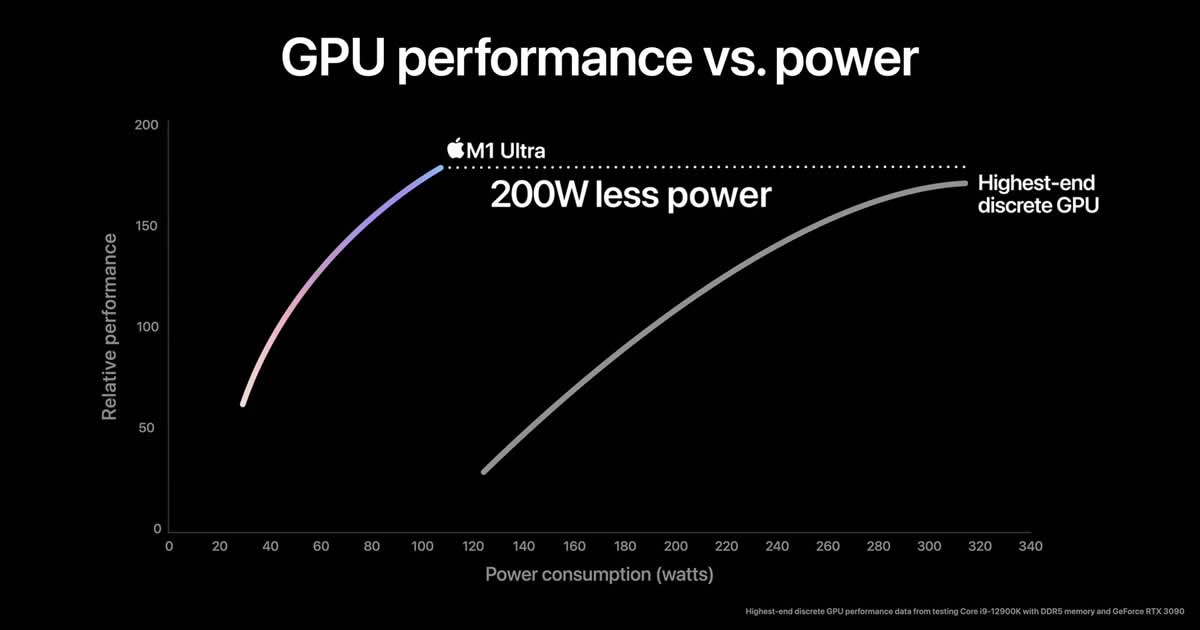
The integrated graphics of the M1 Ultra, on the other hand, should be as fast as a Geforce RTX 3090 but 200 watts more economical.

Apple M1 Ultra GPU performance

The M1 Ultra is the heart of the new Mac Studio, a computer for professionals that was presented at this event along with the new processor. Mac Studio is a Mac in a housing that is significantly taller than the Mac mini, which the editors will deal with separately.

Apple Mac Studio

The M1 Ultra in the new Mac Studio should therefore achieve the performance and efficiency advertised by Apple, with the system including a fully expanded SoC and 64 GB of unified memory costing at least $3999.

iPad Air 2022: Apple Launches Fifth Generation iPad Air With M1 Chip

new iPad Air 2022

Apple has introduced the fifth-generation iPad Air, which offers 5G connectivity. The tablet is equipped with Apple’s M1 chip, which was previously only used in Macbooks and the iPad Pro.

After the major design upgrade that takes inspiration from the iPad Pro back in 2020 and after almost two years without announcing any new model in this range — Apple officially revealed the iPad Air 2022, which inherits not only the best of its predecessor but also the most remarkable of its most professional tablet, the iPad Pro.

iPad Air 2022

The 10.9-inch display with LED backlighting and IPS panel achieves a resolution of 2360 x 1640 pixels at 264 ppi and a brightness of 500 nits. The new iPad Air is compatible with the Magic Keyboard and can be used with the second-generation Apple Pencil.

The fifth-generation iPad Air is equipped with a fingerprint sensor in the on/off switch, which Apple already installed in the predecessor.

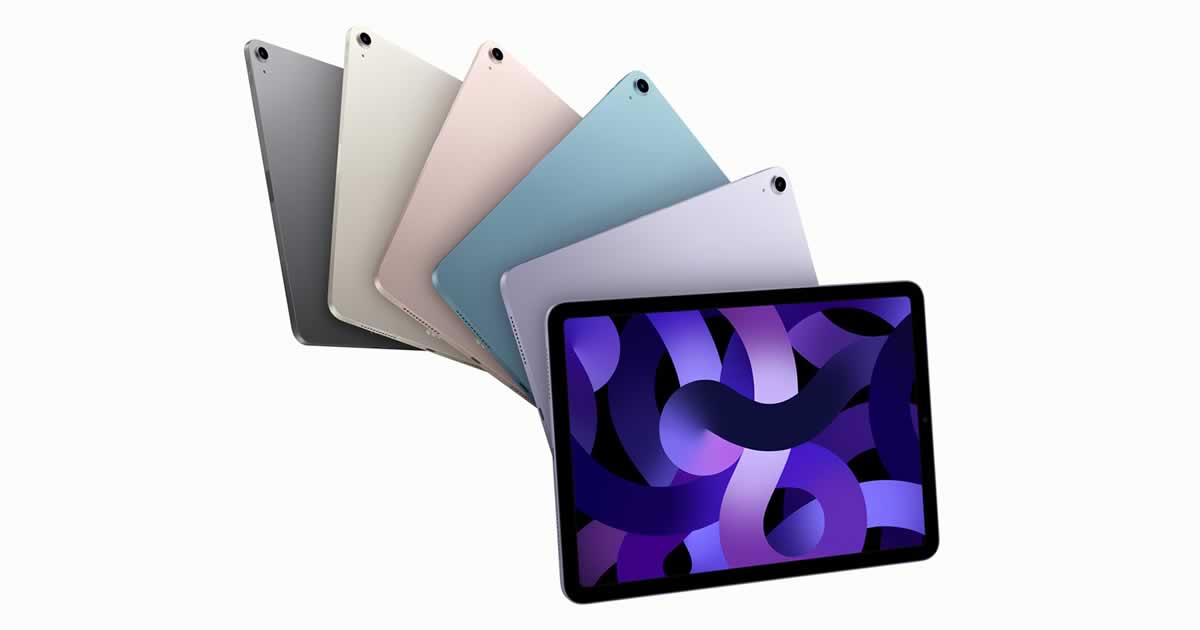
The fifth-generation iPad Air measures 247.6 x 178.5 x 6.1 mm and weighs 461 grams with the WLAN module. With an additional 5G modem, the weight is 462 grams. The iPad Air is charged via USB-C. A 20-watt power adapter is included. In addition to space grey, the tablet is also available in rose, violet, blue and polar star white.

The iPad Air 2022 price starts at $599 for the Wi-Fi-only model, rising to $749 for the Wi-Fi and cellular version. The new iPad Air is said to be available from March 18, 2022. Pre-orders start on Friday.

iPhone SE 2022: Cheapest iPhone Gets A15 Bionic And 5G Support

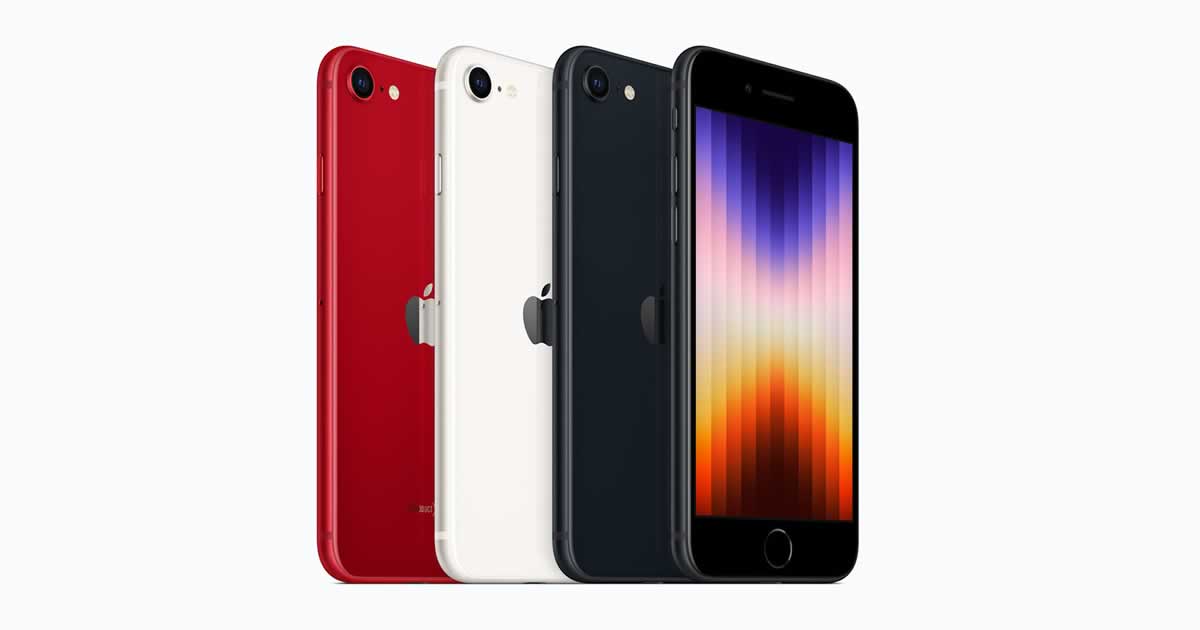
iPhone SE 2022

At its first event in 2022, Apple presented the third-generation iPhone SE, which supports 5G and is equipped with the A15 SoC, which Apple first introduced with the iPhone 13 family.

As with the previous model, the third-generation iPhone SE only has one main camera installed. There is also a 7-megapixel selfie camera. The iPhone is equipped with a 4.7-inch display, and the back is also made of glass. The display achieves a resolution of 1334 x 750 pixels at 326 ppi, a typical contrast ratio of 1400:1 and a maximum brightness of 625 nits.

Below the display, there is again a lot of space, which Apple again uses for the Touch ID fingerprint sensor. The smartphone measures 67.3 x 138.4 x 7.3 mm and weighs 148 grams.

The main camera offers a resolution of 12 megapixels and an initial aperture of f/1.8. Video recordings are possible with a resolution of up to 4K at 24 fps, 25 fps, 30 fps or 60 fps.

iPhone SE 2022 is waterproof to industry-standard IP67, which means it can be submerged in 1 meter of freshwater for up to 30 minutes.

iPhone SE 2022 colors

The third-generation iPhone SE can be ordered from Friday and is scheduled to be delivered from March 18, 2022. The iPhone SE is available with storage capacities of 64, 128 and 256 GB in the colors midnight, polar star and (product) red from $429.

5 Best Lightweight Browsers For Windows 11 That Use Less RAM For Fast Browsing

Lightweight Browsers For Windows 10

If we talk about the web browsers that we can use at the moment, the first that come to mind are Chrome, Firefox, or Edge. These are the most used and widespread around the world.

Of course, their market share clearly shows how much they are popular around users. The major drawback of these so-known popular browsers is their RAM hogging nature. We know how Google Chrome utilizes the unimaginable amount of RAM of our Windows system.

But what we forget is, there are many other alternatives that we can use. There are many other web browsers available on internet with some unique functionalities and characteristics. And one such type of category is lightweight browsers for Windows 11.

These lightweight browsers for PC are the ones without having many of the advanced features and functions of Firefox and Chrome; else they are lighter and faster programs. 

If you have a Windows PC with a low configuration, then lightweight browsers are the best option before you for surfing the internet. Lightweight browsers for Windows 11 allow you to navigate quickly, without complications, and, above all, without overloading your PC’s RAM.

Below recommended lite PC browsers perhaps as not as powerful and are more limited in functions, but they perfectly fulfill their mission, which is to be able to navigate the internet with ease and blazing fast, without clutter. One of the main characteristics of this type of web browser is that they consume very few resources. Windows 11 lightweight browsers have to be highly optimized to consume little RAM and minimal CPU power. In this way, it will be able to work even on older computers without problems.

Therefore, we recommend you take a look at the alternatives that we are going to present since they are fast browsers, and one of them may make you migrate from Firefox or Chrome.

Best lightweight browsers for Windows 11

The following browsers are characterized, for everything, by consuming very little RAM on the PC. All of them will be available for Windows 11, and some other operating systems, such as Linux or macOS.

1. Maxthon

Maxthon is another light and fast proposal in the web browser sector that is currently available for Windows, Android, and iOS. In addition, it has been there for a long time, so it has gained experience over the years. It makes its own storage system available to us, as well as an email client and a password manager.

It is also worth knowing that its interface allows us to see two pages from the same window; it has a translation service and its own plugins to increase its functionality. When it comes to data security, this lightweight browser for Windows 11 provides high-performance cloud backup, synchronization and sharing capabilities, and advanced encryption to ensure user data security.

2. SlimBrowser

SlimBrowser is one of the best lightweight browsers for Windows 11 that allows us to navigate quickly and smoothly. This super fast browser helps you to browse the internet without the Ads, claims to provide 10 times faster file and video download.

It also has a user interface with multiple customizable windows, which allows us to load several websites at the same time. This allows us to have webs at our disposal in a more fluid way, which improves the experience with the program. At the same time, we can carry out safe searches thanks to the data protection system that it presents to us. This way, we can safeguard the privacy and also hide certain unwanted content.

3. Avant Browser

Avant Browser is a Windows 11 lightweight browser that is also characterized by its speed in web browsing. Its user-friendly interface brings a new level of clarity and efficiency to your browsing experience, and frequent upgrades have steadily improved its reliability.

It is worth highlighting that this browser consumes minimal system resources in its operation and allows us to work with it without distractions. At the same time, it presents us with some interesting security-related functions, allowing you to block all types of malware or unwanted content.

4. Midori Browser

Midori Browser is another one of the alternatives to Firefox or Chrome that is characterized by its smooth operation. The browser is light, fast, secure, free software, and open source. This lightweight browser for PC respects users’ privacy by not collecting information or selling invasive advertising, and you will always have control of your data, anonymous, private, and secure.

It has CSS3 and HTML support and is available for Linux and Windows systems. It should be noted that it allows us to navigate without distractions and consumes very few system resources, all without advertising.

5. Opera

Opera is one of the legendary programs in this sector that has been with us for a long time. It is a powerful program that is characterized by its speed when it comes to navigating, and it has its own interesting functions. Thus, we can move around the internet, chat in different ways, function as a BitTorrent client, etc.

At the same time, it is also worth noting that Opera comes with a free VPN, reduces online tracking, and shields your browsing. Also, you can chat and browse at the same time with built-in messengers on the edge of your browser. 

Chrome might be the best web browser out there with many features, but don’t forget, those features come with a price of high CPU and RAM usage. Sometimes these kinds of high requirements are not met by some PCs, so that’s why these lightweight browsers for Windows 11 would be the best alternative.

Best Plagiarism Checker Software 2022

Plagiarism Checker Software

If you’re in search of the best plagiarism checker online, we have carefully vetted a list of credible and free plagiarism detection tools in this article.

Plagiarism charges can do serious damage to a writer’s or student’s reputation. Plagiarism is a serious issue that can affect your grades or even your career. Bloggers, writers, essayists, and students should regularly use an online plagiarism AI checker for plagiarism programs to ensure the content written has no similarity with other information on various web pages.

Every writer or editor’s work process includes a plagiarism check. Fear not, if you’re afraid about unintended paraphrasing. The top free and premium plagiarism reports are covered in this article.

Plagiarism Explained 

Simply put, plagiarism is cheating. Copying and republishing someone else’s content as your own is plagiarism. Plagiarism involves taking someone’s photo and using it without their permission or credit. Using text from a source without citing it is also plagiarism.

Plagiarism in college can lead to expulsion and the end of any future aspirations. Stealing content for your own blog is neither flattery nor lawful. Copying content for your own website can result in a ban or website taken down.

Hence, it is important to utilise tools such that can help indicate any signs of plagiarism and help improve the way you write. Below, we’ve listed the top 4 plagiarism checker software in 2022.

PapersOwl

PapersOwl

If you’re having difficulty with an academic paper and are not sure whether it is entirely unique, you’re most certainly going to need something such as a plagiarism checker that is free and easily accessible. In a case such as this, PapersOwl plagiarism checker is a completely free software that is reliable and will help you in writing content that is completely unique.

When seeking for the most accurate checker available online, PapersOwl is one of the best options out there. When using this online software, a rigorous scan is done to ensure a 100% transparent report regarding any signs of plagiarism.

What makes this a great option amongst others available online is that it is entirely free, quick, secure, and it employs the most powerful algorithms in order to provide the user with an advanced check. Ultimately, assisting the user in receiving high quality papers.

Numerous students have already stated that the free tool is an excellent and convenient feature that assists them in identifying and correcting faults that would most certainly result in failing.

Unicheck

Unicheck

This is one of the best plagiarism checkers that provides a high-quality service by combining cutting-edge technology and intuitive design, and it certainly works: this software is used by over 1,000 educational institutions worldwide.

This tool has access to over 91 billion sites and library files, ensuring that it checks every possible source for plagiarised material. Additionally, you won’t be overwhelmed by data once the app has completed its search: results appear in a basic interface that highlights sources and colour-codes content, and each piece has a plagiarism score that adjusts as you update the content.

Unicheck’s 99.9 percent system uptime ensures that you can check for plagiarism whenever you need to, and its authorised, encrypted accounts provide users with a high level of protection.

The variety and strength are carried across to other areas. A personal dashboard is ideal for managing a large number of sources, and Unicheck interfaces with Office 365, Google Docs, and Chrome, allowing you to check for plagiarism without leaving those applications. Additionally, it has an accessible API, which enables the tool to integrate with other services.

This tool does not have to be costly. Its Personal plan starts at $5 and escalates up depending on the number of content you want to review, and it also offers more comprehensive subscriptions for educational institutions and organisations. Whichever option you choose, it’s evident that this plagiarism checker continues to be one of the greatest plagiarism detectors available.

Grammarly

Grammarly

This is one of the most widely used plagiarism report software online and it does an excellent job of reviewing written material for linguistic accuracy as well as readability and tone. Additionally, it is accessible as a mobile application, a plug-in for the majority of word editing applications, and a browser plugin.

It works in email clients, social media platforms, and even Slack and Discord — ensuring that you can always rely on this software.

It also includes an excellent plagiarism checker. It checks for plagiarism using academic papers in ProQuest’s database and over 16 billion web page sources, and if the program discovers copied words or phrases, you’ll receive a warning in your document.

While Grammarly plagiarism checker is free to use, it will not indicate where the information was taken from.

Rather than that, we recommend subscribing to it’s subscription tiers, which include more than one tool such as grammar, spelling, and punctuation, as well as clarity, engagement, tone, and plagiarism detection.

A premium account costs $12 per month to unlock these services, while a business plan adds further administrative capabilities for $12.50 per user per month. It’s well worth the investment: This is one of the best linguistic tools available online.

Scribbr

Scribbr

Scribbr’s plagiarism detector is integrated within a broader package of tools that also includes a proofreading module and an APA reference generator. Unsurprisingly, the products available on this site will appeal to students and academics, and the site also assists with the creation of dissertations, essays, and thesis documents.

The plagiarism checker is excellent. Scribbr collaborates with Turnitin, which can detect everything from exact word and phrase matches to language in which synonyms have been used, and Scribbr compares content to a database of 91 billion web pages and 69 million publications. Additionally, you can upload previous assignments or referenced works to compare – ideal if you want to compare your material to anything that isn’t in Scribbr’s database.

Apart from preventing plagiarism, Scribbr provides skilled editors who can proofread essays, thesis documents, funding proposals, and literary reviews — it’s great for ensuring that your work is of the highest quality, regardless of the subject. Scribbr also has an APA citation generator and checker, so you can be certain that no one will challenge your sources.

Scibbr’s plagiarism checking service is priced at $20 to $40 per document, depending on its length, and you’ll receive your tested work within 10 minutes.

Scribbr is not ideal for large companies due to its lack of dashboard and security capabilities in comparison to other platforms.

Conclusion 

Plagiarism checkers are critical for authors and scholars alike. They must adhere to certain regulatory and ethical standards if they are to flourish in any sector of education or profession. For them, having content that is plagiarised is something they must avoid at all costs. Everybody wants authentic work since it demonstrates your dedication and intellectual capacity. If you wish to identify and avoid plagiarism in any of your work, you should invest in an appropriate tool. Today we’ve mentioned the best options for you to pick from.

How To Do Wireless File Transfer Between Android And PC?

Thinking about wireless file transfer between Android and PC?

Then the first thing that comes to your mind is connecting devices via Bluetooth. Yes, it’s one method that helps you to transfer files between your phone and PC without using the USB cable.

But today am going to talk about connecting your Android device and PC/laptop via Wi-Fi and then transferring files in lightning speed.

As we know, there are many approaches that come to our mind, when we think of transferring files between our Android device and PC like — via USB cable, Bluetooth, Cloud, Infrared, etc. But why do we choose Wi-Fi to interconnect Android and PC?

Features of Wireless File Transfer:

  • Accessibility —  easy to connect to any device because Wi-Fi connectivity is available in every device.
  • Speed — unlike any other method, wireless file transfer gives the advantage of lightening file transferring speed.
  • Sync anytime — since wireless file transfer method need only an Android device with portable Wi-Fi hotspot (with/without internet connection) to create a Wi-Fi network, so you can synchronize your files between phone and laptop anywhere, anytime.
  • Secure — If you are using your device’s Wi-Fi hotspot feature to transfer files wirelessly, then you don’t need to be afraid of the data breach by cybercriminals. [Always avoid file transferring over public Wi-Fi]

How To Do Wireless File Transfer Between Android And PC (Without USB Data Cable):

Using Sweech

Sweech is one of the simple and easiest Android apps to do wireless file transfer between Android and computer. Sweech comes with a clean, user-friendly interface without any complicated settings. So let’s start the tutorial:

1. First, make sure your Android smartphone and PC are connected to the same network; I mean, if you have a broadband or Wi-Fi, then connect these both devices to that network. Otherwise, turn on your mobile hotspot and connect your PC to that hotspot. This is an important step.

2. Now install from Google play.

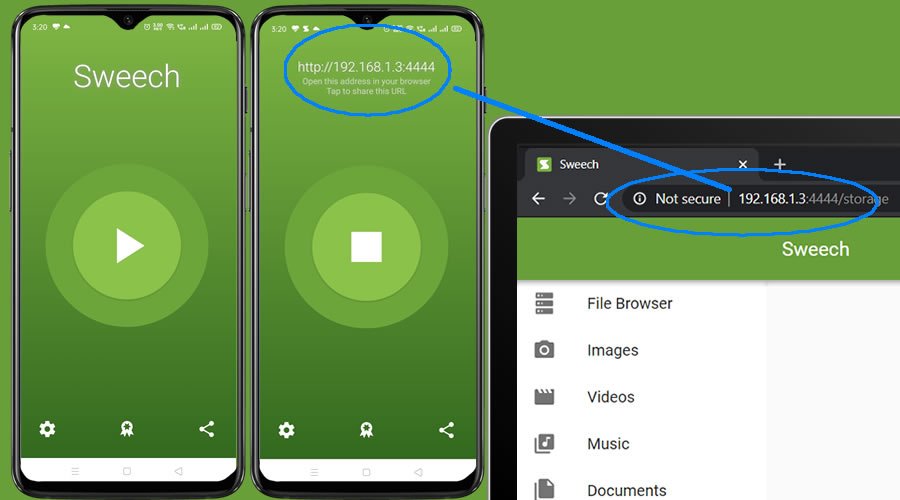
3. Open the app, in the home screen; you are welcomed with a “play” button. Simply tap on it. Now on the top of the screen, you can find a URL like this: http://192.168.1.3:4444.

sweech wireless file transfer between android and pc

4. Enter this URL on your computer’s web browser address bar. That’s it. Your Android smartphone is connected to PC wirelessly — easy-peasy, isn’t it.

sweech wireless file transfer between android and pc

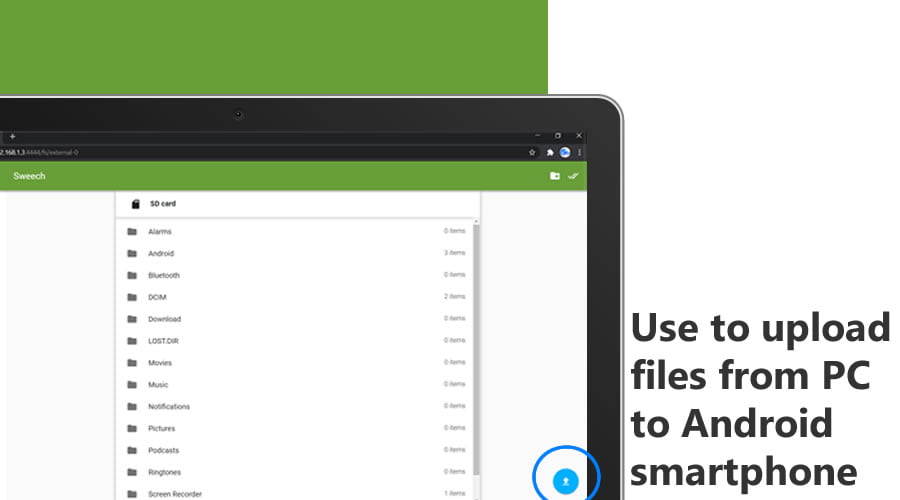
Now start to download and upload your files with Wi-Fi between smartphone and computer — also, don’t worry about your limited data pack. The file transfer is not going to use the internet, so your data pack wouldn’t going to exhaust.

To disconnect, press the “stop” icon on the Android screen or close the browser window on the computer. Also, don’t forget to dive into some optional settings where you can enable SD card write access or keep the screen on while transferring files between Android and PC wirelessly via Sweech.

Using Xender

Here, we are using a simple Android application to transfer files between the Android device and PC without USB cable. The tool we prefer for wireless file transfer is — Xender.

Why I chose Xender over other Wi-Fi file transferring Android applications —

  • Easy user interface
  • Can connect devices within seconds
  • Awesome file transferring speed
  • Can transfer files from Android to Android, Android to PC/laptop and vice versa and Android to Windows/Mac.
  • Wireless file transfer is possible even with or without the internet connection
  • Cross-platform support — app available for Android, iOS, and Windows.

The only thing I hate about Xender is that, with every update, it changes its user interface that shifts the positioning of the setting options every time.

So, let’s see how to use Xender to transfer files wirelessly or without USB cable between Android and PC.

First, you have to install the latest version of Xender from Google Play. As I already mentioned you can do wireless file transfer in Xender with or without an internet connection.

So we are discussing two methods here.

Method 1 — Transfer Files Wirelessly In Xender Without Internet Connection:

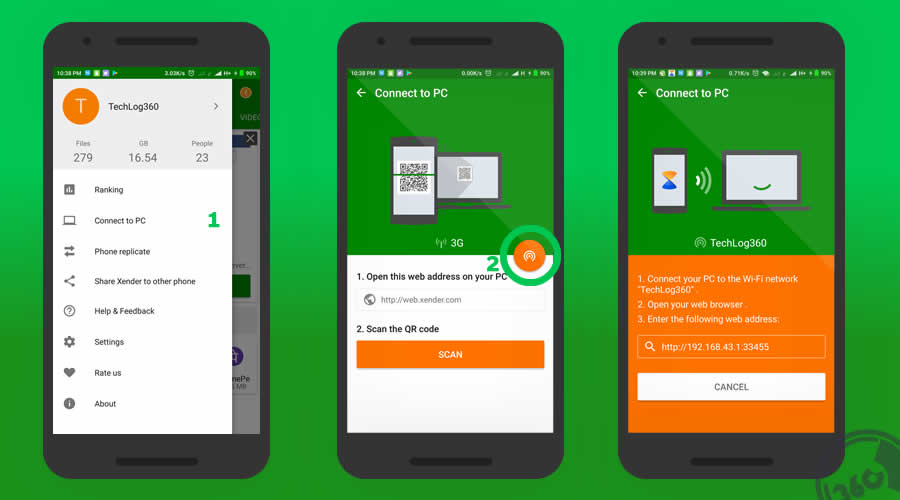
1. First, open Xender app. From the options choose “Connect to PC“.

2. Since you are going to transfer files without using data connection, so tap the circular button to turn on your device’s hotspot.

Wireless File Transfer Between Android And PC

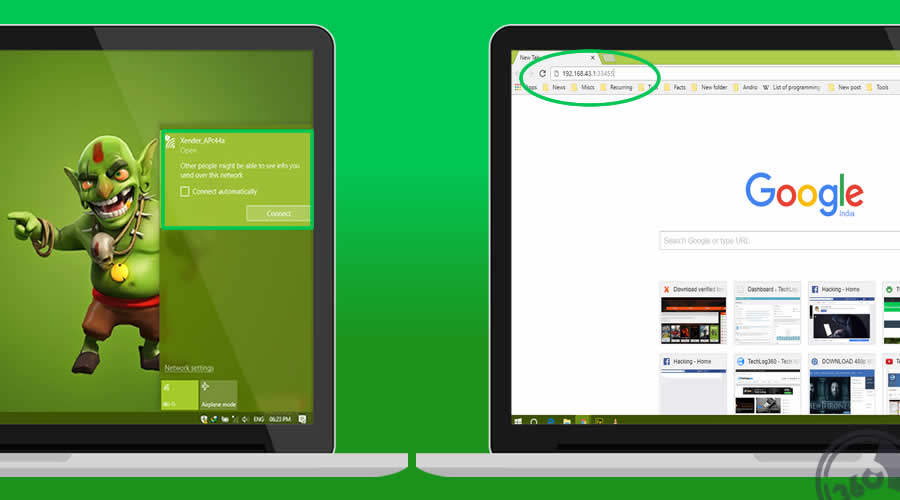
3. Next step, in your laptop/PC,  connect to the Xender wifi network.

4. Now open your computer’s browser and enter the URL provided in the Xender screen.  (http://192.168.43.1:33455).

Wireless File Transfer Between Android And PC

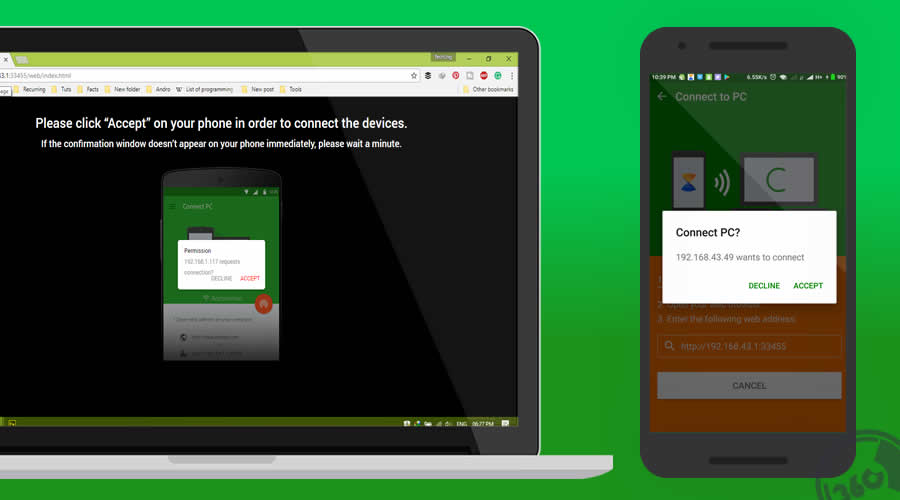
5. Next “Accept” connection permission that pops up on your phone to initiate wireless file transfer between your smartphone and computer.

Wireless File Transfer Between Android And PC

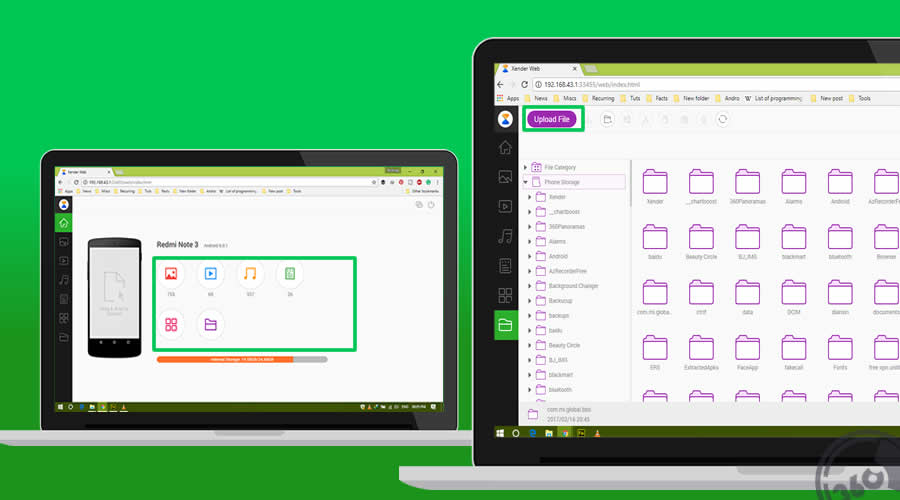
6. That’s it. Now choose any category on-screen or file manager to upload and download files via Xender without the internet connection.

Wireless File Transfer Between Android And PC

Method 2 — Transfer Files Wirelessly In Xender With Internet Connection:

If you like to transfer files in Xender with an internet connection, then make sure your Android smartphone and computer are connected over the same WiFi network that has internet access.

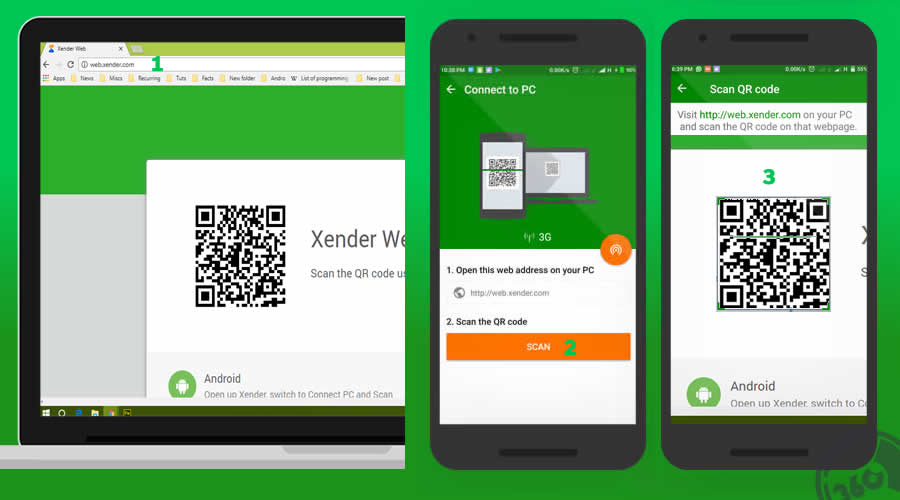
After that instead of tapping that circular button — that we mentioned in Step 2 of the first method — just open your computer’s browser and enter “http://web.xender.com“. And then tap “SCAN” on smartphone and scan the QR code displayed on your browser screen to initiate the connection.

Wireless File Transfer Between Android And PC

That’s it. The only difference between wireless file transfer via Xender with and without an internet connection is while using the internet you have to scan QR code to interconnect Android smartphone and computer whereas with no data connection you have to connect devices via hotspot.

So how is Xender working out for you? Do you find wireless file transfer via Xender is quite easy when compared to other methods or tools? We would like to hear your opinions in the comment box below.

Also, check out our article about how to do wireless file transfer between PC and iPhone or iPad.

Without A Better Internet There Is No Metaverse

Metaverse world

The so-called Metaverse should be the next evolutionary stage of the Internet. It should enable users to move around in a networked virtual reality — or at least to use the applications of the same group of companies such as Facebook, Instagram and Whatsapp with 3D avatars.

In any case, Mark Zuckerberg is so convinced of this vision that he even renamed Facebook to Meta in 2021.

According to Dan Rabinovitsj, vice president of Meta’s connectivity department, current network infrastructure is the biggest hurdle Metaverse has to cross. “If you really look at the pace of innovation in the telecom world, compared to other markets, it’s been harder to go faster in this space,” Rabinovitsj said.

Meta speaks of “metaverse-ready networks” that are necessary for the “industry-wide advance”. Several companies have already announced products under the Metaverse name, and Facebook itself has already started a VR platform with Horizon Worlds.

Mobile Internet connections and thus the new 5G mobile communications standard also play an important role here. According to a report by the industry organization GSMA, by the end of 2025, more than a fifth of all mobile phone connections will run via 5G.

Many tech minds believe Metaverse as a slowly evolving concept. Adoption will come with massive increases in infrastructure and network capacity requirements.

Meta Connectivity goes even further in its improvement requests. “In today’s networks, the protocols and algorithms operating at the application layer — such as adaptive bit rate control loops for streaming video — do not have access to metrics on link quality and congestion from the physical layer. Similarly, protocols to optimize traffic congestion run mostly independent of one another, with some handled by content providers and others by network operators. We believe there’s an opportunity to realize significant gains by moving past this kind of siloed optimization and toward open interfaces for sharing metrics between OSI layers as well as network domains” — the team writes in an article.

Amazon Luna Finally Reaches To All Prime Users For Free In The United States

Amazon Luna

The launch of Amazon Luna is now official. Amazon revealed its own cloud gaming service in late 2020, and now, it’s finally available to Amazon Prime users in the United States. The company has confirmed the launch of the service for Android, iOS, Chrome OS, macOS and Windows.

Although Amazon Luna is not very different from Google Stadia, Nvidia GeForce Now or any other cloud gaming platform, basing its service on streaming games from high-end servers — allowing us not to depend on our hardware to play and what we notice a notable difference is in its subscription structure.

For comparison, Stadia has a free tier with basic service and a premium subscription with additional features like 4K. Both have access to a library of free games, which rotate on a monthly basis. There is also a larger collection of games that users can purchase just like they would on Steam or any other digital store. Purchased games can be streamed whenever the subscriber wants.

For its part, Amazon Luna offers a variety of smaller libraries that it calls “channels”, each with different subscription rates, seeking that users can “build” their own on-demand service according to their tastes and needs. While its free subscription offers only a small selection of games from the rest of the subscription plans, it is only for a limited time, limiting access to games to small availability windows of about a couple of weeks.

  • Luna+, available from $5.99 per month, the basic plan currently includes 115 games such as Control, Grey, No More Heroes, Blasphemous, Carrion, The Surge 2, Devil May Cry 5, Bloodstained, Mortal Shell, A Plague Tale: Innocence, The Medium, Yakuza: Like a Dragon, Kingdom Come: Deliverance, Ghostrunner and DiRT 2.0. Titles run at 1080p/60 FPS.
  • Family, available for just $2.99 ​​per month, based on the inclusion of a smaller game catalogue focused on 44 titles for all audiences, such as Skatebird, Snake Pass or Overcooked.
  • Ubisoft+, going up to $17.99 per month, will give us access to all Ubisoft games, including new releases and current titles like Assassin’s Creed: Valhalla, Far Cry 6 or Immortals Fenyx Rising, among others.
  • Retro Channel, available for $4.99 per month, bills itself as a channel dedicated to classic games that includes 46 titles such as Street Fighter II – Hyper Fighting, Metal Slug 3 and Castlevania Anniversary Collection.
  • Jackbox Games, available for $4.99 per month, exclusively focused on the title selection of these multiplayer party game bundles.

Also, if you don’t have a game controller available — Amazon sells its own Luna Controller — the platform allows you to use an Android phone or iPhone as a game controller when playing from a Fire TV device.

Now it remains to be seen if Amazon ends up launching the service outside the United States, something for which there is currently no data.