Home Blog Page 198

Google Announced Plans For How Android Devices Should Work Better Together In The Future

Android Devices Should Work Better Together

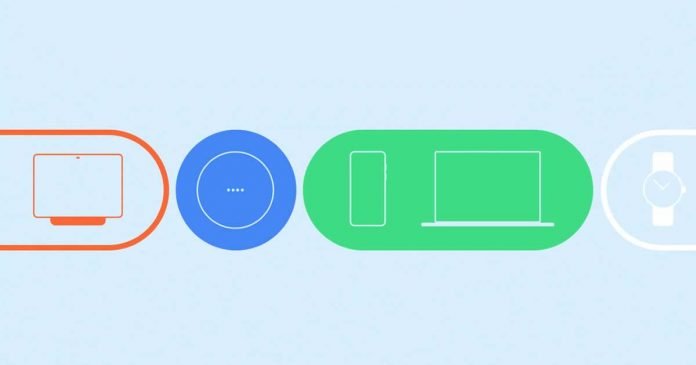
In 2022, Google wants to build its Android and device ecosystem into a truly comprehensive experience and enable better communication and interoperability of the individual devices with each other, as the manufacturer announces in its blog.

The solutions that Google has presented at CES 2022 aimed at improving the interaction between different devices, whether based on Android, ChromeOS or other systems. However, it looks like all to get closer to the integration that Apple already offers that make the Apple ecosystem unique.

Google wants the initial setup of headsets, wearables, or other accessories that pair with the mobile to be faster and easier than ever. The first novelty will arrive in the coming weeks to Chromebooks. It is about Fast Pair, the technology that speeds up the pairing of Bluetooth devices compatible with Android. In a few weeks, it will begin to take its first steps in Chrome OS, which will detect when you turn on a headset compatible with this technology and will allow you to pair them automatically with a simple click.

The company wants Fast Pair to be used not only for audio connectivity, to pair wearables, bluetooth earphones, speakers and cars, but also for televisions and smart home devices so that the user can instantly start using all the devices that are part of their life.

Google says, “In the future, with built-in support for Matter on Android, you’ll be able to use Fast Pair to quickly connect new Matter-enabled smart home devices to your network, Google Home and other accompanying apps all in just a few taps.”

2. Fast Pair Matter enabled devices

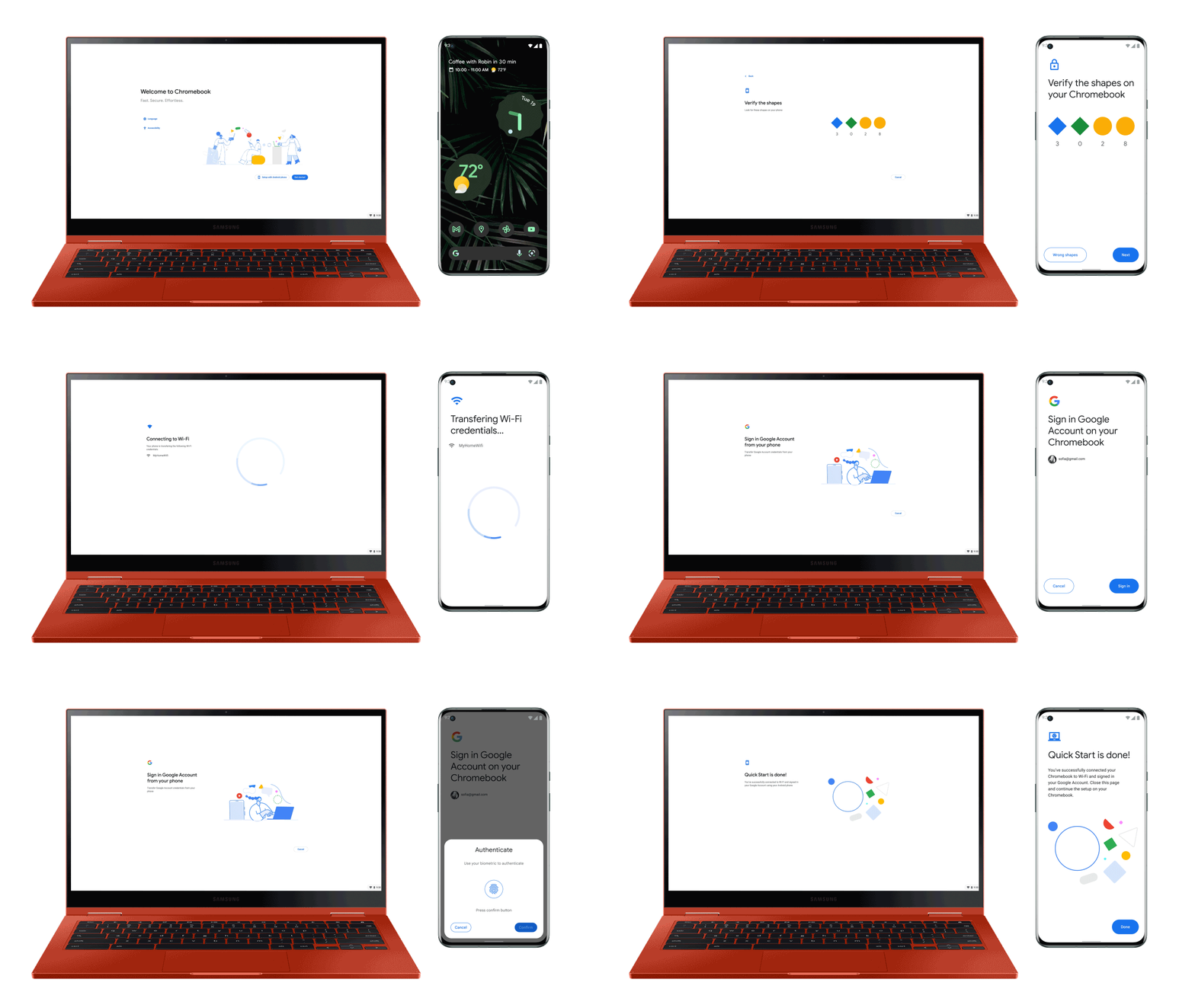
With the new generation of Chromebooks, later this year it should be easy to set up the laptops with the help of an Android phone that has already been set up and thus get direct access to the Google login or settings such as WiFi passwords.

1. Quick setup Chrome OS to Android

The Phone Hub on Chromebooks is also to be expanded. So it should be possible to access the phone’s chat messages from the Chromebook even when it is not nearby. Likewise, the last photos and videos on the phone should be accessible from the Chromebook.

7. Multi device messaging from Android to Chrome OS 1

Google is also working on Fast Pair for Windows 11 so that on PCs where you have Android linked, you can quickly configure the Bluetooth accessories that you already have configured on your mobile. You can also synchronize text messages or share files with Nearby Share. These features will arrive first on select computers from Acer, HP, and Intel in a few months, and it is expected that they will reach more devices later.

8. HP Windows PC WFBRjJe

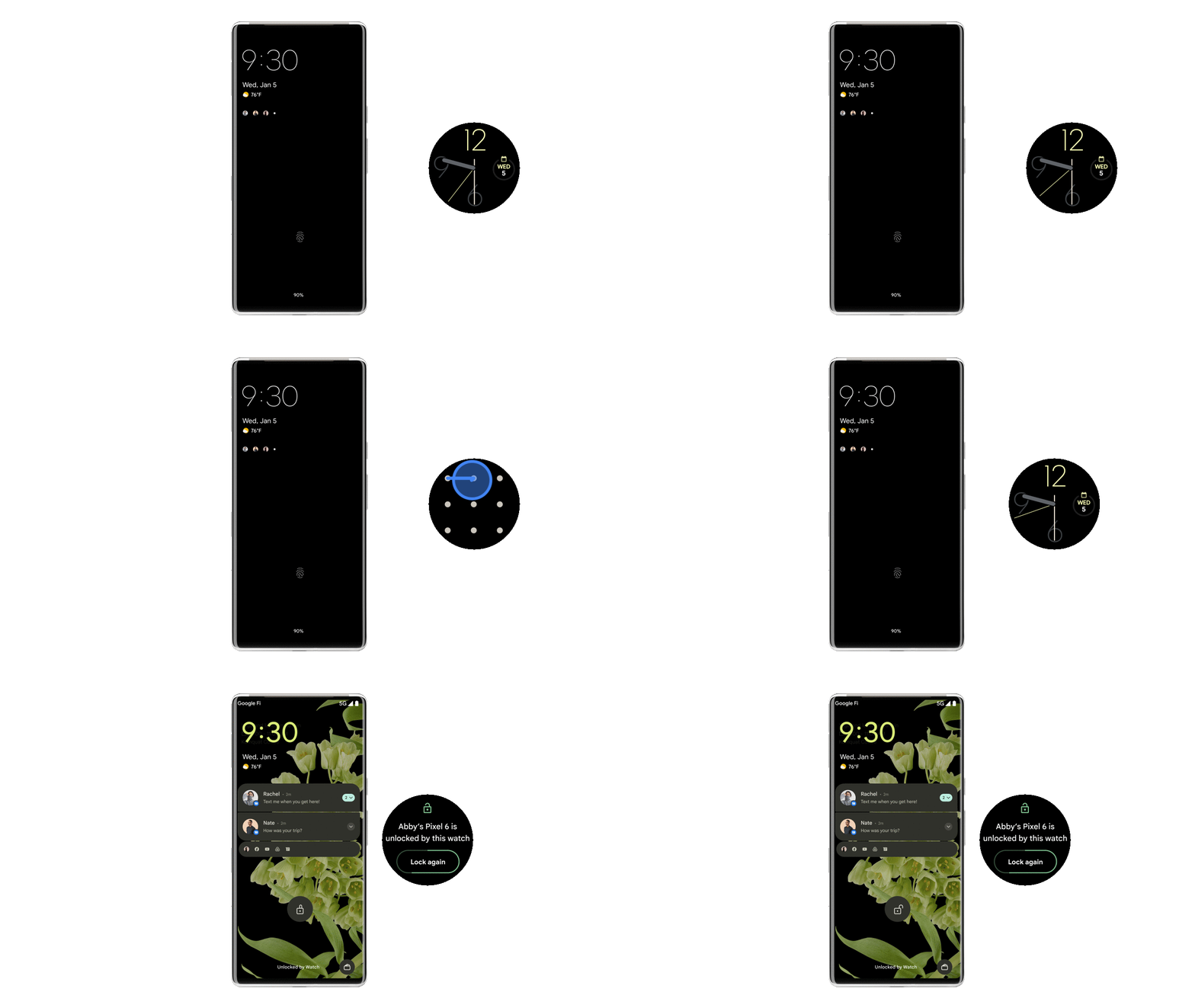
Google has also announced news related to the possibility of unlocking devices with others, as can currently be done to unlock Chromebooks with Android phones. During this year, Google will also allow you to unlock your Chromebook or Android tablet with Wear OS watches that are nearby and are paired to your device.

3. Wear OS unlock Android 1 KkvQpdi

Sound management is another novelty that will be coming to Android. First, the headphones will be able to detect which device is playing sound to prioritize it. 

5. Audio switching from Chrome OS to Android 3Gl8Tan

Another of the functionalities that Google will bring to cars are remote actions, which allow you to use voice commands from home to turn on the heating or air conditioning of the car, close or open its doors and obtain information (for example, about battery charge) on all Assistant-compatible devices. A feature that will debut in Volvo cars but will be joined by other brands.

4. Digital car key

Odyssey Ark: Samsung Introduces 55-Inch Curved Monitor Intended For Portrait Use

Samsung Odyssey Ark

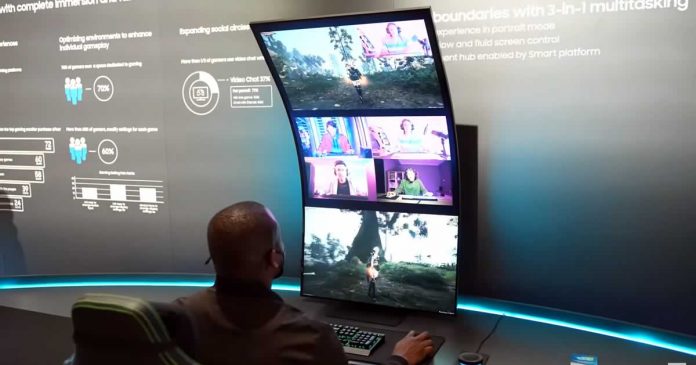
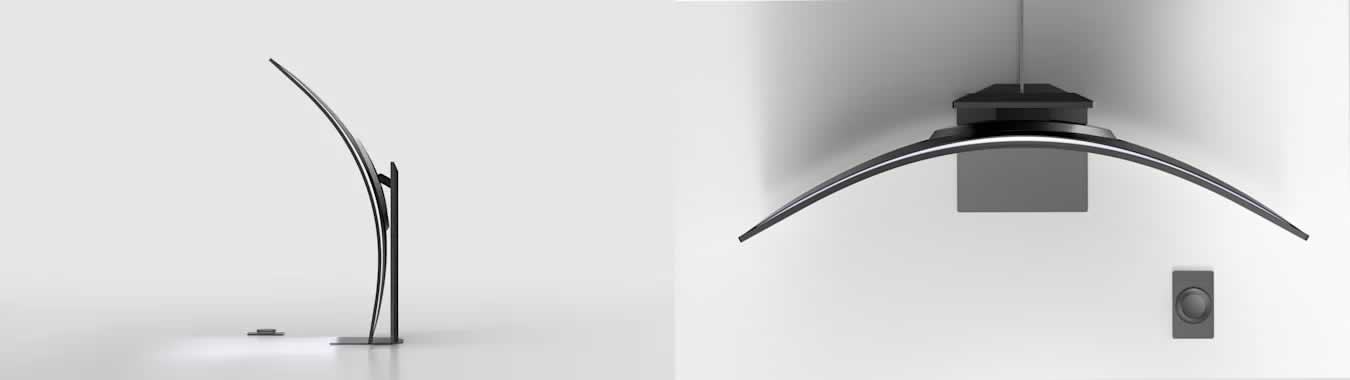
Samsung presented a strange monitor at CES 2022 — the Odyssey Ark, a 55-inch curved gaming-grade monitor with a 16:9 aspect ratio, with Quantum Dot Mini LED technology and was also developed for operation in portrait mode.

Whether or not a display that arches almost over the user’s head is practical or not is certainly a matter of debate. Samsung is definitely attracting attention at CES 2022 with the Odyssey Ark — the unusual, curved monitor offers 4K resolution.

The stand is very high so that the wide display can also be set up vertically rotated by 90 degrees. According to Engadget, it is a “Quantum Dot Mini LED Display” that can be operated wirelessly with the “Wireless Wheel Controller”. The display can be divided into smaller displays using the multiview function, for example, to simulate a 24-inch display. The screen is also strongly curved with 1000R. This should improve the overview on the huge 55-inch screen.

In horizontal operation, the Odyssey Ark extends as a 16:9 monitor. It is noticeable how thin the panel is despite the strong curvature. The screen cladding on the back hardly protrudes backwards so that there is a comparatively large amount of space on the desk.

Samsung Odyssey Ark panel

The resolution is 3840×2160 pixels. Samsung did not provide any further details. Since the Odyssey Ark is a gaming screen, frame rates of 120 or 144 Hz would not be unlikely. Also, Samsung has not yet announced a price for the Odyssey Ark.

At the same time, Samsung presented the Gaming Hub, a new user interface that allows direct access to the streaming services GeForce Now, Stadia and Utomik. The Gaming Hub will be offered on both new Samsung TVs and monitors later this year.

Why you should Integrate your POS with QuickBooks Online

POS System for business

Point-of-sale systems are an excellent way to help simplify the running of your business. Point-of-sale systems can be integrated with payroll, inventory, time tracking, point-of-sale registers, databases, and more. If you are looking for a more efficient way to run your business, then investing in a POS system is something you should consider.

The popularity of QuickBooks Online combined with its ease of use has made it one of the most popular Point-of-Sale systems in business. QuickBooks POS Hosting Services provider would help you to integrate the POS system with QuickBooks Online to upgrade your business.

Reason to integrate:

Accuracy:

Fixing mistakes can be a major time-sink for business owners. Bookkeeping and data entry is always going to be prone to human error. POS integration with QBO means that sales details are automatically entered into QBO. You don’t have to get an invoice or renew your sales at the end of the day. A skilled accountant will need to coordinate all accounts to ensure that the integration is working properly. This comprises all bank accounts, seller accounts, and balance sheet items.

Save Time and Money:

The cost of integrating a POS & QBO system can save a lot of time and money. Employees use an all-in-one app interface on their iPad to manage invoices, inventory, orders, and payments. It also means that many point-of-sale systems can operate offline, so they can serve their customers in the event of a system failure.

Convenience:

The integration of QBO and POS provides a more convenient experience for customers. Employees can receive payments from anywhere in the building. Customers feel that they are personally cared for and have a personal relationship with their employees. QBO and POS integration also ensures that information is not lost through cloud data management and backup.

Data Management:

Businesses can generate a lot of data from their integration. With this data, business managers can understand trends happening with expenses, payments, and more. Armed with this knowledge, managers can improve how they work to best suit your company’s needs. QBO on Hosted Virtual Desktop gives the benefits of accessing QuickBooks account anytime, anywhere, by just logging in.

If you want to be successful in today’s age, you need to make use of data management. It encompasses customer decisions and timing and can effectively help you sell more and achieve your goals.

How POS relates to different industries:

The options out there are plentiful, and some might even seem overwhelming. However, it is worth reminding ourselves that there is more than one right POS. You might want to take the time to determine which option best suits your industry before picking one.

Retail – POS software with QB capabilities can store information like the cost of goods sold, inventory, product SKUs, customer info, and more. It also helps with comparing historical data and sending receipts via text or email automatically.

Restaurant – POS integrated with QB can be used in your business to save time and money. Options include grouping together orders, measuring food cost, or creating menu management.

E-commerce – E-commerce companies can drastically increase their sales and customer interactions through analyzing data and making operational changes. This allows companies to optimize their operations and improve the experience for both customers and employees.

Considering the idiosyncrasies of the accounting applications, Apps4Rent would be the better choice as they command expertise in the field and provide guidance on Office 365 Cloud Migration too.

Best 5 Auto Clicker tools for Gamers – PC (Windows) Edition

Computer mouse model

Do you hate jitters and lag when it comes to auto-clicking? Are you looking for a snappy auto clicker that can be fast and efficient at the same time? If answered yes to either of these questions, then you have come to the right place. With the rapid development in the auto-clicking sector in recent years. Nowadays, it is quite hard to find an all-around auto clicker. However, this doesn’t apply to our users as we are with our list of top 5 auto clickers that are really really fast. So don’t skip any line and read the article all the way to the conclusion on which is the best auto clicker.

Best Auto clicker tools – 2022 Choices

OP Auto Clicker

When it comes to smooth and snappy performance OP should always be somewhere top on the list. So, here it is in our first recommendation. OP Auto Clicker is a really fast and smooth auto clicker that can assist you in repetitive clicking. This software automates clicking at a given location provided by the user.

With OP Auto Clicker you really have the control in your hands. You can change click intervals for faster or slower clickings. You can set mouse button type, click pattern, and even set a specific number of clicks. You can also opt for unlimited clicking as long as your program is running. Moreover, the best thing with OP Auto Clicker is that you need not be a geek in order to operate this tool. It is really simple and effective in use. Gamers prefer this auto clicker in games like Roblox, Minecraft, and Cookie Clicker.

It is available for free on Windows and Android. Users can download it from its official website.

GS Auto Clicker

GS auto clicker is a free automating utility tool that is available on Windows. This auto clicker is really good when it comes to fast clickings. You can change clicking frequency, choose the mouse button, set the number of clicks, and many more. 

This auto clicker is super smooth when it comes to the user interface. With its compact size and low burden on the CPU, it is almost sure that you will not experience lags or jitters while auto-clicking in your favorite programs or games.

This auto clicker is available for free and can be downloaded from its official website.

Murgee Auto Clicker

Murgee is another auto clicker that is popular among gamers and PC enthusiasts. This is certainly fluent automating software that can help you in simulating clicks at your desired location. You just have to set the location and Murgee will do the clicking for you. You can also control the clicking speed, the number of clicks, click button type, etc.

Moreover, it offers a recording feature which can be useful in situations where you need a series of clicking and that too not on a specific location.

This auto clicker is on a free trial for the first 20 uses. After that, you can pay USD6.54 to unlock it for three months. You can download it from the official website.

Perfect Automation

Perfect Automation offers a wide range of job automation options as well as time-saving perks. This software will boost your productivity while also saving your time and money. Perfect Automation can be used as a launcher, a schedule maker, a mouse and keyboard recorder, and a script editor. There’s no need to download and use four distinct programs. All of the modules have been merged into a single program. Even if you use all of its components, the inbuilt system tray or taskbar will only have one icon! You can get it from here.

Fast Auto Clicker

Fast Auto Clicker (earlier Auto Clicker Typer 2.0) is a free macro recorder that duplicates mouse and keyboard motions. Users who seek a fast solution to replicate their keyboard and mouse keystrokes can use this software.

Fast Auto Clicker may conduct a variety of clicking activities at predetermined or dynamic places. At any position on your screen, you can choose the number of clicks required.

One unique feature that it provides is that you can arrange your clicking action, record it then save it as AUTOCT file. You can use this file to reuse those similar actions without recording again. Here is the official website.

Conclusion

Auto clickers can be really useful in certain scenarios in saving your time and effort. They are certainly a boon to the PC world. Especially gamers enjoy the use of these auto clickers in click-intensive games such as Minecraft and Roblox. However, each and every auto clicker is not made the same way and may not meet your expectations.

So this was our list of 5 best auto clicker tools that are extremely fast when it comes to clicking or general user interface. Auto clickers like GS and OP are really lightweight in size and offer the fastest clickings. The compact size also helps in deciding how fast the program responds. All the clickers listed above absolutely nail it in that department. You can blindly go with any of them and you will not be disappointed with the snappiness of these clickers.

7 Most Common Bad Decisions in Web Page Design

Decisions in Web Page Design

Many experts in the field of web page interface design want to make their work stand out, use non-standard solutions that will make their work outshine many other websites. However, in pursuit of an original idea, many designers make many mistakes that have consequences.

In this article, we’ll cover the most common mistakes designers make.

Mixing conceptual blocks

Going to the site, the user wants to find the information he needs quickly. It often happens that designers try to fit a large amount of information into semantic blocks, between which there is no clear separation. This does not contribute to the fact that the user will find what he needs.

Each block must have a clear border. You can visually achieve this solution by using large indents. Moreover, you can also highlight each block of information in different colors.

Every designer should be guided by the knowledge of the design system. However, this is not the same as a style guide. That is why it is necessary to study the Design System and Styleguide differences.

Different sizes of indents between information blocks

If you indent differently in size between information blocks, then you run the risk of creating a sloppy image for the web page. The design will seem to have been made in a hurry.

There must be equal distances between the information blocks. Otherwise, the page will look sloppy, and you may get the feeling that the blocks are not equal in meaning.

Unreadable text in the background of an image

First of all, if possible, you should choose an image or illustration that will contrast with the inserted text. If the image has shaded areas, then you can place the text there so as not to overlap the image.

Otherwise, you can apply a filter to the illustration, which will highlight the text. Many professionals use dark filters, but you can apply different colors that work well with text information.

Using a large number of fonts

There are tons of various fonts that are magnificent. Many designers want to add variety to a web page by applying different styles to various information blocks. However, this solution does not always look good. You run the risk of creating an unattractive appearance and making information difficult to perceive.

The most common solution used by experienced professionals is to use one or two fonts. Also, use two types of weight. You will notice how the web page looks more professional.

Color block decoration

Often, deciding to highlight a semantic block with a bright color, designers highlight only the title or only the text component. This decision makes it difficult to know what to relate to. You visually separate the same block of meaning.

In this regard, for the text blocks to look uniform, you should highlight the entire block with color, both its title and text. Don’t worry about the headings blending in with the text, as you can make the headline appear in a larger bold font.

Web Page Design

Inserting large amounts of information in narrow columns

If you want to separate information by creating narrow columns, for example, 2 or 3, then don’t try to put a lot of information there. You should understand that this will lead to the fact that due to the narrowness of the column the text will stretch and the length of the page will be large. Each user will have to read the information, jumping from line to line. It will look unpresentable and not aesthetically pleasing.

The best option is to reduce the number of narrow columns and also to reduce the amount of text.

Text overlaps illustration

If you plan to place a photo or illustration on a web page that will contain an object, then it is dangerous to place text on it. Firstly, in this case, your photo loses all meaning. Users will not be able to see what is shown in the illustration and at the same time, they will not be able to read the text.

In this regard, you need to find a place in the photo that will be great for text. There will be no essential details and the text will be easy to read. You can experiment with positioning on different edges of the page.

Conclusion

Design is about creativity and thinking outside the box. Design professionals often experiment and come up with new, non-standard web page design solutions. However, many designers, in pursuit of creativity, often make the wrong decisions that lead to a deterioration in the user experience. The above errors are the most common.

How to Improve Sound Quality of your Youtube Videos

Improve Sound Quality of Youtube Videos

While producing a video, the sound is the element that is usually ignored, and creators do not tend to put much focus on it. They emphasize the type of content and the quality of the footage. 

But dear content creators and editors, remember if your video will be blurry, the colours and the lighting may have some issue, your audience may forgive you. 

Whereas a bad & disrupted sound quality will not engage the audience. They will not be able to connect with your content. And due to bad sound in Youtube videos posted may drop your count of subscribers & audience.

Thus, it is essential for you as a creator to use best sound effect to improve sound quality in your Youtube videos. In this exciting and informative article, we will be telling you more about improving the quality of videos and ways to increase & improve the sound quality of videos. 

We will also notify you about the free software & tools where you can find the best sound effects for Youtube videos. Without wasting a minute further, let’s dig into the details of this exciting article.

Need to improve Youtube Video Sound Quality

Sounds are an essential aspect of a video that can make or break the tape. As a professional content creator, you should excel in photo & video editing skills, operating cameras, marketing, networking, handling of social media, etc. 

But along with this, you should also know how to record seamless audio sounds & various sound effects to make your YouTube videos effective & eyeballs grabbing worthy. Imagine recording a video to post on your YouTube account, but there are sounds of people talking, traffic, the buzzing of air conditioner, ceiling fans, pets, or any other sound in the background. 

Due to these, you may get distracted a little bit, and your audience may start losing interest in your videos. This is something unprofessional editors ignore during video creations. Due to this, videos get lower retention rates because, in today’s hectic life, people neither have so much time nor patience to invest in amateur-sounding videos. Thus, the production quality of videos in both visual & auditory aspects is responsible for high subscriber growth and gaining of views on the YouTube platform. 

So, in the next head, we will explain how to improve the sound quality of video on YouTube.

Ways to Increase Sound Quality of YouTube (5 Ways) 

The sound quality is the primary criterion of videos nowadays; the video gets screwed up if the sound is not up to the mark. The overall quality of the video determines how long a person watches your video & stays on your channel if you are clueless about how to improve sounds in your YouTube videos. 

No worries, as given below are some steps that you should follow for the same –

Eliminate all the background noises – 

If you live in a place where there are kids & pets around you, or you live close to a highway or any other home where there is a lot of disturbance, you should choose a quiet location to shoot your YouTube videos. If moving to another place for recording is not possible for you, in such cases, you can use specialized software to remove such noises from the background.

Choose the right equipment – 

If you are serious about content creation on YouTube and want to produce high-quality content to promote your business or channel as an influencer; then, you need to choose the right equipment. To create high-quality videos and impress your audience, you need to spend some bucks purchasing a microphone best suited for recording YouTube videos. In the market, microphone varies from being expensive to affordable. Choose what’s in your budget.

Put music incorrect places – 

Remember, never place background music beneath your vocals as it may be disturbing and distracting. If you want to add music or any sound effects, you can do so in the time frame of 5-6 seconds at the beginning or end of your video or in between when you are not talking. 

For adding music, always choose software or websites that offer a plethora of royalty-free music & sound effects specially designed to add in videos. Be mindful and do not use any such theme or tone due to which you can face copy-right claims & issues.

Keep your volume stable – 

When recording a video, keep a regular check at your sound levels. Keep all your videos in a similar way of speaking, and you should follow a constant sound & speed of speaking. A louder or lower sound than what you present can be a disaster in the user’s experience. If you yell in the video or talk too softly that it is near hardly audible, then the viewers might skip your video. 

You can also keep a check on your sound levels by downloading software on your PC, i.e., Panopto software. Volume input software constantly checks sound levels and indicates the same through green or red lines.

Do not forget to soundcheck – 

Checking the sound and other equipment to see whether they are working or not is indeed an essential step before shooting the actual video, which most people do not follow. So, once you are finished setting up the setup of recording and shooting a YouTube video, you should run a trial and check the sound quality & other audio-related stuff. 

You can record the test recording, play it & listen carefully, improve the sound quality, or make changes & adjustments in the setup, if necessary, before recording the actual video & final output.

Where do we get the best YouTube Sound Effects?

Before uploading & publishing the video on YouTube, you must add some sound effects or music at the starting and end of the video to make it more exciting and attention-worthy. 

Adding sound effects in YouTube videos is done during the editing process, and for this, you should be aware of an exciting music library software. Well, SoundButtons.net is one such website having a music library or sound effects store where you will be offered a plethora of music effects and sounds for free belonging to different niches such as games, animations, humans, memes, sports, pranks, reactions, politics, and more. 

To use this website follow below steps, 

  1. You have to go to https://soundbuttons.net/.
  2. Sign up and view any sound effects by either clicking on a particular category or choosing from what’s trending.
  3. After click on the download button next to the sound name. 
  4. The sound will then be downloaded in MP3 format on your device. 
  5. After the sound is downloaded, you can import it to the video editing app and incorporate it into the video by dragging it on the timeline.

Final Words

By reading the above article, you must have understood how important it is to improve the sound quality of YouTube videos. Due to bad sound quality, the audience may get distracted, and it also acts as a hindrance to the growth of the channel and your career in YouTube as a whole. 

We hope you also understood the five ways of improving sound quality in the videos, and we also introduced you to Sound Buttons.net, a website where you can get the best sound effects for YouTube videos. 

So, what are you waiting for now? Go today, and improve the sound quality of videos and increase viewers’ engagement.

List of Reliable Essay Writing Services for Learners for 2022

online writing service

Are you planning to rely on an essay writing company but have doubts about what exact company to select? Consider our enumeration with the best representatives in paper task writing and choose the most suitable for you.

Best Websites to Assist Students with Paper Assignments

Many students appear in a complicated situation where they should present numerous paper assignments while their deadlines are near. For this and many other reasons, such students started to search for someone who can write essays, research papers, and other projects instead of them.

If you decide likewise to rely on an online paper writing service, you should be careful during selecting a trustworthy company. Eventually, nobody wants simply to spend money and time and be left with nothing. In order not to get into the trap of unfair writing platforms, we have prepared our list of top essay writing companies for your consideration. Overviews include detailed information about these companies so it will be easier for you to make a decision.

BidForWriting.com

If you are looking for high-quality and rapid service that can meet your “help me with my essay” requests, the BidForWriting company is exactly what you need. On this platform, you can select a suitable specialist who can write your essay for you and assist to develop your already thought up idea.

Among some of its features and benefits, we can highlight 100% confidentiality, safe payment methods, money-back guarantee, fast turnaround, plagiarism-free papers, timely delivery, a variety of writing options, 24/7 available essay help, and customer support agents who are attentive to details.

No matter how urgent your paper assignment is, a team of the BidForWriting company consists of experienced and skilled experts who are waiting to provide you with original, unique, mistake-free, and plagiarism-free academic papers. This company has been helping numerous students around the world for many years and it intends to keep up the good work.

Editius.com

If you are looking for a safe company to edit or proofread your paper, Editius will fit you the most. It is worth mentioning that rates for services are quite affordable on Editius.com.

All specialists are qualified with Ph.D. Writers can support you in editing of academic papers, book chapters, job applications, theses, research papers, articles, papers for conferences, manuscripts, and so on.

Editius values its reputation that helps stay on the market for 10 years. Many of their first clients became regular and continue to ask for high-quality editing and proofreading services from Editius. Thus, if you desire to become one of the satisfied clients of Editius, reach a customer support manager who will give answers to all questions concerning the operation of Editius or assist you to place your first order.

Edusharky.com

Edusharky is a place where you can hire a professional essay writer at a fair price. A powerful team of trained and experienced experts is ready to serve your needs anytime you require. All you need to do is to specify the details of your order and pick up a suitable writer. Once you have followed these simple steps, your submission will be up and running, and getting a premium academic paper will be just around the corner.

Among the main features of Edusharky are the presence of qualified writers, privacy guarantee, safe payment methods, no hidden charges, helpful customer support agents, and craftsmanship to meet the set deadlines. On its website, you can familiarize yourself with positive testimonials of clients who stayed pleased with the cooperation with Edusharky.com.

Toppaperreviews.com

If you have doubts about whether to make use of our list of best essay writing services, you can go on Toppaperreviews.com. This website represents its own enumeration of the top 5 best essay writing companies.

Every overview includes the next information about every writing platform: professionalism of writers, quality of assignments, functionality, reliability, prices, and many others. Moreover, Toppaperreviews offers you to analyze the main criteria to choose a writing service.

Proofreading-help-online.com

If there is a necessity to just proofread your draft but not to write your essay from scratch, you can send your requests to Proofreading-help-online.com. This company can bring your academic documents to perfection at an affordable price. If you are a newcomer on this platform, you possess the possibility to utilize a special coupon that offers you a 5% discount for your first order.

Some of them are high quality of services, confidentiality guarantee, free of charge revisions, easy process of placing orders, etc.

Good Marks are Waiting for You

Instead of spending sleepless nights in front of writing and panicking from numerous complicated paper assignments, we advise relying on true professionals. They know exactly what students and their professors expect and are willing to work hard to make sure that you perform well. Contact one of the mentioned essay writing companies and make sure experienced writers can create masterpiece papers. Just several clicks set you apart from getting excellent academic documents and high grades.

10 YouTube tricks, hacks and features you might not know

YouTube tricks, hacks and features

Most of us use YouTube as an entertainment medium to pass our time or as a mentor to learn new skills. Millions of videos are uploading and billions of views are getting in each day. But are we utilizing YouTube at its full potential?

We know how to search and find a video on YouTube, what we didn’t know is some cool hidden YouTube tricks and features to improve the way of using this biggest video streaming social network.

Use YouTube like a pro — here are some of the best YouTube tricks and hacks probably you never knew. With these tricks and hidden features, improve the way how you use YouTube to find the precise search results and video watching experience.

YouTube tricks, hacks and features for Android and desktop users:

1. Use YouTube in incognito mode

Watching YouTube videos in incognito mode is an exclusive feature available for Android app users. By using this feature, you can browse through the YouTube app without recording your watch and search history. To activate incognito mode on YouTube:

  • Tap on your account icon on the top right corner.
  • Turn on Incognito
Turn on Incognito on YouTube
  • To disable incognito mode. Simply tap on spy icon that replaced your account picture and choose the option “Turn off Incognito“.
Turn off Incognito on YouTube

2. Clear search and watch history

Clearing search and watch history on YouTube deletes all the data that contains past searches and watched videos. In both the YouTube app and desktop version, you can find this setting.

Clear search and watch history on YouTube Android app:

  • Go to your “Account >> Settings >> History & Privacy
  • There tap on “Clear watch history” to clear past watched videos data and tap “Clear search history” to wipe past search queries.
  • In setting you can also find options “Pause watch history” and “Pause search history” — enabling them will stop YouTube to record your search and watched videos data. So, enable this option, if you really want to protect your privacy and don’t let anyone know what you are searching and watching on YouTube.
Clear search and watch history on YouTube Android app

Clear search and watch history on desktop version:

  • In the desktop version, click on the hamburger icon on the top left corner to find “History” settings.
  • In history settings, you can see “Watch history” and “Search history” options. Choose respective radio buttons to clear data. Also, like in Android app, you can find “Pause watch history” and “Pause search history” options to stop YouTube from collecting this data in the future.
Clear search and watch history on desktop version

3. Configure How Many Seconds To Advance Or Rewind

We know when we double-tap either left or right side of the screen while playing a video on YouTube, the video player either rewinds or forwards the video. Actually, we can configure how many seconds to advance or rewind when we double-tap by going to “Double-tap to seek” settings.

To edit this feature, you simply have to tap the account icon, then go to “Settings >> General >> Double-tap to seek“. The option will ask you to set the rewind/forward video time jump by 5/10/15/20/30/60 seconds.

Double-tap to seek

4. Turn Autoplay On Or Off

YouTube has an option so that when you finish watching a video, it automatically starts to play another one, and it is quite useful to avoid having to manually select a video every time what you are watching ends.

However, there may be times when you don’t want this playback to continue automatically. You can deactivate it by tapping disable autoplay option on the top right sidebar on PC. And in smartphone, you can disable it by going to “Account >> Settings >> Autoplay >> Disable ‘Autoplay next video’ option“.

5. Try Experimental New Features

YouTube, like any other application, has a development team that is responsible for implementing new features in the application, which are tested among a small number of users. If you are a YouTube Premium subscriber, you can try some features that will reach this mode early.

You just have to go “Try new features” section — available when you tap on the account icon >> Settings — where it will show you the news that you can try and the date on which they will no longer be available. 

Try YouTube Experimental New Features

6. Download YouTube subtitles

Online YouTube subtitles downloader is the best website in the internet arsenal to extract subtitles from any YouTube video. With the help of this website, you can easily download subtitles from YouTube to text or SRT files.

First, you have copy-paste the video URL in the box provided and by default subtitles will be downloaded as a .txt file.

Download YouTube subtitles 1

After that inside the website, you further customize the downloaded subtitles like you can set custom timestamps, change language, and select the specific time interval to download subtitles from. After the necessary customization copy ready subtitles to the clipboard or extract them in .txt or .srt file.

Download YouTube subtitles

Tweak YouTube URL tricks:

Tweaking YouTube URLs to get the most out of the video. Like simply changing YouTube video URL you can convert, download and do so many things. Actually, most of these tweaking YouTube URL hacks are not official — with the help of some third-party websites, we are doing these YouTube hacks.

7. Make GIF from YouTube video

You can convert any part of a YouTube video into GIFs with caption and more advanced editing. For that, you simply have to add “gif” before the video link. Like below example:

YouTube video link:

youtube.com/watch?v=GfqODxio_50

Tweak URL by adding gif on starting to create GIF from YouTube video:

gifyoutube.com/watch?v=GfqODxio_50

8. Download YouTube videos without any software

With this trick, you can download YouTube videos to your local drive for future reference. Use this YouTube trick only to download videos for your own use and do not share them through any means. Multiple YouTube URL hacks are there to attain the best results — one is adding “ss” before video URL and other by adding “pwn“. Like below:

YouTube video link:

youtube.com/watch?v=GfqODxio_50

Change URL to download YouTube video:

  • ssyoutube.com/watch?v=GfqODxio_50
  • pwnyoutube.com/watch?v=GfqODxio_50

9. Loop YouTube video

Put a YouTube video in a continuous loop by adding “repeater” youtube in URL. Like this:

YouTube video link:

youtube.com/watch?v=GfqODxio_50

Change URL to loop a YouTube video:

youtuberepeater.com/watch?v=GfqODxio_50

10. Save thumbnail of a YouTube video

Most of us attract to YouTube videos by looking at its thumbnail and they are an integral part of a video, like a trailer for a movie — giving an idea about the video. Some of us wonder how to grab these images since there is no option for that.

But few of us only know by changing the URL like this:

https://img.youtube.com/vi/<VideoID>/maxresdefault.jpg

Helps you to save full resolution YouTube thumbnail image. Where <VideoID> is the text after “v=” in YouTube video. Check out the example below:

YouTube video link:

youtube.com/watch?v=GfqODxio_50

Save thumbnail of this video:

https://img.youtube.com/vi/GfqODxio_50/maxresdefault.jpg

These YouTube tricks are the only tip of the iceberg, we will soon update this article with more hacks and tips for YouTube. Also, if you know any, do not hesitate to mention it in comments.