Home Blog Page 112

Samsung Display Unveils Latest OLED Technology at CES 2023

Samsung Slideable display

Samsung Display will showcase its latest OLED technology at CES 2023 in Las Vegas. The company will demonstrate its “Flex Hybrid” foldable and extendable OLED display, designed for smart mobile devices. 

The left side of the display can be folded, while the right side can be pulled out and resized, allowing the display to switch between a 10.5-inch display with a 4:3 aspect ratio and a 12.4-inch display with a 16:10 aspect ratio. This allows the display to be adaptable to different applications.

Flex Hybrid OLED DIsplay

In addition to the Flex Hybrid display, Samsung will also be showcasing its “Slideable Display” concept, which is intended for use in future notebooks. The company has developed two concepts for the Slideable Display — the Flex Slidable Solo, where the screen can be enlarged in one direction, and the Slideable Flex Duet, which can be pulled out in both directions. Depending on the location and purpose, the display can switch between a smaller 13-inch display and a larger 17.3-inch display.

Samsung will also introduce its first update for QD-OLED technology, which promises brighter OLED displays with improved algorithms and a new “OLED HyperEfficient EL” material. The company claims that the maximum combined RGB brightness of QD-OLED 2023 will be over 2,000 cd/m² and that the efficiency of the large OLED displays has been significantly improved, with up to 25% less power consumption. This year, the QD-OLED range will also be expanded by introducing a 77-inch, the largest QD OLED model.

Overall, Samsung’s latest OLED technology demonstrates the company’s continued commitment to developing innovative and advanced display technology for many devices, from small portable devices to large QD OLED TVs. The company’s focus on foldable and extendable displays highlights the growing demand for devices with larger screens that can be easily carried and stored. With the continued development of OLED technology, we will likely see even more advanced and versatile displays in the near future.

Intel Introduces 13th Generation Raptor Lake Mobile Processors for Laptops

13th Gen Intel Core mobile processor family

Intel has introduced its 13th generation of mobile processors, known as the Raptor Lake series. This new range includes four different series:

  • Raptor Lake-HX, designed for gaming laptops and featuring the most powerful chips
  • Raptor Lake-H, also for gaming laptops but with slightly less powerful chips
  • Raptor Lake-P, designed for high-performance thin laptops
  • Raptor Lake-U, featuring less powerful chips for thin laptops.

One key feature of the Raptor Lake series is its hybrid architecture, which combines the powerful Raptor Cove P-cores with the energy-efficient Gracemont E-cores. This allows for a range of processors with different levels of power and efficiency, with the most productive models featuring up to eight P-cores and 16 E-cores, and up to 32 threads. The new platform also supports up to 16 PCIe 5.0 lanes and up to 128GB of DDR5-5600 (as well as DDR4-3200) RAM.

Raptor Lake-HX series

The Raptor Lake-HX series is particularly noteworthy, as it features 13th-generation Core desktop chips adapted for use in laptops. This involves limiting the TDP (Thermal Design Power) level and maximum consumption and reducing operating frequencies to adapt the chips for laptop use. The series includes processors with anywhere from 10 to 24 cores, with maximum clock speeds of 5.6 GHz in Turbo mode for P-cores and integrated graphics with up to 32 execution units and a frequency of up to 1.65 GHz.

Intel has claimed that the new Core-HX processors are up to 12% faster than their Alder Lake-HX predecessors in games, although it is worth noting that the comparison is between the Core i9-12900HX and Core i9-13950HX, which may not be entirely equivalent. Intel also claims a significant increase in performance for professional applications, particularly in rendering, and states that the Raptor Lake-HX chips are even further ahead of competitors such as AMD’s Ryzen 6000 processors.

The Raptor Lake-H, Raptor Lake-P, and Raptor Lake-U series are all built on mobile chips, with the Raptor Lake-H offering up to 14 cores, 24MB of L3 cache, and up to 96 EU integrated Intel Iris Xe graphics running at up to 1.5 GHz. Many models in this series also support faster RAM, up to LPDDR5X-6400. 

The Raptor Lake-P series includes just four models, three with 12 cores and one with 14 cores, and features a maximum frequency of 5.2 GHz and a standard TDP of 28 watts. 

The Raptor Lake-U series offers a range of processors from 5 to 10 cores, with maximum frequencies of up to 5.2 GHz and a TDP of 15 watts.

All of the 13th Gen Intel Core mobile processors support Wi-Fi 6E, Bluetooth LE Audio, and Thunderbolt 4, which includes DisplayPort 2.1 support addition. The Raptor Lake processors have received Endurance gaming technology to extend battery life. Some chips include a discrete AI accelerator called Movidius VPU for noise reduction and webcam image enhancement.

In addition to the four main Raptor Lake series, Intel is also relaunching its entire portfolio of notebook CPUs for CES 2023, with the HX, H, P, and U series being updated in parallel for the first time. While the base for most of these updates is the Alder Lake architecture, the Raptor Lake series does offer some new options, particularly in the HX series, which brings 24 cores to the notebook for the first time.

It is worth noting that some sources have referred to the 13th generation Core mobile processors as the “Alder Lake Refresh” rather than the Raptor Lake series. This may be because the new chips are based on the Alder Lake architecture, or it may simply be a matter of branding. Either way, the new processors offer significant improvements and new features, including hybrid architecture and support for the latest connectivity standards.

Overall, the Raptor Lake series appears to be a strong addition to Intel’s lineup of mobile processors, offering a range of options for different types of laptops and various performance levels. With over 250 laptops featuring the new chips expected to be released in 2023, it will be interesting to see how the Raptor Lake processors compare to their competitors in the market.

12 Reliable Measures to Protect Against Cybercrime In 2023

Protect Against Cybercrime

The internet has become an essential part of our everyday lives, with an increasing number of people using it for shopping, banking, and socializing. However, as the number of internet users grows, so does the risk of becoming a victim of cybercrime. Cybercriminals can steal your personal and financial information, infect your device with malware, or even hold your data for ransom. This article will discuss the most reliable measures to protect against cybercrime and keep your online activities safe.

1. Keep Your Device with You

One simple yet effective way to protect against cybercrime is to keep your device with you. Don’t leave your devices unattended in public locations, especially in congested areas like airports, shopping malls, or cafés. If you must leave your device, ensure it is in a secure location where it cannot be easily accessed or stolen. When travelling, use the hotel safe to store your devices, and if you rent an apartment, keep your mobile devices out of sight of strangers. If possible, carry your devices with you on flights instead of checking them in your baggage.

2. Use a VPN

A VPN (Virtual Private Network) is a handy tool for cybercrime prevention since it encrypts your internet traffic, making it very hard for hackers to intercept your data. This is especially useful when using public Wi-Fi, which is not always secure and can be easily exploited by hackers. Many VPN providers are available, so it is important to research and choose one that meets your needs. A VPN is also helpful when travelling, as it allows you to access certain websites and services that may be blocked in the country you visit.

3. Use Two-Factor Authentication

Two-factor authentication (2FA) is a critical security technique that adds an extra layer of security to your online accounts. Before signing in, 2FA asks you to input a code given to your phone through SMS in addition to your password. This implies that even if an attacker acquires your password, they will be unable to access your account without the code, making hacking into your account more difficult. Most 2FA providers also offer backup codes in case your device is unavailable, and it is important to have permanent access to them. We recommend storing backup codes on a separate USB drive for safekeeping.

4. Don’t Use Online Banking on Public Networks

Public Wi-Fi networks are not always secure, and a cybercriminal can easily intercept sensitive data you send or receive while connected to the network. To protect against this, only use secure, encrypted websites for online banking and other sensitive activities. Look for websites that implement SSL (Secure Sockets Layer) encryption and have “HTTPS” in the URL and a padlock icon in the address bar. Verifying the network name before connecting to a Wi-Fi network is also important, as an attacker may create a fake network with a similar name to track your activities.

5. Use a Password Manager

Using strong, unique passwords for each online account is crucial for protecting against cybercrime. While it may be easy to use the same password for many accounts, an attacker may acquire access to your accounts more easily if they obtain one of your passwords. A password manager is a useful tool that generates random, long passwords and regularly updates the mechanisms for creating them. This ensures that your passwords are secure and helps to prevent password reuse.

6. Don’t Click on Links in Emails from Unknown Senders

Email phishing assaults, which fool you into clicking on a malicious link, are one of the most prevalent ways for cybercriminals to access your devices and accounts. This can also happen on social media and other websites. To protect against this, be cautious when receiving emails from unknown senders and do not click on any links or open attachments contained in the email. If you receive an email from a known sender, but the content seems suspicious or out of character, it is still best to exercise caution and not follow any links or open attachments. These rules also apply to social media and other websites. If you need to enter your personal information on an unfamiliar site, verify the site’s authenticity and safety through a search engine before proceeding.

7. Keep Your Software Up to Date

Keeping updated software is one of the most effective methods to defend your device against attacks. This includes the operating system, web browser, applications, and any other software you use. Software updates often include security patches that fix vulnerabilities and protect against new threats. Regularly checking for and installing updates is important to protect your device.

8. Use Firewalls and Antivirus Software

Firewalls and antivirus software are essential tools for protecting against cybercrime. A firewall monitors and regulates network traffic based on security rules. It helps to prevent unauthorized access to your device and can be configured to block certain types of traffic, such as malware. Antivirus software, however, is designed to detect and remove malware from your device.

9. Be Careful with Personal Information

In addition to taking technical measures to protect against cybercrime, it is also important to be careful with your online personal information. Criminals can use this information to steal your identity or gain access to your accounts. Be cautious about sharing personal information such as your name, address, phone number, and birthdate on social media or other websites. If a site asks for sensitive information such as your social security number or bank account details, make sure that the site is secure and legitimate before entering this information.

10. Use Secure Connections

Using secure connections can help to protect against cybercrime by encrypting your data and making it harder for attackers to intercept it. Look for websites with “HTTPS” in the URL, which indicates that the site uses SSL (Secure Sockets Layer) encryption. When making online purchases or entering sensitive information, ensure that the padlock icon is in the address bar, indicating that the connection is secure.

11. Be Vigilant for Suspicious Activity

Being vigilant for suspicious activity can help to protect against cybercrime by allowing you to identify and respond to potential threats. This includes monitoring your accounts for unusual activity, such as unfamiliar charges or login attempts from unfamiliar locations. Awareness of popular cybercriminal strategies such as phishing attempts, malware, and ransomware is important. If you receive an email or message that seems suspicious or out of character, do not click on any links or open attachments. Be sure to report the activity to the appropriate authorities.

12. Educate Yourself and Stay Up-to-Date

Staying informed and educated about cybercrime is an important part of protecting against it. Make it a habit to stay on top of the latest risks and how to defend against them. Follow reputable sources of information, such as cybersecurity experts and government agencies, to stay up-to-date on the latest developments in the field. You can also consider taking online courses or workshops to learn more about cybersecurity and how to protect yourself and your devices.

Cybercrime is a growing concern, and protecting yourself and your online activities is important. By following the tips outlined in this article, you can significantly reduce your risk of becoming a victim of cybercrime. By implementing the abovementioned measures, you can feel confident and secure while using the internet.

New Trends in Access Control Technology for Buildings

Access Control Technology

Keeping a building secure is an important part of managing any type of property. With the continued advancement in access control technology, it has become easier and more effective to protect buildings from unauthorized entry.

From keyless entry solutions to biometric authentication technologies, there are many options available for keeping buildings safe and secure. In addition, mobile-based access control systems offer greater flexibility when it comes to granting or denying access. Cloud-based security management platforms provide another layer of protection by allowing administrators to monitor activity remotely.

Finally, emerging trends such as facial recognition and voice authentication are making their way into the mainstream market and further improving the security of buildings around the world.

  1. Overview of Access Control Technology
  2. Benefits of Access Control Systems
  3. Types of Access Control Systems
  4. Keyless Entry Solutions for Buildings
  5. Biometric Authentication Technologies for Buildings
  6. Mobile-Based Access Control Technology
  7. Cloud-Based Security Management Platforms
  8. Emerging Trends in Building Security and Access Control Technology

Overview of Access Control Technology

Access control technology is a building security tool that helps businesses, organizations and individuals protect their premises. It uses various technologies, such as biometric scanners, keycards, control panels and magnetic locks, to manage who has access to different areas. The system allows you to assign access levels based on roles and other criteria. By using these technologies, you can restrict access to any building or area to safeguard people and assets from potential harm and unauthorized use. This type of building security also keeps unauthorized visitors away by providing an additional level of protection for the building occupants. With a combination of effective access control systems – such as camera surveillance, alarms and door locks – sites can be secured with confidence.

Benefits of Access Control Systems 

Access control systems provide invaluable building security every day. From automated key fobs and card readers to digital cryptography, access control technology provides a non-transferable authorization process that grants building access. Other benefits of access control include easy tracking of building access information, limitation of building access to authorized personnel only, and improved accountability due to detailed records kept from each login. Access control systems are quickly becoming the go-to choice for building owners seeking enhanced security for their building occupants.

There are a variety of types of access control systems and technologies used in businesses today, each offering their own unique benefits.

Biometric Access Control Systems

Biometric Access Control Systems use biometrics to authenticate an individual’s identity with the help of fingerprint, iris, face scans, or voice recognition technology. These systems are considered one of the most secure types of access control available and are often used in high security areas where only authorized personnel should have access.

Keyless Entry Solutions

Keyless Entry Solutions are a type of access control system that uses RFID cards, keypads, or proximity readers to grant individuals entry into a building. This type of system is typically seen in residential buildings as it does not require physical keys and can be easily managed remotely.

Wiegand Access Control

Wiegand Access Control, named after its inventor John Wiegand, is an efficient building security system that can be used to control access to or within a building. It uses electromagnetic induction and current loop transmission techniques on co-axial cables or twisted pair wires, with three basic components – a stripe card reader, a controller and an access panel. The system works by transmitting card data such as birthdates, serial numbers and names from the access reader to the controller which then grants or denies building entry upon verification. Wiegand Access Control technology provides convenience for building occupants as it allows them to move within the building’s secured areas without needing to show their credentials like identification cards multiple times. It is also easy to use and maintain as its installation only requires basic wiring work. These features allow building owners and security personnel alike more time for other important tasks without having to worry about unauthorized building entries.

Mobile Access Control Technology

Mobile Access Control Technology is quickly emerging as one of the go-to security methods for many businesses, especially those that need secure access from outside their premises. Mobile access control systems can be controlled from any web-enabled device, giving greater flexibility to building managers who may have remote teams or multiple locations.

Cloud-Based Access Control Management

Finally, cloud-based access control management applications provide a convenient way for building administrators to track and manage user access from any device with an internet connection. Cloud-based systems are highly secure and offer many features such as real-time reports, user management tools, and automated notifications when changes occur.

As technology continues to evolve and advance, so too does the world of access control for buildings. The past few years have seen a surge in new trends and innovations as it relates to building security, allowing for greater levels of protection and convenience. Here is a look at some of the new trends in access control technology for buildings that are making waves in 2019 and beyond.

Smartphone-Enabled Access Control Systems

Smartphone-enabled access control systems are quickly becoming the go-to choice for businesses looking to modernize their security. These systems allow building administrators to manage user access from a single app, eliminating the need for physical keys or cards. This type of system also offers other benefits such as automated access management, real-time notifications, and a detailed audit trail.

Automated Access Control Systems

Automated access control systems are gaining popularity due to their ability to quickly identify and authorize users through facial recognition technology or RFID cards. These systems are especially useful for applications where there is high traffic flow, such as office buildings, hospitals, and airports. Additionally, they can also be used to manage access hours and monitor who has accessed specific areas of the building.

Integrated Security Systems

Integrated security systems offer a comprehensive approach to access control by combining multiple security technologies such as CCTV cameras, motion sensors, and access control systems into one central system. This type of system provides a higher level of security through automated detection and alerting, allowing building administrators to quickly identify potential threats or unauthorized access attempts.

With the rapid advancement of access control technology for buildings, it is important for businesses to stay up to date with these new trends in order to ensure their premises are secure.

In conclusion, access control technology for buildings has seen a surge in new trends and innovations over the past few years. From smartphone-enabled systems to automated access controls and integrated security systems, there are now many options available that can provide businesses with greater levels of protection and convenience. By staying up to date on these new technologies, companies can ensure their premises remain secure from unauthorized access attempts while also providing employees with more efficient ways to gain entry into their building.


MediaTek Unveils Powerful and Versatile Genio 700 SoC for IoT Devices at CES 2023

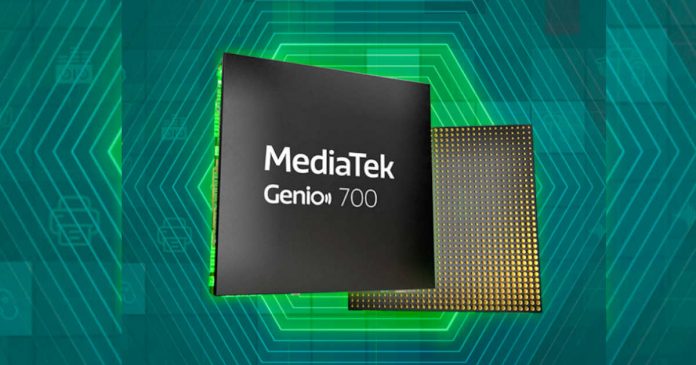
MediaTek Genio 700

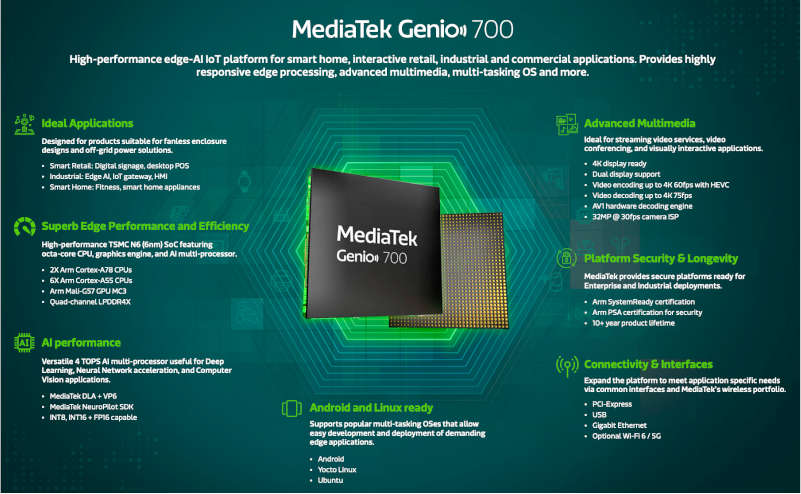
MediaTek has announced the release of its new MediaTek Genio 700 system on chip at the Consumer Electronics Show (CES) 2023. The Genio 700 is designed for smart homes, smart retail, and industrial internet of things (IoT) products and focuses on power efficiency.

The SoC is manufactured using a 6-nanometer (nm) process and features two Cortex-A78 cores running at a frequency of 2.2 GHz and six Cortex-A55 cores running at 2.0 GHz. It also has an image processor and can handle 4K resolution at 60 frames per second. 

In addition, the Genio 700 supports PCIe 2.0, USB 3.2 Gen1, and the MIPI-CSI camera interface. It also supports dual screens with Full HD and 4K capabilities and supports AV1, VP9, H.265, and H.264 video decoding.

MediaTek Genio 700 for IoT

One of the standout features of the Genio 700 is its long service life, with the SoC designed to last for up to 10 years in a wide range of temperatures. It also has ARM SystemReady certification, which allows for easy integration with a range of platforms and ARM PSA certification for enhanced security.

The Genio 700 is the latest addition to MediaTek’s Genio portfolio, including the Genio 1200, designed for high performance, and the Genio 500, a 12nm architecture focused on edge processing and multimedia capabilities. The Genio 700 will be available for purchase in the second quarter of 2023.

In addition to its impressive technical specifications, the Genio 700 allows developers to customize products using Yocto Linux, Ubuntu, and Android. This allows for easily creating a wide range of IoT products, regardless of application type.

The MediaTek Genio 700 is a powerful and versatile SoC well-suited for use in various smart homes, smart retail, and industrial IoT products. Its power efficiency and long service life make it attractive for developers looking to create reliable and long-lasting IoT solutions.

How to Retrieve Deleted WhatsApp Messages on iPhone 2023

WhatsApp Recovery

WhatsApp chats and messages are quite important to all of us. Accidentally losing or deleting WhatsApp chats can be troublesome. If you don’t have a backup of the chats, you will have to think of some smart solutions. Without any technical knowledge and skills, Tenorshare UltData WhatsApp Recovery is a unique tool to retrieve deleted WhatsApp messages on iPhone.

This article will explain some common solutions on how to restore deleted WhatsApp messages without backup, and we have also included the UltData WhatsApp Recovery details as a bonus. This tool not only offers a high success rate but also works for the latest iOS 16 and iPhone 13, and iPhone 14. Stay with us to learn how to restore deleted WhatsApp messages without backup on iPhone.

Way 1: Retrieve Deleted WhatsApp Messages on iPhone via UltData WhatsApp Recovery

There is no official way to get back your deleted WhatsApp messages without the backup. To facilitate the users, UltData WhatsApp Recovery has come up with smart features where you can get back your WhatsApp chats, videos, photos, and many other data types within moments. Before getting started with how to retrieve deleted WhatsApp messages on iPhone, you need to know the salient features of the tool.

Key Feature of UltData WhatsApp Recovery

There are certainly good reasons to choose UltData WhatsApp Recovery over other DIY tricks and available tools. Let’s see what makes this tool most efficient for the users:

Good for Beginners

The user interface of the tool is specially designed to make the whole WhatsApp data recovery process lot easier and straightforward. Every step is fully explained with visuals and easy-to-understand instructions.

Restore WhatsApp Data without Backup

This is the most prominent feature of recommended WhatsApp data recovery tool that makes it the top pick for users. Even if there is no backup available, UltData WhatsApp Recovery can still help you to get back your WhatsApp data.

Recover more than 7 types of WhatsApp data

Not only WhatsApp chats and messages can be retrieved with UltData WhatsApp Recovery, but you can retrieve more than 7 types of WhatsApp data, including media files, stickers, and documents.

Recover WhatsApp Data with a High Success Rate

Your WhatsApp chats are important, and you cannot afford to lose the data. This is the best thing about this tool that you get a high data recovery success rate. You don’t need to worry about losing any WhatsApp data anymore.

Steps to Restore Deleted WhatsApp Messages without Backup on iPhone

How to retrieve deleted WhatsApp messages on iPhone in easy steps without any technical knowledge? Here are the steps you need to follow while using Tenorshare UltData WhatsApp Recovery.

Step 1: Install UltData WhatsApp Recovery

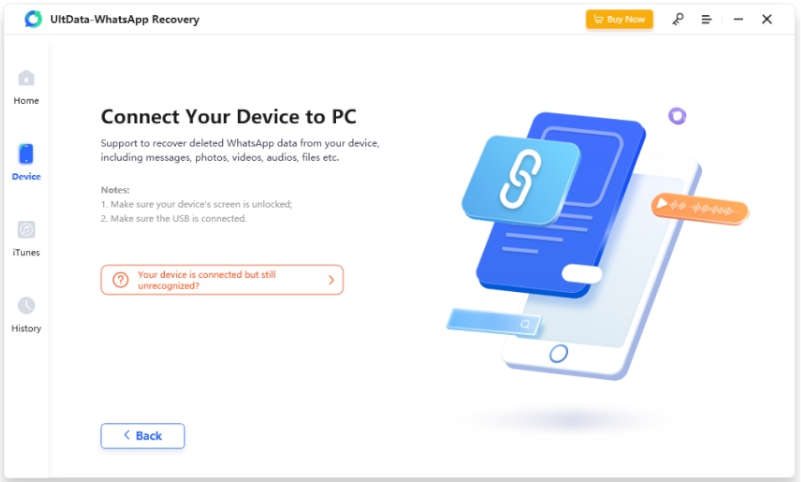
Downloading and installing UltData WhatsApp Recovery will take a few moments, and once done, launch the tool and connect your iPhone with a USB cable and add your computer as Trusted Device.

UltData WhatsApp Recovery

Step 2: Scan your iPhone for Deleted WhatsApp Data

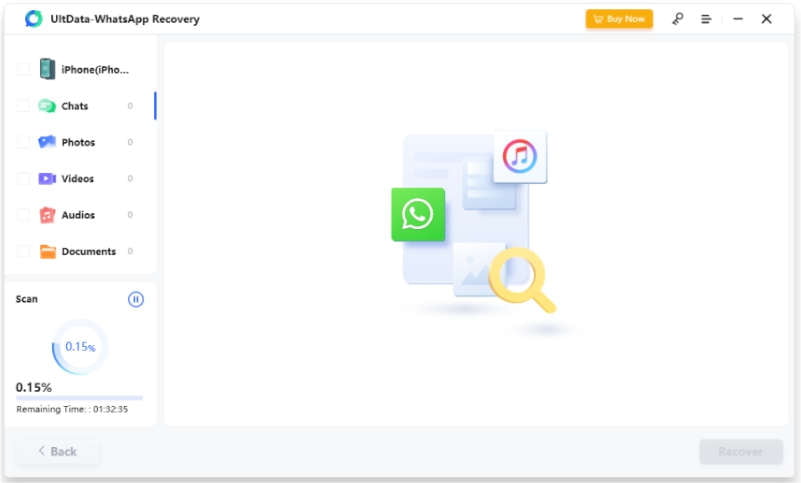
After a successful iPhone connection, you will be able to view the deleted WhatsApp chats and data files that can be recovered. You can select all types or any specific file type.

UltData WhatsApp Recovery

Step 3: Preview Scanned Recoverable WhatsApp Data

Here, you will be displayed the recovered files and chats. You can preview the media files and then confirm the recovery process.

UltData WhatsApp Recovery

Step 4: Retrieve Deleted WhatsApp Messages

Only messages and chats can be retrieved to your iPhone, and you will have to choose the Recover to PC option if there are media files. You are done, and that’s how to retrieve deleted messages from WhatsApp.

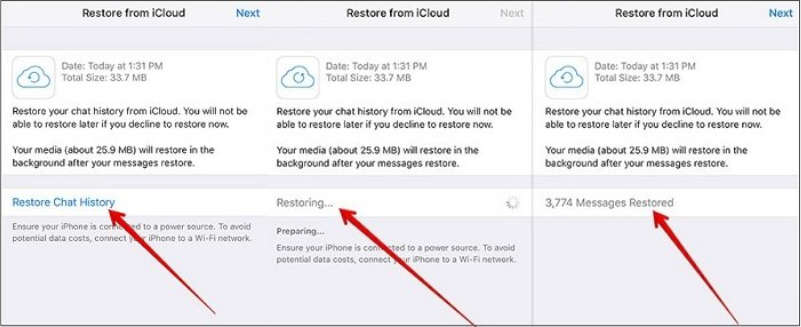
Way 2: Retrieve Deleted WhatsApp Messages on iPhone from iCloud Backup

This method is only viable when you have created a backup on an iCloud account that is linked to your iPhone. If you do not have the backup, the way doesn’t work well.

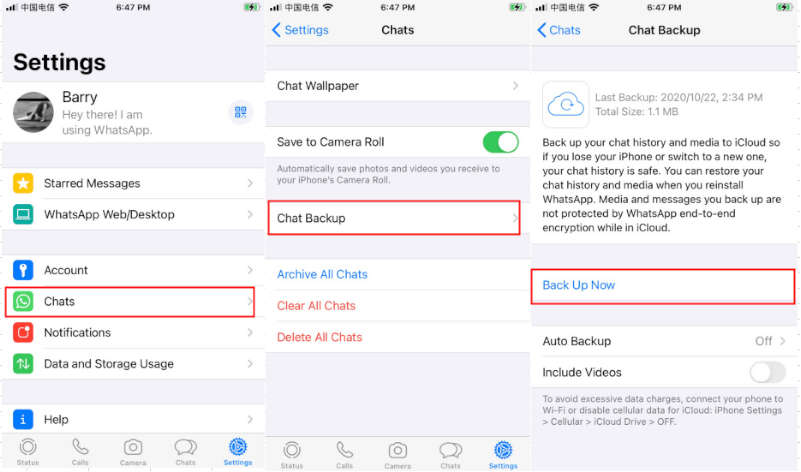
Make sure auto WhatsApp data backup is enabled by going into Settings >> Chat >> Chat backup 

WhatsApp Recovery

Now, uninstall the WhatsApp application and then go to App Store and download WhatsApp and confirm your number.

Here, you will get the option to restore WhatsApp chat history, choose the option, and you recently deleted WhatsApp messages will be retrieved.

WhatsApp Recovery

Way 3: Retrieve Deleted WhatsApp Messages on iPhone from iTunes Backup

Some users like to create a backup of their WhatsApp chats on iTunes. This is also a safe method to retrieve deleted messages with the backup. The process is simple, and you need to follow these steps:

  • Open iTunes on your laptop or Mac
  • Connect your iPhone with the USB cable and choose Trust This Computer option
  • Choose your iPhone when it appears on the iTunes screen
  • Choose the Restore Backup option and choose the last backup that you created and enter the password

FAQs

Here are some other questions that you might like to be answered while we are discussing WhatsApp data recovery.

Q1.Where are deleted WhatsApp messages stored on iPhones?

Deleted messages are stored in the “Recently Deleted” folder for 30 days. If you want to retrieve these messages within 30 days, you can easily recover your messages from this folder.

Q2.How to recover 1-year-old WhatsApp messages without backup?

With the help of the UltData WhatsApp Recovery tool, you can easily recover messages that were deleted one year ago. There is no other option in WhatsApp to recover old messages without backup.

Q3.How can I recover permanently deleted WhatsApp messages on my iPhone?

If you have a backup of WhatsApp chats, you can easily retrieve permanently deleted messages on your iPhone. If you don’t have the backup, you can try using UltData WhatsApp Recovery because it’s the best tool available for WhatsApp recovery.

Final Words

When it comes to the recovery of your WhatsApp chats, UltData WhatsApp Recovery is an excellent tool that can do a great job. You can easily retrieve your deleted chat history and messages with just a few clicks. This tool also supports other types of file types, and you can get back all or any specific files. So download this useful WhatsApp data recovery tool to recover deleted WhatsApp messages without backup.

Odyssey Neo G9: Samsung to Unveil Its First 8K Ultra-Wide Monitor at CES 2023

Odyssey Neo G9

Samsung has caused a stir with the announcement of its new Odyssey Neo G9 gaming PC monitor, set to be unveiled at CES 2023. 

This impressive display boasts a massive 1000R curved 57-inch screen with an 8K resolution of 7,680 x 2,160 and a 32:9 aspect ratio, equivalent to two UHD screens. The use of quantum-type mini-LED technology allows for a contrast ratio of 1,000,000:1 and HDR 1000 support, while the matte display reduces reflections. 

With a 240Hz refresh rate and 1 ms response time, the Neo G9 is a strong choice for high-performance gaming. It is also the first gaming monitor with DisplayPort 2.1 connectivity and industry-standard DSC for lossless information transfer. The inclusion of DisplayPort 2.1 on the Neo G9 is a notable advancement, as it allows for faster data transfer speeds and improved video quality. The DSC feature also ensures that information is transferred without distortion, providing a clearer and more accurate visual experience.

Odyssey OLED G9

Odyssey OLED G9

In addition to the Odyssey Neo G9, Samsung has also revealed the Odyssey OLED G9. This 49-inch 1800R curved organic EL display uses organic EL with quantum dot technology for deeper blacks and a contrast ratio of 1,000,000:1. 

It has a refresh rate of 240Hz and an aspect ratio of 32:9, as well as a Samsung Game Hub for various game streaming services and apps like Netflix and Prime Video. Both the Odyssey Neo G9 and OLED G9 feature Mini DisplayPort, Micro HDMI 2.1, and USB-C charging up to 65W.

While specific details, including pricing, have not yet been announced, these new monitors from Samsung are sure to make waves in the gaming industry with their impressive specifications and features. The release of the Odyssey Neo G9, in particular, marks a significant advancement in gaming monitor technology, offering an unparalleled level of immersion and performance. When these monitors enter the market, it will be fascinating to see how they compare to the competition.

LG Breeze Wireless Earphone: The Future of Sleep Aid and Health Monitoring

LG Breeze

Sleeping with wireless earphones is a common practice for many people who use music or the radio to help them fall asleep. However, LG’s new wireless earphone, called the LG Breeze, may be a more optimal solution.

Developed in collaboration with SleepWave — CIC (Company in company, independent companies) operated by LG Electronics to nurture new businesses and pioneer new markets — these in-ear wireless earphones have been designed to help users sleep and monitor and control their sleep phases.

Unlike smartwatches, which use pulse and vibrations to track sleep, the LG Breeze wireless earphone use sensors to detect sleep-related brain waves. They are extremely lightweight, weighing only 6 grams each, and are capable of reproducing specific sounds to aid in sleep. These sounds include lullabies, nature-inspired ASMR (Autonomous Sensory Meridian Response), and sounds tuned with brain waves. The LG Breeze has about 80 built-in sounds and can also be synchronized with the user’s music or YouTube videos.

LG Breeze Wireless Earphone

The LG Breeze also can sync its sounds with the user’s brain waves. According to LG, playing 100 Hz in the left ear and 98-102 Hz in the right ear can induce 2 Hz brain waves, which can help with sleep. The wireless earphone also record sleep times and phases and analyze posture and movements. In addition, through the accompanying app, users can track additional data, such as the number of steps taken.

In addition to its sleep-aid capabilities, the LG Breeze also has a unique feature to help with hygiene. The headphones come in a box equipped with an ultraviolet LED to help eliminate germs and disinfect the headphones.

The LG Breeze is just one of the innovative projects displayed in LG’s LG Labs Zone at the upcoming CES 2023 event. Currently, there is no information on pricing or availability for the earphone. However, they represent a clear example of how earphones are evolving beyond simply playing music, with LG leading the charge in the field of wireless earphone. The company has previously released self-cleaning headphones, and now the Breeze earphone offers an entirely different focus on sleep aid and health monitoring.