Home Blog Page 111

Acethinker Fone Keeper: Guide To iPhone Data Recovery

Guide To iPhone Data Recovery

Accidentally deleting or losing important data from your iPhone can be a frustrating and stressful experience. Whether you’ve accidentally deleted photos, contacts, or messages, or your device has experienced a system crash, the thought of permanently losing your data can be daunting. Fortunately, applications are available to assist you in recovering lost or deleted data from your iPhone, iPad, or iPod Touch. One such tool is Acethinker Fone Keeper.

In this review, we will look at Acethinker Fone Keeper in depth and assess its usefulness for recovering data from iOS devices. We’ll also look at its capability to repair iOS system faults and present an overview of its primary features. 

Data Recovery Features

iPhone Data Recovery provides three recovery ways for lost or deleted files from all iPhone, iPad, and iPod touch models.

Recover from iOS Devices

Acethinker Fone Keeper is a strong solution for retrieving data from lost or deleted iOS devices. It can recover lost or deleted data from iOS devices, including WhatsApp, Safari bookmarks, reminders, notes, calendar call history, messages, contacts, and more. It can be used to recover data even from damaged or crashed devices and is compatible with various versions of iOS.

Step 1: Install the application on your computer after downloading it.

Recover from iOS Device

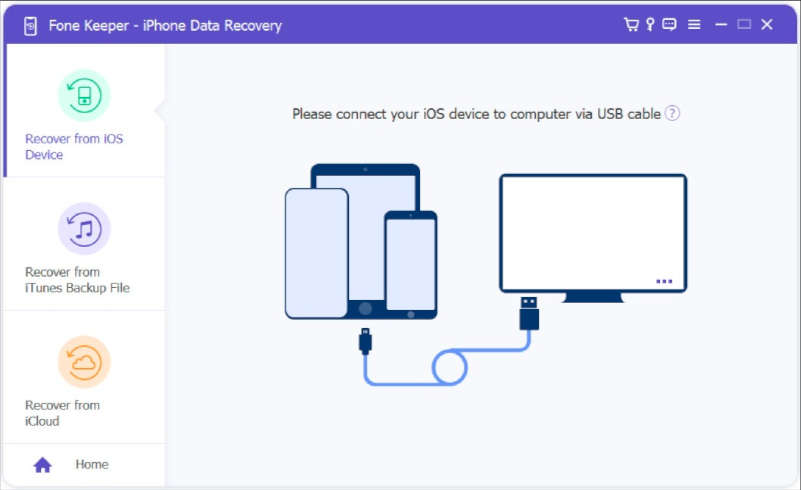
Step 2: Connect your iPhone using a USB cable and pick the “Recover from iOS Device” option.

Recover from iOS Device

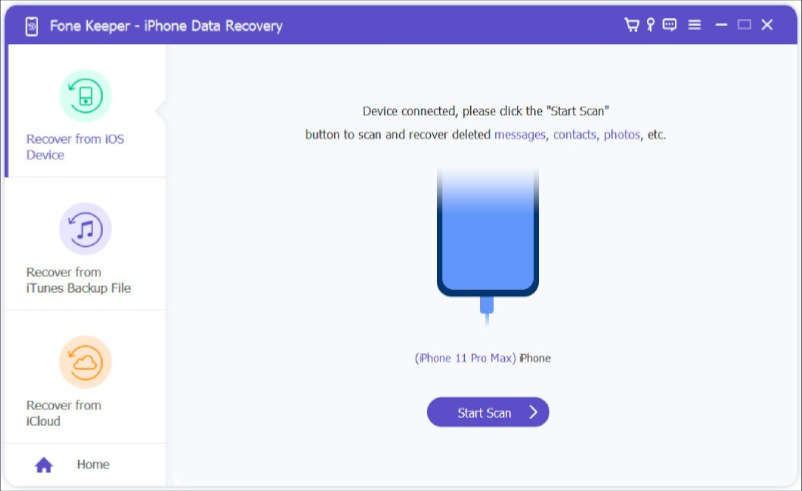
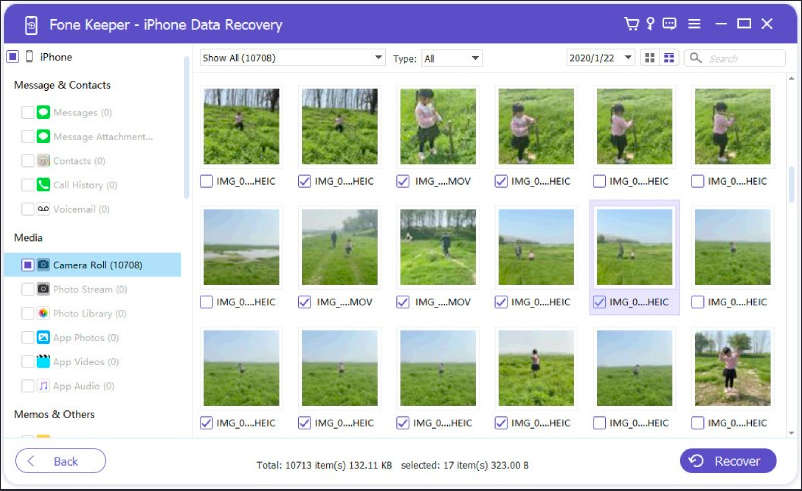
Step 3: Once your device is recognized, click on the “Start Scan” button to have the software scan your device for deleted files. You can preview the data once the scan is complete and select the files you want to recover.

Recover from iOS Device

The software has various categories of data, such as messages, WhatsApp, and call history, which can be accessed by clicking on them.

Avoid opening iTunes while recovering data to prevent overwriting deleted data. Avoid using the device when files are lost, leading to overwriting and inaccurate results if using iOS 6 — press Trust when first connecting the device. Enter the passcode to unlock the device and click on the Start Scan button for devices that haven’t been synced with iTunes or password-protected devices. Existing and deleted data for categories will have different colours, and you can choose display-only deleted items options too.

Recover from iTunes Backup File

AceThinker Fone Keeper is a software tool that can recover lost data from iTunes backup files.

Step 1: Select the “Recover iTunes From Backup File” option after installation and connecting iPhone.

Recover from iOS Device

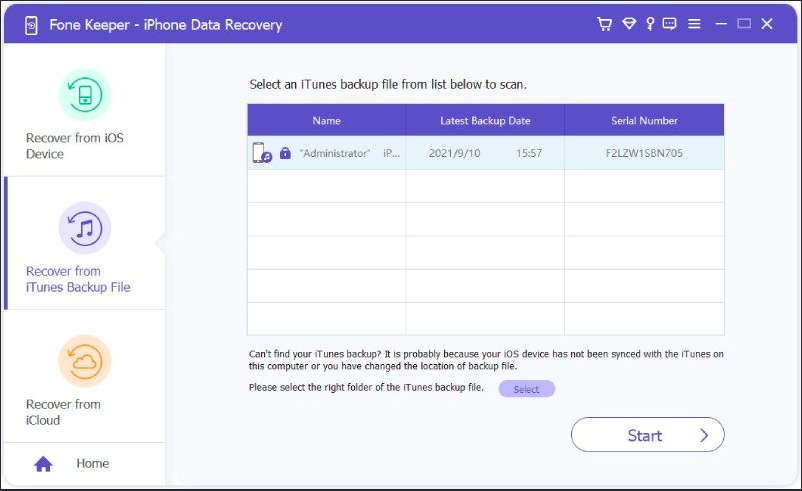
Step 2: The software will display a list of available iTunes backup files, information about the devices, and their latest backup dates. Select the backup file you want to recover from and click the Start Scan button to begin the scanning process.

Recover from iTunes Backup File

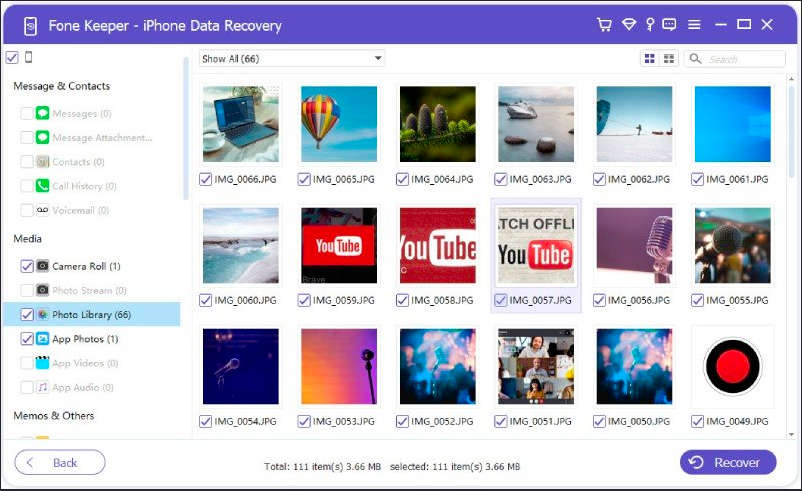
You can preview the data once the scan is complete and select the files you want to recover.

Install the latest iTunes version on your system. Avoid opening iTunes while recovering data to prevent overwriting of deleted data. If the iOS device’s backup file is not showing in the list area, it may be because it has not yet been synced with iTunes. In this case, make sure to do an iTunes backup before retrying. If the backup list section shows a lock mark, it means the iTunes backup is encrypted, and you will need to enter a password to access it before the scanning can commence. 

Recover from iCloud

AceThinker Fone Keeper is a software tool that can also recover lost data from an iCloud backup file. 

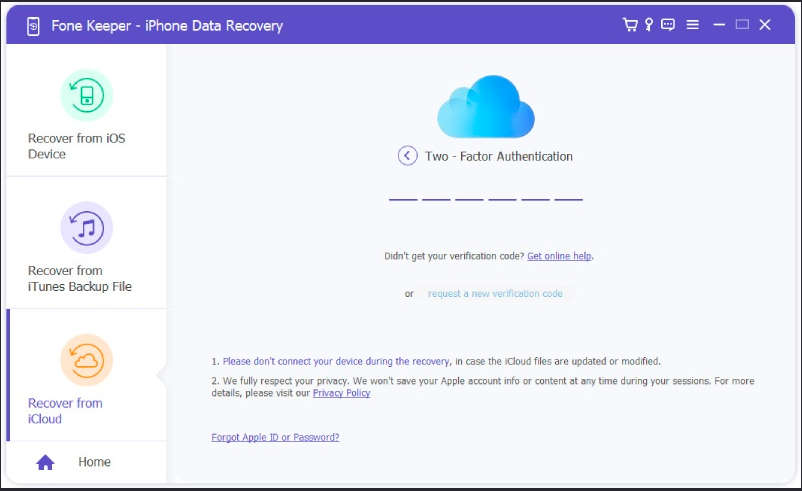
Step 1: Select the “Recover From iCloud” Mode after installing the software.

Recover from iCloud

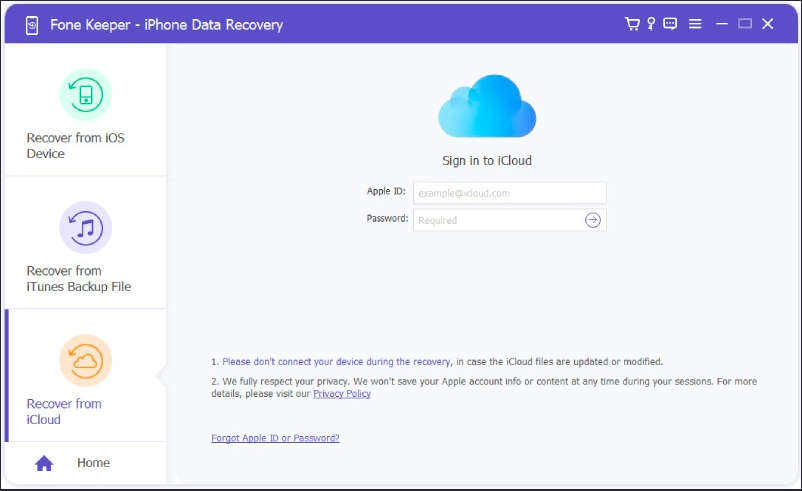
Step 2: Then, you will need to sign in to your iCloud account and follow the prompts to enable two-factor authentication.

Recover from iCloud

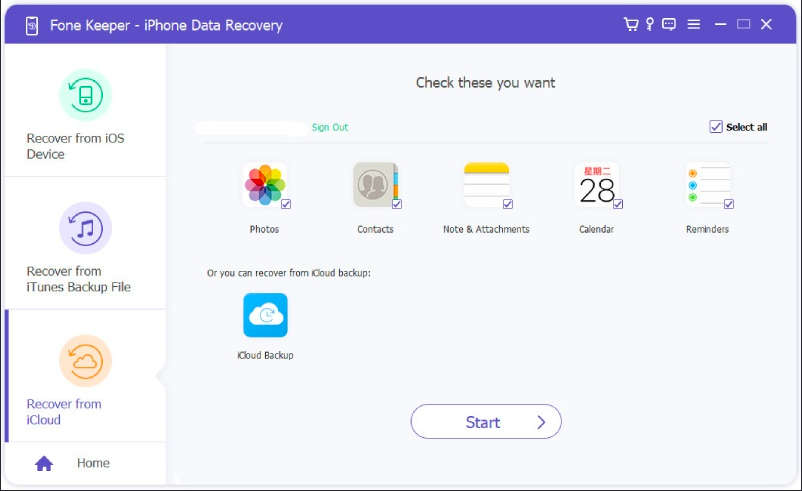
Step 3: After this, you can either scan and recover data by selecting specific data types or by scanning and recovering data from an iCloud backup file.

Recover from iCloud

Step 4: Select the data types you wish to recover and click the Start button to scan and recover them. Once the scanning is complete, you can preview the recovered data, select the items you want to save, and click the Recover button.

Avoid connecting your device to the computer while the recovery process is in progress to prevent modification or updating of the backup files. If you cannot remember your Apple ID or password, you can use the “Forgot Apple ID or Password” option at the bottom of the Fone Keeper software.

iOS System Recovery User Guide

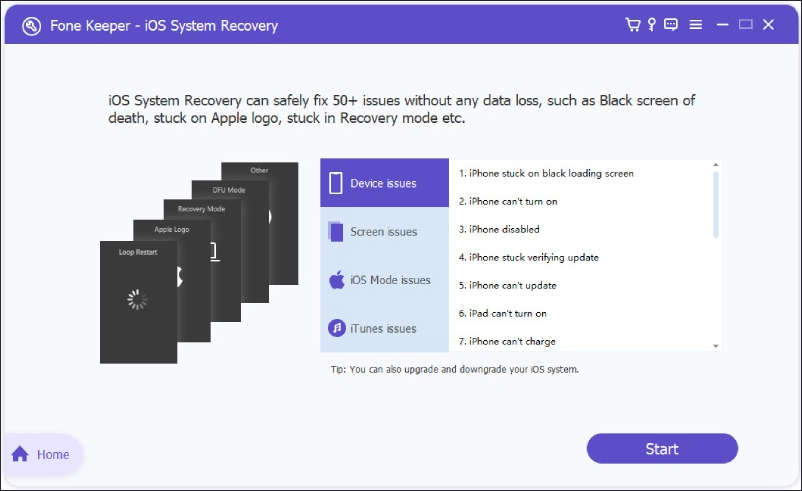
In addition to its data recovery capabilities, Acethinker Fone Keeper can also fix various iOS system issues. iOS System Recovery can be used to repair a device stuck in recovery mode, fix a device experiencing a boot loop, and resolve other common iOS system issues.

To use Acethinker Fone Keeper for iOS system fixes, you will follow a similar process as you did for data recovery.

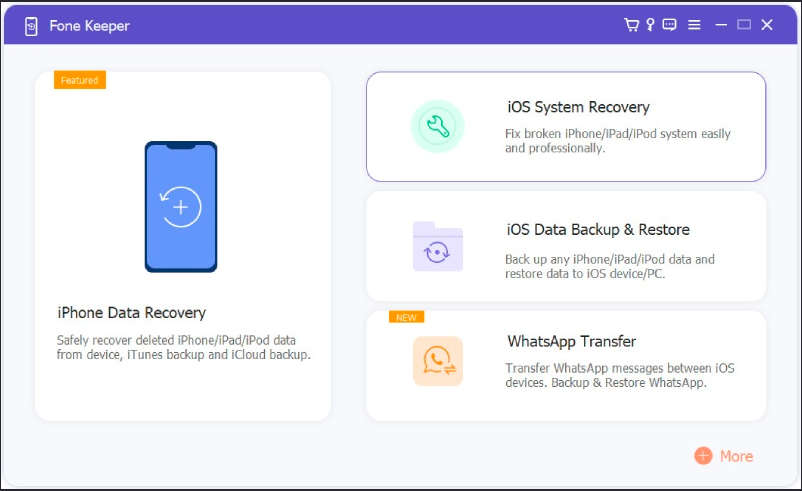
Step 1: Download and instal the software on your computer. Connect your iPhone using a USB cable, select the option to fix the iOS system, and follow the prompts to begin the repair process.

iOS System Recovery

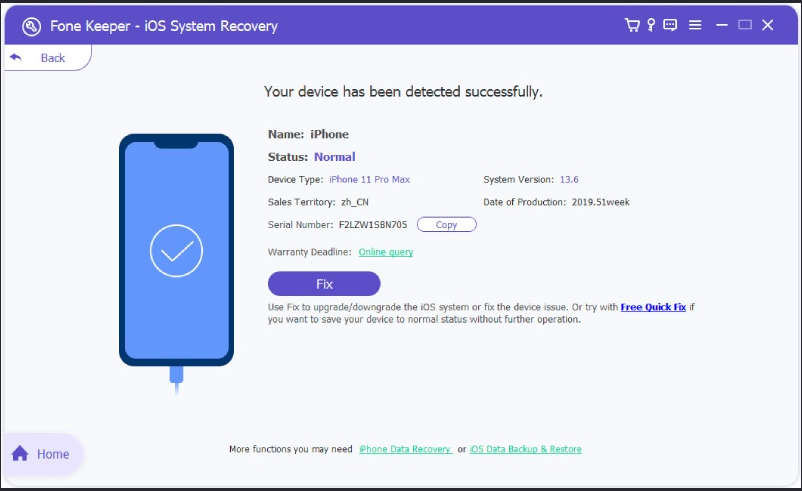
Step 2: After the device gets detected by AceThinker Fone Keeper, confirm your device’s information.

iOS System Recovery

Step 3: To fix common problems with your device, such as a frozen or crashed device, you can choose the “Free Quick Fix” option. This option can resolve these types of issues within 60 seconds. If the Free “Quick Fix” option doesn’t work, you can try using the “Fix Button” option.

iOS System Recovery

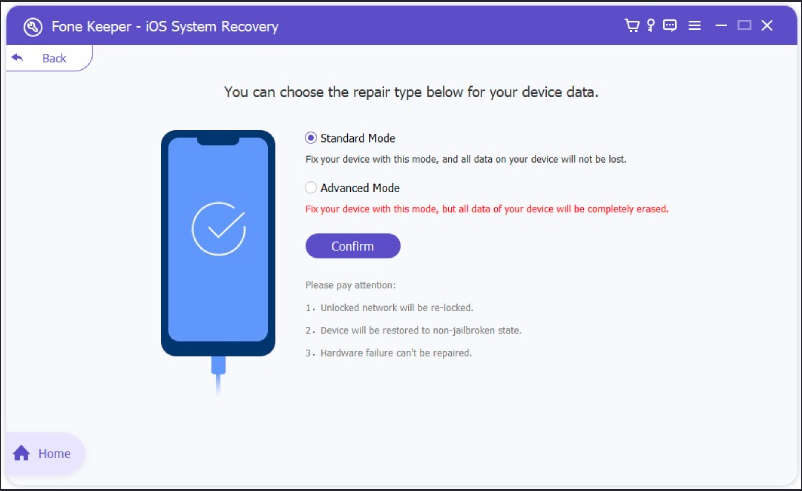
Step 4: Choose between “Standard Mode” and “Advanced Mode”. Standard Mode allows you to fix issues on your iPhone without the risk of losing data, while Advanced Mode will erase all data on your device but has a higher success rate for resolving problems.

iOS System Recovery

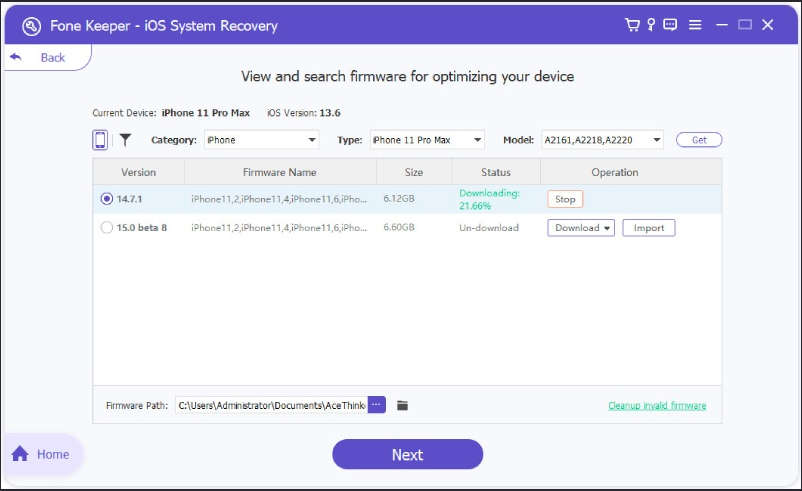
Step 5: After downloading the appropriate firmware, AceThinker Fone Keeper will automatically begin repairing your iPhone’s system.

iOS System Recovery

Overall, Acethinker Fone Keeper is a comprehensive tool for recovering lost or deleted data from iOS devices and fixing common iOS system issues. Its wide range of data recovery capabilities, compatibility with various versions of iOS, and ability to fix system issues make it a useful tool for individuals who have experienced data loss or system issues on their devices. However, remember that data recovery and system fixes are not guaranteed to work in all scenarios, and expert assistance may be necessary in some cases.

Acethinker Fone Keeper is worth considering if you need a tool to recover lost or deleted data from your iOS device or if you have a system issue that must be fixed. Follow the instructions carefully and back up your data before attempting any recovery or repair.

Image Credits: Acethinker

Are Batteries Becoming Obsolete?

batteries news

In the modern world we live in, technological advances are happening all the time which is leading to everyday objects becoming obsolete due to something better coming along. One item that this may be happening to is the battery. Batteries power anything from TV remotes to cars but could this change in the years to come?  

There are many different types of batteries with each serving a slightly different purpose which shows just how useful they are for various applications around the home, in offices and just about anywhere else.  

To understand the state of the battery industry, be sure to read our comprehensive guide to learn about the future of battery power.  

What are the benefits of using batteries 

It’s hard to believe that batteries will no longer serve a purpose in modern society. This is because there are so many unique benefits to using them.

This includes the following: 

Efficient  

Batteries are extremely efficient whether that’s a 9V battery like the ones sold at RS or an AA battery due to their rapid charging time and battery usage. This means that whatever object requires a battery should have very little downtime before it can be used again.  

Reduce fossil fuel use  

Batteries remove the need to use power straight from the grid which is great for both the environment and a homeowner’s household bills. This is especially important for the latter given the current cost of living crisis which is causing price rises for all Brits.  

Little maintenance required  

Batteries are an easy-to-use objects that are simply put into different items to power them. If you’ve got a rechargeable one then it can simply be plugged into your mains to gain power and if it’s not rechargeable then it can be recycled easily at most supermarkets in the UK.  

The future of batteries 

Batteries are, fortunately, not growing obsolete but they are going to change in the future. Currently, lithium Ion is the most popular style but that’s expected to change to a solid-state battery power. This is because they have around twice the energy density of their predecessor, are much lighter, charge faster and they’re far less flammable.  

As you can see, the future of batteries is certainly a bright one. They will help to save vital energy resources and offer greater efficiency to all that use them. 

Realme Officially Unveiled Its 240W Fast Charging Technology

Realme 240W Fast Charging Technology

Realme has made a significant stride in the smartphone industry with the unveiling of its 240W charging system. The technology will be featured in the upcoming Realme GT Neo 5 smartphone, set to be released in February 2023.

The Snapdragon 8+ Gen 1 CPU will power the GT Neo 5, while there are rumours of a variant with a Dimensity 8200 processor and 150W charging capacity. 

In terms of camera, the GT Neo 5 will sport a 50MP primary camera with OIS and IMX890 sensor, an 8MP ultra-wide lens, a 2MP module, and a 16MP front-facing camera. The phone’s display will measure 6.7 inches and have a resolution of 1240×2772, with a refresh rate of 144Hz and high-frequency PWM dimming at 2160Hz.

To ensure the safety of the charging process, the GT Neo 5 will have 13 temperature sensors to monitor the temperature and suspend charging if it exceeds the expected levels. Realme further says that after 1600 charge cycles, the battery would retain 80% of its original capacity.

The 240W charging block is only 5% larger than a 150W charger, and Realme has created a unique USB-C cable to support the high-power output. The power supply converts 20V 12A to 10V 24A with an efficiency of 98.5% and is compatible with 65W PD, QC, and VOOC protocols.

In addition to the temperature sensors, the GT Neo 5 will have the largest evaporation chamber on the market, with a total area of 6,580 sq. mm. These features will work together to ensure the safety and effectiveness of the 240W charging system.

Overall, the Realme GT Neo 5, with its 240W charging technology, is an exciting development in the smartphone industry. The company’s commitment to safety and efficiency makes it a promising choice for consumers.

AMD Unveils Ryzen 7000 Series Mobile and Ryzen 7000X3D Series Desktop Processors

Ryzen 7000 Series Mobile

AMD has unveiled a new line of mobile CPUs in the Ryzen 7000 series for laptops. However, the lineup is quite confusing, as it includes a mix of new and old chips such as Zen 4, Zen 3 Plus, Zen 3, and Zen 2, as well as built-in GPUs ranging from Vega to RDNA3. This complexity is made more confusing by the company’s new naming system for its mobile CPUs, which involves using a model year system and incrementing the first digit of processor model numbers yearly.

The first digit represents the model year, with 7 representing 2023, 8 representing 2024, and 9 representing 2025. The second digit represents the main market segment, with 1 representing Athlon Silver, 2 representing Athlon Gold, and 3 and 4 representing Ryzen 3. The third digit represents the CPU architecture, with 1 representing Zen/Zen+, 2 representing Zen 2, 3 representing Zen 3, and 4 representing Zen 4. The fourth digit represents the segment index, with higher numbers targeting the upper segment. Suffixes indicate TDP and form factor, with HX representing 55W or higher, HS representing 35-54W, U representing 15-28W, e representing 9W, and C representing Chromebook.

AMD has also revised the TDP class of its mobile CPUs as part of this product name refactoring. The H series class has been abolished and replaced by the HS series, which covers TDPs from 35W to 45W. For those who want a more powerful CPU, the HX class will still be offered and will use AMD’s desktop silicon rather than the higher TDP variants of AMD’s mobile silicon.

The Ryzen 7000 Mobile series will include a mix of 3 different Zen CPU architectures built on four different process nodes. 

The Dragon Range, the AMD Ryzen 7045 series, will be the first to offer up to 16 cores for laptops and will be based on the same TSMC 5nm node as the Ryzen 7000 desktop lineup. It has a TDP of 55-75W and includes the same 64MB of L3 cache as the desktop CPUs, which is expected to improve overall gaming performance.

The Phoenix platform, consisting of the Ryzen 7040 series, will feature a mix of mobile-specific monolithic CPU dies. The Rembrandt-R (7035 series) and Barcelo-R (7030 series) platforms, based on Zen 3, will be cheaper options, especially with 15-28W U-series parts. The Zen 2 Mendocino platform, announced late last year and already part of the Ryzen Mobile 7000 family, remains a budget option for thin and light laptops.

These Ryzen 7040 series chips are said to be 30% faster than the Apple M1 Pro, allowing laptops to run videos for up to 30 hours on a single charge. The specific processor used for this comparison was the older AMD Ryzen 9 7940HS, which features 8 cores and 16 instruction threads, operating at a frequency of up to 5.2 GHz. It should be noted that this performance increase only applies to multi-threaded mode.

AMD also introduced three conventional chips at CES 2023 that will expand the Ryzen 7000 line. These include the six-core and 12-thread Ryzen 5 7600, the 8-core and 16-thread Ryzen 7 7700, and the 12-core and 24-thread Ryzen 9 7900, all of which use the Zen 4 architecture. The 16-core and 32-thread Ryzen 9 7950 model was not included in this series of processors.

AMD also announced a new line of processors for desktop computers called the Ryzen 9000 series, based on the Zen 3 architecture and built on the TSMC 7nm process. The lineup includes the Ryzen 9 5950X, Ryzen 9 5900X, and Ryzen 7 5800X, all of which offer significant performance improvements over the previous generation of Ryzen processors.

Ryzen 7000X3D Series Desktop processors

AMD boss Lisa Su also announced the Ryzen 7000X3D series processors at the event — focusing on gaming community. The CPUs are to be released in February in three models with eight to 16 cores. Announced the addition of three new Ryzen X3D processors are — the Ryzen 9 7950X3D, Ryzen 9 7900X3D and Ryzen 7 7800X3D.

Ryzen 7000X3D Series Desktop processors

The previous model Ryzen 7 5800X3D was also known for its high efficiency, since very high clock rates were not necessary for games due to the large L3 cache. At the same time, however, they could not be implemented anyway due to the high temperatures. As a result, the computing power in productive applications was lower compared to other 8-core processors.

The 12 and 16-core models with 3D V-Cache, which have now been announced for the first time, should offer an unusual solution here. Since they are equipped with two CCDs (core/cache die), one CCD with 3D V-Cache and one CCD without the large cache are installed. The cores on the regular die should be able to run with the usual high boost frequency while applications with high cache requirements run on the other die.

The CCDs with 3D V-Cache do not reach the high clock rates of the regular chips. The announced Ryzen 7 7800X3D should appear with a boost clock of 5 GHz. Compared to the Ryzen 7 7700X , that’s 400 MHz less clock speed. This processor in particular should therefore be primarily suitable for gaming, while the larger processors with two CCDs should cover a wide range of applications.

Overall, it was a busy and exciting CES for AMD, with some new products and updates announced across various categories.

OnePlus 11 Announced in China: Comes With Snapdragon 8 Gen 2 SoC, 120Hz AMOLED Display, 100W Charging

OnePlus 11 Announced

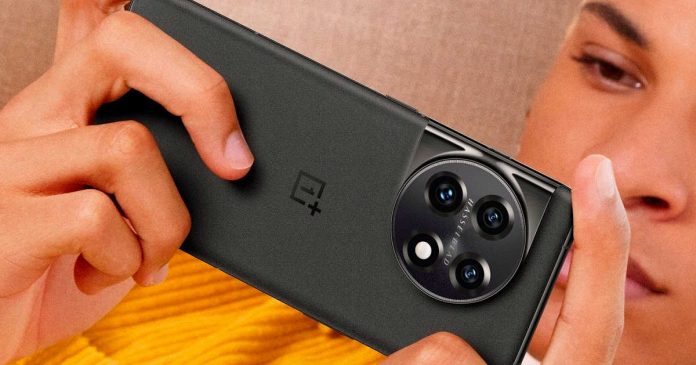
The OnePlus 11 is a highly anticipated smartphone officially unveiled in China. The smartphone is powered by the latest Snapdragon 8 Gen 2 processor and is the world’s first smartphone equipped with an LTPO 3.0 AMOLED display, which was developed in partnership with Samsung.

The OnePlus 11 has a 6.7-inch AMOLED display with 3216 x 1440 resolution and a refresh rate of 1 to 120 Hz. Corning Gorilla Glass Victus cover the phone. The smartphone runs on Android 13 with the proprietary ColorOS 13 and has a 5,000mAh battery with support for 100W wired and 50W wireless charging.

The camera on the OnePlus 11 is a round module with three sensors. The main sensor is a 50 MP Sony IMX890 with optical stabilization, the wide sensor is a 48-megapixel Sony IMX581, and the telephoto lens has a 32-megapixel Sony IMX 709 with the ability to 2x zoom. The camera was developed in collaboration with Hasselblad. The front camera has a resolution of 16 megapixels.

In addition to its impressive camera and processor, the OnePlus 11 also boasts other impressive features, such as Bluetooth 5.3, Wi-Fi 6E, and an NFC chip for contactless payments. The smartphone’s body is made of glass with a Gorilla Glass 7 surface and an aluminium alloy frame, and it has an IP54 rating for protection against dust and splash water. The device also has stereo speakers with a Dolby Atmos configuration and a heat dissipation chamber with an area of 3685 mm².

OnePlus 11 China

OnePlus has highlighted the unique haptic feedback feature of the 11 series, claiming that it is the only Android device with a vibration motor with a volume larger than 600mm³. This makes it the largest six-axis motor on an Android phone. The device’s ability to simultaneously mimic movements in two directions is particularly useful for gaming.

The OnePlus 11 boasts the world’s first “super frame super picture engine,” developed in partnership with the creators of the Unity game engine and traditional partner PixelWorks. This technology allows for a significant improvement in both game frame rate and picture quality. The device includes a unique professional-quality rendering chip from PixelWorks that enables low-power consumption during game-specific calculations. As a result, the OnePlus 11 can achieve 120 frames per second while gaming, making it the first smartphone to do so. This enhanced gaming experience is available in over 100 mainstream games.

Overall, the OnePlus 11 is a capable and feature-rich smartphone that will appeal to tech lovers. With its impressive specs and affordable price point, it is sure to be a popular choice among consumers. Sales in China are set to begin on January 9, 2023.

The OnePlus 11 is available in three configurations: 12 GB of LPDDR5X RAM and 256 GB of built-in UFS 4.0 flash memory for $580, 16 GB of LPDDR5X RAM and 256 GB of built-in UFS 4.0 flash memory for $638, and 16 GB of LPDDR5X RAM and 512 GB of built-in UFS 4.0 flash memory for $711.

Microsoft will challenge Google with a new “Bing” equipped with “ChatGPT”

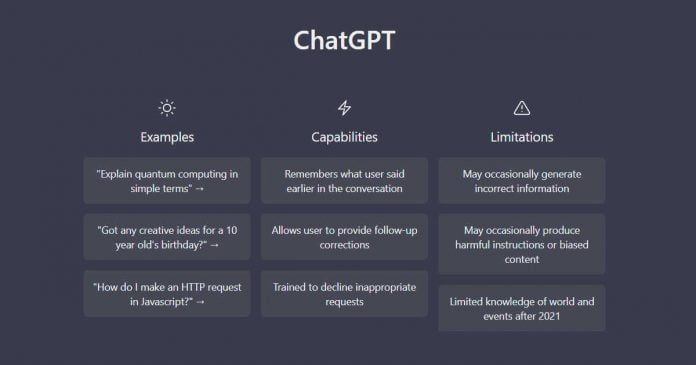
OpenAi ChatGPT

Microsoft is reportedly planning to incorporate OpenAI’s chatbot ChatGPT into its Bing search engine to attract users away from Google.

The move is a bid to provide more conversational and contextual responses to user queries, hoping to improve the quality of search results beyond simple links. The plans are still being finalized, with a limited test release for a small group of users possible. Bing has been testing ChatGPT for several months, according to sources.

ChatGPT is a natural language processing technology that allows chatbots to have human-like interactions. It has gained attention for its ability to perform various tasks, including answering questions, writing code, and generating long-form content. Microsoft is said to be targeting a release by the end of March, intending to challenge Google’s dominance in the search engine market. Both Microsoft and OpenAI have declined to comment on the reports.

This move follows Microsoft’s $1 billion investment in OpenAI in 2019 and a multi-year partnership to develop Azure AI supercomputing technology. Microsoft plans to bring OpenAI’s image generation software DALL-E 2 to Azure OpenAI, allowing users to generate images based on text or image input. Google has indicated that it sees ChatGPT as a potential threat, suggesting that the competition between the two companies could heat up.

Incorporating ChatGPT into Bing is a significant development for Microsoft as the company looks to boost its search engine capabilities and better compete with Google. While Bing is a smaller player in the search market, adding ChatGPT could help it stand out and offer a more comprehensive search experience. The use of artificial intelligence in search engines is becoming increasingly common, with the potential to provide more accurate and relevant results for users.

However, the success of ChatGPT in Bing will depend on its accuracy and the speed at which it can deliver results. There are concerns that chatbots and AI systems can sometimes deliver outdated or incorrect information, which could undermine their usefulness. Nevertheless, the ability of chatbots like ChatGPT to summarize publicly available data suggests that they could be a reliable alternative to the lists of links provided by traditional search engines.

Only time will tell whether the inclusion of ChatGPT in Bing will be enough to give Microsoft a boost in the search market. But it is clear that the company is committed to improving its search capabilities and using the latest technologies. Watching how these improvements affect the search environment in the next months and years will be fascinating as the battle between Bing and Google continues to expand.

Samsung Introduces Galaxy Book 2 Go Laptop with Qualcomm Snapdragon 7c+ Gen 3 Processor

Samsung Galaxy Book 2 Go

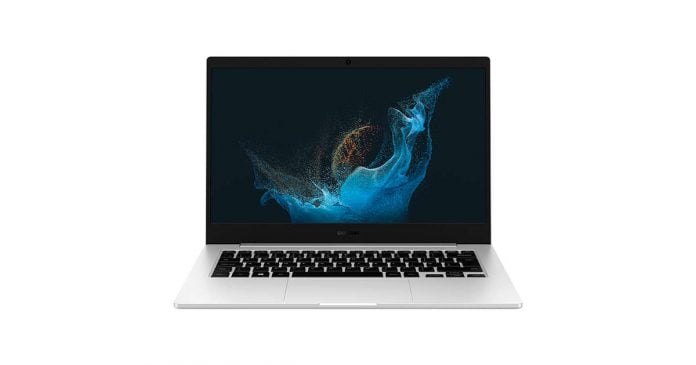
Samsung has announced the release of its latest laptop, the Galaxy Book 2 Go, which is built on the new Qualcomm Snapdragon 7c+ Gen 3 processor. This processor is designed specifically for laptops and offers a significant increase in performance and GPU power over the Snapdragon 7c Gen 2 processor that powered the original Galaxy Book Go. 

The Snapdragon 7c+ Gen 3 chip is built using TSMC’s 6nm process technology, which allows for longer battery life and supports 3200MHz LPDDR4X RAM and NVMe SSD storage.

The Galaxy Book 2 Go comes with a 14-inch Full HD IPS display, is 15.5 mm thick and weighs 1.44 kg. It is also MIL-STD-810G compliant, which means it is resistant to drops, severe temperatures, humidity, shock, and vibration. The laptop runs on Windows 11 and has fast wireless connectivity, including Wi-Fi 6E and Bluetooth 5.2.

In addition to its impressive performance capabilities, the Qualcomm Snapdragon 7c+ Gen 3 chip has improved AI capabilities and supports 5G connectivity. The laptop also boasts a 180-degree hinge, a large trackpad, and a backlit keyboard for easy typing in low-light conditions. It has a slim and portable design, making it easy to take.

In terms of battery life, Samsung claims that the Galaxy Book 2 Go can last all day or up to 21 hours of video playback, thanks to the energy-efficient Qualcomm Snapdragon 7c+ Gen 3 processor. This makes it an excellent choice for people who want a laptop that can keep up with their hectic schedule without requiring regular charging.

The Galaxy Book 2 Go is expected to be available in the market on the official Samsung website from January 20th. At this time, Samsung has not disclosed the device’s RAM, internal memory, battery capacity or price. However, it is expected to be a budget-friendly option, similar to the original Galaxy Book Go. The Galaxy Book 2 Go is intended for education or as a simple work tool.

Overall, the Samsung Galaxy Book 2 Go is a capable and flexible laptop suitable for both personal and business use. With its strong performance, long battery life, and rugged design, it is sure to be a popular choice for those needing a reliable and efficient device.

NVIDIA Introduces RTX Video Super Resolution for Improved Video Quality on PCs

RTX Video Super Resolution

During the CES 2023 GeForce Beyond stream, NVIDIA announced a new technology called RTX Video Super Resolution. This feature uses artificial intelligence to improve the quality of videos viewed in Chrome and Edge browsers by removing blocky compression artefacts and upscaling the video resolution.

This will allow users with GeForce RTX 4000 and 3000 series graphics processing units (GPUs) to view online content in its native resolution on high-resolution displays with improved sharpness and clarity.

One potential benefit of RTX Video Super Resolution is for users of Netflix on their PCs. Netflix offers different image quality options depending on the subscription plan. Even those on the basic plan (720p output) can enjoy image quality close to 4K using this technology on Chrome. This could be a cost-saving option for users who would otherwise have to pay for the more expensive Ultra HD streaming tier to access the higher-quality video.

In addition to RTX Video Super Resolution, NVIDIA also announced updates to its Studio software suite. The Broadcast app has added new eye contact and vignette features in version 1.4. The eye contact feature allows it to appear as though the person on screen is looking directly at the camera, while the vignette feature is a background effect that combines with background blur to simulate a bokeh effect.

Overall, the introduction of RTX Video Super Resolution and updates to the Studio software suite demonstrate NVIDIA’s commitment to improving the video viewing experience for its users. With AI and GPU technology, users can enjoy higher-quality video content without needing expensive subscription plans or hardware upgrades.