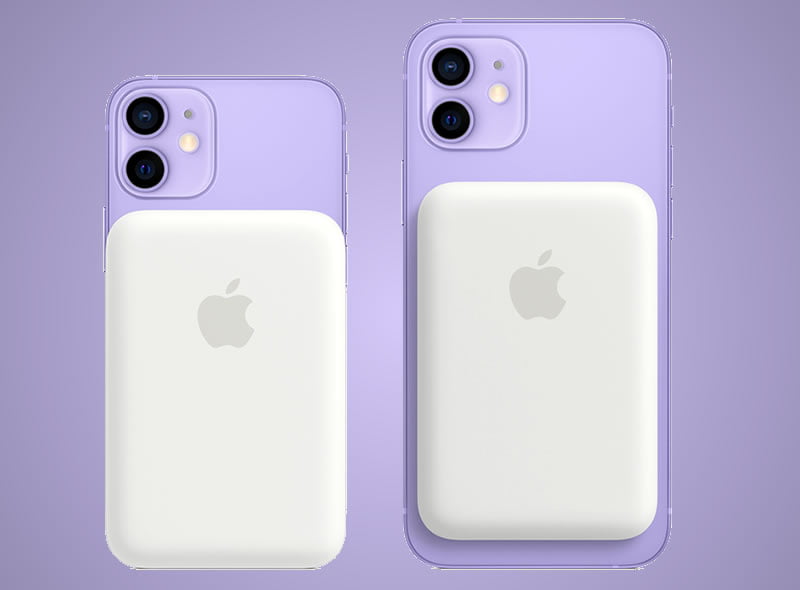
Apple has introduced the MagSafe Battery Pack for its iPhone 12 series. The magnetic battery is attached to the back of the smartphone using the magnetic force. This only works with the iPhone 12 and the Pro and Mini models, but not with older iPhones because no magnets are built into them.
The accessory will be available for $99 dollars and will work with the iPhone 12, iPhone 12 mini, iPhone 12 Pro and iPhone 12 Pro Max. It is worth mentioning that the MagSafe Battery Pack comes with a capacity of 1460 mAh and charges the smartphone with a maximum of 5 watts. Also, iOS 14.7 is a prerequisite. This operating system version has not yet been released.
Another feature to consider is that Apple will allow you to charge both the iPhone 12 and the MagSafe Battery Pack simultaneously. For this, it will be necessary to connect the battery with a Lightning cable and then place it on the back of the device.
Although, the MagSafe Battery Pack does not include a charger or Lightning cable. Apple recommends using the 20 W charger. When connected to a power source of 20 watts or more, it can charge up to 15 watts.
The MagSafe Battery Pack is only available in white and can now be ordered from Apple’s website. The delivery is currently scheduled to take place between July 22nd and 26th, 2021.
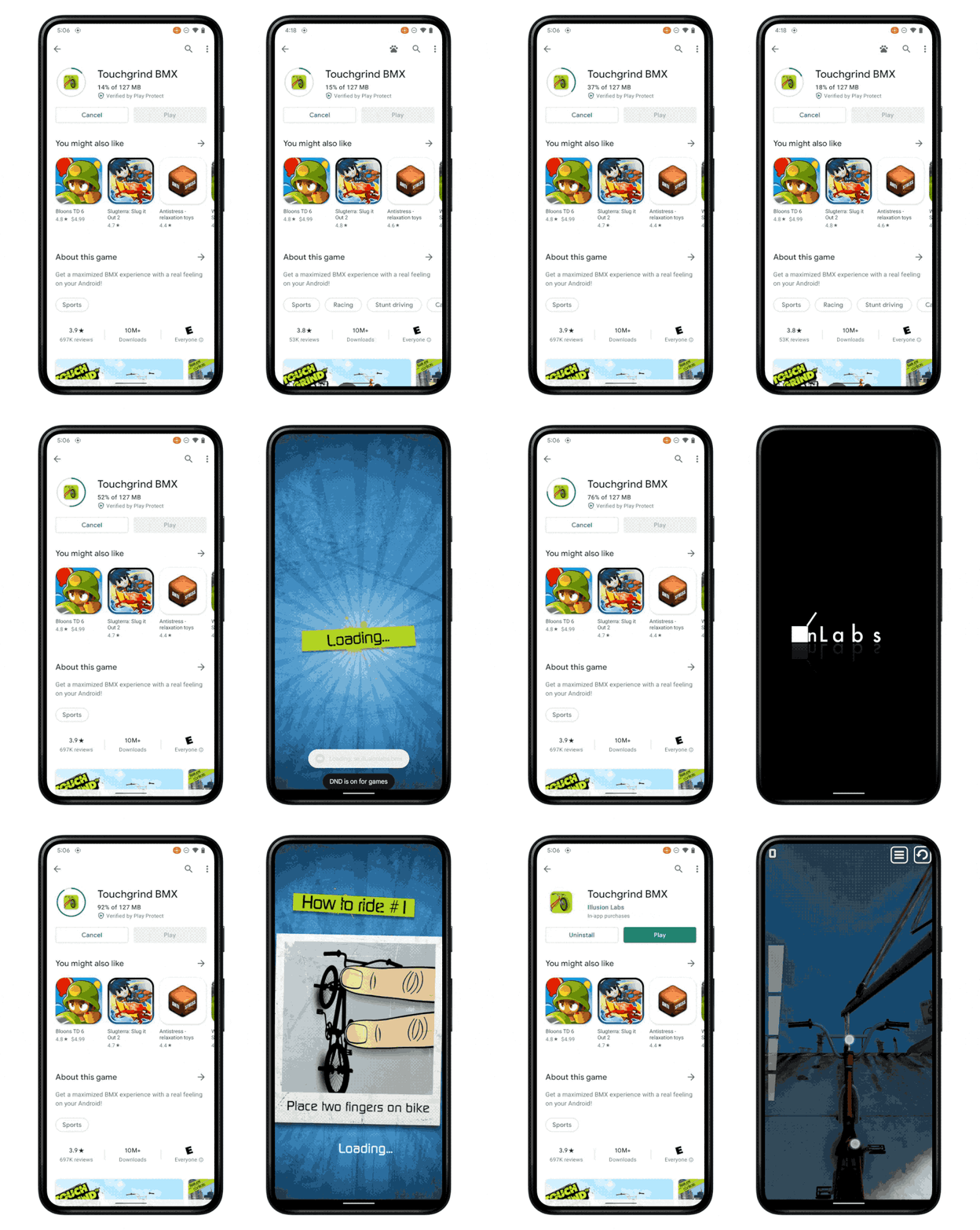
Android 12 brought several revamped features to the table, both in design and functionality. Now Google has announced a new option on Android 12, during the Google for Games Developers Summit 2021, that will allow you to play your favourite games while they download in the background.
Google calls the innovation “play as you download” which makes it possible to start a game while the download is still in progress. This new function promises to be especially useful in games whose installation requires the download of very large files.
All you have to do is download the game engine, the user interface, the first level and, if necessary, the start sequence. Most of the time, the largest amounts of data relate to other areas of a game such as other levels, graphics, sound, music and finished video clips. With this new functionality, 400 MB game can be playable half the time of what it used to be.
The feature will be available in games that use the Play Asset Delivery system on Android 12. The reason is that with Android 12, Google is introducing a new app bundle format as well as a new file system called Incremental FS, which is required for this.
Through this distribution method, Legacy Expansion Files (OBB) are replaced in games that weigh more than 150MB. According to Google, developers who already use this technology in their games will not have to perform any additional steps to activate the option. However, the company will also be able to make available a new Android game development kit with the necessary tools for implementation.
It is already Google’s third attempt to speed up the installation of Android games in particular. First came the streaming apps function in 2015, followed by instant apps in 2018. So far none of the mentioned attempts by Google has really caught on.
Even though most businesses have moved their operations to the cloud and have gone fully digital, some companies have yet to make the move. While a handful of small business owners prefer managing their business manually, others just don’t know where to start.
While digital transformation sounds complicated, it’s really not. However, it is multi-faceted and requires in-depth planning, which could be why many business owners are stalling.
Box.com, a popular cloud storage platform, explains that digital transformation is more than just a digital technology overhaul – it’s a strategy for streamlining business processes and generating better insights. Box has been helping companies make digital transformations for years by providing a secure, cloud-based file storage and organizational platform. The end result? Less staff turnover, higher levels of productivity, and more revenue for the company.
Digital transformation begins with moving file storage to the cloud, but it’s much more involved. Other elements of a digital transformation include:
Using tools that provide high levels of visibility across all departments
Tightening up security at the hardware level in addition to securing the company’s network
In-depth data analysis
Optimizing the user experience for remote employees, including employees using mobile devices
Stronger project collaboration and task management
Collaborating in a digital environment can exponentially improve business outcomes. If you’re looking for tools to help you make your digital transformation, or if you just want to improve your current efforts, check out the following tools.
1. Email marketing automation
While automating things like content creation (article spinning/AI-generated content) is a bad idea, you’ll benefit from automating other marketing tasks. For example, email marketing actually works best when it’s automated.
Marketing automation is an efficient way to nurture your leads. According to data published by Invespcro.com, companies that excel at lead nurturing generate 50% more sales. Those companies are using automation.
With automated email marketing, emails are pre-written and programmed to be delivered to each new subscriber on a schedule. You don’t have to log into your account to send the emails – the entire delivery schedule is automated.
There are pros and cons to each. If you don’t need to send many emails, you can probably use Mailchimp until you grow your business. However, if you’re running a large-scale business with tens of thousands of subscribers, you’ll do better using Infusionsoft.
2. Automated workflow tools
How many times do you create the same tasks each week for your employees? Do you find yourself performing repetitive tasks that require inputting the same information day in and day out? If so, you need automated workflow management tools.
Automated workflow management tools allow you to create conditions that trigger certain actions. For example, you can program software to automatically create a deadline 5 days out and assign it to an entire team each time you create a task.
Depending on the tool you choose, you could automate a large number of tasks that will save you and your team hours each week. Automating repetitive aspects of a workflow also helps to reduce employee frustration and overwhelm.
If you’re not familiar with workflow automation, Kissflow is one of the most popular tools on the market. However, you can find other tools that will get the job done.
3. A customer relationship management (CRM) platform
Your business won’t keep up in your industry without using a CRM to manage your customers, leads, and clients. The level of insight and data you can collect from a CRM far exceeds any manual efforts you can make.
A strong CRM, like Salesforce or Infusionsoft, will collect and segment leads in a database, rate leads on a scale, automate and track where leads are in the sales funnel, and seamlessly integrate with your email marketing program. Some CRMs even come with a built-in shopping cart and software integrations for payment gateways and payment processors.
There’s no way around it – all businesses need a digital CRM if they want to keep up with their competitors.
4. Website tracking tools
Google Analytics isn’t enough. If you want to track more details and have a chance at obtaining those coveted keywords Google likes to hide from webmasters, you need a tool like Matomo. Formerly known as Piwik, Matomo is the ultimate website tracking tool that can be self-hosted for full control.
Why wait? Digital transformation will give you a boost
If your company hasn’t made a digital transformation, there’s no reason to wait. The faster you make the switch, the sooner you’ll see bigger and better results in your business.
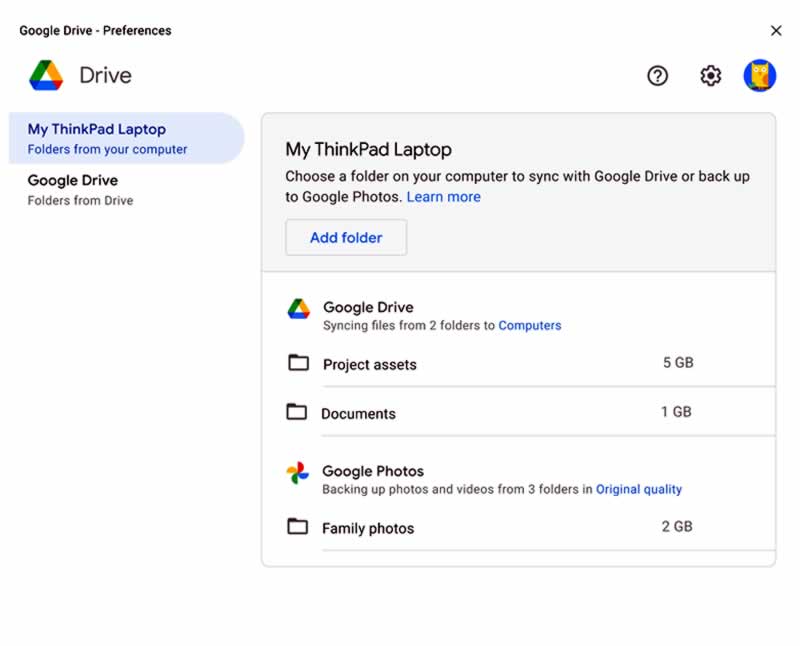
Google has just launched a new Drive application for Windows and macOS, which introduces improved synchronization options between different devices.
The new Google Drive desktop application will replace the tools that the company had until now, such as “Backup and Synchronization” and “Drive File Stream” for business accounts. In addition to that, one of the new features that we are going to find in this app is the addition of the automatic loading of Google Photos.
In this way, from now on, both personal accounts and business accounts will use the same Drive client on desktop with the backup of Google Photos included.
According to Google, the new Drive application aims to make the synchronization process easier and reduce the time required.
Like the web service, in the Drive desktop application, files are stored in the cloud and allows collaboration between multiple users, with changes in real-time.
But this is not all, there are also other features that have been included, such as loading from the Apple Photos library and USB storage support. Other consumer features coming soon include local folder syncing to Google Drive and multi-account access. Additionally, users will also be able to sync individual files to My Drive for offline use, a dark mode, and the ability to view some Microsoft Office and Outlook integrations.
In the coming weeks, users of previous Drive apps will start seeing alerts prompting them to switch to the new Google Drive desktop app, something the company recommends doing before September.
Outsourcing IT Support services is now popular nowadays due to the boom of advancements in the information technology (IT) industry and business technology. If you offer products or services related to technology, an IT support team is essential for your needs. You need to provide solutions to your consumers if they encounter an issue regarding your product or service.
Without an excellent IT support team, your customers may feel disappointed because you can’t attend to their concerns. As a result, you may lose a number of leads and prospects. Additionally, these consumers are more likely to spread the word regarding their experience. Imagine how bad feedback can decrease your chances of acquiring new clients. That’s where technical support outsourcing comes in. A reliable outsourcing provider such as APEX Call Centers in the US discusses more on how to improve your customer support by having an outsourced team
Outsourcing IT Support Services vs. In-House Staff
Since your business relies on your customers, you need to provide them enough support. However, the dilemma lies in choosing between outsourcing or hiring in-house services. Thus, you need to understand the difference between the two options, as elaborated below:
Outsourced IT Support Team: With this option, you enter into an agreement or contract with a third-party organization, firms, or companies providing this type of service. Since these companies have various clients, they charge more affordable fees. Their services include instant access to digital diagnostic software and comprehensive repair tools to help with IT-related issues. Moreover, these services have highly qualified, trained, and knowledgeable in various niches of computer problems and repairs. As a result, they can troubleshoot any IT-related issues your customers may need.
In-House Staff: As for the in-house IT Support team, you have employees working in your building or office space. That way, they can immediately respond to your needs. Their responsibilities are similar to the outsource IT Support team; however, you pay your in-house staff regardless of when they’re not repairing or assisting a customer. Thus, you may be wasting a lot of money if your business doesn’t experience any computer problems. What’s more, the onboarding process and benefits packages can be costly.
How To Choose the Right Outsourced IT Support Services
To avoid spending money on hiring costs, or if your company is small enough not to require an in-house team, you need to outsource the right way. When done right, your business can save up on expenses and have extra funds for improving your products or services. You won’t regret it in the future, as the right provider can keep your business operations smooth.
With that said, here are some recommendations you can consider when outsourcing your IT Support servi1ces;
1. Know the Types of IT Support Services You May Need
By understanding the different IT Support services, you can hire the most suitable one for your business. Some IT Support companies may be popular, but their services may not be what you need. Hence, the popularity of a company should never be the sole reason you should outsource them.
First, you need to understand that IT support services have various types. The general terms you’re most likely to encounter when finding IT support companies are the ‘managed services‘ or ‘break or fix.’ The IT managed services can include one or a combination of the following services:
On the other hand, the break or fix is the traditional model of IT support. The IT provider will fix any breakage in your IT system upon reporting them. Since it’s a one-time occurrence, you only have to pay for the IT provider’s materials, time, and service. No contracts are made in this type of service, too, as it’s a ‘pay per project’ basis, unlike managed services.
That’s why a break or fix services may be best for your business if the costs of downtime cannot affect your earnings or if you don’t have a critical reliance upon IT systems and equipment.
However, you may need to enter into a contract with IT Managed Service providers if you want to prevent downtime, fully staff an IT Support services team, and support your IT infrastructure and systems. Although you may be paying monthly, the benefits you gain will outweigh its cost.
2. Choose Between Local and Offshore Provider
After knowing what type of Outsourced IT Support service is essential for your business, you also need to choose between a local and offshore provider.
With an offshore provider, you can access global talents. You can find experts in any phase of your IT needs, from full software developers to web developers, cybersecurity experts to network experts, and many more. Moreover, you get to work with people from various cultures or nationalities.
However, it would be best if you found an offshore team that you can communicate with easily. They should know your first language, work on your operating hours, and provide suitable IT services specific to your business needs.
On the other hand, locally outsourcing your IT needs is quite geographically different. As its name suggests, the local IT Support service provider operates with you in the same country or state. Since they’re accustomed to the local community, tradition, culture, and trends, they know what IT solutions are suitable for your business.
For instance, your business is in Boston. Hiring IT Support service providers, like Welsh.com, that are locally stationed in the area can provide timely and professional support as a local IT help desk.
If you need on-site support for emergencies, a local provider can immediately assist you. As a result, you can decrease your downtimes and continue delighting your customers.
3. Look for Certifications
Another step you should take before signing a contract with an IT Support Service provider is to check their certifications and specializations. Their certificates will showcase their abilities to perform technical procedures. Without credentials, you may not confirm if the provider had undergone the necessary training or courses to develop their skills.
Reputable service providers are more likely to show their certifications to prove they’re eligible for the project or job you require. If they consist of various individuals performing their services, then the company will also be willing to show individual certificates of the people in their team.
Depending on your business’ needs, the certificates you should look for must validate their specialization. If they present many credentials but not the ones they’ll provide, take it as a red flag. They may be skilled in such areas but may not perform well on the IT needs of your business.
Moreover, it would be best to check where they took their training. It may not be helpful if they have certificates from unknown or unaccredited institutions. With such, here are some known and accredited certifications that you may want to look for when outsourcing IT Support services:
Microsoft Certified Systems Engineer (MCSE): With this certification, the holder has validated the ability to build innovative solutions on various technologies. The specializations that MSCE covers are SharePoint, communication, messaging, business intelligence, data platform, enterprise apps and devices, private cloud, and desktop and server infrastructure. Thus, if you’re looking for a systems manager, field systems technician, or systems administrator, you should look for this certification.
Certified Information Systems Security Professional (CISSP): One of the most recognized credentials in the world is CISSP. This certificate shows that the holder is competent enough to protect an organization’s information from cyberattacks. That’s because CISSP verifies the person’s extensive managerial and technical abilities to manage and engineer information security programs. Thus, if you want cybersecurity in your system, your outsourced IT Support should have this credential.
Before one can get CISSP, the individual should pass eight subjects having 100-150 questions. These questions are from various subjects like software development security, security operations, security assessment, testing, identity, and access management, communications and network security, security engineering, and security and risk management.
CompTIA Network+: In networking proficiency, a certificate from Network+ is a globally recognized credential. When a person has this, they can implement network security standards, configure network devices, design networks, and create virtualized networks. Before receiving a CompTIA Network+, they should also pass examinations on emerging technologies and the configuration of wireless and wired network devices consisting of 90 questions. This certification is perfect for help desk technicians, network engineers, and systems administrators.
Cisco Certified Network Associate (CCNA): As for IT Support services performing enterprise-level networking hardware configuration, operation, and installation, the CCNA is a good credential. It’s also a well-known certificate verifying the person’s understanding of automation, IP services security, IP connectivity, network access, and other IT networking fundamentals. This credential is also suitable for systems administrators, network administrators, and network engineers.
CompTIA A+ Technician: As for the maintenance of laptops, mobile devices, operating systems, printers, and PCs, CompTIA A+ is a good certificate. When you’re outsourcing help desk support like help desk technicians, desktop support technicians, or field service technicians, unlike the previous certification, CompTIA A+ has two exams with a maximum of 90 questions each. One exam covers the configuration and installation of operational procedures, software troubleshooting, expanded security, and operating systems. The other focuses on network troubleshooting, cloud computing, virtualization, hardware, networking technology, and mobile devices.
4. Check Customer Feedback
Moreover, you may want to check the previous clients’ feedback and rating on the IT Support services provider. This feedback is necessary to get a glimpse of what you may experience when you outsource such a provider. The feedback will also show their credibility and how they communicate with their previous customers.
If your prospects have a steady stream of positive reviews, their services may be of high quality. This means that their previous clients are satisfied with them. The way people rate the provider may show how well they have delivered their services.
However, if the reviews are way too low, then something might be wrong. Verify these feedback or ratings by checking out third-party reviews and forums. Enter the provider’s name plus ‘feedback or rating’ on your search engine. Click on the results to learn what people are saying about them.
When using third-party reviews, ensure that they are reputable sites because some may only be destroying the provider’s reputation.
You can also check their clients’ feedback on different social media platforms. People may have tagged them or posted their experience from the provider. If there are more negative posts about them, then consider it a red flag as well. But, also make sure that these previous clients have purchased the services of the IT Support provider.
As for the forums, you can check queries regarding a company. Some people are kind enough to honestly answer questions, especially when they have the same provider.
You can also ask other professionals in your same industry for their thoughts about their provider. That way, you can get a better recommendation based on their personal experience. Especially if the other person is in the same industry, their IT Support may also be a good fit for your needs.
5. Consider Their Pricing Structure
Lastly, you need to check your budget when outsourcing IT Support. Though they’re more affordable than having an in-house team, different providers have different pricing structures. Some may have higher costs, while others have hidden fees.
That’s why looking at these pricing structures will help you understand the best price for your needs:
Ad-Hoc Fees: If you rarely need IT support, then the Ad-hoc model may be perfect for you. In this type of pricing structure, you only pay when you need help. However, you may have to pay higher fees when a major IT issue hits your business.
Per-Device Flat Rate: As its name suggests, you’ll be paying fees per device. If you have only a few devices, this may be cost-effective for you. However, this may be costly if you have multiple devices.
Per-User Flat Rate: Similar to the Per-Device Flat rate, this charge is per user. Thus, if you have more users, you’ll need to have more funds.
Monitoring Only: Lastly, a fixed fee or monthly subscription is applied for this pricing model. The services here are more on backup monitoring, patch management, and other alerting services.
Conclusion
Outsourcing IT support services may be a good choice, but only if you do it right. You may need to consider a lot of things to make sure you’re hiring the most suitable provider. From the types of services to location, certifications to reputation, and pricing model, all of which are essential to finding the best IT Support Services Provider.
Try following this guide and see how it works for you instead of clicking on the first ad on your search engine results pages.
Sir Richard Branson, the founder of the Virgin corporation, flew with Spaceship Two, two pilots and three other passengers to an altitude of 86 kilometers. He has become the first person to go to the edge of space on a ship financed with his own money.
Along with Branson, astronaut instructor Beth Moses and engineers Colin Bennet and Sirisha Bandla travelled, accompanied by pilots Dave Mackay and Michael Masucci.
At 9:15 a.m. local time in New Mexico, United States, the SpaceShipTwo undocked from the WhiteKnightTwo at an altitude of about 50,000 feet (15 kilometers), and rose to 282,700 feet (86 kilometers). The mission was baptized as Unity 22 , and the objective is to analyze the commercial viability and comfort of space tourism.
Virgin Galactic launches into space in a different way; instead of taking off from the ground, with one or more rockets, the ship is attached to a large mother plane. After reaching the necessary altitude, it is released and ignites its rocket engine.
Just a few minutes later, having experienced some weightlessness, VSS Unity began the return journey. A steep descent – much more than that of conventional aircraft – and sustained that concluded with the landing at 17:40.
The goal of Richard Branson is to operate five of these ships for private passenger transport service. Virgin Galactic ensures that the goal is for anyone to experience going into space. The flight is priced at about $250,000 and lasts an hour and a half. You will be able to experience several minutes of weightlessness and see the curvature of the Earth.
The first space tourist was the American billionaire Dennis Tito. He paid about $20 million to go to the International Space Station for a few days, aboard a Russian Soyuz spacecraft. Thus he could have the experience of orbiting the Earth at about 400 kilometers high.
That said, one of the seats reserved for Jeff Bezos’s first Blue Origin mission was priced at $28 million, awarded to a stranger through auction. The flight will last a total of 11 minutes. That’s $2.4 million per minute or $42,424 per second. The company will award the entire auction to its Club for the Future foundation.
Richard Branson achieves the milestone of travelling into space in his own company ahead of Jeff Bezos, founder of Amazon, who aims to achieve the same with Blue Origin. Bezos announced in early June that he would go aboard the New Shepard on July 20, which will be the first manned launch in the company’s history. He will join his brother, an unknown millionaire who won the seat auction and the first flight instructor in the history of the United States.
Virgin Galactic expects to complete a batch of test flights over the next few months and begin commercial operations in 2022. According to the latest reported data, around 600 people have bought a ticket to make one of these suborbital flights at a price of $250,000 each. The sale is currently closed and is expected to open in the next few months.
Portable Document Format, short for PDF, is a common type of file that is used in various industries. The purpose of PDFs is making it easier to share files. The format is accessible not just on computers, but smartphones and tablets, regardless of their operating system.
So long as a device has a PDF reader, users can view files. And when there is a universal format recognized by most people, it is efficient to use such a format because it saves resources. Sending a document in PDF means that the recipient should not have problems opening and viewing the file.
With that said, there are a few things worth mentioning about PDF management. Let’s take a look at some ways to master PDFs.
Sometimes, when you receive a PDF, its original copy is not displayed properly. For example, a person who scanned the document messed up and did not realize that the document came out without a proper rotation.
Thankfully, fixing this issue is not too much of a hassle. According to https://setapp.com/how-to/rotate-pdf-on-mac, using the Preview tool should be enough to rotate a PDF. You can even rotate multiple documents simultaneously.
For Windows users, you will need to stick to Adobe Acrobat, which is pretty much the default software for accessing PDFs.
If there is a PDF on your smartphone or tablet that you want to rotate, you might struggle a bit, unless you look for a specific app for your operating system. If possible, it might be more efficient to rotate the PDF on a computer and reupload it on the mobile device after.
Convert Others Formats to PDF
Like already mentioned, PDFs are recognized as a universal type of a document, meaning that you will likely need to find a reliable converter.
It is common to convert Word to PDF, for example. The question is how often you need to do that because there are two approaches to converting other formats to PDFs.
The first is to install specific software on your computer and use that. The second is to use a converter online.
Since converting other formats to PDFs is popular, it is no surprise to see many different converters available directly on your browser. The problem with these online converters is that they usually have a daily limit. Some let you convert as little as five different documents per day.
Meanwhile, software should not have any limitations. But then again, if you need to convert to PDFs rarely, bothering with software might be too much when there are converters online. The bottom line is that there are two options, and it is up to you to decide which one to pick.
Protect the Document
A password might not be the be-all and end-all method to secure a document, but it is still better than nothing.
If you are using Adobe Acrobat, you can encrypt the document directly in the software. Open a PDF via Adobe Acrobat, then click Tools, Protect, Encrypt, and you will see the option to encrypt the file with a password.
Delete Separate Pages
You might receive a PDF with too many irrelevant pages. Printing and rescanning it again is one of the options, but it would be a waste of resources.
Instead, you can take advantage of Adobe Acrobat again. Enable the thumbnail mode in the software’s left-hand side pane. Once in the thumbnail mode, you can pick separate pages that you want to remove from the PDF.
Sign PDFs
Signing PDFs digitally is more convenient than printing a document, writing a signature on it, and then scanning it.
Mac users can use the Preview app. Before you open a PDF document via the tool, take a picture of your signature and upload it on the computer. Then, launch Preview, and click the “Create New Signature” button. You can upload the signature photo with it and use the signature for future PDFs.
For Windows, you will, once again, need to rely on Adobe Acrobat. After opening the PDF, click “fill and sign” and “add signature”. You will see a few options—draw, type, and image—which are how you will create the signature.
The image option lets you upload the signature in the form of an image, whereas draw asks to use a mouse to draw the signature. It is better to avoid “type” because it does not create a signature that looks real.
Add Watermark
Adding a watermark is one of the best ways to show that a document is genuine and has an original owner.
A company might want to add their logo as a watermark. Inserting a specific watermark that is meant as proof for a recipient is also one of the examples.
There are a couple of options to add a watermark. You can use Word and convert the document with a watermark to a PDF, or use Adobe Acrobat.
Nokia is taking legal action against Oppo in England, France, Germany and India. Nokia’s allegations concern several patents that are important for the 5G wireless standard as well as patents for interface and security technologies.
In 2018, Nokia and Oppo signed a multi-year patent license agreement, but it expired in June 2021. According to Nokia, both parties could not agree on a new patent license agreement, in the course of which the company is taking legal action against Oppo. Oppo faces the risk that courts will ban the sale of its smartphones.
IAM has confirmed that Nokia is suing Oppo over patent infringement in England, France, Germany and India. The pair signed a licence agreement back in November 2018 More details to come… pic.twitter.com/UbsPeODVKj
Nokia said in a statement: “We have been negotiating the renewal of our patent licensing agreement with Oppo but unfortunately they have rejected our fair and reasonable offers. Litigation is always our last resort and we have offered to enter into independent and neutral arbitration to amicably resolve the matter. We still believe this would be the most constructive way forward.”
At the time, neither Nokia nor Oppo made details of the agreement public. Citing the European Patent Office, Gizchina.it reports that under the previous contract, Oppo was obliged to pay Nokia 3 euros in patent fees for every Oppo smartphone sold.
Nokia is one of the major patent holders and earned 1.5 billion euros in license income last year. The company has license agreements with companies like Samsung, Xiaomi, LG, Apple and Blackberry.