Home Blog Page 234

Japan Breaks Internet Speed Record With 319 Terabits Per Second

Choosing an Internet Service

Japan’s National Institute of Information and Communication Technology (NICT) research group has managed to break the internet speed record achieving a total of 319 Terabits per second at 3,000 km — doubling the previous world record.

The previous record was set at 178 Terabits per second. It was achieved in 2020, and was made possible by a collaboration between Japanese and UK engineers.

Well, now the Japanese have managed to set a new record at an impressive 319 Terabits per second, an impressive figure that leaves us with a bandwidth of 39.87 Terabytes per second. With 319 Tbps, it would be possible to download 10,000 high definition movies of about 4 GB each in just one second.

To achieve this new record, NICT engineers used a new fiber optic cable technology in the form of small tubes that transmit information through light. The team had to use major add-ons and worked with lasers to demonstrate, in short, that they could ‘create recirculating transmission on 552 x 25 GHz spaced channels covering less than 120 nm in the S, C and L bands on a fiber of 4 cores of 125 µm in diameter, and achieve a decoded performance of 319 Terabits per second in 3,001 km.

The laser technology they used works on 552 channels and fires at various wavelengths. These light streams are then processed and amplified by new types of fiber amplifiers that were previously enhanced with thulium and erbium. The subsequent process is what is known as regular Raman amplification.

NICT believes that these new fiber optic cables could be adapted “easily” to existing infrastructures, so there would be no major changes to the components that make up the data core networks and, consequently, would facilitate their adoption. In practical terms, this technology would be ideal to drive the development of next-generation communication technologies “beyond 5G (such as 6G) that will offer high internet speed.

Know How to Best Market Your Business

PC laptop business

When you are running a business, one of the most important things is that you know how to properly market and advertise it. There are many tools out there for you to use when it comes to marketing your business and if you do not use them properly, you will see your income become stagnant, or even worse, start to decline. More likely than not, your company is not a known big brand, so people are not going out searching for you exactly. Instead, they are going out and searching for companies like you. So that is where your marketing comes into play. If you know what you are doing and use the proper tools and avenues, those potential clients will become real ones. Once you get them in the door, now you can do what you do best, and watch your business profits grow. 

Understanding What Data Visualization Really Is

If you are not a marketing guru, or someone that is relatively new to marketing, the phrase data visualization in marketing is probably not one you are all too familiar with. The basic thing is the process of taking big and detailed datasets and putting them together in a very pleasing visual type of format. When you do this process, it not only helps your data be that much easier to understand, but now when you want to look at them, it will not look like you are staring at a very confusing math equation. When you are dealing with your marketing, you want to make sure that it is easy to read and understand. 

When it comes to setting up your data visualization, there are numerous options for you to start. There are things you are going to be looking for things like charts, graphs, and all that kind of neat stuff that will help your data visualization for marketing look that much better. Whether you use google data studio tutorial or another program of your picking, you will want to ensure that it gives you everything you need so you and your business can take off and start making the kind of money you want to be making.

What Are The Pros of Using Data Visualization?

Before you dive into the use of marketing research data visualization, you are going to want to know about the benefits it can provide you and your business. If it is something you are not comfortable with or have the time for, then you do not want to waste your valuable time and money trying to get it up and running for your business. 

Get Better Insight

The biggest pro to using data visualization for marketing is that it can provide much better insight on any trends or marketing patterns that you are unaware of. What it can do is give your marketing data more meaning and help you understand what you need to do more moving forward. So instead of you getting hit over the head with loads of information, you can now go through it all in a way that is easy for your eyes and your head. 

Make Better Decisions

Another positive to using data visualization in marketing is that when you use it, it can only help enhance your decision making skills. Now that you are able to take in and understand your marketing data much better, now this will allow you to make better decisions that will only help your business. So instead of spending time going through all that data, you look at the graph and decide which is the best marketing route for you to take. This not only helps you make better decisions, but also allows you to spend more time on other aspects of your business so you can make your money and be successful. 

Get to Know Your Audience

One thing that you probably didn’t know about data visualization is that it can help your business bring in your target audience and talk with them. What does that mean? When you combine data visualization and data storytelling it will add more depth into the info you want to share. This means getting your message across to your audience in a much more efficient way. If you are able to truly know your audience, that can help make all the difference in the world and make marketing your business that much easier. 

Much More Flexible

This may be the biggest positive to using data visualisation there is. You are not confined to just one way of collecting data. It is versatile, so it will allow you to repurpose in any way you would like for your business. Whether that is for social media or any kind of content marketing. So no matter what form of marketing you are doing for your business, data visualization for marketing helps you attain any kind of data and allows you to read it easily. You do not need to worry about downloading different programs for different kinds of marketing. So whether you want internal reporting or reporting for your clients, this is something that will help you out immensely in that field.    

In the end, when you are running your business it is vital that you market it as best as you possibly can. You could provide the best products or services, but if no one knows who you are, you will never see the income you so rightly deserve. So when it comes to marketing, you want to ensure you are able to analyze the data as efficiently as possible. You do not want to spend your time thinking about how you should market, you need to be spending your time making sales and doing the work. Data visualization for marketing is a tool that a lot of successful businesses use. It will make your life as a business owner that much easier. Running a business is very hard work. So do whatever you can to make it easier while getting you richer. 

Google Will Let You Delete Last 15 Minutes Of Search History On iPhone

Google Privacy news and stories

Recently Google has been reinforcing its security and privacy functions by introducing new features. Google now introduces two new privacy features where it requires extra verification when accessing the user’s entire search history, and users can now quickly delete searches from the last 15 minutes with a new delete function and thus keep them private.

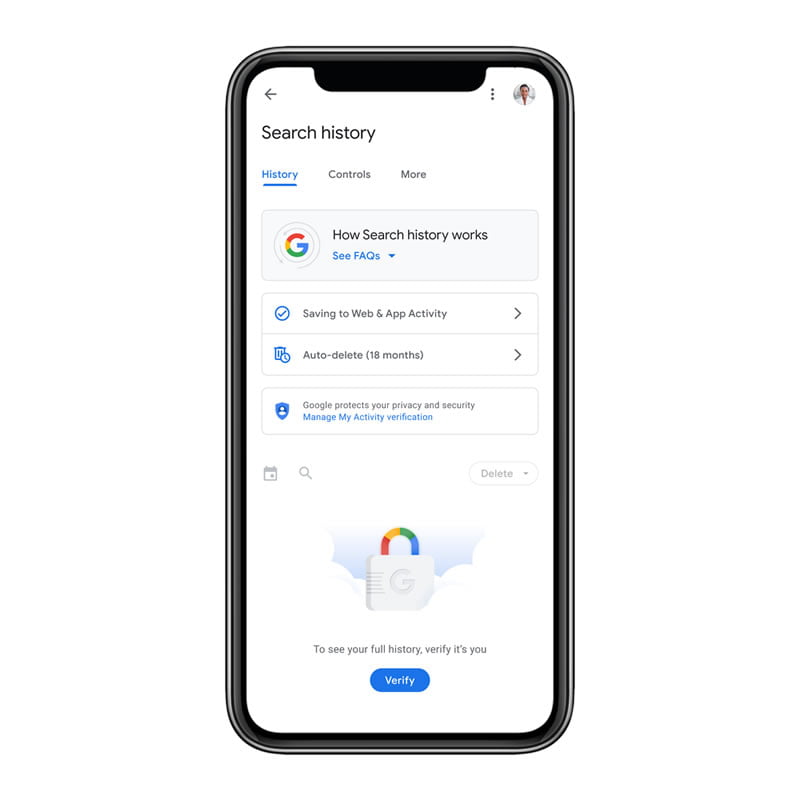
The function for the additional protection of the entire search history by setting a new verification is intended in particular to protect the user when he is not only accessing a device but is sharing it with other people. Without verification, they will not have access to all search queries of the other user as before, even if they are logged in.

Google requires extra verification to access search history

The entire search history can be viewed via “My Activities” in the Google account. The new verification function can also be activated there, which then requires either a password or two-factor authentication.

So far, users can also set that search queries and web activities are automatically deleted after 3, 18 or 36 months. Automatic deletion every 18 months is enabled by default for new Google Accounts. Google also introduced a new function that can be used to delete the last 15 minutes of your own search history. 

Google requires extra verification to access search history

So far, it is only available in the Google app for iOS, but according to Google, it will also be available for the Google app for Android this year.

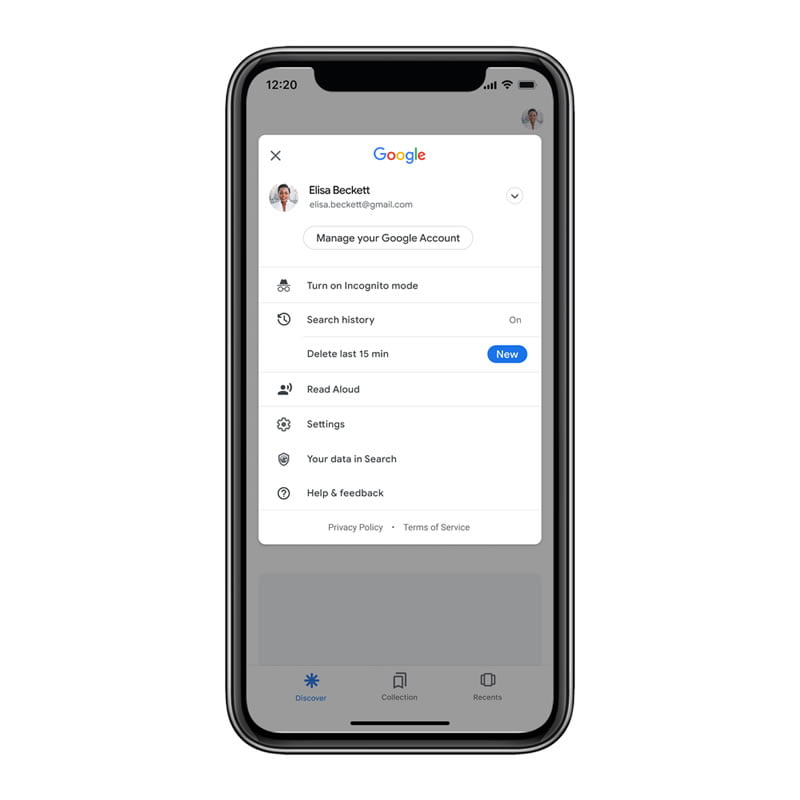
To activate this quick cleaning of the search history in the Google app for iOS, you just need to access the Google profile. In the menu that appears below, under Incognito Mode and Search History, you can see the “Clear the last 15 minutes” button.

Suppose you don’t see the “Delete the last 15 minutes” function in the iOS app. In that case, you can activate it manually by clicking once on “Search History” and activating or deactivating the automatic deletion once. After closing the app, the function for deleting the last 15 minutes should be displayed the next time it is started.

Also, it is necessary to update the Google application on the iPhone to the latest version. The rollout is in progression, so it may take a few days for the update to reach all devices. 

Soundmojis: Facebook Messenger Introduces Emojis With Sound

Soundmojis

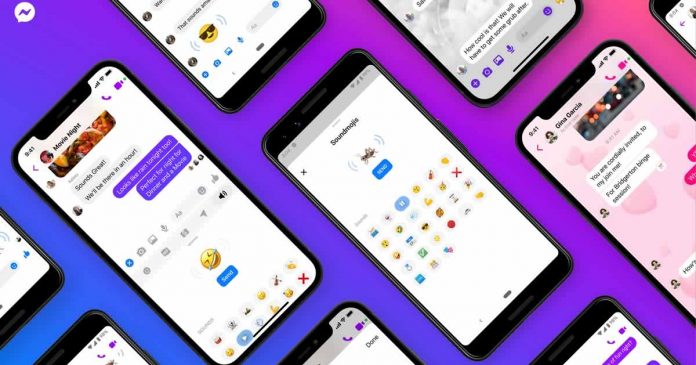
Facebook Messenger is updated with a new type of emojis that have sounds — Soundmojis — a type halfway between GIF and video that will be able to be used in the chats.

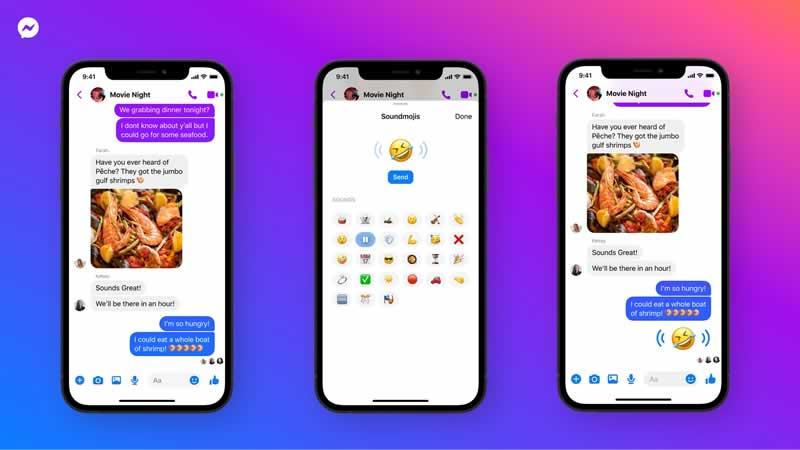
Soundmojis are basically emojis with related sound effects. These range from clapping to crickets to drum rolls to wicked laughter. Facebook has also added audio clips from artists like Rebecca Black.

As if this were not enough, the emojis with sound from Facebook allows you to send audio from series and television programs. At the moment, they include Fast & Furious 9, Brooklyn Nine-Nine and Bridgerton. However, the company is sure that it will add new sounds to the library over time.

Facebook Messenger Soundmojis

Using the new Facebook Soundmojis is very easy. You simply have to access the Messenger application and start a chat. In the conversation window, touch the smiley face to open the expressions menu and select the loudspeaker icon. Once there, you can preview the emojis with audio before sending them.

The new function will gradually be rolled out to all users. This will automatically arrive at the Messenger interface on the web. For mobile device users, it is recommended to update the app.

Steam Deck: Valve Announces Its Portable Console With Zen 2 And RDNA2

Steam Deck

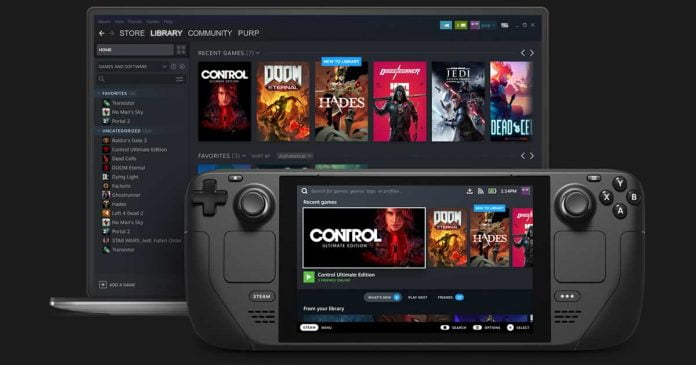
Valve made the Steam Deck official, its first portable video game console.

Previously traded under the name “SteamPal” and the code name “Neptune”, Valve’s PC handheld Steam Deck, inspired by the Nintendo Switch, is based on a custom APU with Zen 2 and RDNA2 and the free Linux system kernel.

The device comes in three versions, which only differ in the built-in mass storage device — the rest of the hardware is the same. Zen 2 architecture of the system offers four cores and works with eight threads at 2.4 to 3.5 GHz. The integrated GPU consists of eight RDNA2-CUs (512 shaders) that run at up to 1.6 GHz.

According to Valve, this should lead to a theoretical performance of around 1.6 teraflops. 16 GB of RAM (LPDDR5-5500) are installed as standard, which, according to the latest information, cannot be expanded because it is soldered. This means that the entire system should also be able to handle the display of current PC games. 

As for storage, it will be offered in three versions: 64GB, 256GB, and 512GB. The last two options jump on the NVMe SSD (PCIe Gen 3) bandwagon to cut load times significantly. It also has a microSD card slot.

The screen of the Steam Deck is a 7-inch LCD touch panel with a resolution of 1280 x 800 pixels and a refresh rate of 60 Hz along with a brightness of 400 nits. The also newly announced Nintendo Switch OLED offers a resolution of 1280 x 720 pixels with a display of the same size.

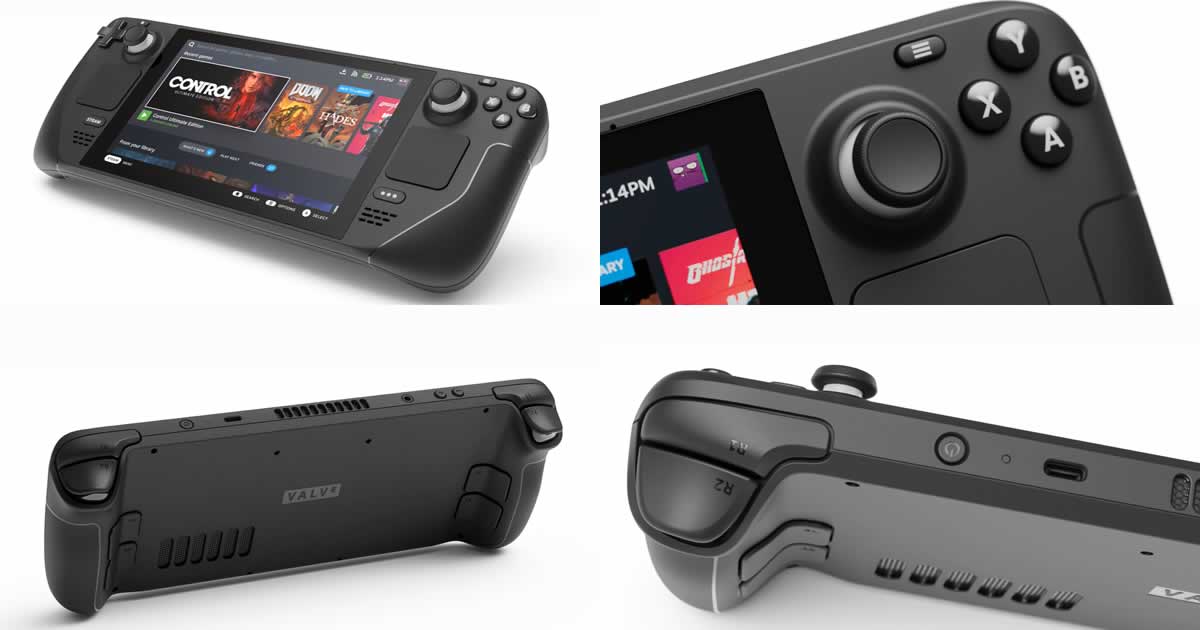
Steam Deck can be connected to larger screens via HDMI 2.0 and Displayport 1.4. Ethernet and multiple USB ports are also available, including USB-C for power. Bluetooth 5.0 and WLAN (IEEE 802.11 a/b/g/n/ac) are available for wireless connections. Speakers, a 3.2 mm headphone jack and microphones are also on board.

According to Valve, the 40-watt-hour battery lasts around two to eight hours of gaming. Specifically, it certainly depends extremely on the game in question. The handheld should have to be connected to the power supply quickly for performance-hungry action titles.

And, of course, its main attraction is that it will offer access to your entire Steam library, as you would through any computer. Its operating system is SteamOS 3.0 (Windows can be installed).

Steam Deck Handheld

It is controlled via the touchscreen as well as with buttons and analog sticks. A special feature underneath is a small trackpad with haptic feedback. This is reminiscent of the Steam Controller — but should offer 55 percent better latency, says Valve. Another extra is motion control so that you should be able to target an opponent yourself by raising and lowering the steam deck.

The Steam Deck will be available from December, starting at a price of $399 for the most basic version with 64 GB (eMMC storage). The 256GB and 512GB variants come with NVMe SSDs and will be available for $529 and $649, respectively.

However, the initial release will be limited to the United States, Canada, and the United Kingdom. According to the manufacturer, the Steam Deck can be pre-ordered from 7 p.m. on July 16, 2021, via the official website. Valve promises that in 2022 they will expand availability to other countries.

Netflix Plans To Offer Access To Video Games From 2022

Netflix to offer games

Netflix is preparing to enter the gaming market fully soon. Now the streaming company has filled an important position — Mike Verdu is the new Vice President of Game Development.

Verdu is relatively well known in the community. Among other things, he founded the then enormously important developer studio Legend Entertainment together with Bob Bates in 1989. Verdu later worked on Command & Conquer at Electronic Arts. Most recently, he was responsible for collaboration with external development studios at the virtual reality offshoot Oculus, which belongs to Facebook.

Appointing Mike Verdu to a vital position confirms that Netflix not only wants to distribute games but also to develop them. Creating titles is not a minor issue; giants such as Amazon and Google have fallen halfway in their attempt to consolidate in the sector. In fact, the Mountain Viewers recently threw in the towel by shutting down Stadia’s development studios.

Netflix itself has not yet commented publicly on its further plans. However, according to Bloomberg, from 2022, Netflix subscription will also include access to games. At the moment there are no plans to make customers pay for it.

With games, Netflix could differentiate itself from other providers in the increasingly competitive video streaming market.

If Bloomberg’s report is correct, one question will be intriguing — how Netflix will distribute its first video games. The first option is for users to download all the files necessary to run a title, which would limit the devices that can support them for performance and storage reasons. The other alternative, and perhaps more feasible, is for Netflix to use Cloud Gaming technology.

If they opt for the latter, Netflix would be entering the territory of Xbox Cloud Gaming (xCloud) and the unbeatable Xbox Game Pass library. Other competitors on the horizon are the aforementioned Google Stadia, Amazon Luna, PlayStation Now, Facebook Gaming, and Nvidia GeForce Now.

How To Protect Your Computer From Hackers

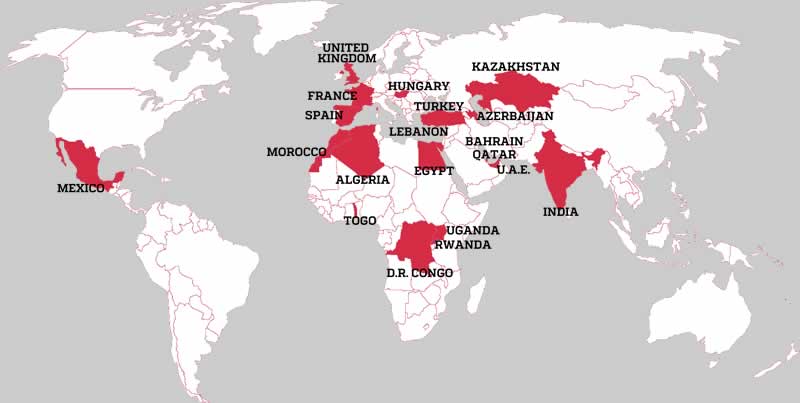
Hackers countries They Live

We are at risk of getting infiltrated by hackers as our computers are always online. With this knowledge, you should always be concerned with the security of your computers. Find ingenious ways to keep your devices safe from hackers.

Hackers are thieves with superior skills to breach your computer security to access it without your permission. They do this with stealth that you won’t realize when you are hacked. You will only find that you are locked out of your device. 

There are many methods you can utilize to protect your computer from hackers.

Use A VPN

One of the best methods to use to protect against hacking is using a VPN. VPN stands for Virtual Private Network. It is a network of servers that you can use to hide while connected to the internet. 

There are different types of VPNs you can use. Some are free while others are paid for. It is best to use paid-for VPN for security. For all the devices you use, you can read more about a good VPN for Windows you can use to secure your computer. A VPN connects you to a different server and provides you with a different IP address. A hacker trying to access your computer from its IP address cannot see it online.

A VPN covers your computer and allows you to carry out sensitive transactions online with ease and peace of mind.

Use A Strong Password

Strong passwords are a good way to protect your computer from hackers. Even though hackers have their brute force methods to crack your password, a strong password will do the trick.

A strong password is a password that is hard to remember or guess. You can guess a random password or get one from a password generator. You will need to use a password manager to store your password for you. When you have a random password, a brute force attack from hackers is unlikely to succeed on your computer. 

With an easy to guess password, you will get hacked easily and your computer will be taken over by hackers. 

Avoid The Use Of Public Wifi

If you want to stay safe from hackers, avoid using public wifi. Public wifi has all types of people using it including hackers. Hackers can use complicated methods to get access to your computer as you are using it in the same network they are in. 

Do not use public wifi for financial transactions or to access websites with your personal information. You may be redirected to a website where your username and password may be stolen.

When your information is stolen, you will find that your personal, financial, and online security gets compromised. Hackers can easily gain access to your bank accounts, home, work emails, and computer system. 

Install A Good Antivirus In Your Computer

If you want to protect yourself against hackers, you will need to install a good antivirus on your computer. One way that hackers use to infiltrate your computer is by sending malware. 

There are several ways you can let malware into your device. First, by clicking on malicious links on websites. Hackers create fake websites and links on websites that download viruses into your computer as soon as you click on them.

Another way that you can download viruses that allow hackers access to your computer is phishing. This involves clicking on links that are sent to your email. The email that sends the malicious links looks familiar which invites you to open it and click on the links. 

A good antivirus will detect malicious viruses as they download into your device. The antivirus then blocks the viruses from getting into your computer.

Update Your Operating Software Regularly

Operating software manufacturers release regular updates of the software. You should always be aware of new update releases and apply them to your device. 

Hackers take advantage of the vulnerabilities you are exposed to if your operating software is not updated. They can use these gaps to infiltrate your computer and hack it. 

Set your computer’s operating system to automatically update whenever there are updates. This ensures that it stays up to date and is well protected from hackers.

Conclusion 

Always keep your computer safe from hacking. Hacking locks you out of your device or wipes away all your information. There are many ways you can keep your computer protected from hackers. Make sure to use all these methods and more to protect your computer from hackers. 

Apple Officially Launched MagSafe Battery Pack For iPhone 12

MagSafe Battery Pack

Apple has introduced the MagSafe Battery Pack for its iPhone 12 series. The magnetic battery is attached to the back of the smartphone using the magnetic force. This only works with the iPhone 12 and the Pro and Mini models, but not with older iPhones because no magnets are built into them.

The accessory will be available for $99 dollars and will work with the iPhone 12, iPhone 12 mini, iPhone 12 Pro and iPhone 12 Pro Max. It is worth mentioning that the MagSafe Battery Pack comes with a capacity of 1460 mAh and charges the smartphone with a maximum of 5 watts. Also, iOS 14.7 is a prerequisite. This operating system version has not yet been released.

MagSafe Battery Pack1

Another feature to consider is that Apple will allow you to charge both the iPhone 12 and the MagSafe Battery Pack simultaneously. For this, it will be necessary to connect the battery with a Lightning cable and then place it on the back of the device.

Although, the MagSafe Battery Pack does not include a charger or Lightning cable. Apple recommends using the 20 W charger. When connected to a power source of 20 watts or more, it can charge up to 15 watts.

The MagSafe Battery Pack is only available in white and can now be ordered from Apple’s website. The delivery is currently scheduled to take place between July 22nd and 26th, 2021.