Home Blog Page 256

FileAgo Review: A New File Sharing And Collaboration Platform For Businesses

FileAgo Review

News flash — the cloud-based file sharing and collaboration segment has just got a new player. Last week, FileAgo quietly launched its SaaS service. 

I had known about FileAgo for some time (back then, they only sold it as on-premise software), but now that they have a cloud service with a 30-day free trial offer, I thought it was worth giving a try.

I personally find it refreshing to see an Indian company trying to compete in a segment which is heavily dominated by tech giants like Google, Microsoft, DropBox, Box etc. And interestingly, the folks at FileAgo claim to solve relevant permission-related problems found in other file-sharing platforms. How true is that? Keep reading to find out.

Signup

I signed up for a trial in their Standard Plan, which gives 5 TB of total storage space. The signup process was smooth, and I received the credentials to my storage space URL in my Inbox in under a minute (that was super quick!). 

The first thing I noticed was the mismatch in the domain name. Although their main website is hosted on .com, but when I signed up, my storage space was created as a subdomain under fileago.io. 

Just like other major cloud providers, I was asked upfront to choose my region during signup, and I opted for the US East region to store my data. Besides US East, they also have US West and EU Central available. India region is listed, but unfortunately, it is not available for selection yet (coming soon, maybe).

First Impressions

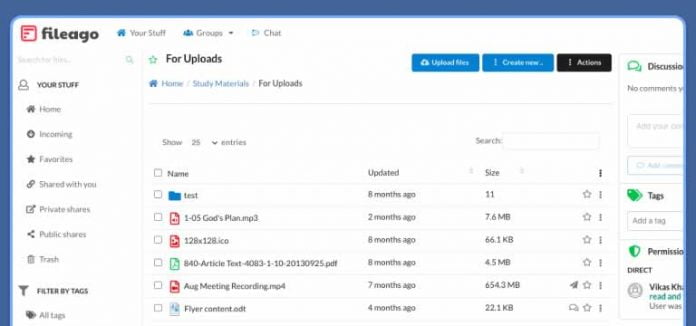
The UI looks very simple and easy to use. The initial user account that gets created also has administrator rights. Before trying to do anything, I quickly went ahead to create a couple of additional user accounts for my team and added them as members of a group.

I didn’t find any “invite users by email” option. It seems like FileAgo is geared more towards SMBs and enterprises, giving the admin of the organization the ability to manage accounts and groups themselves. That is good in a way if you look at it from a security perspective. 

Also, when it comes to migrating existing data, I see that the recommended method is to use a WebDAV client. I tried with both WinSCP and Cyberduck, and both of them were able to upload folder structures to my cloud storage without any issues.

It looks like FileAgo does not provide any client application (for sync or drive mount), but the fact is, even WebDAV is enough, to begin with. For example, configure FileAgo’s endpoint in Rclone, and you could easily set up sync or mount it as a network drive in your local machine.

Collaboration

Creating and editing documents was a breeze, thanks to Collabora Online Editor. I was also able to edit files using Office for the web (Microsoft O365 cloud editor), and they both performed very well. 

The choice of including two editors, both capable of handling real-time co-authoring, is too good to be true. By this move, FileAgo is catering to both open-source geeks (who will be more at home with Collabora Online) and enterprises (who obviously will be having O365 subscriptions already).

There are also other features that contribute to collaboration in general, like discussion (comments), event notifications (for e.g., all team members receive email alerts when you modify a file), and so on.

With great power comes great responsibility.” What uncle Ben said decades ago still holds true to this very day. What if someone from the team does something with the files and then not own up? This is a major concern affecting all collaboration software in general. FileAgo seems to have found the perfect answer for it, which is: 

  1. keep track of all user activities in an event log, and 
  2. simply preserve it forever

Apparently, all logs since the beginning will always be available to search and review whenever needed. This could be of great value for companies because they will always be able to trace back to the culprit even if the actual incident happened months ago but only came to light now.

FileAgo’s “Advanced” and “Enterprise” plans also come with live chat and video calls based on Rocket.chat and Jitsi.

Permission Model

And now, let me get into the most interesting topic regarding FileAgo, which is its permission model. 

In other products, we often find restrictions when it comes to allowing access/blocking others in files and folders. Consider the following scenarios: 

For example, you will be able to share a folder with another user, after which everything under that folder will be accessible for him/her. What if you also want to block access of the same user in a particular file that is present inside that folder?

What if the folder structure is three levels deep, and you want to implement read-only permission for a user on the parent folder, read-write on the child folder, and read-only again on the grand-child folder

What if you shared a folder with a group but want to give different permission for an individual user belonging to that group?

All this is actually possible to do in FileAgo! I tested them all with my team, and we were truly impressed by the flexibility of FileAgo’s permission model, which, I feel, is a combination of both Box’s waterfall permission model and the more common granular permission model. The FileAgo permission model seems to be better in all aspects.

Will there be a use-case for this? Yes — especially for organizations. I came across one particular blog post on the FileAgo website, which talks about the issues with box permission model, and what surprised me was that such complaints are still a regular feature in Box forums. It is evident that there are people out there who want it.

Final Words

My verdict is that FileAgo is overall a great solution for businesses that are looking for a file sharing and collaboration platform. There are obviously a lot of scope for improvements in the UI. Although the UI is simple, quick, and easy to use, it doesn’t have the latest look and appeal. Other than that, everything else in FileAgo simply works.

Don’t just take my word on this. If you are interested, go check out FileAgo and signup for a 30-day trial to explore it yourself. And if you do, don’t forget to come back here and share your thoughts in the comment section below.

VideoDuke: Advanced Video Downloader for Mac

VideoDuke

Currently, it is impossible to imagine the internet without YouTube. In its unlimited catalog, you can find answers to any question you may have simply by browsing through videos of all kinds: music clips, full-length movies, tutorials, educational videos, webinars, cartoons, etc. Unfortunately, YouTube content is available online only, as its creators do not provide the download feature. 

Even so, you can save your YouTube videos on your Mac without problems or outside help. For that, you will need a suitable software solution: a third-party application or browser extension or a subscription to YouTube Premium. And VideoDuke is one of the best third-party applications that can easily meet this challenge.

Among YouTube, VideoDuke is compatible with more than 1,000 websites with videos, such as Vimeo, Facebook, Twitter, Dailymotion, Reddit, etc.

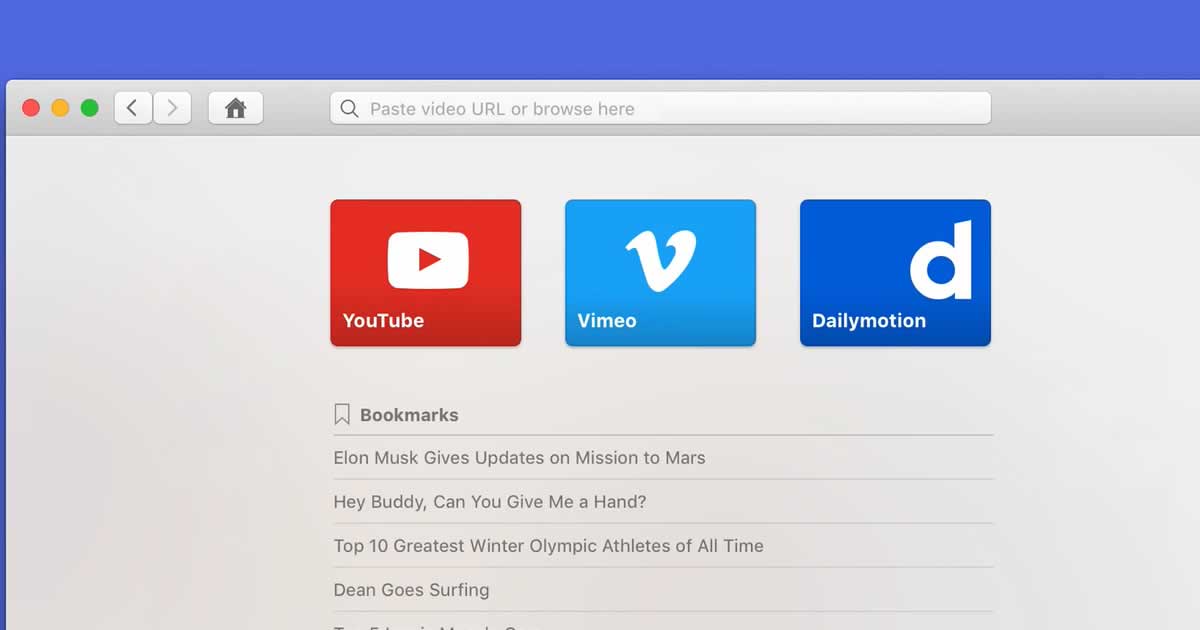
In addition to getting along with any page that contains online video, VideoDuke has the particularity of replacing Safari to facilitate downloading while browsing YouTube or others. That is, you do not have to copy and paste the link, when you find an interesting video, although you can also integrate it into the browser.

As a browser, VideoDuke allows us to search or open any website, save favorite links, etc.

VideoDuke 1

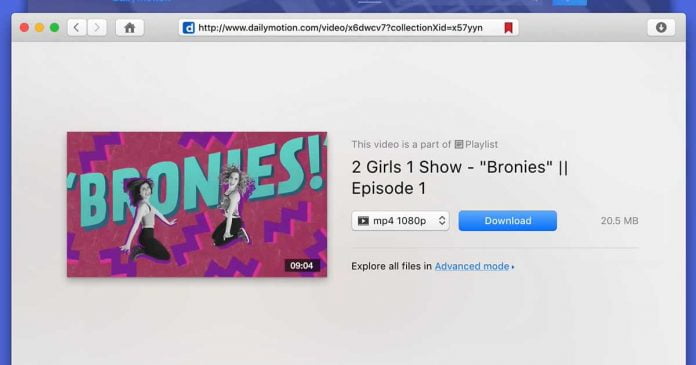
Another option to be appreciated is the choice of the video format and quality. You can save a wide range of video formats, for example, 3GP, MP4, M4V, FLV, in a desired resolution, including HD, 4K, and 8K videos, among others. Before clicking on Download, you will see the size of the downloaded video.

And if you only want the audio, you can choose MP3, WebM or M4A, among other sound formats.

To make everything as simple as possible, when we open a page, VideoDuke will show the detected videos in the lower panel. Another advantage is that you can log into YouTube and other websites.

VideoDuke not only downloads videos, it also allows us to attach the integrated subtitles or that we have in SRT, as well as save streaming video from live broadcasts, both HTML5 and RTMP. Another great attraction of this software is that it will allow you to save the channels and complete YouTube playlists that you want to have on your computer.

As you can see, downloading multimedia content on Mac is not as complicated as it often seems. All you need are the correct apps and tools to achieve it.

VideoDuke is one of the best video downloads Mac on the market, because it gives you all the comforts you want and that you have surely been looking for to download all the videos and music that you like so much on your computer.

How to Make Your Business as Secure as Possible

security tools for protecting your devices

The rule “safety first” extends to all branches of life. Because of that, many businesses put their security at the top of their priority list. If you are a business owner, you should think about doing the same thing!

Thanks to the growth of the Internet, every security system can be breached in many ways. Consequently, protecting yourself from cyber-threats and being one step ahead of criminals has become incredibly important.

If you are not careful, all of the legal documents and other personal information of both your clients and your employees that your company may possess can become an easy target for hackers and thieves.

Fortunately, we are here to help you! This article will provide you with useful information related to upgrading the security of your business. Check it out!

Secure Your Telephone System

You do not need to know what a PBX is to understand that phone hacking is a common practice. Both smartphones and office phone systems are at the risk of being hacked. A hacker simply has to call your office phone system while spoofing the caller ID.

If you are unaware of this, all the hacker needs to do is call your switchboard and press some buttons on the keypad to trick the answering machine into thinking that this is actually you calling in. Believe it or not, it is really that simple!

Make Security a Habit

One of the first steps you should consider doing is changing your way of thinking. Nothing is too small to protect, ranging from security cameras to office computers. On top of that, set a good password to your personal computer, update your operating system on a regular basis, and keep your devices safe while you are at the office.

Remember that if you are higher up in the company, you have access to more data than most other employees. As a result, you are most likely to get targeted. But implementing all of these changes should protect you from malicious software.

Keep Everything Clean

In addition to upgrading your security system, you should think about ways in which you can keep it clean. The first thing that comes to mind is patching. Simply put, this refers to repairing old flaws and mistakes in software updates.

You should make sure that you download all the updates from the developer’s official website. For example, if there is an update for Microsoft Word installed, you should download it directly from a website that belongs to Microsoft. Forget about shady websites with many pop-ups and questionable ads.

You may also want to install anti-virus programs on all devices used by your employees. Do it right after purchasing a new laptop or a desktop computer instead of waiting until problems occur. The same applies to mobile phones that you provide your employees with.

Anti-malware programs are cheap nowadays and worth every penny spent on them! It will definitely pay off in the long run!

Keep an Eye Out for Suspicious Activity

Of course, all existing tools are useless if they are not used the way they were meant to be used! Make sure that every employee knows how important it is so that they can effectively protect their devices. Additionally, security protocols must be set up for each device. With more people having access to the valuable data that your business is in possession of, it is more important than ever!

Video Surveillance

Never forget that hackers can easily get into your closed-circuit video surveillance. The truth is that those video surveillance cameras are just like any other electronic device. Since most of them are not complicated, they can be hacked into with relative ease. You might not be aware of this, but it is one of the most common ways how hackers can steal information from your office.

So, it is important to have some sort of CCTV monitoring system installed on your premises. Just be sure to implement additional security measures and have responsible personnel handle these devices so that they actually perform their function. Otherwise, they might end up serving as yet another access point that can be used by malicious actors.

The Bottom Line

Securing your business activities should be on the top of your priority list for 2021. Why is that the case? With the economic despair brought upon by the COVID-19 pandemic and the financial crisis that ensued, many people resort to crime just to make ends meet.

The era of halfwitted criminals is long gone — modern thieves and hackers are often highly skilled, intelligent individuals, pushed to the limit by their financial situation. You must not underestimate their ability to wreak havoc upon you and your business.

Hopefully, this article provided you with useful information on how you can make your business as secure as possible. Remember, do not hesitate to make much-needed changes, as it will help protect your people and assets!

Top Smart Home Gadgets That Are Actually Worth Buying

Apple Homepod Mini

Having a smart home has become quite trendy in recent years. Even though it can be a bit of an investment, many people consider it to be totally worth it. First of all, it can help reduce your electricity and water bills. Second of all, it is convenient and can make your life more comfortable!

Does that sound like something that you are interested in? If so, then you should consider purchasing a few smart home gadgets! But before you do that, you might want to determine what kind of devices will best suit your needs.

To make it easier for you, we prepared a list of five smart home gadgets you may want to consider. Do you want to know what they are? If that is the case, then keep on reading!

A Smart Garage Door Controller

Have you ever forgotten to close your garage door? That will not happen again if you buy a smart garage door controller! You should be able to install it without any major issues. All you need to do is attach the device and a pair of wires to your garage door opener and stick a special sensor to your garage door.

Once you are done, the sensor will be able to detect whether the garage door is open or not. It will send you a push notification whenever it detects that the door is open when it should not be. Moreover, you will be able to close it from wherever you are as long as you have access to the internet!

But keep in mind that if your garage door is not working properly, the device might start malfunctioning. For instance, it might start sending you notifications for no reason. When that happens, make sure to contact emergency garage door repair services in your area. They are guaranteed to find a solution to the problem in no time!

A Smart Speaker and Display

Smart speakers and smart displays are among the best smart home devices on the market! Both are voice-activated and make use of virtual assistant software, such as Amazon Alexa or Google Assistant. As a result, they can perform various tasks, ranging from scheduling appointments to making phone calls and managing e-mail accounts.

The only difference between the two is how they provide their users with results. A smart speaker will tell you what the results are out loud. A smart display will do the same thing, but in addition to that, it will present the results on a screen.

Now, why would you buy such a gadget if your smartphone and your computer can use the very same assistant software that it uses? The answer to that question is relatively simple – it is all about convenience. You will no longer have to use any of those devices! You will be able to ask questions or give commands by speaking from anywhere in the room. Pretty cool, right?

A Smart Thermostat

Do you want to save a considerable sum of money by reducing your heating and cooling costs? If that is the case, then buy a smart thermostat! But bear in mind that not all thermostats are created equal. The simplest models offer basic scheduling and programming options, while the more complex ones can control heating and cooling, as well as the dehumidifier and ventilation systems.

Once you consider this, it should come as no surprise that the prices of smart thermostats vary. But each model is equipped with Wi-Fi circuitry that will allow you to connect it to the internet. As a result, it can be controlled from a mobile device such as a or a tablet.

If you decide to purchase a more advanced thermostat, it takes everything a step further. It will track your daily comings and goings as well as take note of the temperature that you seem to prefer. That way, it will be able to create a heating and cooling schedule that is perfectly tailored to your needs! However, keep in mind that you are bound to pay more for such features.

An Ultra-Modern Security Camera

Keeping your home safe has never been easier! Thanks to security cameras that can connect to the Wi-Fi network inside of your home, you will be able to monitor the activity around your property even if you are away. But how does it work? Thanks to the fact that they have access to the internet, such cameras can send alerts, video clips, and live video feeds directly to your smartphone!

Now, there are many benefits of having a security camera. Most importantly, it can provide you with peace of mind by letting you see that your kids arrived home safely from school or that a UPS package you have been waiting for has finally arrived.

After you decide to make a purchase, you will have to choose between two types of home security cameras. The first type is a wireless security camera, which can be placed anywhere you want. The second type is a video doorbell, which is a security camera that happens to be built into a doorbell. While choosing between the two might be difficult, each type is guaranteed to make you feel much safer!

You Should Definitely Consider Buying These Gadgets!

All in all, there are many smart home devices out there that are worth buying. The ones that we mentioned above are only a small fraction of the available options. Because of that, you are bound to find what you are looking for in no time!

However, make sure that you really need a particular device before buying it. For instance, you might not be able to benefit from using a smart home device that works with Alexa and Google Assistant if you rarely ever use virtual assistants.

But once you find a smart home device that you know you will use daily, you should go for it! It will definitely prove to be extremely beneficial for both you and your family!

5 Important Business Benefits of Remote Interpreting

Remote Business Communications Tools

Remote Virtual Interpreting is a technology that allows you to provide your event’s translation in real-time through an offsite interpreter. Even before the pandemic, VRI was becoming an increasingly common practice, but now the need for these kinds of remote services went through the roof. Remote interpreting can benefit your business vastly, but what exactly does it do?

Virtual interpreting is the on-demand practice of translating meetings and events by a third party simultaneously. The interpreter works from a different location, and there is no need for him to be present in the same room; the only thing that he needs is a computer. It offers a lot in terms of quality and cost-efficiency, and because of that, more and more business owners decide to use it. Here are the five reasons why you should switch and start using remote interpreting services instead of traditional ones.

Flexibility

Everything is done remotely, so there is a lot of flexibility involved. No one needs to be present in the same room; hence the meeting can be set up everywhere, from the train or airplane to a beach in the Bahamas. The time that is saved on going from one place to another can be used in a lot more effective ways.

Working hours are also better, as you can hire interpreters from all over the world. You can always find services that will cover every time zone you need and provide constant support. It’s the ideal choice, especially for urgent, unpredictable business meetings and conferences. You can also add some additional language requirements with minimal effort.

Cost

When it comes to costs, remote interpreting is very cost-efficient compared to other translation and localization services. When setting up a potential business meeting, you have to count the costs of renting a place, travel, equipment, and other necessary fees. Then, you have to hire a translator for a longer time, as he has to be in the same place you are and he has to cover the expenses of getting to the right place. It always takes longer than a remote meeting, meaning that the hourly payments will be higher, and on-site interpreters mostly require a two-hourly payment minimum charge, whereas virtual ones often charge by the minute.

A simultaneous translator has to have his own space and expensive equipment on louder events, like a soundproof booth, and everyone present has to be given a headset. With remote interpreting, all your audience needs is a laptop or a smartphone.

Industry Fitted

In some settings, like legal or medical, the information has to be interpreted correctly. Many problems occur with written and phone communication methods, and they can be easily fixed using the VRI method. You can see the translator on the screen, including visual clues like the movement of the lips or hands. There is a smaller chance of gaps and missed beats that can happen when using the phone.

Since remote interpreters can work worldwide, you can choose from the best ones in their field, and be sure that you have a person with the right knowledge. Remote work can also decrease the risk of something going wrong when dealing with more sensitive situations like translating to a sick patient.

Availability

As mentioned before, due to remote work, there are more options about the interpreter’s choice, but that is not all – with VRI, you no longer need to worry about finding the translator who speaks the language you need right now. Interpreters cover all possible languages and dialects, so there is no need to worry that you won’t find anyone speaking the same regional language as your client or partner.

Owing to the video chat, you can now hire a remote translator who uses sign language. As every country has its own sign language, it’s sometimes almost impossible to find the right interpreter, for example, a German sign language translator in France.

Safety

Given that we have been locked in our homes for over a year now due to COVID-19, remote services are becoming more and more reasonable, as they limit the chances of spreading the disease. With remote interpreting services, you can organize conferences, meetings, and events without risking people’s lives and health. It may also prove to be more inclusive — it’s all done over the internet, so no one needs to cover travel and accommodation costs.

The Bottom Line

The last few years have shown us that remote services are the future. They are faster, more flexible, cheaper, and more inclusive. The benefits greatly outweigh all the disadvantages. If you are interested in interpreting services, try to find a reliable company that can guarantee you professional service and utmost care. You rarely need to worry about any equipment or time zone. It’s all easily accessible and can be done from anywhere. Remember to look for interpreters suited for your needs and with good, professional reviews.

5 Tips for Better Communication with Your Workers

Business collaborations

Good communication among employees is one of the most important parts of operating a business. Ultimately, a good relationship within the organization makes the company grow, allowing a manager to build a strong, motivated team. In the long run, a committed and loyal team helps the company achieve grand success in the field.

Therefore, the importance of good communication in your organization should become the ultimate goal of your everyday work as a company leader. The tricky part? Not every manager is naturally born with amazing communication skills. For those who might be struggling with establishing good communication with their workers, we’ve got a solution. Follow the article to find out more:

Choose Modern Solutions

To ensure better communication with your workers, think about the means of communication that will help you achieve your goal. For fast and effective communication, you should choose modern solutions, such as digital communication software and specific apps that can help you exchange information. For example, websites such as www.faxburner.com will also allow you to finally get rid of old machines lying around the office and conduct your business faster.

Get Rid of Unnecessary Information

To communicate with workers in a simple, clear, and effective way, you should go through all your communication channels. In offices, especially in the corporate world, teams use email as a primary channel of communication. Many employees share the same email address to make work faster and easier. But it’s not always a good idea. This approach can significantly increase the workload of your employees because they will be flooded with the information they don’t need to know.

The solution is to create individual profiles for workers and assign each one to a mailbox. The process will help you stay on top of who needs what and when. Besides, it’ll help you make sure that your account doesn’t have numerous messages from different clients.

Bond with Your Team

Remember that leadership is a conversation. Foster a positive work environment where members can freely express their opinion and are not afraid to ask questions if they don’t understand something. You should learn how to communicate with an employee, especially if he disagrees with you. Do it without raising your voice or threatening them with punishment. If you believe that an employee doesn’t fit into the company culture or his performance doesn’t match expectations, be honest and straightforward about it without blaming him or her for everything that happened in the office since last Thursday.

Team events and contests will help you build emotional bonds among coworkers and ensure better communication within the company. You can organize team vacations or neighborhood parties to keep communication with your employees fresh and stimulating. 

That’s why planning those activities that promote collaboration inside the team is highly recommended. Everybody should be identified as an important member of the company.

Be a True Leader

One of the most important tips for better communication with your workers is to allow them to speak openly about their ideas, opinions, and problems. You should build your team on the values of trust and respect towards the voice of others. Try to think about yourself not as the dominant, authoritative figure but as a supporting and motivating leader that employees can respect and ask for help.

Stay aware of all the facts that can affect your team’s productivity and happiness. An important aspect of successful leadership is to make your employees feel valued. Therefore you must always keep them updated.

Moreover, it is important that you analyze if the decisions that you are making are in the best interest of the whole team, or if they benefit only a few people. You should always look for solutions in which your workers feel included and compensated. Make sure that their interests are protected from possible failure points.

Be Flexible

Successful companies are always flexible. No matter what’s happening around, they have a plan B (and even C if needed!). Modern companies take a turn, allowing the overall company strategy to be constantly evolving, changing, and improving. As a leader, you should be flexible with your ideas. If you want to see some changes or take a different direction, inform your team about it as soon as you can. Your employees won’t read your mind, but they would totally appreciate more transparency in the company. 

The Bottom Line

When creating new working strategies or applying changes to existing ones, there’s always some sort of confusion within your team members. They may not understand whether a certain practice is completely forbidden or if they should follow it under certain circumstances. If you want to build trust with your employees, then you must establish clear, detailed rules for them to follow. 

If they know how exactly they are supposed to behave or produce results, then they will respect both your requests and themselves. They will also work better in a culture where failure is considered something normal and even expected sometimes. Reward those who try harder or come up with creative ways to solve problems instead of blaming them for not being prepared enough before attempting something new that might have been unsuccessful in advance.

How can citizens living in remote areas get quality Internet Services?

Fibre Optic Broadband

Rural areas deserve the best services like the rest of the locations in the United States. However, that is not the case. Due to their remote location, most technological infrastructures don’t reach the rural districts at all. The deployment of such tech is not only difficult due to the geographical location and conditions, but they are also expensive to install. Most internet service providers base their services in urban cities because of the great return on investment. The population index is more suitable in metropolitan cities than in rural ones.

Regardless of that, everybody deserves a stable and reliable internet connection. Our lives are revolving around the power of internet connectivity. We need it for communication, for our workplaces, for giving quality education as well as for optimum medical services. We cannot always choose our area of living. You may have to move to a rural location due to work situations or you may simply be a remote area resident from the beginning. The government needs to step up and make sure that every location within the country gets equal opportunities for advancements.

This is where Satellite technology comes in. It is simply the best way to get connected to the entire world without worrying about not having a network of cables or fiber for telecom services. HughesNet is just such an ISP that is providing premium telecommunication to all the states in the USA. Wherever you are, and wherever you travel to, as long as there’s a view of the southern sky, you will have their powerful connectivity at your disposal. HughesNet internet packages offer internet plans that are perfect for single as well as multiple users. 

HughesNet Technology

HughesNet has recently launched their high internet capacity satellite, EchoStar XIX. Their new Gen5 technology is perfect for providing high-speed internet overall data plans. There is a consistent speed of 25 Mbps which is just enough for all kinds of internet usage. So, whether you’re an online gamer or a common internet user, you will get constant service without glitches. You can stream online data content, download and upload office or educational documents, stay in touch with friends and family on video calls without a worry in the world.

We’re going to take a look at the different plans that HughesNet is offering as well as their price. You can choose any one of them according to your own or your household’s specific needs and requirements.

Although, if you recently moved from an urban city with a high-speed cable or fiber-optic internet then you shouldn’t compare those speeds with satellite internet technology. A signal has to travel a long distance as the satellite orbiting the space is located at a huge distance from Earth. The latency rate is therefore higher than with the wired networks.

HughesNet Internet Plans

HughesNet PlanDownload SpeedPricingContract Term
10 GB Plan25 Mbps$59.9924 months
20 GB Plan25 Mbps$69.9924 months
30 GB Plan25 Mbps$99.9924 months
50 GB Plan25 Mbps$149.9924 months

As you can see above, HughesNet has kept all its plans simple and straight. There are no confusions at all. You will be bound in a contract but since you’re residing in a location with no other choice of connectivity, the contract doesn’t dampen the deal.

HughesNet Service Perks

With HughesNet, you get the most affordable satellite internet. Their name is synonymous with reliability and consistency. There are no hard data caps so the service is never canceled or terminated. There are no hidden charges and no extra fees for going above your listed plan data limit. The provided speed is there as it is. It doesn’t go through service glitches other than when there are certain weather conditions or technical issues like broken equipment and such.

If you’re not satisfied with the data limit or somehow end up using all the data before the end of the month, you will not be left without connectivity. The speeds will be reduced to 1 to 3 Mbps which will be enough for regular usage. However, if you don’t like using the internet at slow speeds, then you can buy HughesNet data tokens at any point during the month.

Bonus Zone Free Data

Still not happy and satisfied? Go on and try their Bonus Zone. With all the HughesNet internet plans, the customers get the opportunity to avail of 50 GB of free high-speed data between 2 a.m. and 8 a.m. Try limiting all your heavy data usage to these hours if you want to save up on precious data. Additionally, you will not see any price increments at any point during the tenure of the service.

HughesNet also offers the Video Data Saver option to all its customers. The video quality is automatically reduced to standard definition to save the listed service data.

HughesNet Internet Speed

You don’t have to worry too much about the internet speed with HughesNet. The advertised speed is constant over all data plans which means that you don’t have any options for increasing the bandwidth by investing in an expensive plan. HughesNet is focused on delivering outstanding services with uncompromising quality. While other satellite providers promise fast speeds, HughesNet delivers on its commitment which was also proven after an analysis done by FCC on fixed broadband speeds. The 25 Mbps speed works amazingly well for all kinds of internet usage.

HughesNet Equipment and Installation

Satellite equipment is extremely expensive. That’s why satellite internet providers charge more for their services than other ISPs. HughesNet is offering a free dish antenna with all its internet plans. The in-built Wi-Fi modem can either be leased for a price of $14.99 per month or it can be bought straight off for a one-time price of $449.99. There is no activation fee if the modem is bought. However, you will have to pay $99 if the equipment is leased. The installation requires technical assistance so pre-book it for an easy day.

At HughesNet, the customers come first. You can call customer services, talk to a representative and get issues fixed. You can also use the live chat button on the Localcabledeals webpage and get in touch with a representative directly without waiting.

Etcher vs. Rufus: Detailed Comparison Guide

USB4 is ready now

A few years back, it was impossible to convert a USB drive into a bootable drive. But today, the story is different. Thanks to advancements in technology, we now have Rufus and Etcher at our service. But what exactly are they? 

Etcher (also known as balenaEtcher) is a free, open-source utility used to burn image files to store files for creating USB flash drives and bootable SD cards. It can easily work on several operating systems like Linux, Windows, macOS, among others. 

On the other hand, Rufus is also used to create bootable USB flash drives with ISO files for free. Rufus is much more popular than Etcher and is loaded with more features than the latter. 

What is so special about Etcher And Rufus?

Both tools come with a list of features to offer maximum comfort to their users. Let’s begin with Etcher, shall we?

Features of Etcher:

  • Frame a bootable USB flash drive. 
  • Instate live CD versions of Tux2live, Clonezilla or GParted. 
  • Works well with syslinux boot menu (same version) in zip/ISO file. 
  • It’s easy to learn and operate. You won’t have to go through a complicated installation process. 
  • It has a beautiful graphical interface and won’t allow you to get bored while burning SD cards. 
  • It helps to validate the burning of an SD card. This will help you to detect corrupt cards. 
  • You’ll get regular updates for this software. Meaning, all the latest features will be at your disposal. 

Features of Rufus:

  • It’s absolutely free and can be used for commercial/personal purposes. 
  • Frame DOS-compatible environment to operate legacy tools with MBR partition scheme and FreeDOS. 
  • Easily format the USB flash drives to UDF, FAT or ReFS file systems, edit volume label, set cluster size, among others. 
  • It can be used to compute the SHA-256, MD5 and SHA-1 hashes of the recently selected image. 
  • It has a modern UI with UAC elevation. 
  • The software is pretty lightweight. You can install it on most Windows PC/laptops, and it won’t put pressure on it. 
  • It comes with an auto-update feature. You won’t have to stay awake to install updates manually. 
  • It has support for different languages, and you can adjust the cluster size without any trouble. 

What are the system requirements to install Etcher and Rufus?

Both software programs are quite different in nature. This can be proved with their system requirements. If you want to install Rufus, you need Windows Vista, XP, 7, 8, or 10 (32 or 64 bit). Along with this, you need a USB flash drive with 8 GB capacity (at least). 

For creating Etcher USB, you’ll need either Windows, macOS, or Linux systems to install it with flying colors. 

How can you operate Etcher?

Keeping convenience in mind, this tool doesn’t require an installation process. Just visit its official website and download the file (based on your operating system). Once that is done, follow the below-listed steps. 

  1. You’ll get three options to select the ISO files- clone drive, flash from file and flash from URL. 
  2. For a bootable USB flash drive, choose an ISO file from your PC/laptop and tap on ‘Select Target’ to select the USB flash drive. 
  3. To begin the burning process, tap on ‘Flash’ button. 

And the process is complete. 

How can you operate Rufus?

Right now, Rufus only works on Windows and doesn’t require any installation process. To frame a bootable USB flash drive using Rufus, open its official website and follow the below stated steps. 

  1. Download the file to see Rufus’s interface. 
  2. When you click on the ‘Device’ section, Rufus will select the detected USB flash drive (automatically). 
  3. In the ‘Boot Selection’ section, tap on the ‘Select’ button to pick an ISO file. 
  4. Configure the file system, partition scheme and volume label as per your needs. 
  5. Tap on the ‘Start’ button to begin the process. Finally, tap on ‘Ok’ to continue. 

Etcher vs. Rufus: Who’s the winner?

Honestly, there is no clear winner between the two. Let us explain. Most people believe that Rufus is better than Etcher when it comes to extra features. Also, there is a risk of data failure/loss when using Etcher, as it has a system drive for detected target drives, which is dangerous and may destroy the data if users choose system drive by mistake. This doesn’t happen with Rufus, as it doesn’t list the local drive. But when it comes to the operating system, Rufus only works on Windows. Whereas, Etcher is functional on Linux/macOS. 

Therefore, both the tools have their pros & cons, and it depends on the user’s requirements when it comes to choosing between the two. 

Etcher and Rufus have made it easy for users to convert a USB drive into a bootable drive. Both come with useful features and have the potential to help the user in their manner.