Home Blog Page 108

31 New Vulnerabilities Discovered in AMD Processors: A Comprehensive Overview

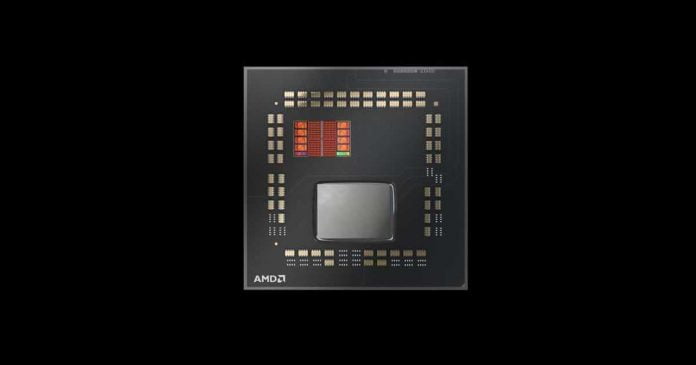
AMD Ryzen 7 5800X3D

AMD has discovered 31 new vulnerabilities in its chips, including the Ryzen and EPYC series. Several mitigation methods for unprotected CPUs have been created, and an update has introduced several types of AGESA (the code discovered while constructing the system’s BIOS and UEFI code).

Ryzen 2000, Ryzen 5000 APUs, Ryzen 2000 APUs, Ryzen 2000 mobile, Ryzen 3000 and Ryzen 5000, as well as server AMD Threadripper 2000 HEDT and Pro and AMD Threadripper 3000 HEDT and Pro, are among the CPU series impacted. In addition, the company has detected 28 vulnerabilities in EPYC processors, with four models labelled as “high severity”.

AGESA updates have been issued to Original Equipment Manufacturers (OEMs) due to the nature of the vulnerability, and patch distribution timings will vary by vendor. Instead of waiting for the firm to release it later, consumers could check the vendor’s official website to see if a new update can be downloaded.

In addition, the company published a paper in partnership with teams from three major corporations: Apple, Google, and Oracle. They’ve discovered one “high severity” vulnerability and two less severe ones that need to be repaired. All vulnerabilities are exploited via the BIOS and ASP bootloader (also known as the AMD Secure Processor bootloader).

These vulnerabilities can be fixed with BIOS upgrades. However, keep in mind that motherboard makers may behave inconsistently. Users must maintain their systems up to date to defend themselves from any assaults.

NortonLifeLock Customers Notified of Credential-Stuffing Attacks on Norton Password Manager Accounts

Norton Password Manager

NortonLifeLock, a software development business specialising in information security and information protection, has notified clients of a data breach, alerting them that hackers have successfully infiltrated Norton Password Manager accounts in credential-stuffing assaults.

According to the notice, an attacker attempted to enter Norton customer accounts around December 1, 2022, using username and password pairs purchased from the dark web. On December 12, 2022, the company discovered “an extraordinarily large amount” of unsuccessful login attempts, indicating credential stuffing assaults in which threat actors test out credentials in mass. The company had finished its internal investigation by December 22, 2022, which determined that the credential stuffing assaults had successfully compromised an unspecified number of consumer accounts.

The alert advises users who use the Norton Password Manager service that the attackers may have accessed information kept in private vaults. Depending on what users put in their accounts, this might compromise other online accounts, the loss of digital assets, the exposure of secrets, and other consequences. The company also emphasises that the danger is especially high for individuals who use similar Norton account passwords and Password Manager master keys, making it easier for attackers to pivot.

NortonLifeLock has reset Norton passwords on impacted accounts to prevent attackers from getting access to them in the future and has also deployed additional security measures to resist fraudulent efforts. Customers are advised to set two-factor authentication to secure their accounts and to take advantage of the offer for a credit monitoring service. The company has not disclosed how many people were affected by this incident.

The company’s systems were not breached during the attack. Still, the attackers could obtain customers’ data and passwords using username and password combinations purchased on the dark web. This emphasises the significance of having unique and strong passwords for all online accounts and activating two-factor authentication for enhanced protection.

LastPass, another encrypted password manager, said last month that hackers were able to copy a backup of user vault data in a recent data breach.

Nvidia’s Eye Contact Feature: Improving Streaming Experience with Artificial Intelligence

Nvidia Eye Contact

Nvidia’s Broadcast streaming software was upgraded to version 1.4, offering a few new features, the most noteworthy of which is the Eye Contact function. This function assures that the user is constantly looking at the camera, even when they are not. 

The neural network analyses the picture such that the user on the screen seems to be staring straight into the eyes of the person with whom they are conversing. According to Nvidia, “simulated eyes” will be the same colour as actual ones and can blink naturally. If the streamer looks away too much and Eye Contact is overwhelmed, the function will switch off so that the person on the screen does not appear utterly weird.

Nvidia believes that the new functionality will be especially useful for people who wish to stream while reading their notes or script or who just want to avoid eye contact for some reason. The company notes that Eye Contact is currently in testing mode, so picture processing may not always be perfect. There are millions of eye colour and lighting combinations, all of which influence how Eye Contact works, so users may test and develop the new function.

The Verge published a video explaining how the new functionality in Nvidia Broadcast works by combining two images: one with Eye Contact turned off, and one with it switched on. The function needs to be enhanced; however, it does work very well in some places. This functionality is not restricted to Eye Contact; Nvidia Broadcast 1.4 also has a vignette effect and better options for blurring, replacing, or deleting backdrops. The upgraded application will only function properly on PCs equipped with Nvidia GeForce RTX graphics cards.

Nvidia’s Eye Contact feature is a terrific tool for streamers who want to verify that their audience is looking at them directly; however, the technology is not yet complete. The company is still improving its function. With technological improvements, we may anticipate more features like this soon.

What Is a Return Merchandise Authorization (RMA)?

Safely Shop Online

If you are a business owner, you know that handling client returns can sometimes become a hassle.

That is why it is in your best interest to comprehend the entire refund procedure, including how you can utilize return merchandise authorization codes to monitor returns and ensure you take the suitable steps to process them.

So, what does RMA stand for? In this blog post, we will discuss return merchandise authorizations and explain how to issue them. Let’s get started.

What Is RMA?

A return merchandise authorization is a numbered approval provided by an eCommerce merchant or mail order to permit the refund of an item.

Most sellers have a policy concerning returns. For instance, some businesses allow only defective goods to be returned; others, when it comes to software, allow items to be returned only when they’re unopened. Based on the seller’s returns policies, a refund may be issued or a shop credit given to the buyer. On the other hand, returns might be denied when an item is outside its warranty period or returns window.

How Does RMA Function?

The client service department typically assigns the number while processing the request. The special form will list the rules regarding the returns and any special guidelines on how to pack and ship the item back to the seller. It might also ask for customers’ feedback on why they’re returning the goods.

Items returned without this number can be refused or subject to restocking commission by the sellers. Thus, it’s essential to get an RMA before replacing any products.

Do You Require an RMA System?

If you have an eCommerce business that sells goods, you should probably utilize a return merchandise authorization system.

Requests for a refund might be frustrating, but it is vital to remember that they are also a normal part of running a business. For example, they typically grow during the holiday season, when individuals buy presents for family members and friends.

Keep in mind that because your clients are buying online, they cannot try out or touch the merchandise before they buy it. Consequently, there is always some risk that the item will not meet their expectations. A decent RMA strategy lowers customers’ purchase risk, letting them fix wrong buying decisions. In addition, by growing customer satisfaction with the purchasing experience, sellers may stay strong in the tough competition of online stores.

Utilizing an RMA system is essential to help keep a good reputation for companies and keep clients returning for more. Remember that while it is impossible to avoid refund requests, there are some things you may do to minimize them besides having an airtight RMA system. For instance, ensure your Refund and Return Policy is clearly stated on the website and contains detailed rules for how to ask for a return.

You also need to consider providing a voucher or discount for clients who agree to keep the product they bought rather than replace it. By taking these actions in tandem with an RMA, you may help reduce the number of refund requests you get.

Conclusion

As stated above, the RMA procedure benefits any online merchant because returns are now very common. Also, according to many clients, an excellent eCommerce merchant allows them to return the items quickly without any hassle.

It will not be wrong to say that the RMA is the core of refund management in the online selling business as far as returns are concerned.

Exploring the Possibility of Using Humans as Antennas in 6G Technology

People using smartphone

While 5G technology is still being deployed in certain areas, scientists and engineers are already planning for the 6th generation of wireless communication. 

Visible light communication (VLC), which employs light in the range of 380 to 700 nanometres, that is, light visible to human eyes, is one of the proposed 6G technologies. This technique is considered a viable alternative for 6G since it can be broadcast via LED lights, ubiquitous in our daily lives, and received by any device equipped with a camera.

However, there is a disadvantage to VLC, which are radio waves, known as RF, which have been seen to arise during the transmission of information. This wastes substantial energy that could be utilized for other reasons. A team of scientists from the University of Massachusetts Amherst has offered an intriguing solution to this problem — utilizing humans as antennas.

The scientists proposed a 6G technology that would utilize humans in various ways, including information transmission and receiving, as well as the utilization of leftover energy. They built an antenna out of coiled copper wire to detect energy leakage and tested it on various surfaces, including wood, cardboard, plastic, and steel. However, they discovered that when the coil came in touch with the human body, it was most efficient in capturing energy losses.

This pushed the team to create Bracelet+, a bracelet worn on the upper forearm. According to the researchers, depending on the consumer’s preferences, it may also be customized to be worn as a ring, belt, anklet, or pendant. The bracelet costs approximately 50 cents to create, and the energy harvesting is good enough to be directed into smartphone apps such as health monitoring apps.

The concept of using humans as antennae for 6G technology is intriguing, but it remains to be seen if the public would embrace it. With the rise of mobile phone conspiracy theories and the production of anti-radiation mattresses, finding someone ready to wear such a bracelet may be difficult. However, because 6G technology is a few years away, the team has time to work on enhancements and handle any issues.

Introducing the Core i9-13900KS: Intel’s Most Powerful Limited Gaming Processor with a Boost Clock of 6 GHz

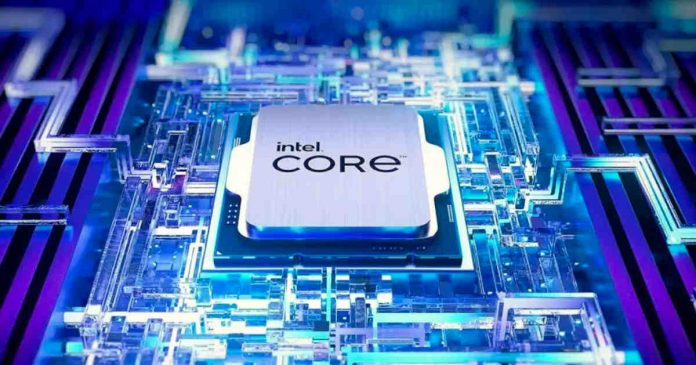
Intel Core i9-13900KS with Boost Clock of 6 GHz

Intel has released its latest and most powerful CPU, the Core i9-13900KS in the Raptor Lake series. This processor boasts a boost clock of 6 GHz, making it the fastest processor from Intel yet, with previous models like Intel Core i9-13900K reaching a peak of 5.8 GHz and also ASUS Extreme Overclocker team has successfully overclocked an Intel Core i9-13900K to over 9GHz. 

The chip has a processor base power (PBP) of 150W, which is 25W higher than the 13900K, making it the world’s most power-hungry desktop PC processor in base TDP. Intel has specified a maximum turbo power (MTP) specification of 253W.

However, there are no other new features, just a clock increase. The 13900KS, like the previously announced 13900K, features 8 performance and 16 efficient cores in a large and small array. The only difference is that Intel boosted the chip’s speed by 200 MHz across the board, bumping the max turbo to 6 GHz and increasing the thermal design power (TDP). The Turbo Boost Max 3.0 frequency for the P-cores has also been increased by 100 MHz to 5.8 GHz and can reach this clock rate under load on individual cores as long as the power consumption and temperature remain within limits.

Intel’s demo showed the chip achieving 6 GHz on two coresusing Corsair’s all-in-one liquid cooler. However, this test ran the 7zip benchmark, which isn’t particularly taxing, especially when limited to 2 cores.

Intel also doesn’t show what temperatures the chip recorded in these tests. The chip’s peak frequency relies on Intel’s Thermal Velocity Boost (TVB) technology, which means the chip must be below a preset temperature (70°C) to reach a peak of 6 GHz. A custom liquid cooling system will bring out the maximum performance.

TVB refers to a boosting algorithm that allows for higher clock speeds based on the amount of thermal headroom and available power budget. As long as the chip is cool and has access to power, it can continue to boost to its maximum speed.

The Core i9-13900KS is compatible with LGA 1700 motherboards and

the Intel Z690 and Z790 chipset. A UEFI update is already available for most models on the manufacturers’ websites and should be used for optimal performance. However, the motherboards can also start with an older version, making it easy to update after purchase.

The Core i9-13900KS is Intel’s first CPU that can run at 6 GHz

out of the box, and it is directly aimed at gamers and enthusiasts. It is a

strong CPU that supports DDR5-5600 and DDR4-3200 and has 8 P cores, 16 E cores, 32 threads, 32MB L2 cache, and 36MB L3 cache. However, it is a limited edition, available only in limited volumes.

The new top model is available from retailers today for $700, which is $110 more than the Core i9-13900K.

How to Uninstall Windows Updates If They Cause Errors

Uninstall Windows Updates

Microsoft releases security updates for Windows at regular intervals to fix the latest bugs found on your system and prevent hackers and viruses from taking over your system. Due to the complexity of Windows and, above all, since Windows is installed on computers with different types of hardware, some updates could be defective, causing new instability problems or even causing the operating system to freeze (BSOD or blue screen error).

If we have encountered this unpleasant problem, we can fix it by applying one of the methods described below to uninstall the Windows updates that cause errors or malfunctions.

This guide will be based on the latest operating system supported by Microsoft, namely Windows 11. Still, many of the proposed changes or solutions can be applied to Windows 10, Windows 8.1 and Windows 7 too.

Uninstall Windows updates from Settings

In Windows 10, you can view the update history by opening the Settings app from the Start menu, heading to the Update and Security menu, selecting Windows Update, and then clicking on the View update history option.

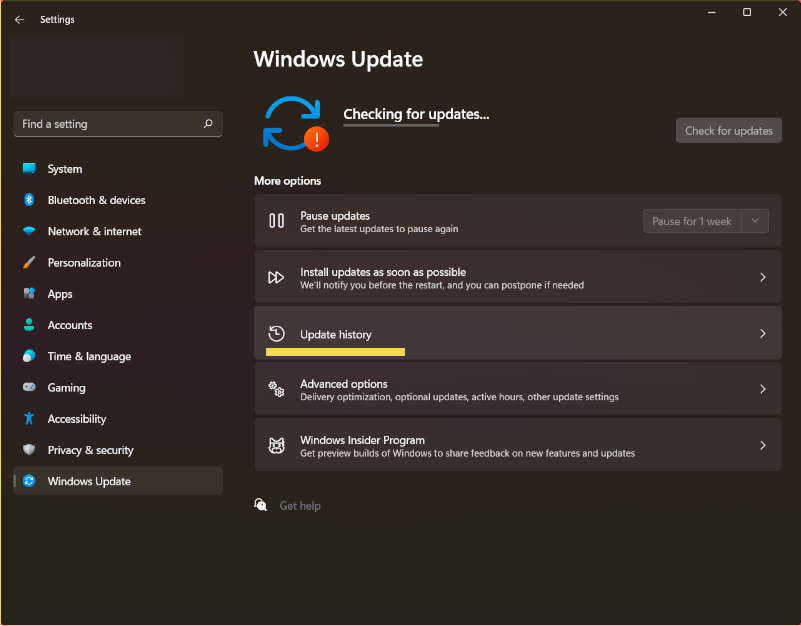
In Windows 11, it’s the same thing, only that the update history is located in Settings > Windows Update > Update History.

Uninstall Windows updates from Settings

Once this window is open, scroll down and click on Uninstall updates to open the specific window where you can uninstall the most recent updates (those we suspect have caused the problem with Windows).

If the update has changed the current version of Windows 10 or Windows 11 installed (i.e. we have installed a major update), we can uninstall it and go back to the previous version to continue using the computer without problems; however, avoid skipping too many major updates, which might result in other security issues.

Uninstall Windows updates from Control Panel

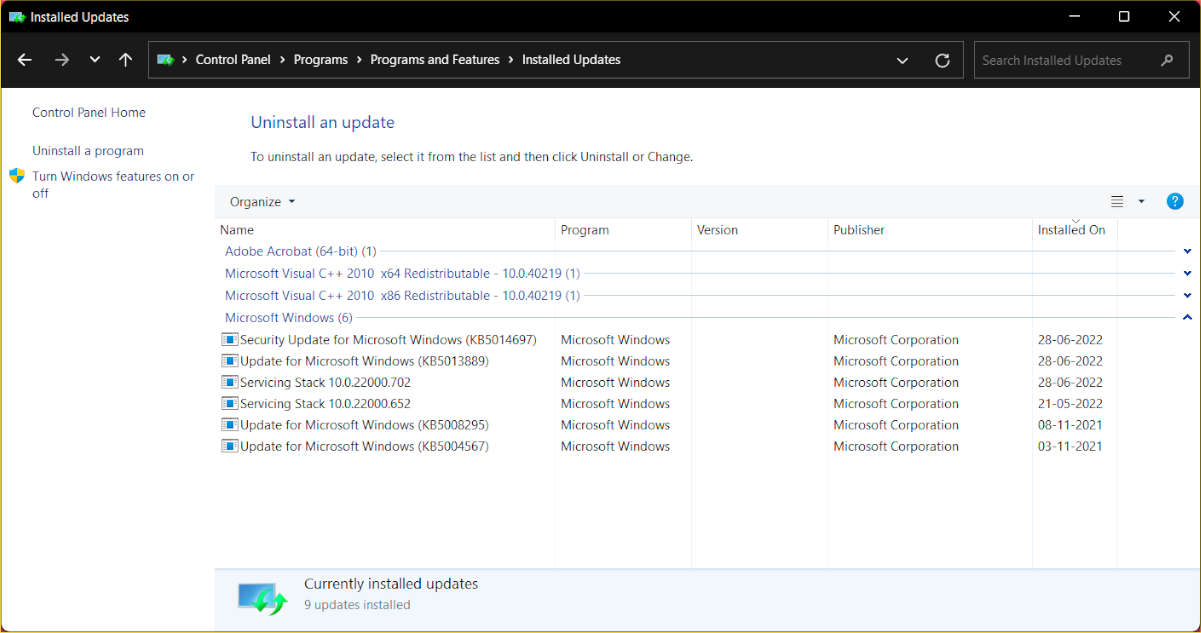
Open the Control Panel (we can always look for it from the Start menu) and click on Uninstall a Program to delete patches and updates the old-fashioned manner on any version of Windows (under the Programs section). From the uninstall programs window, click on View installed updates from the options on the left and look for the updates to remove.

Uninstall Windows updates from Control Panel

For convenience, we can use the search box and write the abbreviations (for example, KB2982791 and KB2976897 ) or search for them manually by sorting the updates by installation date (click on the header of the column Installed on ). Having identified the update to be removed, right-click on it and remove it. Windows may ask you to restart your PC to complete the operation.

Uninstall Windows updates from the Command Prompt

For geek and expert users, it is also possible to uninstall updates from the command prompt using the WUSA(Windows Update sandbox) tool. In this situation, you must know the version of the update (KBXXXXXXXX) that you wish to uninstall and input it by hand to avoid errors.

To do so, press the Windows key, enter cmd.exe, right-click Command Prompt, and select Run as administrator to open a command prompt with administrative rights. Once the black Prompt window is open, we can remove an update by writing the following command:

wusa /uninstall /kb:2982791

Obviously, the KB string must be replaced with that of the update that caused problems or that we want to remove immediately.

Remove Windows updates on a locked PC

Suppose the computer does not start or is completely locked out after performing a new update. In that case, we can restore to a known working version of the system by starting the recovery console and pressing Troubleshoot, then on Advanced options and finally on System recovery.

We select the system to restore and wait: with a little luck, we will go back in time before installing the update.

Suppose we cannot start Windows 8.1 or Windows 7. In that case, we can repeatedly press the F8 key when starting the computer and remove the updates using the latest restore point, selecting the Last known good configuration.

Fortunately, errors in updates are not frequent. Still, they can always happen, and since we work on computers, it is worth knowing all the methods available to remove the problematic updates.

NVIDIA and Intel Accelerate AI Computing with Hopper H100 GPUs and 4th Generation Xeon CPUs: A 25x Efficiency Boost

NVIDIA Hopper with Intel Xeon

NVIDIA announced an updated line of NVIDIA Hopper accelerated computing systems powered by its proprietary H100 Tensor Core GPU and 4th Gen Intel Xeon Scalable processors. The new combination of hardware is touted to offer up to 25 times more efficiency than previous-generation machines.

NVIDIA’s new system, the NVIDIA DGX H100, is powered by Intel’s 4th Generation Intel Xeon Scalable processors, known as the “Intel Xeon CPU Max Series” and “Intel Data Center GPU Max Series,” to boost data centre performance, and efficiency, security and AI Performance. This new generation of processors brings new capabilities to the cloud, network, edge and the world’s most powerful supercomputers.

One of the major new features of Intel’s 4th generation Xeon processors is support for PCIe 5.0. This doubles the speed of data transfer from CPU to GPU. This enables higher GPU density and faster networking within each server, boosting performance for data-intensive workloads such as AI, increasing network speeds up to 400 Gbit/s per connection, and increasing network speeds. Accelerate data transfer sequence between server and storage.

The NVIDIA DGX H100 system pairs Intel CPUs with eight NVIDIA H100 GPUs. The NVIDIA H100 GPU is the company’s most powerful chip, with over 80 billion transistors, making it the perfect fit for Intel’s new processors. It also has unique features ideal for high-performance computing workloads, such as the built-in Transformer Engine and the highly scalable NVLink interconnect, to power large-scale AI models, recommender systems, and more.

In addition to the NVIDIA DGX H100 system, several of NVIDIA’s partners have also announced their server systems based on this new hardware combination. Companies like ASUS, Atos, Cisco, Dell, Fujitsu, GIGABYTE, HPE, Lenovo, and Quanta have all announced products with Intel CPUs.

NVIDIA claims the new system can run workloads 25 times more efficiently than traditional CPU-only servers and consumes significantly less power due to its amazing performance-per-watt. Additionally, compared to its previous-generation NVIDIA DGX system, the latest hardware is 3.5x more efficient for AI training and inference workloads, with a nearly 3x lower cost of ownership.

The software that drives NVIDIA’s new system is also substantial. All new DGX H100 systems come with a free NVIDIA Enterprise AI license. It is a cloud-native set of AI development tools and deployment software, providing users with a complete platform for their AI initiatives.

Additionally, according to NVIDIA, a customer can purchase multiple DGX H100 systems in the form of his NVIDIA DGX SuperPod platform. It is a small supercomputing platform that delivers up to 1 exaflop of AI performance.

With these announcements, it’s clear that both Intel and NVIDIA are establishing themselves as leaders in the HPC and data centre space, focusing on performance, efficiency, and AI capabilities. The combination of Intel’s new Xeon processors and NVIDIA’s H100 GPUs provides a powerful platform for enterprise customers, researchers, and organizations looking to accelerate AI workloads.