Home Blog Page 131

Data Labeling For Machine Learning: 5 Things To Know

Artificial Intelligence in Neuro Sciences

With so much data used on the internet, it’s important to have powerful methods in place to recognize data and organize it to be found by the right algorithms. One of the most effective methods of identifying data is data labeling. 

In machine learning, data labeling involves identifying raw data, such as images and videos, and adding one or more informative labels to create context so that a machine learning model can find it and learn from it. 

If you have large amounts of data you want to utilize for machine learning (ML), you need specific tools and people to enhance it so you can effectively tune your model. Many businesses hire professionals such as data annotation specialists to take on the task of data labeling.

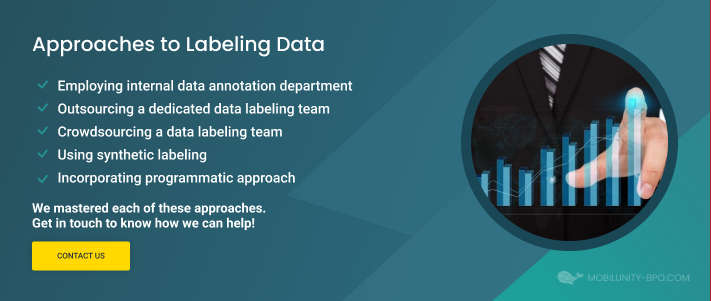
Labeling data
Source: https://mobilunity-bpo.com/full-guide-to-data-labeling-in-machine-learning-and-ai/

Top Qualities a Dedicated Data Annotation Specialist Should Have

When looking into hiring a data labeling professional, it’s important to know which skills and experience to look out for. Here are some of the top qualities a data annotation specialist should have to complete certain tasks and take on specific responsibilities:

Ability to work on repetitive tasks efficiently

Data labeling can become a lengthy and repetitive task and, therefore, a specialist for data entry solutions should be able to work without becoming distracted or bored. 

Good communication skills

A dedicated labeler should be able to communicate important information clearly to other teams, both in writing and verbally. 

Ability to multitask

Data labeling involves completing several tasks. Data labeling specialists should have the ability to work fast and accurately on different tasks.

Good attention to detail

Making mistakes can lead to inaccurate identification data. Therefore, data annotation specialists offering outsource data entry services should pay special attention to detail. 

Five Things to Know About Data Labeling for ML

Before investing in outsourcing data entry services for your business, it’s essential to learn more about the subject. Here are five key things to know about data labeling for ML

Data labeling starts with data collection

Collecting the right type and amount of raw data in different formats is the first step of data labeling for machine learning. The collection of data can be done in two forms: One that your company collects internally, and the other, that is collected from external sources. 

The quality of raw data is key

A big step towards accurate results of machine learning models is the quality of raw data. Before annotations are assigned, it’s important to check that data is acceptable for the task, effectively cleaned, and balanced.

Quality of labeled data
Source: https://mobilunity-bpo.com/full-guide-to-data-labeling-in-machine-learning-and-ai/

Human-in-the-loop is part of the process

When testing data, humans should be involved to provide ground truth monitoring. Using a human-in-the-loop method allows you to check that your model is making the correct predictions. 

You need a data labeling platform

To complete data labeling tasks, you need a suitable platform. There are many options to choose from, from building one in-house, to using open-source tools, or leveraging commercial platforms.

Data labeling can be automated 

Apart from being completed manually, the process of data labeling for machine learning can also be assisted by software. Tags can easily be identified and added to training datasets automatically with a technique known as active learning.

The Bottom Line

Machine learning is only as good as the data it is trained with. With both the quality and quantity of data determining the success of an ML algorithm, it’s no surprise that the majority of time spent on an ML project is working with data training processes, including data labeling. It forms an important part of ensuring data can be found and identified successfully. 

Microsoft Explains Settings To Improve Gaming Performance On Windows 11

adoption rate of Windows 11

When Microsoft launched Windows 11, it was touted for improving gaming performance. However, after several tests were actually conducted, Windows 11 did not show any noticeable changes compared to Windows 10 in terms of game performance. Perhaps in response, Microsoft has published a new blog post with tips for gamers on how to optimize gaming performance on Windows 11.

There are two main ways Microsoft tells users to tune their PCs for better gaming performance: by turning off memory integrity and Virtual Machine’s Platform (VMP).

This new blog post explains why these security features exist, why they’re on by default on all new Windows 11 devices, and why it’s okay for gamers to turn them off, at least temporarily. If you want to boost the performance, try these changes, but Microsoft also warned that switching them off “may leave your device vulnerable to threats.”

That said, after clarifying the warning, Microsoft has provided step-by-step instructions, complete with screenshots, to toggle between two security settings that can affect game performance.

Improve gaming performance on Windows 11

Windows gives you choices and controls to configure your PC to suit your needs, turning Windows features like memory integrity and VMP on or off. Gamers who want to prioritize performance can turn these features off while gaming and turn them back on after.

Turn off memory integrity

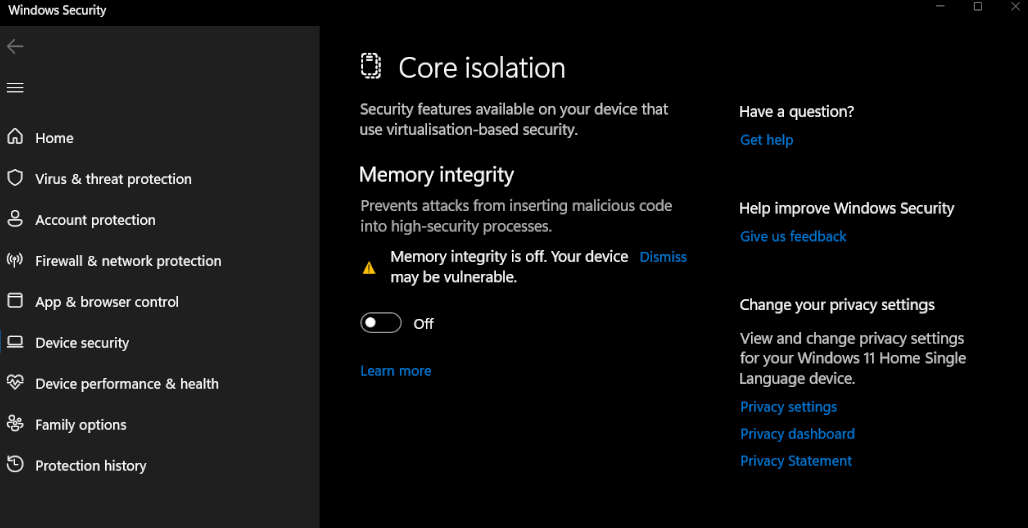
According to Microsoft, memory integrity is a core isolation feature that prevents malware from accessing high-security Windows processes if your system is attacked.

  1. Open the Windows Security app by selecting Start, type “Core Isolation” in the search bar, and select Core Isolation from the results list.
  2. Then Turn off the memory integrity option on the Core Isolation page. A reboot may be required.
Turn off memory integrity

Turn off the Virtual Machine Platform (VMP) 

The second background process is called the VM platform, where VM stands for the virtual machine. This feature provides central services around — who would have thought it — virtual environments, which becomes relevant in terms of security when applications are to be run in an isolated sandbox to prevent malware from accessing the rest of the system.

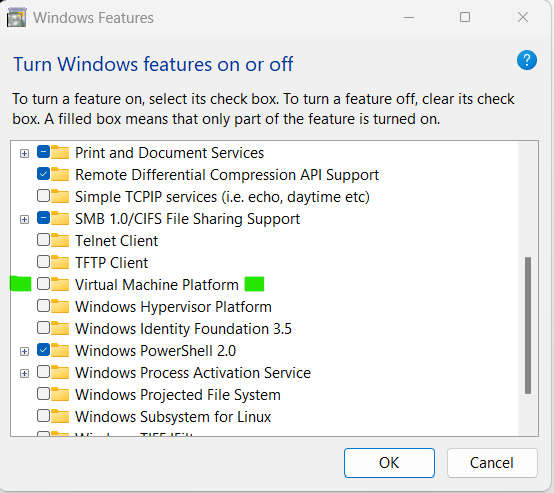
  1. Select Start, type “Windows features” in the search bar, and select the “Turn Windows features on or off” option.
  2. Locate the Virtual Machine Platform and deselect it.
  3. Select OK. A reboot may be required.
Turn off the Virtual Machine Platform

Microsoft says players can reactivate the two background processes after gaming. The tuning tips can slightly improve the performance whether and to what extent depends on your system hardware, the respective game and the exact settings.

If you want to tickle the last bit of performance out of your Windows 11 computer, you can try the measures described above at your own risk.

How Media Companies Transfer & Sync Files Seamlessly

Sync Files Seamlessly

Technology advancements have made file transfer easy compared to a few years ago. The most basic features of the early internet adoption involved file transfer between users. Solutions such as Google Drive and Dropbox came later and simplified file syncing.

However, these solutions do not meet the requirements of enterprise customers such as media companies. This is because these companies transfer and sync large amounts of data in real-time.

This led to the development of enterprise solutions that simplify and streamline file transfer and sync for such companies. These solutions are also referred to as EFS (Enterprise File Sharing). Here are solutions used by media companies to transfer and sync files seamlessly.

Peer-To-Peer Solutions

Also referred to as P2P solutions, Peer-to-Peer solutions can be defined as mechanisms for sharing files that are designed to share and distribute large files between users. One common P2P solution is BitTorrent.

Unfortunately, even though this solution is highly effective, torrenting is not very common among companies. This is because it has been very popular with the pirate community. This does not mean the solution is illegal.

You will find it among Linux distributions, especially when they are sharing software between users. This is because apart from being efficient, it is also fast. Peer-to-Peer solutions work by creating smaller pieces from large files. The smaller pieces are then sent to different locations. After that, they are reconstructed for the end-user.

File Sync Solutions

File Sync, also referred to as File Synchronization, allows media companies to ensure that data in different devices or locations is updated automatically. This is dictated by rules set by the media companies. 

It is one of the best solutions for companies looking for file versioning and backup solutions. There are different solutions available for media companies to use, with one of the most common ones being Signiant.

However, Signiant performance is below par when it comes to file synchronization. This means that companies need to look at Signiant alternatives for file sync solutions. These alternatives use the Rsync protocol that allows them to only copy new files or parts of files instead of having to rewrite entire files.

Some of the most common Signiant alternatives include Resilio Connect, IBM Aspera, and PeerGFS.

Cloud Storage

This is one of the most common transfer and sync solutions used today. Even though they might not address the requirements of large media companies, you will still find them used largely, especially within the companies.

Some of the most common cloud storage solutions available today include OneDrive, Dropbox, Google Drive, Apple iCloud, Amazon Cloud Drive, ExaVault.com, and Files.com. They offer a free plan but are quite affordable for media companies that want to expand.

For instance, Dropbox offers 2GB of storage for free. Media companies that want to expand this can subscribe to 2TBs for $19.99. Google Drive, on the other hand, offers 15GB of space for free. Just like Dropbox, users can upgrade at some fee.

WebDAV: HTTP-based File Transfer

HTTP (HyperText Transfer Protocol) was initially designed to display websites. So where does the transfer and syncing of files come in? Well, the HTTP and HTTPS protocols load files such as JavaScript, PHP, and HTML files, among others to make users see websites.

This means that files are transferred between the client (web browser) and server (website). WebDAV, on the other hand, can be described as an HTTP extension that comes with many features. For instance, media companies can manage their web content remotely on a web server.

This way, the web server can be seen as a file server, allowing the transfer and syncing of files. This extension is common among some collaboration services. For instance, Sharepoint uses WebDAV to allow the creation, upload, modification, and download of files from the cloud.

File Transfer Protocols

File transfer protocols were created to allow media companies and other large enterprises to transfer and sync files regardless of their size or type. This explains the reason most cloud storage solutions use these protocols when transferring files between users.

Media companies that use these protocols without cloud storage rely on software, a server, and a client. For instance, when using a computer, a user can install a client such as FileZilla and then use WinSCP to connect to FTPS.

This way, the user can transfer any amount of files through FTPS without any problems. These protocols can be used with tools such as SolarWinds SFTP/SCP Server, Cyberduck, WinSCP, and FileZilla.

The transfer and syncing of files among media companies are important in helping them relay information uniformly. This explains the reason why they rely on the solutions discussed above.

Nvidia Releases Open-Source Physics Engine PhysX 5

Nvidia PhysX 5

Nvidia announced that it had open-sourced its PhysX 5 physics simulation engine, allowing developers to access the development toolset via GitHub to build various physics simulation applications.

PhysX 5 uses the same open-source licensing model as PhysX 4, with enhanced physics collision detection and custom geometry, allowing developers to use its physics engine to create robots, autonomous vehicles, self-driving scene simulations, and more, just like games, movies, and anime content.

Additionally, Nvidia has incorporated the Flow library for fluid simulations, the Blast library for explosion simulations, and the Flex library for particle simulations into PhysX 5, making it easier for developers to simulate the dynamics of liquids, cloth, and gases. to create

In the past, the physics engine PhysX was mainly used for game content. Still, it has become an important engine design for physics simulation at Nvidia, is used for larger physics simulation applications, and continues to be expanded by open-source.

Powered by Pixar’s Universal Scene Description (USD) file format, PhysX 5 allows developers to easily add physics to various 3D models to create more realistic physics interactions.

This release of the PhysX SDK is closely related to USD Physics, which Nvidia co-developed with Pixar to describe the physics of a scene. The idea is to make things simpler to incorporate physics into scenes, and the SDK’s open-sourcing will hasten the integration of simulation behaviour into more creative tools.

Also, advanced demos are no longer bundled with the SDK. A demo is available on Nvidia On-Demand’s Nvidia Omniverse, and you can download it to experience what’s possible with PhysX. Nvidia has invested in creating the best possible physics toolset for Omniverse and will continue to evolve and improve it.

Managed IT Services Vs In-House IT: Which Is Better For Business?

IT working people

As businesses adapt to the fast-paced digital world, reliable and robust IT support has become necessary to thrive. 

That said whether you’re starting to build your IT infrastructure or want to upgrade your IT management and maintenance, you’ll be faced with two options–assembling an in-house IT department or outsourcing a managed IT service provider. 

Are you wondering which of these two is the better option for your business? This article discusses the basics of each option and its pros and cons. Also, you’ll learn key points on when to hire a managed IT service or when it’s best to create an in-house team. 

Understanding Managed IT Services

Managed IT services, also known as Managed Service Providers (MSPs), are third-party IT service providers that manage and take responsibility for providing a specific set of technology services to businesses. 

A small- or medium-business can take advantage of their services on a subscription basis to improve technology-related processes to the same level as industry giants in their field. Depending on your needs, managed services can range from specific to general projects. 

Common services often include the maintenance and monitoring of equipment, remote monitoring and server management, security and IT systems management, and other support services. Some IT firms like GoComputek Managed IT Services may also offer industry-specific IT support from healthcare to manufacturing to non-profit organizations. 

Managed service provider

The Benefits Of Managed IT Services

Cheaper

Outsourcing your IT needs to a third party may seem expensive, but it’s more cost-effective than hiring full-time IT employees. In the case of managed IT, you only pay for their services —no need to pay for employees’ monthly salary and benefits. You also don’t have to worry about providing them with the best tools and systems to do their job.

In comparison, the salary of a single full-time in-house IT expert can pay for a month’s worth of managed IT services, which include a team of specialists and the appropriate tools. While there are a variety of price methods, the majority of managed IT services are less expensive than developing an internal workforce.

Efficiency

Technology is constantly changing. Thus, you want an IT team that needs to adapt to these changes to support your business’s growth. You’re often limited to an employee’s experience and knowledge with an in-house team unless you decide to invest in their training. 

This is not a problem with a managed IT company. As experts in the IT industry, any MSP looking to provide the best services for their clients will invest in their employee’s training and career advancement. As mentioned before, you also get an entire team of IT professionals with varying skill sets and expertise, from web developers to system analysts and cybersecurity specialists. 

Scalable

Working with a managed IT firm makes it easier to scale your IT requirements as your business grows. With their pay-as-you-go service plans, you can easily upgrade your IT solutions and services during the busiest time of the year or scale down as needed. 

Secure

Technology offers convenience and makes your business more efficient. However, it also comes with inherent risks that can stop your company’s growth. If you want your company to thrive, you need to guard against evolving cyber threats. 

One may think that outsourcing your IT processes to a 3rd party is not that safe. However, if you can’t hire a top-notch cybersecurity specialist for your team, managed IT services can better protect your business. They have the right skill set experience in most cybersecurity risks, and the right tools and resources to protect your business. 

The Drawbacks Of Managed IT Services

Less Control

Compared to keeping your IT processes in-house, outsourcing to an MSP will prevent your company from having complete control over your IT infrastructure. When you work with managed IT services, you turn over the management of your network security, IT processes, and some data to a 3rd party company. 

While they can keep you in a loop of emerging threats and significant updates, signing a contract with them means you have to rely on them to manage and protect your network. 

Limited On-Site Availability

Unlike in-house IT, outsourced IT firms are often from a different area or even on the other side of the world. Since you don’t have access to them on-site, this may translate into longer response times. This can be problematic in case of an emergency. However, most providers do their best to provide the fastest response possible for their clients. 

Also, minimum response time, per your service-level agreement (SLA), can assure you that your concerns will be addressed and resolved as soon as possible.

May Not Keep Up With Your Company Standards, Culture, And Ethos

Most companies have their own cultures, standards, and ethical codes. Unlike an in-house team working closely within your company, an outsourced 3rd party may not ensure that your company standards and values are upheld to your satisfaction. In addition, if the 3rd party services don’t follow or match your company culture, you may end up with an inferior service, or your partnership can quickly turn toxic.  

Understanding An In-House IT Team

An in-house IT team is pretty self-explanatory. It means having an IT specialist or IT department inside your business premises. You’ll hire the team or individual and assign them to complete specific jobs, making it an ‘in-house’ operation. 

The Benefits Of An In-House IT Team

Operational Control

An in-house IT is the best choice for businesses that prefer a hands-on approach to IT processes, data management, and cyber security. Since they’re like regular employees, they’ll be right in the office, and you can physically visit their department any time to ask questions or share concerns. 

Having in-person communication with your IT specialist instead of an email or phone can be valuable for resolving issues quickly and ensuring peace of mind. 

Business-Specific Expertise

While you can find MSPs offering industry-specific IT services, nothing beats the business-specific expertise that an in-house IT team develops. Over time, your in-house IT team will develop a deeper knowledge and detailed picture of your business’s internal systems and infrastructure. 

By having an inside-out knowledge of your business’s IT infrastructure, an in-house team becomes better equipped to troubleshoot issues.

Customization

An in-house IT allows you to customize your team as you see fit. You can hire employees with the exact experience and qualifications you prefer. Since you have better knowledge of your company and its requirements, you know exactly how many IT employees will be enough to manage your business’s technology. 

Also, you can customize all the software and hardware you’ll use. This includes everything from antivirus and firewalls to email filtering and servers. 

Outsourcing or in-house

The Drawbacks Of An In-House IT Team

Expensive

Building an in-house IT team from the ground up can quickly add up to your overhead expenses. Like any other employees, you’ll need to pay them monthly salaries and provide them benefits like sick leaves. Plus, you also need to pay for all the equipment they need to do their job and the necessary software to maintain your business network. 

Off-The-Clock-Issues

While an in-house team offers you on-site availability, they may not be available 24/7. Assuming your IT specialist works an average of eight hours a day, five times a week, who will maintain and monitor your business network during the nights, weekends, and even holidays?

Also, if an unexpected issue should occur when your IT team members become unavailable, it can cause severe consequences on your business’s productivity. 

Employee Turnover

Another issue that occurs with the in-house IT team is when a team member resigns. You’ll need to find a replacement quickly to maintain the level of IT management and support your company’s needs. 

Recruiting takes months and can be expensive, especially if you’re looking for an IT expert with enough experience and knowledge. After they’re hired, they’ll also need to learn more about your systems and undergo training to get up to speed with your business’s network and IT processes. 

To Outsource Or To Build A Team? 

Depending on your company’s needs, either option can be a good fit. 

If you have the budget and want better control of your IT processes and data, an in-house IT is the best option. Other circumstances that call for an in-house team instead of outsourcing include:

  • You have highly sensitive data you don’t want to share to 3rd party providers
  • You’re using custom software and applications or proprietary technologies
  • You have a large employee count that requires in-person IT support and assistance
IT expert

Now, if you’re a startup with a limited budget and prefer to skip the stress of finding the right IT specialists for your business, you should outsource to a managed IT service provider. In addition, there are some situations when outsourcing your IT management is the clear winner. These include:

  • You have short-term needs
  • You don’t have the right in-house specialist or experts to tackle an IT issue or project
  • Specific tasks are too time-consuming or repetitive
  • You want your existing team to focus on the core business IT needs
  • You want a project to be completed as quickly as possible

Takeaway

Technology has become a significant contributor to the growth of modern businesses. As technology advances, businesses need a reliable team–whether outsourced or in-house–to help manage and maintain their IT infrastructure and stay relevant in this competitive world. 

Google One VPN Comes To Windows And macOS

VPN by Google One

Google extended the reach of its VPN offering to the desktop. Google One subscribers can now download VPN apps for Windows and macOS, allowing users worldwide to mask their IP on their desktops and reduce online trackers.

As in the past, Google has its VPN audited by an independent agency. They also share the source code of the app library for transparency. In the following weeks, the desktop app audit will be made public.

However, Google’s VPN service has some limitations. It can only be used in one of the supported countries. Using the VPN to circumvent regional restrictions for streaming content such as sports broadcasts is not viable.

Like Apple’s iCloud+ private relay, Google One VPN also doesn’t allow you to assign an IP address from another country manually. Instead, Google gives an IP for the region you’re connected to.

The significant advantage of Google One VPN is that it’s a bundle. It seems like a good deal because it comes for free with a convenient cloud storage option.

Google originally started offering VPN access to 2 TB Google One cloud storage subscribers in the US in 2020 as a complimentary addition to their existing $9.99/month plan. It has since expanded to 22 markets, including Mexico, Canada, the UK, France, Germany, Spain and Italy. Google also stated that the Pixel 7  and 7 Pro would be equipped with this VPN service.

How to Get Started in Virtual Reality

VR headsets

Many of you are used to virtual reality (VR) development. Through simulation games, users are able to pick and personalize an avatar. Avatars can visit virtual settings and explore new landscapes, go on dates, address and solve mysteries, and get married. VR has come a long way, and today there is a massive number of opportunities to discover.

Virtual Reality (VR) Development: How to Get Started

A virtual reality headset is able to assist you in taking the initial step in the online world. A virtual reality headset is a peripheral tool that you wear like eyeglasses to experience a 360-degree or 180-degree field of view in an online world. 

The virtual setting can be simulations of experiences, a film, or video games. It’s a platform where you are able to closely assess the world around you as well as feel like you belong to that world. 

For instance, virtual reality videos are available on video-sharing sites like YouTube of individuals going on Ferris wheel rides. If you use the virtual reality headset, you seem like you’re on the Ferris wheel yourself, experiencing precisely similar excitements and thrills which you would have while physically taking pleasure in a rollercoaster ride. 

At this point, many VR glasses for smartphones are available on the market for purchase. It is also complex and overwhelming to pick the right. The costlier they are, the better pixel count and quality you get. On the other hand, there are also reasonably priced virtual headsets available, which you can attach to smartphones. 

Virtual reality takes account of interacting with simulated settings. Users primarily utilize a VR headset or also known as HMD or head-mounted device. VR development needs a specific set of skills and much patience in the field of making virtual settings. These skills can be utilized for media, film, entertainment, television, and video games. Virtual reality is also used for education, business, healthcare, training, and many others. With regards to developing skills in virtual reality, there are easy to follow ways that you can follow to get started successfully. 

So, if you want to know the steps to get started with virtual reality development, we suggest you keep reading. 

Develop a Strong Foundation

If you want to get started in VR, it is vital to engage with games or apps. Students are also able to learn the development of virtual reality projects and what makes them thrive.  

Through practical training, you can develop fluency in designing a product, video game design, design theory, 3D modeling, animation, and a whole lot more. For programming, this also helps you know more about the C# programming language.

In short, for the development of virtual reality, it is vital to becoming used to the systems that support virtual reality. There are workshops available that are considered a promising avenue for learners to create an understanding of the system. By learning virtual reality at a learning center, students are able to know how to tell compelling virtual reality stories in this burgeoning field.

Pick a Specific Platform and Get Used to it.

There are many platforms for learners to try virtual reality. One effective and popular platform is Unity, and learners do not need the virtual reality hardware to begin creating games. What is more, you can use it for free without spending any amount.

Unreal is also a common engine to give a try. Begin with mobile virtual reality and develop an outline with the use of Google Cardboard as well as Cardboard Viewer. You can also use WebVR as an entry point, and this is particularly helpful for newbie developers. A lot of media firms, as well as forecasters today, are betting that a three-dimensional immersive virtual is on the horizon. As virtual devices get more accessible and cheaper, content developers for the three-dimensional web tend to become a universal application of virtual reality.

Using Free Resources

Unity platform has its own VR tutorials, and there are a lot of virtual reality courses you can find over the net. If the prototype is ready, put in the right sound and art to make the experience immersive. Also, is it useful to understand how accelerometer and gyro sensors in smartphones work and image processing as well as speed recognition.

Keep Informed with New Virtual Reality Developments

VR is a continuously evolving field, and a lot of learners can discover it the more experience these students are able to build up. To chase creative objectives in VR, it is vital to keep informed to speed on the VR industry.

Are Other Virtual Reality Accessories Which Are Needed to Get Started?

While you are ready to take pleasure in virtual reality only with a simple set of a headset, you can also boost your experiences in the world of simulation by putting in some accessories like treadmills and hand controllers.

Hand controllers enable you to interact with the online world utilizing your hand. You are able to choose objects or press keys in a virtual world with the use of these hand controllers. These accessories are optional for a client as they’re not needed to experience virtual reality; however, they’re vital when you decide on playing virtual reality video games.

Treadmills are a luxury purchase because they’re literally big treadmills you walk on. This accessory enables virtual reality users to walk through the virtual world devoid of moving in the real physical setting, which can be dangerous or harmful.

Therefore, if you just want to take pleasure in the world of virtual without making an expensive investment, a simple virtual reality headset is the best choice.

What are the Types of Virtual Reality Headsets?

The VR headsets available can be widely separated into three classifications, such as:

  • Mobile-powered virtual reality headset
  • Console-powered virtual reality headset
  • Computer-powered virtual reality headset

Each VR headset mentioned has its own features and benefits. We are hoping that through you are able to start your development in VR successfully. 

Intel Max Series: Intel Introduced A New Family Of Products

Intel Max Series

Intel announced the Intel Max Series as a new family of CPU/GPU for HPC and AI applications. 

The CPU Intel Xeon Max is equipped with a wideband memory that is 4.8 times faster than competing products. The company’s highest-density GPU, Intel Max GPU, is scheduled to be released in January 2023. The Max series is being adopted for the supercomputer Aurora at the Argonne National Laboratory in the United States.

Sapphire Rapids HBM, aka Xeon Max

Xeon Max is a CPU known by the development code name of Sapphire Rapids, and among Sapphire Rapids, those with HBM (broadband memory) mounted on the package have been commercialized as Xeon Max this time. The company describes Xeon Max as the first and only x86-based processor with HBM, which it says can accelerate many HPC workloads without code changes. It is a look that corresponds to the fact that narrow memory bandwidth tends to be a bottleneck in HPU / AI workloads.

The main specifications include up to 56 performance cores (Golden Cove cores), 64GB of HBM2e memory that achieves a maximum bandwidth of 1TB/s, and a maximum TDP of 350W. Four tiles are mounted on the Xeon Max CPU package, each with 14 performance cores and 56 Golden Coves. The maximum specification of Sapphire Rapids is 15 Golden Coves per tile, so up to 60 can be designed. Each tile is connected by Intel’s multi-die interconnect bridge technology EMIB.

It also features flexibility for running with HBM and DDR memory configurations. In addition to high-speed HBM Only, there are three types of memory — HBM Flat, which increases capacity, and HBM Caching, which uses HBM as DDR cache and balances capacity and performance. 

Performance is 4.8 times higher than competing products in actual HPC workloads. According to the company’s research, compared with AMD’s Milan-X (3rd generation EPYC) in workload benchmarks, A 2.4-fold increase in speed for climate modelling calculations and a 2.8-fold improvement in performance for molecular dynamics calculations are said to have been achieved. In addition, it is also appealing for its high-power efficiency, as it can achieve the same performance with 68% less power consumption.

Intel Max Series CPU and GPU

Ponte Vecchio aka Max GPU

The Max GPU’s existence has been known so far under the development codenamed Ponte Vecchio and the architecture name of Xe HPC. It has already been positioned for the first customer, Intel Data Centre GPU at Argonne National Laboratory in the United States for Aurora.

On the GPU package of Max GPU, 47 tiles with more than 100 billion transistors are built in, and up to 128GB HBM2e is also installed, making it the company’s highest-density processor. Up to 128 Xe cores. Arithmetic throughput reaches 52TFLOPS for FP64/FP32 and 104TFLOPS for FP16.

In addition, the product line-up of the following three models has been released for Max GPU.

  • Max Series 1100 GPU: Equipped with 56 Xe cores and 48GB of HBM2e memory. TDP300W. PCIe card (2 slot size). Multiple cards can be connected via an Intel Xe Link bridge.
  • Max Series 1350 GPU: Equipped with 112 Xe cores and 96GB HBM. TDP450W. OAM module (OCP Accelerator Module).
  • Max Series 1550 GPU: Equipped with 128 Xe cores and 128GB HBM, TDP600W. OAM module (OCP Accelerator Module).

In the announcement, there was also a reference to “Rialto Bridge” as a successor to this Max GPU. This second-generation Xe HPC is expected to be released in 2024. Following Rialto Bridge, it is said that it will release “XPU” (code name: Falcon Shores), which integrates Xe core and x86 core in one package.