Home Blog Page 214

5 Things That Students Must Install On Their Laptops

Students and technology

A good computer is important for a college student. However, it is the software in the computer that will add value to its users. The software gives the student the best college experience through ease in completing assignments, and an opportunity to work on personal projects. Use the laptop to search for a professional to do my statistics homework online and create the best college experience.

The software to install on a laptop depends on personal preference. Some students are big on academic-related apps while others prefer entertainment apps. Here are some of the best types of apps for college students to install on laptops and guarantee the best experience.

1. Cloud storage

A cloud storage app allows you to access documents from any device. Install the app on your phone, tablet, and laptop. The app allows you to access your assignments, reference materials, and other academic tools you need wherever you are. Once you deposit the materials in the cloud-storage app, you can seamlessly open and updates as well as share these materials on different devices.

The internet has several types of cloud storage apps. The easiest and most common storage app is Google Drive. It comes naturally with your Gmail account but you will need a subscription to access some of the advanced features it offers.

Evernote is also a reliable cloud storage app. It allows you to create a database for your assignments. You can access reference materials like research papers from any device to give you a seamless experience when writing your assignment. Evernote also allows you to create smaller databases within the larger ones.

Dropbox is also an alternative when you need cloud storage. It is free but requires a subscription for advanced features. You do not need to open the app to store your documents. As the name suggests, you just drop the files by dragging and they will be stored safely.

2. Editing app

College assignments require a lot of editing. You must polish your essays to eliminate errors that would mislead your readers or misrepresent your idea. You use the software as an independent app or install it as an add-on on another app.

Grammarly is one of the best editing apps to install. It provides real-time editing services, eliminating the need to hire an editor at the end of your writing process. It has a free version but the advanced features require a subscription.

3. Distraction-avoiding app

A student needs to pay utmost attention when writing essays. In the absence of distractions, you reduce the time taken to complete an essay. You also produce a more insightful discussion because your mind is immersed in the paper.

Distraction apps help you to block such sites as social media or calls on your phone. It also helps you to monitor the time taken to complete different tasks, allowing you to improve efficiency. One of the best distraction-avoidance apps is OFFTIME. It allows you to block websites, monitor time taken on a task, and alert you when you need to take a break to avoid burnout.

4. Homework planner

Install a homework planner on your laptop and you will never miss any homework deadline. Homework planners work as a dashboard providing a glimpse of all the homework activities you need to undertake as well as their deadlines.

Homework planners send alerts whenever a deadline is approaching. You can also set milestones to ensure that you are working on assignments long before the deadline. Some of the best homework planners include iHomework, Todait, The Homework App, and My Study Life. Choose an app with rich features to make homework easier and avoid missing deadlines.

5. Entertainment software 

College is not all about studies. You need time off books to relax the mind and socialize with friends. Install several entertainment apps based on your preference.

Include an app to watch the latest movies during your off-hours. You may also include a music app as well as a video gaming app. The apps help you to relax and rejuvenate the mind in between study sessions.

A laptop is an asset for any college student when it is utilized well. Choose the best apps based on your desired lifestyle. Explore further to avoid expensive or difficult-to-use apps that give you a terrible experience.


Nokia T20: New Android Tablet With A 2K Screen And A Powerful 8200mAh Battery

Nokia T20

HMD Global presents its first Nokia branded tablet — Nokia T20 — which comes with a 2K screen, a powerful 8,200 mAh battery and a wide variety of accessories.

The Nokia T20 brings the “familiar quality of the company’s phones to the big screen” with a host of versatile features and a long battery life.

The Nokia T20 has a design in which the company has wanted to reduce the frames to offer a better viewing experience on its 10.4-inch screen at 2K resolution and with a maximum brightness of 400 nits. In addition, it has OZO audio that promises a great experience when watching a movie or series. 

The tablet comes with guarantees in terms of software since it promises 3 years of monthly security updates and 2 years of Android updates.

In addition, Nokia T20 is equipped with an 8200 mAh battery with 15 W fast charge, which promises to offer good battery life to keep this 2K screen on for quite some time. The company itself promises a battery life of 15 hours browsing the internet or 10 hours watching movies.

Nokia T20 powered with Unisoc T610 octa core processor with two A75 cores at 1.8 GHz and 6 A55 cores at 1.8 GHz. The HMD Global technicians have stated that the performance of the processor is comparable with the Qualcomm and Mediatek platforms of similar characteristics. The device also includes up to 4GB of RAM.

Nokia T20 comes with an 8 megapixel AF rear camera and a 5-megapixel front camera. For video calling, the cameras are assisted by dual microphones that allow others to hear you clearly even in noisy environments.

The connections include the USB-C 2.0 port, Bluetooth 5.0 and the 3.5mm headphone jack. The body is designed to be tough, with an aluminium back cover, reinforced glass and IP52 certification.

The Nokia T20 also features Google Kids Space, a safe way for children to play with applications, read books and watch videos. A feature that works in parallel with the children’s Google account and that parents can manage with the Family Link parental controls.

When it comes to the operating system, we can find pure Android and the guarantee of constant updates over time. It starts with Android 11, but the update to Android 12 is already planned.

The Nokia T20 price starts at 199 euros for the Wi-Fi only variant and 239 euros for the Wi-Fi + 4G model. The Wi-Fi only variant comes in 3GB RAM + 32GB storage and 4GB RAM + 64GB storage options, while the Wi-Fi + 4G model be limited to the 4GB + 64GB configuration. On the availability front, the Nokia T20 will go on sale in select markets around the world starting October 6.

Google Will Make Two-Step Verification Mandatory For 150 Million Existing Accounts

Google Two-Step Verification

Google is celebrating Cybersecurity Awareness Month and is taking steps to incentivize greater security on the part of users. Google wants to push the hesitant use of two-step verification (2SV). 

By the end of the year, the Google will activate the two-factor authentication by default for 150 million existing accounts. Google will also oblige two million YouTube content creators to use the 2SV in the coming months.

According to this, users of a Google account that activated 2SV by default will have to confirm their identity when logging in after entering their password — for example, it requires a simple tap on your mobile device to prove it’s really you trying to sign in. 

The company had already announced corresponding plans in May 2021 and is now specifying its plan in a current blog post. The company has also stated that it understands that this method is not ideal for many users and is looking for alternative solutions to increase the security of logins on its platforms.

Along with this measure, the technology company has reviewed some of its recent launches in this area, such as Google One Tap, or its Google Identity Services. The latter is an API that allows users to log into third-party platforms that have partnered with Google, which has been described as the future of authentication.

Google has also recommended visiting the security control center for a security check to verify that all the requirements to activate the two-step verification mentioned above are met.

5 biggest challenges in mobile app development

programming coding GUI Framework

Mobile app development is a booming industry with millions of apps available to download. But mobile app development can be difficult, time-consuming, and expensive. This post discusses the five most significant challenges that developers face in this competitive space.

1. Mobile OS fragmentation

Mobile OS fragmentation is one of the biggest challenges in mobile app development. This means that operating system updates are released much more rarely than software for PCs and laptops, making it hard to keep track of all possible changes. Developers need to constantly check new SDKs (software development kits) to see if they support any significant changes or additions since their last update and keep up with iOS-specific features like iMessage.

Apps also have a shorter life cycle on mobile because users quickly move onto newer apps – especially when there’s not enough differentiation. It’s therefore crucial that developers continually test their code against the latest versions of the OS so they don’t miss out on vital functionality or compatibility issues down the line.

2. Funding

The biggest problem for many startups is coming up with the cash to fund their mobile app development company. Building and customizing apps can be expensive, particularly when you consider that developers need to give them considerable attention not only at the beginning but throughout their life cycle as well – especially if they’re planning a significant update or overhaul of an existing product.

It’s, therefore, no surprise that so many companies rely on crowdfunding platforms such as Kickstarter and Indiegogo to get funding from users willing to back projects early. This enables developers to raise money upfront and build up user numbers before even building an MVP (minimum viable product), which can often help attract private investors later down the line.

3. Security

Security is another major challenge for mobile app developers, which need to be considered from day one. Apps must ensure that their users can’t obtain unauthorized access or personal information about them – even if they’re opening an app without any knowledge of its specific functionality (such as when clicking on links within emails).

This means that security should be a top priority throughout every stage of development and testing so that all possible vulnerabilities have been considered and fixed before going live with a product. It’s also essential for developers to build apps using secure code rather than relying on third-party SDKs or off-the-shelf products because they could contain potential backdoors. This is particularly true now we know more details about NSA spying techniques and how they can compromise devices with pre-installed backdoors.

4. Performance

Mobile app developers need to constantly test apps both on a wider range of devices and in different conditions. This is because not all mobile users have access to high-end, expensive smartphones, especially in developing markets such as China and India, where average selling prices for Android phones come in at less than $100 (USD).

This means that developers should keep up with the latest tips, techniques, and technologies to produce performing code that scales well across their device ecosystem. It’s also essential for them to consider user experience during this process because slow loading times or crashes will quickly turn off existing customers while failing to attract new ones into downloading an app in the first place.

5. Device Compatibility

Developers must always ensure that their apps are compatible with the latest operating systems – particularly when it comes to Apple’s iOS platform. The company is known for releasing new OS versions, which developers can’t test against before they’re released, unlike Google who releases previews of upcoming Android updates well in advance (which gives devs plenty of time to prepare ahead).

In conclusion, there are many challenges in the mobile app development process. However, these can all be overcome with hard work and dedication from developers over time.

Apple Honors Steve Jobs With An Emotional Video On The 10th Anniversary Of His Death

10th death anniversary of Steve Jobs

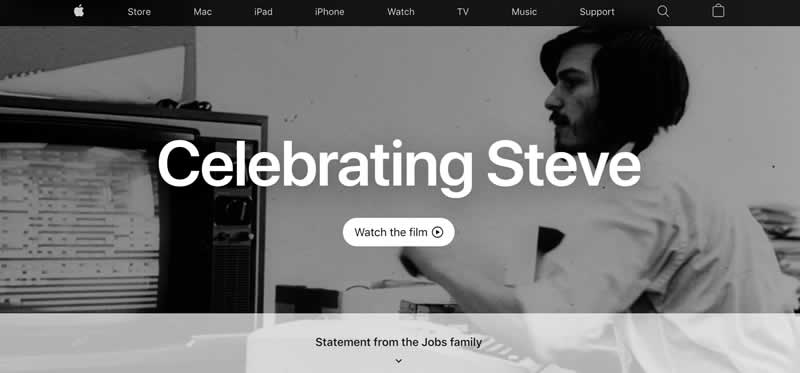
On the 10th death anniversary of Steve Jobs, Apple has dedicated the cover of its website to a clip that recalls some of the most iconic moments of his time at the company.

Apple has released a message on its website in the form of a video. In addition to this, the company has launched a message to the Steve Jobs family, in which they speak of overcoming, mourning and gratitude. Some lines that highlight Jobs’ work at Apple and his fight against cancer.

Under the motto ‘Celebrating Steve’, Apple has shared a video in which it compiles some of its most important moments in the company. The presentations of the Macintosh, iMac, iPod and iPhone, plus the announcement that he would no longer be the “acting” CEO of the company, are just some of the moments that the company has chosen for the clip. And all under the narration of Steve Jobs himself.

Celebrating Steve

The video in tribute is accompanied by a statement from the Jobs family:

Statement from the Jobs family

The current CEO of Apple, Tim Cook, also remembered Steve Jobs, who placed all his trust in him by recommending him as his successor. On his Twitter account, he shared the same video that appears on the company’s website; and he accompanied it with one of Jobs’s catchphrases: “People with passion can change the world for the better.”

Interesting Reasons to Update Your POS System

POS System for business

As a business owner, we’re always looking for ways to enhance and push your business success forward, whether you’re working from a high street brick and mortar store, or you’re solely focused on an eCommerce enterprise, updating your POS and merchant services account can effectively improve and develop your business foundations, helping you reach those revenue goals and enhance your brand.

When was the last time you updated your POS system? If you’ve always used the same technology, or it’s been a while since you considered a new merchant service provider, the development and progression of technology and POS design may surprise you. Today, POS displays aren’t just used to make payments faster, they have a variety of uses that make an upgrade worthwhile. In this post, we’ll examine some interesting reasons why you should update your POS system, read on to find out more.

Gather and Analyse Your Business Data

As a business owner, you’re under pressure to make strategic decisions about which products to promote, which ones that need less attention and how to drive your sales up. Previously, you’ll have had to do all this by hand, including looking through mountains of receipts and making notes of sales trends by monitoring your inventory levels and creating intricate breakdowns of hand-gathered data. By updating your POS system, all of this vital knowledge is gathered for you, from transactional history and sales numbers to identifying your busiest periods and even how well your marketing strategies are working. It’s this data that can help you make better business decisions, such as reducing labour costs, arranging staff for busier times, and promoting special offers on products that people want.

This kind of business insight can help you make better decisions and increase your profitability.

Increase Service Speed

No one wants to wait in long lines to make a purchase. Especially if those customers are on their lunch break or in a hurry. Updating your POS system means increasing your service speed, with multiple transaction options, faster payment processing and touchscreen and hotkey capabilities that make communicating to banks, merchant providers and even the kitchens in your café or restaurant much smoother.

Streamlined Inventory Management

Managing your inventory levels can be a real headache for small business owners. Whether you’re monitoring food stock in your pantry or the number of pencils you have in your gift shop, stock taking is time-consuming and is a drain on multiple resources. By updating your POS system you’ll be able to see your stock levels in real-time and receive accurate data that can prompt you to reorder your most popular items or consider promoting those that are struggling to move. You’ll also be able to forecast your predicted stock levels, improving accuracy and saving your business money. Reducing the number of errors within your manual stock-taking can streamline the efficiency of your business and help you make better business decisions.

Final Thoughts…

Updating your POS system can benefit your entire enterprise. Embracing the latest technology can give your business the edge!

How To Download And Install Windows 11 For Free

Download And Install Windows 11 For Free

The final and stable version of Windows 11 has already begun to be deployed around the world, here is how you can upgrade or download and install Windows 11 for free.

Microsoft provides it as a free update for personal computers with a valid Windows 10 license and meeting the minimum required hardware requirements. Windows 11 is also available as ISO images for new installations, running in virtual machines or third-party updates, as well as being the reference version of Windows that OEM manufacturers will use for pre-installations on new machines.

Before starting with the mini tutorial to install Windows 11 on your PC it is necessary to know the minimum system requirements that Microsoft recommends.

  • 1 GHz 64-bit or faster processor with 2 or more cores.
  • 4 GB of RAM.
  • Minimum 64GB or more of available storage.
  • DirectX 12 compatible graphics card with WDDM 2.0 driver.
  • Screen larger than more than 9 “diagonal.
  • UEFI compliant with Secure Boot.
  • TPM 2.0.
  • Internet connection, only to activate Windows 11 Home.

How to upgrade to Windows 11

If your computer meets the requirements, it will be updated sooner or later. In case of being “fully compliant”, you will receive the update much sooner than the computers that are in the process of reaching that status which will arrive when Microsoft considers that the experience is good enough. So much so that completing the program will take months —mid-2022 — to reach all eligible Windows 10 devices.

To check if the update is available for a computer, just go to Settings, then Update and Security, and finally Windows Update. In this section, it is possible to ask the system to check for new updates available. If the answer is negative, do not despair; to reach all the compatible devices that are scattered around the world, Windows 11 will take a while.

How to download and install Windows 11 for free

In addition of upgrading Windows 11 from Windows 10, Microsoft also offers Windows 11 ISO file, the Windows 11 Media Creation Tool and the Installation Assistant for download.

With Windows 11 installation wizard

This will download software to your computer that will check the hardware requirements and, if you meet them, proceed to download the new system.

Creating installation media for Windows 11

If you want to install Windows 11 for the first time on a new or already used PC, download the media creation tool to create a bootable USB. Here you need a license to install Windows 11 or a Windows 10 device that is eligible for an upgrade to Windows 11.

This will download software to your computer that will check the hardware requirements and, if you meet them, proceed to download the new system.

Install with Windows 11 ISO

With the Windows 11 ISO, you can, of course, create a bootable installation media using different methods, like with the Rufus tool. Installing Windows 11 through the ISO image can bypass the minimum system requirement recommended by Microsoft. The bad news is that Microsoft will deny them security, driver, and new feature updates

For greater device security, it is worth waiting for the official version. For those without a compatible computer, Microsoft says, “There has never been a better time to buy a PC.”

What Are the Best Technological Tools to Use for Student Engagement?

Couple working on phone

Nowadays, students have a lot of different opportunities at their disposal. In a world with advanced technology that rapidly grows as an entire industry, they have more ways to make their classroom interesting. Student engagement is something that represents an important part of their education. However, it is often the case that some of them lack it. As more and more technological devices and features are getting involved in educational institutions, it is fair to say that the level of engagement during the classes must be bigger. The point of it is to create an interesting environment for students and still allow them to learn beneficial information regularly. So, let’s check out what are the best technological tools that can be used for student engagement.

Video Games

At the first sight, it might look awkward but video games can indeed increase the level of students’ engagement during the classes by far. Since the first signs of massive technological improvements appeared, the use of video games in high schools and colleges has become frequent. And, their presence is not particularly imagined to provide students with a little fun. Alongside joyful moments, they can also learn. Playing video games represents one of the most represented hobbies for younger populations in recent years. Some of them allow their users to experience things they could only dream of recently. There are many video games online that can truly help students in numerous ways. Depending on the concept and genre, each of them can boost different skills. For example, there can be found games whose content is focused on survivability, like “The Last of Us”. Here, students are experiencing situations related to surviving tough moments and learning how to make correct decisions in the right moments. Such a method can really increase students’ willingness to participate in the classes and the lessons that are in front of them.

Kahoot

Have you ever been thinking about how it would be to have a little quiz time in the classroom? Well, with Kahoot at your disposal, that would be a reality. Students can select some of over 100 games that are ready to launch or create their own quiz with adjusted questions in a couple of minutes. It is compatible with more than one device so its implementation would never be a problem. It represents a great way for students to have fun, laugh a little bit, and find out who is the smartest guy in the classroom.

Krisp

One of the most typical issues that distract students from carefully following their teachers’ speaking is surrounding noise. This is a common problem for educational institutions that are situated nearby some high-traffic streets. Although students themselves are not responsible for the noise that comes from the outside, they can collectively agree to find the most efficient ways to isolate the classroom, at least during the classes. Students must be focused on the lessons that come through the teachers’ mouths and if background noise is constantly present, a lot of content can be misunderstood or not heard at all. If no solutions can be found, the Krisp application will be a true-life savior. It is an artificial intelligence-based application that is created as a background noise remover. It provides people with acoustic and room echo removal which will help students to hear what teachers are saying to them. 

writing and other things

Venngage

Students’ engagement is frequently associated with the level of interaction in the classroom. The way they communicate holds the key for every door. With the Venngage at your disposal, you can forget about confusing communication, dry data, and dull documents. This is a professional infographic maker with over 10 thousand templates available. The most important thing is that it allows students to experience learning lessons in real-time. It implies that they can get suitable feedback instantly. Data analytics is a theme that has gained a lot of attention in recent times. Hence, it allows digital literacy to be improved and makes students understand its value. Through Venngage, students can visualize the data they have collected which will definitely make the classroom a far more interesting place to be. Just imagine how much it will boost their engagement. 

Trello

Multitasking is something that broke through the thick branches of the modern world. It allows people to do several things at the same time. Just imagine that a writer writes his paper in which a 1000-word essay is two pages and at the same time reads useful data that he will eventually put onto his paper. Wouldn’t it be fantastic? Well, Trello can secure similar things to students. Namely, it is designed to help them with organizing their assignments. It is a free tool that students can also use to create charts related to their workflow. Another feature that can be interesting is that it allows a couple of students to be a part of the exact board. Thus, Trello can additionally boost students’ collaboration with each other and motivate them to work in groups. As group projects are frequently seen in schools, this will be a real jewel to the students.

Conclusion

Technological tools are truly beneficial designs for the entire humankind. They are making participation in classes interesting. With them, students will get to know the newest ways of learning and experience things that will have a positive impact on their lives. What can they ask more for?