Home Blog Page 216

Beginner Tips For Building A Brand On Twitch

Brand On Twitch

As the world’s leading streaming platform for gamers, Twitch has millions of viewers every day. Users can watch, interact, play, and support fellow streamers – all from the comfort of home. If you’re looking at building a Twitch account, establishing your brand is a critical step in your success. After all, your brand isn’t just the name attached to your profile; it’s everything you do with the account.

Consider Your Account Name

The username is the first point of contact with your viewers, and it needs to stand out. Great names are brief, punchy, descriptive, and memorable. You’ll want to keep the name between twelve and fifteen characters. Studies have shown anything longer than that is easy to forget.

Confirm Brand Availability

With over a million registered accounts, twitch username availability isn’t the easiest thing to navigate. Spend some time researching popular channels and establish whether they have anything in common. Maybe they all target keywords or phrases users will search; perhaps the name is unique and original. Try to find something that matches both your brand and relevant keywords.

Expand Beyond Twitch Registration

Having a decent username is only the beginning of building your brand on Twitch. You’ll need to expand your reach to different social media accounts too. Once you’ve decided on a brand name, register the account name with all social media platforms you intend to use.

Find a Niche for your Channel

A niche is a specific area of gaming that you want to focus on. Ask yourself the following questions. How am I going to stand out? What games am I going to play? How am I going to interact with the community? What streaming are you going to offer? Knowing the type of content you want to share will help you market the channel in the future.

Develop Some Custom Graphics

Having a professional-looking logo can set you apart from other streamers. A logo should offer insight into the type of channel, content, and personality on the site. It needs to appeal to your target audience and should stand out among other logos. You want a logo that’s easy to spot and memorable. Research color psychology and how they influence your brand and build from there.

Use a Personal Photo for Your Profile

The profile photo is potentially the first visual a viewer will see when connecting to your brand. You want the image to be clear and high-resolution while staying within the optimal size for the Twitch profile. Photos must be under 10MB and in JPEG, GIF, or PNG formats.

Upload Your Profile Banner

Although it’s not as important as it used to be, the banner is still used across platforms. You’ll want to keep this image professional (preferably in the same colors and fonts as your logo). Try to use the same images across all social media platforms, integrating the same brand simultaneously. Banner sizing should be 1200x480px to prevent stretching or warping upon upload.

Understand the Importance of Overlays

An overlay can help a streamer block out sensitive information (like chats or maps) or offer additional information to viewers on the channel. It’s essential to keep the overlay clean and straightforward. You don’t want to overlay to be too cluttered, or they become distracting. You want the focus to be on your content, not the overlay.

Always Integrate Transition Screens

If you’re stepping away from your camera, keep your viewers informed with transition screens. These screens can appear when you’re taking a quick bathroom break, received a quick phone call, or decided to have a coughing fit live. Consider using high-quality images that advertise your social media, domains, or other ways to stay connected. You should also include additional information about your next streaming session, which can market your services when you’re not around.

Consider Other Income Opportunities

What you wear in front of the camera can make all the difference in your streams. Users can wear anything from pajamas to scuba diving gear if it meets the platform’s rules. As your channel builds in popularity, consider branching into merchandise for your brand. This merchandise can include t-shirts, sweaters, pajamas, or accessories. Wear them in your stream and sponsor yourself!

Act Professional and Be Accountable

If you’re hoping to turn your Twitch channel into a full-time career, you need to treat it seriously. Establish a streaming schedule and stick with it. There’s nothing worse than viewers showing up, and there’s no content. Share your content schedule with social media channels and maintain contact with your followers. You want to balance your content, brand, and channel, which only happens with consistent work and dedication.

Must-Have Senior Phones for Your Parents and Grandparents

Senior citizen Phones

No matter how old your folks are, they still need to stay connected to the family and to the world. The problem is, not all phones manufactured today were made with the older generation in mind. So they easily get left behind in the fast-changing world of technology.

While some old folks can keep up somehow, the majority of the senior population can’t.

Good thing though that there are still mobile phones out there that most seniors can easily navigate. This way, they can still connect with you even though you live far away from them.

So if they don’t have a phone yet, or they need to replace the much older ones, below are some of the senior phones that you should be looking for your nan and pop.

These phones are the best phones for them as they are easy to learn and easy to navigate.

Keypad Phones

These phones are like the iPhones back in the day. They changed the game then when bulky phones were still the norm. If you’ve owned a Nokia phone before, you can probably attest to just how cool and fun these phones are. Especially the clickety-clackety keypads.

Good thing there are still tech giants right now who understand just how functional these keypad phones are. Especially for the older folks who can’t keep up to the fast-changing technology.

If you’re currently on the hunt for keypad phones for your nan and pop, you can check out the Alcatel 3080 or the Nokia 2020. While these keypad phones are patterned from the vintage phones, they did not come from some old warehouse or unearthed chest box.

They’re new models specifically designed with keypads and made with today’s tech. Meaning, they’re still as functional as ever.

Just take a sneak peek at their specs. The Alcatel 3080 is 4G capable and can take up to 32GB of storage. Cool, right? It’s also powered by a 1530 mAh battery. And that’s on top of the phone features that your old folks will need like messaging, calling and a little bit of browsing.

Flip Phones

If your parents want to add a little flair to their phone experience, flip phones are the best choice. Getting a flip phone back then means you’re the coolest kid in class. But now, flip phones are more of a need. Especially for parents and grandparents. But the fun of flipping it open is still there, don’t worry!

Speaking of flip phones, the Telstra Flip 3 is arguably the best in the category. Much like the Alcatel model, it’s 4G capable but it has a slightly bigger 1600 mAh battery. They also have large and clear buttons and a decent display screen for people who already have blurred vision.

The coolest thing about it is that it has Wi-Fi so your old folks can connect to the internet. What a nice little touch!

Smartphones

While it’s true that most old folks would love a good ol’ functional keypad and flip phones, there are still some parents and grandparents who would love to try some new stuff, too. Some seniors can easily navigate the system of an iPhone or a Galaxy. So, mobile phones for seniors Australia don’t always have to be the vintage phones from the past.

Just look at the iPhone XR. While it’s a great starter phone for the new generation, it’s also a great senior phone for mom and dad. It sports an okay battery and a buttery-smooth screen. It’s lightweight, too!

But what makes it a great senior phone is its face recognition feature. This way, old folks don’t have to remember their passwords all the time.

Amazon Echo Show 15: 15.6-Inch Smart Screen That Can Recognize The Person In Front

Amazon Echo Show 15

In addition to Astro, at Amazon’s annual event, the company also presented the new Echo Show 15 — its new smart screen that aims not only to be your control center for the rest of Alexa devices but also as the perfect supplementary screen for your bedroom, your bathroom or your kitchen.

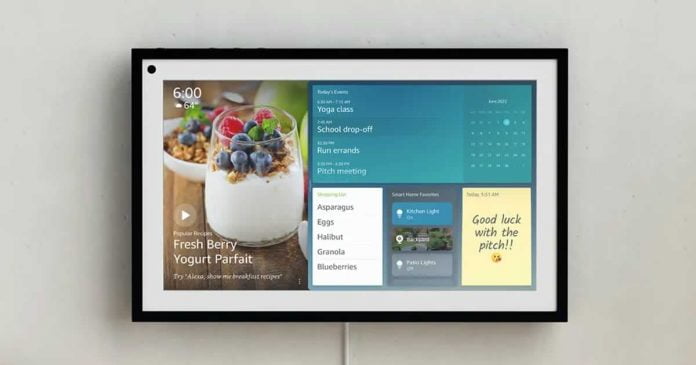
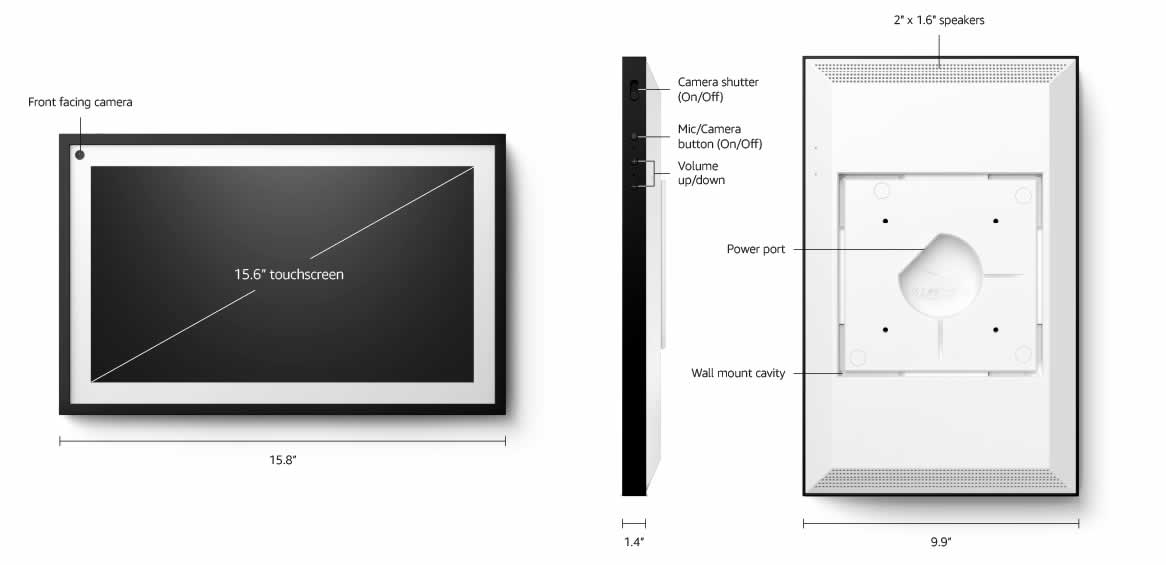
Amazon Echo Show 15 is based on a 15.6-inch display with full HD resolution and can be attached to the wall — a stand is available separately. Its home screen now integrates Alexa widgets with which we can see our family calendar, see our tasks and shopping lists.

Amazon Echo Show 15 integrates streaming services like Netflix, Prime Video, and more. In addition to all this, the screen integrates a processor with machine learning processing capabilities. The machine learning processor with quad-core architecture enables computer vision algorithms to be processed directly on the device. In this way, the Echo Show 15 can recognize a person who has created a visual ID and process their images directly on the device.

Amazon Echo Show 15 parts

For the first time, an Echo Show can be used in both portrait and landscape format and is visually reminiscent of a picture frame. The redesigned home screen with Alexa widgets also offers more customization options and new personalization functions using the visual ID. 

Like the other Echo Show devices, the Echo Show 15 can also be used to control smart home devices. With the 15.6-inch screen, users of the Echo Show 15 can access a picture-in-picture display with video cameras. The 5-megapixel camera with a cover that can be locked at any time allows video calls to be made again — also via drop-in to other Alexa devices in the household.

The Echo Show 15 will be available for $249.99, but Amazon has not yet announced a date. The stand and other accessories are sold separately and available at the same time as the Echo Show 15.

With Astro, Amazon Has Presented Its First Alexa Robot For The Home

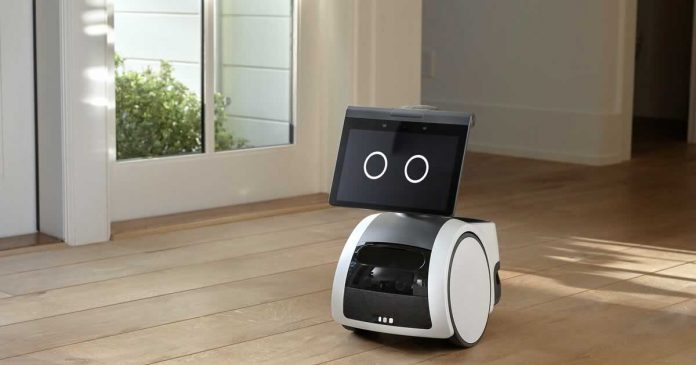
Amazon Astro

At the same time as the Echo Show 15, Amazon presented another Alexa product — a robot called Astro. The presentation was mainly about making video calls or using it as a mobile surveillance camera.

In five to ten years we believe that every home will have at least one robot. They will become a central part of everyday life,” reason for which they have launched Astro, a robot capable of moving around the house, performing tasks, monitoring or controlling that everything is alright. 

Initially, Amazon Astro will only be available in the USA and will provide an outlook on how small robots could accompany life in the future. It is intended to help users in everyday life — including keeping in touch with the family.

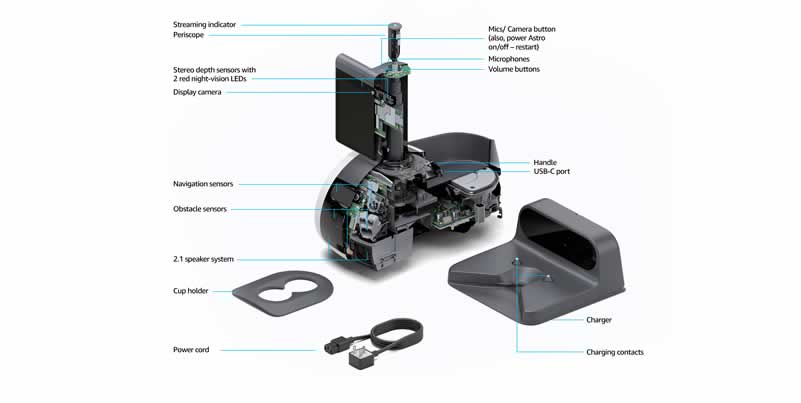
It has numerous sensors, cameras, the digital voice assistant Alexa and can move autonomously, for example, when nobody is at home, and transmit a live image of the home to the user via the Astro app or trigger an alarm if an unknown person is detected. Periscope camera should provide the best possible overview. Astro can also be sent on a targeted trip if you want to go to a certain place.

With Alexa Guard, Astro can also capture the acoustic signal from a smoke or CO detector or from bursting glass and sound an alarm. In addition, certain zones in the house or apartment can be defined that the robot is not allowed to enter.

Amazon Astro is also intended to help older people cope better with their everyday lives. On the one hand, by allowing family members to set reminders, on the other hand, by maintaining closer contact with the family via drop-in via Alexa.

Astro also has a button that can be used to turn off the microphone and camera on the device. Then all movement functions are also deactivated, and the robot no longer moves. Amazon did not provide any information on battery life.

Amazon Astro parts

The market launch is planned for the end of 2021. In the first phase, the robot will be available for $1000. The regular list price will be $1500.

Third-Party App Stores Can Be Installed On Windows 11 From The Microsoft Store

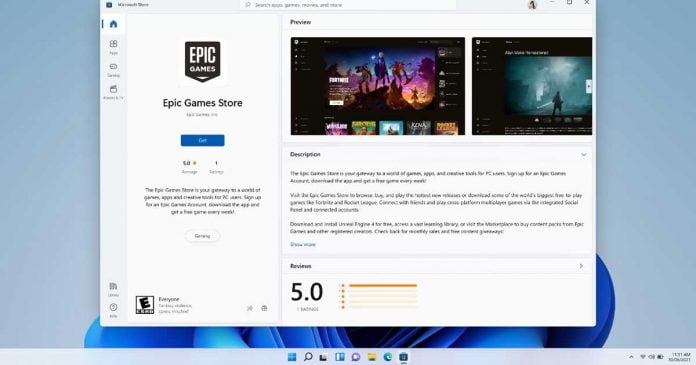
Epic Games Store on the Microsoft Store

The Microsoft Store for Windows 11 will include third-party platforms, such as the Epic Games Store and the Amazon Appstore over the next few months.

Microsoft had already emphasized at the official announcement of Windows 11 that the Amazon Appstore, including Android app support, will be integrated into the Microsoft Store. Windows 11 is supposed to offer various programs for download and purchase that are actually geared towards mobile ARM devices. As a presentation, Microsoft showed a direct integration into the Microsoft Store, a kind of subpage within the app.

Run Android Apps on Windows 11

The Amazon Appstore and the Epic Games Store are the first third-party stores to appear on the Microsoft Store. However, those in Redmond hope to entice other platforms to follow the same path. “We look forward to welcoming other stores as well in the future” — writes Microsoft in a blog post.

More than a technical innovation, it is a gesture by Microsoft towards its rivals. By allowing other application stores to be installed from the Microsoft Store, it is intended to strengthen the concept of openness that has been proclaimed since the introduction of Windows 11.

Just like any other app, third-party storefront apps will have a product detail page that can be found via search or by browsing – so that users can easily find and install it with the same confidence as any other app in the Microsoft Store on Windows.” — explains Microsoft.

Future technologies for school education

human and future technology

What is the future of the schools we know today? The form may be preserved, but the essence will change. And perhaps in 30 years, educational institutions will be radically different from those that exist today. We can make many assumptions, but no one really knows the answer. Now we already have some innovations like paper editor. However, let’s talk about the technologies of the future, which are already becoming important elements of modern education. They are talked about – they are the technologies of tomorrow, and we need to work with them today. Consider a few technologies that can potentially change the usual learning format.

3D printers

There is a lot of talk now about Lego, its benefits for children. And if we go further and teach children to use 3D printers? The children of the future will not be limited by the set number of details of the designers, they will create what they can play and learn with.

This device could one day be considered one of the best cheap printers and will help to create working mini-models for designing, carrying out various experiments. Students can improve their design skills to prototype inventions without significant time.

3D printer is an expensive pleasure, and their mass production will make the device cheaper. This means that more schools will be able to use it in their work. Teachers will be able to create demonstration models that will help to better master the practical and theoretical material, visualizing abstract concepts.

Cloud technologies

Are you familiar with the student’s excuse that the homework was done, but the notebook was eaten by a dog? In the near future, it may be replaced by something else – there was not enough space in the cloud, and I could not remove anything. Some of the teachers are well acquainted with cloud technologies, and some are just learning the principles of their work, some are not interested. But in the future without “clouds” can not do.

Students may need access to all homework, study materials directly during the lesson. And the habit of carrying stacks of books to school will be considered a relic of the past. The main thing is to have computers and high-speed internet at school. This will allow you to work on projects, homework anywhere and anytime. And e-textbooks, as part of cloud technology, can completely replace the usual format of libraries.

Cloud technology can really visualize the classroom, creating a classroom for online learning. Classes in the virtual environment are already gaining popularity, so there is no reason to believe that this development will change in the near future.

Local social networks

Everyone knows about the existence of global social networks, many people use them quite successfully in their work. In this case, we are talking about local area networks for communication within the school or school complex. Such networks will be open to every student, children will be able to discuss ideas, projects, tasks. This is one way to show that learning is a personal responsibility, not a teacher’s responsibility.

Another advantage of this format is the similarity to work in real conditions, where cooperation is a condition for success. Teachers can also be present in such a network to answer students’ questions or add useful information. Moreover, it is a feedback tool that helps to improve learning.

Stadia ‘Phone Link’ Turn Your Smartphone Into A Gamepad To Connect To The TV

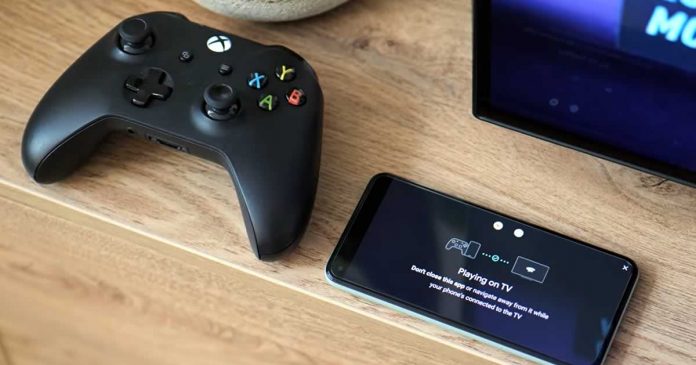
Stadia Phone Link

Google Stadia users will no longer need an official controller to play on their TV. The Mountain View giant is about to release a new feature that will allow players to use the smartphone as an input device.

The ‘virtual’ buttons will be displayed on the screen of your device, be it Android or iOS, and will include the two analog sticks, the front and rear buttons and the directional cross.

The editorial staff of 9to5Google had the opportunity to try Phone Link, a new feature that — starting this week — allows you to transform any (compatible) smartphone into a gamepad for Stadia.

Phone Link supports Android TV, Google TV and Chromecast Ultra. Making sure you have connected the smartphone to the same Wi-Fi network to which the TV is connected, simply select ‘Phone Link’ and enable the touch gamepad.

The next update will introduce another interesting feature that allows the connection of a third-party controller — it will always be the smartphone that establishes the connection with the TV through the Stadia mobile application.

Samsung Wants To ‘Copy And Paste’ Brain Data On Chips

Copy And Paste Brain Data On Chips

A new Samsung project aims to make the classic ‘copy and paste’ that we would see on a PC but with a human brain to neuromorphic chips.

The South Korean company introduced a new approach to reverse-engineering the brain on a memory chip in a paper co-authored with Harvard University researchers published in the journal Nature Electronics.

The idea, therefore, would be to create a method to ‘copy and paste’ the wiring map of neurons in our brain in 3D neuromorphic chips, based on an array of nanoelectrodes to record large volumes of neurons and thus record their connections and their intensity.

The objective is to copy the map of the neural connections of our brain using this array of nanoelectrodes and copy it into a high-density 3D network of SSD memories. 

Since the human brain has approximately 100 billion neurons and a thousand times more synaptic connections, the ultimate neuromorphic chip will require 100 trillion memories. The integration of such a large number of memories on a single chip would be possible thanks to 3D memory integration. Remember that Samsung has played a very important role in the development and distribution of this kind of memory.

If what Samsung wants to achieve, it would be possible to create a memory chip that is close to mimicking the “unique computing features of the brain” that until now have not been able to reach the artificial technology of the human being. This includes, according to Samsung, cognition, adaptation to the environment or easy learning.

This approach could allow a future in which artificial intelligence could behave like a real brain, adopting some of its main benefits such as adaptation or the ability to have genuine cognition. Thus, we would get extremely close to an artificial intelligence practically identical to human intelligence.