Home Blog Page 218

What Is The Best Android Data Recovery Software In 2021?

Android apps black bg

Most of us use phones every minute, and phones have become part of our daily must-haves. Whether you are taking pictures, editing and saving documents, calendars, shopping lists, to-do lists, or just taking in some music and movies from a friend, it is majorly done on the phone. 

However, the phones are very susceptible to damage and data loss and are a big headache, especially when data is lost from them, and you have to start over from scratch. Fortunately, you can still turn to the Android data recovery software to restore lost data.

There are several data recovery software you can use to retrieve lost files and folders in your Android phone. However, they differ in terms of many factors such as user interface, recovery process, among other factors. In this article, we look at the best Android Data Recovery software in 2021. But first, let’s look at the evaluation criteria.

Evaluation Criteria 

To ensure we give you only the best, look at the evaluation criteria used by our software reviewers to qualify the best data recovery software for Android we are about to discuss. 

  1. Recovery process: The recovery process is a significant consideration in the ranking as some apps will take much longer to process the recovery data than others. 
  2. Free photo and video recovery: some apps charge premiums for recovering photos and videos. It would help if you had software you could use for free on your Android phone to decrease your overall data management costs.
  3. Mac user option: Does the app include options for Mac users? We consider this to ensure the app you are using is all-inclusive and comes with data recovery tools for macOS too.
  4. User Interface: Getting a good user experience is critical if you want to quickly get back your lost data. That is why you need data recovery software that offers seamless navigation. 
  5. SIM card recovery: The best Android data recovery software should offer SIM card recovery for lost contacts, SMSs, etc.
  6. Customer support: Finally, you need relentless customer support from the best recovery app to ensure you are not stranded at any stage of recovering files from your Android. 

Follow this link to access a complete list of reliable Android data recovery software. This list has been evaluated using the criteria above.

So, What Is The Best Android Data Recovery Software? 

Disk Drill 4 Android Data Recovery

Disk Drill by CleverFiles is the best Android data recovery software to look for when you lose files or folders from your Android phone. It works on Mac OS X to recovery data from SD cards and internal memory. While it makes the recovery process seamless, deep scan features make it easier to search through older files and recover all the lost data types.

The deep scan feature will deeply and entirely examine your phone’s memory to unearth all the files that have been deleted accidentally. Besides, it will also search your SIM card to retrieve lost contacts and SMSs. 

User Experience

Like other Android data recovery software, users must have a rooted phone to function adequately. The software is so versatile and can recover files from a phone that has been factory reset.  

With a rooted device, the software recovers files that would have otherwise gone for good. Besides, it is not limited to photos and videos. 

Disk Drill offers a free option for users who need to try and verify the recoverability of the lost data on their handsets before investing in the paid version. 

Key Features 

  • A good UI that makes photo recovery just a few clicks
  • Advanced scanning algorithms 
  • It is compatible with various storage devices from SanDisk, Samsung SD, Micro SD to SDHC, and CF.
  • Quick scanning and file recovery from virus
  • Deep scan to locate and reconstruct deleted files 
  • It can read a wide range of uncommon file types such as NTFS, FAT32 among many other file types.

Pros

  • Recovers all types of files and folders
  • Works for failed system upgrades
  • High success rate
  • Recover files after factory reset
  • Recover files from interrupted file transfers
  • Verifies recovery chances with “Preview.”

Cons

The software will only recover deleted files on Mac.

Microsoft Brings Surface Pro 8, Surface Laptop Studio, and Surface Go 3

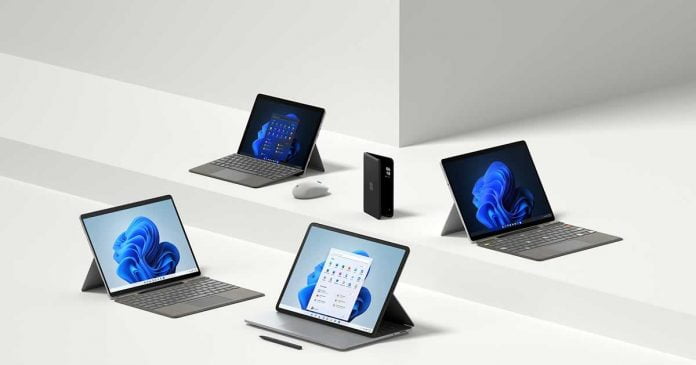
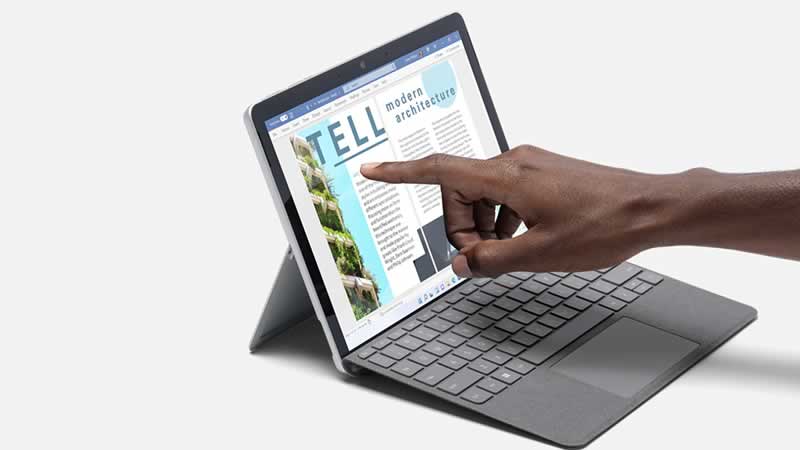
Surface Pro 8 Surface Laptop Studio and Surface Go 3

In addition to the Surface Duo 2, Microsoft has presented its new range of other Surface devices — Surface Pro 8, the “successor” of the Surface Book, Surface Laptop Studio, and Surface Go 3.

Surface Pro 8

Microsoft’s all-in-one, the Surface Pro 8. Microsoft describes the new Surface Pro 8 as “the largest update of the Surface Pro series since the popular Surface Pro 3.”

Surface Pro 8

The new Surface Pro 8 comes in a slimmer design, whose screen grows from 12.3 to 13.0 inches thanks to narrower bezels with PixelSense technology that supports 120 Hz refresh rate. It offers Thunderbolt (2 × Thunderbolt 4 via USB Type C) and for the first time should be up to “twice as fast as its predecessor” — up to 40 percent more CPU performance, also as a result of an adapted cooling system, and up to 74 percent GPU performance is promised by Microsoft.

The tablet is compatible with the new Surface Pen 2 and now the keyboard has a small hole through which we will charge the pen completely wirelessly. Although Microsoft has not given too many details about its internal hardware, we know that it will feature 11th generation processors and up to 32GB of RAM.

It supports Dolby Vision and automatically adjusts the color temperature to the ambient light conditions. It should also be up to 12.5 percent brighter.

The Surface Pro 8 will be available in the United States starting next October 5 from $1,099 (Intel Core i5, 8 GB of RAM and 128GB of storage).

Surface Laptop Studio

Surface Laptop Studio is a hybrid between the ideas that spawned the Microsoft Surface Laptop and Microsoft Surface Studio in a unique design that combines the best of a graphics tablet and a laptop.

Optimized for Windows 11, the Surface Laptop Studio has several highlights, but one of them is undoubtedly versatility. Instead of having a removable screen, like the Surface Book 3, it has one that repositiones so it can be used as a computer or tablet.

The Surface Laptop Studio has two settings with higher or lower power. On the one hand one with an 11th generation Intel Core i5-11300H processor, Intel Iris Xe integrated graphics, and on the other an Intel Core i7-11370H with Nvidia GeForce RTX 3050Ti graphics . You can choose between 16 GB and 32 GB of RAM and up to 2 TB of SSD storage.

Added to this is its 14.4-inch touch screen with PixelSense technology, compatibility with Dolby Vision HDR and a refresh rate of 120 H.

Pre-orders for the Surface Laptop Studio have already started in the United States. The notebook has an initial price of $1,599.99.

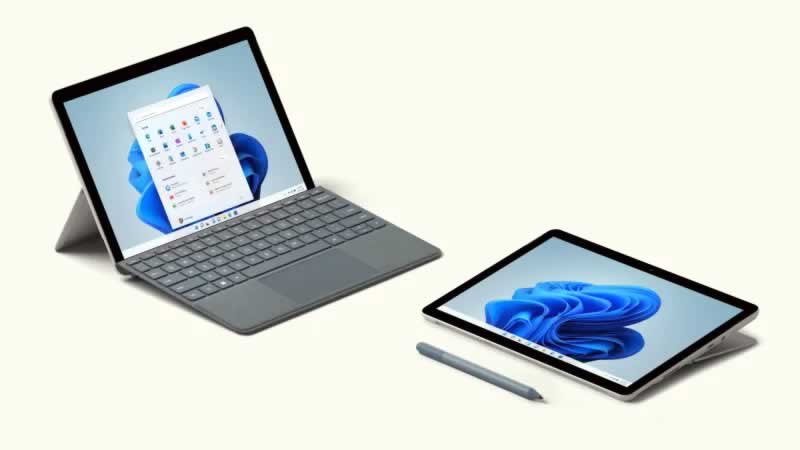
Surface Go 3

Surface Go 3 — the affordable entry-level Surface “retains its compact design with a 10.5 inch PixelSense touch display.” The most important thing to note about this Go 3 is that it now mounts improved Intel processors, with the Pentium Gold 6500Y as the base option and another with the Core M3. They are accompanied by a version with the Core i3-10100Y.

Surface Go 3

The screen becomes 10.5 inches with PixelSense technology and 1080 resolution. The internal storage is 64 or 128 GB in SSD and unfortunately, it does not include Thunderbolt technology, but continues to use Surface Connect technology. However, it has USB-C, Bluetooth 5.0, card reader and Windows Hello facial recognition. All this with a battery life of up to 11 hours.

The Surface Go 3 starts at $399.99 and is now available for preorder on the Microsoft Store in “select markets.” 

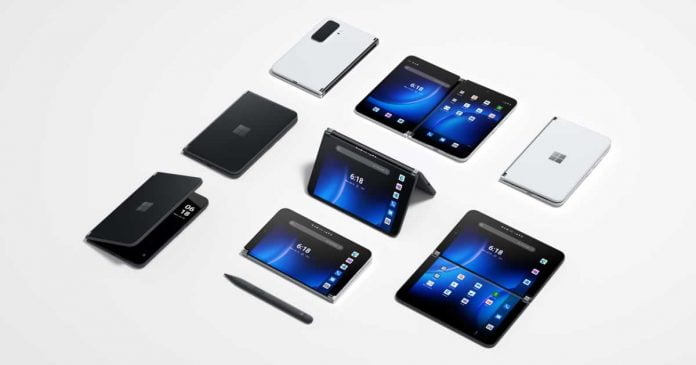
Microsoft Surface Duo 2 Is Official: Comes With 5G And Wireless Charging

Microsoft Surface Duo 2

Microsoft has officially confirmed the launch of Surface Duo 2, its new folding smartphone with dual screens that comes with 5G network technology, wireless charging and even a ‘smart’ hinge.

Designed to take entertainment and productivity to another level, the new Microsoft Surface Duo 2 arrives with the idea of becoming more than just a phone. The Surface Duo 2 arrives packed with high-end features, plus the promise to make up for the rest of its predecessor’s weak spots.

The new generation has become narrower and has been supplemented with important functions that characterize a modern premium smartphone, as Microsoft calls the device itself — 5G support, NFC for contactless payment and a dynamic triple-lens camera, with which pictures and videos can be recorded in 4K.

Like the previous generation, Microsoft Surface Duo 2 comes with two screens, in this case, 5.8-inch AMOLED and with a refresh rate of 90 Hz each. When joining, the user gets an 8.23-inch panel, ideal for consuming multimedia content in an immersive way. The brightness is up to 800 cd/m². The so-called PixelSense touch displays also support digital input using a pen.

One of the strengths of the two displays is that they allow the Surface Duo 2 to be placed in any position to suit the user’s needs. In terms of design, it highlights its new ‘smart’ Glance Bar hinge that shows important information, such as volume, charge or notifications, without having to open the phone.

Several applications have been adapted to this format, and thanks to the company’s software, two or more apps can now be run at the same time, dragged and dropped so that the user can arrange the windows to their liking, even forming a ‘third screen’.

Inside, Microsoft’s Surface Duo 2 wears a Qualcomm Snapdragon 888 processor, which is accompanied by 8 GB of RAM and 126/256/512 GB of internal storage. It is powered with a 4449 mAh battery that supports 23W fast charging over USB-C and has wireless charging support.

Surface Duo 2 integrates three cameras — a 12 megapixel main, a 16-megapixel ultra-wide-angle and a 12-megapixel telephoto, while on the front it features a 12-megapixel selfie camera. Microsoft has also added photo capture while video is being recorded, being capable of recording at a maximum of 4K at 30 fps and slow-motion at 120 or 240 fps.

Microsoft has confirmed that the new Surface Duo 2 will arrive in the coming weeks in a number of selected markets at a starting price of $1,499.

Introduction to SQL Server monitoring & why it matters for businesses

binary sphere

If your business uses SQL Server in some capacity, then managing this important resource effectively will make a big difference to how well it functions.

Monitoring performance is a key part of this process, so here is a look at what it means to monitor SQL Server and why this can benefit your organization.

Measuring metrics to make the most of SQL Server

By using modern SQL Server monitoring tools like those compared at https://www.sentryone.com/compare-best-sql-server-monitoring-tools/, you will be able to track a number of metrics that indicate how well your database is performing at any one time.

These metrics cover everything from the time it takes for requests to complete to the amount of hardware resources monopolized by particular processes.

One of the best things about harnessing the tools above is that it saves you from having to do all of the hard work manually and instead offloads this to a platform that can streamline the duties of any SQL Server admin.

Furthermore, with automated alerts, monitoring tools will identify problems and bring them to your attention so you can troubleshoot them, rather than have potentially serious performance issues flying under the radar.

The business significance of SQL Server monitoring

Your database can be used for many things, from hosting a website to powering internal software apps and more besides, so you need to see its performance as intrinsically linked to things like the productivity of your employees and the reputation of your brand.

As such, SQL Server monitoring is about more than just keeping the backend elements from functioning as smoothly as possible, but rather being able to shore up the underpinnings of your entire operations. Any server snafus can have a knock-on effect that does damage in other areas, so you simply cannot afford to let your monitoring responsibilities fall by the wayside.

Additional considerations

Another aspect to keep in mind is that if you are always on top of monitoring, you will be able to see where inefficiencies in the current infrastructure might lie, allowing you to optimize your use of hardware and your SQL query composition to squeeze more out of your setup.

Then there is the prospect of long-term planning, which can be better achieved with the help of persistent SQL Server monitoring. Rather than discovering that your server hardware is suddenly inadequate for your needs in months or years to come, you can keep tabs on usage in real-time, project how needs will change further down the line, and plan your procurement well in advance to sidestep unexpected bottlenecks.

Lastly, monitoring should not just be seen as a means of ironing out smaller kinks in your database but instead of making it far more resilient and resistant to the likelihood of downtime occurring. Unplanned outages are another costly disaster that can strike small and large businesses alike. Still, by taking SQL Server monitoring seriously, you will set yourself on the path to having a more robust infrastructure at your back.

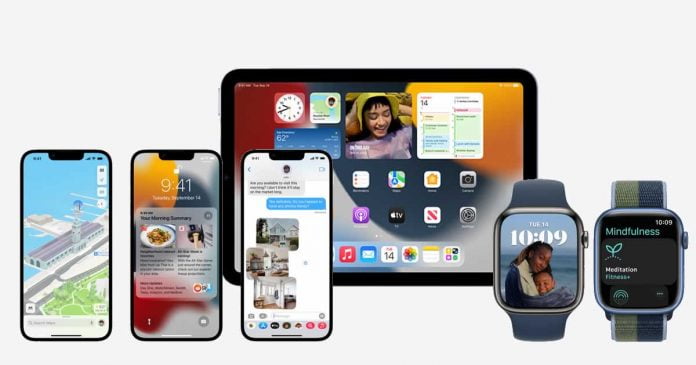
Apple Released iOS 15, iPadOS 15 And watchOS 8: Here Is The List Of Supported Devices

iOS 15, iPadOS 15 And watchOS 8

Apple has released major updates to its operating systems. Now iPhone, iPad and Apple Watch users can install iOS 15, iPadOS 15 and watchOS 8 through system settings.

Make sure that the gadget is at least half charged, and it is also recommended to take a backup of valuable data prior to the update.

Apple has said it plans to let people continue to use iOS 14 unless they intend to upgrade to iOS 15. For this reason, iOS 14 may only receive minor security updates over time, but new features are likely to remain for iOS 15.

iOS 15 is a version that brings many new features to the iPhone, such as the redesigned Safari and FaceTime applications, improved Spotlight search, Siri offline, Focus mode and many more features.

iPhone that will receive iOS 15:

  • iPhone 13 Mini
  • iPhone 13
  • iPhone 13 Pro
  • iPhone 13 Pro Max
  • iPhone 12 Mini
  • iPhone 12
  • iPhone 12 Pro  
  • iPhone 12 Pro Max.
  • iPhone SE 2
  • iPhone 11 Mini
  • iPhone 11
  • iPhone 11 Pro
  • iPhone 11 Pro Max
  • iPhone XS 
  • iPhone XS Max
  • iPhone XR
  • iPhone X.
  • iPhone 8 
  • iPhone 8 Plus
  • iPhone 7 
  • iPhone 7 Plus
  • iPhone SE
  • iPhone 6s 
  • iPhone 6s Plus

Apple claims that with the introduction of iPadOS 15, multitasking capabilities have become even more accessible, simple, and efficient. The new application bar allows you to view all open application windows and quickly switch between them. The widgets were also updated. They can now be placed next to application icons.

iPads that will receive iPadOS 15:

  • iPad Air Gen 2
  • iPad Air Gen 3
  • iPad Air Gen 4
  • iPad Mini Gen 4 
  • iPad Mini Gen 5 
  • iPad Mini Gen 6
  • iPad Gen 5
  • iPad Gen 6
  • iPad Gen 7
  • iPad Gen 8
  • iPad Gen 8
  • iPad Pro, all released so far

watchOS 8 lets you share your favorite photos with family or friends in a special place. There’s a new watch face for that, which applies a dynamic layered effect to pictures taken with iPhone in Portrait mode. In addition, users can view the entire contents of the Memories collection, displayed as unique mosaic collages.

Apple Watch Series that will receive watchOS 8:

  • Apple Watch Series 3
  • Apple Watch Series 4
  • Apple Watch Series 5
  • Apple Watch SE
  • Apple Watch Series 6
  • Apple Watch Series 7

Information Exchange: The SFTP Secure File Exchange

SFTP Secure File Exchange

In the digital world full of constant technological development, much of the focus is placed on information as it is exciting and informative. Users actively exchange files amongst each other for their specific purposes, and it should be no surprise that this practice is vital in the business world. However, file exchange is a highly confidential practice between the sender and the receiver. Hackers who may use the information for their reasons may place businesses at risk.

Due to this risk, the business industry has decided to use the Secure File Transfer Protocol or SFTP for any business to ensure that their files are sent directly to the intended receiver and offer protection. In reality, these databases are made as a requirement by many for several reasons. For example, GoAnywhere has SFTP servers to protect your data at  https://www.goanywhere.com/managed-file-transfer/file-server/sftp-server, and one may find their service to be an intricate but secure one. After all, that is the main factor for a reasonable exchange of information.

Nevertheless, what is so special about SFTP file exchanges that separate them from others?

The Server Itself (Features)

Before mentioning any intricate features, it would be best to know more about the SFTP server first.

The SFTP is essentially a file transfer protocol with set utilities, providing secure access to PC units to deliver vital information, befitting its nature as a secure file transfer method. The idea of this protocol, or any FTP protocol for that matter, is to send files over the internet that are secure and opened only by the sender and receiver without having to share them with the DMZ. This is especially helpful with sending or storing bigger files taking up more space than others.

A typical security method for files sent between companies is the encryption that appears once an attempt to open the file is made. This is important for any trading partner as it protects any data, passwords, user IDs, and other information exchanged between organizations.

Even More Features

Encryption may be necessary, but that is just the superficial side of an SFTP server. The protocol should be highly scalable with no actual limit to the number of trading partners, meaning that it should maintain a more significant population of users. Along with supporting multiple senders and receivers, reporting and administrating files and email notifications processing are equally necessary.

Regarding access, the server should hold administrators who oversee all the devices that attempt to access specific files in the name of security. This also means that the system must consider login attempts, successes or failures, and file requests should be granted and rejected. A good SFTP server must also be ready to offer support as systems may require an administrator to help if it becomes uncooperative or inconsistent.

Logs & Key Management

SFTP servers should generate audit trails or logs to meet auditing and compliance requirements. This detail includes commands issued, messages, IP addresses, user ids and file names transferred. Log messages may be sent to System Logging Protocols or SYSLOGs which aid in tracking what device is logged on and from where they are logged on.

In addition to this, intuitive graphical screens should be provided by servers, allowing SSH Keys management. This may be utilized to create SSH public and private, import and export, and view keys. Some businesses, like GoAnywhere, support RSA and DSA key types with critical lengths up to 4096 bits.

SFTP’s High Availability Planning

FIle transfers rely on the ability of an organization to keep up with the current time without any disruptions. Knowing this, businesses may decide between active-passive and active-active high availability plans.

Active-passive plans involve only one active SFTP server at a time to service all the trading partners. However, it is a “passive” system, and it is an installed and configured system that is not running. The active-active is much more work efficient than the other as it mimics “clustering” systems where two or more SFTP servers run concurrently. One server failing would not cause any problems for other users as it has another server to keep the machine running.

While both provide high availability once appropriately configured, the active-active seems to be the better choice for more prominent businesses simply due to its “clustering” system. Additionally, as downtime is a reality in information systems, the active-passive can range from a few seconds to a few hours, unlike the active-active as it has a backup server to support it.

The SFTP server is filled with intricacies, providing security to users who intend to share their files with other organizations securely. Of course, encryption is an essential factor, but a sound system also gives the SFTP its name and importance.

To learn more about GoAnywhere and its services, visit their page.

Hideo Kojima Would Like To Create Games That Change In Real Time

Hideo Kojima

Hideo Kojima, the creator of Death Stranding and the Metal Gear saga, wants to make a video game that is not identical for all players — that takes into account the location and mindset of the players to change in real time. This was stated in an interview with Japanese publication Anan.

What I want to do is to make games that change in real time,” he said. “People of all ages and professions are playing the same game, but everyone is playing the same way. Instead, it’s something that changes depending on where you live and how you feel about it.”

Present technical advancement makes it logically possible to dream of reaching a level of sophistication that is interesting enough for an idea of ​​this type to become a reality. In fact, the renowned director already knows what it is to experiment with external factors that influence the outcome of a game.

He said, “I made a game called Boktai: The Sun is in Your Hand before. It’s a portable Game Boy Advance with a sun sensor and a clock. The amount of light from the sun is reflected in the game to defeat vampires, so the game changes depending on where and when you play. This kind of device connects the system created by people to the real world.”

5 Must-Have Tech Tools For Successful Virtual Meetings

remote conferencing software for online classes

The global work scenario has experienced significant changes fueled by the pandemic. In the last couple of years, we saw almost all kinds of industry sectors opting for Work From Home or WFH. With that, the need for effective communication & self-management rose exponentially. 

Today, we will talk about Five state-of-the-art tools that can help you reduce work-related communication voids, ensure teams are on the same page, and conduct productive virtual meetings with added ease. Without further ado, let’s move ahead:

SlideModel:

SlideModel is the leading provider of ready-to-use PowerPoint templates on the internet. The platform houses a non-exhaustive collection of readymade templates that presenters can seamlessly download to create intuitive & quick presentations. Every template has been crafted by design connoisseurs and encompasses a pixel-perfect design. Hence, SlideModel allows you to worry less about the slide design & focus on creating quality content for the slides.

Apart from out-of-the-box presentation templates for PowerPoint, SlideModel also has a beautiful collection of 100% editable slide elements such as Diagrams, Infographics, Shapes, Backgrounds, Typographies, and much more. Therefore, SlideModel is a perfect go-to destination when you want to create captivating and moving presentations.

Zoom:

Zoom is a popular online video conferencing tool that is easy to use and highly affordable. The tool enables small and big businesses to transition easily to video. The platform offers an engaging user experience to the users along with an array of benefits. With Zoom, you can enjoy top-of-the-line features such as HD audio & video calls, screen sharing, remote control, cross-platform messaging, etc. Zoom also provides you a comprehensive and feature-rich admin dashboard to manage participants.

One should note that Zoom also provides end-to-end encryption for all sorts of communications. Both- audio & video calls are secured with 256-bit TLS encryption. Hence, companies don’t have to worry about data leaks and security breaches in between their meetings. Zoom also provides several unique features for your virtual meetings, such as waiting rooms, calendar scheduling, personalized meeting room, meetings recordings, and more.

Adobe Connect:

Adobe Connect goes much beyond a mere traditional virtual meeting tool. The tool allows you to conduct highly collaborative remote meetings. Thanks to its wide range of high-grade functionalities such as attendee management, screen sharing, polls, notes & QnA. Presenters can also organize emails, create customizable digital rooms, record and share meetings recordings around the clock.

The leading webinar software is a popular choice among companies ranging from all industries. Adobe Connect is highly used by educational institutions as well. The tool allows one to invigorate a rich, virtual classroom experience for students infused with engaging storyboards, infographics, and other visual resources. Hence, whether the goal is to conduct online meetings, training, or webinars, Adobe Connect is a valuable addition to your virtual meetings tools arsenal.

Canva:

Visuals are one of the deciding factors for the success of your virtual meetings. It becomes a task when it comes to keeping the participants engaged in remote meetings. Canva is a popular design tool that allows presenters to create stunning visuals that boost engagement of your virtual conferences manifolds. Canva allows you to assemble images, colors, fonts into meaningful building blocks for design.

With thousands of visual resources at your disposal, presenters are no longer required to start from scratch. You can transform the conventional slide content into charming visuals and embed the same into PowerPoint templates. Whether you’re a small business owner or entrepreneur, Canva can help you save time, effort and make your virtual interactions memorable for the audience.

Slack:

When it comes to making business communication simpler & more productive, Slack is paving the way for organizations of all scales. As per TechJury, Slack has become a leading team communication and chat messenger platform and is used by over 600,000 companies around the world. The platform brings aboard a plethora of benefits such as efficient and scaled team collaboration, easy administration, enhanced security, data loss prevention, and much more.

With Slack, you can create specific channels for your teams. Managers can seamlessly create an enterprise-level grid and divide the projects into separate workspaces. Moreover, you may also integrate Slack with Google Drive for effective file sharing & transfer. Other popular third-party plugins supported by Slack are GitHub, OneDrive, SharePoint, Workday, Loom, etc.

Wrapping It Up:

Gone are the days when you and your audience were in the same room. Today, with remote working becoming the new normal, businesses must adapt to new technologies to ensure growth & sustainability. Presenters need to eliminate communication gaps and ensure a smooth knowledge transfer between stakeholders remotely. The tools that we discussed today help you achieve just that. Explore today!