Home Blog Page 61

DDR1, DDR2, DDR3, and DDR4 RAM memory: What are their differences?

Computer RAM

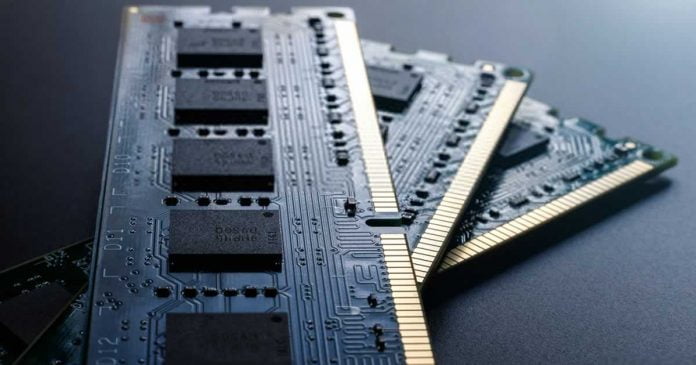
Since the introduction of RAM in DIMM (Dual In-line Memory Module) format, there are many types of memory that have been on the market, but since 2000 it is DDR RAM that has prevailed above the rest.

Here we will tell the difference between DDR1, DDR2, DDR3, and DDR4 since its inception in 2000.

It is true that DDR1 and DDR2 RAM are no longer in use, and in fact, DDR1 memory is long gone. DDR3 RAM is out of print, but many still use it, while DDR4 is already established in the market since its launch in 2014 and is currently used by all platforms.

But let’s see what differences we find between DDR1, DDR2, DDR3 and DDR4 RAM so that you can learn to differentiate these types of modules.

DDR1 vs DDR2 vs DDR3 vs DDR4:

Technical differences

DDR stands for Double Data Rate, and basically, it means that they are capable of two reads and two write tasks per clock cycle. This is what all generations have in common, but logically each new generation has been implementing changes and improvements that make them technically very different.

DDR1 RAM

Launched in 2000, it did not start to be used until almost 2002. It operated at 2.5V and 2.6V, and its maximum density was 128 Mb (so there were no modules with more than 1 GB) with a speed of 266 MT/s (100-200 MHz).

DDR2 RAM

Released around 2004, it ran at 1.8 volts, 28% less than DDR1, making it more energy-efficient. Its maximum density was doubled to 256 Mb (2 GB per module). Logically, the maximum speed also multiplied, reaching 533 MHz, providing a noticeable performance boost over DDR1.

DDR3 RAM

This release occurred in 2007, and it was a revolution because XMP (Extreme Memory Profile) profiles were implemented here. To begin with, the memory modules operated at 1.5V and 1.65V, with base speeds of 1066 MHz, but that went much further, and the density reached up to 8 GB per module, making DDR3 a popular choice for high-performance systems.

DDR4 RAM

This did not arrive until 2014, but today it is already the most widespread. The voltage is reduced to 1.05 and 1.2V, although many modules operate at 1.35V, making it more energy-efficient than its predecessors. The speed has been notably increased, and each time faster memories are released from the factory, but its base began at 2133 MHz. Currently, there are already 32 GB modules, and this is being expanded gradually, catering to the needs of high-end servers and workstations.

Looking Ahead: DDR5

DDR5 RAM promises even higher speeds, lower power consumption, and increased density, making it a significant leap forward in RAM technology. DDR5 is expected to start at a base speed of 4800 MHz, a substantial increase over DDR4. It also aims to triple the maximum density, allowing for modules up to 128 GB. The operating voltage is expected to be reduced to 1.1V, further improving energy efficiency.

DDR5 adoption is set to start in servers and the business world, where the new, faster RAM is expected to capture a 25% share of the memory market. The shift towards DDR5 will then expand to consumer hardware, not just PCs, but also phones, where it is predicted to hold a market share of approximately 55% by 2023​.

This rapid transition isn’t unprecedented. When we reflect on the introduction of DDR4 RAM in mid-2014, it captured around 23% of the market share in 2015, and then rose to around 55% in 2016. DDR5, introduced later in 2021, is following a similar path, albeit at a slightly faster pace.

The arrival of DDR5 is a significant leap forward, but it’s important to manage expectations. When DDR5 first hits the shelves, it’s likely to be quite expensive and may not immediately offer a significant performance boost over top-tier DDR4 RAM. Like all new tech, it takes time for DDR5 to fully showcase its potential. However, some initial products are already making impressive claims.

The memory market, driven by massive demand for DDR5, is predicted to surpass $200 billion by 2026. By this point, DDR5 is expected to dominate the RAM market, holding a 95% share, akin to DDR4’s current dominance.

You can read more about the difference between DDR4 and DDR5 here — DDR5 Vs DDR4 RAM.

Physical differences

Although these four types of memory are DIMM formatted and can look very similar in appearance (in fact, they are all 133.35mm long). There are fundamental physical differences whereby we will never be able to plug a DDR1 RAM module into a DDR2 socket.

All modules have an opening in the area of ​​the contacts that will prevent them from being connected to the sockets of another generation (and be careful because if you push too hard, you could break the socket or the RAM module).
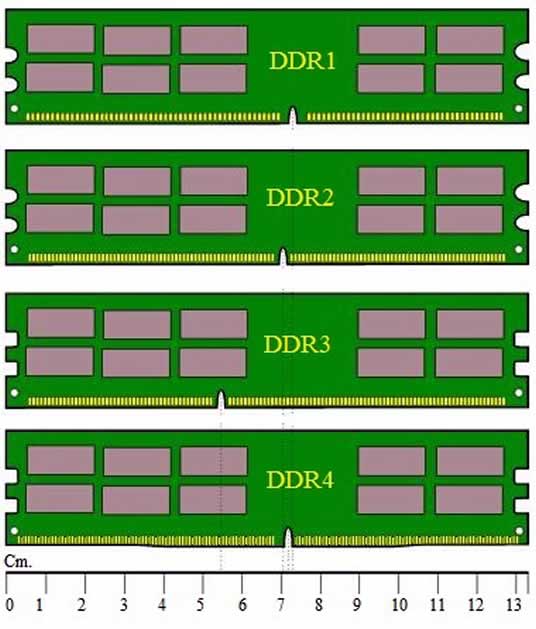
DDR1 vs DDR2 vs DDR3 vs DDR4 RAM

In addition, DDR4 RAM memory modules have the contact area with a ridge in the center. It is not completely flat, although it is unnecessary because the incision would not allow us to connect a DDR4 module in a socket of another generation. In the image given below, you can see the physical differences in each module.
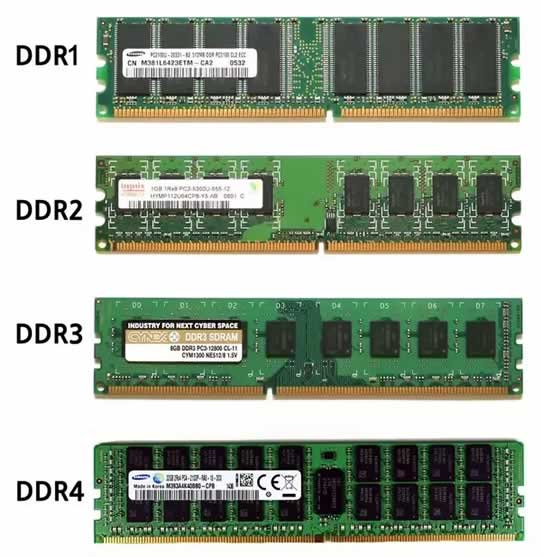
DDR1 vs DDR2 vs DDR3 vs DDR4 RAM

Finally, it should be noted that in each generation, the number of contact pins has changed as follows:

  • DDR1: 184-pin (DIMM), 200-pin (SO-DIMM), and 172-pin (micro DIMM).
  • DDR2: 240-pin (DIMM), 200-pin (SO-DIMM), and 214-pin (micro DIMM).
  • DDR3: 240 pins (DIMM), 204 pins (SO-DIMM), and 214 pins (micro DIMM).
  • DDR4: 288-pin (DIMM), 256-pin (SO-DIMM). DDR4 micro DIMMs no longer exist.

RAM differences in performance

The most obvious differences between the different generations of RAM are in the performance. As technology has advanced, performance has been gradually improved, and this has generally been doubling generation after generation.

Thus, there is an obvious difference between DDR3 and DDR4 RAM, for example, and not only in practical terms but also in terms of the sensations that users appreciate when using a PC with one memory or another.

However, it is true which also has to do with improving the rest of the components’ performance since the change from one generation to another of RAM is usually linked to a complete platform change.

Power Consumption

While the operating voltage of each type of RAM is mentioned, it’s important to note that lower voltage often means lower power consumption. This can be a crucial factor for those interested in building energy-efficient systems or running servers where power consumption can translate into significant costs. DDR4, for example, operates at a lower voltage than DDR3, making it more energy-efficient.

Compatibility and Use Cases

When considering upgrading your RAM, it’s crucial to check the specs of your motherboard to see which kind of RAM it supports. Different types of RAM are compatible with different types of motherboards and processors, and using the wrong type can lead to system instability or even hardware damage. For instance, DDR4 RAM cannot be used in a motherboard that only supports DDR3, and vice versa.

Price and Availability

The cost and availability of each type of RAM can vary widely. DDR4 is currently the most widely available and has a broad range of prices depending on speed and capacity. DDR3, while out of print, can still be found on the second-hand market. DDR1 and DDR2 are largely obsolete and may be difficult to find. As DDR5 becomes more prevalent, it’s expected that the price of DDR4 will decrease.

The Future of RAM

The future of RAM technology is exciting. With the upcoming DDR5 and potential future generations, we can expect to see even faster speeds, higher densities, and lower power consumption. As technology continues to advance, the importance of RAM in our systems will only continue to grow. The advent of technologies like DDR5 signifies the industry’s commitment to pushing the boundaries of what’s possible, paving the way for more powerful and efficient computing systems.

I hope that the article was helpful in understanding the difference between DDR1, DDR2, DDR3, and DDR4. So if you ever think about upgrading RAM in your PC, don’t forget to check the specs of the motherboard to see which kind of RAM it supports.

Shutterstock Acquires Giphy from Meta after UK Regulators Block Acquisition

After facing regulatory obstacles in its acquisition of Giphy, Meta has decided to sell the popular GIF platform to stock photo provider Shutterstock for $53 million. 

The sale is expected to be completed in June, and it won’t disrupt compatibility as Meta has a programming interface agreement to ensure Giphy’s GIFs continue to function seamlessly across platforms like Facebook, Instagram, and WhatsApp.

By adding Giphy’s extensive catalogue of GIFs and stickers, as well as incorporating Giphy’s partnerships with Microsoft, TikTok, and Twitter, Shutterstock aims to strengthen its presence in the realm of “casual conversation.” Shutterstock currently leverages generative AI to serve images to its customers, and acquiring Giphy’s vast library could potentially provide a wealth of training data for future AI-based products.

Meta acquired Giphy in November 2021 for about $315 Million, intending to integrate its GIF library into platforms like Instagram. However, the UK’s Competition and Markets Authority (CMA) initiated an investigation into the acquisition, citing concerns of anti-competitive behaviour. The CMA subsequently fined Meta $69.6 million for proceeding with the merger plan without regulatory approval. A year later, the CMA concluded that the acquisition would excessively enhance Meta’s market power and directed the company to divest Giphy. Thus, Meta’s acquisition of Giphy ultimately proved to be a failure, resulting in a fine and the subsequent sale at a significantly lower price than the original purchase amount.

According to Shutterstock’s press release, Giphy’s platform currently boasts 1.7 billion daily users, 15 billion daily media impressions, and 1.3 billion daily search queries. Giphy’s library not only allows direct viewing of GIFs on websites or apps but also offers over 14,000 API/SDK integrations, enabling seamless integration with numerous other services such as Instagram, Facebook, WhatsApp, TikTok, Twitter, Slack, Discord, and more.

The acquisition of Giphy by Shutterstock opens up new opportunities for both companies to enhance their offerings and cater to the growing demand for engaging visual content in various online platforms and conversations.

Microsoft Enhances Bing Search and Bing Chat: Introducing Integration with ChatGPT and Third-Party Plugins

integration of Bing search into ChatGPT

During the Microsoft Build 2023 developer conference, Microsoft made significant announcements regarding its search engine, Bing, and its chatbot AI, ChatGPT. The most notable update is the integration of Bing search directly into ChatGPT, a move that aligns with Microsoft’s partnership with OpenAI and signifies the company’s commitment to improving Bing’s capabilities.

In the blog post, Microsoft emphasized that ChatGPT, powered by Bing search, will provide more timely and up-to-date answers by leveraging its built-in world-class search engine and web access. Users can expect ChatGPT’s responses to be based on search results and web data, complete with relevant quotes for further exploration.

Initially, the new Bing search feature will be available to subscribers of ChatGPT Plus, but Microsoft plans to extend it to free users in the near future through a plugin that seamlessly incorporates Bing search into the chatbot experience.

Microsoft’s dedication to expanding functionality does not stop there. In early May, the company revealed its plans to support third-party plugins in Bing Chat. The recent Microsoft Build 2023 conference confirmed that developers will have the opportunity to create plugins compatible with various platforms, including Bing Chat, ChatGPT, Dynamics 365 Copilot, Microsoft 365 Copilot, and Windows Copilot.

Additionally, Microsoft introduced several new plugin partners for Bing Chat, with names including Expedia, Instacart, Kayak, Klarna, Redfin, TripAdvisor, Zillow, and more. These plugins will be available on both desktop and mobile platforms in the coming weeks, either within Bing Chat or through the Bing Sidebar in the Edge web browser.

Looking ahead, Microsoft plans to incorporate the Bing Chat plugin into the newly announced Windows Copilot and Edge web browsers, further expanding the reach and functionality of the Bing ecosystem.

By integrating Bing search into ChatGPT and introducing a wide range of third-party plugins, Microsoft aims to enhance the search and chatbot experiences for its users. These updates demonstrate Microsoft’s commitment to continuous improvement and innovation, providing users with more comprehensive and efficient tools for information retrieval and interactive communication.

Microsoft Unveils Windows Copilot: An AI Chatbot Empowering Windows Control and Text Generation

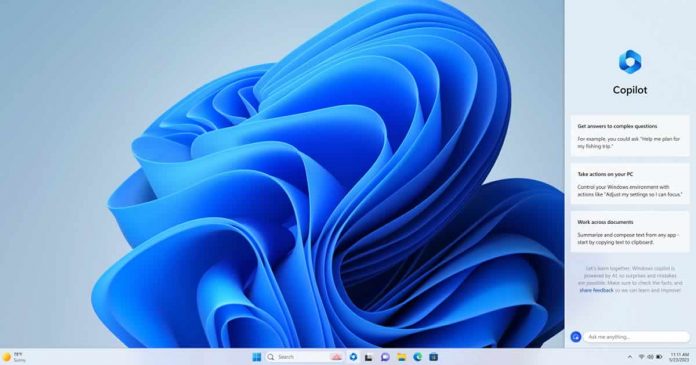
Windows Copilot

Microsoft has taken its integration of AI to new heights with the introduction of “Windows Copilot,” a chatbot designed to provide users with control over Windows and text generation capabilities. Building upon the existing AI-powered Bing Chat, which is driven by OpenAI’s GPT-4 model, Windows Copilot aims to make Windows interaction more accessible and user-friendly.

In a previous Windows update, Microsoft made it easier for users to access Bing Chat from the Windows taskbar. However, the company has now elevated its AI integration within Windows by presenting a vision of the future where users can directly control Windows itself through interactions with a chatbot.

Windows Copilot takes a prominent position “front and centre of the taskbar,” allowing users to easily locate and modify settings by engaging with the chatbot without the need to navigate deep into Windows menus. This streamlined approach empowers users to interact with Windows in a conversational manner, simplifying tasks and enhancing the overall user experience. Moreover, the tool enables users to summarize content or compose text directly from the clipboard, providing additional convenience and efficiency.

Microsoft positions Windows Copilot as an extension of the existing Bing/ChatGPT ecosystem. Users can ask a wide range of questions to Copilot, spanning from simple to complex inquiries. For instance, users can plan a trip to visit family in Cyprus by asking Copilot to find airfare and accommodation options for their winter vacation. This integration seamlessly connects users to the capabilities of Bing Chat while leveraging the power of AI to deliver tailored and informative responses.

By introducing Windows Copilot, Microsoft aims to empower all users, transforming them into power users who can fully harness the potential of Windows through intuitive interactions with the chatbot. Additionally, Microsoft plans to support third-party plugins within Bing Chat, further expanding the capabilities and versatility of the platform.

No More Typos: WhatsApp Rolls Out Message Editing Feature

WhatsApp Message Editing

WhatsApp has announced the rollout of its much-anticipated message editing feature. This announcement was confirmed by Mark Zuckerberg in a Facebook post​​.

WhatsApp users can now modify their messages within a 15-minute window after sending them. To edit a message, users simply need to press and hold on the message and select the ‘Edit’ option from the contextual menu that appears. After making the necessary changes, the edited message will display an ‘Edited’ tag next to the timestamp, making it clear that the message has been altered. Importantly, the application will not retain any correction history, meaning that other users will not be able to view previous versions of the edited messages​.

This new feature is expected to give users more control over their chats, allowing them to correct misspellings or add more context to a message within 15 minutes of sending it. However, if a message is older than 15 minutes, it can no longer be edited​​.

Before the introduction of this feature, WhatsApp users had to either delete a message entirely or send a correction in a separate message. Last year, the platform increased the time limit to delete a message from 48 hours to 60 hours. The message editing feature, though, will help users avoid sending correction messages that may potentially confuse the recipient and create unnecessary notifications. It’s worth mentioning that when a message is deleted, it doesn’t completely disappear from the conversation but is replaced with a greyed-out note stating, “This message was deleted”​​.

WhatsApp’s competitors, including Telegram and Signal, have long offered the ability to edit messages. Apple also introduced the ability to edit and unsend messages sent via iMessage with iOS 16. Twitter introduced the edit button for its paid users last year. While WhatsApp’s 15-minute window to modify a message isn’t as generous as Telegram’s 48-hour window, it is certainly a step in the right direction​​.

Meta, the parent company of WhatsApp, has stated that the feature is already being rolled out to users and will be available to everyone globally in the coming weeks​​.

The process of editing a WhatsApp message is simple and user-friendly:

  1. Open the WhatsApp application and navigate to the message you wish to edit. Remember, you have a 15-minute limit from the time it was sent to make edits.
  2. Long press on the message. A contextual menu with different options will appear.
  3. Select the ‘Edit’ option, which appears next to a pencil icon.
  4. Rewrite the message and save the changes once it’s ready.
  5. The tag ‘Edited’ should now appear at the bottom of the WhatsApp message, next to the time it was last modified.

Rest assured, all the changes made to WhatsApp messages will maintain the same end-to-end encryption that the platform has been using for some time. This ensures that users’ data is not being used by third parties without their consent or that of Meta.

Supercomputers in 2023: Frontier Retains Top Spot and AMD Rises to Prominence

Frontier Retains Top Spot

The TOP500 list of supercomputers from June 2023 does not have many surprises, with the Frontier at the Oak Ridge National Laboratory (ORNL) remaining the top-ranked supercomputer. Developed by AMD and Hewlett Packard, the Frontier is the only true exascale model system on the list, with a maximum performance (Rmax) of 1,194 PFLOPS and a peak performance (Rpeak) of 1,679.82 PFLOPS. It has 8,699,904 cores and consumes 22,703 kW of power.

The second-place supercomputer is the Supercomputer Fugaku in Japan, with a significantly lower Rmax and Rpeak of 442.01 and 537.21 PFLOPS respectively. The rest of the top 10 includes supercomputers from Finland, Italy, the United States, and China. Notably, the LUMI supercomputer in Finland, developed by the same team as the Frontier, ranks third.

It’s worth noting that the anticipated Aurora, a mainframe for the Argonne National Laboratory, is missing from this list, despite expectations of it having over 2 Exa-FLOPS of computing power.

The new entry to the list is in the eleventh place, a Microsoft Azure system with a performance of 53.96 PFLOPS, pushing the Juwels Booster, the most powerful mainframe in Germany, to the 13th position. This Azure system, like the Frontier, uses AMD’s Epyc processors and Instinct MI250X accelerators.

In terms of processors, AMD’s Epyc processors are now as popular as Intel’s Xeons for new systems on the list. This is a significant achievement for AMD, given that Xeons have long been the first choice for high-performance computers.

On the geographical distribution of the supercomputers, most of them are located in the USA and China. However, China’s share is decreasing, partly due to the country no longer reporting data for its most powerful systems, and the trade blockade making the construction of new systems with components from the USA significantly more difficult.

As for the Green500 list, it still has the same frontrunner, a system called Henri, which is operated by the US research institute Flatiron Institute. Thanks to an upgrade with Nvidia’s H100 computing GPU, it currently achieves 65,396 GFLOPS/W, which is half a percent better than the value reported in November 2022​1​.

For the most accurate and detailed information, you may want to directly check the TOP500 and Green500 websites or their official reports.

Google to Delete Inactive Accounts After Two Years: Here’s What You Need to Know

Google account deletion

Google has announced a significant policy change that will affect users who remain inactive for an extended period. The tech giant will start deleting Google accounts and the associated data — Gmail, Drive, and Photos files — of users who have not logged in for two years. This new policy, set to go into effect later this year, is Google’s latest move to ensure the safety and integrity of its services​.

According to Google, the primary reason for this move is security. The company’s internal analysis suggests that inactive accounts are 10 times less likely to have two-step verification set up, making them more vulnerable to security breaches. Once compromised, these accounts can become conduits for spam and identity theft. Additionally, this policy change also serves as a cost-saving measure for Google, as deleting old accounts and freeing up storage space can reduce operational expenses​.

However, it’s not all doom and gloom for Google users. The company has clarified that this policy applies only to individual accounts. Business accounts, especially those paying a monthly fee, will not be affected as long as the payments continue. Furthermore, YouTube content, despite initial confusion, will not be deleted as part of this policy change. Google has affirmed that public YouTube videos will remain intact regardless of account activity​​.

Users can maintain their Google account activity and avoid deletion by taking a few simple actions at least once every two years:

  • Reading or sending an email
  • Using Google Drive
  • Watching a YouTube video
  • Downloading an app on the Google Play Store
  • Using Google Search (while signed into the account)
  • Signing in to a third-party app or service using Google
  • Checking in with an Android device
  • Paying for a Google One storage subscription​.

Moreover, Google Photos has a separate “activity” metric. This metric requires users to either visit the Google Photos app or website or upload a photo every two years to prevent the deletion of their photos​.

This policy change does not mean that users who haven’t logged in for two years will immediately lose their accounts. Google has planned a phased implementation of this policy, officially termed as “The Great Google Account Purge,” scheduled for December 2023. Google promises to send multiple notifications in the months leading up to the deletion, both to the account’s primary and recovery email addresses if provided, to ensure that users are not caught off guard by this change​​.

8 Best free online presentations tools to create slides without PowerPoint

free online presentations tools

We use Microsoft PowerPoint for presentations for our personal, professional, and educational projects. What about trying something new — online presentations tools to create presentations without PowerPoint.

Although we are familiar with PowerPoint, and it’s many customization options, but it is not the only one that we can use if we want to achieve a striking, original, and fun result. 

Lets checkout some interesting free online presentation tools that can replace PowerPoint. These tools deliver slides something much more attractive than the Powerpoint does or something with a different and dynamic touch. And these free online presentation tools are the best free PowerPoint alternative out there with which to create slides with ease.

Best free online presentations tools:

1. Google Slides

Google Slides is a free, online, and collaborative tool to create presentations online, making it one of the best alternatives to PowerPoint.

In Google Slides, there is a gallery of templates that we can choose from if we don’t want to start from scratch and want to work on a ready-made scheme. Once created, the format and design are identical to the Microsoft suite — you can add titles, add backgrounds, add images, or slide and transitions between them.

There are backgrounds or designs for all the slides you create, and you can change them as many times as you want. Google allows you to insert images, audio, video, text, shapes, graphics, diagrams, etc. You can also share what you created with anyone so that everyone can have access or add text, make the required adjustments. 

2. Sway

Sway is Microsoft’s own tool, like Google, with its Google Slides. It is a free online presentation tool in which we find predetermined presentations to fill in or templates that we can use at no cost. 

It can be a recommended option if you are not looking to complicate yourself but are looking for online alternatives to PowerPoint. Its main advantage is its simplicity, but it also has tutorials that show you how to make your presentations step by step.

3. Canva

Canva is one of the most fashionable online design tools in recent times thanks to the number of functions it allows us. It is available online or through an app for both Android and iOS. It is free although with payment options for users who want better graphics or more functions. 

It is one of the most practical and recommended to create infographics or designs for social networks and even to create your own ebook. It is also one of the best options for creating presentations online.

Just choose from the templates it offers us, add photographs, texts, or descriptions, and let’s add pages to the design. Once we have the project complete, we can download it in various formats like PDF, video with MP4 format, GIF, etc.

4. Genial.ly

Genial.ly is one of the best online alternatives to the classic PowerPoint, the most recommended for infographics, for presentations. 

You can create interactive content, and it has all kinds of resources that we can access from a free account. One of the best free online presentation tools used not only by many design professionals but also practical for the field of education, communication agencies or for the corporate field. However, there are payment plans to unlock more options in it, that allows even more creativity.

5. Slidebean

In Slidebean, you can get presentation templates for business, academic use, startups, etc. The operation is similar to the previous ones — you must register for free to access the editor, and once inside, you will be able to see all your presentations or create a new one.

Everything is perfectly guided, and you will find tutorials that will tell you how to do it, so there is no problem. In addition, as in most, you will see that there are templates designed for each type of presentation — within academics, you will find, for example, templates for history presentations or to defend a thesis or a master’s degree.

6. Emaze

The way Emaze works is very similar to other online slide creating websites, and its main advantage is undoubtedly its simplicity. If you don’t have experience creating presentations, this is one of the best alternatives to PowerPoint that you can try online. 

You will need to register with an email and password, and once you have to choose from all the available templates. They are available in video, 3D, or conventional templates with slides. Since there are a lot of different templates already available, you will only have to fill in your data without complications, which is very useful for all the newbies. It is completely free. Although it has a payment option to improve its functions, but you wouldn’t have to pay to get an original and quality presentation.

7. Visme

Visme is an online designing tool very similar to Canva and also useful for infographics or designs of all kinds. It can be used when creating presentations online if you are looking for alternatives to PowerPoint to achieve a striking and different effect. There are over a thousand different templates available. All you need to do is register for free to make your presentation. You can choose between the available formats or start from scratch with your designs.

8. Zoho Show 

Zoho Show is also an online presentation program based on slides. Register for free (although there are payment options). One of the advantages of this website for presentations is that it has the possibility of collaborative editing in documents or presentations so you can work in a group without any problem. Another interesting advantage is that we find its app on almost any device, so we will not necessarily have to work on a computer. You can download it on iPhone and iPad, Apple TV, Android, or even has an extension to add to your browser.

We hope that you were able to find the one you were looking for. If you know any other similar online presentation tools to replace PowerPoint, do let us know in the comment section.