Home Blog Page 125

Amazon Launches AWS SimSpace Weaver: Now Run Large-Scale Simulations In The Cloud

AWS SimSpace Weaver

Amazon has announced a new AWS service, AWS SimSpace Weaver, that allows users to build realistic SimCity-like large-scale simulations.

Amazon’s proposed uses would be for city managers testing emergency response systems by simulating natural disasters or investigating sports games’ impact on traffic flow instances to gain insight. Another advantage of running in the cloud is that multiple external parties can view and interact with the simulation in real-time.

During the announcement, a uCrowds video demo shows AWS SimSpace Weaver in action. The demo simulates one million people walking through the streets of Las Vegas. By overlaying geospatial data with simulated crowds of people, it is possible to see how people behave in a computerized city. The demonstration found that for 1 million people, there are not enough roads, and even if we reduced it to 50,000 people, people would start to get crowded.

Usually, when users wanted to scale their spatial simulations, they had to balance simulation accuracy with hardware capabilities, limiting the usefulness of being able to learn. AWS SimSpace Weaver relieves users of the stress of managing simulation infrastructure, simplifying how large-scale simulations are operated and freeing them up to focus on producing distinctive content and broadening access to simulation creation.

AWS SimSpace Weaver can also access popular development engines Unreal Engine 5 and Unity through plugins. It seems likely to become as attractive to developers as they want to use it.

Starting today, it is available in US East, US West, Asia Pacific, and Europe AWS Regions. There are no license fees, and pricing is determined by the number of instances developers integrate into their simulations.

Start Chatting With Yourself On WhatsApp

After the first tests in the beta version, yet another important feature also arrives on the Meta messaging app. WhatsApp has introduced the “Message Yourself” option in the stable version.

WhatsApp explains in its statement that this new feature allows you to track your own tasks and expenses or even make a shopping list. That is to say, sending text messages or even multimedia content will serve so that this chat with oneself can be used in thousands of ways to achieve an experience similar to what Telegram has always had. 

Self-messaging works great as a reminder, for taking quick notes on the go, or as a personal archive of information, media, and web page links. It is a real chat present in the list of conversations on WhatsApp.

How to WhatsApp a Message to Yourself

  • Click on the new chat icon at the bottom right
  • At the top of the contact list, you will see your name or number; tap on it
  • A new chat window will open with you, now start chatting with yourself.

In this way, your name will also appear in the chat list — it is also possible to pin that chat to the top so that it is always available at all times.

The feature is currently released for all users. Ensure you have the latest version of WhatsApp installed on your smartphone (Android & iOS).

Intel’s Next-Gen Core i7-1370P With 14 Cores, Clocked At 5.0 GHz, Appears On Geekbench

Intel Alder Lake BIOS

A new Intel Core i7-1370P (Raptor Lake-P) processor has been found in the Geekbench database being tested. The product name used is Dynabook, so it’s not specified which one, but Dynabook doesn’t have a tablet or mini PC line, so it’s a new laptop.

So far, leaks of Intel’s 13th Gen Core mobile platform have focused on Intel’s H, HK and HX (45/55W+) series, all considered high-end gaming series. However, Intel seems to be preparing a low-power P series with a default TDP of 28W, which seems to be for ultra-thin notebook PCs and high-end tablets.

The Intel Core i7-1370P will be manufactured on a 10nm process and will feature the same hybrid core layout as the Raptor Lake desktop lineup. The new chip has six P-cores and eight E-cores. The processor operates at a base frequency of 1.90 GHz, which can be increased up to 5.0 GHz.

There is also a 24 MB L3 cache. The Core i7-1370P has 14 cores and 20 threads and has the same configuration as the current model Core i7-1280P. Since the size of the L1-3 cache is also the same, it can be said that it is a rebrand with only a clock going up. 

Also, when it comes to clock speed, this model boosts up to 5.0GHz, clocking 200MHz higher than any previous Core P series SKU. However, the base clock is not the best at 1.90GHz. The predecessor (i7-1270P) had a 300MHz higher (2.2GHz) boost.

As for the performance of the Intel Core i7-1370P, it scored 1,655 in single-core and 10,184 in multi-core Geekbench 5 tests. The performance is slightly lower than that of the Core i7-13700H. In terms of performance, sample data is insufficient to make a meaningful comparison. Still, based on limited data, the 13th generation Core model has higher multi-core performance due to the addition of two Gracemont cores.

Intel’s 12th generation Core P series was launched on January 4th of this year. Therefore, the successor is expected to debut at CES 2023, just over a month away.

KDE And GNOME On MacBook Air With Apple M2 Chip

KDE And GNOME On M2 MacBook Air

The Linux developer and YouTuber Asahi Lina (@LinaAsahi) has now announced the implementation of support for the Apple M2 chips and the successful launch of the KDE and GNOME user environments on the Apple MacBook Air with the M2 chip with full support for GPU acceleration with ten cores.

https://twitter.com/LinaAsahi/status/1596190561408409602

On a MacBook Air 13″ (2022) with M2 SoC and full graphics acceleration via the 10-core GPU, Asahi ran KDE Plasma and Gnome. Asahi Linux and the open-source graphics stack Mesa 3D serve as the basis, which is essential for gaming under Linux, as the developer demonstrates in a long video with a duration of more than eleven hours in which the launch of the free and platform-independent first-person shooter Xonotic game was demonstrated, simultaneously with the well-known OpenGL 2.0 benchmark Glmark2 and a tech demo, the eglgears tests.

All these ran in parallel and with full GPU acceleration on the 3.6 TFLOPS graphics unit of the Apple M2. It is also noted that the DRM (Direct Rendering Manager) driver adapted for the M2 chips for the Linux kernel can now work with the Asahi OpenGL driver developed for Mesa out of the box without making changes in user space. 

Full GPU acceleration support pushes Linux desktops on Apple silicon one step closer to the Linux mainstream. In addition to the M2, the developer’s driver covers the M1 lineup.

5 Business Apps That Actually Help Employees Be More Productive

Business Productive Apps

In an era of intense competition, employee productivity can be critical to getting an edge over the competition. This helps the business minimize overhead while allowing it to be more efficient, agile and fruitful. However, it’s important to make sure that this productivity is being put to good use, as productivity without aim is often useless.

There are many ways to improve productivity, from using knowledge management services to make full use of institutional knowledge, to more unwelcome methods like remote monitoring software. Another solution would be to use productivity apps, but some apps are made by bad actors, so it can be a minefield to find the right one.

To help you out, we’ve prepared five proven apps that can greatly improve employee productivity.

5 Business Apps That Help Employee Productivity

1. Basecamp

One of the biggest issues when it comes to productivity is when your employees are not working efficiently enough together. Basecamp is a solid app when it comes to improving collaboration. This app has a number of features that contribute to this, including forums, a to-do list, a chatroom, and a shared list of files that users of the app can access.

One of the biggest downsides of Basecamp, however, is the price, though it could be argued that the value proposition is strong. After all, it does have a lot of features, as opposed to focusing exclusively on only one feature. At the same time, there is a free version that limits you to three projects and 20 users, which may be useful for smaller companies. Otherwise, the Business version is $99 per month with a 30-day free trial.

2. Evernote

Note taking is an important thing in any business, as our memories are only going to do us so well. and Evernote is a solid tool for businesses large and small. Evernote can be used for various reminders, but there are also other things that you can use it for. For example, you can post PDFs, images, URLs, Slack conversations, and more into Evernote in order to remind yourself and provide the content for anyone else who’s connected.

Evernote has a limited free version, as well as three paid tiers. The free version offers very limited features; for example, you can only upload 60MB per month, notes can only be 25MB at most, and other features are limited or inaccessible. Additionally, you can only use it on a maximum of two devices at a time.

Personal, meanwhile, costs $8.99 per month, and includes all features in the free tier. In addition to these, you have unlimited devices, 200MB max note size, and a cap of 10GB of uploads per month, among other things. The Professional tier is $10.99 per month, includes all lower tier features, adds an extra 10GB to your upload cap per month, and removes the cap for note size.

There’s also the Enterprise tier, which costs $14.99 per month, and each new user pays $14.99 per month as well.

3. IFTTT

IFTTT – or ‘If This Then That’ – is an app which aims to help connect different apps together to make them behave more efficiently. Even if you get a lot of use out of another business productivity app, you may also find that it lacks certain features, or that another app may have better execution with one of these features.

Many apps are capable of connecting with IFTTT, most notably communication apps like Slack and other important apps, like Gmail and Google Drive.

Another great feature of IFTTT is that you can set it to automatically share content across different social media websites. No more having to write an individual post for every single social media platform. You can enjoy IFTTT for free, although if you want to have more features, there are two more tiers: Pro and Pro+. These plans have a seven-day free trial, and once the trial is over, they cost $2.50 and $5 per month respectively.

4. Tide

One of the biggest issues for a lot of workers is being unable to focus on their work. Whether that may be due to stress, anxiety, or simply distractions that pull them out of their work momentum. The point behind Tide is to cure those distractions. It accomplishes two functions in particular: the use of natural sounds, as well as break management.

The way it’s set up, Tide plays nature sounds, such as rain or thunderstorms, while having you work 30 minutes before you can have a break. You can also have music playing during your work and break if that helps with concentration. After this, you’re given a five-minute break. For a lot of people, this kind of structure helps you from getting burnt out, while also keeping you from procrastinating too much.

Unlike a lot of other apps that help boost productivity, Tide is 100 percent free. It can be downloaded on both the Google Play Store and the iPhone’s App Store, though you can also download it as an extension on Google Chrome.

5. Trello

Trello is a popular tool for a lot of businesses and organizations, owing mainly to the fact that it is fairly simple to use. For example, when you’re managing the progress of certain tasks, all you need to actually do is drag and drop them as they progress.

Trello focuses specifically on task and project management, and thus is a good choice if you are looking for an app that prioritizes this. The app is also capable of connecting with certain other business communication apps, like Slack, Microsoft Teams, and Google Workspace.

In addition to the limited free version of Trello, there are three paid tiers in total, all three of which are paid annually. These tiers are Standard, Premium, and Enterprise, which cost $5, $10, and $17.50 per month respectively.

The Enterprise tier scales with the number of users who will be using it, as opposed to Evernote, which is a flat fee per user. You can sign up for the tier for up to 5000 users at $7.38 per month, making it ultimately the second cheapest of the three tiers if you have that many users. You can go over 5000, but you would need to get in contact with Trello to see how much it costs beyond that.


Twitter 2.0: Elon Musk Plans Major Upgrade

Twitter Safety Mode

Elon Musk is preparing a global update on Twitter. To do this, he even began recruiting employees after a wave of layoffs.

Elon Musk published a series of slides on his Twitter account, sharing comparative statistics for some indicators and revealing the details of the Twitter 2.0 update. According to the new concept, the platform will become an “App for everything”.

Twitter 2.0 will feature multi-colour ticks, long tweets, and redesigned social network video content. The most striking is the development of “long tweets”, which will not have a character limit and allow us to express ourselves however we want. 

It is no secret that Musk is paying close attention to what the competition is doing, and his commitment to video is proof. Although it was rumoured that the Vine app could return, at the moment, it only seems that the video will have more importance on Twitter, although Musk has not elaborated on this.

WhatsApp is another app that has ‘inspired’ the Twitter team with the advent of direct encrypted messages. It will be developed jointly with the creator of the Signal messenger Moxie Marlinspike.

In addition, interactive advertising will be added. For example, if a user likes an HBO Max post, the system will analyse their profile and determine which House in the world of the House of the Dragon series they belong to. 

Musk also mentioned a new payment system in the presentation, but the details remain unclear.

At the same time, despite the decisive ambitions of Musk, the social network Twitter is not doing very well now. More than half of the employees were fired, and those who remained began to complain about overtime. In addition, large advertisers began to leave Twitter due to the controversial policies of the new CEO.

Everything You Need to Know About Crypto Phishing Scams

Crypto Phishing Scams

Similar to real fishing, scammers will lure victims into taking their bait through phishing scams. This social engineering attack is becoming more advanced as time goes on, and scammers are trying everything they can to trick and steal from users. Since cryptocurrency is such a profitable industry, phishers are increasingly targeting traders and attempting to steal their crypto wallet keys or other account information.

What’s worse is that scammers are succeeding in profiting from crypto phishing scams! Over $1 billion has been stolen from crypto traders since 2021 and much of this is due to phishing attacks since users are unaware of what to look out for. Understanding the signs of a crypto phishing scam and learning how to avoid them is key to keeping your crypt assets safe!

What Is a Phishing Scam?

A phishing scam is a type of scam where scammers attempt to trick their victims into revealing sensitive information such as bank information, password, and crypto wallet keys. Scammers will do this by masquerading as a genuine company and sending out emails that urge recipients to either click a malicious link or hand over their account details. Usually, phishing emails will display a sense of urgency and tell users they need to open a link immediately to claim a prize or avoid a penalty in their account. Phishing attacks are widespread, and in recent years, scammers have been turning their attention to traders to steal cryptocurrency and other assets. 

Key Signs of a Phishing Scam

Despite being so common in the cryptocurrency world, phishing scams can be easily identified and avoided if you know the key signs to look out for.

Spelling and Grammar Mistakes

Scammers often rush the process of creating phishing emails before they send them out to the masses. This means that the emails will often contain spelling and grammar mistakes despite claiming to be from a legitimate business. This can also be a result of a scammer using an online language translater or as an attempt to evade email spam filters. If you’re reading an email that’s sent to you and it contains lots of mistakes or clearly seems to be written by someone who is not adept in your language, then it’s best to mark it as a scam. You can also take a lot at some examples of phishing emails, so you know what exactly to look out for.  

Public Email Addresses

In addition to checking for spelling and grammar errors, you should also take a look at the sender’s email address. Legitimate businesses will often use corporate email domains such as @businessname.com. However, creating an email address with a public domain is much easier, so scammers often use this option. So, you should be extremely sceptical if you receive a ‘professional’ looking email that has been sent by a public email domain. Additionally, legitimate businesses will often address you in their email as a way to personalise it (such as Dear ‘Your name’) whereas scammers don’t have that information so they will include a generic greeting such as ‘Dear Sir/Madam’ instead. 

Copycats

Phishing scammers may also choose a particular business to imitate when creating emails or even entire websites. This means that they will try to perfectly match their target’s content, font, logo, and colour scheme. If you have already familiarised yourself with genuine brands, then it can be easy to spot the fakes as long as you pay attention to detail. Also, if you’re on a website, always check the URL, as scammers will often try to match it to the website they are limiting but will switch some letters to make it unique. For example, Google.com may appear to be G00gle.com or Mircosoft.com as Mirc0s0ft.com. 

Documentaries About Hacking And Hackers

How to Avoid Phishing Crypto Scams

After you’ve learnt what to look out for, the next step is learning how to protect yourself from phishing scams. First of all, you should never click on any links that have been sent to you through email, text, or instant message, no matter how genuine it seems. If a business is requesting that you complete an action on their website, instead of clicking on any links, you should type the website’s URL directly into your browser. 

Additionally, you should never reveal your crypto wallet keys or other account information to anyone. If you’re being contacted by your bank or other financial company, you should head to the official website (by typing the URL in your browser), find their contact information, and verify the email you’ve been sent. If you believe you’re being contacted by a phisher but are still unsure, then you can try searching the sender’s email address or website URL in Google to see if there is any mention of it being a scam. 

Finally, if you do receive any suspicious emails that you believe to be phishing scams, then we recommend that you report them to a website such as The National Cruber Security Centre as they will have the power to remove the scammer’s email address. 

How to Invest in Crypto Safely 

Despite scammers seemingly flooding the crypto space, investing in cryptocurrency can still be safe. If you’re looking for additional support when trading and want to help limit poor financial decisions, then why not sign up for a cryptocurrency platform? After signing up for a crypto platform, you’ll be connected to a broker that can help you reach your full trading potential. They will offer a wide array of tools and resources that can help set you on the right path as you start (or continue) your crypto journey. 

Before signing up for a crypto platform, you need to decide what your trading goals are and have an idea of which cryptocurrencies you’re interested in trading. Immediate Edge is an excellent crypto platform that supports a wide range of cryptocurrencies and connects its users with professional brokers worldwide. After signing up for a crypto platform, you can put your mind at ease knowing that you’re getting relevant support that can help guide you to success! 

Recap

Although phishing scams may seem alarming, as long as you take the proper precautions, you can avoid them. By learning the signs of phishing scams and understanding what to do to avoid them, you can prevent yourself from falling into a scammer’s trap and losing your crypto assets. Also, it’s incredibly important always to keep your guard up and pay attention to the content in any email that’s sent to you. If you’re suspicious for whatever reason, then it’s best to leave the website or delete the email rather than risk becoming a phisher’s next victim. After all, it’s better to be safe than sorry! 

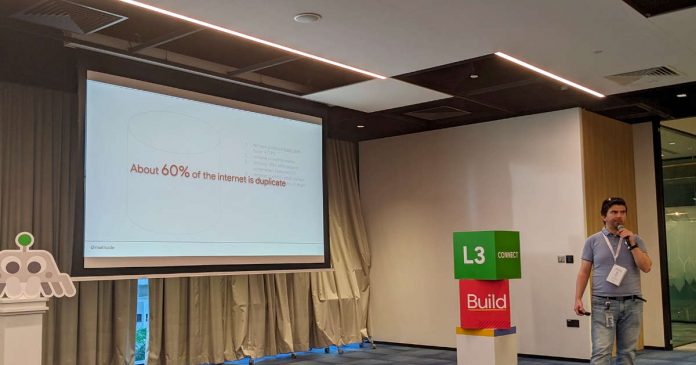
According To Google, 60% Of The Internet Is Duplicate

60 percent Of The Internet Is Duplicate

As part of the Google Search Central Live event in Singapore, the company revealed some very interesting information about what the internet is currently like — Google announced that about 60% of the internet is duplicated. The company tried to explain what a duplicate is and how the global internet works now.

The company says the data that is on the internet, more than half of these files are copies. It seems that it is not only about the fact that some data is copied and placed elsewhere. It’s more about the different settings of sites in which there are copies. 

The company also suggested ways to solve the problem. Site owners are encouraged to:

  • Remove duplicate protocols – give preference to HTTPS.
  • Remove www/non- www.
  • Remove URLs with useless parameters.
  • Remove the slash/no slash option.
  • Remove other duplicate checksums.

All this will help optimise resources and make the work of search engines on sites better and more accurate.